![[H]ard|Forum](/styles/hardforum/xenforo/logo_dark.png)
Navigation
Install the app
How to install the app on iOS
Follow along with the video below to see how to install our site as a web app on your home screen.
Note: This feature may not be available in some browsers.
More options
-
Some users have recently had their accounts hijacked. It seems that the now defunct EVGA forums might have compromised your password there and seems many are using the same PW here. We would suggest you UPDATE YOUR PASSWORD and TURN ON 2FA for your account here to further secure it. None of the compromised accounts had 2FA turned on.
Once you have enabled 2FA, your account will be updated soon to show a badge, letting other members know that you use 2FA to protect your account. This should be beneficial for everyone that uses FSFT.
You are using an out of date browser. It may not display this or other websites correctly.
You should upgrade or use an alternative browser.
You should upgrade or use an alternative browser.
LG 48CX
- Thread starter gan7114
- Start date
Ok, I found the auto off timer which was under "timers". The 4 hour automatic shut off was already selected. But maybe it only functions for use as a TV and not desktop use?
EDIT: Also unplugged a bunch of USB's. My screen saver and power management works again. I will spend some time later checking for which device it was. If you guys run into your SS not working, definitely unplug stuff and find out what's keeping the computer live.
Whew, ok. Carry on!
EDIT: Also unplugged a bunch of USB's. My screen saver and power management works again. I will spend some time later checking for which device it was. If you guys run into your SS not working, definitely unplug stuff and find out what's keeping the computer live.
Whew, ok. Carry on!
Last edited:

HiCZoK
Gawd
- Joined
- Sep 18, 2006
- Messages
- 860
Still conflicted if I should return my 48" c1 with 2 dead subpixels in 1 pixel... probably not.
Is there any chance full pixel refresh will wake these pixels ?
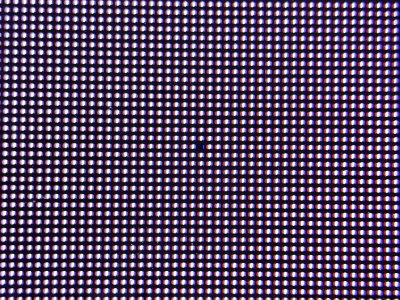
btw, this is where it is:
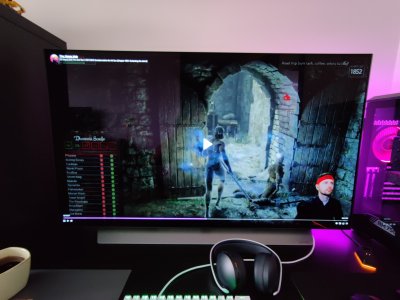
Is there any chance full pixel refresh will wake these pixels ?

btw, this is where it is:
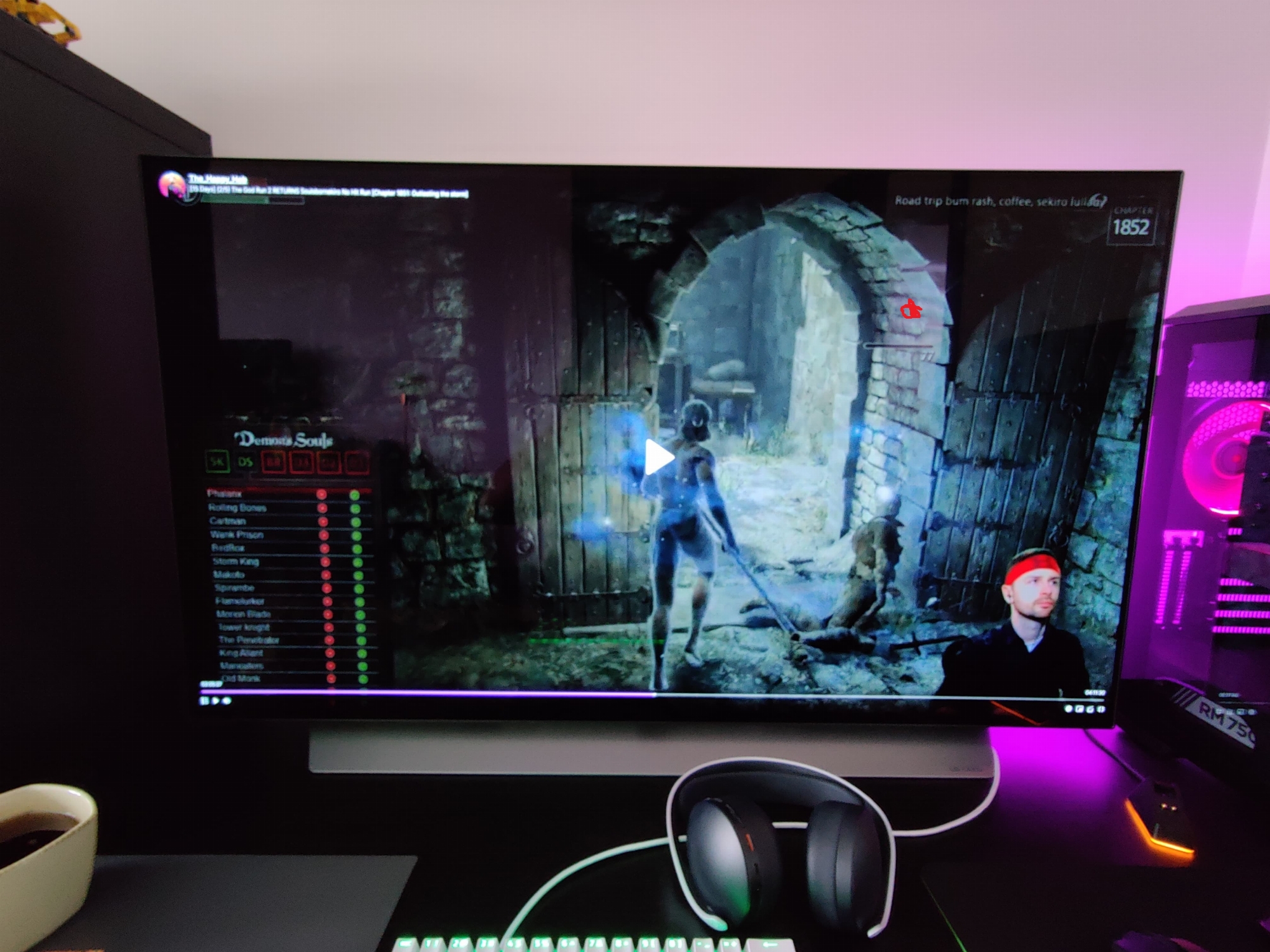
Still conflicted if I should return my 48" c1 with 2 dead subpixels in 1 pixel... probably not.
Is there any chance full pixel refresh will wake these pixels ?
View attachment 345942
btw, this is where it is:
View attachment 345945
Dude, return it. It's a to of the line premium tv. You paid for excellence
It works for me during desktop use. Mine is set for 2 hours and even in the middle of playing a game it will give me the "please press a button within 5 minutes or your TV will turn off" promptOk, I found the auto off timer which was under "timers". The 4 hour automatic shut off was already selected. But maybe it only functions for use as a TV and not desktop use?
EDIT: Also unplugged a bunch of USB's. My screen saver and power management works again. I will spend some time later checking for which device it was. If you guys run into your SS not working, definitely unplug stuff and find out what's keeping the computer live.
Whew, ok. Carry on!
Definitely never trust Windows screen savers or sleep. You never know what program might trick Windows into staying awake

- Joined
- May 5, 2006
- Messages
- 5,781
Ok, I found the auto off timer which was under "timers". The 4 hour automatic shut off was already selected. But maybe it only functions for use as a TV and not desktop use?
EDIT: Also unplugged a bunch of USB's. My screen saver and power management works again. I will spend some time later checking for which device it was. If you guys run into your SS not working, definitely unplug stuff and find out what's keeping the computer live.
Whew, ok. Carry on!
Yeah I've said it almost every time screen savers come up in this thread. I do not recommend trusting them at all. Not only can screen savers fail but crashed app notification windows can take the top layer above one floating there static, even if very unlikely - your pc could very rarely spontaneously reboot/crash and get stuck on a bios screen or logon screen, or your gpu itself could crash leaving noise or other frozen content on the screen.
Every time I walk away from the OLED I just hold the mic button down on the remote and tell it to "turn off the screen". It does a 5 sec countdown and turns the emitters off without dropping the displays from the windows/nvidia array or affecting anything running (including sounds unless you mute those separately). It doesn't even affect or drop a game running in full screen exclusive HDR, eARC sound. When you want to go back to what you were doing you just hit any button on the remote (like pushing the direction wheel on one side) and the emitters turn back on instantly. This is completely seamless unlike alt-tabbing with a fullscreen exclusive HDR mode game since it's actually running the whole time in the display as far as the operating system and gpu are concerned, it's just not being shown on the emitters. I'm leaving for hours or going to sleep I turn the screen off completely to standby using the power button so that it can run wear-evening routines if it needs to but if I ever forgot to it would already be in the "turn off the screen" emitters off mode anyway.
It's very easy to get sidetracked even after taking a bathroom break or whipping up a snack or a drink, getting a delivery etc... phone calls, someone shows up or just get derailed doing something or looking for something etc. or to just plain forget.
I followed a guide sheet I found on the reddit super thread on it.
I have a CX with the 2080Ti.
Used the cablematters usb-c adapter. Running 4k120Hz full rgb 10bit
View attachment 345874
This is a very handy chart for optimal settings, considering most OLED topics have like 10,000+ pages of replies (especially AVS Forums) with everyone making comments about optimal settings.
Does anyone here have any notable objections for these settings? (just PC only, can care less about consoles). I realize it's HDMI 2.1 GPU only settings. Thanks!
You really do have to abuse the screen in order for there to be permanent burn-in. It's actually "burn-out" where the pixels dim to the point of being noticeably darker than the rest of the screen. Image retention can usually be solved by simply turning off the screen for a while or running pixel refresher.Ok, guys thanks for all the tips. I am happy to report the image retention is gone. Thank god. I will look for the auto off and try to find out the reason my screen saver and power management is not working. Appreciate all the help!
Glad to hear all is well.

l88bastard
2[H]4U
- Joined
- Oct 25, 2009
- Messages
- 3,902
DON'T ENCOURAGE ELVN!

- Joined
- Dec 2, 2004
- Messages
- 32,702
Meanie!DON'T ENCOURAGE ELVN!
HiCZoK
Gawd
- Joined
- Sep 18, 2006
- Messages
- 860
I've ran full pixel refresher once to maybe fix the dead pixel but it didn't do anything.Dude, return it. It's a to of the line premium tv. You paid for excellence
In the end i think I better chill out. It's not worth to replace it probably... and I would have to give back LG fn7 wireless earbuds which I got as a preorder gift
I've ran full pixel refresher once to maybe fix the dead pixel but it didn't do anything.
In the end i think I better chill out. It's not worth to replace it probably... and I would have to give back LG fn7 wireless earbuds which I got as a preorder gift
No you wouldn't.
Are you that scared to make a phone call for an exchange? Do you not value your hard earned money?
HiCZoK
Gawd
- Joined
- Sep 18, 2006
- Messages
- 860
I did in fact. The store said I can just return full order and order again (or from another place), so then I give gifts back too. They cannot offer me an exchange for new unit. Only return.No you wouldn't.
Are you that scared to make a phone call for an exchange? Do you not value your hard earned money?
Or I can contact lg at any time and they would swap the panel. If I am to do that, maybe it's better to do after a year when more problems appear.
I agree about money and stuff but in the end let's not go too crazy over this. Now even if I ignore earbuds, I need to move the desk, pack the unit, return and pay for shipping, wait for money back and hope for better luck on next order. That's almost a month of inconvinience.
Anyway - I know You are right but there is some merit to just trying to fight with ocd and be chill

Armenius
Extremely [H]
- Joined
- Jan 28, 2014
- Messages
- 53,287
LG doesn't have a defined number of acceptable dead pixels, so it wouldn't hurt to contact them about it. They will probably ask for pictures of it so they can determine whether or not a replacement is warranted. Two subpixels may honestly not be enough, so if you're still eligible for a full return at the retailer I would take it and just buy another one. I find any dead pixels unacceptable no matter the type of display.I did in fact. The store said I can just return full order and order again (or from another place), so then I give gifts back too. They cannot offer me an exchange for new unit. Only return.
Or I can contact lg at any time and they would swap the panel. If I am to do that, maybe it's better to do after a year when more problems appear.
I agree about money and stuff but in the end let's not go too crazy over this. Now even if I ignore earbuds, I need to move the desk, pack the unit, return and pay for shipping, wait for money back and hope for better luck on next order. That's almost a month of inconvinience.
Anyway - I know You are right but there is some merit to just trying to fight with ocd and be chill
I find that dead pixels are not as bad as subpixels getting lit in the wrong color. I used to have a bright red pixel on white background happening on a 30" Dell I had and it was annoying. Also if the dead pixel is anywhere near the center it's going to be a far worse problem than one on the edge of a display.
TwistedMetalGear
2[H]4U
- Joined
- Jun 19, 2005
- Messages
- 2,442
Sigghhh. Sucks that dead pixels are still an issue on modern displays. Though I guess it makes sense when you cram 8 million pixels into a display. That's 8 million chances of a defect. Your replacement display might have even more dead pixels. The whole display buying process is a lottery and I hate it. It actually gives me anxiety. It should be exciting! But nope, gotta worry about dead pixels, backlight bleed, uniformity issues, etc...

sharknice
Supreme [H]ardness
- Joined
- Nov 12, 2012
- Messages
- 4,883
Sigghhh. Sucks that dead pixels are still an issue on modern displays. Though I guess it makes sense when you cram 8 million pixels into a display. That's 8 million chances of a defect. Your replacement display might have even more dead pixels. The whole display buying process is a lottery and I hate it. It actually gives me anxiety. It should be exciting! But nope, gotta worry about dead pixels, backlight bleed, uniformity issues, etc...
Dead pixels seem to be less common in OLEDs than LCDs and you don't need to worry about backlight bleed, also uniformity is much, much better. I have 2 OLED TVs and neither has a dead pixel. I actually have never gotten a dead pixel on the 9 LCD monitors and TV I've bought either though, so maybe I'm just lucky. When you buy premium model you generally get better quality control so there's less chance of getting dead pixels. It sucks if you do get a dead pixel, but you can typically get it replaced no problem, whereas if it's a lower end model policies may not allow it.
TwistedMetalGear
2[H]4U
- Joined
- Jun 19, 2005
- Messages
- 2,442
I can't say that I've seen a dead pixel on a TV either, however I sit so far away from my TV's that I probably wouldn't notice them.
On a related note, some coworkers and I rented out a private movie theater a few weeks back and played some video games on the big screen. We had to set up the console right in front of the screen and I noticed several dead pixels. They were HUGE. But you never even notice them when you're in the audience because you're so far away. I guess even high end movie theater projectors aren't immune to dead pixels.
On a related note, some coworkers and I rented out a private movie theater a few weeks back and played some video games on the big screen. We had to set up the console right in front of the screen and I noticed several dead pixels. They were HUGE. But you never even notice them when you're in the audience because you're so far away. I guess even high end movie theater projectors aren't immune to dead pixels.
- Joined
- May 5, 2006
- Messages
- 5,781
Backlight bleed is commonly due to LCD's being edge lit, flashlighting and flaring from the sides. OLED is per pixel emissive and has no backlight.
It does go through a color layer with LG's WOLED method so it could be thought of being in some way like a per pixel isolated FALD made of white oled emitters if you want to think of it that way. Still not large vs pixel size like separate backlights balancing against other fald zones making dim/glow "halos" so as to not overpower each other any more than possible to avoid... and not a few edge lights flashlighting from the sides and playing against each other.
Some LCD screens also get bleed because their plastic frames/housings are imperfectly sandwiched or warped. They also tend to ship with very high brightness setting by default which exacerbates the issue.
I had what appears to be a bad pixel or pixels (dead/black) on my VA living room tv after years of use but it gets a lot of hot sunlight from the picture window it has it's black back to so it takes a beating. I can hear the housing crack/pop at different time of day when the temperature changes. That's one reason I'm avoiding an oled upgrade in the living room until I remodel and flip the floor plan around someday. I still might avoid oled there due to usage habits outside of mine.
It does go through a color layer with LG's WOLED method so it could be thought of being in some way like a per pixel isolated FALD made of white oled emitters if you want to think of it that way. Still not large vs pixel size like separate backlights balancing against other fald zones making dim/glow "halos" so as to not overpower each other any more than possible to avoid... and not a few edge lights flashlighting from the sides and playing against each other.
Some LCD screens also get bleed because their plastic frames/housings are imperfectly sandwiched or warped. They also tend to ship with very high brightness setting by default which exacerbates the issue.
I had what appears to be a bad pixel or pixels (dead/black) on my VA living room tv after years of use but it gets a lot of hot sunlight from the picture window it has it's black back to so it takes a beating. I can hear the housing crack/pop at different time of day when the temperature changes. That's one reason I'm avoiding an oled upgrade in the living room until I remodel and flip the floor plan around someday. I still might avoid oled there due to usage habits outside of mine.
Last edited:
Panicknife
n00b
- Joined
- Dec 1, 2020
- Messages
- 7
Anyone had a date of release for the c1 48 in the us?
Armenius
Extremely [H]
- Joined
- Jan 28, 2014
- Messages
- 53,287
Mid- to late-April.Anyone had a date of release for the c1 48 in the us?
https://www.bestbuy.com/site/questi...question/4256efe1-c6d0-302a-a480-8c5f53ad3082

sharknice
Supreme [H]ardness
- Joined
- Nov 12, 2012
- Messages
- 4,883
One of the other retailer websites on their site said it was available now, I never actually went through to try to add it to cart and see if was actually shipping though.
Panicknife
n00b
- Joined
- Dec 1, 2020
- Messages
- 7
Awesome I can’t wait! Def going to be getting this for the 3090/ps5 setup of my dreams
- Joined
- May 5, 2006
- Messages
- 5,781
Didn't realize but I looks like a couple of more posts to supreme I guess. I post more per post rather than some people's short shitposts I guess.
Didn't realize but I looks like a couple of more posts to supreme I guess. I post more per post rather than some people's short shitposts I guess.
This is a shitpost.
- Joined
- May 5, 2006
- Messages
- 5,781
and the other wasn't? lol
hate to get dragged to that level yeah. shit flingers. Better with no shit at all.
hate to get dragged to that level yeah. shit flingers. Better with no shit at all.
Glad you figured it out. Yeah windows is really idiotic and disables suspend/sleep if it thinks you have a gaming peripheral like a game pad plugged in. It’s so stupid. I learned the hard way as well as I like to keep my gamepads plugged in.Ok, I found the auto off timer which was under "timers". The 4 hour automatic shut off was already selected. But maybe it only functions for use as a TV and not desktop use?
EDIT: Also unplugged a bunch of USB's. My screen saver and power management works again. I will spend some time later checking for which device it was. If you guys run into your SS not working, definitely unplug stuff and find out what's keeping the computer live.
Whew, ok. Carry on!

p3sty
2[H]4U
- Joined
- Feb 22, 2006
- Messages
- 2,621
Ok what’s the best cheat sheet for a3080 setup guide for this?
Ok what’s the best cheat sheet for a3080 setup guide for this?
Previous page
I followed a guide sheet I found on the reddit super thread on it.
I have a CX with the 2080Ti.
Used the cablematters usb-c adapter. Running 4k120Hz full rgb 10bit
View attachment 345874
The LG C1 seems like an iterative update compared to the CX... same with the C9.
Outside of the new EVO line, it seems like LG isn't improved OLED very much. This is ok, as for the moment, there's nothing else out there that can touch it.
Outside of the new EVO line, it seems like LG isn't improved OLED very much. This is ok, as for the moment, there's nothing else out there that can touch it.
Yup seems to be a similar situation as C9 vs CX. Not much appreciable difference so it comes down to getting the one that's available or cheaper. While the C1 will get firmware updates longer, it's not like there is much that needs to be improved on the CX. Or C9 for that matter, I'm happy with the performance of that although my C9 is a living room TV for media and console gaming.The LG C1 seems like an iterative update compared to the CX... same with the C9.
Outside of the new EVO line, it seems like LG isn't improved OLED very much. This is ok, as for the moment, there's nothing else out there that can touch it.
HiCZoK
Gawd
- Joined
- Sep 18, 2006
- Messages
- 860
I've seen some reviews that c1 is a bit brighter than cx (about 100 nits in peak small window and 15 full screen) but I can't find it now.The LG C1 seems like an iterative update compared to the CX... same with the C9.
Outside of the new EVO line, it seems like LG isn't improved OLED very much. This is ok, as for the moment, there's nothing else out there that can touch it.
I've not used any other oled before but c1 is bright enough. At least when I use dynamic tone mapping

phinix
Gawd
- Joined
- Dec 13, 2005
- Messages
- 914
Coo, thanks for confirmingI measured it on my unit with a meter and it was like the reviews said. 25 is around 100, 30 around 120 etc. I did not measure higher values because I have no interest in those and use the TV in a dark room (in practice I use 20-25 for SDR).
phinix
Gawd
- Joined
- Dec 13, 2005
- Messages
- 914
Thanks, yeah, so I use mostly is OLED light at 9-10, so its pretty low, in my dark room.on which one ? on cx, reviwes said 36 is 120nits
btw -anyone got tips how to use chrome? I already set windows to dark mode, autohide taskbar, 1minute blank screen saver and hide icons. But the bookmarks and top bar in chrome is still the last static element
I was worried as I use my CX48 for work at home for 10-12 hours a day, office work, but keeping it at OLED 10 for example shouldn't do anything to it, even if I keep excel spreadsheet for like an hour on the screen.
phinix
Gawd
- Joined
- Dec 13, 2005
- Messages
- 914
View attachment 344202
Source:
https://www.tftcentral.co.uk/reviews/lg_cx_oled.htm#brightness
Since the C1 is basically unchanged from the CX the settings should be similar if you get one of those.
Thanks. So OSD brightness is OLED light value?
Sounds about right, so 120nits would be around 35-36 OLED.
Armenius
Extremely [H]
- Joined
- Jan 28, 2014
- Messages
- 53,287
You want to leave Brightness at the default and change OLED Light to set the nits.Thanks. So OSD brightness is OLED light value?
Sounds about right, so 120nits would be around 35-36 OLED.
Personally I've gotten used to 0 OLED light now. It's surprisingly comfortable. Doesn't work in a bright room though.Thanks, yeah, so I use mostly is OLED light at 9-10, so its pretty low, in my dark room.
I was worried as I use my CX48 for work at home for 10-12 hours a day, office work, but keeping it at OLED 10 for example shouldn't do anything to it, even if I keep excel spreadsheet for like an hour on the screen.