Which is also wrong since the 48" display is only 120HzI'm guessing the "high powered specs" just refers to being 4k and 144Hz.
![[H]ard|Forum](/styles/hardforum/xenforo/logo_dark.png)
Navigation
Install the app
How to install the app on iOS
Follow along with the video below to see how to install our site as a web app on your home screen.
Note: This feature may not be available in some browsers.
More options
-
Some users have recently had their accounts hijacked. It seems that the now defunct EVGA forums might have compromised your password there and seems many are using the same PW here. We would suggest you UPDATE YOUR PASSWORD and TURN ON 2FA for your account here to further secure it. None of the compromised accounts had 2FA turned on.
Once you have enabled 2FA, your account will be updated soon to show a badge, letting other members know that you use 2FA to protect your account. This should be beneficial for everyone that uses FSFT.
You are using an out of date browser. It may not display this or other websites correctly.
You should upgrade or use an alternative browser.
You should upgrade or use an alternative browser.
LG 48CX
- Thread starter gan7114
- Start date
- Joined
- Jun 29, 2004
- Messages
- 5,938
I snagged one of these to replace a Asus ROG 34in ultra wide and another monitor. Works freaking great for work & gaming. Only issue is people on WebEx asking me to zoom in a little, "looks really small". lol
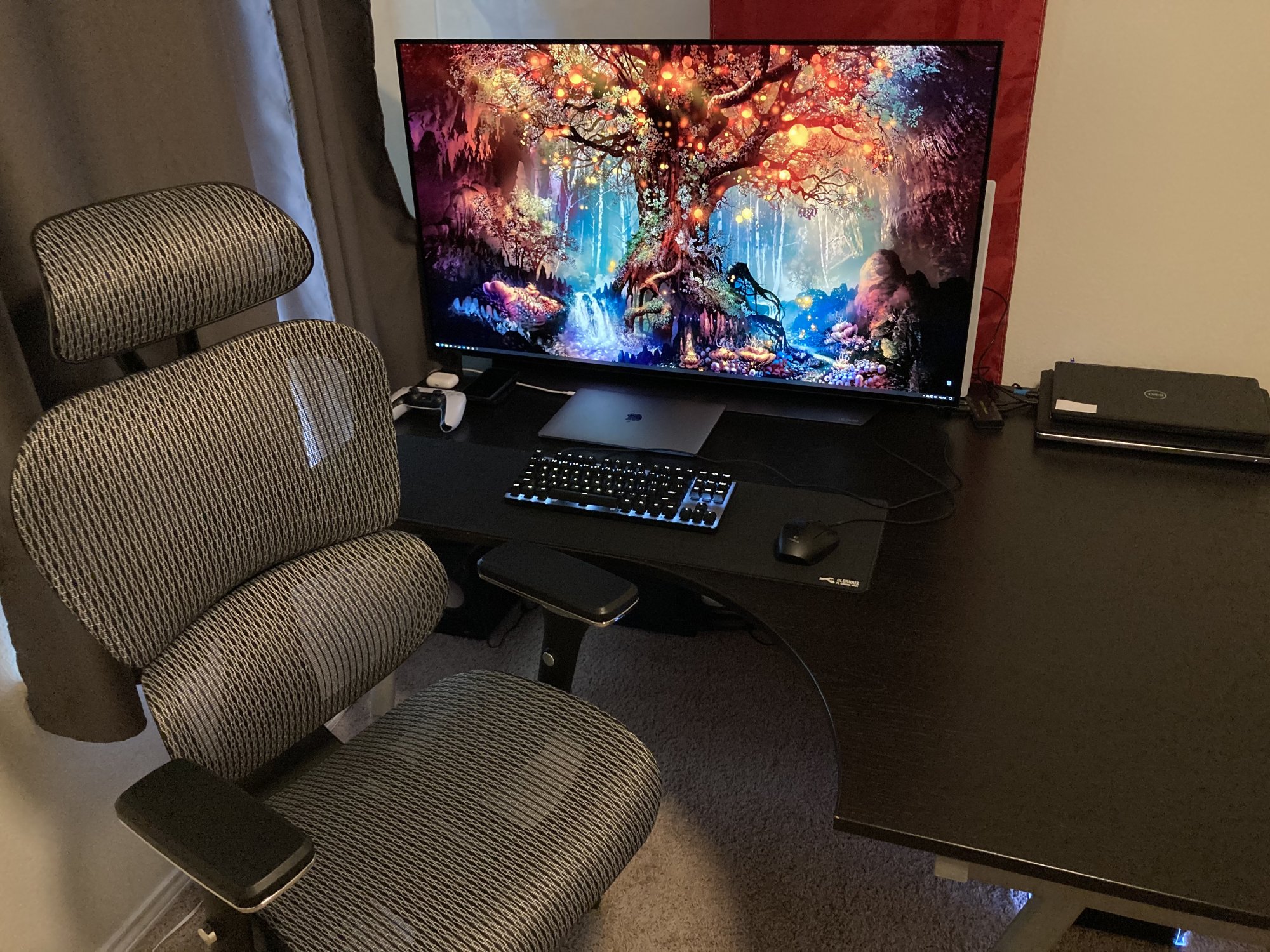
Wow! That chair looks comfy!I snagged one of these to replace a Asus ROG 34in ultra wide and another monitor. Works freaking great for work & gaming. Only issue is people on WebEx asking me to zoom in a little, "looks really small". lol
View attachment 348083
Only 100Mb connection.Sorry if I missed it, does the new C1 support DTS? Gigabit ethernet?
What is the depth on that desk?I snagged one of these to replace a Asus ROG 34in ultra wide and another monitor. Works freaking great for work & gaming. Only issue is people on WebEx asking me to zoom in a little, "looks really small". lol
View attachment 348083
- Joined
- Jun 29, 2004
- Messages
- 5,938
What is the depth on that desk?
~ 31.5in, from left (narrowest) side in above pic, where keyboard and mouse are.
Last edited:
mirkendargen
Limp Gawd
- Joined
- Dec 29, 2006
- Messages
- 435
That's an old Ikea desk top isn't it? I'm pretty sure I have the exact same one in white, heh.~ 31.5in, from left (narrowest) side in above pic, where keyboard and mouse are.
View attachment 348155
- Joined
- Jun 29, 2004
- Messages
- 5,938
Indeed it is! I want to say it’s a Galant, but I got it back in 2014 so I’m not 100% sure.That's an old Ikea desk top isn't it? I'm pretty sure I have the exact same one in white, heh.

Armenius
Extremely [H]
- Joined
- Jan 28, 2014
- Messages
- 54,552
No DTS support, either.Sorry if I missed it, does the new C1 support DTS? Gigabit ethernet?
- Joined
- Jul 5, 2012
- Messages
- 4,716
Side by side comparison of the G1 vs GX/CX by HDTVTest:
Side by side comparison of the G1 vs GX/CX by HDTVTest:
To summarize: both are great panels. Probably, the G1’s off-angle “pink tint” would make me choose the GX.
Which cable matters adapter did you use for this? I see several on amazon. I am ok getting 4k/60 with hdr since I will be running a longer hdmi cable to my 65" c9.I followed a guide sheet I found on the reddit super thread on it.
I have a CX with the 2080Ti.
Used the cablematters usb-c adapter. Running 4k120Hz full rgb 10bit
View attachment 345874
Last edited:
I
Which cable matters adapter did you use for this? I see several on amazon. I am ok getting 4k/60 with hdr since I will be running a longer hdmi cable to my 65" c9.
https://www.amazon.com/dp/B08MSWMXT...abc_GVW92GAQBV3WZRDPKM4C?_encoding=UTF8&psc=1
As an Amazon Associate, HardForum may earn from qualifying purchases.
As an Amazon Associate, HardForum may earn from qualifying purchases.
clayton006
[H]ard|Gawd
- Joined
- Jan 4, 2005
- Messages
- 1,089
So I came here to update everyone about this. I can also confirm that I have this working as well. No more using ancient drivers. I did actually report this bug using the Nvidia driver feedback form about a month before this driver came out. I don't believe I was the cause of this lol but I like to think I helped given the timing.Good news!
Nvidia driver 465.89 finally fixes the "Realtek Displayport-to-HDMI 2.1 protocol converter clock limited to 600MHz pixel clock [3202060]" issue that has been plaguing the drivers for several months and made it impossible to get 4K 120 Hz 4:4:4 with the Club3D adapter.
Installed and confirmed all is working as expected again.
This was super annoying as I run a 65" C9 in the middle and two 48" CX monitors (one on each side). I could do one direct HDMI connection on my 3090 but the other two had to be the adapters.

- Joined
- Jun 10, 2011
- Messages
- 441
No, and it doesn't even work with most native DisplayPort 4K 120 Hz monitors. It's something about the timings (even with DSC) that cause some displays to not work.Any luck yet gettting a Macbook to drive 4k 120hz, or is that ship sailed?
HDR doesn't through the adapter either.
mirkendargen
Limp Gawd
- Joined
- Dec 29, 2006
- Messages
- 435
I'm sure Apple will release a 48" 4k 120hz OLED display with RetinaFluid magic motion and RetinaBlack ultra mega HDR and charge $8k for it 
Missed a zeroI'm sure Apple will release a 48" 4k 120hz OLED display with RetinaFluid magic motion and RetinaBlack ultra mega HDR and charge $80k for it
I have to ask, what are you using 3 monitors for?So I came here to update everyone about this. I can also confirm that I have this working as well. No more using ancient drivers. I did actually report this bug using the Nvidia driver feedback form about a month before this driver came out. I don't believe I was the cause of this lol but I like to think I helped given the timing.
This was super annoying as I run a 65" C9 in the middle and two 48" CX monitors (one on each side). I could do one direct HDMI connection on my 3090 but the other two had to be the adapters.

p3sty
2[H]4U
- Joined
- Feb 22, 2006
- Messages
- 2,622
flight sim 2021?

- Joined
- May 5, 2006
- Messages
- 5,937
So I came here to update everyone about this. I can also confirm that I have this working as well. No more using ancient drivers. I did actually report this bug using the Nvidia driver feedback form about a month before this driver came out. I don't believe I was the cause of this lol but I like to think I helped given the timing.
This was super annoying as I run a 65" C9 in the middle and two 48" CX monitors (one on each side). I could do one direct HDMI connection on my 3090 but the other two had to be the adapters.
Sounds interesting. Huge.
I have to ask, what are you using 3 monitors for?
I don't use mine for the same reasons he does but here is some of my multiple screen story:
I've ran at least a dual screen setup since at least 2008 with a fw900 graphics professional CRT for gaming next to misc LCDs (22.5"1024x768 lcd, then a 31.5" x1200, etc). Then a 27" 120hz 1080p gaming lcd next to a 27" 1440p glossy ips when 120hz hit but before g-sync was a thing. Later a 1440p 144hz g-sync TN gaming screen next to the 1440p glossy ips.
In more recent years I ran the 27" 1440p g-sync screen alongside a 43" 4k VA in landscape, but then I liked the 4k so much that I added a 2nd one to the other side for more desktop/app real-estate. Shortly after I got a 32" (31.5") 1440p VA g-sync screen that I put between the two 43" 4k landscape screens which I stuck with for awhile. That array was ~ 7' Long edge to edge.
Long story short I've more or less run a separate screen for gaming next to another one (or more) for desktop/apps for years.
Currently I have the 48" cx in between the two 43" 4k VA screens but I switched the 43" 4k screens into portrait mode to consolidate the space better. Coincidentally it still ends up being 7' long just like the previous landscape mode setup was.
Any wider than that and I'd have to sit back farther than the 38" to 48" I sit now but I'm not using the side monitors for gaming~peripheral immersion at all. I typically use the left 4k screen split into 3 windows high. The right screen I have around a 40% bottom portion for browser, mail, text editor,etc. above which are chat apps and screenshot apps, discord, etc. and above those readouts, notifications, progress meters, etc.
Since I cannot game and work at the same time I just use one monitor. Most games are hard enough to run at 4K 60 with full graphics much less 4K 120. I guess if you prefer OLED for gaming and VA/IPS for work I can see that but a 65" C9 in the middle and two 48" CX monitors (one on each side) seems so huge and having to turn your head so far from left to right not to mention image degradation at extreme viewing angles that it seems unproductive. I must be missing something 
clayton006
[H]ard|Gawd
- Joined
- Jan 4, 2005
- Messages
- 1,089
So I don't have any extreme viewing angles with them. I usually play games in windowed move on a single screen at a time and then have a youtube video playing as well, I then dual boot one of my desktops to do work with as well across all three displays. If I play fullscreen it is on only one monitor at a time.Since I cannot game and work at the same time I just use one monitor. Most games are hard enough to run at 4K 60 with full graphics much less 4K 120. I guess if you prefer OLED for gaming and VA/IPS for work I can see that but a 65" C9 in the middle and two 48" CX monitors (one on each side) seems so huge and having to turn your head so far from left to right not to mention image degradation at extreme viewing angles that it seems unproductive. I must be missing something
The way I have them positioned is in a way that each one of them isn't blocking the other. It honestly works out really well. My multiple cameras I use for OBS and multiple angles on work calls if I need to switch to a different laptop / desktop.
I really have quite a lot going on with my setup. Which I will link a picture below.
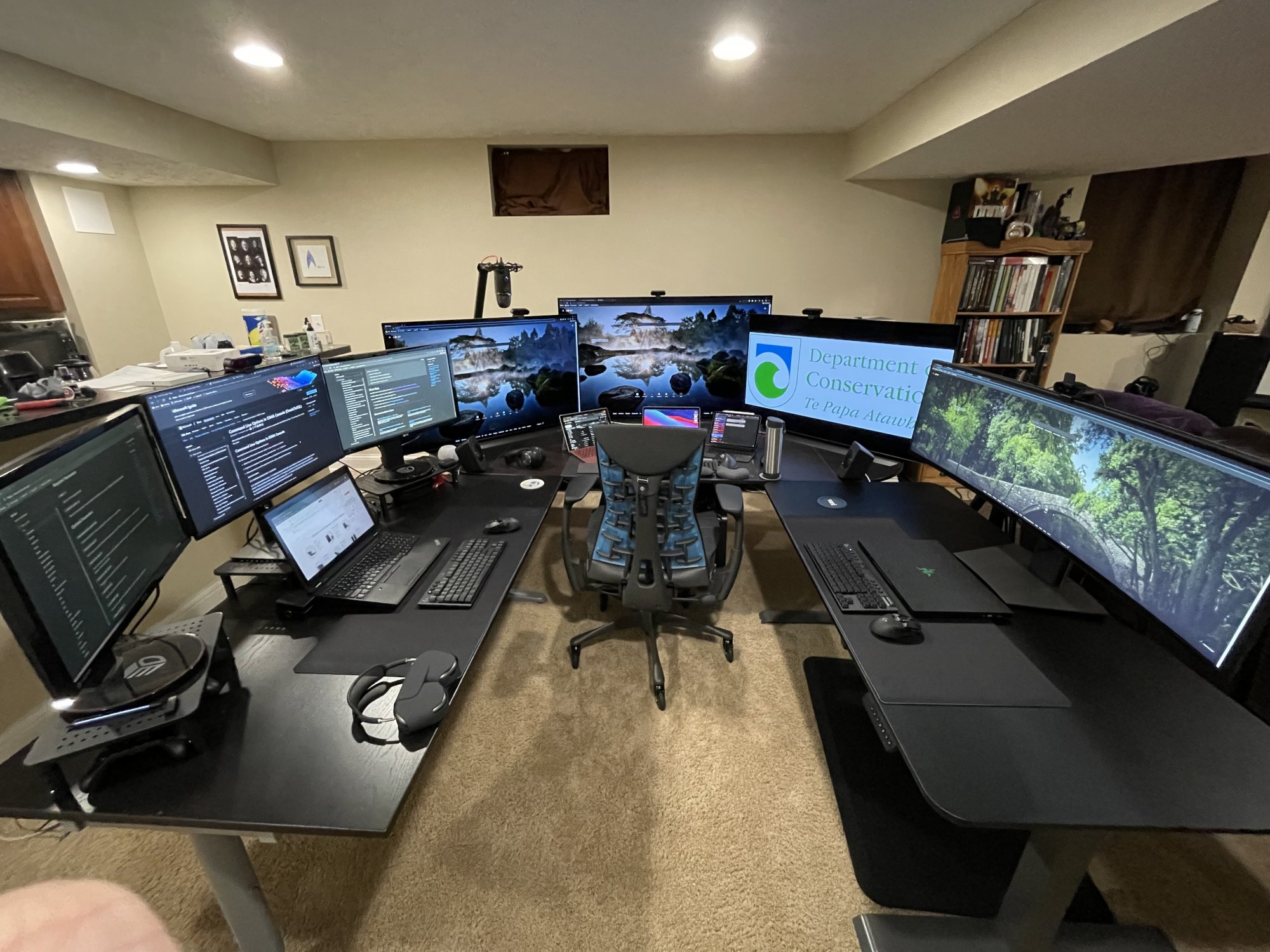
I think I saw fewer monitors at NORAD.So I don't have any extreme viewing angles with them. I usually play games in windowed move on a single screen at a time and then have a youtube video playing as well, I then dual boot one of my desktops to do work with as well across all three displays. If I play fullscreen it is on only one monitor at a time.
The way I have them positioned is in a way that each one of them isn't blocking the other. It honestly works out really well. My multiple cameras I use for OBS and multiple angles on work calls if I need to switch to a different laptop / desktop.
I really have quite a lot going on with my setup. Which I will link a picture below.
View attachment 348866
Seriously though, are you running them all off one PC? Do you shut down background tasks when you game? What games do you play?
edit: I saw you say 'different laptop / desktop' how many computers do you use to run all those displays?
That's crazy. Why do you have so many different setups? Why not just a couple of computers and the OLEDs?So I don't have any extreme viewing angles with them. I usually play games in windowed move on a single screen at a time and then have a youtube video playing as well, I then dual boot one of my desktops to do work with as well across all three displays. If I play fullscreen it is on only one monitor at a time.
The way I have them positioned is in a way that each one of them isn't blocking the other. It honestly works out really well. My multiple cameras I use for OBS and multiple angles on work calls if I need to switch to a different laptop / desktop.
I really have quite a lot going on with my setup. Which I will link a picture below.
View attachment 348866
By comparison I get all my work done on a single LG CX and three virtual desktops on MacOS. For personal stuff I don't even use virtual desktops.
So I don't have any extreme viewing angles with them. I usually play games in windowed move on a single screen at a time and then have a youtube video playing as well, I then dual boot one of my desktops to do work with as well across all three displays. If I play fullscreen it is on only one monitor at a time.
The way I have them positioned is in a way that each one of them isn't blocking the other. It honestly works out really well. My multiple cameras I use for OBS and multiple angles on work calls if I need to switch to a different laptop / desktop.
I really have quite a lot going on with my setup. Which I will link a picture below.
View attachment 348866
Looks like your commanding a shuttle at NASA with that setup
clayton006
[H]ard|Gawd
- Joined
- Jan 4, 2005
- Messages
- 1,089
HahaI think I saw fewer monitors at NORAD.
Seriously though, are you running them all off one PC? Do you shut down background tasks when you game? What games do you play?
edit: I saw you say 'different laptop / desktop' how many computers do you use to run all those displays?
So a bit more about my setup (yes my signature is way out of date).
I have three Alienware desktops R11 (10700k, two with 3080 and one with a 3090). First time I've ordered pre-built, just to get those darn GPUs. I didn't pay full price, I used an EPP plus called in to negotiate even more. I do have a custom built "server" with a 10980xe and 256GB ram for VM's
The 3090 system drives the OLEDs, the two 3080 systems split between the 3 monitor setup and the 49" ultrawide
My m1 MacBook mostly runs on the ultra wide now to save power. My Razer Blade is my mobile gaming platform. Not a bad system.
Most days I actually don't run this setup for work (Unless I need the screens) and use my m1 MacBook to make sure I'm just running the setup when I need to. I have two Tesla's that I charge and while my kWh price is around the national average, I try to pinch my pennies where I can. At idle, the entire setup running consumes about 900w.
As far as why I have three + separate setups, honestly I don't know. I had the 3 OLED's and the three monitors in my basement, and an extra desk I wasn't using and thought I could set up a separate workstation just cause. Then that turned into "Hey I could use a standing desk for a change" and my work pays for some equipment so I got the 49" monitor.
I dual boot my desktops (and laptops) for work vs. personal. I encrypt every volume but I don't unlock the work volume when I'm booted up in personal mode and vice-versa.
As far as what games I play. Well, the hardware is really wasted on them. I play mostly Fallout 76 and Diablo 3 as my re-occuring games. Occasionally I play some Wolf: Youngblood or other games when friends ask me to play with them.
I hope that answers most questions.
Armenius
Extremely [H]
- Joined
- Jan 28, 2014
- Messages
- 54,552
Are they using a PDC coating on the new one for some reason, or is that something else?To summarize: both are great panels. Probably, the G1’s off-angle “pink tint” would make me choose the GX.
Not sure. I don't think he said anything about the type of coating.Are they using a PDC coating on the new one for some reason, or is that something else?
Armenius
Extremely [H]
- Joined
- Jan 28, 2014
- Messages
- 54,552
I can't find any info on the type of coating they use, period. But that pinkish/purplish tint at off-angle viewing is one of the signs of using PDC. You can see it if you wear glasses and get the coating they use for computer use.Not sure. I don't think he said anything about the type of coating.

Bigjohns97
[H]ard|Gawd
- Joined
- Oct 18, 2000
- Messages
- 1,251
Jesus man what kind of amp breaker are you running that all on?Haha
So a bit more about my setup (yes my signature is way out of date).
I have three Alienware desktops R11 (10700k, two with 3080 and one with a 3090). First time I've ordered pre-built, just to get those darn GPUs. I didn't pay full price, I used an EPP plus called in to negotiate even more. I do have a custom built "server" with a 10980xe and 256GB ram for VM's
The 3090 system drives the OLEDs, the two 3080 systems split between the 3 monitor setup and the 49" ultrawide
My m1 MacBook mostly runs on the ultra wide now to save power. My Razer Blade is my mobile gaming platform. Not a bad system.
Most days I actually don't run this setup for work (Unless I need the screens) and use my m1 MacBook to make sure I'm just running the setup when I need to. I have two Tesla's that I charge and while my kWh price is around the national average, I try to pinch my pennies where I can. At idle, the entire setup running consumes about 900w.
As far as why I have three + separate setups, honestly I don't know. I had the 3 OLED's and the three monitors in my basement, and an extra desk I wasn't using and thought I could set up a separate workstation just cause. Then that turned into "Hey I could use a standing desk for a change" and my work pays for some equipment so I got the 49" monitor.
I dual boot my desktops (and laptops) for work vs. personal. I encrypt every volume but I don't unlock the work volume when I'm booted up in personal mode and vice-versa.
As far as what games I play. Well, the hardware is really wasted on them. I play mostly Fallout 76 and Diablo 3 as my re-occuring games. Occasionally I play some Wolf: Youngblood or other games when friends ask me to play with them.
I hope that answers most questions.
clayton006
[H]ard|Gawd
- Joined
- Jan 4, 2005
- Messages
- 1,089
120v 20amp - It runs into a Liebert UPS in the unfinished basement.Jesus man what kind of amp breaker are you running that all on?
p3sty
2[H]4U
- Joined
- Feb 22, 2006
- Messages
- 2,622
If I buy this and drive it with my 3080 will the "high speed hdmi cable" be the only thing I need?
Specifically, a 48Mbps HDMI cable.If I buy this and drive it with my 3080 will the "high speed hdmi cable" be the only thing I need?
Haha
So a bit more about my setup (yes my signature is way out of date).
I have three Alienware desktops R11 (10700k, two with 3080 and one with a 3090). First time I've ordered pre-built, just to get those darn GPUs. I didn't pay full price, I used an EPP plus called in to negotiate even more. I do have a custom built "server" with a 10980xe and 256GB ram for VM's
The 3090 system drives the OLEDs, the two 3080 systems split between the 3 monitor setup and the 49" ultrawide
My m1 MacBook mostly runs on the ultra wide now to save power. My Razer Blade is my mobile gaming platform. Not a bad system.
Most days I actually don't run this setup for work (Unless I need the screens) and use my m1 MacBook to make sure I'm just running the setup when I need to. I have two Tesla's that I charge and while my kWh price is around the national average, I try to pinch my pennies where I can. At idle, the entire setup running consumes about 900w.
As far as why I have three + separate setups, honestly I don't know. I had the 3 OLED's and the three monitors in my basement, and an extra desk I wasn't using and thought I could set up a separate workstation just cause. Then that turned into "Hey I could use a standing desk for a change" and my work pays for some equipment so I got the 49" monitor.
I dual boot my desktops (and laptops) for work vs. personal. I encrypt every volume but I don't unlock the work volume when I'm booted up in personal mode and vice-versa.
As far as what games I play. Well, the hardware is really wasted on them. I play mostly Fallout 76 and Diablo 3 as my re-occuring games. Occasionally I play some Wolf: Youngblood or other games when friends ask me to play with them.
I hope that answers most questions.
This looks like its beside the kitchen. Which suggests this is the dining area. That's serious.
What's the material the desk top is made out of for the standing desk? I plan to get a standing desk for an LG OLED C1 TV. 48". So far I know I need something wide enough to hold a TV and a second monitor (at an angle). strong enough as well. A mounting arm is likely.
Armenius
Extremely [H]
- Joined
- Jan 28, 2014
- Messages
- 54,552
You need an Ultra High Speed cable to get the full HDMI 2.1 bandwidth. High Speed is only for up to 4K 60 Hz at HDMI 2.0 bandwidth.If I buy this and drive it with my 3080 will the "high speed hdmi cable" be the only thing I need?