Honestly, I dont even need 120hz. Its wonderful, but I can function with 60hz. But I cannot go back to the days of VSYNC. I absolutely require VRR. Just a small 40-60fps range and I would strongly consider the OLED monitors.Yeah, I should have specified monitors with VRR and native 120Hz.
![[H]ard|Forum](/styles/hardforum/xenforo/logo_dark.png)
Navigation
Install the app
How to install the app on iOS
Follow along with the video below to see how to install our site as a web app on your home screen.
Note: This feature may not be available in some browsers.
More options
-
Some users have recently had their accounts hijacked. It seems that the now defunct EVGA forums might have compromised your password there and seems many are using the same PW here. We would suggest you UPDATE YOUR PASSWORD and TURN ON 2FA for your account here to further secure it. None of the compromised accounts had 2FA turned on.
Once you have enabled 2FA, your account will be updated soon to show a badge, letting other members know that you use 2FA to protect your account. This should be beneficial for everyone that uses FSFT.
You are using an out of date browser. It may not display this or other websites correctly.
You should upgrade or use an alternative browser.
You should upgrade or use an alternative browser.
LG 48CX
- Thread starter gan7114
- Start date
The problem with VRR @ 60hz is you're forced to use a 57FPS frame cap. Every frame per second is precious at 60hz not to mention it eliminates any possibility of LFC for games that drop under 40 even momentarily.Honestly, I dont even need 120hz. Its wonderful, but I can function with 60hz. But I cannot go back to the days of VSYNC. I absolutely require VRR. Just a small 40-60fps range and I would strongly consider the OLED monitors.


l88bastard
2[H]4U
- Joined
- Oct 25, 2009
- Messages
- 3,902
Yea...same woman put her fist thru my first Gateway XHD3000 way back in 2009-2010ish.True story? What did you do to get a shoe thrown at you lol
XHD3000's are not fist proof and AW55's are not stiletto proof!
It sucks ass when you watch $4,000 go up in smoke.
Yea...same woman put her fist thru my first Gateway XHD3000 way back in 2009-2010ish.
XHD3000's are not fist proof and AW55's are not stiletto proof!
It sucks ass when you watch $4,000 go up in smoke.
Must have something amazing between her legs. Mine would be gone.
l88bastard
2[H]4U
- Joined
- Oct 25, 2009
- Messages
- 3,902
Honestly, I dont even need 120hz. Its wonderful, but I can function with 60hz. But I cannot go back to the days of VSYNC. I absolutely require VRR. Just a small 40-60fps range and I would strongly consider the OLED monitors.
Its 2021. 60hz needs to be shunned like Leprosy.
l88bastard
2[H]4U
- Joined
- Oct 25, 2009
- Messages
- 3,902
Must have something amazing between her legs. Mine would be gone.
Yep. Beautiful women are not for the feint of wallet.
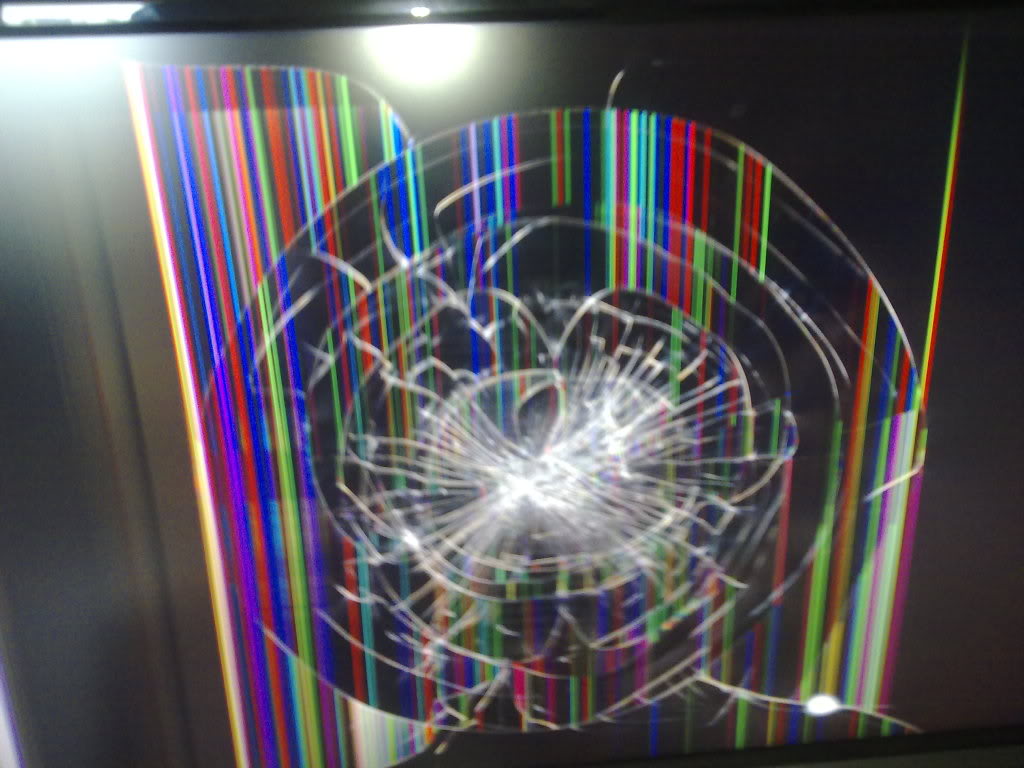
My old XHD3000........
Last edited:

vick1000
2[H]4U
- Joined
- Sep 15, 2007
- Messages
- 2,443
It wouldn't matter after that, 'cause I would be in jail for assualt. I tell all my women, don't use a weapon unless you want to quickly grow testicles and fight like a man.Another weakness of the Alienware 55 Oled is it did not hold up when my woman threw a shoe at my head, missed, & smashed the screen.
Stupid Dell / Alienware not building monitors to withstand projectile high heels!!!!
vick1000
2[H]4U
- Joined
- Sep 15, 2007
- Messages
- 2,443
Heiny drinkers can't handle OLEDSo the question is..is this the right monitor for me at 48"?!

l88bastard
2[H]4U
- Joined
- Oct 25, 2009
- Messages
- 3,902
http://www.okmoviequotes.com/wp-content/uploads/2014/06/8-Idiocracy-quotes.gifIt wouldn't matter after that, 'cause I would be in jail for assualt. I tell all my women, don't use a weapon unless you want to quickly grow testicles and fight like a man.
Yes, and that really sucks. But if I had to choose between a crappy IPS edge lit panel at 144hz or a OLED at 60hz (with VRR) the OLED absolutely has a chance. The image just looks that much better.The problem with VRR @ 60hz is you're forced to use a 57FPS frame cap. Every frame per second is precious at 60hz not to mention it eliminates any possibility of LFC for games that drop under 40 even momentarily.
Heiny drinkers can't handle OLED
Ohhhh, that's just my chugging beer
Well, it all depends on the IPS panel, the LG 37,5 are really on par with OLED's image quality except for IPS glow and black color. If there was one without mechanical flaws - I'd be running one now instead of the OLED gladly. The one has to have hardware gsync module, that makes them run smoother with less motion blur than OLEDs without VRR.

phinix
Gawd
- Joined
- Dec 13, 2005
- Messages
- 914
Guys, I forgot and cannot find it - what are the nits values for these OLED light settings:
10 OLED light
20
30
100
I think we've calculated it in the past, but cannot find those posts.
36 OLED light in SDR is 120 nits - this came from some review.
Is that correct?
How do we then calculate it further?
If you wall mount it, buy separate stands for your speakers and pull your desk back a good amount. Otherwise no, not with this desk.So the question is..is this the right monitor for me at 48"?!View attachment 344056
Sorcerer_Tim
Limp Gawd
- Joined
- Oct 8, 2009
- Messages
- 183
You will really enjoy it. I play more games more often that I did with my Alienware ultrawide because I just enjoy looking at the imageJust ordered one from Worldwide Stereo.
If you wall mount it, buy separate stands for your speakers and pull your desk back a good amount. Otherwise no, not with this desk.
I agree with the speaker stands.
I checked the dimensions, and it's only 4" wider and less than 8" taller than the 38" UW in the photo. I think it'll be perfect. I lean back when I play, not forward. I rarely play FPS anymore, mostly sim games and Diablo 3.
36 OLED light in SDR is 120 nits - this came from some review.
Is that correct?
How do we then calculate it further?
I measured it on my unit with a meter and it was like the reviews said. 25 is around 100, 30 around 120 etc. I did not measure higher values because I have no interest in those and use the TV in a dark room (in practice I use 20-25 for SDR).

- Joined
- May 5, 2006
- Messages
- 5,781
Not to be pedantic but I got a kick out of that considering what was said to have happened:
That shoe wasn't a feint it was a direct throw. The use of wallet in regard to women was implied to not be faint, as in not "faint of wallet". That is, even if the results were rage inducing based on the stories. Feint of wallet would be a fake use or throw of a wallet ( or a shoe ) aka throwing garbage. Pretending to take out your wallet to pay could be considered a feint in some ways I guess, faking throwing a ball for a dog to get him to run, or faking throwing a shoe without throwing it rather than ..


feint:
a deceptive or pretended blow, thrust, or other movement, especially in boxing or fencing.
"a brief feint at the opponent's face"
faint: lacking the courage to face something difficult or dangerous —usually used in the phrase not for the faint of heart. "This is a difficult climb that is not for the faint of heart".

 courage ...
 faint
faint........................
What the alienware mainly had over OLED TVs at the time was a displayport for 120hz vrr for which a lot of gaming monitors were (and some still are) charging a stupid premium for before hdmi 2.1 displays and gpus came out (some TVs already had 120hz screens in them and were vrr capable but only at 60hz, at native 4k anyway, due to hdmi 2.0b). Though some of us still don't have hdmi 2.1 gpus to go with the LG due to stock so there is that.
Last edited:

Armenius
Extremely [H]
- Joined
- Jan 28, 2014
- Messages
- 53,287
Guys, I forgot and cannot find it - what are the nits values for these OLED light settings:
10 OLED light
20
30
100
I think we've calculated it in the past, but cannot find those posts.
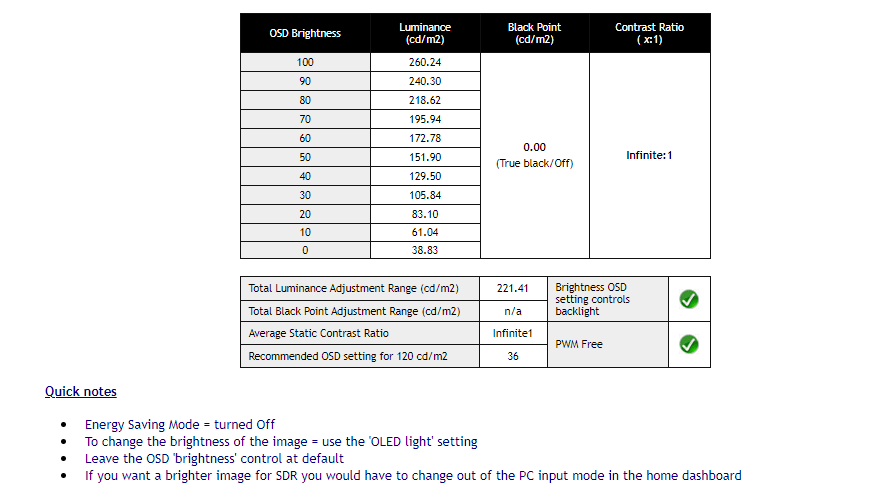
Source:
https://www.tftcentral.co.uk/reviews/lg_cx_oled.htm#brightness
Since the C1 is basically unchanged from the CX the settings should be similar if you get one of those.
Previous monitor was 144hz 1440p TN. Current is the CX OLED @ 4K120.Its 2021. 60hz needs to be shunned like Leprosy.
I will NEVER go back to 60hz. It feels like 30hz used to feel.... slow and laggy.

HiCZoK
Gawd
- Joined
- Sep 18, 2006
- Messages
- 860
on which one ? on cx, reviwes said 36 is 120nitsGuys, I forgot and cannot find it - what are the nits values for these OLED light settings:
10 OLED light
20
30
100
I think we've calculated it in the past, but cannot find those posts.
btw -anyone got tips how to use chrome? I already set windows to dark mode, autohide taskbar, 1minute blank screen saver and hide icons. But the bookmarks and top bar in chrome is still the last static element
HiCZoK
Gawd
- Joined
- Sep 18, 2006
- Messages
- 860
sdr stuff is mastered for 100-120 nits.What's the deal with all the nit adjustments?

sharknice
Supreme [H]ardness
- Joined
- Nov 12, 2012
- Messages
- 4,883
F11 for full screen will hide all the UI. I don't think you really need to go to such extreme measures though. But you could also just not use the bookmark bar and use something like a speed dial page instead ,or a completely different browser like Vivaldi that has all that built in and a much more efficient and customizable user interface etc.on which one ? on cx, reviwes said 36 is 120nits
btw -anyone got tips how to use chrome? I already set windows to dark mode, autohide taskbar, 1minute blank screen saver and hide icons. But the bookmarks and top bar in chrome is still the last static element
Ahhsdr stuff is mastered for 100-120 nits.
mirkendargen
Limp Gawd
- Joined
- Dec 29, 2006
- Messages
- 435
You can get all of that on a 2080Ti but not at the same time. You can get 4k/120hz 4:2:0 VRR no HDR or 4k/60hz 4:4:4 HDR VRR natively, or 4k/120hz 4:4:4 HDR no VRR with one of the adapters.So there seems to be so much on using this as a monitor.
Is there a comprehensive guide somewhere?
Also, with a 2080Ti, can I get 4k/120Hz VRR 4:4:4 with one of those DP to HDMI 2.1 adapters?
The ONLY way to get everything that the CX has to offer (at the same time) is either an RTX 3000 series or RX 6000 series GPU. HDMI 2.1 is the key.So there seems to be so much on using this as a monitor.
Is there a comprehensive guide somewhere?
Also, with a 2080Ti, can I get 4k/120Hz VRR 4:4:4 with one of those DP to HDMI 2.1 adapters?

- Joined
- Aug 7, 2004
- Messages
- 19,611
And it’s f’ing glorious.The ONLY way to get everything that the CX has to offer (at the same time) is either an RTX 3000 series or RX 6000 series GPU. HDMI 2.1 is the key.
The CX was really, really great with HDMI 2.0...but 2.1 is the way to fully unleash the beast. It’s amazing.

- Joined
- Dec 2, 2004
- Messages
- 32,702
Hehe, I was off for a few mostly myself... I recognized your name!btw I don't post too often but I've been here all these years. Back in 2007 when samsung 226bw was all the rage. Look where we are
Hey guys,
After asking around and reading a lot in here, I got a 48" CX in September, and love it. I've been running at 4k@60Hz because my brain couldn't do numbers, and I thought I needed a 30xx with HDMI 2.1 to do 4k@120Hz until my friend pointed out I was an idiot that that's only for 4:4:4 content.
When I first swapped to 120Hz, all the text seemed blurry, but I found the fix of turning off pixel shift. But anything red is still weird, and I'm not sure what's going on with it. It's a pain to try and take a picture of, this is the best I can get. You can see the white text at the top is perfectly fine, but the red is 'crunchy' - look at the hash sign, and looks worse in real life. I run a multi monitor setup and this is the only display that it happens on. Is this something to do with what I've been reading about chroma subsampling in 4:2:2? I don't understand the modern display stuff in this much detail, but I'm trying to learn!
After asking around and reading a lot in here, I got a 48" CX in September, and love it. I've been running at 4k@60Hz because my brain couldn't do numbers, and I thought I needed a 30xx with HDMI 2.1 to do 4k@120Hz until my friend pointed out I was an idiot that that's only for 4:4:4 content.
When I first swapped to 120Hz, all the text seemed blurry, but I found the fix of turning off pixel shift. But anything red is still weird, and I'm not sure what's going on with it. It's a pain to try and take a picture of, this is the best I can get. You can see the white text at the top is perfectly fine, but the red is 'crunchy' - look at the hash sign, and looks worse in real life. I run a multi monitor setup and this is the only display that it happens on. Is this something to do with what I've been reading about chroma subsampling in 4:2:2? I don't understand the modern display stuff in this much detail, but I'm trying to learn!
HiCZoK
Gawd
- Joined
- Sep 18, 2006
- Messages
- 860
yes. this is chroma subsampling effect. It's not full rgb in order to acheive 120hz on hdmi 2.0Hey guys,
After asking around and reading a lot in here, I got a 48" CX in September, and love it. I've been running at 4k@60Hz because my brain couldn't do numbers, and I thought I needed a 30xx with HDMI 2.1 to do 4k@120Hz until my friend pointed out I was an idiot that that's only for 4:4:4 content.
When I first swapped to 120Hz, all the text seemed blurry, but I found the fix of turning off pixel shift. But anything red is still weird, and I'm not sure what's going on with it. It's a pain to try and take a picture of, this is the best I can get. You can see the white text at the top is perfectly fine, but the red is 'crunchy' - look at the hash sign, and looks worse in real life. I run a multi monitor setup and this is the only display that it happens on. Is this something to do with what I've been reading about chroma subsampling in 4:2:2? I don't understand the modern display stuff in this much detail, but I'm trying to learn!
Btw - anyone with new c1 models yet?
My c1 keeps switching back my audio preset to game optimizer on every tv or pc restart. Super annoying
Hey guys,
After asking around and reading a lot in here, I got a 48" CX in September, and love it. I've been running at 4k@60Hz because my brain couldn't do numbers, and I thought I needed a 30xx with HDMI 2.1 to do 4k@120Hz until my friend pointed out I was an idiot that that's only for 4:4:4 content.
When I first swapped to 120Hz, all the text seemed blurry, but I found the fix of turning off pixel shift. But anything red is still weird, and I'm not sure what's going on with it. It's a pain to try and take a picture of, this is the best I can get. You can see the white text at the top is perfectly fine, but the red is 'crunchy' - look at the hash sign, and looks worse in real life. I run a multi monitor setup and this is the only display that it happens on. Is this something to do with what I've been reading about chroma subsampling in 4:2:2? I don't understand the modern display stuff in this much detail, but I'm trying to learn!
Is this noticable in games?
The ONLY way to get everything that the CX has to offer (at the same time) is either an RTX 3000 series or RX 6000 series GPU. HDMI 2.1 is the key.
So can I get 4k120 4:4:4 no vrr with the dongle?
I'm wondering if I made a mistake buying this without a 2.1 card.
Sorcerer_Tim
Limp Gawd
- Joined
- Oct 8, 2009
- Messages
- 183
I used my CX for a couple of weeks before you were kind enough to let me get your 3080 from EVGA and while the 3080 is better, the 2080ti really did a nice job in everything I used it for. I enjoyed gaming on it with the 2080ti more than on the Gsync ultrawide I had before it. I never tried it with a dongle, but I would suspect that would help even more. I would keep it until you get a 2.1 card, but if you are within the return window, you could always return it and re-buy it when you have a 2.1 card.
Hey all, thinking of getting a CX1. Have a 3080 to drive it. While it is my gaming box, I do a ton of work on it and I need razor sharp text - not only 444 obviously, but good IPS-like sharp text. Is the CX/CX1 good for this? I know the contrast alone will help, but without being able to see one in person, I hate to gamble. I also know there will probably be a lot of static image no-nos many hours of the day and am sort of preparing myself for a slight bit of burn-in. Anybody else been using theirs as a work monitor for many hours of the day?
I used my CX for a couple of weeks before you were kind enough to let me get your 3080 from EVGA and while the 3080 is better, the 2080ti really did a nice job in everything I used it for. I enjoyed gaming on it with the 2080ti more than on the Gsync ultrawide I had before it. I never tried it with a dongle, but I would suspect that would help even more. I would keep it until you get a 2.1 card, but if you are within the return window, you could always return it and re-buy it when you have a 2.1 card.
I've been kicking myself for that today, lol.
How was the image quality? I assume 4:2:2 was what you could get at 4k120?
Hey all, thinking of getting a CX1. Have a 3080 to drive it. While it is my gaming box, I do a ton of work on it and I need razor sharp text - not only 444 obviously, but good IPS-like sharp text. Is The CX/CX1 good for this? I know the contrast alone will help, but without being able to see one in person, I hate to gamble. I also know there will probably be a lot of static image no-nos many hours of the day and am sort of preparing myself for a slight bit of burn-in. Anybody else been using theirs as a work monitor for many hours of the day?
If you have a Sam's nearby, they have them on display, as does Best Buy in the Magnolia area