• Some users have recently had their accounts hijacked. It seems that the now defunct EVGA forums might have compromised your password there and seems many are using the same PW here. We would suggest you UPDATE YOUR PASSWORD and TURN ON 2FA for your account here to further secure it. None of the compromised accounts had 2FA turned on.
    Once you have enabled 2FA, your account will be updated soon to show a badge, letting other members know that you use 2FA to protect your account. This should be beneficial for everyone that uses FSFT.

LG 48CX

Looks like it might require server edition of windows and even then it could potentially still dump out of fullscreen exclusive mode when 2nd user is active on the side monitors (still don't know about that in regard to exclusive mode).. so I think I'll just use the local desktop of the 2nd machine on my side display's other hdmi input and duplicate my apps+logins, share folders, etc.

I'll have to split audio and utilize aux ins etc. to get all of the mic and headphone/speaker audiio shared between the two machines (to/from my gaming rig's sound peripherals) as I don't have a big analog/digital controller and multi-out mixing panel currently.
 
Hey guys,
i got a 48cx around two weeks ago, which i would like to use as an pc monitor.
But iam not sure how to classify the tint, which definetly exists, and bending of my tv.

What do you think?

Settings:

Contrast 85
Gamma: 2,4
OLED Light 35
ISF-Dark Mode

Last tint picture is with my daily setup -> Game Mode, OLED Light 75, Contrast 100 and Gamma 1886.

Best regards and happy new year.
 

Attachments

  • 48cx white tint oled35, kontrast85, gamma 2.4 - iphone.jpg
    48cx white tint oled35, kontrast85, gamma 2.4 - iphone.jpg
    177 KB · Views: 0
  • 48cx 5%grey 35 OLED 85 Kontrast 2.4 Gamma.jpg
    48cx 5%grey 35 OLED 85 Kontrast 2.4 Gamma.jpg
    294.2 KB · Views: 0
  • 48cx 5% grey.jpg
    48cx 5% grey.jpg
    372.4 KB · Views: 0
  • 48cx sichtfeld 2.jpg
    48cx sichtfeld 2.jpg
    273.1 KB · Views: 0
  • 48cx sichtfeld.jpg
    48cx sichtfeld.jpg
    283.1 KB · Views: 0
  • 48 distance 2.jpg
    48 distance 2.jpg
    268.7 KB · Views: 0
Hey guys,
i got a 48cx around two weeks ago, which i would like to use as an pc monitor.
But iam not sure how to classify the tint, which definetly exists, and bending of my tv.

What do you think?

Settings:

Contrast 85
Gamma: 2,4
OLED Light 35
ISF-Dark Mode

Last tint picture is with my daily setup -> Game Mode, OLED Light 75, Contrast 100 and Gamma 1886.

Best regards and happy new year.
OLED light at 75 for daily usage is waaayyyy too bright.
 
Hey guys,
i got a 48cx around two weeks ago, which i would like to use as an pc monitor.
But iam not sure how to classify the tint, which definetly exists, and bending of my tv.

What do you think?

Settings:

Contrast 85
Gamma: 2,4
OLED Light 35
ISF-Dark Mode

Last tint picture is with my daily setup -> Game Mode, OLED Light 75, Contrast 100 and Gamma 1886.

Best regards and happy new year.
Looks good... enjoy the sweet screen!
 
Hey guys,
i got a 48cx around two weeks ago, which i would like to use as an pc monitor.
But iam not sure how to classify the tint, which definetly exists, and bending of my tv.

What do you think?

Settings:

Contrast 85
Gamma: 2,4
OLED Light 35
ISF-Dark Mode

Last tint picture is with my daily setup -> Game Mode, OLED Light 75, Contrast 100 and Gamma 1886.

Best regards and happy new year.
The OLEDs have a magenta tint even on Warm2 (D65), which can be corrected without a meter.
 
The OLEDs have a magenta tint even on Warm2 (D65), which can be corrected without a meter.

Hold on a sec. He specifically says in that video he has calibrated it to D65 first in the service menu. At D65 it has a magenta tint. Some people do claim this, compared to a plasma at D65. You can basically pick an alternate white point shifted from D65 then to make it look your preferred white. You definitely need a meter though to first calibrate to D65 I think. My panel stock has a green tint so bumping up green blindly first is a bad idea.
 
I'll also add that d-nice himself says that D65 is good on the 77CX... which is the same panel as the 48CX. The alternate white point is only intended for 55 / 65 CX, I believe. Another reason to be careful copying things. I'll also throw in that a calorimeter like the i1display 2 has larger tolerance than the difference between D65 and the alternate white point - so to even get this reliably, you would need a 2k spectrometer. I guess you can simply try the AWPs and see if it looks better though - it can't hurt.
 
Hold on a sec. He specifically says in that video he has calibrated it to D65 first in the service menu. At D65 it has a magenta tint. Some people do claim this, compared to a plasma at D65. You can basically pick an alternate white point shifted from D65 then to make it look your preferred white. You definitely need a meter though to first calibrate to D65 I think. My panel stock has a green tint so bumping up green blindly first is a bad idea.
There's another video where he says is good for Warm2 on most panels out of the box. My 48 CX looks magenta.
 
  • Like
Reactions: hhkb
like this
when you turn the tv on, it goes straight t HDMI1 where my PC is connected, but every time I get that programs menu - is there a way to turn it off?
 
when you turn the tv on, it goes straight t HDMI1 where my PC is connected, but every time I get that programs menu - is there a way to turn it off?
Settings > All Settings > General > Home Settings > Home Auto Launch
 
There's another video where he says is good for Warm2 on most panels out of the box. My 48 CX looks magenta.
Makes sense if you see magenta to try tweaking a bit. I don't think it affects all panels - on mine at Warm2, it has a noticeable green tint in the greyscale, also quite cool in the whites so I needed to bump up red at the high point.
 
Guys, for those of you with 3090s, how is it handling this display? Are you satisfied with the performance? I am mulling over picking one up on Saturday (I scored one through Best Buy's site and it is on its way for pickup) for use with this display, but I have not yet moved this display into my game room and am currently using it as a TV.

My concern is that 3090, as fast as it is, is not quite fast enough to really push 4K and the investment is not worth it. Forget the 3080--that card is just not gettable and I like the silencer cooler on the 3090. Is anyone finding 3090 to be just a little lacking or does it meet expectations?
 
Not a 3090 owner, but I am satisfied w/ 3080 performance at 4k. In well optimized games, like Doom Eternal, it easily maintains 120FPS at all ultra settings. Similar with pretty much every other game I've tried so far. I think the 3090 will do well for 99% of games right now, otherwise you have g-sync. You can check the benchmarks yourself to see. Not gonna do much better until the next generation.
 
Guys, for those of you with 3090s, how is it handling this display? Are you satisfied with the performance? I am mulling over picking one up on Saturday (I scored one through Best Buy's site and it is on its way for pickup) for use with this display, but I have not yet moved this display into my game room and am currently using it as a TV.

My concern is that 3090, as fast as it is, is not quite fast enough to really push 4K and the investment is not worth it. Forget the 3080--that card is just not gettable and I like the silencer cooler on the 3090. Is anyone finding 3090 to be just a little lacking or does it meet expectations?

I think it handles 4k on this display very well. One thing you need to consider is the OLED pixel response. The panel is so fast that it doesn't have to hit 120FPS. Anything above 80 looks smooth as hell, smoother than my 1440p VA at 165. I haven't played Cyberpunk yet, but RDR2 and Horizon Zero Dawn are both silky at 4k without sacrificing much in the settings. For me the 3090 was definitely worth it when pairing with this TV.
 
I'm not sure what to think about that bendable 48" screen. On the one hand its cool and all but on the other hand I'm not sure I want to own the first year model either. I'd need to see proof that its not buggy or not good enough to work as expected. Maybe their second year model? Def needs independent reviews.
 
Guys, for those of you with 3090s, how is it handling this display? Are you satisfied with the performance? I am mulling over picking one up on Saturday (I scored one through Best Buy's site and it is on its way for pickup) for use with this display, but I have not yet moved this display into my game room and am currently using it as a TV.

My concern is that 3090, as fast as it is, is not quite fast enough to really push 4K and the investment is not worth it. Forget the 3080--that card is just not gettable and I like the silencer cooler on the 3090. Is anyone finding 3090 to be just a little lacking or does it meet expectations?
Many of the 3080 have exactly same cooler as 3090 so it should be even quieter than 3090. But demand on 3080 is so high is its lot easier to get 3090 vs 3080. Performance is good but only issue I can see is that nvidia is going to rls 3080 Ti in 2 months and it should have 20GB vram at msrp about 999$. So after that 3090 will be just quite a waste of money.
 
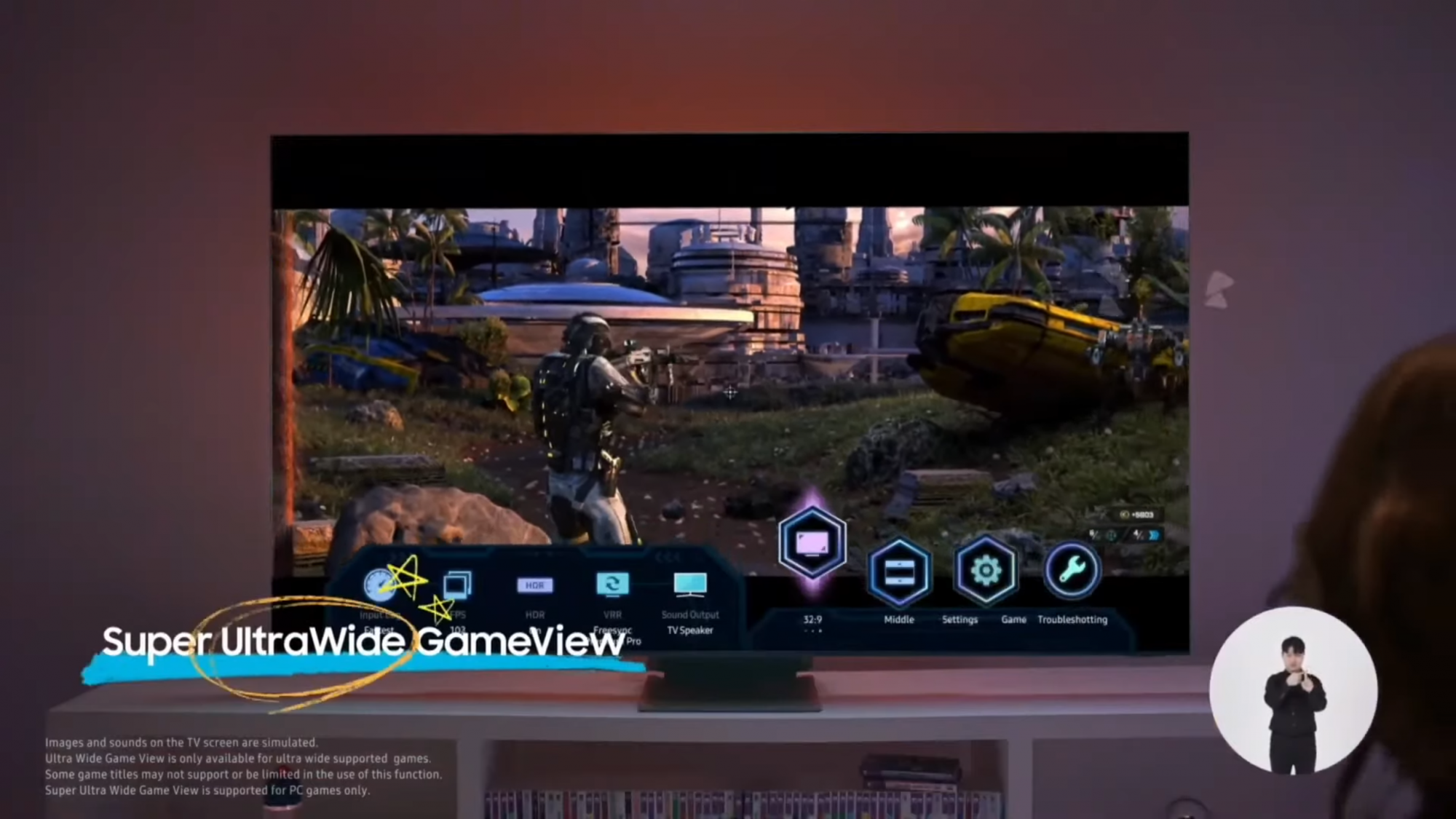
I just watched Samsung's Neo QLED TV full reveal and noticed quite nice gaming feature.
You can switch to 21:9 or even 32:9 and even move image to bottom/middle/top of the screen.
It would be nice if LG can implement something like this.

samsung-uw.png
 
I'm not sure what to think about that bendable 48" screen. On the one hand its cool and all but on the other hand I'm not sure I want to own the first year model either. I'd need to see proof that its not buggy or not good enough to work as expected. Maybe their second year model? Def needs independent reviews.

I don't think it's really anything that special. LG has done curved OLEDs before and have a rollable OLED. What are you worried will be buggy?
 
Interesting random find: 2080 Ti USB-C port -> CableMatters USB-C to DP 1.4 "8K" adapter -> Club3D DP 1.4 to HDMI 2.1 adapter works at 4K 120 Hz, same as connecting it directly with Displayport. I am mainly interested in getting 4K 120 Hz on my 2019 16" Macbook Pro and tried this setup on it previously but never got more than 4K 60 Hz. I think I may need to give it another try.

Started looking into this again because CableMatters has released a USB-C to HDMI 2.1 adapter that they claim should allow for 4K 120 Hz on my 2019 16" Macbook Pro. Too bad their adapter does not support VRR either.
 
Guys, for those of you with 3090s, how is it handling this display? Are you satisfied with the performance? I am mulling over picking one up on Saturday (I scored one through Best Buy's site and it is on its way for pickup) for use with this display, but I have not yet moved this display into my game room and am currently using it as a TV.

My concern is that 3090, as fast as it is, is not quite fast enough to really push 4K and the investment is not worth it. Forget the 3080--that card is just not gettable and I like the silencer cooler on the 3090. Is anyone finding 3090 to be just a little lacking or does it meet expectations?

3090 is totally adequate for 4k gaming unless you are playing horribly optimized Ubisoft titles. Even with a 3090 I cannot maintain above 60fps at all times in AC:V despite using optimized settings from youtuber HardwareUnboxed. For every other game that isn't Ubisoft trash though, a few tweaks and you're looking at 100+ average fps.
 
Hi guys, firmware 3.21.09 here in Europe and it seems that I'm still plagued with the Freesync stuttering issue when using 4k@120h 4:4:4 10 bit. If I return to 8 bit the issue is mitigated but like in 90% - there is still stuttering with Freesync, just considerably less. I started suspecting the cable, although it's HDMI 2.1 certified so I ordered a new one just in case. Also it seems that the stuttering is there in 10 bit in general even with Freesync off and vsync on. I really don't want to lose the 10bit colors, it's so much better but it seems that I'm one of those people that's extra sensitive to stuttering and it's bothering me a lot. Any ideas how I can fix that?
 
I'll also add that d-nice himself says that D65 is good on the 77CX... which is the same panel as the 48CX. The alternate white point is only intended for 55 / 65 CX, I believe. Another reason to be careful copying things. I'll also throw in that a calorimeter like the i1display 2 has larger tolerance than the difference between D65 and the alternate white point - so to even get this reliably, you would need a 2k spectrometer. I guess you can simply try the AWPs and see if it looks better though - it can't hurt.

While It is correct that the 77 and 48 are manufactured on the same panel, D-Nice recommends to also apply his AWP on the 48"

https://www.avsforum.com/threads/20...-settings-no-price-talk.3113174/post-60193111
I only have one AWP.... x0.309 y0.3290. It works on all 48/55/65” WRGB OLEDs regardless of brand.

This is what I have done and the white is no longer pinkish on my 48CX.
 
  • Like
Reactions: hhkb
like this
3090 is totally adequate for 4k gaming unless you are playing horribly optimized Ubisoft titles. Even with a 3090 I cannot maintain above 60fps at all times in AC:V despite using optimized settings from youtuber HardwareUnboxed. For every other game that isn't Ubisoft trash though, a few tweaks and you're looking at 100+ average fps.
Yeah it is. My 3080 is doing fine, I think most triple a titles will start having dlss, so that will help too
 
I noticed something interesting when calibrating for HDR from my PC. The nvidia driver randomly compresses the HDR signal to limited (despite NVCP set to Full), elevating all the blacks. I'm not sure what causes this - it didn't happen reliably. To fix it, I had to toggle range from Full to Limited and back again. Something to keep in mind if you try an HDR game and suddenly everything is washed out.
 
I noticed something interesting when calibrating for HDR from my PC. The nvidia driver randomly compresses the HDR signal to limited (despite NVCP set to Full), elevating all the blacks. I'm not sure what causes this - it didn't happen reliably. To fix it, I had to toggle range from Full to Limited and back again. Something to keep in mind if you try an HDR game and suddenly everything is washed out.
Thanks for the tip, I’ll keep an eye on it since I always leave Windows and my CX in HDR.
 
I don't have a 3000 series gpu yet but I'll definitely be looking to prioritize (well implemented) HDR games and/or games with DLSS 2.0 support (quality mode), even if either of those is a short list.

Generally I'll dial in graphics settings to 100fps+ whenever I can unless it starts to really trash the game way too much graphically. It's not "ultra" to me at under 100fps on a 120hz or higher display on PC - so at that point it's a matter of trading off one ultra setting for another the way I look at it. (Turn something "down" to get motion definition and motion clarity UP, otherwise you are doing vice-versa).

I'd rather turn RTX/ractracing off and get over 100fps average for 120hz+ displays(with DLSS 2.0 quality mode when available) than have raytracing on most games I think but pick your poison at 4k. There will be stronger GPUS in the following years but game's arbitrary graphics caps will get moved up too. VR will probably get even more demanding than it already is compared to desktop display resolutions in the following years as well (which is another reason AI upscaling is being dev'd so much). I also play older games in my library (if 2015 - 2020 is that old) though, and can crank the graphics settings up on those and in some cases apply heavier graphics/FX/view-distance mods them. 4k rez on a game whose graphics ceilings were trashing frame rates well below 100 average several years ago will look amazing at 4k with in some cases the ability for over the top settings (and maybe mods on some games) and on an OLED with ultra blacks/contrasts.

That said, some of my favorite games are souls and souls-like games many of which are capped at 60fps to being with so there is that too :rolleyes: ... but at least I can get 60fps min rather than hit 30-40fps throughout the graph. I'm stuck at 60hz capped with RTSS at 57Hz (playing Jedi: Fallen order in HDR currently) until I can get the 3090 model I want for now.
 
LG unveiled new QNED Mini LED TVs at CES 2021. They will be the first to run the latest webOS 6.0, “the most significant update” to the operating system since it was introduced back in 2014. It comes with a new Magic Remote to boot.
Anyone have idea if its possible remote will work with CX line ?
gsmarena_001.jpg
 
LG unveiled new QNED Mini LED TVs at CES 2021. They will be the first to run the latest webOS 6.0, “the most significant update” to the operating system since it was introduced back in 2014. It comes with a new Magic Remote to boot.
Anyone have idea if its possible remote will work with CX line ?
View attachment 317085

That new remote looks about as horrible design as the existing one, except now you wo't hit the Netflix button so easily whne trying to press back. If the C1 lineup gets this as well then it will probably work on CX too.
 
I noticed something interesting when calibrating for HDR from my PC. The nvidia driver randomly compresses the HDR signal to limited (despite NVCP set to Full), elevating all the blacks. I'm not sure what causes this - it didn't happen reliably. To fix it, I had to toggle range from Full to Limited and back again. Something to keep in mind if you try an HDR game and suddenly everything is washed out.
Install the latest drivers. This was fixed in the last hotfix drivers and is fixed in the official drivers that came out yesterday.
 
  • Like
Reactions: hhkb
like this
I sort of like the new remote. I always hit the TV Guide button by accident. Now I can hit the settings button instead by accident. But I usually want to hit it, I think that's my most used button. It looks huge though! Like 20% longer.
 
Has anyone had any success with custom resolutions for higher refreshrates, such as 144Hz 4k, or 240-480Hz 1080p?
I tried a little but it all just fails. Really a missed opportunity for LG here, this is for sure the best monitor for 4k120, but it couldn't have been that hard to let it accept 240 or 480Hz 1080p to completely crush the high refresh lcd segement as well.
 
I noticed something interesting when calibrating for HDR from my PC. The nvidia driver randomly compresses the HDR signal to limited (despite NVCP set to Full), elevating all the blacks. I'm not sure what causes this - it didn't happen reliably. To fix it, I had to toggle range from Full to Limited and back again. Something to keep in mind if you try an HDR game and suddenly everything is washed out.

With my 3 monitor setup, I noticed that HDR didn't initialize on some content even though the HDR slider was still on in the windows settings for the LG CX. That required me having to turn the hdr slider off and back on again. I don't know if it's doing this between powering down the displays occasionally or not and if it would be otherwise solid throughout. I'm assuming that might be the case but I haven't been keeping track that closely.

I was previously having an issue with the HDR logo and HDR mode dropping on mouseovers of video panel when the time slider showed, volume overlay, etc. but I thought I had the HDR slider nailed down after messing with some settings. However now, like I said, I'm noticed that on a few occasions full HDR range didn't activate at all on content though windows HDR slider was still on. In fact, when I checked it the input name on the TV in it's settings OSD didn't even say HDR anymore when this happened until I toggled that slider back and forth - so that is why it can't work at that point.

So it seems like this is another setting drop out like your range one but it's possible it's just not picking it up sometimes when the monitors all power back up and get their signal again from standby.

I'll install the new drivers now but I'm also going to see if I can make a displayfusion script with that HDR tray tool running to toggle it on and off "rebooting HDR" easier since I don't use taskbar and tray much anymore. Then I'd just hit a streamdeck "HDR toggle" button to turn it on and off if I have to (plus waiting for it to transition each way, which affects all three monitors in a clunky fashion for several seconds).

https://github.com/bradgearon/hdr-switch

now you can call hdr_switch_tray while it is running (in the tray) with a parameter 'hdr'

hdr_switch_exe hdr
 
I spent about 30 mins trying to find magenta/pink tint on my panel. No luck though. I even pulled out my old LG IPS and played a white screen on both. If anything the CX looked cool even calibrated to D65. So I'm not sure how common this is on 48CX. If anyone has an exact scene or game where I could see it then that would help.
 
Last edited:
I'm sure this was already known by some and maybe even posted since it's old news, but for those that don't know and never had a LG remote here are a few tips about the remote.

------------------------------------------
credit here:
https://www.reddit.com/r/OLED/comments/e7364t/pro_tip_time_how_to_turn_off_the_screen_while_the/

Posted byu/Naekyr
Pro tip time: How to turn off the screen while the TV stays on (great for music)
Hold the voice activation button in and say "Turn off screen". The screen will go black but the TV is still on and your music/content will keep playing :)

kami77
If you don’t want to use voice the same turn off screen option is under energy saving in the main picture menu.

LorsL84
Great tip! Another tip: Long press the settings button = instant access to picture settings, long press exit button = instant exit.

phronk
Another: long press a number key within an app to set it as a shortcut to that app. Long press it again to use the shortcut.
------------------------------------------------

This makes it very easy to blank the screen when walking away or if you aren't sure how long you might be away. It doesn't actually turn off the screen as far as windows is concerned. That means unlike using the power/standby button - it won't shuffle all my app window positions on my side monitors or anything when toggling it "off and on" using this method. Press any button on the remote and it "turns back on" in a microsecond.
 
I'm sure this was already known by some and maybe even posted since it's old news, but for those that don't know and never had a LG remote here are a few tips about the remote.

------------------------------------------
credit here:
https://www.reddit.com/r/OLED/comments/e7364t/pro_tip_time_how_to_turn_off_the_screen_while_the/

Posted byu/Naekyr
Pro tip time: How to turn off the screen while the TV stays on (great for music)
Hold the voice activation button in and say "Turn off screen". The screen will go black but the TV is still on and your music/content will keep playing :)

kami77
If you don’t want to use voice the same turn off screen option is under energy saving in the main picture menu.

LorsL84
Great tip! Another tip: Long press the settings button = instant access to picture settings, long press exit button = instant exit.

phronk
Another: long press a number key within an app to set it as a shortcut to that app. Long press it again to use the shortcut.
------------------------------------------------

This makes it very easy to blank the screen when walking away or if you aren't sure how long you might be away. It doesn't actually turn off the screen as far as windows is concerned. That means unlike using the power/standby button - it won't shuffle all my app window positions on my side monitors or anything when toggling it "off and on" using this method. Press any button on the remote and it "turns back on" in a microsecond.
Thanks man, the long press tips will be helpful.
 
Back
Top