also this, and disable all the overlays, even nvidia overlay. Some game engines doesnt like these stuf.Did you try disabling the FPS limiter? That can cause stutter in some games in my experience (Hades being a notable example).
![[H]ard|Forum](/styles/hardforum/xenforo/logo_dark.png)
Navigation
Install the app
How to install the app on iOS
Follow along with the video below to see how to install our site as a web app on your home screen.
Note: This feature may not be available in some browsers.
More options
-
Some users have recently had their accounts hijacked. It seems that the now defunct EVGA forums might have compromised your password there and seems many are using the same PW here. We would suggest you UPDATE YOUR PASSWORD and TURN ON 2FA for your account here to further secure it. None of the compromised accounts had 2FA turned on.
Once you have enabled 2FA, your account will be updated soon to show a badge, letting other members know that you use 2FA to protect your account. This should be beneficial for everyone that uses FSFT.
You are using an out of date browser. It may not display this or other websites correctly.
You should upgrade or use an alternative browser.
You should upgrade or use an alternative browser.
LG 48CX
- Thread starter gan7114
- Start date

- Joined
- May 5, 2006
- Messages
- 5,937
I would try to enable vsync on driver and disable in game, sometimes it helps.
I agree. Make sure you aren't duplicating anything like a frame limiter in the game + RTSS , or dynamic resolution enabled somehow tied to it or something so I'd turn that off.
Did you try disabling the FPS limiter? That can cause stutter in some games in my experience (Hades being a notable example).
You can also try a different limit, like -5 or so. Might be cutting it close for that game.
also tested having Gsync on BUT having the Acer monitor set at 60Hz (or unplugged) and I get no (or almost no) stutter. Has anyone experienced something like this? Could it be the GPU is not capable of providing Gsync at 120-144Hz for BOTH displays? Or is my settings wrong somewhere causing the stutters? Or Nvidia driver/LG firmware problem?
You can try turning hardware scaling on in the nvidia control panel for both displays for the hell of it. That used to work when 60hz and 120hz screens stuttered and didn't play nice together a long time ago.
Was set to 100; that resulted in the Windows task bar burning in after about a year. I've since reduced to 30. You actually do adjust to it after a day or two.4 years is pretty good though. What OLED light setting did you use before and what is it at now? And for how long was it running at the original setting?
Which is what I've heard previously, and why I always note my experience is on a B6 and not a later model. I'll keep this in mind when I upgrade [as soon as I can get a GPU. I'm told they allegedly exist.]LG substantially improved burn in issues with 7 series and later, by changing the subpixel structure to reduce effect of reds on burn in. I believe rtings showed this improved burn in for bright static logos from 600 hours on 6 series to 5000 hours on 7 series. So you should get way better burn in protection if you upgrade.
b1gLoRD , hhkb , elvn
Thanks. It wasn't any of those. I found out the problem. It was HWInfo being displayed on the secondary Acer monitor. Whenever it's on the screen, it causes stutters (I guess from constantly updating the display with new numbers.) I now have it still running but minimized and have no more stutters. And I can run CX48 at 4k 120 and Acer at 1440p 144Hz.
Thanks. It wasn't any of those. I found out the problem. It was HWInfo being displayed on the secondary Acer monitor. Whenever it's on the screen, it causes stutters (I guess from constantly updating the display with new numbers.) I now have it still running but minimized and have no more stutters. And I can run CX48 at 4k 120 and Acer at 1440p 144Hz.
I've been following along with this thread. I'm trying to convince my brother to get one of these for the living room we share and that he games on with PS4.
I just saw upcoming sale on these posted on slickdeals: https://slickdeals.net/f/14760979-l...950-3250?prop=pfd-14760979|prt-3&src=featured
I just saw upcoming sale on these posted on slickdeals: https://slickdeals.net/f/14760979-l...950-3250?prop=pfd-14760979|prt-3&src=featured
- Joined
- Jul 5, 2012
- Messages
- 4,716
could be massively price-prohibitive compared to the TVs.
https://videocardz.com/newz/lg-announces-31-5-inch-oled-4k-display-32ep950
I mean you've got people who are actually willing to dump $3500 on that new 32" FALD Asus monitor sooooo.....

mirkendargen
Limp Gawd
- Joined
- Dec 29, 2006
- Messages
- 435
Who knows if the 32" monitor is even 120hz, since it's targeting photo/video editing.
- Joined
- Jul 5, 2012
- Messages
- 4,716
Who knows if the 32" monitor is even 120hz, since it's targeting photo/video editing.
Would be really stupid if this monitor is still using DP 1.2 and HDMI 2.0 in 2021. Although I guess it's possible it could use DP 1.4 and HDMI 2.1 yet somehow still be limited to 60Hz.
mirkendargen
Limp Gawd
- Joined
- Dec 29, 2006
- Messages
- 435
3.21.16 is available on engineering mode. Supposedly fixes game mode peak brightness and doesn't revert any of the other recent fixes.
Just tested for myself. It brought the completely reset calibration for HDR Game mode in Calman from 625nit to 750nit.
I did a full Autocal calibration and it came out a lot better. Whatever was dimming game mode was throwing off the entire calibration in the process and it's noticeably better now.
Just tested for myself. It brought the completely reset calibration for HDR Game mode in Calman from 625nit to 750nit.
I did a full Autocal calibration and it came out a lot better. Whatever was dimming game mode was throwing off the entire calibration in the process and it's noticeably better now.
Last edited:
mirkendargen
Limp Gawd
- Joined
- Dec 29, 2006
- Messages
- 435
When you say ULMB do you mean BFI? This TV doesn't have ULMB in the Nvidia sense. BFI is kinda rough at 60hz, I (and I think most people) can see the flicker. If you can play the game locked at 60FPS but at 120Hz with it just doubling every frame, that might look ok.Is it a good idea to run ULMB for games that are ingame capped at 60fps? I mean, if you already run the game consistently at 60fps, then Gsync isn't really used, so wouldn't ULMB be better for this case? (Or is there a downside to using ULMB at 60fps?)
60hz requires the "high" BFI setting to look decent which means brightness (even with OLED light 100) will only be adequate for a really a dark room. And that is assuming the flickering doesn't bother you to begin with. Depending on content and on your eyes, it could end up being rather unpleasant.
Is it a good idea to run ULMB for games that are ingame capped at 60fps? I mean, if you already run the game consistently at 60fps, then Gsync isn't really used, so wouldn't ULMB be better for this case? (Or is there a downside to using ULMB at 60fps?)
The downside to BFI (like ULMB on other screens) is an extra frame of input lag on the CX (rtings measured ~7ms increase at 120Hz) and significantly reduced brightness. However the motion clarity of BFI is pretty phenomenal in my opinion. Playing fighting games for example it feels very CRT like.
But to use BFI at 60fps without tearing you will need to enable vsync most likely, which will add further delay.
Gsync is still worth it at 60 fps because you can get a tear-free experience with no additional input delay. So use gsync if you want minimal latency.
Also keep in mind, if you do use vsync (like any console would), the CX itself has top tier input lag at 60Hz. Most high refresh LCDs, due to the way scanout conversion works, have awful input lag at 60Hz - usually around 40-50ms. The CX is around 13ms. You will only do better with native 60Hz LCD screens or a CRT.
Last edited:
- Joined
- May 5, 2006
- Messages
- 5,937
Even if you can't consciously register the flicker it can still cause eye strain over time even at 120fps-@-120Hz. It's also incompatible with HDR since it drops the peak color brightness so much. For example, I'm playing Jedi Fallen order in HDR (at 60hz locked at 57fps since I don't have a 3000 series gpu yet) and it looks gorgeous in HDR mode. It wouldn't look anything like that with BFI. Of course the bulk of titles aren't HDR or quality HDR at this point though either.
https://www.tftcentral.co.uk/reviews/lg_cx_oled.htm#mbr
..
I've heard high has flickering and more overt eye strain but their review claims it's fine at 120fps
https://www.tftcentral.co.uk/reviews/lg_cx_oled.htm#mbr
At 60Hz the BFI behaves a bit differently. In the low and medium modes it is unfortunately not in sync with the refresh rate and you get two "strobes" per refresh rate cycle. It inserts a black frame every 8.33ms which has the negative impact of causing a doubled ghost image to moving content and doesn't look very good. You can see this clearly from the pursuit camera photos above. If you switch up to the high mode then the "strobing" is brought in sync with the refresh rate at 60Hz and you get a much clearer picture with great motion clarity again. It makes a huge difference relative to normal mode (BFI turned off) at 60Hz making the moving image much sharper, clearer and easier to track. The issue though here is that the BFI is then every 16.67ms which introduces a noticeable flicker to the screen (at 60Hz frequency). For motion and gaming this is harder to spot, but could still cause you issues with eye strain and discomfort. It's certainly very noticeable for static images when you first turn it on. Some people may like it still and at least at 60Hz it's a usable option that really helps with motion clarity. We would not recommend using the low or medium modes at 60Hz though.
..
You may want to consider lowering the game resolution to accommodate higher frame rates here we think if you don't have the system power to run 4K @ 120Hz reliably.
I've heard high has flickering and more overt eye strain but their review claims it's fine at 120fps
Turning BFI on brings about some decent improvements in motion clarity as well which is great. At 60Hz the only mode usable really is 'high' where the strobing is in sync with the refresh rate at 60Hz. This massively improves the motion clarity relative to normal 60Hz mode, but does introduce a very noticeable flickering. At 120Hz all the low/medium/high modes are usable and improve the image very nicely, just with differing max brightness levels. Go for the highest level you can while still having the screen at the right brightness for your preference.
V-sync on this is just as laggy as on LCDs, there is no difference other than pixel response times, obviously (which can make a significant difference on some panels but still). You can do lagless v-sync if you have spare horsepower and the game isn't too demanding. Or just cap 0.01 below refresh rate for low lag v-sync (about 1-2 frames, not bad). Fastsync or equivalent (such as Windows DWM when running in windowed or borderless) is also a decent solution, although it's not nearly as smooth if you don't have insanely high framerates.
jorimt (same guy behind the blurbusters g-sync guide) received hardware from nvidia and tested BFI as consistently having ~1 frame of lag at any refresh rate (so about 17ms at 60hz or 9ms at 120hz etc). Again, not bad at all and totally usable if you want/need that motion clarity instead of VRR.
jorimt (same guy behind the blurbusters g-sync guide) received hardware from nvidia and tested BFI as consistently having ~1 frame of lag at any refresh rate (so about 17ms at 60hz or 9ms at 120hz etc). Again, not bad at all and totally usable if you want/need that motion clarity instead of VRR.
V-sync on this is just as laggy as on LCDs, there is no difference other than pixel response times, obviously (which can make a significant difference on some panels but still). You can do lagless v-sync if you have spare horsepower and the game isn't too demanding. Or just cap 0.01 below refresh rate for low lag v-sync (about 1-2 frames, not bad). Fastsync or equivalent (such as Windows DWM when running in windowed or borderless) is also a decent solution, although it's not nearly as smooth if you don't have insanely high framerates.
jorimt (same guy behind the blurbusters g-sync guide) received hardware from nvidia and tested BFI as consistently having ~1 frame of lag at any refresh rate (so about 17ms at 60hz or 9ms at 120hz etc). Again, not bad at all and totally usable if you want/need that motion clarity instead of VRR.
Ah yeah, whoops. I misread the rtings chart. It shows clearly an additional frame of lag with BFI on (it's very confusing they don't label the 120Hz explicitly...)
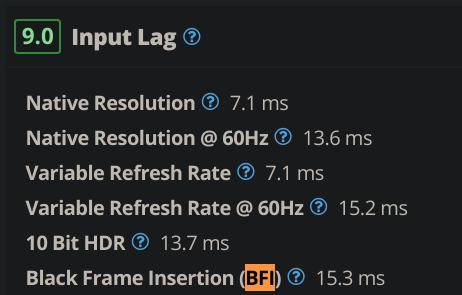
I meant the ULMB option in NVCP (the option includes Gsync, ULMB, or Fixed). But now that everyone mentions how it introduces more input lag, flicker, and lower brightness, I guess I'll stick with Gsync or Fixed for consistent 60fps capped games.When you say ULMB do you mean BFI? This TV doesn't have ULMB in the Nvidia sense. BFI is kinda rough at 60hz, I (and I think most people) can see the flicker. If you can play the game locked at 60FPS but at 120Hz with it just doubling every frame, that might look ok.
One more question:
Is the CX48's Freesync range 48-120Hz?
Last edited:
For practical experience at least I cannot notice any significant difference between BFI on/off in lag. Personally with my previous KS8000 TV I could notice lag between its SDR and HDR modes (21ms vs 35ms) but this was using consoles where controller lag is also a factor.V-sync on this is just as laggy as on LCDs, there is no difference other than pixel response times, obviously (which can make a significant difference on some panels but still). You can do lagless v-sync if you have spare horsepower and the game isn't too demanding. Or just cap 0.01 below refresh rate for low lag v-sync (about 1-2 frames, not bad). Fastsync or equivalent (such as Windows DWM when running in windowed or borderless) is also a decent solution, although it's not nearly as smooth if you don't have insanely high framerates.
jorimt (same guy behind the blurbusters g-sync guide) received hardware from nvidia and tested BFI as consistently having ~1 frame of lag at any refresh rate (so about 17ms at 60hz or 9ms at 120hz etc). Again, not bad at all and totally usable if you want/need that motion clarity instead of VRR.
On the LG CX with a 2080 Ti on PC and using Doom Eternal as the test game since it can actually run at 4K 100-120 fps, V-Sync off, I did not notice BFI adding any noticeable input lag at least on the medium/auto settings that IMO work best for brightness. I did notice a slight increase in input lag when using any other mode than Game mode even with Instant Game Response enabled, you could feel a bit of lag when moving the mouse.
But overall all of these modes would be perfectly playable and only people extremely sensitive to input lag would notice.
ULMB does not work if your monitor does not support it and the LG CX obviously does not. ULMB is a feature of the G-Sync modules.I meant the ULMB option in NVCP (the option includes Gsync, ULMB, or Fixed). But now that everyone mentions how it introduces more input lag, flicker, and lower brightness, I guess I'll stick with Gsync or Fixed for consistent 60fps capped games.
One more question:
Is the CX48's Freesync range 48-120Hz?
CX Freesync range is 40-120 Hz.
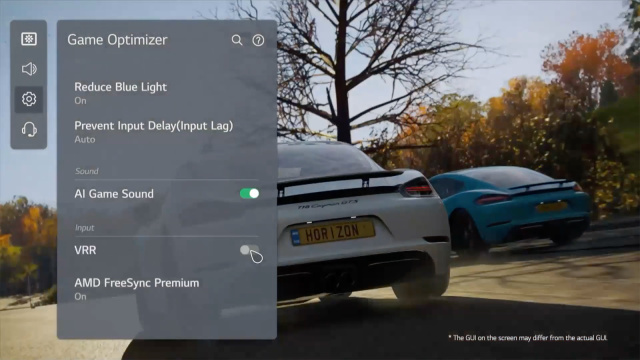
Or how to just quickly cram a bunch of settings into a menu without putting any effort into it.This is a new game optimizer menu for LG (There is some info about it in HDTV test video).
View attachment 318436
- Joined
- Jul 5, 2012
- Messages
- 4,716
I can't believe that we might see a 42" C1 OLED. RIP CX48... your days are numbered.
I think my CX55 also just shed a tear.
Based on HDTVTest's video I do not think we will see a 42" C1, most likely starting with the C2. For me personally I'm not going to bother upgrading from my CX until the "OLED EVO" technology trickles down to the 42" panel, even if I have to buy a G series OLED to get it. Higher PPI of the 42" is nice sure, but that's really all it offers and I want more of an upgrade than just a few PPI.

phinix
Gawd
- Joined
- Dec 13, 2005
- Messages
- 914
Guys, what OLED light setting do you use for Windows use, like browsing etc?
I have 30 and its pretty dark. I feel like 80 is like normal LCD monitor. And this is in total dark room at night.
I have 30 and its pretty dark. I feel like 80 is like normal LCD monitor. And this is in total dark room at night.
mirkendargen
Limp Gawd
- Joined
- Dec 29, 2006
- Messages
- 435
That's like...bright Best Buy store floor display bright... It's certainly possible to turn LCD monitors up that bright, but it's certainly wayyyyy above "correct" SDR brightness for them too. ~35 OLED light is correct SDR brightness.Guys, what OLED light setting do you use for Windows use, like browsing etc?
I have 30 and its pretty dark. I feel like 80 is like normal LCD monitor. And this is in total dark room at night.
You must've burned your eyes or something. I use OLED light at 30 day and night and find it's fine on all but the brightest sunny days.Guys, what OLED light setting do you use for Windows use, like browsing etc?
I have 30 and its pretty dark. I feel like 80 is like normal LCD monitor. And this is in total dark room at night.
- Joined
- Jul 5, 2012
- Messages
- 4,716
Guys, what OLED light setting do you use for Windows use, like browsing etc?
I have 30 and its pretty dark. I feel like 80 is like normal LCD monitor. And this is in total dark room at night.
Do you have HDR enabled? If you do then you need to adjust the SDR brightness slider. If you are running the TV in SDR mode then I'm not sure how 80 is useable.
80 in a dark room is nuts. I guess you can get used to just about anything though, some people do use their LCDs at max brightness (often the out of the box setting) day and night... In my personal experience even smartphones are often waaay too bright in dark rooms with automatic settings (also hurts battery life).
I'd venture a guess that's where a lot of the complaints about blue light effects (no such thing to worry about with OLED btw) and eye fatigue related to screen usage come from.
I'd venture a guess that's where a lot of the complaints about blue light effects (no such thing to worry about with OLED btw) and eye fatigue related to screen usage come from.
Last edited:
30 is what I'm using. You actually adjust to it after a day or two.Guys, what OLED light setting do you use for Windows use, like browsing etc?
I have 30 and its pretty dark. I feel like 80 is like normal LCD monitor. And this is in total dark room at night.
Its now also out on the Korean support site... so out of engineering ring. Available for download.3.21.16 is available on engineering mode. Supposedly fixes game mode peak brightness and doesn't revert any of the other recent fixes.
Just tested for myself. It brought the completely reset calibration for HDR Game mode in Calman from 625nit to 750nit.
I did a full Autocal calibration and it came out a lot better. Whatever was dimming game mode was throwing off the entire calibration in the process and it's noticeably better now.
- Joined
- May 5, 2006
- Messages
- 5,937
Regarding brightness, I keep HDR mode on all of the time and I had my windows HDR color brightness slider at 7 initially but now I keep it at 12 or 13 to more closely match my side (6100:1 contrast ratio) 60hz 4k samsung VA screens I use for desktop/apps.
I'm not using the OLED for desktop/apps really so I don't have to worry about it as much. When I put a 4k art slideshow, photos, or sdr video/streaming content on the OLED full screen I don't want the color brightness muted.
I'm not using the OLED for desktop/apps really so I don't have to worry about it as much. When I put a 4k art slideshow, photos, or sdr video/streaming content on the OLED full screen I don't want the color brightness muted.
I use 50 OLED Light for both morning (with side window open) and night (not total darkness, I have some warm lights on).
------------------
I'm thinking of getting a service remote to disable ASBL; it's so annoying for web browsing and desktop productivity lol. For anyone who has ASBL disabled for several months, have you notice any burn-in or negative effects (like Logo Luminance not working, etc)? And can you re-enable it when you want to do a warranty?
------------------
I'm thinking of getting a service remote to disable ASBL; it's so annoying for web browsing and desktop productivity lol. For anyone who has ASBL disabled for several months, have you notice any burn-in or negative effects (like Logo Luminance not working, etc)? And can you re-enable it when you want to do a warranty?

Porter_
[H]F Junkie
- Joined
- Sep 10, 2007
- Messages
- 8,467
I didn’t think ASBL would bother me much but working from home it has definitely been an annoyance. I’ll learn to live with it but it’s not great. My one and only gripe with this display.I use 50 OLED Light for both morning (with side window open) and night (not total darkness, I have some warm lights on).
------------------
I'm thinking of getting a service remote to disable ASBL; it's so annoying for web browsing and desktop productivity lol. For anyone who has ASBL disabled for several months, have you notice any burn-in or negative effects (like Logo Luminance not working, etc)? And can you re-enable it when you want to do a warranty?
Hi, first of all excuse my English
a few days ago I bought the cx48 but using it I immediately noticed that the center part seems more swollen as if it were curved.
replaced it but still have the same problem.
the cx48s are manufactured in december
unfortunately you can't see it in the picture
some advice?
some Italian to give me a hand?
a few days ago I bought the cx48 but using it I immediately noticed that the center part seems more swollen as if it were curved.
replaced it but still have the same problem.
the cx48s are manufactured in december
unfortunately you can't see it in the picture
some advice?
some Italian to give me a hand?
Porter_
[H]F Junkie
- Joined
- Sep 10, 2007
- Messages
- 8,467
Update 03.21.16 is apparently available globally, per Reddit. It hasn’t come through yet for me on the US west coast. This update supposedly fixes the reduced HDR luminance issue while maintaining the previous black level fix.
Yeah its 'old' news as it came out yesterday and possibly earlier via engineering mode.
The Korean mothership site only mentions some vague image improvements in the change log.
Far more info on 3.21.09.
At least I dont see .16 breaking anything on my US-spec CX48 and CX65.
The Korean mothership site only mentions some vague image improvements in the change log.
Far more info on 3.21.09.
At least I dont see .16 breaking anything on my US-spec CX48 and CX65.
phinix
Gawd
- Joined
- Dec 13, 2005
- Messages
- 914
I keep Game(user) mode in Windows all the time (SDR).
OLED light 35
Contrast 80
Brightness 40
Sharpness 10
Color 55
Tint 0
Color gamut Auto
Gamma BT.1886
Color temp Warm1
I do not set Windows to HDR - when I game, I switch TV mode to HDR Effect(user):
OLED light 100
COntrast 100
Brightness 50
Sharpness 20
Color 55
Tint 0
Color temp C50
Color gamut Wide
Is there anything wrong with this? Am I missing something?
OLED light 35
Contrast 80
Brightness 40
Sharpness 10
Color 55
Tint 0
Color gamut Auto
Gamma BT.1886
Color temp Warm1
I do not set Windows to HDR - when I game, I switch TV mode to HDR Effect(user):
OLED light 100
COntrast 100
Brightness 50
Sharpness 20
Color 55
Tint 0
Color temp C50
Color gamut Wide
Is there anything wrong with this? Am I missing something?
- Joined
- Jul 5, 2012
- Messages
- 4,716
I keep Game(user) mode in Windows all the time (SDR).
OLED light 35
Contrast 80
Brightness 40
Sharpness 10
Color 55
Tint 0
Color gamut Auto
Gamma BT.1886
Color temp Warm1
I do not set Windows to HDR - when I game, I switch TV mode to HDR Effect(user):
OLED light 100
COntrast 100
Brightness 50
Sharpness 20
Color 55
Tint 0
Color temp C50
Color gamut Wide
Is there anything wrong with this? Am I missing something?
Color temp should be set to Warm2 for both modes if you wish to target close to D65 whitepoint. Sharpness should be set to 0 if you want neutral sharpness.
phinix
Gawd
- Joined
- Dec 13, 2005
- Messages
- 914
Color temp should be set to Warm2 for both modes if you wish to target close to D65 whitepoint. Sharpness should be set to 0 if you want neutral sharpness.
When I do Warm2, all white is like yellow... Like no blue light mode on mobile phone...