There is always a few who will. LoLNow all the people who keep whining that 48" is "too big" no longer have any excuses.
![[H]ard|Forum](/styles/hardforum/xenforo/logo_dark.png)
Navigation
Install the app
How to install the app on iOS
Follow along with the video below to see how to install our site as a web app on your home screen.
Note: This feature may not be available in some browsers.
More options
-
Some users have recently had their accounts hijacked. It seems that the now defunct EVGA forums might have compromised your password there and seems many are using the same PW here. We would suggest you UPDATE YOUR PASSWORD and TURN ON 2FA for your account here to further secure it. None of the compromised accounts had 2FA turned on.
Once you have enabled 2FA, your account will be updated soon to show a badge, letting other members know that you use 2FA to protect your account. This should be beneficial for everyone that uses FSFT.
You are using an out of date browser. It may not display this or other websites correctly.
You should upgrade or use an alternative browser.
You should upgrade or use an alternative browser.
LG 48CX
- Thread starter gan7114
- Start date
- Joined
- Jul 5, 2012
- Messages
- 4,714
When I do Warm2, all white is like yellow... Like no blue light mode on mobile phone...
If you are used to a more bluer white point then yes it will appear that way. Give it a bit and your eyes will eventually adjust.

Armenius
Extremely [H]
- Joined
- Jan 28, 2014
- Messages
- 54,507
50 OLED Light + 50 SDR Brightness should give you around 150 nits in PC mode. Setting OLED Light to 36 while leaving SDR Brightness at 50 will give you about 120 nits.Guys, what OLED light setting do you use for Windows use, like browsing etc?
I have 30 and its pretty dark. I feel like 80 is like normal LCD monitor. And this is in total dark room at night.

Note that the graph says "OSD Brightness" when it is referring to OLED light. It is recommended to leave SDR Brightness set to 50 and control how bright the screen is with OLED Light.
And bear in mind 120nits is an "enchanced" normal because most sets need it. In theory, 100nits is ideal. And I'm very happy in the 20s in a dim room. It's plenty bright and where I like it for reading and gaming.
HDR content is a different matter entirely.
But for SDR and desktop I can't imagine going over 30, or it starts getting uncomfortably bright for long reading sessions anyway.
HDR content is a different matter entirely.
But for SDR and desktop I can't imagine going over 30, or it starts getting uncomfortably bright for long reading sessions anyway.

- Joined
- May 5, 2006
- Messages
- 5,937
desktop reading is totally different than media and images. I have dark themes and I can use a brightness slider addon "turn off the lights" on my web browsers too, which can leave images and videos untouched. (I also have a color changer addon with a quick drop down menu for background and text color wheels).
If I was using the OLED as my only display (rather than a dedicated media and gaming "stage").. with some work apps that had no way to be in dark modes I'd probably set up one of the named sets of inputs in the TV OSD just for apps/reading and swap in and out of it with the mic on the remote.
I would never want to use my lower "white-page" reading brightness levels...
... that I use with my addons (mostly for web pages what have a white background - if I don't want to use the color changer addon-on on them)
... as the same brightness (and color brightness) I use for media and pictures. They'd be too dull.
Same as if I am using an ebook reader on my tablet.. it would be set way dimmer in the e-reader than if I was viewing photos, art and videos outside of it.
Dark background themes and app settings work fine on everything else. I use a 3rd party file browser (directory opus) that has a ton of options. The aforementioned browser addons for both firefox and chrome, 3rd party notepad like app with dark background, 3rd party email app with dark background/theme, dark mode chat apps, streaming apps, youtube dark mode, slickdeals dark mode, etc etc. along with a high contrast dark windows theme.. you get the idea.
If I was using the OLED as my only display (rather than a dedicated media and gaming "stage").. with some work apps that had no way to be in dark modes I'd probably set up one of the named sets of inputs in the TV OSD just for apps/reading and swap in and out of it with the mic on the remote.
I would never want to use my lower "white-page" reading brightness levels...
... that I use with my addons (mostly for web pages what have a white background - if I don't want to use the color changer addon-on on them)
... as the same brightness (and color brightness) I use for media and pictures. They'd be too dull.
Same as if I am using an ebook reader on my tablet.. it would be set way dimmer in the e-reader than if I was viewing photos, art and videos outside of it.
Dark background themes and app settings work fine on everything else. I use a 3rd party file browser (directory opus) that has a ton of options. The aforementioned browser addons for both firefox and chrome, 3rd party notepad like app with dark background, 3rd party email app with dark background/theme, dark mode chat apps, streaming apps, youtube dark mode, slickdeals dark mode, etc etc. along with a high contrast dark windows theme.. you get the idea.
Last edited:

phinix
Gawd
- Joined
- Dec 13, 2005
- Messages
- 914
OK... I'm starting to think that there is something wrong with my OLED then...
Here are few photos of it set OLED light to 100. Total dark room, no lights, SDR Windows.
What you guys are explaining, in dark room, this OLED light set to 100 should blind my ass like a sun, right?
And still, I can read everything ok, even white Google page doesn't blind me - is pretty vivid, but not that bright...
Tell me why?
Here are few photos of it set OLED light to 100. Total dark room, no lights, SDR Windows.
What you guys are explaining, in dark room, this OLED light set to 100 should blind my ass like a sun, right?
And still, I can read everything ok, even white Google page doesn't blind me - is pretty vivid, but not that bright...
Tell me why?
Attachments


- Joined
- Jul 5, 2012
- Messages
- 4,714
OK... I'm starting to think that there is something wrong with my OLED then...
Here are few photos of it set OLED light to 100. Total dark room, no lights, SDR Windows.
What you guys are explaining, in dark room, this OLED light set to 100 should blind my ass like a sun, right?
And still, I can read everything ok, even white Google page doesn't blind me - is pretty vivid, but not that bright...
Tell me why?
Only way to know for sure is to get a colorimeter and measure the maximum light output with OLED light set to 100. Sustained windows up to 25% are nearly 400 nits bright which is definitely enough to blind you in the dark (as well as accelerate burn in). Have you tried messing with peak brightness settings?

Last edited:

- Joined
- May 18, 1997
- Messages
- 58,453
mirkendargen
Limp Gawd
- Joined
- Dec 29, 2006
- Messages
- 435
You want contrast at 85 and brightness at 50. Having those lower is doing weird things. Just adjust OLED light when you want to change the "brightness".OK... I'm starting to think that there is something wrong with my OLED then...
Here are few photos of it set OLED light to 100. Total dark room, no lights, SDR Windows.
What you guys are explaining, in dark room, this OLED light set to 100 should blind my ass like a sun, right?
And still, I can read everything ok, even white Google page doesn't blind me - is pretty vivid, but not that bright...
Tell me why?
I use 50 OLED Light for both morning (with side window open) and night (not total darkness, I have some warm lights on).
------------------
I'm thinking of getting a service remote to disable ASBL; it's so annoying for web browsing and desktop productivity lol. For anyone who has ASBL disabled for several months, have you notice any burn-in or negative effects (like Logo Luminance not working, etc)? And can you re-enable it when you want to do a warranty?
Think of ASBL increasing your panel life by another 3000-4000 hours if using it as a PC monitor. IMO it's not worth disabling it because of this. But I agree it's not ideal and probably a bit too aggressive. I don't really care much about it in desktop personally. It's mostly annoying when it triggers in media. It even happened when I was watching Kingdom last night. Your call whether it is worth disabling or not.
OK... I'm starting to think that there is something wrong with my OLED then...
Here are few photos of it set OLED light to 100. Total dark room, no lights, SDR Windows.
What you guys are explaining, in dark room, this OLED light set to 100 should blind my ass like a sun, right?
And still, I can read everything ok, even white Google page doesn't blind me - is pretty vivid, but not that bright...
Tell me why?
It looks really bright to me from your photos. OLEDs naturally look dimmer than backlit LCD, because LCD literally has a flashlight shining to illuminate the entire screen regardless of each pixel value. Whereas OLED illuminates per pixel, so the overall brightness will change depending on the content you're viewing. You are used to super bright screens it sounds like. It will probably take a while to get used to it but you should turn it down.
phinix
Gawd
- Joined
- Dec 13, 2005
- Messages
- 914
You want contrast at 85 and brightness at 50. Having those lower is doing weird things. Just adjust OLED light when you want to change the "brightness".
Thanks, fixed those.
phinix
Gawd
- Joined
- Dec 13, 2005
- Messages
- 914
It looks really bright to me from your photos. OLEDs naturally look dimmer than backlit LCD, because LCD literally has a flashlight shining to illuminate the entire screen regardless of each pixel value. Whereas OLED illuminates per pixel, so the overall brightness will change depending on the content you're viewing. You are used to super bright screens it sounds like. It will probably take a while to get used to it but you should turn it down.
I think it must be me then - sounds like you're right - I'm used to overall brightness of LCD screen, sitting 50cm from 40" VA panel for last 5 years.
Now, sitting 50cm from OLED I see only brightness from pixels, not the whole screen, so it feels like its dark.
Keeping OLED to 30 (20 even), Contract 85, Brightness 50, color 50.
I need to get used to it now.
ABSL isn't bothering me ever, with brightness 20-30 in SDR. I've not seen it happen in a game or video, only on the desktop when leaving a static window for a little bit (I don't do work on this display so don't care). Only way I can make it happen in a game is by leaving a mostly static menu open, or finding a scene with practically zero motion and not move the camera at all (aka be AFK). Of course pausing a video works too.
That's a good thing though, means if I forget to toggle the screen off when walking away for a few minutes it will mitigate the damage.
If you have a low OLED light setting to begin with, it's probably not too bad to disable it anyway. Should not make much of a difference in the long run.
That's a good thing though, means if I forget to toggle the screen off when walking away for a few minutes it will mitigate the damage.
If you have a low OLED light setting to begin with, it's probably not too bad to disable it anyway. Should not make much of a difference in the long run.
Can anyone help me?Hi, first of all excuse my English
a few days ago I bought the cx48 but using it I immediately noticed that the center part seems more swollen as if it were curved.
replaced it but still have the same problem.
the cx48s are manufactured in december
unfortunately you can't see it in the picture
some advice?
some Italian to give me a hand?
Lg says it's normal
I think if you're mostly just gaming or watching content it can make sense to turn off ABSL - it can be really obnoxious sometimes and isn't doing much anyways to protect your screen in those instances.
I've never heard of this... How would the screen be swollen in the middle? It's a flat piece of glass. It sounds like an obvious defect to me if so, though. Do you have pics showing it?
Can anyone help me?
Lg says it's normal
I've never heard of this... How would the screen be swollen in the middle? It's a flat piece of glass. It sounds like an obvious defect to me if so, though. Do you have pics showing it?
MelonSplitter
[H]ard|Gawd
- Joined
- Aug 6, 2006
- Messages
- 1,141
Just disable it. You will not regret it. Thank me laterI didn’t think ASBL would bother me much but working from home it has definitely been an annoyance. I’ll learn to live with it but it’s not great. My one and only gripe with this display.
I used to be the same day; you'll adjust after a few days.I think it must be me then - sounds like you're right - I'm used to overall brightness of LCD screen, sitting 50cm from 40" VA panel for last 5 years.
Now, sitting 50cm from OLED I see only brightness from pixels, not the whole screen, so it feels like its dark.
Keeping OLED to 30 (20 even), Contract 85, Brightness 50, color 50.
I need to get used to it now.
There is no point in running it in anything but Game mode when connected to a PC. That offers the lowest input lag and if you just copy the settings from Expert (dark) you will get very similar image quality.when instant game responce is active a lot of picture options seem get disabled is there an easier way to switch between desktop/games usage and movies/tv than going in and deactivating instant game responce?
If you want you could just hook up another HDMI input to your GPU and set that to use different settings with instant game response disabled on that input. But IMO it's not worth the effort.
For streaming services I would just use the built in apps which can all have their own picture settings.
ASBL is awful if you do use it on the desktop. It will gradually dim the display all the time and often it can be hard to get it out of that dimmed state without showing a big white window to it. Disabling it from the service menu made it just much better, I don't care that it will reduce its lifetime a bit. I have a blank screensaver set to turn on in case I forget to turn on the display when I take a longer break.ABSL isn't bothering me ever, with brightness 20-30 in SDR. I've not seen it happen in a game or video, only on the desktop when leaving a static window for a little bit (I don't do work on this display so don't care). Only way I can make it happen in a game is by leaving a mostly static menu open, or finding a scene with practically zero motion and not move the camera at all (aka be AFK). Of course pausing a video works too.
That's a good thing though, means if I forget to toggle the screen off when walking away for a few minutes it will mitigate the damage.
If you have a low OLED light setting to begin with, it's probably not too bad to disable it anyway. Should not make much of a difference in the long run.
phinix
Gawd
- Joined
- Dec 13, 2005
- Messages
- 914
Guys, is there a setting I'm missing to make text look better?
Its almost ok, but on dark backgrounds I can see this "shadow" or double letters kinda thing.
Hopefully this photo shows it - look at the d letter.

Its almost ok, but on dark backgrounds I can see this "shadow" or double letters kinda thing.
Hopefully this photo shows it - look at the d letter.
Guys, is there a setting I'm missing to make text look better?
Its almost ok, but on dark backgrounds I can see this "shadow" or double letters kinda thing.
Hopefully this photo shows it - look at the d letter.
View attachment 319343
I believe this is an effect of ClearType on Windows combined w/ the WRGB subpixel layout. There are various hacks to minimize it if you search around for color fringing on an LG OLED. Also make sure you are in 4:4:4 chroma.
phinix
Gawd
- Joined
- Dec 13, 2005
- Messages
- 914
I believe this is an effect of ClearType on Windows combined w/ the WRGB subpixel layout. There are various hacks to minimize it if you search around for color fringing on an LG OLED. Also make sure you are in 4:4:4 chroma.
I'm on 444 and cleartype is disabled.
I need to look and find some tips for it you said.
Get Better Cleartype Tuner, set it to use Grayscale antialiasing and restart the computer. That's IMO the best thing for Windows text rendering on these displays. Disabling Cleartype works but IMO looks crap. OSX is far better with the way it handles no font smoothing.Guys, is there a setting I'm missing to make text look better?
Its almost ok, but on dark backgrounds I can see this "shadow" or double letters kinda thing.
Hopefully this photo shows it - look at the d letter.
View attachment 319343
Also make sure you are running 4:4:4 color space. This requires that the icon for your TV input is set to PC and RGB is selected in Nvidia Control Panel settings or the same thing on the AMD equivalent.
phinix
Gawd
- Joined
- Dec 13, 2005
- Messages
- 914
Get Better Cleartype Tuner, set it to use Grayscale antialiasing and restart the computer. That's IMO the best thing for Windows text rendering on these displays. Disabling Cleartype works but IMO looks crap. OSX is far better with the way it handles no font smoothing.
Also make sure you are running 4:4:4 color space. This requires that the icon for your TV input is set to PC and RGB is selected in Nvidia Control Panel settings or the same thing on the AMD equivalent.
Wait, what do you mean by 4:4:4 - I thought Nvidia panel needs to be set to YCbCr444 - should it be RGB? If yes, how am I gonna set it to 444?
- Joined
- May 5, 2006
- Messages
- 5,937
I'll also add.. don't sit too close to it. I had a 32" 1440p and the text and anything else would show edges if I tried to sit 1' to 1.5' away. When I sat at a more appropriate distance for it's ppi .. it's PPD and default font sizes looked great. Also in the same vein, don't try to make the fonts smaller than the ppi's limitations just because you are sitting too close as that will be worse too.
THX 's standard has optimal viewing angle for movies as 45 to 50 degree width. On a 48" 16:9, 50deg starts at ~ 44.4" screen to eyeballs. This results in ~ 76 PPD.

That's for movies though, to see the whole scene. It's a good baseline but I sit closer for some games at 38" to 41" away. I wouldn't bother sitting closer than that (and then complain about the ppi and font edges).
The PPD at that THX 50 degree is the same as what the ppi would look like at all of these monitor sizes at these distances below. For general usage and gaming I would sit closer (putting a little more of the scren's extents into the periphery) but this gives some idea of the distance ratio between all of these screen sizes PPD wise at ~ 76 PPD.
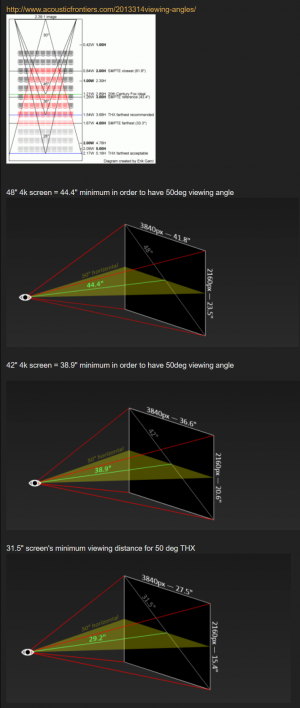
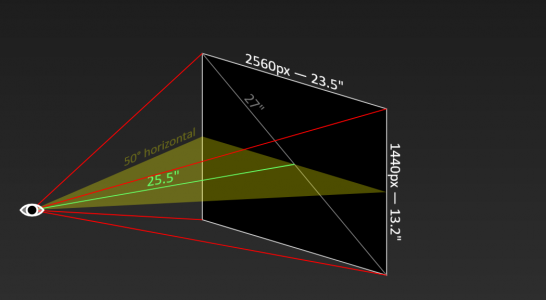
You can adjust that tool to compare nearer.
e.g. 54 degree viewing angle and the same ~71 to 72 PPD at 4k on all of them at those distances would be:
48" 16:9 display = 41" view distance ( ~ 3.5 ' )
42" 16:9 display = 35.9" view distance ( ~ 3' )
31.5" 16:9 display = 27" view distance ( ~ 2.4')
27" 16:9 display = 23" view distance ( ~ 2')
THX 's standard has optimal viewing angle for movies as 45 to 50 degree width. On a 48" 16:9, 50deg starts at ~ 44.4" screen to eyeballs. This results in ~ 76 PPD.
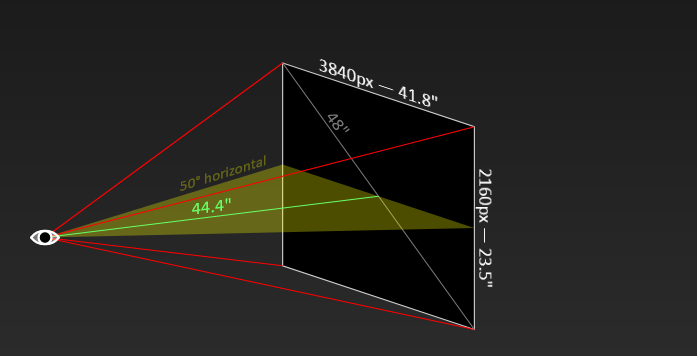
That's for movies though, to see the whole scene. It's a good baseline but I sit closer for some games at 38" to 41" away. I wouldn't bother sitting closer than that (and then complain about the ppi and font edges).
The PPD at that THX 50 degree is the same as what the ppi would look like at all of these monitor sizes at these distances below. For general usage and gaming I would sit closer (putting a little more of the scren's extents into the periphery) but this gives some idea of the distance ratio between all of these screen sizes PPD wise at ~ 76 PPD.
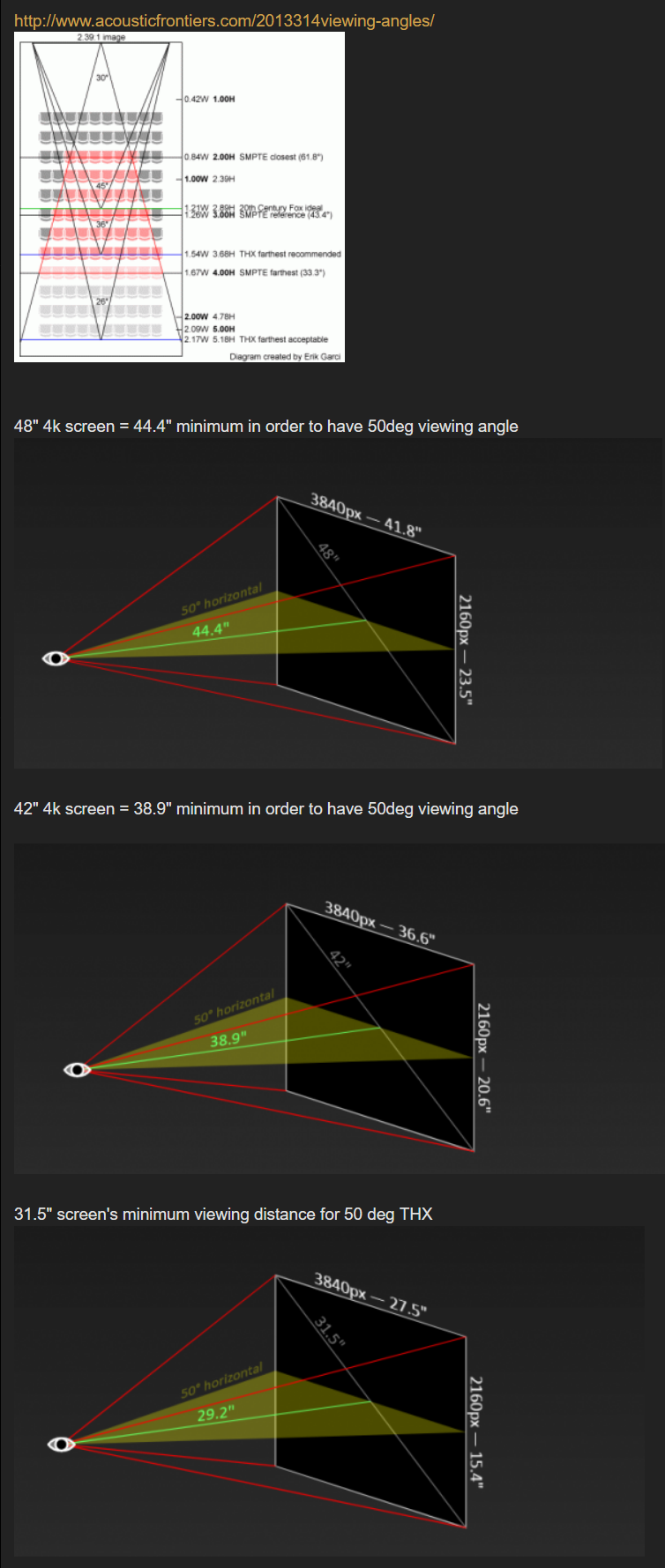
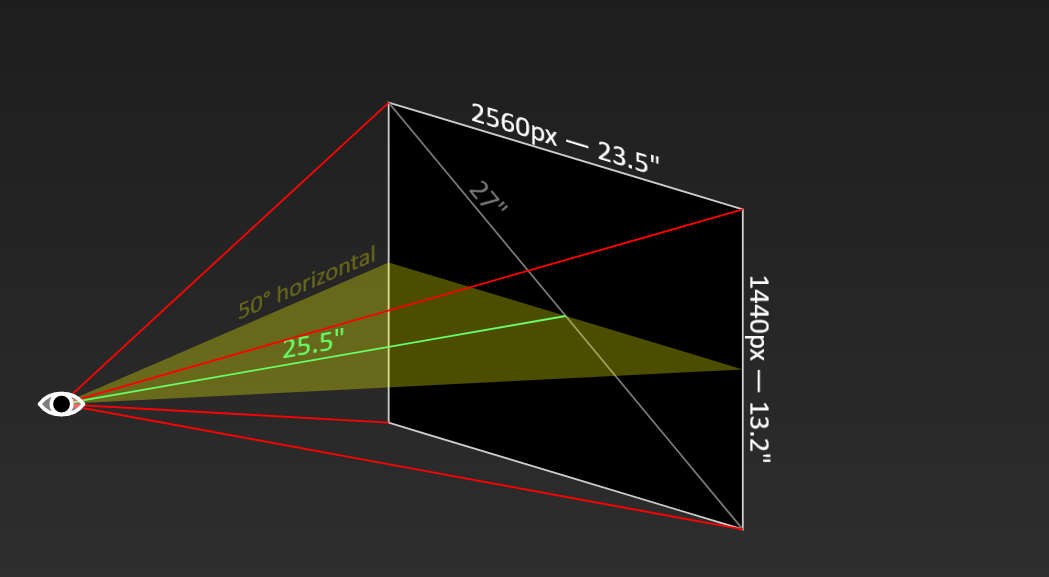
You can adjust that tool to compare nearer.
e.g. 54 degree viewing angle and the same ~71 to 72 PPD at 4k on all of them at those distances would be:
48" 16:9 display = 41" view distance ( ~ 3.5 ' )
42" 16:9 display = 35.9" view distance ( ~ 3' )
31.5" 16:9 display = 27" view distance ( ~ 2.4')
27" 16:9 display = 23" view distance ( ~ 2')
Last edited:
- Joined
- Sep 15, 2011
- Messages
- 3,475
what is the best way to clean the screen?
https://www.lg.com/us/support/help-library/cleaning-your-lg-4k-oled-or-led-tv-webos-CT10000020-20150154791049#:~:text=Cleaning your 4K, OLED, or,may not be too late).what is the best way to clean the screen?
Only a microfibre cloth according to LG, no water or anything.
Personally I have a small spray bottle of distilled water+light cleaning fluid, advertised for TVs/screens/lenses, that I spray onto a microfiber and use that. And very lightly clean the screen. Scratches come from pressing too hard when cleaning, which is likely to happen if you don't use any cleaning agent at all cause it's hard to remove some stuff.
Last edited:
- Joined
- Sep 15, 2011
- Messages
- 3,475
Thanks. I have a microfibre cloth but will need some cleaner as well. What cleaning fluid do you suggest? I have anti-reflective glass cleaner that I use for my glasses. Mix that with distilled water?
Last edited:
Yes you can just set it to RGB. This gets you 4:4:4. YCbCr444 does pretty much the same thing, all that changes is where any possible conversion happens, the end result is the same.Wait, what do you mean by 4:4:4 - I thought Nvidia panel needs to be set to YCbCr444 - should it be RGB? If yes, how am I gonna set it to 444?
Do NOT use glasses cleaner - they usually have alcohol in them. Which will strip the coating of the screen.Thanks. I have a microfibre cloth but will need some cleaner as well. What cleaning fluid do you suggest? I have anti-reflective glass cleaner that I use for my glasses. Mix that with distilled water?
If you have distilled water just use that, you should be fine. Only use liquid if you can't easily remove with just a dry cloth.
I use this stuff: https://www.amazon.co.uk/Ecomoist-Natural-Screen-Cleaner-Microfiber/dp/B00DX7GLW8/ref=sr_1_5?crid=2VMAVCCRN2NRG&dchild=1&keywords=ecomoist+natural+screen+cleaner&qid=1610732097&sprefix=ecomoist+n,aps,149&sr=8-5
Mostly because I had it on hand for my iPad, and it's not easy to get distilled water in the UK.
Last edited:
As an Amazon Associate, HardForum may earn from qualifying purchases.
- Joined
- Sep 15, 2011
- Messages
- 3,475
Great thank you for the info.Do NOT use glasses cleaner - they usually have alcohol in them. Which will strip the coating of the screen.
If you have distilled water just use that, you should be fine. Only use liquid if you can't easily remove with just a dry cloth.
I use this stuff: https://www.amazon.co.uk/Ecomoist-Natural-Screen-Cleaner-Microfiber/dp/B00DX7GLW8/ref=sr_1_5?crid=2VMAVCCRN2NRG&dchild=1&keywords=ecomoist+natural+screen+cleaner&qid=1610732097&sprefix=ecomoist+n,aps,149&sr=8-5
Mostly because I had it on hand for my iPad, and it's not easy to get distilled water in the UK.
As an Amazon Associate, HardForum may earn from qualifying purchases.
- Joined
- Sep 15, 2011
- Messages
- 3,475
Can someone please tell me how to disable the Soundshare prompt screen that comes up everytime the monitors turns on or is woken up?
phinix
Gawd
- Joined
- Dec 13, 2005
- Messages
- 914
Set the Nvidia panel to RGB instead of explicitly to 444, and look at your text again. Tell me what you think.
I cant see the difference.

- Joined
- Jun 10, 2011
- Messages
- 441
There is no solution for the text. The OS doesn't have control over the white sub-pixel and can never anti-alias text properly on this panel.I cant see the difference.
There is no solution for the text. The OS doesn't have control over the white sub-pixel and can never anti-alias text properly on this panel.
His text looks a lot worse than mine. I don’t have the green fringing. Try the cleartype tuner if you haven’t already.
- Joined
- May 5, 2006
- Messages
- 5,937
That pic he took is from very close to the screen though too. How far away is he sitting? Sitting too close in reltaion to ppi = a lower PPD so will always look bad. (Using text sizes too small in relation to the ppi will also look bad).
...27" 3840x2160 at 2.0' away is 73.5 ppd (and 53 deg horizontal viewing angle)
...48" 3840x2160 at at 42.5" away is 73.5 ppd
...27" 3840x2160 is 57.9 ppd at 18" (1.5') away
...48" 3840x2160 is 57.9 ppd at 32" away
Same goes for sitting too near at a desk for 1440p on 31.5" 1440p diagonal screen like the VA I upgraded from, and it's why VR resolutions are still an issue currently (even though they use lenses to change the focal point).
...27" 3840x2160 at 2.0' away is 73.5 ppd (and 53 deg horizontal viewing angle)
...48" 3840x2160 at at 42.5" away is 73.5 ppd
...27" 3840x2160 is 57.9 ppd at 18" (1.5') away
...48" 3840x2160 is 57.9 ppd at 32" away
Same goes for sitting too near at a desk for 1440p on 31.5" 1440p diagonal screen like the VA I upgraded from, and it's why VR resolutions are still an issue currently (even though they use lenses to change the focal point).
Last edited:
- Joined
- Sep 15, 2011
- Messages
- 3,475
hey all, I installed one of the desktop clearing apps as recommended in this epic thread, so that my desktop is pure black. I am not finding the trashcan via searching in Windows and I need to empty it. I am used to doing so from the desktop icon.
Can anyone explain how I can access it now? Thanks.
Can anyone explain how I can access it now? Thanks.