• Some users have recently had their accounts hijacked. It seems that the now defunct EVGA forums might have compromised your password there and seems many are using the same PW here. We would suggest you UPDATE YOUR PASSWORD and TURN ON 2FA for your account here to further secure it. None of the compromised accounts had 2FA turned on.
    Once you have enabled 2FA, your account will be updated soon to show a badge, letting other members know that you use 2FA to protect your account. This should be beneficial for everyone that uses FSFT.

Silverstone TJ09!

This case is said to host big coolers. But does it fit (in height, for the removable tray) TITAN's Amanda cooler (TTC-NP04TZ)? It's a great cooler; and I want it. But I want the TJ09, too. :)
 
the back brace can be removed if needed for the mobo tray to slide in
 
I broke down and picked one up. My TJ-07 was starting to get old :)
 
I broke down and picked one up. My TJ-07 was starting to get old :)
Hahahaha

That's funny cause I ordered mine on Monday. I was wanting one for a long time and since I had a TJ07 without a window I really wanted a nice new Silverstone case with a window to cool my 8800GTX.
Gonna make my TJ07 a server case for my backup / server / HD htcp rig.

As I recall you purchased the TJ07 around the same time I did. So what pushed you over the edge?
 
Hahahaha

That's funny cause I ordered mine on Monday. I was wanting one for a long time and since I had a TJ07 without a window I really wanted a nice new Silverstone case with a window to cool my 8800GTX.
Gonna make my TJ07 a server case for my backup / server / HD htcp rig.

As I recall you purchased the TJ07 around the same time I did. So what pushed you over the edge?

Wanted something new, some change I guess. I did want a window too which isn't an upgrade option on the 07
 
go velcro! magnets in a pc = not always a great idea (just keep them clear of your drives)

I have a small rattle in the non-windowed side panel, where the HD area venting is.. I am thinking about taking a glue gun to it and sealing in all the seams.. or something like that so the mesh's bracket doesn't rattle any more.. gah! pretty annoying. I have pushed the mesh's tabs all the way down, as hard as they will go also.. so it's how the bracket attaches to the side panel which is loose.. if I do any gluing of that it will have to be real careful like.. to keep it clean looking. :)

I was thinking the same thing about the magnets.
Wouldn't be the same true for having a fan so close to harddrives ?
Or are they shielded some how ?
 
I was thinking the same thing about the magnets.
Wouldn't be the same true for having a fan so close to harddrives ?
Or are they shielded some how ?

I would sure hope they are shielded somehow as I have a fan right between 4 hard drives in this case lol.
 
My case came, the cable management was 100 times better than my TJ-07, the airflow appears much improved, and the weight is substantially less IMO.

I will have to post pics, my wiring jobbie is complete and it's incredibly clean.
 
My case came, the cable management was 100 times better than my TJ-07, the airflow appears much improved, and the weight is substantially less IMO.

I will have to post pics, my wiring jobbie is complete and it's incredibly clean.

Hahaha Yup Picked mine up today also. Will have pics of the swap out from 07 to 09.
 
cant wait to see pics Ockie/JonDoms
i just got mine a little while ago.. did the wiring.. its decent, but still looking for ways to possibly improve it.
 
Guys ! Whats taking so long with the pics? Even though I have a sexy TJ09 sitting next to me, I never ever get tired of looking at other people's.

Anyways here is mine updated with a Dominator airflow fan:
Picture007.jpg
 
cant wait to see pics Ockie/JonDoms
i just got mine a little while ago.. did the wiring.. its decent, but still looking for ways to possibly improve it.

Not to bark my ego here or anything.

My wiring is impeccable.
 
Just wondering, I surfed through the thread and I did not find this question/answer combo. I just ordered my TJ-09 (Black w/ Window) and I have 5 HDDs to place in this mother (soon to be six with the Hitachi 1 TB) and I want to know if it is possible to mount the HDDs backwards to hide the wiring. Has anyone doen this? If so how, and pictures please.

One possibility i was wondering about was flipping the cage around within the brackets, so they still slide in fine, but are turned around.

I dunno, just can't wait to touch this thing!

Blocatan (AKA Barracuda)
www.daklan.org
 
Just wondering, I surfed through the thread and I did not find this question/answer combo. I just ordered my TJ-09 (Black w/ Window) and I have 5 HDDs to place in this mother (soon to be six with the Hitachi 1 TB) and I want to know if it is possible to mount the HDDs backwards to hide the wiring. Has anyone doen this? If so how, and pictures please.

One possibility i was wondering about was flipping the cage around within the brackets, so they still slide in fine, but are turned around.

I dunno, just can't wait to touch this thing!

Blocatan (AKA Barracuda)
www.daklan.org

nope
 
What is that supposed to mean? It isn't possible, no one has tried it, you don't have pictures, what? :confused:
 
there was one guy who posted just a few pages back and had his hdd cages flipped

i tried it out on mine and the top bay CAN be switched around but the bottom one CANNOT because it will hit the bottom lip of the case

found the pic

Sorry, other picture didn't come out.
DSC00252.jpg

from page 38 in this thread
 
Thank you ... I guess if both cant be switched without forcin or modification, then i will just have to have some uber cable management.

Thank you
 
it can be done but i think you may have to mod the hdd cage a bit, just to get the cables to pass properly, shouldnt be to hard to do.. but i just couldnt justify taking my dremel to it...... yet.... lol
 
I built a pc in this case for a client of ours, and BOY can I say that I am extremely jealous. This is hands down the sexiest, most well built case I have ever worked with.

My ONLY gripe, is that the intake that's right behind the hdd cages makes cable management more of a pain.

As far as turning the hdds around, I actually looked at this, and would have done it but I didn't have a long enough screw driver. It looks to me like you could simply unscrew the black brackets/handles and turn them around.
 
What length of SATA cables are you guys using in your cases? I'll need to grab some cables and I was just going to go with 18" for the optical drives and hard drives. Anyone think I should go shorter or longer?
 
if you have a small screw driver your fine for flipping the hdd cages around..

i found that 24" sata cables would fit perfectly and give you just enough slack to route them a bit better, to bad for me my local place only had 36" ones in stock at the time i went in, may check in again to see if they have any 24" back in stock.

but if you do flip the hdd cage around it is a very tight fit for the cables so i would look into modding the hdd cage to make it better
 
Hmm.. I didn't even think about SATA cable length. I was just going to use the stock ones that came with my P6N Platinum, but I'd imagine they're only 6 or 8 inches.

Guess I'll have to buy some new ones.
 
if you have a small screw driver your fine for flipping the hdd cages around..

i found that 24" sata cables would fit perfectly and give you just enough slack to route them a bit better, to bad for me my local place only had 36" ones in stock at the time i went in, may check in again to see if they have any 24" back in stock.

but if you do flip the hdd cage around it is a very tight fit for the cables so i would look into modding the hdd cage to make it better

I concur except I am probably going to get 1 or 2 36" depends on how many drives you have.
The 24" works fine for the drive on the left but on the right it needs a few extra inches.
Also don't get those locking clip sata cables. Fricking pulled off my SATA mobo header and can't get it back on because the pins are soo damn small.

Nothing special pics coming tonight as soon as I figure out my NB heat problems.
 
I do believe stock sata cables shipping with motherboards are only 18" and they are definitely too small. 24" at least is needed. Thanks for the heads up on the locking cables as I was going to get some, guess not now lol.
 
I do believe stock sata cables shipping with motherboards are only 18" and they are definitely too small. 24" at least is needed. Thanks for the heads up on the locking cables as I was going to get some, guess not now lol.

Is that too small to use? Or too small to route the wires cleanly.
 
i found the standard 18" cables are a little to short, the cables are pretty much stretched out..
 
I have been wanting the TJ09 for a long time.

SilverStone TJ09 BW
http://www.svc.com/sst-tj09-bw.html

I waited till I started my new job before purchasing it just as a present to myself.
I ordered the case on Monday (along with a few other items I'll talk about later).
It arrived Friday and I went to work on it Saturday night.

The box is HUGE. Just as big if not bigger than my TJ07. But it was lighter.

IMG_3885.jpg


It was packed super well with foams that are wrapped around cardboard.

IMG_3886.jpg


IMG_3887.jpg


I love the side window!
And the side vents for the HDD area and the intake for the video fan.

IMG_3888.jpg


And the removable motherboard tray. That thing was lighter than the TJ07's.
The video cooling fan is awesome. It helps move air around the system.

IMG_3889.jpg


Here's the frontal shot:

IMG_3890.jpg


The front panel is solid and takes a good effort to open and close:

IMG_3891.jpg


I ripped out my Main Rig from the TJ07. I also took out the 500 Watt PSU from my spare rig
as I wanted to leave the 600 watt for the spare HTPC Server rig in the TJ07.

I removed the stock North Bridge (NB) Heat Sink Fan (HSF) from the Asus P5N-E SLI motherboard
and replaced it with the Zalman NBF47 Fan like HSF.

Zalman NBF47
http://www.svc.com/zm-nbf47.html

Than I removed the Zalman 9700 and installed the Tuniq tower.

Tuniq Tower
http://www.svc.com/tuniq.html

IMG_3892.jpg


After getting the Motherboard all laid out I installed the optional fans.
I ordered 2 Scythe 120mm Silent fans. These fans are awesome! Silent and move a good amount of air.

Scythe 120mm Silent fan
http://www.svc.com/sy-fan-sff21d.html
Other Scythe Fans located here:
http://www.svc.com/120x25mmfans2.html

I have had a variety of high end fans and these are the best fans yet! The Antec Tri-Cools are also really good.
Because they have the little adjustment control. If it performed as well as the Scythe without it I would consider
the LED Antec Tri-Cool to be the best.

IMG_3894.jpg


Here's the thing installed with Power. Worst Wiring job I have ever done but this case and the fans are pretty hard to route around.
IMG_3899.jpg


I realized the Northbridge temps were really high with the new Zalman so I went to Central Computers and picked up
a Cooler Master Blue Ice Pro:
http://www.svc.com/rr-ncw-l4e1-gp.html

After installing that and adding an extra Nexus 120mm fan
http://www.svc.com/d12sl-12-bw.html
I had around my case temps are pretty stable and cool.
Core are 32 & 33 Idle playing some live HDTV. The North bridge now is 47 Degrees instead of 56 or 57
with the Zalman.

I thought I took pics of the new install but than I realizes my camera said no CF card. Dammit.
Oh well one day I will take some more shots.

For now here's my gallery.
http://www.classifiedfotos.com/files/TJ09/
 
Congratulations on the new case. Have you noticed any issues with it? Mine is very good but I did notice my window is slightly bowing away from the side panel in between where the rivets hold the window to the panel. Convex for sure. Does yours do this? Have you noticed any rattling at all while your system is running with everything in the case? I have, though I have minimized after literally taking the side panel of and mucking around in there at least 30 times since I bought it last month.

Don't worry too much about your wiring job, mine looks nearly identical lol.

I beg to differ on the video card fan however. I find it much too weak. My video card and chipset temps are much higher than they were on my old case which had a 120mm fan on the side panel blowing right onto the pci area. I really miss that about my old case. If I could ever find the patience to get the center fan removed I have a 79cfm aluminum evercool sitting here that I wouldn't mind trying out to see how it fares. Much louder yes but on my Sunbeam controller it wouldn't matter much as long as the airflow was better. With the summer months coming my temps are not what I would like them to be for a case that is suppose to have great cooling for a video card. Cpu and hard drives temps are great however.
 
Is that too small to use? Or too small to route the wires cleanly.

They are fine if you dont mind having them come straight across the center fan to the front of the drive cages. If you want to route them through the back you definitely need longer. 24" at a minimum.
 
Congratulations on the new case. Have you noticed any issues with it? Mine is very good but I did notice my window is slightly bowing away from the side panel in between where the rivets hold the window to the panel. Convex for sure. Does yours do this? Have you noticed any rattling at all while your system is running with everything in the case? I have, though I have minimized after literally taking the side panel of and mucking around in there at least 30 times since I bought it last month.

Don't worry too much about your wiring job, mine looks nearly identical lol.

I beg to differ on the video card fan however. I find it much too weak. My video card and chipset temps are much higher than they were on my old case which had a 120mm fan on the side panel blowing right onto the pci area. I really miss that about my old case. If I could ever find the patience to get the center fan removed I have a 79cfm aluminum evercool sitting here that I wouldn't mind trying out to see how it fares. Much louder yes but on my Sunbeam controller it wouldn't matter much as long as the airflow was better. With the summer months coming my temps are not what I would like them to be for a case that is suppose to have great cooling for a video card. Cpu and hard drives temps are great however.

Good comments; I had one slightly bowed panel too, but I just tweeked it very slightly (while off) and now it's perfect. Never had vibrations. I too think the center fan is weak, but my temps are ok, for now.
 
How exactly did you fix the bowed panel? I would like to fix mine as it looks ugly looking at it from the side and seeing the window separating itself from the panel. Dust is in behind it so I know the gap is fairly large.

Are you planning on swapping out your center fan? If so to which one? I really wish I had swapped this fan when I first got the case but I figured it would have been good enough so left it as is. With everything installed now it is going to be even more of a hassle than usual to get that center fan out. Why couldn't Silverstone have mad that fan a snap in exchangeable one like the two top blow holes and the hard drive fan? Why such a song and dance to get it in and out of the case?
 
They are fine if you dont mind having them come straight across the center fan to the front of the drive cages. If you want to route them through the back you definitely need longer. 24" at a minimum.

Alright thanks. I'll put a longer one on order.
 
My window doesn't bow. Yet.
My TJ07 had a rattle after 1 year+ and several LAN trips.
I do agree the Middle Video card fan is less than desired but it does provide some air vs none and it is inaudible.

I felt the side panels were a little more trouble some to put back on as compared to the TJ07.
The TJ07 had these nice hooks where you can slide in place and it would just fit.
The TJ09 you have to put the front edge in first and then adjust up and down to match the rest of the panels to the top and bottom of the case. Then it was a little push from the back and your in. Also the panels on the TJ09 being thinner are more susceptible to flex and bend. Hence the warpping comments.

I also agree that the HDD cage area cools better than my TJ07. Plus it's quieter too!

Overall I really like the looks of the case and it looks 10x better in person than in pictures.
Silverstone cases do stand out from your generic cases <period>.
Can't wait till Showdown LAN in San Jose where I will have both my TJ07 and TJ09 to show off.
 
Alright thanks. I'll put a longer one on order.

If you look at my pictures 24" is good for the left HDD but 36" is better for the right. This way
you do not have to route the cables through the Fan Vent in the middle of the chassis.
I noticed that with my right hdd and went out and got a 36". It's extra slack let me route the cable above the fan vent and the excess goes into the HDD cage area.
 
If you look at my pictures 24" is good for the left HDD but 36" is better for the right. This way
you do not have to route the cables through the Fan Vent in the middle of the chassis.
I noticed that with my right hdd and went out and got a 36". It's extra slack let me route the cable above the fan vent and the excess goes into the HDD cage area.

I was thinking the same thing. I figured too much is better than not enough in this case. I'm only putting in 1 HD for now (a 320GB WD) and probably a 150gb raptor later on this year when I can afford it so I'll grab two. Too bad nobody around here sells them.. I hate ordering things like cables off the egg or other sites when they end up being only 3 bucks a piece.. but 10 dollars for shipping. :rolleyes:
 
very nice JonDoms!
I think i found my new case i've been looking for...clean, sexy, and beastly :cool: :D
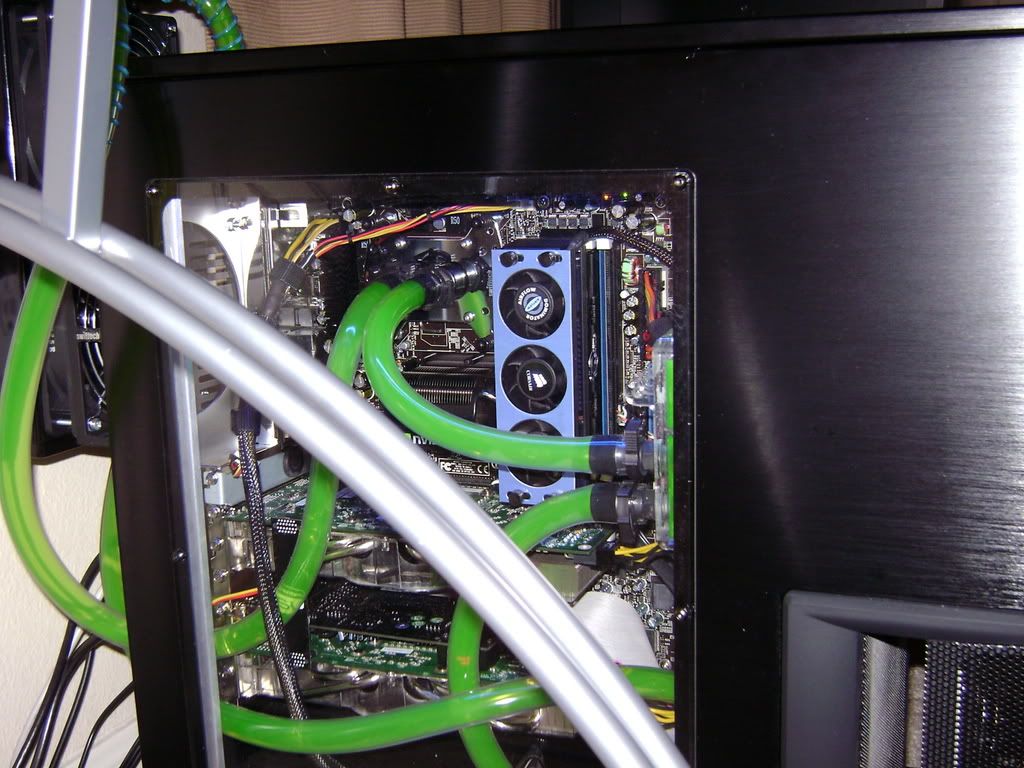
 
^^^^^ very good post! thanks for the pics.... :D

very nice JonDoms!
I think i found my new case i've been looking for...clean, sexy, and beastly :cool: :D

Thanks guys.

I also want to note how I have the setup for my fans.

I have a Nexus 120mm silent fan in the back top slot blowing out on the black header (12v) of the Zalman ZM-MC1 Fan controller adapter.

http://www.svc.com/zamuco1z.html

I also have the Scythe 120mm on the same 12v header also but it blows air in from the top front 120mm fan slot.

The stock rear is on another 12v line on another ZM-MC1 blowing hot air out.
The HDD cage area has the other Scythe 120mm and is on the other 12v line.

The middle video card fan is directly connected to the PSU.

The PSU is facing down so the vent has nothing to do with the air system inside the chassis. I originally had it facing up but noticed the extra warm air inside the lower part of the chassis. If heat rises from anywhere it's definitely from your PSU.

I am also going to get an Antec vcool and use the short end to cool the 8800GTX as that thing produces the most heat in my system.
http://www.svc.com/vcool.html

Last word, if you live in the bay area I highly suggest you take a trip to Central Computers.
There are now 4 locations in the bay area (SF, Freakmont, Santa Clara, and Sunnyvale).
They have comparable prices to the online e-tailers and I fine them a bargain for the small items. They also have specials posted in store on Sundays and online on Mondays.
www.centralcomputers.com

I also like places like SVC where you can order online and pick up will call.

BTW If you like or want Antec Cases and live local you can do the same thing directly from Antec's B stock. Can you say Super Lanboy for $35??? picked up locally?
 
Back
Top