![[H]ard|Forum](/styles/hardforum/xenforo/logo_dark.png)
Navigation
Install the app
How to install the app on iOS
Follow along with the video below to see how to install our site as a web app on your home screen.
Note: This feature may not be available in some browsers.
More options
-
Some users have recently had their accounts hijacked. It seems that the now defunct EVGA forums might have compromised your password there and seems many are using the same PW here. We would suggest you UPDATE YOUR PASSWORD and TURN ON 2FA for your account here to further secure it. None of the compromised accounts had 2FA turned on.
Once you have enabled 2FA, your account will be updated soon to show a badge, letting other members know that you use 2FA to protect your account. This should be beneficial for everyone that uses FSFT.
You are using an out of date browser. It may not display this or other websites correctly.
You should upgrade or use an alternative browser.
You should upgrade or use an alternative browser.
Silverstone TJ09!
- Thread starter NV-man
- Start date
From the top where the fans mount, to the top of that corner bracket is just a hair over 2 1/2 inches.
As far as removing that bracket and tray sturdiness, I would say that as long as your careful it should not be a problem
thanks so i doesnt fit, the setup would require over 3 inches
even if dremel that part off it would way too far
thanks for your help and nicepants too
do you have the exact specs for the L-brackets and screws you used?
Take a look at this thread and this one.
You're going to have problems with a full-size rad up there, bro. You might be able to move the entire radiator assembly toward the front of the case, avoiding that motherboard brace completely. I'd suggest getting a measurement from the front of the top mesh to where that brace starts (from the perspective of looking downward at the top of the case). The distance might be enough to fit a 120.2. You might be able to squeeze a little more if you place the fans against the mesh and mount the radiator so far forward that the hose outlets are underneath the solid part of the top of the case, instead of the mesh.
Hope you understood that garble.
that might actually work... But im just worried about how far I can actually move the rad toward the front. That center bar seperating the 2x 120mm fans only seem about 1inch or more
Haha, when I started this thread I had no intentions of buying this case (My TJ06 is only 6 months old!) but today I caved.... with my two 8800s sandwiched together, and no direct airflow to them, buying a TJ09 just seemed to make a lot of sense to me. I'm still a little delirious. PS: I got the silver windowed version off of newegg for 260. Man I can't wait!!!
Haha, when I started this thread I had no intentions of buying this case (My TJ06 is only 6 months old!) but today I caved.... with my two 8800s sandwiched together, and no direct airflow to them, buying a TJ09 just seemed to make a lot of sense to me. I'm still a little delirious. PS: I got the silver windowed version off of newegg for 260. Man I can't wait!!!
And your thread almost hits the 80000 views

there must be something good about the tj-09
ah nevermind. from another picture of the same build, it looks like they screwed it through the top vent.
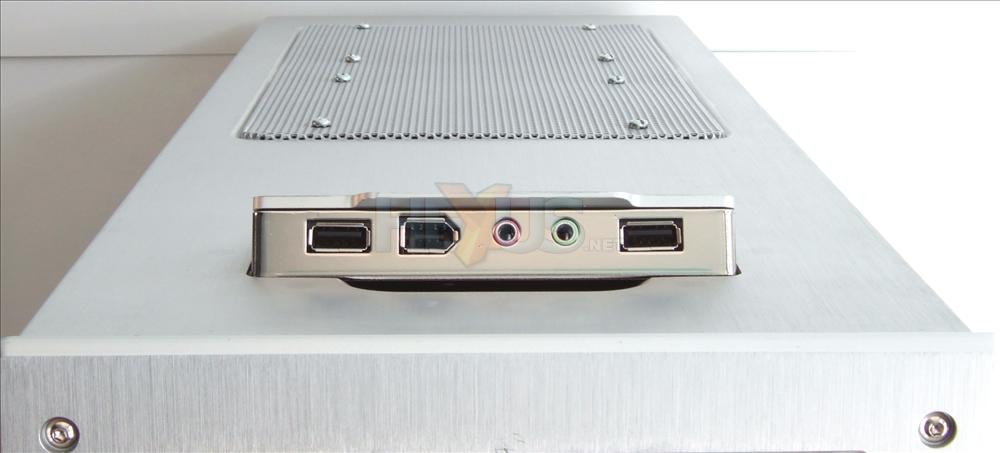
so much for that. painted black L-brackets it is.
I don't know how people do that without drilling the top grate. I considered doing it, but the holes in the grate are way to small for a screw large enough to secure a radiator.
txtmstrjoe
Weaksauce
- Joined
- Sep 22, 2006
- Messages
- 67
Here are a few pics of my TJ09B-W:

This shot was taken a couple of weeks ago; the cable management is a tiny bit neater today than it is here.

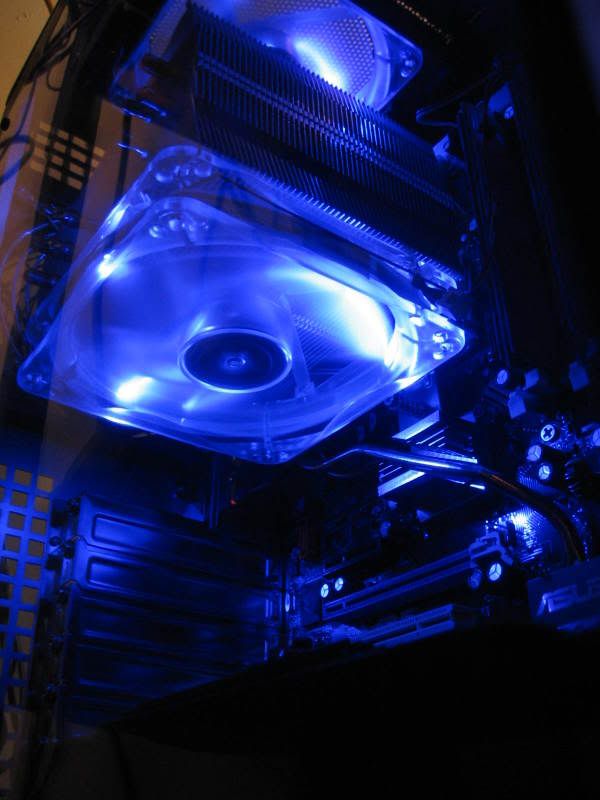

Thanks for looking!
This shot was taken a couple of weeks ago; the cable management is a tiny bit neater today than it is here.
Thanks for looking!
I think I finally read through this entire thread
and now I am off to buy this case. It came down to U2-UFO vs TJ09, and this case just wins by a nose. U2-UFO would have required me to ditch my current desk and I didn't want to do that or put it on the rug.
I'll save my pennies and in a year I'll get a UFO, a new desk, and a custom setup (or Petra kit+120.3) for water. For now though I am going to enjoy this one
and now I am off to buy this case. It came down to U2-UFO vs TJ09, and this case just wins by a nose. U2-UFO would have required me to ditch my current desk and I didn't want to do that or put it on the rug.
I'll save my pennies and in a year I'll get a UFO, a new desk, and a custom setup (or Petra kit+120.3) for water. For now though I am going to enjoy this one
ScytheNoire
n00b
- Joined
- Mar 19, 2007
- Messages
- 27
got mine Thursday and put my parts in it yesterday. the case is just gorgeous, so beautiful. the cooling is great, and i love how roomy it is inside, easy to do wiring and fit that 8800 GTX in there. also love the slide out motherboard tray, first case to have that and my god, is it about time i got that feature. never going without that again.
only issue i have, the hard drives are exposed, thanks to that mesh there, so they are kinda loud compared to closed cases. that kinda sucks. never realized how loud my drivers were (Seagates).
only issue i have, the hard drives are exposed, thanks to that mesh there, so they are kinda loud compared to closed cases. that kinda sucks. never realized how loud my drivers were (Seagates).
cantankerous
Gawd
- Joined
- Nov 15, 2006
- Messages
- 655
got mine Thursday and put my parts in it yesterday. the case is just gorgeous, so beautiful. the cooling is great, and i love how roomy it is inside, easy to do wiring and fit that 8800 GTX in there. also love the slide out motherboard tray, first case to have that and my god, is it about time i got that feature. never going without that again.
only issue i have, the hard drives are exposed, thanks to that mesh there, so they are kinda loud compared to closed cases. that kinda sucks. never realized how loud my drivers were (Seagates).
Looks like this was a TJ-09 week for us both. I totally agree with the hard drive statement. I have 4 drives, two of them raptors. You can imagine how loud they are for me. I never noticed my drives at all in my Antec P160.
You mentioned the case has good cooling? At the moment I beg to differ. My CPU is cooler in the TJ09 than in my P160 but the GPU and chipset are MUCH hotter. I have to do some major wire cleaning as well as get a more powerful fan for the center of the case to do a better job. I modded my P160 to have a 120mm side panel fan blowing into the case and my gpu and chipset were always very cool like this, not so with the fan being mounted in the case blowing behind the gpu/chipset instead of directly on. What fans are you running in your system? Did you change any out?
cantankerous
Gawd
- Joined
- Nov 15, 2006
- Messages
- 655
anyone have any problems with rattling when the side panels are on ?? its kinda a weird buzzing sound that happens from time to time .. and i have to loosen or tighten the side panels .. quite annoying .. other than that i love my tj09
yes I have had that too. I thought it was because my side panel is a bit warped. My windows is bowing away from the panel a bit in the center and thought that might have caused it, guess not?
The DooGie
n00b
- Joined
- Mar 16, 2007
- Messages
- 26
You mentioned the case has good cooling? At the moment I beg to differ. My CPU is cooler in the TJ09 than in my P160 but the GPU and chipset are MUCH hotter.
I agree entirely with that. I was expecting better GPU cooling with this case. My CPU temp has dropped by around 3 degrees but my GPU temp has risen by 2 or 3 degrees compared to my Lian-Li PC60. Overall a far nicer case to work with though and I'll see how it goes with the GPU temps but suspect I may change the case fan to something with a bit more ooooomph.
cantankerous
Gawd
- Joined
- Nov 15, 2006
- Messages
- 655
I agree entirely with that. I was expecting better GPU cooling with this case. My CPU temp has dropped by around 3 degrees but my GPU temp has risen by 2 or 3 degrees compared to my Lian-Li PC60. Overall a far nicer case to work with though and I'll see how it goes with the GPU temps but suspect I may change the case fan to something with a bit more ooooomph.
Thanks for the reply, I am glad we are seeing similar results. I will admit my cable clutter is a mess right now and right in front of that fan too which doesn't help. I hope with all those cables out of the way and a more powerful fan (Scythe S-Flex 'F' series) temps will drop. With the Accelero X2 on my X1900XTX it dumps a lot of heat into the case which I guess my P160 with side panel fan did better at dissipating. The new ATI card will have rear exhausting again meaning not so much heat being dumped into the case. I am not looking forward however to changing that center fan. It looks to be quite the chore. They made every fan in the case able to snap in place except that one. I am sure they could have made something like the hard drive area fan where a simple removal of a thumbscrew would allow you to remove the fan casing and 'snap' a new one into place.
The DooGie
n00b
- Joined
- Mar 16, 2007
- Messages
- 26
My GPU temps have dropped back to normal after a re-build. I had to RMA my TJ09 due to non working front USB ports. The replacement works fine and have CPU idle at 32 C and GPU at 54 C. Just need to do a bit more cable management but isn't that always the way
meimeiriver
n00b
- Joined
- Mar 28, 2007
- Messages
- 33
Here are a few pics of my TJ09B-W:
This shot was taken a couple of weeks ago; the cable management is a tiny bit neater today than it is here.
Thanks for looking!
Mighty impressive cable-managment.
Interesting how you put your Video card in the second PCI-E slot; I didn't even realize you could boot that way (guess I'm still thinking of the old days).
One question for you, though, or others perhaps. How is the noise and/or dust level? With the side-panel having this huge opening in the middle, can you not hear everything inside? And I figure the case must attract a lot of dust, too, that way.
Still, it looks like the nr. 1 case for me.
cantankerous
Gawd
- Joined
- Nov 15, 2006
- Messages
- 655
My GPU temps have dropped back to normal after a re-build. I had to RMA my TJ09 due to non working front USB ports. The replacement works fine and have CPU idle at 32 C and GPU at 54 C. Just need to do a bit more cable management but isn't that always the way
Thanks for the confirmation. It brings me some hope that some serious cable management and a slightly more powerful fan in that area will net me lower temperature results as well.
The DooGie
n00b
- Joined
- Mar 16, 2007
- Messages
- 26
I actually didn't change the fan. It's still the stock one
thanks to dutt1113 for letting me use his pic as reference
but i plan to put a thermochill pa120.2 up there
so are any of you guys kind enough to take this measurement for me??
thanks in advance

and is that gfx card cooler removable? the one attached to the left side of the hard drive cage?
how much thicker is a thermochill 120.2? In my picture above, I dremeled out the bar across the middle of the mesh as well as 4 little tabs that are facing in towards the mesh. I was able to get my rad almost touching the mesh from underneath.
txtmstrjoe
Weaksauce
- Joined
- Sep 22, 2006
- Messages
- 67
Mighty impressive cable-managment.
Interesting how you put your Video card in the second PCI-E slot; I didn't even realize you could boot that way (guess I'm still thinking of the old days).
One question for you, though, or others perhaps. How is the noise and/or dust level? With the side-panel having this huge opening in the middle, can you not hear everything inside? And I figure the case must attract a lot of dust, too, that way.
Still, it looks like the nr. 1 case for me.
Thanks so much for the compliment.
Actually, I'm a little unhappy with the cables, but with such a huge space inside the TJ09, it's a little difficult to hide stuff like power cables and such.
The noise is dependent on your fan choice; mine aren't quiet (three Thermaltake 120mms with blue LEDs), but they're not loud, either. I also use a Zalman fan controller, so I can dial down the noise if needed. The system is overclocked, but under normal conditions the core temps never creep up above 35-37* C; while gaming, they rise to about 42-44*C. At full stress test load, the peak I've observed is about 55*C.
Dust can be a problem, but not one that a regular spraying of canned air and a dust rag can't take care of.

lukx
Limp Gawd
- Joined
- Aug 5, 2003
- Messages
- 352
here's another one mine (after the crushed one i posted earlier this one came in perfect condition .
Inside: intel 6700 with Scythe Infinity, ASUS P5WDH DELUXE, 4GB Corsair 800mhz RAM, EVGA 8800 GTX ACS3, Creative XFI xtreme music, seagte 300, WD raptor 74, WD raptor 150, Seasonic 700W modular.

.Inside: intel 6700 with Scythe Infinity, ASUS P5WDH DELUXE, 4GB Corsair 800mhz RAM, EVGA 8800 GTX ACS3, Creative XFI xtreme music, seagte 300, WD raptor 74, WD raptor 150, Seasonic 700W modular.
here's another one mine (after the crushed one i posted earlier this one came in perfect condition
Inside: intel 6700 with Scythe Infinity, ASUS P5WDH DELUXE, 4GB Corsair 800mhz RAM, EVGA 8800 GTX ACS3, Creative XFI xtreme music, seagte 300, WD raptor 74, WD raptor 150, Seasonic 700W modular.
Sweet
Did you try to mount the fan on Scythe Infinity in different combinations. Is there room to put it on top ( exact opposite the set up you have right now )
I read on some review of that cpu cooler that it works better with dual configuration .
I have trouble to find some quality cpu air cooling without any lights on them i.e Zalman 9700.
lukx
Limp Gawd
- Joined
- Aug 5, 2003
- Messages
- 352
nope I dodn't try different position of fan on infinity. I think It might fit on the top but it's pointless beacuse on the top of the case there you can put two more fans. I got it like that and my temps are: CPU around 30 C. Motherboard is also 30 . The hottest drive (Raptor 150) is 32. Another two drives are 25, 27 C. Graphic card temp is 61. Also there is fan between hardrives. Basically I got all 5 fans mounted.

- Joined
- Apr 10, 2005
- Messages
- 17,159
My TJ09 grills and sides rattle on and off.. it's pretty annoying actually.. I need to brace the grills or whatever it is with some tape or something.. I've bent the tabs for the grills all the way in, so they should hold better, but it still does the rattle. I have never had such a rattlely case.. other than that, I still like it a lot.. but I think the TJ07 might have been better for building a water system into.. well, there's always going the Exos2 route..
nope I dodn't try different position of fan on infinity. I think It might fit on the top but it's pointless beacuse on the top of the case there you can put two more fans. I got it like that and my temps are: CPU around 30 C. Motherboard is also 30 . The hottest drive (Raptor 150) is 32. Another two drives are 25, 27 C. Graphic card temp is 61. Also there is fan between hardrives. Basically I got all 5 fans mounted.
I have the same setup as you..Can I ask what fan are you using on the Scythe. Right now I am using a Zalman. Works good as long as the outside temp. is good.
Thanks
cantankerous
Gawd
- Joined
- Nov 15, 2006
- Messages
- 655
Hey guys. I rewired my case last night to help the airflow to my video card. It looks 100% better and is about as good as I feel it is going to get with the way stuff is oriented in my case. There is clearly a clean path for air to flow from the center fan to my video card yet it is still quite hot when compared to my modded Antec P160 which had a 120mm side panel fan dremeled in. The gpu fan is at 100% so there is really nothing else I can do to keep this thing under 80c at which vpu recover kicks in and my monitors lose signal. I never had this issue in my old case. With the summer coming things are only going to get worse. I definately feel I need to change the center fan though with all the 'worded' ways to change the fan I can't figure it out. Apparently there was a file with instructions and perhaps diagrams from Silverstone themselves on how to change this fan however the file is no longer available for download. Does anyone have any detailed instructions, perhaps with pictures on how to do this as right now the case cooling is sub par for the video card though great for everything else. I understand I'm using the Accelero X2 on my video card which has no rear exhaust but it did work well on my old setup. I truly feel a side panel fan is better than the center fan mounted internally in the case. When I get the X2900XTX (whenever it comes out) things should 'hopefully' be better as that will have a rear exhaust method as well as a slightly longer card with the fan more towards the back of the card instead of the center bringing it closer to the internal fan for cooling. I think regardless of video card used the center fan could be more powerful as the X2900XTX surely isn't going to be cool running, probably far from it.
I have tried peering into the oval shaped holes on the fan shroud of the center fan with a flashlight but see no such screws to remove like mentioned. This is going to be a nightmare to change but still want to get it done. I want to do this properly and get the best fan in there possible so I only have to worry about doing this once. If anyone could help with diagrams, full detailed instructions etc I would be very much appreciated. The stock center fan is rated for 54cfm which is decent but I want mid 60+ for the best cooling possible. I will put the fan onto a controller to aid in noise if need be. I am still geared towards the F variant of the S-Flex instead someone can tell me a more powerful 25mm fan that is recommended. The S-Flex is rated for 64cfm which isn't much over the stock fan but it is still 10cfm more at 4dba less. I just hope those specs are correct cause I will be royally pissed if the S-flex is 'the same' as the stock or even worse yet, not as strong in airflow due to manufacturers inflated specs.
I have tried peering into the oval shaped holes on the fan shroud of the center fan with a flashlight but see no such screws to remove like mentioned. This is going to be a nightmare to change but still want to get it done. I want to do this properly and get the best fan in there possible so I only have to worry about doing this once. If anyone could help with diagrams, full detailed instructions etc I would be very much appreciated. The stock center fan is rated for 54cfm which is decent but I want mid 60+ for the best cooling possible. I will put the fan onto a controller to aid in noise if need be. I am still geared towards the F variant of the S-Flex instead someone can tell me a more powerful 25mm fan that is recommended. The S-Flex is rated for 64cfm which isn't much over the stock fan but it is still 10cfm more at 4dba less. I just hope those specs are correct cause I will be royally pissed if the S-flex is 'the same' as the stock or even worse yet, not as strong in airflow due to manufacturers inflated specs.
There are four screws all at the front of the housing unit for the fan, all you'll see is four holes, and the screws are in there, to access them, you'll need to take off both side panels (makes things a little easier.) The holes with the screws are on the outer edges of the housing unit, once you remove all screws you can take the housing unit out, then you need to remove two more screws to take off the back plate of the housing unit, and then you can finally remove the fan. I warn you though, taking it out and putting it back in, is a pain in the ass!
cantankerous
Gawd
- Joined
- Nov 15, 2006
- Messages
- 655
thanks for the reply mate. I guess I missed those 'screws' because everyones description is the same yet when I looked last night I could not see them. I will have to take off my panels and give it another shot I suppose. I just hope I dont drop one of those small screws down inside the shroud while taking them out . That would just suck.
What fan did you replace yours with and did you find a cooling difference with a different fan?
. That would just suck.What fan did you replace yours with and did you find a cooling difference with a different fan?
I will be getting T09 soon ( required preorder at my computer store ).
I also will change the stock fans to SilenX 120x25mm 14dBA 1400rpm 72cfm .
Four in total . One in front , one in the back and two on top.
From what I have read many people use the top fans to blow the air into the case and not
out. I will disregard the simple physic rule that hot air raises and go with the idea that
this set up brings more cool air into the case.
But the fact remains that you will have 3 fans blowing the air in and only one taking it out.
Also the positioning of the top 2 fans is so close to the out fan and the cpu fan will
definitely cause some air turbulence that will disrupt the air flow in there.
You might set up the two top fans to take out the air out of the case which would promote good air flow thru the whole case. One bringing ( front of the case ) the cool air in and 3 taking the hot air out ( one at the back and two on top ). But is it enough of cool air being pumped into the case 1 vs 3.
Or maybe just stick to original case set up 1 front vs 1 back and forget about two top fans
all together.
I would like to hear some input of owners of Tj09 and if they tried different combinations of their set up as to how effectively air cool it.
Also I have a dilemma as to what fan should I choose to cool my cpu with.
- Zalman CNPS 9700 LED
- Scythe INFINITY Universal 5
Tunic tower 120 is not an option for me cause local stores do not carry one.
Any comments would really help me out, thanks and Happy Easter
I also will change the stock fans to SilenX 120x25mm 14dBA 1400rpm 72cfm .
Four in total . One in front , one in the back and two on top.
From what I have read many people use the top fans to blow the air into the case and not
out. I will disregard the simple physic rule that hot air raises and go with the idea that
this set up brings more cool air into the case.
But the fact remains that you will have 3 fans blowing the air in and only one taking it out.
Also the positioning of the top 2 fans is so close to the out fan and the cpu fan will
definitely cause some air turbulence that will disrupt the air flow in there.
You might set up the two top fans to take out the air out of the case which would promote good air flow thru the whole case. One bringing ( front of the case ) the cool air in and 3 taking the hot air out ( one at the back and two on top ). But is it enough of cool air being pumped into the case 1 vs 3.
Or maybe just stick to original case set up 1 front vs 1 back and forget about two top fans
all together.
I would like to hear some input of owners of Tj09 and if they tried different combinations of their set up as to how effectively air cool it.
Also I have a dilemma as to what fan should I choose to cool my cpu with.
- Zalman CNPS 9700 LED
- Scythe INFINITY Universal 5
Tunic tower 120 is not an option for me cause local stores do not carry one.
Any comments would really help me out, thanks and Happy Easter
my whole rig


i now have SLi set up, that's two 8800 GTS 640s

very happy about the cable managment with this case, im going to be routing that SATA poer cable around back.

ahhh...
and the wall mount FTW

now here is a question, the two top fans, should i exhust or should i intake? and
please for the love of god how to i remove that first intake fan !!? ??
i now have SLi set up, that's two 8800 GTS 640s
very happy about the cable managment with this case, im going to be routing that SATA poer cable around back.
ahhh...
and the wall mount FTW
now here is a question, the two top fans, should i exhust or should i intake? and
please for the love of god how to i remove that first intake fan !!? ??
Lol, I actually didn't replace the fan, I just wanted to see how the shroud works, and how hard it is to take everything out. Also, I dropped the screws into the shroud, thankfully they can only fall to the bottom of the shroud were they are pretty easy to get out.
Let me show you all my TJ09. Get ready cause I'm sure you never saw such thing in your whole life
19th of December 2006 from Poland (Europe) to Cyprus (Europe). I received it today it's 21 March 2007. Here it is.
Hmmm I guess plane runover it. Well I don't wish anyone such thing to happen with his 400$ !!!
did they drop it out of a plane to yr house?