• Some users have recently had their accounts hijacked. It seems that the now defunct EVGA forums might have compromised your password there and seems many are using the same PW here. We would suggest you UPDATE YOUR PASSWORD and TURN ON 2FA for your account here to further secure it. None of the compromised accounts had 2FA turned on.
    Once you have enabled 2FA, your account will be updated soon to show a badge, letting other members know that you use 2FA to protect your account. This should be beneficial for everyone that uses FSFT.

LG 48CX

He's talking about stock clearances (the C148 just dropped below $1000 for the first time:

https://www.amazon.com/LG-OLED48C1PUB-Alexa-Built-Smart/dp/B08WFK81RH/ref=mp_s_a_1_3?tag=hardfocom-20&ascsubtag=ddfbdc1ca90411eca88a728b6ce44b6a0INT&crid=1NF3N7S7BPYWD&keywords=c1+oled+48&qid=1647571106&sprefix=c1+,aps,113&sr=8-3&th=1

You need to have a noticeable price differential when clearing stock (or most folks will just buy the much larger panel for slightly more money!) But this also means that any stock clearance of the 42" model will drop to around $700 to $800!

He's comparing closeout C1 prices to potential 42" C2 closeout pricing.

Looking forward to the 42" c2 hitting $700 to 800 myself. When you can buy a 55" c1 for $1k I expect nothing close to that for the 42 (https://slickdeals.net/f/15709150-5...rd-1097-free-s-h-at-buydig-less-w-sd-cashback). These deals are pretty consistent at end of model year time for the oled tv's. Their initial ask for the 42 c2 is just too high for what it is.

This time next year, the closeout pricing of the 42" and 48" C2s won't have much of a difference because the manufacturing costs differences aren't that great. You're seeing that now with the 48" and 55" C1s and their closeout pricing with them both hovering around $1000 for the TV when you look at the additional incentives being thrown in.
 
As an Amazon Associate, HardForum may earn from qualifying purchases.
Yo, does the C1 48" have this problem:
Yes, if you have VRR enabled your frame rate is fluctuating a lot you'll see this.

Here's a severe case where my C1 was flashing every time I moved my mouse in RE2. My frame rate was tanking whenever I moved the mouse. Dropping the mouse polling rate fixed it.

 
Last edited:
Yes, if you have VRR enabled your frame rate is fluctuating a lot you'll see this.

Here's a severe case where my C1 was flashing every time I moved my mouse in RE2. My frame rate was tanking whenever I moved the mouse. Dropping the DPI fixed it.


Im trying to understand this VRR flicker a little more in order to set my expectations if I purchase an OLED display (dell monitor or LG TV)...

What level of frame fluctuations produces this flicker? Like does this only occur with extreme fluctuations (like say from 100 or 120 down to 40 or 50) or is this normal even with mild/moderate fluctuations (like 100 or 120 down to 75-80)?
 
I think it's more noticeable in some games than others and not just because of the frame rate fluctuation. For example in his video the game appears to be paused with a pause menu pulled up including a "return to game" heading. He's just moving a mouse cursor around. That cursor movement should be max fps at all times like the desktop in that scenario I'd think? He said when he moved the mouse his framerate tanked though which sounds strange to me. It's not even moving the viewport around in the youtube video and nothing on screen is actively moving or changing besides the cursor. Something strange is going on there. It seems more like near black flickering due to WOLED rather than VRR in that case, where the frame of the mouse cursor is bright/white.

There are a lot of different rendering methods in games too, plus HDR gaming rather than SDR and even with HDR there are usually ways to change the whitepoint, gamma, HDR peak brightness, HDR overall brightness.


There are different issues like this one:

LG 65 CX black flickering non VRR​

renderTimingPixel.png


Tech Support
I've seen a few posts but none that have resolved my issue. I recently watched 2 movies on Netflix and in the dark scenes there send to be a black flickering occurring. Any suggestions for settings to fix this? I've played around with brightness, motion blur, noise reduction etc. But bugging send to help.
Update 8/5/21: Appreciate all the help on this. It seems the issue was with appleTV 4k. The solution was to manually update from tvOS 14.6 to tvOS 14.7. After doing this the flicker in Netflix movies went away. Also, when I had tvOS 14.6 I was able to get the issue to go away by reducing the brightness to 52 or below. I did not see any issues with Chromecast Google TV Netflix or when watching a 4k disc in my Xbox SeriesX.

Stock-Freedom
· 8 mo. ago

It’s absolutely Netflix. The low quality streams cause the low light near blacks to be literally flickering boxes. If you pump up the black levels, you can see that it’s huge macro artifact blocking from awful compression. It makes the screen to overreact to compensate.
Throw in a 4K Blu Ray of the exact same content and you won’t see it at all.
.
So maybe RE2 is doing something strange resolution wise with the mouse curor or backgrounds or something idk.
 
So maybe RE2 is doing something strange resolution wise with the mouse curor or backgrounds or something idk.
Oh believe me it's bizarre. Happens in any RE engine game for me. Moving the mouse puts a heavy load on the game and frame rate drops by 15-20 fps. It stabilizes the instant I stop moving my mouse. Good news is that I fixed it by lowering the mouse polling rate from 1000Hz to something like 250Hz. RE just doesn't seem to like high mouse polling rates, at least not on my hardware.

This video shows 119 fps stable with no mouse movement. Once I start moving my mouse, it drops as low as 102 fps.

 
Last edited:
Oh believe me it's bizarre. Happens in any RE engine game for me. Moving the mouse puts a heavy load on the game and frame rate drops by 15-20 fps. It stabilizes the instant I stop moving my mouse. Good news is that I fixed it by lowering the mouse polling rate from 1000Hz to something like 250Hz. RE just doesn't seem to like high mouse polling rates, at least not on my hardware.

This video shows 119 fps stable with no mouse movement. Once I start moving my mouse, it drops as low as 102 fps.


From what I can find online at a glance people recommend using a controller for those games. They say even WASD or whatever movement keys you use won't dip the frame rate, only the mouse/mouse cursor does so it's something wacky with their game engine and the mouse.

Some other post claimed it doesn't happen on linux with the mouse either.. that he used https://lutris.net/ but I have no exp with using that.
 
The brightness/gamma increasing whenever there is camera movement with VRR is present and visible but it's extremely minor. I would have to point it out up close to most people for them to even spot it. There is also very minor overshoot from really really dark shades but again, it requires pixel peeping to spot.

The guy above's video is literally zoomed in to hell and it's still hard to tell.

As for the flicker, it never occurs for me in actual gameplay. I don't count menus or loading screens because flicker occurs there even on Gsync module equipped LCD monitors.

TBH I think most people online and Vincent from HDTV test blow this whole flicker thing out of proportion especially Vincent because the CX/C1's competitor (QN90B) exhibits flicker galore and he seems to fixate on said menus/loading screens. Don't use a potato CPU or go give any other VRR capable LCD a try and get back to me on how prominent flicker is across VRR monitors as a whole.

The raised blacks/gamma is IMO the only real legitimate concern.
 
Last edited:
In 2 more months I will be at 2 years of CX ownership and the VRR flickering has not been a huge problem for me the entire time. Yes it does flicker during loading screens and sometimes menus but during actual gameplay it hasn't bothered me enough.
 
so i should've tried this sooner, but i connected my c1 to my old el cheapo Yamaha receiver with an optical cable, then changed the audio device type in my ps5's settings to AVR, 5.1 channel, and DTS for the format, and now i get to use my surround sound properly with my ps5 instead of being stuck using either headphones or craptastic tv speakers. thankfully my receiver has two optical inputs so i can still leave my pc/soundblaster z plugged, i just have to switch inputs on the receiver as well as the tv. too bad you can't get DTS encoded directly out of the video card so i could just use one input.
In 2 more months I will be at 2 years of CX ownership and the VRR flickering has not been a huge problem for me the entire time. Yes it does flicker during loading screens and sometimes menus but during actual gameplay it hasn't bothered me enough.
it really depends on the game though. most of the games i play are like that where the flicker mainly appears only in loading screens or menus, but there are some where it becomes an unplayable distraction (euro truck simulator 2/american truck simulator are an example.)
 
I think it was another forum that put me on to how to watch actual DV HDR videos... put them on a usb stick and plug it into the TV itself. The TV's player plays them perfectly. This does stick me with the TV's speakers when I do that rather than my Logitech Z5500 and Klipsch fronts for 7.1... I wonder if the ancient 5.1 decoder in the ancient Z5500 still works on modern rips? I could try the optical cable from the TV and see what happens.

But frankly, the TV speakers on the CX are really not bad in a small office. Not bad at all.
 
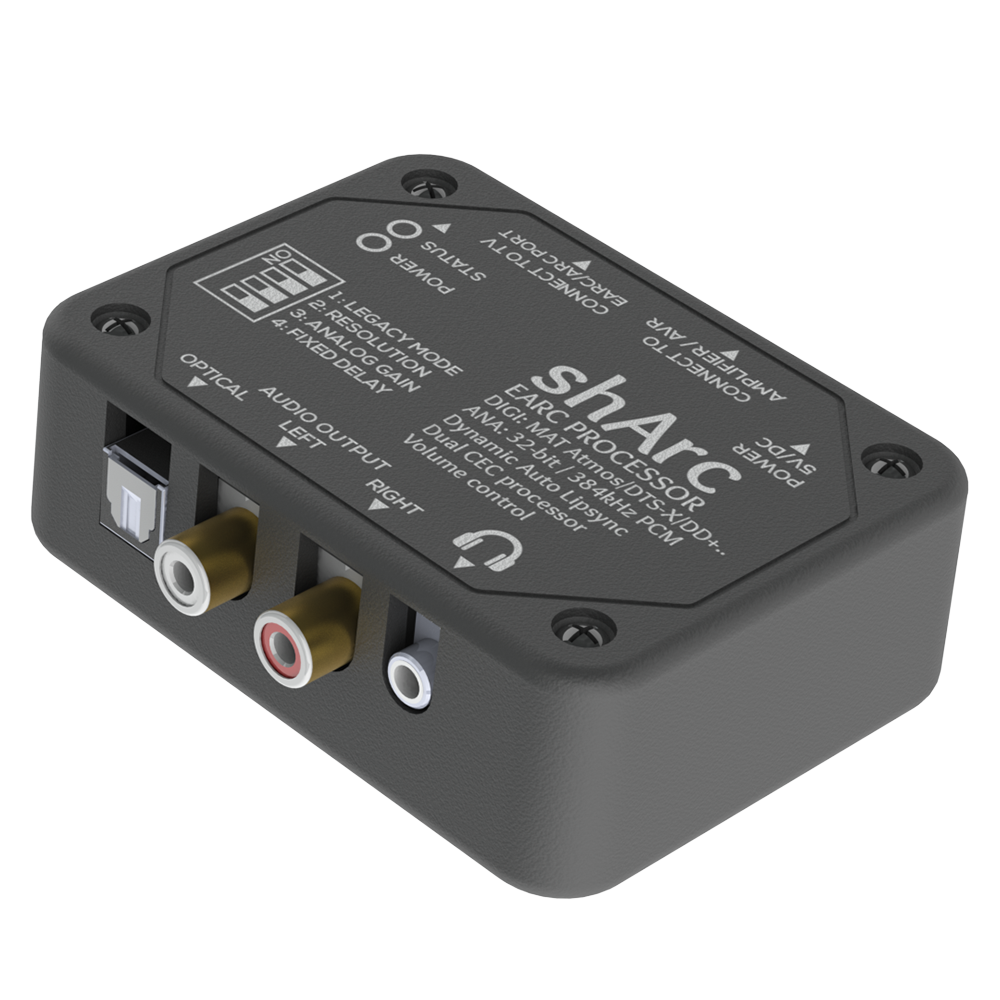
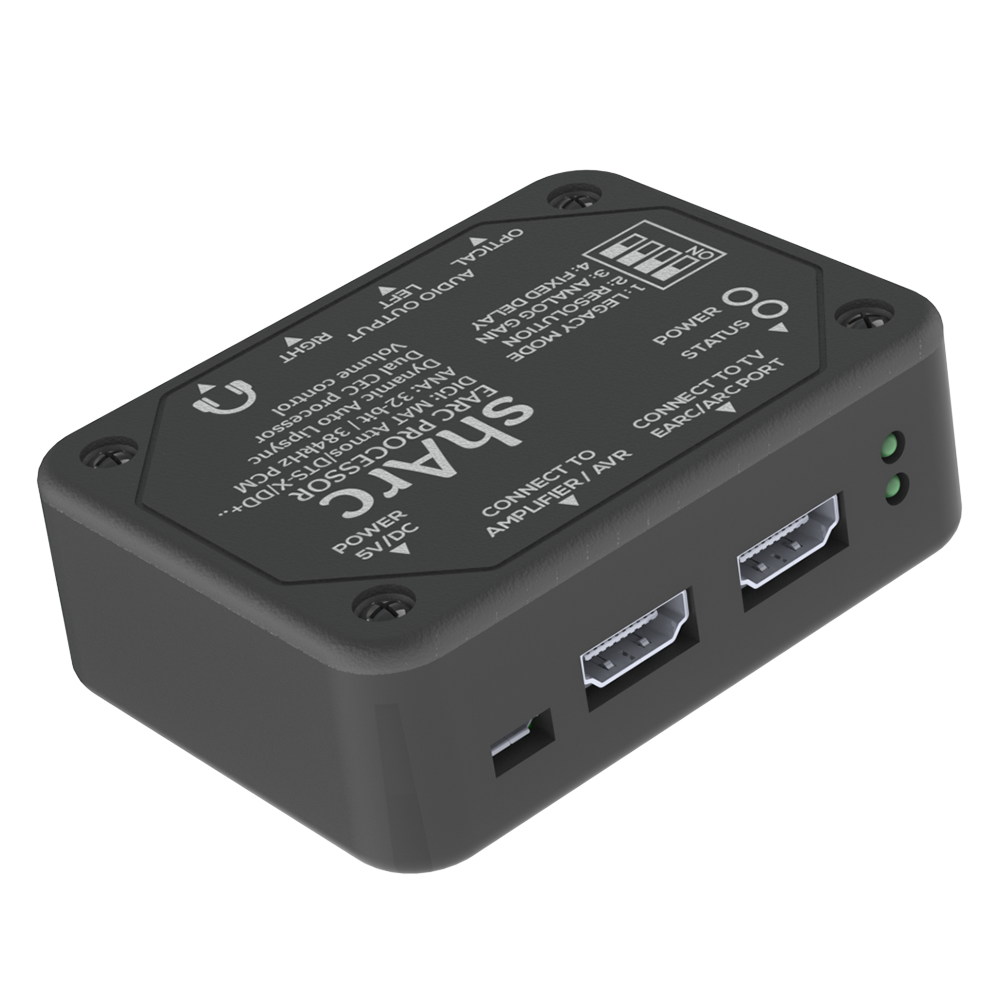
The shARC box can take hdmi 2.1 eARC output and break it down to spdif optical or an hdmi output that can go to any hdmi input on an older receiver (just don't connect that to any arc port, it has to connect as if it is a just a regular input device). It's gone up in price since I got it though so it's not cheap at $188 currently. You could put that money toward an eARC receiver instead. However the sharc does allow for some flexibility, swapping around between different hardware in the future, and use with existing setups. I have an older 7.1 (incl atmos) receiver without hdmi 2.1 eARC sound and it's bandwidth so it worked out for me, running eARC out from the LG OLED to the sharc and then out a hdmi input on my receiver. It basically adds a hdmi 2.1 earc port to an older receiver. It also breaks down the eARC output of any tv to spidif optical or rca~stereo L/R, headphone outputs for those usage scenarios.


SHARCSIDE.png


shtop4_1000.png

I think it was another forum that put me on to how to watch actual DV HDR videos... put them on a usb stick and plug it into the TV itself. The TV's player plays them perfectly. This does stick me with the TV's speakers when I do that rather than my Logitech Z5500 and Klipsch fronts for 7.1... I wonder if the ancient 5.1 decoder in the ancient Z5500 still works on modern rips? I could try the optical cable from the TV and see what happens.

But frankly, the TV speakers on the CX are really not bad in a small office. Not bad at all.


Spdif/Optical won't sound horrible or anything but it won't have the full bandwidth of hdmi 2.1 uncompressed hdmi audio streams.

hdmi-earc-chart-arrow-5b661d8846e0fb002571eebe.jpg
 
Last edited:
Well, there's something I never considered. Time for some more reading on this. Thanks.
 
cool, today i found out that you can in fact output true dolby surround from a pc connected to a c1 via hdmi and from the tv to a receiver via optical out. you just have to install the free 'dolby access' app from MS Store, and then you can select "Dolby Atmos" in the sound control panel app and configure speaker layout etc. at first i had occasional issues with buzzing sounds but that was solved by changing the digital out format in the TV's advanced sound settings to pass through. even though my old Yamaha receiver is wayyy too old for Atmos, everything gets picked up as Dolby and sounds beautiful. also, there is virtually no audio processing lag than i can detect. if there is any, it's even less than what my Soundblaster Z was doing.

i took the SB Z out of my PC, no more need for it :cool:
 
In light of the eARC stuff, I'd also like to remind people that you will be hard pressed to hear any real difference between e.g SPDIF or eARC sound quality unless you have an audio system that can actually deliver, preferably room corrected too. I know my living room setup is not good enough so I'm using SPDIF from the TV into a 10 years old Denon AV receiver and two Magnat Quantum stereo speakers + BK XLS200 subwoofer.

It works fine but I do want to replace it with a proper HDMI 2.1 receiver after I move next month. These had a lot of issues in the past few years with e.g gaming, 120 Hz etc but does anyone know if they have managed to solve those and bring something good to market?
 
I think it was another forum that put me on to how to watch actual DV HDR videos... put them on a usb stick and plug it into the TV itself. The TV's player plays them perfectly. This does stick me with the TV's speakers when I do that rather than my Logitech Z5500 and Klipsch fronts for 7.1... I wonder if the ancient 5.1 decoder in the ancient Z5500 still works on modern rips? I could try the optical cable from the TV and see what happens.

But frankly, the TV speakers on the CX are really not bad in a small office. Not bad at all.


You can connect your speakers overt optical out using a dac/receiver (you just need o adjust the volume on the speakers)

Been doing simultaneous output for years with my b7 (turn on speakers when you just want music/watching a musical.)

The combined output is good for poorly-mastered movies that need a little extra dialog bump
 
Last edited:
So we're roughly 2 years in and guys I've gotta say I continue to be blown away by this monitor. Truly the best one I've ever had and I don't see how it gets any better compared to other options on the market, currently. I disabled ASBL using the service remote and with the auto-dimming now gone it is now not just incredible for gaming and movies but desktop use as well. Any brightness or burn-in concerns are way overplayed IMO and haven't been an issue for me at all. I'd buy this thing again in a heartbeat. I hope the features that were removed from the C2 lineup (namely the removal of BFI @ 120Hz) aren't indicative of the direction that LG intends to go in the future, but that won't affect everyone as not everyone uses BFI (including me, most of the time). More options is better, and this thing has plenty.
 
So we're roughly 2 years in and guys I've gotta say I continue to be blown away by this monitor. Truly the best one I've ever had and I don't see how it gets any better compared to other options on the market, currently. I disabled ASBL using the service remote and with the auto-dimming now gone it is now not just incredible for gaming and movies but desktop use as well. Any brightness or burn-in concerns are way overplayed IMO and haven't been an issue for me at all. I'd buy this thing again in a heartbeat. I hope the features that were removed from the C2 lineup (namely the removal of BFI @ 120Hz) aren't indicative of the direction that LG intends to go in the future, but that won't affect everyone as not everyone uses BFI (including me, most of the time). More options is better, and this thing has plenty.

The QD-OLEDs have higher color volume heights so more and brighter crayons shades in the crayonbox. They also resolve color a bit differently in greens and reds on the horizontal color map so it's a little wider. Both techs are OLED though so have per pixel side by side contrast with "infinite" black depth. There is always something better around the corner every few years but contrary to what some people are saying, LG OLED vs QD-OLED, while a very good step up to HDR 10 (1000+) and higher sustained in HDR from HDR 600 - 800 of the LG OLEDs and better bright room viewing -- is not "like a TN compared to an OLED".

I'm very happy with my 48CX. So much so that when my 70" 2015 Vizio M died we sprung for a 77" C1 in the living room (we didn't want to downsize to 65" and there are no 70" models). There's no way I'm upgrading the C1 for years yet, I just got it before xmas for around $3300. I might upgrade the 48CX in the next few years if the price was right, as it would be much less costly at that size than the living room display. I'm in no rush though. I still grin every time I see fire or other light source in a dark scene and I still remember the first time I saw the reflectivity of people's eyes on a (large) OLED display.
 
Last edited:
So we're roughly 2 years in and guys I've gotta say I continue to be blown away by this monitor. Truly the best one I've ever had and I don't see how it gets any better compared to other options on the market, currently. I disabled ASBL using the service remote and with the auto-dimming now gone it is now not just incredible for gaming and movies but desktop use as well. Any brightness or burn-in concerns are way overplayed IMO and haven't been an issue for me at all. I'd buy this thing again in a heartbeat. I hope the features that were removed from the C2 lineup (namely the removal of BFI @ 120Hz) aren't indicative of the direction that LG intends to go in the future, but that won't affect everyone as not everyone uses BFI (including me, most of the time). More options is better, and this thing has plenty.

It gets better by upgrading from W-OLED to QD-OLED. Once Samsung makes a size around 48-50" I'll be upgrading my CX.
 
So we're roughly 2 years in and guys I've gotta say I continue to be blown away by this monitor. Truly the best one I've ever had and I don't see how it gets any better compared to other options on the market, currently. I disabled ASBL using the service remote and with the auto-dimming now gone it is now not just incredible for gaming and movies but desktop use as well. Any brightness or burn-in concerns are way overplayed IMO and haven't been an issue for me at all. I'd buy this thing again in a heartbeat. I hope the features that were removed from the C2 lineup (namely the removal of BFI @ 120Hz) aren't indicative of the direction that LG intends to go in the future, but that won't affect everyone as not everyone uses BFI (including me, most of the time). More options is better, and this thing has plenty.
Agreed. I would prefer a smaller display but have been pretty ok with the CX 48" as long as it's mounted at least 1m away. I'm looking forward to reading TFTCentral's review of the 42" model, might end up selling my CX and swapping to that.
 
my c1 continues to blow me away, in both picture quality and features. it's so nice having stuff like the optical out and ARC/eARC support which is stuff that regular PC monitors usually don't have, and that's icing on the cake with the amazing picture quality. i still can't get over what it's like having blacks be true black. it is so important for movies and gaming.

also, i'm on the 48", and i could already see myself upgrading to the 55" or even 65" with some desk and seating adjustment (my c1 is wall mounted and i have a small lightweight desk for regular/work use and i can easily swap it with my sim racing/flight sim rig - the TV just stays where it is. it's a very cool setup if i do say so myself :D
 
For what it's worth, rtings has the full G2 review up and early access for the C2 (which should be up in a few days).
 
The LG G2 got a stellar review from RTINGS. Very tempted to replace my Samsung Q90R with this TV due to support for eARC and Dolby Vision.

I'm very interested in the Samsung SN95B QD-OLED, but not having support for Dolby Vision in 2022 is a huge deal breaker for me. Dolby Vision makes a massive difference in streaming services that support HDR, one that the Q90R can't match using HDR10.
 
The LG G2 got a stellar review from RTINGS. Very tempted to replace my Samsung Q90R with this TV due to support for eARC and Dolby Vision.

I'm very interested in the Samsung SN95B QD-OLED, but not having support for Dolby Vision in 2022 is a huge deal breaker for me. Dolby Vision makes a massive difference in streaming services that support HDR, one that the Q90R can't match using HDR10.

IMO I feel like the superior hardware in the S95B would look better than the LG G2 with Dolby Vision. Could be wrong though.
 
IMO I feel like the superior hardware in the S95B would look better than the LG G2 with Dolby Vision. Could be wrong though.
Hopefully someone will do a side-by-side HDR comparison of the following.
  • Samsung SN95B (QD-OLED, HDR10(+))
  • Sony A95K (QD-OLED, Dolby Vision)
  • LG G2/C2 (WOLED, Dolby Vision)
I guess we shall see.
 
Yes and would be good to show what movie and game titles support/are available in each format too.

Also autoHDR performance (incl. after CRU edit), VRR, etc. of course.

It seems like there will be some HDR10+ support for gaming offered but as of now I don't think any consoles support it like they do dolby vision.


Nov: 2021: https://www.whathifi.com/us/news/samsung-bringing-hdr10-to-gaming-in-2022
There's also no news on where the HDR10+ games will come from. Dolby Vision, supported by TV makers such as LG, is said to be exclusive to the Xbox Series X and S for two years. Could Samsung be working with Sony to bring HDR10+ gaming to the PlayStation 5? It's certainly one possibility.

Nov 2021: https://topp.today/hdr10-plus-gamin...aunching-in-2022-a5f45b1e6ca4?gi=555d04d94955

The elephant in the room, of course, is none other than content support. There is no point developing a new standard if it’s not used widely enough to matter — and Samsung’s HDR10 Plus has not yet secured the kind of support the company was probably hoping for in films and TV shows (compared to Dolby Vision). In order for HDR10 Plus Gaming to not go down the same path, the Koreans will have to work closely with home entertainment manufacturers and game developers… and that’s a tough crowd to please. Microsoft may well update their Xbox Series S|X to include HDR10 Plus Gaming support, even Windows 11 in order for PCs to do the same, but it’s not easy to imagine the Americans developing HDR10 Plus Gaming compatible games from scratch (even Dolby Vision Gaming right now is “added” after the fact). Sony will obviously never support HDR10 Plus Gaming on the PlayStation5 (they do not even support Dolby Vision Gaming yet).

Dec 2021: https://www.flatpanelshd.com/news.php?subaction=showfull&id=1640232085

As part of the announcement, it was confirmed that Nvidia GeForce RTX 30 Series, RTX 20 Series and GTX 16 Series GPUs will also support HDR10+ Gaming, with driver updates scheduled to release sometime in 2022.

- "Nvidia GeForce gamers can enjoy a brighter, more vivid and consistent HDR gaming experience on their monitors or TVs from the support of the new HDR10+ Gaming standard," said Vijay Sharma, Director of Product Management at Nvidia.

Since Samsung is partnering with Nvidia for the launch we would not expect game consoles like PlayStation and Xbox to gain HDR10+ Gaming support. Sony has resisted HDR10+ since its inception and Microsoft recently enabled Dolby Vision gaming on Xbox Series S/X.

Some of the first games to take advantage of HDR10+ Gaming will be Redout 2 and Pinball FX from Saber Interactive. Game Mechanic Studios' Happy Trails and the Kidnapped Princess is another title.

- "We are very excited to help usher in a new era of video game picture quality. By adopting HDR10+ Gaming, gamers of all ages will enjoy cutting-edge visuals for the best overall gaming experience," said Todd Hollenshead, Head of Publishing at Saber Interactive. "The HDR10+ Gaming standard is genuinely raising the bar, and we are proud to be at the forefront of bringing it to market with games like Redout 2, the fastest 8K anti-gravity racer ever made, and with Pinball FX, the king of digital pinball, brought to life in a brand-new way."


Dec 2021: https://www.howtogeek.com/776609/what-is-hdr10-gaming/
Dolby Vision for Games is an extension created by Dolby to bring the benefits of Dolby Vision HDR format to gaming. It was first to arrive in May 2021 and is quite similar to HDR10+ Gaming in many ways, and includes support for Auto HDR calibration and VRR. But it does have at least one additional trick up its sleeves.


One of the significant ways Dolby Vision for Games differs from HDR10+ Gaming is its ability to enhance regular HDR titles. Of course, the best Dolby Vision for Games experience is only available on the titles optimized for it. Still, even the older titles that were released in HDR or Auto-HDR get improved visual experience with Dolby Vision for Games technology. It isn’t clear exactly how much enhancement they get, but something is better than nothing.


As of late 2021, Dolby Vision for Games is only available on Xbox Series X and Series S consoles, but it has broader support in terms of gaming titles compared to HDR10+ Gaming.
 
IMO I feel like the superior hardware in the S95B would look better than the LG G2 with Dolby Vision. Could be wrong though.

I'd guess most likely correct due to the raw specs (much higher and sustained color volume/brightness lengths incl full frame before ABL/ABSL type protections) when running HDR10 alone rather than HDR10+ content's enhancement and availability of HDR10+ content going forward. Even SDR's shallow brightness range should look slightly better (wider) due to somewhat wider color gamut with the QD tech's ability to display reds and greens better. So for now, from the reviews I've watched, better - but format war wise, I'd go with DV if there is anything DV capable with similar specs within the next few years if I wasn't in a hurry to upgrade (I'm not).
 
I frequently use the "Screen Off" shortcut in settings to turn my screen black when I'm away for a while. As far as I'm aware, all this does is turn the screen black and the display is otherwise still powered on, and thus the total power on time is still ticking away.

One concern I had is that this may lead to a premature pixel refresh cycle. Because although my total power on time might be 2000 hours (which kicks off the pixel refresh), the total SCREEN ON time is probably closer to 1000.

Makes me wonder if I should avoid using the "Screen Off" feature when I'm going to be AFK for long periods of time and instead turn off the display via the remote.
 
I frequently use the "Screen Off" shortcut in settings to turn my screen black when I'm away for a while. As far as I'm aware, all this does is turn the screen black and the display is otherwise still powered on, and thus the total power on time is still ticking away.

One concern I had is that this may lead to a premature pixel refresh cycle. Because although my total power on time might be 2000 hours (which kicks off the pixel refresh), the total SCREEN ON time is probably closer to 1000.

Makes me wonder if I should avoid using the "Screen Off" feature when I'm going to be AFK for long periods of time and instead turn off the display via the remote.
I say just keep using it in an way that is convenient to you. I hate opening the menus and then navigating to stuff there so for me just turning the TV off when taking a longer break works better.
 
I'm going to go pick up a 55" S95B today. I have read so many glowing impressions of this display, I just have to try it out. It will have to be pretty damn good to dethrone the CX!
 
I frequently use the "Screen Off" shortcut in settings to turn my screen black when I'm away for a while. As far as I'm aware, all this does is turn the screen black and the display is otherwise still powered on, and thus the total power on time is still ticking away.

One concern I had is that this may lead to a premature pixel refresh cycle. Because although my total power on time might be 2000 hours (which kicks off the pixel refresh), the total SCREEN ON time is probably closer to 1000.

Makes me wonder if I should avoid using the "Screen Off" feature when I'm going to be AFK for long periods of time and instead turn off the display via the remote.

I do this every time I walk away from my CX or C1 (during a usage session) as well as whenever I do a long pause of material on the screen. The Screen Off (emitters off) : "Turn off the Screen command" added to the quick menu. I also gel superglued a nice foam bumper pad button to the mic button on the remote so I can blindly hold that down and say "turn off the screen" (or any other voice commands like switching display modes, opening things, asking questions etc.).

The pixel refresher does not just automatically burn down all of the emitters to a set point like you are getting at. As I understood it, the wear-evening burns down the emitters to the level of the most used ones and then boosts the energy to the emitters to bring it back up. It actually tests and compares the neighboring emitters so it sort of maps the whole screen and burns it down intelligently. So it won't burn down the screen just from being in the "turn off the screen" emitters-off mode. At least that is what I have read.

Reddit post/reply from 10 months ago:

akelew
· 10 mo. ago

Q: What is the purpose of the Pixel Refresh function?
A: Regardless of what you may have read or told, the main purpose of the Pixel Refresh function is NOT to minimize the Image Retention or Burn-In effects. The fact that Pixel Refresh has an effect on the Image Retention or Burn-In is a positive side-effect, but NOT the main purpose of this function. The main Pixel Refresh function purpose is to deal with the natural unevenness of the brightness of the OLED pixels in time. That unevenness needs to be leveled so the panel has the same brightness all over its surface so that the entire panel ages in a uniform manner. There is no need to manually run Pixel Refresh, just let the TV execute this function automatically!
Q: How often should I run the Pixel Refresh?
A: You should NOT run the Pixel Refresh often, only if you need it, or told so by a qualified person - because the Pixel Refresh function shortens the lifespan of the panel. Pixel Refresh runs automatically at every 2000 hours of content viewing and there is no need for the owner to run Pixel Refresh at other intervals of time, regardless of what you have read on the Internet or told by salespeople.

Q: What Pixel Refresh actually does?
A: In short, a newly-minted OLED panel is powered and each pixel is measured for (1) voltage across OLED cell and (2) current through OLED cell, compared with neighboring pixels and the voltage+current levels are leveled for each pixel so that the panel has good image/brightness uniformity - and then the levels are stored in a non-volatile memory on the panel electronics board (not on the TV mainboard).

That new panel will end up in a new manufactured TV - that TV will be used and, in time, some OLED cells will age differently than the neighboring cells, thus image non-uniformity will start to appear. This is where the Pixel Refresh function enters the arena.
When the Pixel Refresh function is run automatically or manually by the user, it checks voltage+current differences between the stored values and those measured for each OLED pixel and tries to normalize them. The OLED panel has an additional compensation applying circuit for each pixel and a separate sensing IC (Integrated Circuit) that interprets the measured values. Increased current through the cell is associated with OLED cell aging, and an algorithm adjusts the current and voltage to compensate for that aging. The new compensation values are stored separately (in a Flash memory) to the initial ones. The pixels that have very high voltage/current differences are "leveled down" - that results in an even field of pixels across the panel. After the pixels that were "high" are leveled down, the Pixel Refresh brings up the voltage/current back to full brightness without the danger of overdriving the ones that were "high" (the measured/calibrated brightness of the panel will not be affected).

The whole Pixel Refresh process is done in vertical batches, which is what causes the panel banding, and why the bands "move" over time. If the Pixel Refresh would not run, the brightness uniformity of the panel would be affected in time - over months of use the panel would just get zones that are dimmer than others. The Pixel Refresh has a big downside, though, it shortens the lifespan of the panel, the operation of leveling down of the voltage/current values is a BIG stress for the panel - this is why you should NOT be using the Pixel Refresh function repeatedly or at short intervals of time (the automatic run at 2000 hours is just enough and it would ensure a long lifespan of the panel).

Source:
https://www.avsforum.com/threads/20...s-thread-faq-posts-1-6-no-price-talk.3119288/


. . . .


https://www.lg.com/eg_en/tvs/oled-tvs/oled-reliability
 
Last edited:
https://www.lg.com/eg_en/tvs/oled-tvs/oled-reliability
The Pixel Refresher feature, built into LG OLED TVs, automatically detects
pixel deterioration through periodic scanning, compensating for it as needed.
It also senses any TFT (Thin Film Transistor) voltage changes during power off
to detect and correct pixel degradation by comparing it with a set reference value.


| Automatic Pixel Refresher — For Effortless Image Retention Recovery |


After every four hours of cumulative use

Pixel Refresher is automatically operated when you turn off the TV after watching it
for more than four hours in total. For example, if you watched TV for two hours yesterday
and three hours today (more than four hours in total), Pixel Refresher will automatically run,
deal with potential image retention issues and reset its operation time.
*This function does not initiate if the TV is not plugged in.


After 2,000 hours of cumulative use

After watching for a total of 2,000 hours or more (five hours per day for a period of one year)
the Pixel Refresher is automatically operated, and the function runs for about an hour
once you turn off the TV. You may see some vertical lines on the screen during this process,
however, this is not a malfunction. It is designed to remove Image Retention by
scrolling a horizontal bar down the screen.


Another reddit reply:
"
The TV automatically does a voltage check after every 4 hours of cumulative use, but it is called a pixel refresher. This clears up image retention. You won't see it but you will hear a click within 1 to 5 minutes after turning the TV off. This does not wear out the panel.
Roughly every 2000 hours the TV will do a totally different kind of 'pixel refresh' which attempts to even out the overall panel and does cause wear. It takes a while so if you see the start up message hopefully you won't use the TV for an hour or so (IDR the exact length) or else the process will restart from the beginning next time you turn off the TV.
At certain points in the process you may see a while line moving up/down the screen. There's almost never a reason to do this manually."


. . . . . . .

When they say "causes wear" - they mean it is burning down, BUT, the LG oleds reserve the top 25% of the brightness range for this. As long as you have that brightness buffer remaining to some % you are doing well. It's much better than the alternative and is the reason people say they "aren't experiencing" burn in on their OLED tvs for a few to several years (unless they are completely abusing them as well as removing burn in protections).
 
. . . .

From what I read the modern LG OLEDs reserve the top ~ 25% of their brightness/energy states outside of user available range for their wear-evening routine that is done in standby periodically while plugged in and powered. Primarily that, but along with the other brightness limiters and logo dimming, pixel shift, and the turn off the "screen" (emitters) trick if utilized, should extend the life of the screens considerably. With the ~25% wear-evening routine buffer you won't know how much you are burning down the emitter range until after you bottom out that buffer though. As far as I know there is no way to determine what % of that buffer is remaining. So you could be fine abusing the screen outside of recommended usage scenarios for quite some time thinking your aren't damaging it, and you aren't sort-of .. but you will be shortening it's lifespan wearing down the buffer of all the other emitters to match your consistently abused area(s).

A taskbar, persistent toolbar, or a cross of bright window frames the middle of the same 4 window positions or whatever.. might be the first thing to burn-in when the time comes but on the modern LG OLEDs I think the whole screen would be down to that buffer-less level and vulnerable at that point as it would have been wearing down the rest of the screen in the routine to compensate all along over a long time.

The buffer seems like a decent system for increasing OLED screen's lifespan considering what we have for now. It's like having a huge array of candles that all burn down unevenly - but with 25% more candle beneath the table so that you can push them all up a little once in awhile and burn them all down level again.
Or you might think of it like a phone or tablet's battery you are using that has an extra 25% charge module, yet after you turn on your device and start using it you have no idea what your battery charge level is. You can use more power hungry apps and disable your power saving features, screen timeouts, run higher screen brightness when you don't need to, leave the screen on when you aren't looking at it etc. and still get full charge performance for quite some time but eventually you'd burn through the extra 25% battery.

The QD-OLEDs are all blue and blue is higher energy to start with so they can do average screen brightness at a lower energy level which might reduce the change of burn in / increase the lifespan of the QD-OLED screens. However they have higher peak brightness spec for HDR so depending how much HDR material you are watching it might be slightly less of a burn-in/down difference as they would be back to using the higher energy more often at least in some bright highlights and light sources (though those are usually moving around dynamically in scenes). Some OLEDs have used a heatsink on the entire back of the panel too, which reduces oled heat at higher energy states which can reduce burn in/down rate but not all OLED screens have this.
 
I got the S95B set up and it's a sweet display. Contrast looks incredible. I ran Dying Light 2 for a few minutes and right away I noticed how bright and glowing fire looks compared to the CX. Colors are so intense I might have to dial it down a bit. Perhaps it is time to invest in a calibrator! Anyway, first impression is it will be a worthy upgrade from the CX. Input lag feels great, Gsync works and I can already recommend it for PC gamers.
 
I'd rather just run UW resolutions on a 48 - 55" screen personally, even if losing out on the curve. Curves have their own downsides in some material as it is. However it is mainly that ~ 13" tall screens are too short for me now. Even though the FoV is a function of distance. I'd also like a full frame when I want it for regular video material. Maybe something like 2 super ultrawides one on top of the other size wise, on a single screen without the bezel, would interest me (~48" curved 16:9 ish) but the short belt ones don't.

CRG9 lords of gaming review image:

Snapshot_9-1024x576.png


A reddit user's dual vertical setup:

sa0r1lcgcku61.jpg


A curved oled concept from CES years ago:

417264_IlB5Ect.png
 
Last edited:
Might be a super ultrawide rather than a 49" 16:9. I've found that my CRG9 is a better desktop display than my CX 48" and would be interested in a QD-OLED version of the super ultrawide form factor.

Could be but Idk that article seems to be talking about TV's mainly.
 
I'd rather just run UW resolutions on a 48 - 55" screen personally, even if losing out on the curve. Curves have their own downsides in some material as it is. However it is mainly that ~ 13" tall screens are too short for me now. Even though the FoV is a function of distance. I'd also like a full frame when I want it for regular video material. Maybe something like 2 super ultrawides one on top of the other size wise, on a single screen without the bezel, would interest me (~48" curved 16:9 ish) but the short belt ones don't.
For me it's mostly about the resolution for the form factor. That 5120x1440 gives me just the right amount of desktop space whereas my CX 48" with 120% scaling (3200x1800) in MacOS is inconvenient even if it's a bit sharper. It comes down to the super ultrawide having enough horizontal space for nice placement of 3-4 large windows whereas the CX is a better fit for two large ones. For me the CX is a bit too tall which is why more often than not I don't use all of its vertical space and could do with more horizontal space. That's also part of why I'm thinking of selling the CX and buying the C2 42" or just go back to the CRG9 for desktop use and for gaming use my living room C9.

I do love the CX for gaming and videos. It's good enough for my personal use where I don't have much more than a web browser, maybe a DAW or graphics software open but for work I need multiple browsers, terminals, Slack/Teams, email etc. Even with virtual desktops its not quite to my liking for that.

One or two displays and a pair of large Genelec speakers is about as much as I want on my desk.
 
Back
Top