Good to know and yes on both. Wonder if I could get a browser up on one instead of the usual 1080p loops they run...If you have a Sam's nearby, they have them on display, as does Best Buy in the Magnolia area
![[H]ard|Forum](/styles/hardforum/xenforo/logo_dark.png)
Navigation
Install the app
How to install the app on iOS
Follow along with the video below to see how to install our site as a web app on your home screen.
Note: This feature may not be available in some browsers.
More options
-
Some users have recently had their accounts hijacked. It seems that the now defunct EVGA forums might have compromised your password there and seems many are using the same PW here. We would suggest you UPDATE YOUR PASSWORD and TURN ON 2FA for your account here to further secure it. None of the compromised accounts had 2FA turned on.
Once you have enabled 2FA, your account will be updated soon to show a badge, letting other members know that you use 2FA to protect your account. This should be beneficial for everyone that uses FSFT.
You are using an out of date browser. It may not display this or other websites correctly.
You should upgrade or use an alternative browser.
You should upgrade or use an alternative browser.
LG 48CX
- Thread starter gan7114
- Start date
Good to know and yes on both. Wonder if I could get a browser up on one instead of the usual 1080p loops they run...
In magnolia at BB, they run proper 4k content. They'd probably let you bring in your laptop or something to try
Sorcerer_Tim
Limp Gawd
- Joined
- Oct 8, 2009
- Messages
- 183
I think I could just get 4:2:0, but someone else can confirm. It was/is outstanding. I only noticed the red text issue in Star Wars The Old Republic, which I rarely play, but even then it was not distracting enough to make much of a difference.
I've been kicking myself for that today, lol.
How was the image quality? I assume 4:2:2 was what you could get at 4k120?
I think I could just get 4:2:0, but someone else can confirm. It was/is outstanding. I only noticed the red text issue in Star Wars The Old Republic, which I rarely play, but even then it was not distracting enough to make much of a difference.
So, Diablo 3 should look amazing with all it's colors in Whimsydale? Lol

- Joined
- May 5, 2006
- Messages
- 5,781
So can I get 4k120 4:4:4 no vrr with the dongle?
I'm wondering if I made a mistake buying this without a 2.1 card.
I'm still running 4k ~57fps/Hz capped on 1080ti sc gpus since the 3090 stock is screwed well into this year. Having been used to most souls games and nioh1 only being capable of 60fps max I found my "Jedi: Fallen Order" playthrough (on jedi master with HUD removed) and my current progress on nioh2, both in HDR 4k very enjoyable. With my settings my frame rate isn't fluctuating enough that VRR is missed too much so running 57fps solid most of the time. So 'm not missing the VRR much at these frame rates but I am missing the 120hz that nioh 2 is capable of. The picture quality increase on per pixel emissive OLED with the ultra black depth and response time combined with the well implemented HDR on both of these games is well worth the tradeoff for now. Of course I didn't foresee this scalper/miner/supply drought and had $2k + ready for my 3080/90 of choice but it is what it is. As I related a few times in this thread I actually had a completed 3090 order at newegg that was canceled later that night by egg stating lack of stock.
Last edited:
Does that mean it will disappear when I can get a 30xx?yes. this is chroma subsampling effect. It's not full rgb in order to acheive 120hz on hdmi 2.0
It's really, really bad in this one game I'm playing in particular because the bad guys are just 255,0,0 basically hehIs this noticable in games?
Does that mean it will disappear when I can get a 30xx?
It's really, really bad in this one game I'm playing in particular because the bad guys are just 255,0,0 basically heh
That's correct. If you can do without VRR, there is an adapter you can get that will let you have 4k120 4:4:4 10bit on the 20x0 series.
https://www.cablematters.com/pc-1368-125-48gbps-usb-c-adapter-supporting-8k-video.aspx
I just ordered one on Amazon a few minutes ago.
Last edited:
The biggest issue reported about LG's OLEDs for work-related tasks is that text doesn't look as sharp as it does on an IPS panel. This is mainly because LG's OLED uses a WRGB subpixel matrix, while LCDs use RGB. This can cause artifacting on text when looking up close; if the text is pure white, only the white subpixel will be lit, while on a normal LCD screen, White = RGB lit. If you're a few feet away from the screen, you probably won't notice.Hey all, thinking of getting a CX1. Have a 3080 to drive it. While it is my gaming box, I do a ton of work on it and I need razor sharp text - not only 444 obviously, but good IPS-like sharp text. Is the CX/CX1 good for this? I know the contrast alone will help, but without being able to see one in person, I hate to gamble. I also know there will probably be a lot of static image no-nos many hours of the day and am sort of preparing myself for a slight bit of burn-in. Anybody else been using theirs as a work monitor for many hours of the day?
The best thing I can tell you is find one and test it out.
As for burn-in, I've been using mine for mixed use (work + gaming) for just a tick under 5000 hours with brightness set between 0-30 most of the time, and so far, burn-in has not been an issue. Just make sure you have a good screen saver so if you walk away, it will not maintain the static image.
I think these will depend on the individual display. I don't have a calibrator anymore (borrowed from previous workplace) but for me it measured about 120 nits at 20 brightness. If it was as low as 83 nits it would be too dim for me. I normally use a setting between 20-30.View attachment 344202
Source:
https://www.tftcentral.co.uk/reviews/lg_cx_oled.htm#brightness
Since the C1 is basically unchanged from the CX the settings should be similar if you get one of those.
The biggest issue reported about LG's OLEDs for work-related tasks is that text doesn't look as sharp as it does on an IPS panel. This is mainly because LG's OLED uses a WRGB subpixel matrix, while LCDs use RGB. This can cause artifacting on text when looking up close; if the text is pure white, only the white subpixel will be lit, while on a normal LCD screen, White = RGB lit. If you're a few feet away from the screen, you probably won't notice.
The best thing I can tell you is find one and test it out.
As for burn-in, I've been using mine for mixed use (work + gaming) for just a tick under 5000 hours with brightness set between 0-30 most of the time, and so far, burn-in has not been an issue. Just make sure you have a good screen saver so if you walk away, it will not maintain the static image.
I find that as long as you use some DPI scaling text rendering is not an issue. Obviously having more viewing distance helps too. I have worked on mine since last summer and no burn in so far.
But anything red is still weird, and I'm not sure what's going on with it. It's a pain to try and take a picture of, this is the best I can get. You can see the white text at the top is perfectly fine, but the red is 'crunchy' - look at the hash sign, and looks worse in real life. I run a multi monitor setup and this is the only display that it happens on. Is this something to do with what I've been reading about chroma subsampling in 4:2:2?
Hey all, thinking of getting a CX1. Have a 3080 to drive it. While it is my gaming box, I do a ton of work on it and I need razor sharp text - not only 444 obviously, but good IPS-like sharp text. Is the CX/CX1 good for this?
I would refer to the post I made back on page six regarding "Better Cleartype Tuner" - setting it to greyscale or disabling it altogether should solve the "color weirdness" and blurriness issues as long as you're OK with the increase in text aliasing due to effectively cutting the horizontal resolution of text to 33% (at least with 4:4:4 chroma; if/when 4:2:2 or 4:2:0 is used then greyscale or disabling cleartype altogether should actually improve the resolution).
After reading through the discussion regarding WOLED sub-pixel arrangement and ClearType, I felt the need to dig out my ancient HardForum account just to share the following ClearType tweaking utility that IMO beats the pants off of Windows' built-in ClearType tuner since this even includes keep-it-simple-stupid toggles for full-pixel greyscale font anti-aliasing, RGB ClearType, BGR ClearType, and disabling ClearType and font anti-aliasing altogether:
Info: https://github.com/bp2008/BetterClearTypeTuner
Download: https://github.com/bp2008/BetterClearTypeTuner/releases
Last edited:
- Joined
- May 5, 2006
- Messages
- 5,781
There are a lot of repeat Q & A's in this thread as more people interested in buying are making inquiries. Which is fine but if you do a search on this thread for things like text, viewing distance, screensaver, burn in , burn-in etc you'd find most of the answers you are looking for.and people's opinions in the surrounding replies.
I wouldn't trust operating system screen savers.
From about one page back in this thread::
screen savers / avoiding static content where possible
https://hardforum.com/threads/lg-48cx.1991077/post-1044971422
----------------------
View distance vs. text quality and AA
https://hardforum.com/threads/lg-48cx.1991077/post-1044972495
--------
WOLED contributes to text issues like others have said but if you are sitting closer than the 20/20 vision threshold your text/subsampling and graphics aliasing are going to be bad regardless to start with - requiring more aggressive attempts at cleartype work arounds and more aggressive AA in games just attempting to get back to what you'd be seeing at 33.5" to 48" away .
I wouldn't trust operating system screen savers.
From about one page back in this thread::
screen savers / avoiding static content where possible
https://hardforum.com/threads/lg-48cx.1991077/post-1044971422
----------------------
View distance vs. text quality and AA
https://hardforum.com/threads/lg-48cx.1991077/post-1044972495
20/20 vision threshold is 60 PPD which starts at (meaning no closer than)
33.5" viewing distance and 64 degree viewing angle for a 48" 16:9 4k screen (and starts at ~1.5' on a 27" 4k)
Sitting any closer will be much poorer text and aliasing. You can try to compensate with aggressive AA and try to tweak subpixel sampling on text but it's still not optimal.
While
33.5" - 60 PPD - 64deg is the nearest you can sit while still within the 20/20 vision threshold, personally I think what's best for this screen is:
38" -- 41" - 44.4" - 48" view distance
66.6 - 72 -- 76 - -- 81.5 PPD
58 - - 54 -- 50 --- 47 degree horizontal viewing angle
--------
WOLED contributes to text issues like others have said but if you are sitting closer than the 20/20 vision threshold your text/subsampling and graphics aliasing are going to be bad regardless to start with - requiring more aggressive attempts at cleartype work arounds and more aggressive AA in games just attempting to get back to what you'd be seeing at 33.5" to 48" away .
Last edited:

HiCZoK
Gawd
- Joined
- Sep 18, 2006
- Messages
- 860
I took some more pics of this 1 dead pixel I have on c1.The LG's are really weird with dead pixels. From my experience, it's not like normal LCD's. I've had multiple 55" LG OLED's, and the dead pixels just come and go at random. I usually find 1-2 dead pixels on my screen, then a few months later I look for them and they're no longer there, but there's 1-2 dead pixels somewhere else, and it just repeats somewhere else. From my experience with LCD's, when you get dead/stuck pixels, they're usually permanent (even with stupid pixel refreshing fixes), and if they're not already on your screen the first time you use it then you should be good to go in the long term. I'm usually very OCD about dead/stuck pixels, it's a 100% return on my part usually, but the screen is so large, and I sit so far back, and they usually go away anyway, that it truly doesn't bother me. Just my personal experience though.
It appears it's not the whole pixel dead. It's ok on blue or green but dead on red, magenta and white.
So maybe it's red and white sub pixel... no idea, the images I took on primary rtings colors only confuse me

I still don't find it reasonable to return the screen because 2 or 3 subpixels are not working... but I do notice it occasionally on sky or brighter colors and it's kinda annoying me
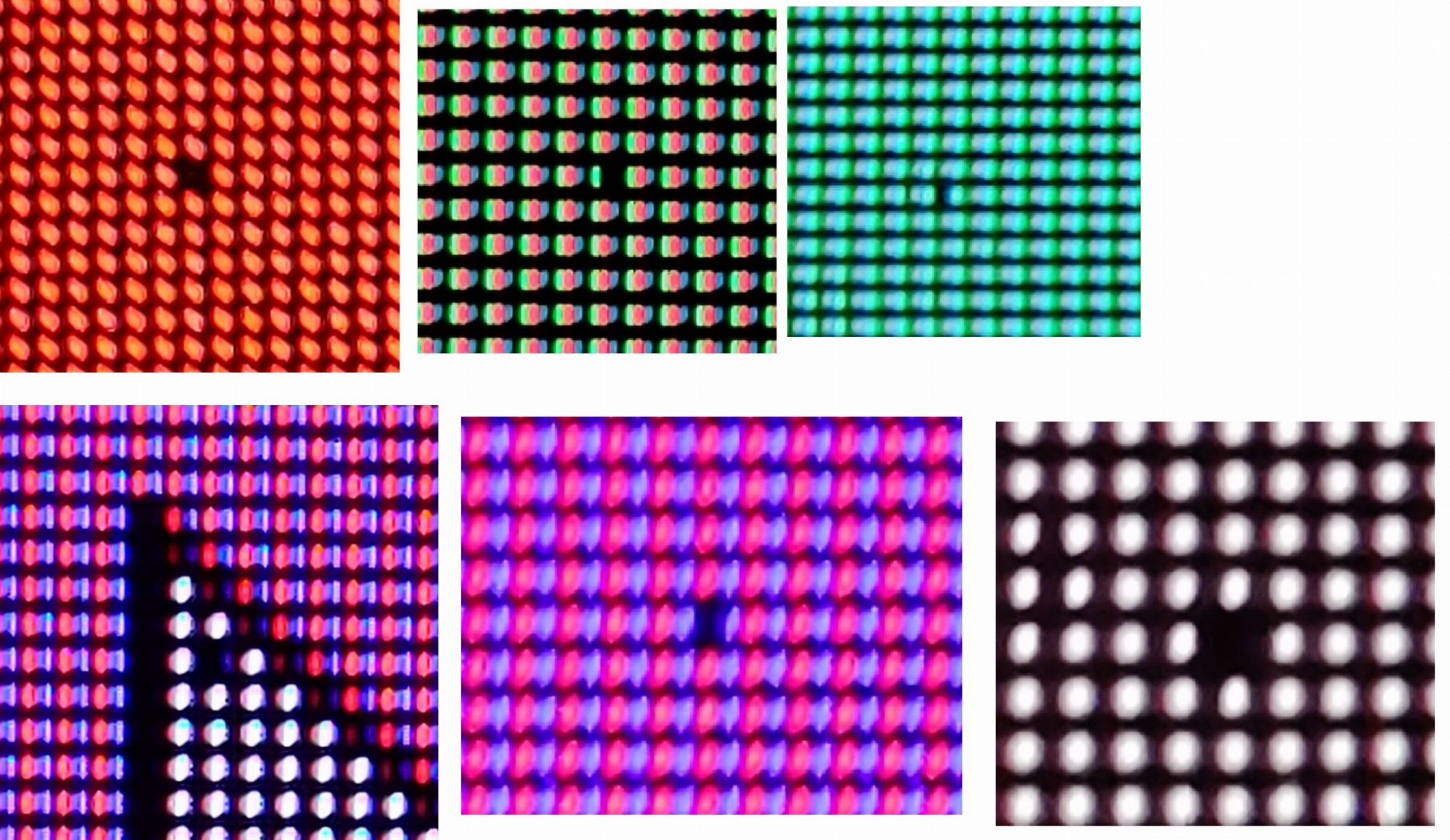
I took some more pics of this 1 dead pixel I have on c1.
It appears it's not the whole pixel dead. It's ok on blue or green but dead on red, magenta and white.
So maybe it's red and white sub pixel... no idea, the images I took on primary rtings colors only confuse me
I still don't find it reasonable to return the screen because 2 or 3 subpixels are not working... but I do notice it occasionally on sky or brighter colors and it's kinda annoying me
View attachment 344628
For the amount of money that these panels cost, I would return it.
HiCZoK
Gawd
- Joined
- Sep 18, 2006
- Messages
- 860
I would but it's so much hassle to pack the tv back and wait for 2 weeks for money return so I can buy again elsewhere... and then get 3 dead pixels probably.For the amount of money that these panels cost, I would return it.
And the pixel is visible on reds and whites the most.
My buddy is getting the screen on tuesday. I will check pixels on his unit. If he has none, then I will return. The monitor is so good, I don't want to live few weeks without it again
And others said, the pixel might eventually maybe fix itself. Maybe I could run the full 1 hour refresher ?
I've been reading (and experiencing) the VRR flicker. Do you think it's something that would ever get worked out? Is it less noticeable at higher framerates? I was hoping on getting a 30xx for the proper 4:4:4 4k@120, but if the VRR flicker isn't going to get sorted it might be worth just sticking with vsync and get the adapter for 4:4:4 on my 2070S.
So glad I sold my c9 few days ago (no support from lg/amd for Vrr on c9) . Just before I bought heavily discounted 48cx today 48c1 showed up for pretty much the same price (immediately bought it). Here's me hoping actual c1 (and not CX) model shows up so I can be sure to receive firmware updates for next 2 years 55 was fine for couch viewing but up close I looked real funny over zoom meetings constantly turning my head for documents which were in 4 different corners of my screen.
55 was fine for couch viewing but up close I looked real funny over zoom meetings constantly turning my head for documents which were in 4 different corners of my screen.So glad I sold my c9 few days ago (no support from lg/amd for Vrr on c9) . Just before I bought heavily discounted 48cx today 48c1 showed up for pretty much the same price (immediately bought it). Here's me hoping actual c1 (and not CX) model shows up so I can be sure to receive firmware updates for next 2 years
Where did you get a c1?
European Union, local webshops have it and delivery is supposed to happen next week (so far it really looks like I bought lg 48c1).Where did you get a c1?
no support from lg/amd for Vrr on c9
Are you saying the "freesync over HDMI" EDID override trick no longer works, or doesn't work on newer GPUs (e.g. RX 6000 series)?
https://www.reddit.com/r/Amd/comments/g65mw7/working_freesync_mod_for_vrr_displays_tested_on/
(not that I guess you could test it since you've sold the C9 now...)
At least EDID edit with previous version of CRU (CRU was updated recently) resulted in no signal received by LG C9 (as far as I'm aware it was the same for everybody else with 6000 series GPU, 120/60Hz, 4k, 1440p or 1080p made no difference) as display was detected by windows (LG just displayed no signal message) but I needed second screen (which I no longer have) to roll back changes made to EDID to disable freesync.Are you saying the "freesync over HDMI" EDID override trick no longer works, or doesn't work on newer GPUs (e.g. RX 6000 series)?
https://www.reddit.com/r/Amd/comments/g65mw7/working_freesync_mod_for_vrr_displays_tested_on/
(not that I guess you could test it since you've sold the C9 now...)
HiCZoK
Gawd
- Joined
- Sep 18, 2006
- Messages
- 860
anyone figured out how to stop audio preset from changing to "game optimizer preset" every time pc is restarted and gsync detected?
The only solution aside from switching to my preferred preset (music) on each pc restart is do disable gsync in the TV or in Nvidia control panel.. but I love gsync
The only solution aside from switching to my preferred preset (music) on each pc restart is do disable gsync in the TV or in Nvidia control panel.. but I love gsync
Is this only a problem with the new CX1?anyone figured out how to stop audio preset from changing to "game optimizer preset" every time pc is restarted and gsync detected?
The only solution aside from switching to my preferred preset (music) on each pc restart is do disable gsync in the TV or in Nvidia control panel.. but I love gsync
HiCZoK
Gawd
- Joined
- Sep 18, 2006
- Messages
- 860
No idea. I only got C1 and it's annoyingIs this only a problem with the new CX1?
I would assume it's a quirk of the C1 and maybe the Instant Game Response setting also causes this to happen. Try contacting LG and maybe they will fix it in a firmware update.anyone figured out how to stop audio preset from changing to "game optimizer preset" every time pc is restarted and gsync detected?
The only solution aside from switching to my preferred preset (music) on each pc restart is do disable gsync in the TV or in Nvidia control panel.. but I love gsync
You can expect that a new iteration will have all kinds of annoyances. Some get fixed, others do not within the first 6 months or so.
HiCZoK
Gawd
- Joined
- Sep 18, 2006
- Messages
- 860
I tweeted at them. not sure which account is alright though...I would assume it's a quirk of the C1 and maybe the Instant Game Response setting also causes this to happen. Try contacting LG and maybe they will fix it in a firmware update.
You can expect that a new iteration will have all kinds of annoyances. Some get fixed, others do not within the first 6 months or so.
HiCZoK
Gawd
- Joined
- Sep 18, 2006
- Messages
- 860
Hey, I've been wondering - The Peak Brightness setting seems important but it is greyed out in both SDR and HDR modes when I am in "PC INPUT" on m pc. These are available on ps5 with "console input".
Does that mean that these settings are set to high or off ? What would it do in sdr anyway if am set to Oled Light 30, then the tv never dims below 120nits as it can hold this brightness even on full screen no problem.
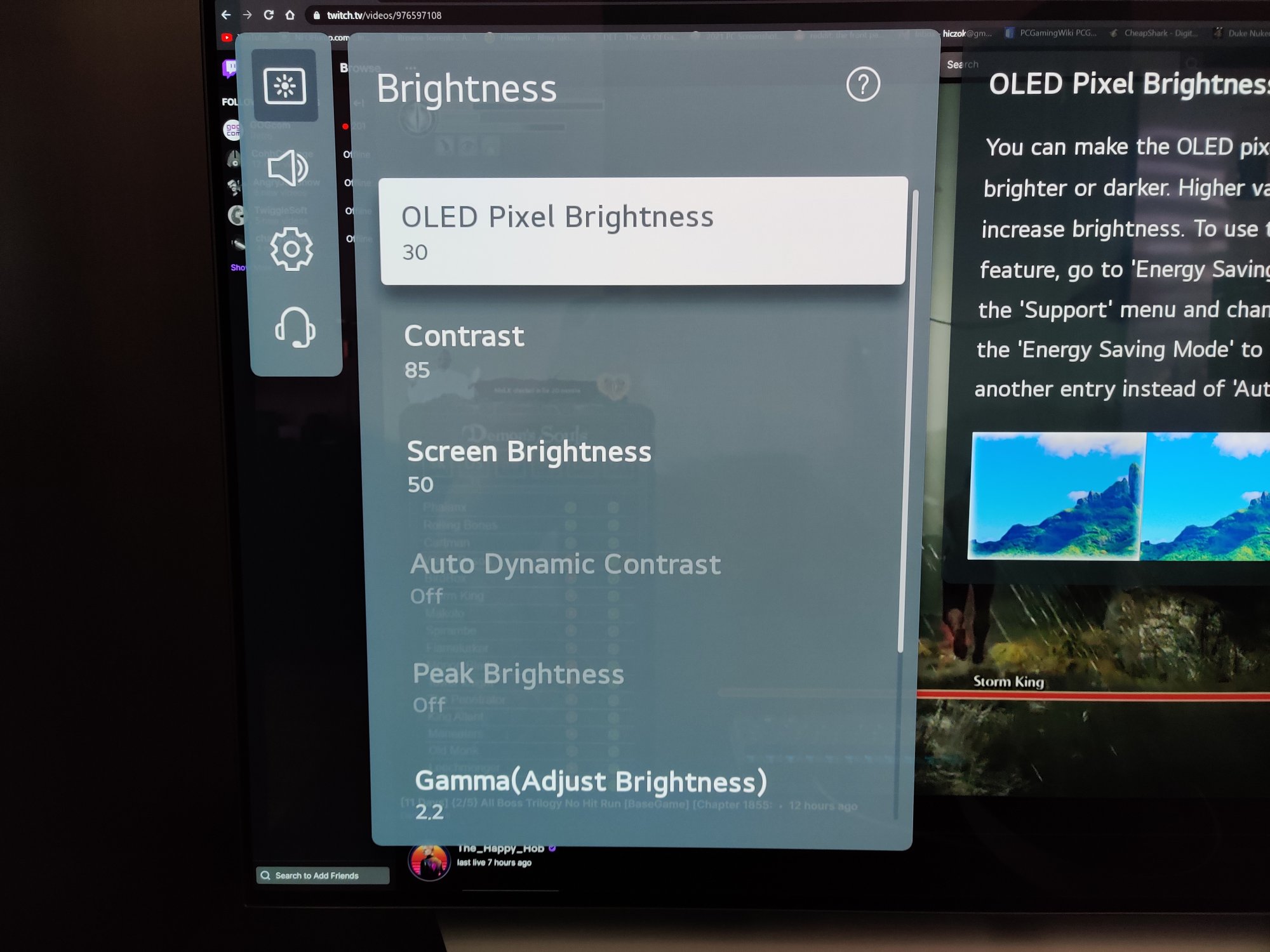
Does that mean that these settings are set to high or off ? What would it do in sdr anyway if am set to Oled Light 30, then the tv never dims below 120nits as it can hold this brightness even on full screen no problem.

Armenius
Extremely [H]
- Joined
- Jan 28, 2014
- Messages
- 53,287
The peak brightness alters the ABL behavior so SDR can get brighter. A setting of 'high' can get close to 500 nits with a 2% window compared to 300 nits with it turned off. I assume they disable it in PC mode to protect the screen.Hey, I've been wondering - The Peak Brightness setting seems important but it is greyed out in both SDR and HDR modes when I am in "PC INPUT" on m pc. These are available on ps5 with "console input".
Does that mean that these settings are set to high or off ? What would it do in sdr anyway if am set to Oled Light 30, then the tv never dims below 120nits as it can hold this brightness even on full screen no problem.
View attachment 345565
I don't know if anyone has helped you out yet.It was delivered. I got it configured. Woah.
But i also have a C9 with a 2080ti
What arrived? i have both adapters the club3d and the cable matters.
Forget VRR on a 2080ti unless you want 60hz which no one does.
Go with either adapter and a ultra high speed cable for 4k 120hz 10/12bit
I don't know if anyone has helped you out yet.
But i also have a C9 with a 2080ti
What arrived? i have both adapters the club3d and the cable matters.
Forget VRR on a 2080ti unless you want 60hz which no one does.
Go with either adapter and a ultra high speed cable for 4k 120hz 10/12bit
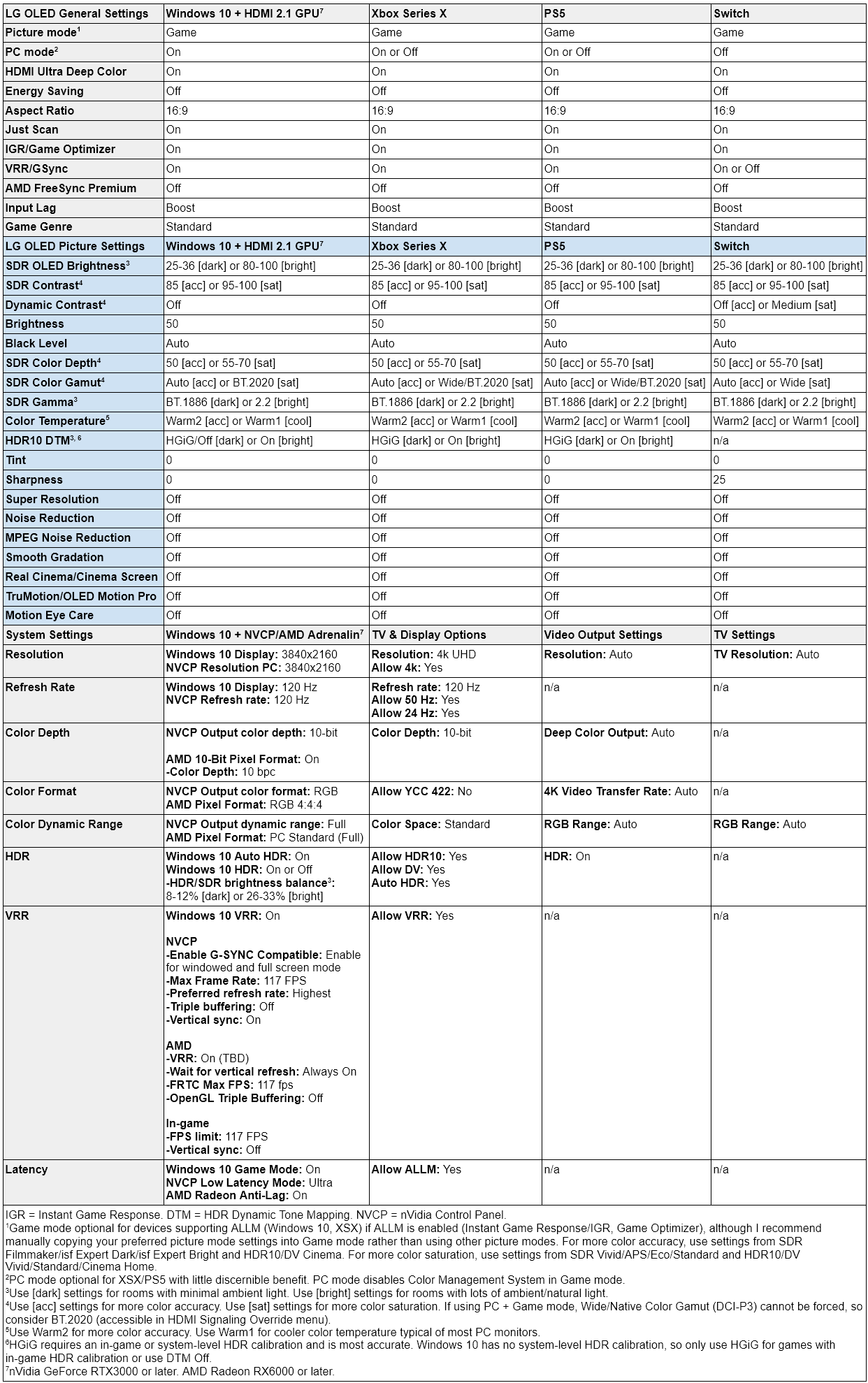
I followed a guide sheet I found on the reddit super thread on it.
I have a CX with the 2080Ti.
Used the cablematters usb-c adapter. Running 4k120Hz full rgb 10bit
Last edited:
Microcenter $999 Refurbs stocked today
https://hardforum.com/threads/lg-ol...99-microcenter.2009071/page-2#post-1044980791
https://hardforum.com/threads/lg-ol...99-microcenter.2009071/page-2#post-1044980791
If you want to try DSR for some 8K craziness etc, you might want to use CRU to remove the 4096x2160 resolutions completely from the EDID. Otherwise the DSR settings will be based on that resolution so they are a bad match for the real 3840x2160 res. I wish you could just disable 4Kx2K support from some menu on the TV because that is basically a useless resolution for 99% of users since the display can't actually show it correctly since it doesn't have the pixels.
I followed a guide sheet I found on the reddit super thread on it.
I have a CX with the 2080Ti.
Used the cablematters usb-c adapter. Running 4k120Hz full rgb 10bit
Ahh ok, so you got your adpater working, kk nice, grats, looks amazing doesn't it? now go try some youtube 4k60 hdr videos here https://www.youtube.com/user/jacobschwarz
I know it's only 60hz but they still look amazing. Try Peru, Bulgaria and Morocco.
Ahh ok, so you got your adpater working, kk nice, grats, looks amazing doesn't it? now go try some youtube 4k60 hdr videos here https://www.youtube.com/user/jacobschwarz
I know it's only 60hz but they still look amazing. Try Peru, Bulgaria and Morocco.
It is absolutely amazing indeed.
Wife and I watched "Bright" on it last night, and now she wants one for the living room.
Freaking nightmare just happened for me. My windows screen saver is suddenly not turning on, and my triple 48's stayed on for the past 18 hours or so with my windows and icons. I have image retention and possibly burn in on my center screen from a white box that was on a web page, a small notepad window, and even my desktop icons, which I have religiously moved around to prevent this issue.
Has anyone run into something like this? I see the LG pixel refresher in the menus but don't really know what it's about. What can I do?
I am gutted. I've been very careful to date. I can move my main screen to the side and center one with no burn in. But UGH. So gutted. It's only noticeable with flat colours. But that's like the sky for me in driving sims. I'll see it.
Has anyone run into something like this? I see the LG pixel refresher in the menus but don't really know what it's about. What can I do?
I am gutted. I've been very careful to date. I can move my main screen to the side and center one with no burn in. But UGH. So gutted. It's only noticeable with flat colours. But that's like the sky for me in driving sims. I'll see it.
There is an "auto off" setting in the TV, highly recommend you turn it on. It can be annoying at times but it's worth itFreaking nightmare just happened for me. My windows screen saver is suddenly not turning on, and my triple 48's stayed on for the past 18 hours or so with my windows and icons. I have image retention and possibly burn in on my center screen from a white box that was on a web page, a small notepad window, and even my desktop icons, which I have religiously moved around to prevent this issue.
Has anyone run into something like this? I see the LG pixel refresher in the menus but don't really know what it's about. What can I do?
I am gutted. I've been very careful to date. I can move my main screen to the side and center one with no burn in. But UGH. So gutted. It's only noticeable with flat colours. But that's like the sky for me in driving sims. I'll see it.
Definitely run the pixel refresher
Ok. I am 20 minutes into the pixel refresher and will report back. Any use in running that several times if I still see stuff?
I will look for auto off. Thanks for that! I gotta figure out why my screen saver isn't working. Power management used to turn them off at 30 minutes too. Not working. I did a windows updato to no effect. I will try unplugging USB stuff.
I will look for auto off. Thanks for that! I gotta figure out why my screen saver isn't working. Power management used to turn them off at 30 minutes too. Not working. I did a windows updato to no effect. I will try unplugging USB stuff.
Armenius
Extremely [H]
- Joined
- Jan 28, 2014
- Messages
- 53,287
I would try to avoid running the pixel refresher consecutively because the voltage cycling it does will wear out the pixels faster. The TV will automatically run the refresher when it's turned off after a certain number of operating hours, so there is usually no need to run it manually unless situations like yours happens. If you're paranoid just manually turn the TVs off when you walk away from your PC.Ok. I am 20 minutes into the pixel refresher and will report back. Any use in running that several times if I still see stuff?
I will look for auto off. Thanks for that! I gotta figure out why my screen saver isn't working. Power management used to turn them off at 30 minutes too. Not working. I did a windows updato to no effect. I will try unplugging USB stuff.
Yes, do not run the voltage refresher often. I would actually recommend you never run it, as the TV will run it itself from time to time, and thats usually enough.
Turn the OLED off and give it some time. I highly doubt 18 hours of static content caused permanent burn in. Leave it off, let the voltage settle, and see what it looks like,.
Turn the OLED off and give it some time. I highly doubt 18 hours of static content caused permanent burn in. Leave it off, let the voltage settle, and see what it looks like,.