Logically speaking unchecking it just disables the gsync setting which makes things smooth. I don't see how this is a fix for stutter with Gsync? It just takes gssync out of the picture.In my case, unchecking that box makes the Hz value stable with G-SYNC at any locked frame rate below 120 Hz, and the stuttering stops.
![[H]ard|Forum](/styles/hardforum/xenforo/logo_dark.png)
Navigation
Install the app
How to install the app on iOS
Follow along with the video below to see how to install our site as a web app on your home screen.
Note: This feature may not be available in some browsers.
More options
You are using an out of date browser. It may not display this or other websites correctly.
You should upgrade or use an alternative browser.
You should upgrade or use an alternative browser.
LG 48CX
- Thread starter gan7114
- Start date
It somehow glitches so gsync is still running. Can confirm It worked for me too. The TV reports VRR on, BFI (truemotion) is grayed out, etc.Logically speaking unchecking it just disables the gsync setting which makes things smooth. I don't see how this is a fix for stutter with Gsync? It just takes gssync out of the picture.
However, without any workarounds, 4k 120 10bit 444 Limited simply works for me, no glitching needed. OLED55CX6LA .26 firmware. RGB full doesn't and stutters a lot. As described above there's also less banding in 444 limited than rgb full on my unit/firmware.

- Joined
- May 5, 2006
- Messages
- 5,956
idk if this has been mentioned yet but I'm sure many are aware that the PS5 currently is not supporting VRR at all. It's listed in their spec sheets though so it might be enabled eventually.
- Joined
- May 5, 2006
- Messages
- 5,956
Has anyone else tried disabling auto-dimming like I have?
I'm genuinely curious, as it was driving me crazy and I thought more people would want to do it. I haven't looked back since doing it!
Using settings like these in the second quote that RTings offered in their C9 review to avoid ABL should probably work on the CX while keeping your screen from going into higher burn-in risk ranges. These settings wouldn't work for HDR though and would be cutting brighter colors out in general.
I don't know if it would turn off auto dimming entirely. It might or it might not. It might depend on what the bottom value of the dimming steps is compared to these setting. Either way it would avoid ranges that kick ABL on by keeping your settings in a safer range vs burn in.
The C9 has a new Peak Brightness setting, which adjusts how the ABL performs. Setting this to 'Off' results in most scenes being displayed at around 303 cd/m², unless the entire screen is bright, in which case the luminosity drops to around 139 cd/m². Increasing this setting to 'Low', 'Med', or 'High' increases the peak brightness of small highlights.
If ABL bothers you, setting the contrast to '80' and setting Peak Brightness to 'Off' essentially disables ABL, but the peak brightness is quite a bit lower (246-258 cd/m² in all scenes).
Last edited:
Can you set peak brightness in game mode?Using settings like these in the second quote that RTings offered in their C9 review to avoid ABL should probably work on the CX while keeping your screen from going into higher burn-in risk ranges. These settings wouldn't work for HDR though and would be cutting brighter colors out in general.
I don't know if it would turn off auto dimming entirely. It might or it might not. It might depend on what the bottom value of the dimming steps is compared to these setting. Either way it would avoid ranges that kick ABL on by keeping your settings in a safer range vs burn in.
- Joined
- May 5, 2006
- Messages
- 5,956
From what I know about TVs in general, you can usually setup OSD settings under unique names and switch between them with the remote but I'll wait for someone who owns and LG CX to reply. I'm still waiting at least a few weeks on nov deals and hopefully the next firmware update. At this rate I won't have a 3000 series gpu until january based on the release time of the model I want and the availability of stock vs scalpers.
ASBL and ABL are separate things. ASBL kicks in even at low brightness because the screen thinks there is static content.Using settings like these in the second quote that RTings offered in their C9 review to avoid ABL should probably work on the CX while keeping your screen from going into higher burn-in risk ranges. These settings wouldn't work for HDR though and would be cutting brighter colors out in general.
I don't know if it would turn off auto dimming entirely. It might or it might not. It might depend on what the bottom value of the dimming steps is compared to these setting. Either way it would avoid ranges that kick ABL on by keeping your settings in a safer range vs burn in.
https://hardforum.com/threads/lg-48cx.1991077/page-79#post-1044661831Please share how you get to the service menu to disable this. I was only aware of the energy savings setting.
- Joined
- May 5, 2006
- Messages
- 5,956
ASBL and ABL are separate things. ASBL kicks in even at low brightness because the screen thinks there is static content.
But how low does ASBL go compared to the ABL avoiding settings RTings posted? Like is it several steps lower than those settings almost like a dim screensaver overlay? Honestly asking. My laptop is set to go pretty dim when it isn't on wall power so I imagine it's something like that, which can be quite dim if set up to be.
It gets quite dim. It also does this constantly in desktop use. For example when I am typing this message it would start to dim the display and the only way to reset is to show a bright window on screen so it detects that content has changed.But how low does ASBL go compared to the ABL avoiding settings RTings posted? Like is it several steps lower than those settings almost like a dim screensaver overlay? Honestly asking. My laptop is set to go pretty dim when it isn't on wall power so I imagine it's something like that, which can be quite dim if set up to be.
shadow2761
Limp Gawd
- Joined
- Mar 11, 2016
- Messages
- 455
So there is issues with 4K 120 444 and gsync?
I was considering this TV as an upgrade only for my single player games from my LG 38GL950. But I may wait now?
I was considering this TV as an upgrade only for my single player games from my LG 38GL950. But I may wait now?
MelonSplitter
[H]ard|Gawd
- Joined
- Aug 6, 2006
- Messages
- 1,142
Yes. If I were you I would wait until the next firmware update reviews. If it isn't fixed at that time then it would probably be best to avoid the CX if you are planning to game a lot. Being that I already have one, my fingers are surely crossed.So there is issues with 4K 120 444 and gsync?
I was considering this TV as an upgrade only for my single player games from my LG 38GL950. But I may wait now?
- Joined
- May 5, 2006
- Messages
- 5,956
I'm waiting on the next firmware and since I won't be able to get the 3000 series gpu I want for awhile I feel less of a rush anyway. However I can't see myself getting an ips or any other LCD over one of these if they fix the VRR stuttering. That is, I'll probably still buy one begrudgingly even if there are still raised blacks in VRR - though flickering would bother me too much and I'd have to return it if it was flickering on me. The overall quality (sans stuttering and flickering) is too good on OLED compared to LCD. I also don't want a short panel anymore. I followed the 43" LCDs for awhile but they aren't worth the money so choices are limited. Most ultrawides are the same ~ 13" tall of a 27" 16:9. The 38" ultrawides are around 14.4" tall.
For reference, ordered by height.. (roughly, based on raw sizes):
----------------------------------------------------------------
22.5" diagonal 16:10 .. 19.1" w x 11.9" h (1920x1200 ~ 100.6 ppi) FW900 crt
27.0" diagonal 16:9 .... 23.5" w x 13.2" h (2560x1440 ~ 108.79 ppi)
34.0" diagonal 21:9 .... 31.4" w x 13.1" h (3440x1440 ~ 109.68 ppi)
37.5" diagonal 21:10 .. 34.6" w x 14.4" h (3840x1600 ~ 110.93 ppi)
31.5" diagonal 16:9 .... 27.5" w x 15.4" h (2560x1440 ~ 93.24 ppi) .. (3840x2160 ~ 137.68ppi)
40.0" diagonal 16:9 .... 34.9"w x 19.6" h (3840x2160 ~ 110.15ppi)
43.0" diagonal 16:9 .... 37.5" w x 21.1" h (3840x2160 ~ 102.46 ppi)
48.0" diagonal 16:9 .... 41.8"w x 23.5" h (3840x2160 ~ 91.79 ppi)
55.0" diagonal 16:9 .... 47.9"w x 27.0"h (3840x2160 ~ 80.11 ppi)
----------------------------------------------------------------
Sorcerer_Tim
Limp Gawd
- Joined
- Oct 8, 2009
- Messages
- 183
How are you all connecting your 3080s (or maybe any cards) to receivers for audio? Since I got my TV and 3080 I have had my GPU connected to my TV via HDMI and to my receiver via a DisplayPort to HDMI cable. Last night my card only automatically switched to 4K/60Hz and after rebooting the PC now I get no HDMI signal as long as the DisplayPort cable is plugged in. Not sure what happened. The receiver is a Denom 4520ci. Any thoughts?
We're really nitpicking. I for one cannot say any raised-gamma issue but I have no idea what I'm looking for nor am I going to go hunt for it. The Gsync stutter only happens for me in COD MW and I just used a fixed refresh rate setting vs gsync and I can't really tell too much. The clarity, color pop is completely unparralleled (I just tested it against the 34gn850 which I had for 2 weeks). And I use it just as a desktop monitor; so those using it for the apps, that's just gravy on top.
t1337duder
Gawd
- Joined
- Sep 7, 2014
- Messages
- 783
Depends. The IQ is vastly better than any other monitor. If having the best display device with a few kinks which may or may not get fixed bothers you, then you're always free to get any of the other monitors with worse IQ and no G-Sync issues. I've only had a chance to use VRR on my XB1 and it's not something I notice.I'm really on the fence with this. Is this TV still worth it even with the unfixable VRR raised-gamma issue and Gsync issue (possibly fixable via firmware)? What's the general consensus?
Makeroflostsouls
2[H]4U
- Joined
- Jun 4, 2008
- Messages
- 2,850
I haven’t had any issues with VRR with my 5700 xt. I’m going to try some more games today. But everything seams smooth with it. Also seams that I’m the only one here with an amd card. Don’t believe that will be an issue soon with the new cards coming out in a week. The only issue I have had is since the last firmware update, I launch a game and get a black screen. Have to toggle off and on game response or whatever it’s called and then everything is fine till I turn the computer off. After the first time it doesn’t do it any more. Still super annoying.
- Joined
- May 5, 2006
- Messages
- 5,956
I haven’t had any issues with VRR with my 5700 xt. I’m going to try some more games today. But everything seams smooth with it. Also seams that I’m the only one here with an amd card. Don’t believe that will be an issue soon with the new cards coming out in a week. The only issue I have had is since the last firmware update, I launch a game and get a black screen. Have to toggle off and on game response or whatever it’s called and then everything is fine till I turn the computer off. After the first time it doesn’t do it any more. Still super annoying.
You'd still be subject to raised blacks when VRR is enabled while running a frame rate average whose graph runs through rates well below 120fpsHz
... but the VRR stuttering issue is on hdmi 2.1 gpus , at least the only hdmi 2.1 gpus available so far being the nvidia 3000 series. The 2000 series nvidia gpus don't have stuttering either since they are also hdmi 2.0b like your card so are limited in what they can output at 4k.
The 3000 series on hdmi 2.1 doesn't stutter at 8bit or reduced chroma resolution of 4:2:0 either I think, so it's almost like it is limited to running somewhat lower rates like a PG27UQ on dp 1.4 is in a way. Most reports of stuttering are at 100fpsHz and higher ranges but that includes an average frame rate that spans above 100fpsHz (unless you cap it at 100 or lower or set your monitor to 100hz in display settings I guess).
--------------------------------------------
So again, from what I understand the VRR stuttering is in this scenario:
hdmi 2.1 output gpu running 4k 10bit 444 where the actual frame rate anywhere in your frame rate graph goes above 100fpsHz. That could include a 75fps average game that swings 30fps and more.
The raised blacks issue is from the oled emitters being over energized through lower fpsHz rates compared to the gamma curve at 120fpsHz, which sounds like the farther you drop from 120fpsHz the brighter and more grey the blacks would be.
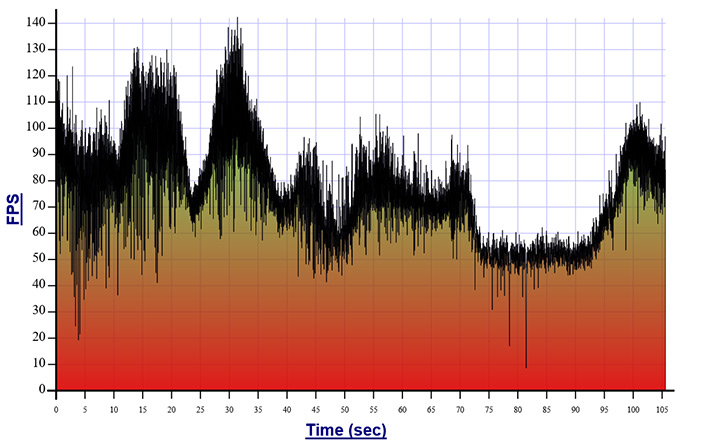
An example of what the actual frame rates can be on a game running ~ 75fpsHz average is in the quote below on metro exodus. As you can see the actual rates hit way higher than 100 (into 4k 10bit 444 stutter range) and also span much lower through 60fpsHz and some much lower "potholes" (very distant from 120Hz gamma).
Metro Exodus 4k Ultra frame rate AVERAGE graph (no DLSS, no RTX), showing what 75.5 fps average can look like in actual frame rates.
https://hothardware.com/reviews/nvidia-geforce-rtx-3090-bfgpu-review?page=4
So it would make sense that you might be able to see the difference, especially if starting at a lower, and apparently brighter, frame rate average to begin with.
Last edited:
equinox654
Gawd
- Joined
- Apr 7, 2005
- Messages
- 994
I just noticed the coolest thing. I have had uncharted 4 for years and never played it. I figured I would give it a go on the cx.
About half an hour into the game I went to see what the picture settings were at and noticed motion smoothing was on. I turned it off and it felt like the nasty 30fps I was expecting from the ps4 pro. Turned it back on and added some de juddder and the game feels great.
Obviously you wouldn't want to play a game like cod that way, but for a game like uncharted... I don't really notice the latency and the smoothess is great.
About half an hour into the game I went to see what the picture settings were at and noticed motion smoothing was on. I turned it off and it felt like the nasty 30fps I was expecting from the ps4 pro. Turned it back on and added some de juddder and the game feels great.
Obviously you wouldn't want to play a game like cod that way, but for a game like uncharted... I don't really notice the latency and the smoothess is great.
- Joined
- May 5, 2006
- Messages
- 5,956
reply/rumor....
https://www.avsforum.com/threads/20...aming-thread-consoles-and-pc.3138274/page-207
https://www.avsforum.com/threads/20...aming-thread-consoles-and-pc.3138274/page-207
Quý Trọng said:
Glad to hear that! I know 05.00.03 fixed this issue, no idea about CX firmware though.
Btw Digital Foundry told me that their beta firmware on CX is 03.21.03 and they have no problems. Hope we get this firmware soon.
And some interesting stuff regarding the gamma shift: https://www.reddit.com/r/OLED_Gaming/comments/jnivu5/seeing_gamma_shift_might_not_get_sorted_for/
Which confirms that it is in practice negligible at 100-120fps, so will be a near perfect display once the stutter is fixed.
Which confirms that it is in practice negligible at 100-120fps, so will be a near perfect display once the stutter is fixed.
- Joined
- Jul 5, 2012
- Messages
- 4,743
Well that makes sense. I haven't seen any gamma shifting because all of the games I've played so far are games that I can easily get 90+ fps on a 2080 Ti. Giving that Control is quite a demanding game on even the latest Ampere cards it's easy to see why that game shows gamma shifting so easily. So you either calibrate the TV, turn the brightness down 2 clicks from 50 to 48, or simply target 100+ fps at all times. At least there are solutions to this issue if it really bothers you that much.
Yeah I'll make one (or several) calibration profile of some sort for the games I won't be playing at 100+fps then. I think that's acceptable because even with VRR I frequently cap my frames way below 117 to get a more consistent experience, esp in the more immersive single player titles.
shadow2761
Limp Gawd
- Joined
- Mar 11, 2016
- Messages
- 455
So rtings retested the cx with a hdmi 2.1 signal recently.
The input lag for 4K VRR is 13.9ms?
I find that is a bit high for what I was expecting.
The input lag for 4K VRR is 13.9ms?
I find that is a bit high for what I was expecting.

- Joined
- Jun 10, 2011
- Messages
- 441
On an FALD, ~13 ms seems to be the typical minimum latency at 4K 120 Hz for HDR + VRR. It needs one frame to process the HDR luminance for the FALD with backlight response set to the fastest mode. That shouldn't be required for OLED, but there may be a hardware limitation in VRR mode.So rtings retested the cx with a hdmi 2.1 signal recently.
The input lag for 4K VRR is 13.9ms?
I find that is a bit high for what I was expecting.
Are you sure? I thought only the 3000 series could do HDMI VRR since it requires HDMI 2.1If there isn't some additional variable involved you aren't aware of, then same TV, same cable type, different GPUs points to something wrong in the GPUs or NVidia drivers, not the TV. Both GPUs are doing HDMI VRR.
EDIT: HDMI VRR with HDMI 2.1 supports 4K@120 but HDMI 2.0 supports it a 60. Is that correct?
Last edited:
- Joined
- Jul 5, 2012
- Messages
- 4,743
So rtings retested the cx with a hdmi 2.1 signal recently.
The input lag for 4K VRR is 13.9ms?
I find that is a bit high for what I was expecting.
It's REALLY not going to matter unless you are a top 100 level competitive player or something, in which case you will not even be using a CX as your gaming display to begin with but probably some 1080p 240Hz one instead. I can guarantee 99% of people on this forum won't benefit from the CX having 1ms of input lag vs the measured ~10-13ms from various sites. Sure, the lower number is better on paper and looks more appealing, but in the real world it makes a negligible difference. I can still frag out pretty hard in a fast paced shooter like COD on my CX even with it's "high" input lag.
Its strange but I tested few games, and there was shuttering using VRR, then I enabled vsync and shutering was gone in all games.
In apex legends with vsync I got capped at 115 fps max, no issues.
In Horizon Zero Dawn I got shuttering in benchmark even at 80fps, turned on vsync and it was gone.
In apex legends with vsync I got capped at 115 fps max, no issues.
In Horizon Zero Dawn I got shuttering in benchmark even at 80fps, turned on vsync and it was gone.
shadow2761
Limp Gawd
- Joined
- Mar 11, 2016
- Messages
- 455
It's REALLY not going to matter unless you are a top 100 level competitive player or something, in which case you will not even be using a CX as your gaming display to begin with but probably some 1080p 240Hz one instead. I can guarantee 99% of people on this forum won't benefit from the CX having 1ms of input lag vs the measured ~10-13ms from various sites. Sure, the lower number is better on paper and looks more appealing, but in the real world it makes a negligible difference. I can still frag out pretty hard in a fast paced shooter like COD on my CX even with it's "high" input lag.
I actually think I may that small % that can notice a difference of 7ms.
- Joined
- Jul 5, 2012
- Messages
- 4,743
I actually think I may that small % that can notice a difference of 7ms.
Then that Asus 360Hz monitor must be the ideal choice for you

And VIncent measured 7ms at 4k120hz. But yeah RTings and TFTcentral measured around 13.
Make of that what you will but yes I play fast paced online shooters and have zero issues. I could measure it with my 240fps camera (which means +/-4ms) at some point but I really haven't felt compelled to since I'm performing at least as good if not better than on my gaming LCDs with 1-2ms input lag.
Make of that what you will but yes I play fast paced online shooters and have zero issues. I could measure it with my 240fps camera (which means +/-4ms) at some point but I really haven't felt compelled to since I'm performing at least as good if not better than on my gaming LCDs with 1-2ms input lag.
And VIncent measured 7ms at 4k120hz. But yeah RTings and TFTcentral measured around 13.
Make of that what you will but yes I play fast paced online shooters and have zero issues. I could measure it with my 240fps camera (which means +/-4ms) at some point but I really haven't felt compelled to since I'm performing at least as good if not better than on my gaming LCDs with 1-2ms input lag.
Rtings update puts 4K 120 Hz at about 7ms but at 13 when VRR is enabled, which is odd when both 1080p and 1440p have even lower input lag with VRR than without it. Might be a bug or something specific to how the display handles 4K.
I've played all through Doom Eternal (as an example of a game with the kind of action you would see in MP shooters too) and never had any issues as long as Game mode was used. Using any other mode with Instant game response enabled increased input lag a bit, just enough to feel a difference but even that would not have been a problem for having a good gaming experience. I should test it again with the latest updates.
To me the input lag on the LG OLEDs is low enough to be a complete non-issue for any gaming.
It should be 7ms.I actually think I may that small % that can notice a difference of 7ms.
12ms VRR at 4k120 probably were measured in windowed mode with V-Sync on or something.
- Joined
- May 5, 2006
- Messages
- 5,956
If you go back and look at my other replies you'll see the huge delays comparatively in world action states sent and received when playing online games. If you are within a frame locally and can't feel the input lag in single player games, you are not going to get any competitive edge with higher Hz from a world action state delivery point playing online games. It's literally many frames before you get the next update on the best tick servers and most are worse ticks. Maybe if you were playing all LAN players on the same LAN with a fast tick server but otherwise it's really moot competitive wise other than aesthetics. I supposed you could argue a little more blur reduction could help slightly at higher Hz as long as you are supplying enough fps to fill those Hz, which most people and games aren't.. but the marketing is not focusing that and is acting like you are going to be served online game frames/ticks at "360hz" .. hah. It's hard to blame people much for believing it when that's what they are being told in advertisements.
Quoting my post again about tick rates in games for more detailed info and referenced links:
If you run 120fps solid (not average) you'd see new game world data on a local game every 8.3ms.
Or 8.54ms at 117ms capped.
However most people on a 4k screen will be using VRR with lower bottom end frame rate ranges to get better graphics settings, outside of a few very high frame rate and/or older games so they would be seeing 14ms (70fps) through 8.5ms (117fps) per frame ranges at 90 or 100fpsHz average, if they can even hit that average.
Online games aren't sending you new world/action states to react to for a much longer time - based on (15ms and usually much longer for most games) tick rates combined with the ping time of every player (usually 20ms - 40ms when possible). You don't want a long reaction time locally after the server state is sent back to you and you don't want to feel like your lip-sync is off so to speak, but considering the whole chain (time to send your action to server, server calculation, interpolation, time to send back) and the margins on both ends between multiple players I think there's a limit on the low end to how small in ms it really matters after a point - for online games in particular since you can't really react on what hasn't processed yet or what you haven't seen happen yet and neither can anyone else playing on the server.
So you can't see new world/action states (new unique pages in an animation flip book) until every 8.5ms at 117fps on a 120hz monitor locally.
Then in an online game the whole loop of your action, the server processing it, and sending that new server action state back to you (including everyone else's actions, ping+interpolation factored) is magnitudes longer.
For example a good server game with 128 tick servers and using interp ratio 2 (to avoid huge 250 ms hits on missed packets) would have 15.6ms interpolation + 25ms to 40ms (your ping). So say 41ms to 56ms just for your own actions not counting lag compensation between other players. Lets say 56ms for now on the higher 128tick servers (though most games are much longer tick). 56ms is 6.6 frames of time on a 120hz monitor at 117fps solid (8.5ms per frame). So you aren't seeing new world updates for every 6 or 7 frames, maybe worse in relation to syncing with your next local (8.5ms) frame draw.
On a more traditional 64tick , 22tick, or 12 tick online game the numbers go up by a lot:
128tick at interp_2 = 15ms + (25 - 40ms) ping = 40ms to 55ms ~~~~~~~~~> 5 to 7 frames before new action/world state data is show (at 117fps solid)
64 tick at interp_2 = 31.2ms + (25 - 40ms) ping = 56ms to 71ms ~~~~~~~~> 7 to 8 frames
22 tick at interp_2 = 90ms + (20 - 40ms) ping = 110ms to 130ms ~~~~~~~~> 13 to 15 frames
12 tick at interp_2 = 166ms + (20 - 40ms)ping = 186ms to 206ms ~~~~~~~> 22 to 24 frames
If you set interp_1 then the tick interpolation time would be halved (minus 1 frame, 2 frames, 5 frames, 10 frames respectively) - but any lost packet at all would hit you with a 250ms delay /8.5ms per frame = 29 frames.
Command Execution Time = Current Server Time – (Packet Latency + Client View Interpolation)
For reference, tick rates of some common online games:
Valorant: 128tick
Specific paid matchmaking services like ESEA: 128tick
CSGO ("normal" servers): 64tick
Overwatch: 63
Fortnite: 60 (I think, used to be 20 or 30)
COD Modern Warfare mp lobbies: 22tick
COD Modern Warfare custom lobbies: 12tick
Some have guessed that League of Legends tick rate is around 30.
ESO PvE / PvP: ??
WoW PvE / PvP ?? .. World of warcraft processes spells at a lower 'tick rate' so is a bit more complicated, but overall the tick rate probably isn't that great.
https://us.forums.blizzard.com/en/wow/t/is-classic-getting-dedicated-physical-servers/167546/81
https://happygamer.com/modern-warfa...or-a-game-that-wants-to-be-competitive-50270/
Quoting my post again about tick rates in games for more detailed info and referenced links:
If you read through what I quoted about tick rates on servers you'd see that you'll still likely be getting 15.6 ms per tick on a 128tick server unless you had pristine ping and were willing to risk 250ms delays whenever your 2nd package is lost. For most game's 64 tick , 22, tick and 12 tick games your ms from the server would be much longer.
" Put into English this means that once you pull the trigger and this information package gets sent to the server, it then goes back from the current server time (the time the pulling the trigger package was received) by your ping plus your interpolation time. Only then it is determined if the client hit the shot or not. "
Then consider that everyone else in an online game is subject to the same lag compensation formulas.
I really think the response time considering extreme hz and mouse usage is overblown considering all of that, unless you are playing LAN games only (or single player local games) and at very high frame rates rather than using VRR to ride a roller coaster of frame rates that are moderate or low on the middle and low end of a frame rate graph. I'm guessing most people buying a HDR capable 4k OLED are buying it for some serious eye candy, not playing a very high frame rate competitive game at low settings or that is low graphics by design. What I do agree with is that at very high frame rates on very high frame rate monitors, the sample and hold blur would be reduced (without suffering the tradeoffs of BFI). That is not only advantageous for image clarity while moving for targeting purposes, but also aesthetically.
Anyone testing would have to make sure that they are running 120fps (115 or 117fps capped) as a minimum , no averages, in order to get 8.3ms per frame at 120fps (or 8.6ms at 115fps) for the upper limit of what the monitor can do. However a more realistic test would be 90 to 100fps average where people are using higher graphics settings on demanding games, relying on VRR to ride a roller coaster of frame rates.
-------------------------------------------
If someone is doing graphics settings overboard or has a modest gpu and cranks up the graphics at 4k resolution on a game so that they are getting say 75fps average, they would then be frame durations something in the ranges of:
......25ms / 16.6ms <<< 13.3ms >>>> 11.1ms / 9.52ms
at...40fps / 60fps <<< 75fps >>> 90fps / 105fps
------------------------------------------
https://win.gg/news/4379/explaining-tick-rates-in-fps-games-difference-between-64-and-128-tick
- CSGO official matchmaking: 64-tick
- CSGO on FACEIT: 128-tick
- CSGO on ESEA: 128-tick
Valorant tick rates:
- Valorant official matchmaking: 128-tick
Call of Duty: Modern Warfare tick rates:
While that sounds fast, many CSGO players have monitors capable of running at 144Hz. In simple terms, the monitor can show a player 144 updates per second, but Valve's servers only give the computer 64 frames total in that time. This mismatch in the server's information getting to the computer and leaving the server can result in more than a few issues. These can include screen tearing, a feeling like the player is being shot when protected behind cover, and general lag effects.
- COD multiplayer lobbies: 22-tick
- COD custom games: 12-tick
---------------------------------------------------
You'd think that a tick of 128 would be 7.8ms and a tick of 64 would be 15.6ms , but it's not that simple... (see the quotes below)
----------------------------------------------------
http://team-dignitas.net/articles/b...-not-the-reason-why-you-just-missed-that-shot
interpolation. When your game client receives a package from the server, it doesn’t simply show you the updated game world right away. This would result in everyone breakdancing in 128 or 64 tick intervals across the map. Rather, it waits a set interpolation time called “lerp”, whose name probably originated by a network engineer stepping on a frog.
During this time, a set number of further packages arrived on the client’s side containing more updated ticks from the server. Through these ticks, the client is able to interpolate what has happened between these two points in time and display this assumption to the player (don’t get mad yet). Interpolation time is determined by the simple equation
cl_interp = cl_interp_ratio / cl_updaterateSo in our 128 tick server example from above, on otherwise default settings this would mean: You receive a new packet every 7.8 Milliseconds (cl_updaterate 128) but the server waits until you received a third packet (cl_interp_ratio 2) before displaying the information, making the interpolation time is 15.6 Milliseconds for this example. On the other hand, a client running cl_interp_ratio 1 is presented with a renewed state of the game every 7.8 Milliseconds – assuming all other hardware and software variable are optimal.
Of course, from everything we’ve learned in our long online gaming history we assume that a lower number in front of the ms sign is always preferable. But, you already guessed it, things aren’t so easy this time around as bad connections and lag compensation come into the picture.
Again, the people with unreliable connections are better off to accept higher interp times, as the game client requires a new package of information from the server precisely at the interpolation time to update your game. If the second package is lost, the client waits 250ms on another package before flashing that red warning message in the top right corner of the screen.
For someone who tends to experience any package loss pretty much ever, it is safer to set cl_interp_ratio to 2, especially since you regain the “lost” time in the lag compensation.
Lag Compensation
The inevitable conclusion from the preceding segment and also the fact that all players on the server have a ping is, that everything you see on your screen has happened on the server already a few Milliseconds in the past.
Let’s leave any philosophical and Einsteinian implications of this to the side for the moment to focus on how a playable game is produced from this situation in which you don’t have to pre-aim your crosshair in front of the enemy.
The process responsible for this is lag compensation in which the server accounts for both ping and interpolation timings through the formula:
Command Execution Time = Current Server Time – (Packet Latency + Client View Interpolation)
Put into English this means that once you pull the trigger and this information package gets sent to the server, it then goes back from the current server time (the time the pulling the trigger package was received) by your ping plus your interpolation time. Only then it is determined if the client hit the shot or not.
Combining all of these factors - these tiny ms differences on the LG are really moot and especially if arguing latency regarding online (rather than LAN) gameplay and without using solid frame rates that don't dip below the max Hz of the monitor.
mirkendargen
Limp Gawd
- Joined
- Dec 29, 2006
- Messages
- 435
I am sure. HDMI VRR is a feature that was finalized around the same time as HDMI 2.1, but nothing about it requires HDMI 2.1 bandwidth and a signal that fits in HDMI 2.0 bandwidth (like 4k 120hz 4:2:0) can have VRR fine on HDMI 2.0. How did you think Turing cards did VRR on this TV and labeled them G-Sync compatible? Lots of us ran that way for months.Are you sure? I thought only the 3000 series could do HDMI VRR since it requires HDMI 2.1
EDIT: HDMI VRR with HDMI 2.1 supports 4K@120 but HDMI 2.0 supports it a 60. Is that correct?
- Joined
- May 5, 2006
- Messages
- 5,956
And some interesting stuff regarding the gamma shift: https://www.reddit.com/r/OLED_Gaming/comments/jnivu5/seeing_gamma_shift_might_not_get_sorted_for/
Which confirms that it is in practice negligible at 100-120fps, so will be a near perfect display once the stutter is fixed.
Yes but those are frame rate averages, not solid frame rates. That means you can still drop down 30fps + a few potholes from your average point of 100 throughout the game.
For example this graph of far cry new dawn at 4k getting around 92fps average. Just adjust the graph upward in your head as many steps as you need for 100 or 120:
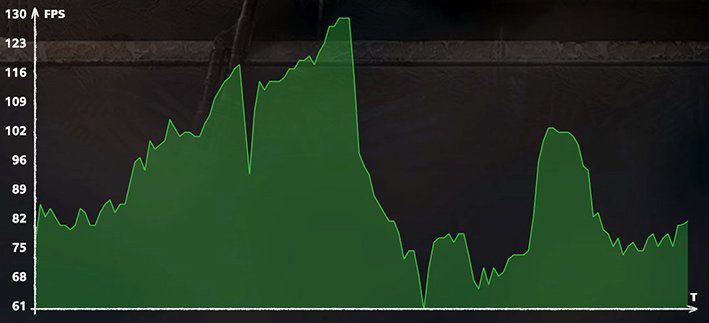
Or scale this one upward from 75.5 fps average on Metro: Exodus....
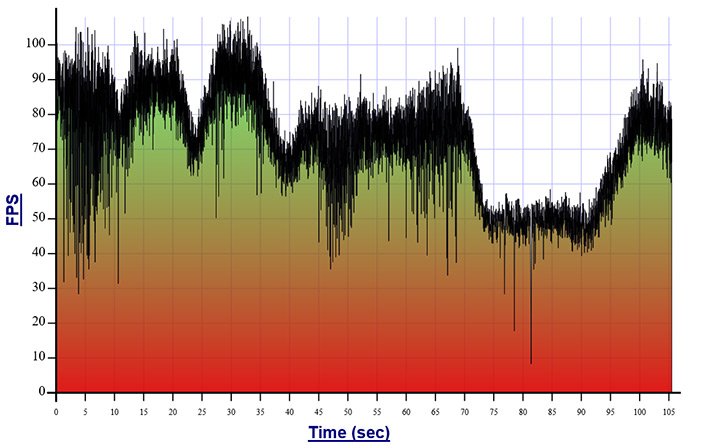
Both graphs are from https://hothardware.com/reviews/nvidia-geforce-rtx-3090-bfgpu-review?page=4
If you adjust the metro one's fps scale to show a ~100fps average on the same graph just as a simple hypothetical, it looks like this below. Of course the graph could be different when actually running that rate but for the sake of argument lets assume it was the same:
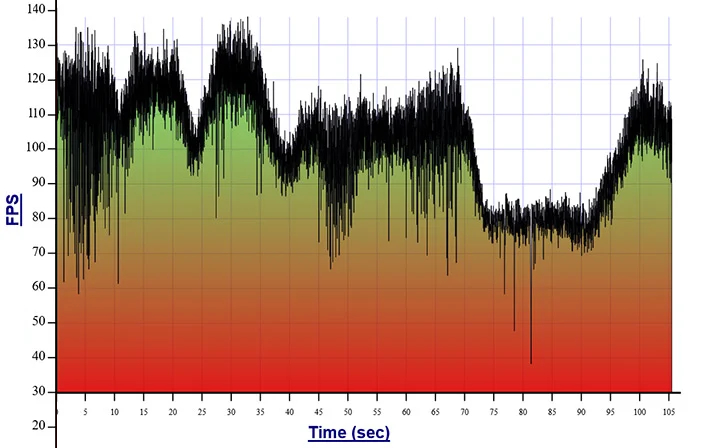
As you can see you'd still be dropping into 80fps and with 60fps and less "fps potholes".
VRR will still blend these varying Hz smoothly but what will the raised blacks be like? Hopefully you are right and the raised blacks won't be as obvious (or as grey) at these kind of 100 - 110fps average rates where about 1/3 of the graph is below 100.
VRR is still very useful at 100fps average but a lot of people probably want to use vrr at more like 75fpsHz average. So if you are "forced" to run 100fpsHz average or better to avoid issues it would be pretty limiting for a lot of people, especially at 4k resolution. On the top end, I wouldn't turn VRR off unless it was on a game with insanely high fps (considering fps potholes), where I could keep the worst minimums at 117fpsHz.
Yeah, but still - what's the alternative? 120 zone FALD with generally worse blacks than even the "raised blacks" on the CX, halos, no VRR and/or no 120Hz support at all?
Right now it's imho either:
A) turn off VRR
B) run at 60Hz VRR
C) live with raised blacks
D) get a 4k€ Alienware OLED that doesn't even have HDMI 2.1 and worse peak brightness (and probably the same raised black issues..?)
E) wait for LG C11 to maybe fix it
F) wait for microLED (miniLED isn't going to cut it against OLED)
Imho it's extreme nitpicking in 2020 for that price point as there is no alternative.
Not saying it is irrelevant, it IS an issue. But it shouldn't be a dealbreaker (vs other current gen TVs/monitors) as ALL current alternatives are worse in many other ways, and especially including blacks.
If you want 4k120 VRR and perfect black in 2020 there currently is no way around LG.
Right now it's imho either:
A) turn off VRR
B) run at 60Hz VRR
C) live with raised blacks
D) get a 4k€ Alienware OLED that doesn't even have HDMI 2.1 and worse peak brightness (and probably the same raised black issues..?)
E) wait for LG C11 to maybe fix it
F) wait for microLED (miniLED isn't going to cut it against OLED)
Imho it's extreme nitpicking in 2020 for that price point as there is no alternative.
Not saying it is irrelevant, it IS an issue. But it shouldn't be a dealbreaker (vs other current gen TVs/monitors) as ALL current alternatives are worse in many other ways, and especially including blacks.
If you want 4k120 VRR and perfect black in 2020 there currently is no way around LG.
Last edited:
- Joined
- May 5, 2006
- Messages
- 5,956
yes I'll deal with/live with raised blacks as long as they fix the stuttering.
I'd just like to know what raised blacks looks like (how grey does it become) at 100fps or 110fps AVERAGE where the rate is still droping way beneath that in the ~100fpsHz graph. (Also curious how raised they are at 75fps average for example).
Saying it's not an issue AT 100 or 120fps (solid) wouldn't mean much since the frame rate variance is what VRR is for in the first place.
I'd just like to know what raised blacks looks like (how grey does it become) at 100fps or 110fps AVERAGE where the rate is still droping way beneath that in the ~100fpsHz graph. (Also curious how raised they are at 75fps average for example).
confirms that it is in practice negligible at 100-120fps, so will be a near perfect display once the stutter is fixed.
Saying it's not an issue AT 100 or 120fps (solid) wouldn't mean much since the frame rate variance is what VRR is for in the first place.
That is what I thought. I had this all figured out back when Nvidia added VRR ability to the 2000 series but now so many posts in this thread saying they are waiting for their 3000 series card to try this out have me confused.I am sure. HDMI VRR is a feature that was finalized around the same time as HDMI 2.1, but nothing about it requires HDMI 2.1 bandwidth and a signal that fits in HDMI 2.0 bandwidth (like 4k 120hz 4:2:0) can have VRR fine on HDMI 2.0. How did you think Turing cards did VRR on this TV and labeled them G-Sync compatible? Lots of us ran that way for months.
So all the posts from people saying we need 3000 series cards are only talking about 4k@120 4:4:4?
I am still using a Titan Xp until stock from either Nvidia or AMD.