It's an interim tech for sure hopefully replaced by micro-LED. How long it will take for us to get monitors using that tech is unknown but I expect initially micro-LED will be limited to large TVs while mini-LEDs and OLEDs are the defacto tech for monitors.Yep, OLED is amazing and will serve a lot of people well but it is definitely not for everyone in its current iteration. I don't know how much the tech can be refined but I guess it will never be ideal for monitor use in bright rooms for example.
HDR will also gain more and more traction and super bright highlights will most likely remain challenging. It doesn't matter to me right now but once high quality HDR is everywhere and LCDs have a gazillion zones it will be a different story and I think that future is not very far off. OLED will still have some strengths even then but it may not be as much of a winner as it is now.
![[H]ard|Forum](/styles/hardforum/xenforo/logo_dark.png)
Navigation
Install the app
How to install the app on iOS
Follow along with the video below to see how to install our site as a web app on your home screen.
Note: This feature may not be available in some browsers.
More options
You are using an out of date browser. It may not display this or other websites correctly.
You should upgrade or use an alternative browser.
You should upgrade or use an alternative browser.
LG 48CX
- Thread starter gan7114
- Start date

- Joined
- May 5, 2006
- Messages
- 5,944
Yep, OLED is amazing and will serve a lot of people well but it is definitely not for everyone in its current iteration. I don't know how much the tech can be refined but I guess it will never be ideal for monitor use in bright rooms for example.
HDR will also gain more and more traction and super bright highlights will most likely remain challenging. It doesn't matter to me right now but once high quality HDR is everywhere and LCDs have a gazillion zones it will be a different story and I think that future is not very far off. OLED will still have some strengths even then but it may not be as much of a winner as it is now.
In the longer run, we'll likely have very high rez VR headsets with mixed reality .. but will also have probably have narrower rendering FoV lightweight and non-bulky AR/Mixed reality glasses that are capable of showing media and virtual screens. Those might still be oled and even clear oled layers too, at least initially.
baby steps:
https://www.cnet.com/tech/computing/htcs-new-vr-headset-appears-to-have-leaked-days-before-reveal/


=================================================================================================================
https://www.macrumors.com/roundup/apple-glasses/
Apple is rumored to be working on at least two AR projects that include an augmented reality headset set to be released in right around 2022 followed by a sleeker pair of augmented reality glasses coming at a later date. Many rumors have focused solely on the glasses, however, leading to some confusion about Apple's plans, but it appears the headset will be the first product launched.
Apple analyst Ming-Chi Kuo believes Apple's "mixed reality" headset will come out in the second quarter of 2022, with the Apple Glasses to follow in 2025, though other sources have said the glasses will come in 2023. The headset is AR/VR, aka mixed reality, while Apple's Glasses are augmented reality.
It's said to feature two high-resolution 8K displays and eye-detecting cameras that will let users "read small type" and "see other people standing in front of and behind virtual objects." The headset will be able to map surfaces, edges, and dimensions of rooms with "greater accuracy than existing devices on the market." It will have a more advanced display and a chip that's even faster than the M1 processor in 2020 Macs.


Micro OLED for both the headset and the glasses supposedly:
The Elec claims that the VR headset will feature a high-resolution micro OLED display with up to 3,000 pixels per inch. A micro OLED display was previously rumored for the smart glasses, but not the VR headset.
bad rez on the lightweight AR glasses so they seem like they are mostly for HUD type things and simple graphics compared to the actual "dual 8k" 8k resolution headset.
Apple is allegedly planning to use "cutting edge" OLED microdisplays supplied by Sony for its rumored augmented reality glasses. Sony's OLED microdisplays feature an ultra-fast response rate, ultra-high contrast, a wide color gamut, high luminance, low reflectance, and integrated drivers for a thin and light design. The glasses are said to feature an 0.5-inch display with a 1280x960 resolution.
==============================
https://uploadvr.com/ps5-vr-headset-hdr-oled-aaa/
includes the resolution of 4000×2040 pixels (2000×2040 per eye) and eye-tracking support for foveated rendering.
Other details from PSVR Without Parole’s video claim the device, codenamed NGVR (next-generation VR), uses an HDR OLED display and has a field of view (FOV) of 110 degrees, 10 more degrees than the original PSVR. Alongside foveated rendering, the new headset could also use a technique called flexible scaling resolution to further increase the performance of PSVR titles.
===================================
Valve and Facebook are also working on next gen headsets. Valves is probably going to microOLED and they are also probably going to use varifocal optic lenses (thin clear Liquid crystal lenses stacked with polarizers that change your focal point). This would make VR more realistic compared to how our normal vision works, and could work better with foveated rendering, using lower resolution outside of what you are focused on. Facebook is prob also going to use Varifocal Lenses but idk if their headest will be microOLED (probably though gauging by what everyone else is doing and what optical/display tech companies are being tapped).
=====================================
So as you can see, OLED display tech isn't going away any time soon. Quite the opposite for the near future.
Last edited:
- Joined
- May 5, 2006
- Messages
- 5,944
Just to update -- it turns out that HTC headset is not going to be the first of the new generation of sleeker microOLED screens (like the ones apple and valve are working on). The HTC Viveflow has an inferior 1600x1600 LCD display so will get outclassed once the better microOLED headsets come out.
- Joined
- May 5, 2006
- Messages
- 5,944
Went ahead and ordered the 77" C1 from best buy *without* the warranty after all.
I'm banking on the fact that LG reserves the top 25% of the brightness range for wear evening, has logo identification and dimming after 5 mins, pixel shifting. That and the fact that I can set up a screen saver on both the TV and my nvidia shield, and maybe energy saving/shutdown. I also know how to do the "turn off the screen" emitters trick but I can't count on everyone doing that or any of us not falling asleep on the couch w/o doing that. Still every time I do that it should save on some wear cumulatively.
Hopefully no other tv breaking issues outside of (avoiding) burn in happen for 4 - 5 yrs. So I went ahead and rolled the dice.
I could have received a $100 e-card from amazon and I could have until the end of jan 2022 to return (and price match) the amazon purchase.
Instead I went with best buy (no e-card currently) and return (and price match) until end of November, but that gets me an extension past the pre-BF and black friday deals. I just didn't like the prospect of having to box up a 77" tv and ship it. I'd rather be able to bring it to bestbuy in my truck if it came to it. That and I wouldn't risk the box showing up busted or speared by fork lift on a drop-off at my house. (If it showed up at bb like that it would be less problematic)
Might get lucky and price match it a little cheaper ($100 - $200 potentially) before the end of november too, will see. If that happens even better but I'm not counting on it necessarily.
I'm banking on the fact that LG reserves the top 25% of the brightness range for wear evening, has logo identification and dimming after 5 mins, pixel shifting. That and the fact that I can set up a screen saver on both the TV and my nvidia shield, and maybe energy saving/shutdown. I also know how to do the "turn off the screen" emitters trick but I can't count on everyone doing that or any of us not falling asleep on the couch w/o doing that. Still every time I do that it should save on some wear cumulatively.
Hopefully no other tv breaking issues outside of (avoiding) burn in happen for 4 - 5 yrs. So I went ahead and rolled the dice.
I could have received a $100 e-card from amazon and I could have until the end of jan 2022 to return (and price match) the amazon purchase.
Instead I went with best buy (no e-card currently) and return (and price match) until end of November, but that gets me an extension past the pre-BF and black friday deals. I just didn't like the prospect of having to box up a 77" tv and ship it. I'd rather be able to bring it to bestbuy in my truck if it came to it. That and I wouldn't risk the box showing up busted or speared by fork lift on a drop-off at my house. (If it showed up at bb like that it would be less problematic)
Might get lucky and price match it a little cheaper ($100 - $200 potentially) before the end of november too, will see. If that happens even better but I'm not counting on it necessarily.
t1337duder
Gawd
- Joined
- Sep 7, 2014
- Messages
- 783
I wouldn't worry about it. Simple precautions such as that ones you listed prevent noticeable burn-in from accumulating from even after years of use. My C7 had none after years of use. Sold it on Craigslist right before getting my 77CX. People just need to learn to be careful and be respectful of their displays. Plasma TVs were a lot worse in this regard and IR/burn-in was manageable with those, too. A burned-in OLED says more about the owner than the technology, at this point.Went ahead and ordered the 77" C1 from best buy *without* the warranty after all.
I'm banking on the fact that LG reserves the top 25% of the brightness range for wear evening, has logo identification and dimming after 5 mins, pixel shifting. That and the fact that I can set up a screen saver on both the TV and my nvidia shield, and maybe energy saving/shutdown. I also know how to do the "turn off the screen" emitters trick but I can't count on everyone doing that or any of us not falling asleep on the couch w/o doing that. Still every time I do that it should save on some wear cumulatively.
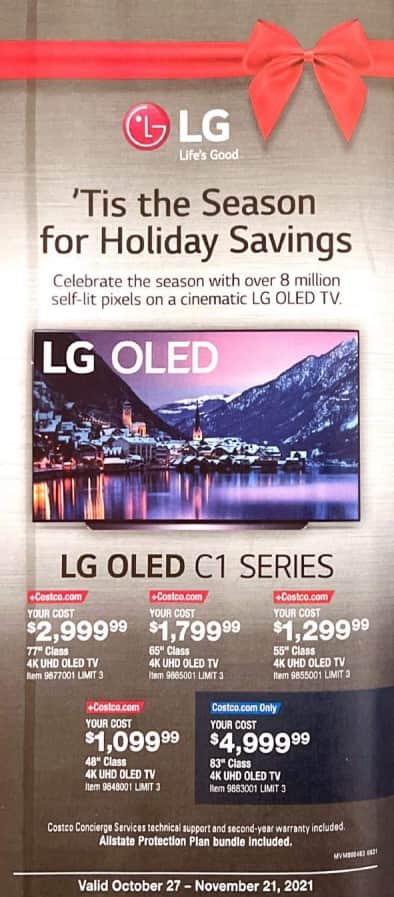
Thanks for that heads up. Will pick one up for bedroom TV. It's useless in my use case as a monitor. But perfect for watching movies and media.For anyone in the US, Costco will have the 48" C1 for $1099 starting October 27th. By far the lowest price it's ever been. Crazy that Asus 32" 144hz IPS monitor with a handful of edge lit zones costs more.
View attachment 403890
- Joined
- May 5, 2006
- Messages
- 5,944
People just need to learn to be careful and be respectful of their displays.
That's the main concern I had though before deciding on it:
Unlike the 48cx at my pc - "people" is not just me when it's a big living room tv with different viewers and at a couch where you can walk away a lot some days and get distracted not coming back (diverting to bedroom for the night for example), or can fall asleep on the couch, etc. A lot of people don't have screen ettiquette and don't feel like they should have to on a tv - whether we agree with that position or not ourselves.

I'll enable as many screen savers and energy savers to standby etc. as I can on the tv and nvidia shield though, along with the built in protections in the newer lines of LG OLED tvs. It seems like a fair bet. Thanks for the feedback on your TV's lifespans.
$1099 ?!?
Ok, seriously now. Anyone reading this thread who even THINKS that they may want to buy a truly incredible monitor someday... make it now. At that price, it absolutely is obliterating whatever other gaming display you've ever considered buying.
The Gsync... just works. The HDR... just works. The 120hz... just works. And they all work together at the same time with no drama. And it's OLED. You really aren't going to do any better in the next couple of years. Or ever maybe.
What a deal.
Even more so considering how many other things are overpriced and in short supply.
Ok, seriously now. Anyone reading this thread who even THINKS that they may want to buy a truly incredible monitor someday... make it now. At that price, it absolutely is obliterating whatever other gaming display you've ever considered buying.
The Gsync... just works. The HDR... just works. The 120hz... just works. And they all work together at the same time with no drama. And it's OLED. You really aren't going to do any better in the next couple of years. Or ever maybe.
What a deal.
Even more so considering how many other things are overpriced and in short supply.
Got to agree. It all just works (now). No strings attached. Not only did LG fix basically every bug this display shipped with, they keep adding features, too!$1099 ?!?
Ok, seriously now. Anyone reading this thread who even THINKS that they may want to buy a truly incredible monitor someday... make it now. At that price, it absolutely is obliterating whatever other gaming display you've ever considered buying.
The Gsync... just works. The HDR... just works. The 120hz... just works. And they all work together at the same time with no drama. And it's OLED. You really aren't going to do any better in the next couple of years. Or ever maybe.
What a deal.
Even more so considering how many other things are overpriced and in short supply.
This is one of the best displays you can buy. Doesn't matter if it's for PC, console gaming, watching TV, Smart TV... the list goes on. LG has shown that they mean business when it comes to OLED displays.

N4CR
Supreme [H]ardness
- Joined
- Oct 17, 2011
- Messages
- 4,944
I see microLED doing better than vastly better than OLED especially on VR headsets where the size is manageable. Sure you can print OLED but the heatsinking, density, brightness and speed of the microLED (already at 1KHz/1000fps) will stomp OLED.
And I am damn sad I'm not in USA right now. I have the $ sitting there to buy it and I doubt there will be a better price in the next year.....
And I am damn sad I'm not in USA right now. I have the $ sitting there to buy it and I doubt there will be a better price in the next year.....
This 48” Holiday sales price bodes well for next years 42”. I think $899 is in the realm of possibility next holiday season.
At that price point and size I really can’t see any excuse to buy any comparable LCD especially all of these 800:1 contrast ratio ultrawides that cost $1200-1800.
At that price point and size I really can’t see any excuse to buy any comparable LCD especially all of these 800:1 contrast ratio ultrawides that cost $1200-1800.
- Joined
- Jul 5, 2012
- Messages
- 4,724
This 48” Holiday sales price bodes well for next years 42”. I think $899 is in the realm of possibility next holiday season.
At that price point and size I really can’t see any excuse to buy any comparable LCD especially all of these 800:1 contrast ratio ultrawides that cost $1200-1800.
"Burn In" Lol
Wow!I see microLED doing better than vastly better than OLED especially on VR headsets where the size is manageable. Sure you can print OLED but the heatsinking, density, brightness and speed of the microLED (already at 1KHz/1000fps) will stomp OLED.
And I am damn sad I'm not in USA right now. I have the $ sitting there to buy it and I doubt there will be a better price in the next year.....
Did you know, that all current OLED's can do 2000Hz (pixel response time under 0.5ms)?
However, there is signalling interface that do support data bandwidth required to deliver that kind of image update speeds @2160p or even 1080p (not even DP2.1).
And there are currently no TCONs / display processors that do support that kind of display update frequences (refresh is not a correct word, as it is related to refreshing CRT phosphors, and is no longer valid for LCD/OLED panels).
https://tftcentral.co.uk/reviews/lg_cx_oled

And I will really heartily welcome any 2160p or better MicroLED display that is smaller than 100", costs under 50K$/k€ and is available during the current decade.
- Joined
- May 5, 2006
- Messages
- 5,944
I see microLED doing better than vastly better than OLED especially on VR headsets where the size is manageable. Sure you can print OLED but the heatsinking, density, brightness and speed of the microLED (already at 1KHz/1000fps) will stomp OLED.
And I am damn sad I'm not in USA right now. I have the $ sitting there to buy it and I doubt there will be a better price in the next year.....
The OLED TVs, even with the TV overhead, have a response time minimum of 1ms ( => 1000hz..and I think up to 2.5ms in testing). So OLED are already capable of 1ms and perhaps even less in the panel itself. In fact this is somewhat a problem because it is so fast that it exacerbates stuttering that is otherwise blended out by slower LCD tech.
Also.. (As I just linked in this thread recently)...
The VR headsets being devoloped by the big players (valve, facebook, apple) now are going to be micro OLED, not microLED.
They are also going to be using varifocal lenses which are very thin clear layers of LED lenses stacked and polarized. These can be switched between on the fly to change the focal point in order to make VR look more like how our real eyesight works. e.g. you hold your finger up in front of your face and focus on it, the background goes out of focus. So they can do that mechanically using the lenses instead of having the headset/app render to infinity and instead of having to devote rendering to simulate the ways our eyes work.
OLED is not going away any time soon.. especially in VR.
https://hardforum.com/threads/leak-rumor-valve-deckard-wireless-vr-ar.2014317/
- 2K/4K per eye, Micro OLED panels. May be rotated to allow wider FOV
- Varifocal lenses confirmed, apparently with support for an OpenXR option that communicates depth for objects
- New custom Qualcomm SoC in "frunk" for standalone capabilities
- Swappable headstrap, modular to alternate between WiGig or higher end computing unit
- AR capabilities
- May announce/release soon - manufacturing facilities for lenses and display are ready
- Evidence in software that it will interop with Steam Deck for split rendering
- There's also mention of a "tablet"
- It could be used with Valve's alleged future console
- Updated controllers with same joysticks as Steam Deck, no more drifting
- Updated sensors for finger tracking
https://www.reddit.com/r/ValveIndex/comments/pzfn79/updated_info_dump_on_the_valve_deckard/
Last edited:
- Joined
- May 5, 2006
- Messages
- 5,944
This 48” Holiday sales price bodes well for next years 42”. I think $899 is in the realm of possibility next holiday season.
At that price point and size I really can’t see any excuse to buy any comparable LCD especially all of these 800:1 contrast ratio ultrawides that cost $1200-1800.
I understand how people want a smaller screen because a lot of people don't have the space or just don't want to dedicate the space for farther viewing distance - but a 42" 4k screen still would be best at a pretty decent distance compared to a 27" to 32" 4k screen.
==================================
For a 42" 4k the viewing distances are:
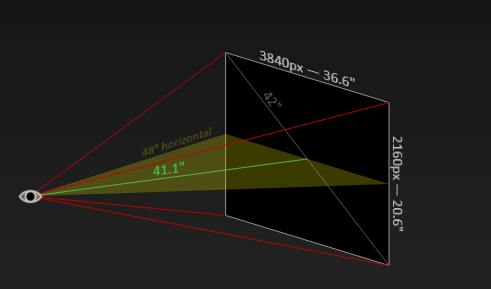
--- ~ 29" or less viewing distance = lower than 60 PPD, below 20/20 vision; most everyone can see individual pixels. You likely need strong anti-aliasing to hide artifacts.
= jumbo pixels to your eyes, aliased graphics, bad text fringing
--- Over 29" viewing distance = above the 20/20 vision threshold of 60 ppd, but below the average vision of ~20/15. You likely need moderate anti-aliasing.
--- ~ 41" viewing distance = 80 PPD which is is moderate, slightly above the average visual acuity; few can see individual pixels. Anti-aliasing only necessary in medium- and high-contrast areas.
==================================
48" 4k at 33" or less viewing distance:
59.3 ppd is below 20/20 vision; most everyone can see individual pixels. You likely need strong anti-aliasing to hide artifacts.
= jumbo pixels to your eyes, bad text fringing
-------------------------------
48" 4k at 33.5" viewing distance:
60 ppd is above the 20/20 vision threshold of 60 ppd, but below the average vision of ~20/15. You likely need moderate anti-aliasing.
= moderate aliasing that can be more or less compensated for with AA (usually at the cost of some frame rate loss) and sub-sampling on text
-----------------------------------
48" 4k at 47"+ viewing distance:
Anti-aliasing is only necessary in medium- and high-contrast areas.
----------------------------------
==============================
I typically sit 38" to 48" away from the 48"CX. If I find I'm not looking at my HUD enough to my detriment in some games I'll kick back to near 48"
When you sit around the same distance away as the monitor's diagonal measurement you are making a more or less equilateral triangle out of your viewing angle and the screen width. Any closer it's a squashed fat triangle (or pyramid) with a more extreme angle to view the corners which can affect how easily you can view your HUD elements.
.....................................
So as a rule of thumb on a 4k screen, as you approach sitting as far away from the screen as the diagonal screen measurement you surpass 80PPD and won't see the overall aggressive/aggravated pixel structure anymore (without AA applied).
That would still be 41"+ viewing distance on a 42" screen to exceed 80PPD.
While you wouldn't see the aggressive individual pixel structure overall generally anymore since it's beyond 20/15, it would still "require" or be recommended to have some modest AA b/c you'd still notice some pixel fringe in medium and high contrasted areas.
80PPD+ 42" 4k
----
In order to exceed 60PPD on a 42" 4k screen requires sitting over 29" viewing distance to your eyeballs. That would "require" or be recommended to have more aggressive AA and good text sub sampling since it still shows a more aggressive/aggravated pixel structure~general pixelization.
60PPD+ 42" 4k

----------------------------------
8k screens will have twice the pixel density so the minimum distances would be halved in all cases vs 4k. However that pyramid to the periphery still applies in regard to your viewing angle degrees regardless of the PPD so I still wouldn't want to sit way too close.
Last edited:
- Joined
- May 5, 2006
- Messages
- 5,944
Running in SDR at OLED brightness of 60-80 10 hours per day as a desktop monitor will DEFINITELY cause this screen to degrade prematurely. No doubt about it. However, the majority of users on this forum take care of their screens and run OLED brightness around 0-30 in SDR. That is the mostly agreed upon "safe zone" for these displays.
Seriously, Linus and Wendel were absolutely abusing their screens.
For reference, I have 7440 hours on my CX. Zero burn-in.
Linus also said in his video, regarding his LG 77" G10:
(wendell uses it as a desktop monitor without dark themes, has static windows in quads/zones and a static taskbar on his screen 8 - 10 hr a day at 60 brightness or more and has been for a few years)."The 77 inch G10 in my living room has been there almost as long as wendell has been driving his C10"
Linus goes on to say:
and finishes with"and in spite of it being used for not just movies, but also for games which are notorious for burning-in static elements like spedometer, life bars -you get the point - it shows no signs of burn-in whatsoever.. and you'll find plenty of similar testimonials from people online. So it's clear that OLEDs absolutely can live long, healthy lives doing what they do best - absolutely crushing other technologies with their image quality"
<like simply use them as a media and gaming stage/theater and NOT using them as a static desktop/static app screen AT ALL.. >"They just clearly require a level of TLC"
( = the safest method at least in my opinion, though you technically can probably get away with it with extra precautions as some of the forum users do).
Linus and Wendell..
..no less using their screens with white app backgrounds and not using dark themes globally
..not locking/hiding taskbars away or even making them transparent
...not switching to using full frame/full-screen material.. leaving window frames in quads all day long and at high 60-80 brightness (Linus admitted to using 80 brightness on static desktop/apps with white backgrounds and obviously had a constant 4 window quad setup static on screen all of the time, Wendell claims "around 60" but looks around sheepishly)
.. some of them were even disabling some of the burn in mitigation tools <I know some forum members swear by this but it does not provide a fair measure of lifespan vs burn in as it's technically voiding the warranty and abusing the screen>
Meanwhile both wendell and linus leave a giant searing bright white static background document on half of the screen throughout the rest of the video while they aren't even using it.
I agree - they both abused the shit out of their screens.
When it comes down to it - these TVs are made to watch movies/videos/media and play games (including pc games) on. Not for use as static desktop app screens or static billboards. If you use them for that you are doing so at your own risk, and they upped that risk a lot with their lack of screen etiquette.
Last edited:
i wonder where the dolby vision firmware update is... i have the korea download and am not really afraid to put it on, i did others last year... but since we are getting down to the last few updates I'm trying to let things update properly to avoid warranty issues later.
- Joined
- Jul 5, 2012
- Messages
- 4,724
Linus also said in his video, regarding his LG 77" G10:
(wendell uses it as a desktop monitor without dark themes, has static windows in quads/zones and a static taskbar on his screen 8 - 10 hr a day at 60 brightness or more and has been for a few years).
Linus goes on to say:
and finishes with
<like simply use them as a media and gaming stage/theater and NOT using them as a static desktop/static app screen AT ALL.. >
( = the safest method at least in my opinion, though you technically can probably get away with it with extra precautions as some of the forum users do).
Linus and Wendell..
..no less using their screens with white app backgrounds and not using dark themes globally
..not locking/hiding taskbars away or even making them transparent
...not switching to using full frame/full-screen material.. leaving window frames in quads all day long and at high 60-80 brightness (Linus admitted to using 80 brightness on static desktop/apps with white backgrounds and obviously had a constant 4 window quad setup static on screen all of the time, Wendell claims "around 60" but looks around sheepishly)
.. some of them were even disabling some of the burn in mitigation tools <I know some forum members swear by this but it does not provide a fair measure of lifespan vs burn in as it's technically voiding the warranty and abusing the screen>
Meanwhile both wendell and linus leave a giant searing bright white static background document on half of the screen throughout the rest of the video while they aren't even using it.
I agree - they both abused the shit out of their screens.
When it comes down to it - these TVs are made to watch movies/videos/media and play games (including pc games) on. Not for use as static desktop app screens or static billboards. If you use them for that you are doing so at your own risk, and they upped that risk a lot with their lack of screen etiquette.
I have done absolutely zero TLC on my CX besides lowering the brightness down to 100 nits for desktop use and I have no burn after just under 1.5 years so far. First thing I did when I got the screen was use the service remote to disable ASBL and have been using it like a normal monitor with static elements and all without a care for this entire time. I really think that if you just use reasonable OLED light setting then you should be fine for years. Of course I don't expect my screen to last 10 years or anything but I'm going to upgrade to a 42" probably in 2023 or 2024 anyways so as long as I can get 3-4 years out of my current CX then I am more than happy and it seems like just running a low OLED light value will get me there no problem.
- Joined
- May 5, 2006
- Messages
- 5,944
I have done absolutely zero TLC on my CX besides lowering the brightness down to 100 nits for desktop use and I have no burn after just under 1.5 years so far. First thing I did when I got the screen was use the service remote to disable ASBL and have been using it like a normal monitor with static elements and all without a care for this entire time. I really think that if you just use reasonable OLED light setting then you should be fine for years. Of course I don't expect my screen to last 10 years or anything but I'm going to upgrade to a 42" probably in 2023 or 2024 anyways so as long as I can get 3-4 years out of my current CX then I am more than happy and it seems like just running a low OLED light value will get me there no problem.
Ymmv doing that and you are voiding the warranty disabling some of the burn in protections but yeah I get it - it's your tv you could do whatever you want with it.
I will say linus's graphic in the transition between parts of his video was pretty relevant. It was several candles burning down.
It's like that or a block of ice with an array of micro torches/flame burner holes. LG reserves the top 25% of the brightness range (beyond that which is in the regular HDR brightness peaks) for the wear-evening routine. It will level that block of ice down to even every so often. Once you run out of that buffer the TV will not be able to do any more "burn down" to make it even so you will be getting "burn in" retention/ghosting permanently (or alternately, if it continued to "burn down" with wear-evening, you would be cutting down your regular peak brightness).
I was under the imperssion that it would just stop doing the wear evening once it exhausted that top 25% reserved brightness but I'm not sure. I'll have to look that up. If it continued to "burn down" and even the emitters, people might think they are still good b/c they are still not seeing "burn-in" ghosting but if it were that scenario they'd actually be losing peak brightness and shrinking their HDR color volume over time. If you were only using SDR you probably wouldn't notice that for a much longer time. SDR ~ 250nit.. peak HDR on the C1 is 767 nit in small % of screen.
Again I thought it would just stop doing the wear evening after the reserve 25% above the normal set function but I haven't verified that.
Using the burn in avoidance features will reduce the amount of heat and/or duration of high heat those burners are applying to the block of ice so will extend how long before that top 25% buffer will be exhausted by a lot.
Last edited:
- Joined
- Jul 5, 2012
- Messages
- 4,724
Ymmv doing that and you are voiding the warranty disabling some of the burn in protections but yeah I get it - it's your tv you could do whatever you want with it.
I will say linus's graphic in the transition between parts of his video was pretty relevant. It was several candles burning down.
It's like that or a block of ice with an array of micro torches/flame burner holes. LG reserves the top 25% of the brightness range (beyond that which is in the regular HDR brightness peaks) for the wear-evening routine. It will level that block of ice down to even every so often. Once you run out of that buffer the TV will not be able to do any more "burn down" to make it even so you will be getting "burn in" retention/ghosting permanently (or alternately, if it continued to "burn down" with wear-evening, you would be cutting down your regular peak brightness).
I was under the imperssion that it would just stop doing the wear evening once it exhausted that top 25% reserved brightness but I'm not sure. I'll have to look that up. If it continued to "burn down" and even the emitters, people might think they are still good b/c they are still not seeing "burn-in" ghosting but if it were that scenario they'd actually be losing peak brightness and shrinking their HDR color volume over time. If you were only using SDR you probably wouldn't notice that for a much longer time. SDR ~ 250nit.. peak HDR on the C1 is 767 nit in small % of screen.
Again I thought it would just stop doing the wear evening after the reserve 25% above the normal set function but I haven't verified that.
Using the burn in avoidance features will reduce the amount of heat and/or duration of high heat those burners are applying to the block of ice so will extend how long before that top 25% buffer will be exhausted by a lot.
I don't expect the display to last as long as it can with the way I'm using it but I just wanted to mention it to let people know that you can pretty much use it like a normal monitor and it won't burn in within a few months like Linus, IF you tone down the OLED light. We'll see how long my CX actually lasts being used this way, but I would say it's good to have many different use cases to get an idea of the life expectancy between people who do maximum TLC, zero TLC like Linus, and somewhere in between like me.
Actually elvn Rtings did not manage to reduce peak brightness on their units even the ones that suffered burn-in. But that was on older models, maybe they let you eat away at peak brightness to increase lifespan on recent sets. I'd prefer that personally as I'm mostly consuming SDR content anyway and value uniformity over highlights anyway. Ideally, let the user decide? IDK.
Last edited:
- Joined
- May 5, 2006
- Messages
- 5,944
Yeah that's what I was getting at but I don't think that is the case, at least not much past the reserved 25% if at all.Actually elvn Rtings did not manage to reduce peak brightness on their units even the ones that suffered burn-in. But that was on older models, maybe they let you eat away at peak brightness to increase lifespan on recent sets. I'd prefer that personally as I'm mostly consuming SDR content anyway. Ideally, let the user decide? IDK.
I think once you "melt"past your buffer you will get permanent burn in ghost images. If only watching movies, media, and gaming with the burn in limiting features enabled that should last the lifetime of the set though, maybe 5 yrs though I've heard people at 6 with no burn in.
Needless to say, I'm leaving all the protections on the 77" I ordered for the living room and primarily using it for movies and YouTube, a few console games maybe. Too pricey for me to be a short term throw away.
5 years from now people will be upgrading to 8k tvs and will probably also be adopting lightweight microOLED 4k and greater glasses to watch virtual screens in real space / mixed reality. Also years later than that microLEDs in panels.
Last edited:
equinox654
Gawd
- Joined
- Apr 7, 2005
- Messages
- 983
I wish we could see the status of 25% overhead buffer.
I have a 5 year old LG B6 and it's flawless. No burn in. I don't baby it either. All my settings are for greater brightness. Recently got a 77" Sony a80j and again, running it with settings for higher brightness.Yeah that's what I was getting at but I don't think that is the case, at least not much past the reserved 25% if at all.
I think once you "melt"past your buffer you will get permanent burn in ghost images. If only watching movies, media, and gaming with the burn in limiting features enabled that should last the lifetime of the set though, maybe 5 yrs though I've heard people at 6 with no burn in.
Needless to say, I'm leaving all the protections on the 77" I ordered for the living room and primarily using it for movies and YouTube, a few console games maybe. Too pricey for me to be a short term throw away.
5 years from now people will be upgrading to 8k tvs and will probably also be adopting lightweight microOLED 4k and greater glasses to watch virtual screens in real space / mixed reality. Also years later than that microLEDs in panels.
Hello,
I recently got a LG C1. Most guides recommend to set color format to RGB and color depth to 10 bpc in NVCP, but with these settings I ran into some issues with color banding, for exemple on this test pattern : http://www.lagom.nl/lcd-test/gradient.php
However, when I set RGB 8 bpc in NVCP (displayed as "8-bit with dithering" in windows advanced display settings), the color banding is visibly reduced.
Even better, if I use YCC 444 AND 8 bpc, I can't see any color banding at all in this test pattern.
Is there any downside in using these settings instead of RGB 10 bpc ?
I recently got a LG C1. Most guides recommend to set color format to RGB and color depth to 10 bpc in NVCP, but with these settings I ran into some issues with color banding, for exemple on this test pattern : http://www.lagom.nl/lcd-test/gradient.php
However, when I set RGB 8 bpc in NVCP (displayed as "8-bit with dithering" in windows advanced display settings), the color banding is visibly reduced.
Even better, if I use YCC 444 AND 8 bpc, I can't see any color banding at all in this test pattern.
Is there any downside in using these settings instead of RGB 10 bpc ?
Hello,
I recently got a LG C1. Most guides recommend to set color format to RGB and color depth to 10 bpc in NVCP, but with these settings I ran into some issues with color banding, for exemple on this test pattern : http://www.lagom.nl/lcd-test/gradient.php
However, when I set RGB 8 bpc in NVCP (displayed as "8-bit with dithering" in windows advanced display settings), the color banding is visibly reduced.
Even better, if I use YCC 444 AND 8 bpc, I can't see any color banding at all in this test pattern.
Is there any downside in using these settings instead of RGB 10 bpc ?
In SDR I can't see this issue. Are you talking about HDR? This is exactly what I discovered last week. Colorbanding is greatly reduced with ycbcr444 limited + 8bit in HDR on my C1.
It is very obvious in AC: Valhalla for example, when there is a blue sky without clouds. But it is also visible on test patterns or even youtube videos like this one:
The grey wall shows way less posterization/banding with 8bit + ycbcr444 limited VS 10 bit.
And since I cannot see any difference at all between 10bit and 8bit (+FRC), limited vs full, RGB vs ycbcr444 in terms of picture quality in any content or games, I will just stick to ycbcr444 limited + 8bit.

- Joined
- Aug 7, 2004
- Messages
- 19,740
Probably something like this.If anyone is on the fence, I just saw a Costco ad at my parents' place today, they had 48" C1s for 1099.99. Didn't recall the prices on the other sizes
- Joined
- May 5, 2006
- Messages
- 5,944
Hello,
I recently got a LG C1. Most guides recommend to set color format to RGB and color depth to 10 bpc in NVCP, but with these settings I ran into some issues with color banding, for exemple on this test pattern : http://www.lagom.nl/lcd-test/gradient.php
However, when I set RGB 8 bpc in NVCP (displayed as "8-bit with dithering" in windows advanced display settings), the color banding is visibly reduced.
Even better, if I use YCC 444 AND 8 bpc, I can't see any color banding at all in this test pattern.
Is there any downside in using these settings instead of RGB 10 bpc ?
In SDR I can't see this issue. Are you talking about HDR? This is exactly what I discovered last week. Colorbanding is greatly reduced with ycbcr444 limited + 8bit in HDR on my C1.
It is very obvious in AC: Valhalla for example, when there is a blue sky without clouds. But it is also visible on test patterns or even youtube videos like this one:
The grey wall shows way less posterization/banding with 8bit + ycbcr444 limited VS 10 bit.
And since I cannot see any difference at all between 10bit and 8bit (+FRC), limited vs full, RGB vs ycbcr444 in terms of picture quality in any content or games, I will just stick to ycbcr444 limited + 8bit.
Lower with frc will give a compression effect almost like anti aliasing so yeah it would soften the color transitions/gradations if there were any. Nothing really wrong with doing that if it looks better to you.
However youtube can also cause problems due to it's own compression, even if you are watching in what I am assuming is the max quality available of that vid from them. You were watching youtube on pc, with which browser or app? Was it full screen? Out of curiousity did you try watching the youtube videos that bothered you instead on the WebOS version of youtube or off of a different device (so that it wouldn't be on the pc named input in order to see how it compares to your pc rgb)?
Where you playing AC Valhalla on PC rather than console? Do you have anti aliasing applied on AC: valhalla? If so what kind and amount and are you at native resolution 4k in the game (consoles use dynamic resolution and checkerboarding)? Full screen exclusive mode HDR of course on PC. Are you using 120hz VRR off of hdmi 2.1 for that game? If so, what were your frame rate averages while you saw that issue (assuming the game doesn't have a 60fpsHz cap)? The gamma on the tv is set for 120Hz so you could try playing it with VRR disabled just to test to see if there is any difference there. Did you have dynamic HDR/Tone-mapping or Hgig enabled or disabled on the TV for the game mode? (Dynamic HDR is inaccurate and off from the absolute HDR metatdata values). Did you use any white point/gamma adjustment in the game's own HDR settings? What are your tv settings including general and especially the brightness, color, sharpness (and BFI) extended settings? Do you have the hdmi input on deep color?
You can check and try these settings for pc:
https://www.reddit.com/r/OLED_Gaming/comments/mbpiwy/lg_oled_gamingpc_monitor_recommended_settings/
Also, how far away are you sitting from the screen?
There are a lot of variables potentially.
Last edited:
Lower with frc will give a compression effect almost like anti aliasing so yeah it would soften the color transitions/gradations if there were any. Nothing really wrong with doing that if it looks better to you.
However youtube can also cause problems due to it's own compression, even if you are watching in what I am assuming is the max quality available of that vid from them. You were watching youtube on pc, with which browser or app? Was it full screen? Out of curiousity did you try watching the youtube videos that bothered you instead on the WebOS version of youtube or off of a different device (so that it wouldn't be on the pc named input in order to see how it compares to your pc rgb)?
Where you playing AC Valhalla on PC rather than console? Do you have anti aliasing applied on AC: valhalla? If so what kind and amount and are you at native resolution 4k in the game (consoles use dynamic resolution and checkerboarding)? Full screen exclusive mode HDR of course on PC. Are you using 120hz VRR off of hdmi 2.1 for that game? If so, what were your frame rate averages while you saw that issue (assuming the game doesn't have a 60fpsHz cap)? The gamma on the tv is set for 120Hz so you could try playing it with VRR disabled just to test to see if there is any difference there. Did you have dynamic HDR/Tone-mapping or Hgig enabled or disabled on the TV for the game mode? (Dynamic HDR is inaccurate and off from the absolute HDR metatdata values). Did you use any white point/gamma adjustment in the game's own HDR settings? What are your tv settings including general and especially the brightness, color, sharpness (and BFI) extended settings? Do you have the hdmi input on deep color?
You can check and try these settings for pc:
https://www.reddit.com/r/OLED_Gaming/comments/mbpiwy/lg_oled_gamingpc_monitor_recommended_settings/
Also, how far away are you sitting from the screen?
There are a lot of variables potentially.
In SDR I can't see this issue. Are you talking about HDR? This is exactly what I discovered last week. Colorbanding is greatly reduced with ycbcr444 limited + 8bit in HDR on my C1.
It is very obvious in AC: Valhalla for example, when there is a blue sky without clouds. But it is also visible on test patterns or even youtube videos like this one:
The grey wall shows way less posterization/banding with 8bit + ycbcr444 limited VS 10 bit.
And since I cannot see any difference at all between 10bit and 8bit (+FRC), limited vs full, RGB vs ycbcr444 in terms of picture quality in any content or games, I will just stick to ycbcr444 limited + 8bit.
Thanks a lot for your responses, glad to know I am not alone on this.
Yes I am talking about HDR, in SDR I can't see any problem either.
I checked lors' youtube video and a slight banding on the wall is present in YCC444 8bit, but much more visible in RGB 10bit.
Concerning settings, I followed the guide elvn linked and I am running the TV connected to a HDMI 2.1 port, with a HDMI 2.1 certified cable, at 4K@120, with HGiG on and deep color.
In RGB 10bit mode, the TV's VRR information screen reports :
118.XXHz
VRR
3840 x 2160P@120
RGB 10b 4L10
Lower with frc will give a compression effect almost like anti aliasing so yeah it would soften the color transitions/gradations if there were any. Nothing really wrong with doing that if it looks better to you.
However youtube can also cause problems due to it's own compression, even if you are watching in what I am assuming is the max quality available of that vid from them. You were watching youtube on pc, with which browser or app? Was it full screen? Out of curiousity did you try watching the youtube videos that bothered you instead on the WebOS version of youtube or off of a different device (so that it wouldn't be on the pc named input in order to see how it compares to your pc rgb)?
Where you playing AC Valhalla on PC rather than console? Do you have anti aliasing applied on AC: valhalla? If so what kind and amount and are you at native resolution 4k in the game (consoles use dynamic resolution and checkerboarding)? Full screen exclusive mode HDR of course on PC. Are you using 120hz VRR off of hdmi 2.1 for that game? If so, what were your frame rate averages while you saw that issue (assuming the game doesn't have a 60fpsHz cap)? The gamma on the tv is set for 120Hz so you could try playing it with VRR disabled just to test to see if there is any difference there. Did you have dynamic HDR/Tone-mapping or Hgig enabled or disabled on the TV for the game mode? (Dynamic HDR is inaccurate and off from the absolute HDR metatdata values). Did you use any white point/gamma adjustment in the game's own HDR settings? What are your tv settings including general and especially the brightness, color, sharpness (and BFI) extended settings? Do you have the hdmi input on deep color?
You can check and try these settings for pc:
https://www.reddit.com/r/OLED_Gaming/comments/mbpiwy/lg_oled_gamingpc_monitor_recommended_settings/
Also, how far away are you sitting from the screen?
There are a lot of variables potentially.
Good points, but I know how to validate things like that. I'm using OLED since two years. I know Youtube compression can show banding, but it is clearly less visible with ycbcr444 limited + 8bit. Also visible in the Eizo monitortest programm and the gradient test patterns. My C9 behaves exactly the same btw. Also 60Hz vs 120Hz or VRR on or off makes no difference.
I could swear I stumbled across it on the C9 some time ago. Sometimes it seems to me that things go away and then suddenly come back, wether due firmware updates, GPU driver updates or whatever. Or maybe not, and it was always the case lol.
At the moment PC-mode and ycbcr444 limited + 8bit is definitely my choice for HDR atm. I leave HDR enabled btw, also for desktop usage, because I don't want to switch back and forth and I want to watch HDR supported videos on Youtube via chrome browser. HDR/SDR brightness balance slider is set to "0", in the TV settings black stabilizer at 7, fine tune dark area at -10 and HGIG. These settings exactly match SDR at OLED-Light 25 / contrast 85 with gamma 2,4. Picture looks identical to me.
Last edited:

Rattle
2[H]4U
- Joined
- Apr 10, 2007
- Messages
- 2,850
Need another tv. PS5 And windows usage. It seems it's impossible to do better than this 48
$1099 ?!?
Ok, seriously now. Anyone reading this thread who even THINKS that they may want to buy a truly incredible monitor someday... make it now. At that price, it absolutely is obliterating whatever other gaming display you've ever considered buying.
The Gsync... just works. The HDR... just works. The 120hz... just works. And they all work together at the same time with no drama. And it's OLED. You really aren't going to do any better in the next couple of years. Or ever maybe.
What a deal.
Even more so considering how many other things are overpriced and in short supply.
I agree and just to give some pricing perspective, right now here in Denmark the few CX'es still in stock are priced at 940$ and the C1 is at 1120$ - Vat/sales tax included.
Yup that was it!

Porter_
[H]F Junkie
- Joined
- Sep 10, 2007
- Messages
- 8,467
Software update 04.30.10 just came through for me, US west coast.

sharknice
Supreme [H]ardness
- Joined
- Nov 12, 2012
- Messages
- 5,209
Software update 04.30.10 just came through for me, US west coast.
I just got it last night on central coast. The "VRR Information" actually shows the framerate now, and there is a minimum brightness you can set in energy saving mode. Pretty cool.