So just playing around with BetterClearTypeTuner and someone else mentioned they used Greyscale, but on mine this looks downright awful. What actually looks the best is unchecking the enable font anti aliasing box, which I'm assuming is just turning clear type completely off? In any regard none of the settings, including turning off clear type, reduce the ghosting with text. I read in another thread that this was expected behavior somewhat with OLED's, but I can't find that thread anymore. It's really distracting and between this and the horrendous ASBL I'm really close to just returning this, BUT... it just looks so damn good in games.
![[H]ard|Forum](/styles/hardforum/xenforo/logo_dark.png)
Navigation
Install the app
How to install the app on iOS
Follow along with the video below to see how to install our site as a web app on your home screen.
Note: This feature may not be available in some browsers.
More options
-
Some users have recently had their accounts hijacked. It seems that the now defunct EVGA forums might have compromised your password there and seems many are using the same PW here. We would suggest you UPDATE YOUR PASSWORD and TURN ON 2FA for your account here to further secure it. None of the compromised accounts had 2FA turned on.
Once you have enabled 2FA, your account will be updated soon to show a badge, letting other members know that you use 2FA to protect your account. This should be beneficial for everyone that uses FSFT.
You are using an out of date browser. It may not display this or other websites correctly.
You should upgrade or use an alternative browser.
You should upgrade or use an alternative browser.
LG 48CX
- Thread starter gan7114
- Start date

phinix
Gawd
- Joined
- Dec 13, 2005
- Messages
- 914
I’m thinking about getting a 48CX for my office, but don’t have the option of going on a stand behind the desk. Would 36” be too close? What’s the optimal viewing distance for a 48” screen?
Also, what’s a good price for those? I see Costco.com has these for $1450, but the 55” in store is 1400. Is this something I can find for around 12-1300 if I shop around for a week or 2?
I sit about 20-23" from it and its ok.
Right now I sit 20" from it, but will be changing my desk to be a bit deeper, so will be sitting 27" from the screen.
Actually, THX recommended viewing angle is 40 degree, not 45-50. For 48", that means a viewing distance of ~4.8'.
https://www.inchcalculator.com/tv-size-viewing-distance-calculator/
Note that THX based their recommendation on the field of view of the human eye, for which the resolution decreases significantly after ~45 degree.
Of course, high def FOV can vary a bit by individual and after testing I decided that 4' (47 degree) was the optimal distance for my 48". I think it is fair to say that 3' (60 degree) is on the extreme end and I wound never recommend this to someone else (of course, I am not arguing with taste and good for you if you like such setup!).
https://www.inchcalculator.com/tv-size-viewing-distance-calculator/
Note that THX based their recommendation on the field of view of the human eye, for which the resolution decreases significantly after ~45 degree.
Of course, high def FOV can vary a bit by individual and after testing I decided that 4' (47 degree) was the optimal distance for my 48". I think it is fair to say that 3' (60 degree) is on the extreme end and I wound never recommend this to someone else (of course, I am not arguing with taste and good for you if you like such setup!).

- Joined
- May 5, 2006
- Messages
- 5,937
The 45 to 50 degree is the sweet spot of viewing angle width if you take thx, smpte, and 20th century fox standards into consideration.
http://www.acousticfrontiers.com/2013314viewing-angles/

But that is for movie watching in particular. Gaming can be different. Even different games (racing, flight sims etc. for example) could benefit from different view distances than other game types. Also ultrawide resolutions would probably benefit from a few different viewing distances depending on what game type being played in uw.
30 inch viewing distance on a 48inch 4k is 55 ppd (and is a 70 degree wide viewing angle).
That would equate to a 16.75 inch viewing distance on a 27 inch 4k screen at the same 55ppd and ~70 degree viewing angle.
That's just under ~1' 5" which is little close but usable at 4k ppi.
I don't think sitting closer to either screen would be optimal in regard to making the ppi look worse and also the viewing angle.
Personally I sit 38"/41" to 48" away most of the time depending on what I'm doing, but I'm using monitors on the sides so a little extra viewing distance helps with the longer array. When gaming I sit at the nearer distance depending the game.. At those distances I'm able to keep the 48 cx at 100% scaling 1:1. I keep each side 43 inch portrait mode monitor at 125% scaling.
http://www.acousticfrontiers.com/2013314viewing-angles/

New cinemas built to THX specifications have a minimum viewing angle of 36 degrees from the last row of seats. The viewing angle ‘sweet spot’ seems to be around 45-50 degrees where SMPTE, THX and 20th Century Fox recommendations converge. This matches quite closely with CEDIA’s 43 degree viewing angle recommendation for 2.4:1 ‘Cinemascope’ content as per CEB-23. For reference 43 degrees is 3x picture height using a 2.35:1 screen.
But that is for movie watching in particular. Gaming can be different. Even different games (racing, flight sims etc. for example) could benefit from different view distances than other game types. Also ultrawide resolutions would probably benefit from a few different viewing distances depending on what game type being played in uw.
30 inch viewing distance on a 48inch 4k is 55 ppd (and is a 70 degree wide viewing angle).
That would equate to a 16.75 inch viewing distance on a 27 inch 4k screen at the same 55ppd and ~70 degree viewing angle.
That's just under ~1' 5" which is little close but usable at 4k ppi.
I don't think sitting closer to either screen would be optimal in regard to making the ppi look worse and also the viewing angle.
Personally I sit 38"/41" to 48" away most of the time depending on what I'm doing, but I'm using monitors on the sides so a little extra viewing distance helps with the longer array. When gaming I sit at the nearer distance depending the game.. At those distances I'm able to keep the 48 cx at 100% scaling 1:1. I keep each side 43 inch portrait mode monitor at 125% scaling.

Armenius
Extremely [H]
- Joined
- Jan 28, 2014
- Messages
- 54,574
The recommendations from THX are for viewing movies, not playing video games.Actually, THX recommended viewing angle is 40 degree, not 45-50. For 48", that means a viewing distance of ~4.8'.
https://www.inchcalculator.com/tv-size-viewing-distance-calculator/
Note that THX based their recommendation on the field of view of the human eye, for which the resolution decreases significantly after ~45 degree.
Of course, high def FOV can vary a bit by individual and after testing I decided that 4' (47 degree) was the optimal distance for my 48". I think it is fair to say that 3' (60 degree) is on the extreme end and I wound never recommend this to someone else (of course, I am not arguing with taste and good for you if you like such setup!).
- Joined
- May 5, 2006
- Messages
- 5,937
Updated with a 30" distance comparison since that seems like a fairly popular setup, though that might be more popular due layout limitations (space, desk dimensions, etc) overall. You can see the PPD (pixels per degree ~ effective PPI to your eyes at distance) drops considerably the closer you sit. The screen extents spread from the mid-line a lot more too obviously and that's not even measuring the heights.
According to the site calculator, the 20/20 vision threshold is 60 PPD which starts at 33.3" viewing distance for a 48" 16:9 4k screen (and starts at ~1.5' on a 27" 4k) so any higher PPD will look tighter than the pixels and any lower PPD will look worse than the pixels .
Example reference points I made using a nvidia viewing angle calculator
---------------------------------------------------------------------------------------------------------
50 deg, the nearest angle in the "sweet spot" convergence of THX, SMPTE, 20thCenturyFox standards (for movie viewing)
76.1 PPD

42" 16:9 display = 39.6" view distance ( ~ 3.25' )
31.5" 16:9 display = 29.7" view distance ( ~ 2.5')
27" 16:9 display = 25.5" view distance ( ~ 2' 2")
-----------------------------------------------------------------------
54 degree 71 to 72 PPD

A 54 degree viewing angle (closer than the THX standard's movie viewing sweet spot of 45 - 50 deg)
..resulting in the same ~71 to 72 PPD at 4k on all of these screen sizes at their respective distances :
48" 16:9 display = 41" view distance ( ~ 3.5 ' )
42" 16:9 display = 35.9" view distance ( ~ 3' )
31.5" 16:9 display = 27" view distance ( ~ 2.4')
27" 16:9 display = 23" view distance ( ~ 2')
----------------------------------------
58 degree 66.6 PPD

A 58 degree viewing angle resulting in the same 66.6 PPD at 4k on all of these screen sizes at their respective distances:
48" 16:9 display = 38" view distance ( ~ 3 ' + 2")
42" 16:9 display = 33.3" view distance ( ~ 2' + 9")
31.5" 16:9 display = 25" view distance ( ~ 2' + 1")
27" 16:9 display = 21.4" view distance ( ~ 1' + 9")
------------------------------------------
70 degree 55 PPD

A ~70 degree viewing angle resulting in the same 55 PPD at 4k on all of these monitor sizes at their respective distances:
48" 16:9 display = 30" view distance (2.5')
42" 16:9 display = 26.3" view distance (~ 2' 2")
31.5" 16:9 display = 19.7" view distance (~ 1' 8")
27" 16:9 display = 16.75" view distance (just under ~ 1' 5")
----------------------------------------------
82 degree 46.7 PPD
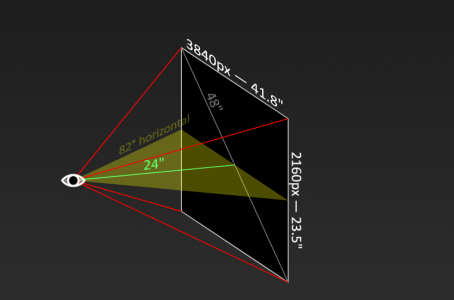
A 82 degree viewing angle resulting in the same 46.7 PPD at 4k on all of these monitor sizes at their respective distances:
48" 16:9 display = 24" view distance (2')
42" 16:9 display = 21" view distance (~ 1' 9")
31.5" 16:9 display = 15.7" view distance (~ 1' 4")
27" 16:9 display = 13.5" view distance (~ 1' 2")
According to the site calculator, the 20/20 vision threshold is 60 PPD which starts at 33.3" viewing distance for a 48" 16:9 4k screen (and starts at ~1.5' on a 27" 4k) so any higher PPD will look tighter than the pixels and any lower PPD will look worse than the pixels .
Example reference points I made using a nvidia viewing angle calculator
---------------------------------------------------------------------------------------------------------
50 deg, the nearest angle in the "sweet spot" convergence of THX, SMPTE, 20thCenturyFox standards (for movie viewing)
76.1 PPD
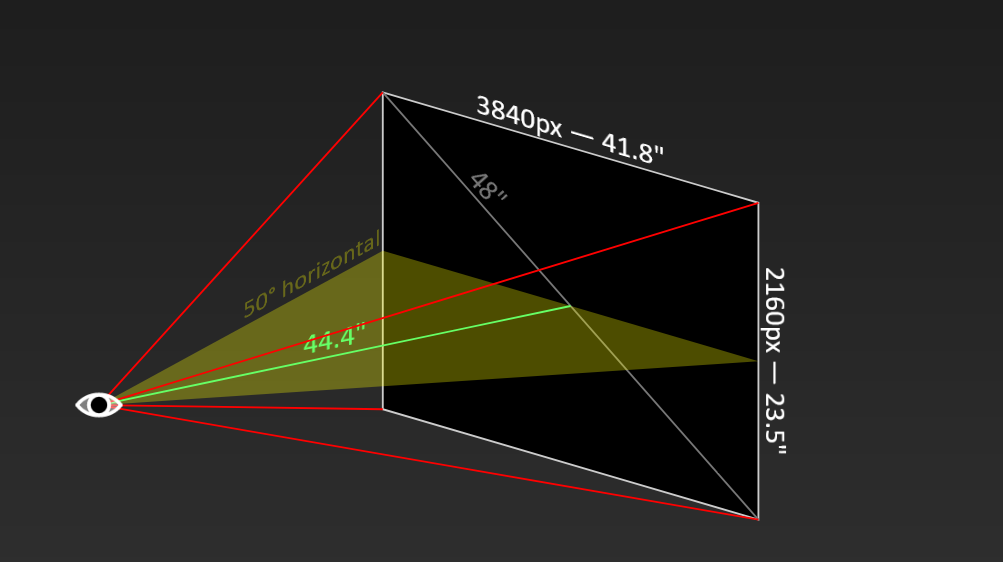
48" 16:9 display = 44.4" view distance ( ~ 3' 8" )76.1 ppd is above the 20/20 vision threshold of 60 ppd, but below the average vision of ~20/15. You will likely need moderate anti-aliasing.
42" 16:9 display = 39.6" view distance ( ~ 3.25' )
31.5" 16:9 display = 29.7" view distance ( ~ 2.5')
27" 16:9 display = 25.5" view distance ( ~ 2' 2")
-----------------------------------------------------------------------
54 degree 71 to 72 PPD
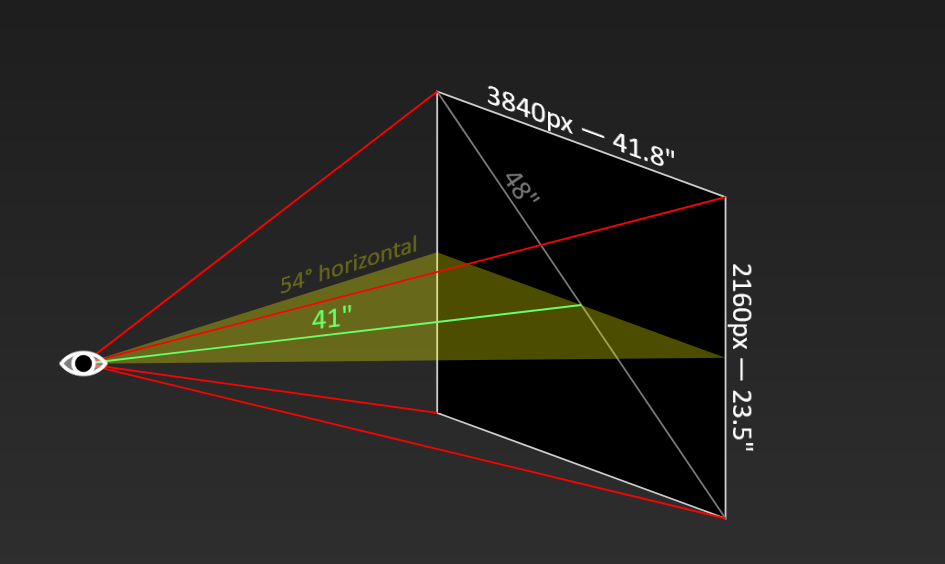
71 ppd is above the 20/20 vision threshold of 60 ppd, but below the average vision of ~20/15. You will likely need moderate anti-aliasing.
A 54 degree viewing angle (closer than the THX standard's movie viewing sweet spot of 45 - 50 deg)
..resulting in the same ~71 to 72 PPD at 4k on all of these screen sizes at their respective distances :
48" 16:9 display = 41" view distance ( ~ 3.5 ' )
42" 16:9 display = 35.9" view distance ( ~ 3' )
31.5" 16:9 display = 27" view distance ( ~ 2.4')
27" 16:9 display = 23" view distance ( ~ 2')
----------------------------------------
58 degree 66.6 PPD

66.6 ppd is above the 20/20 vision threshold of 60 ppd, but below the average vision of ~20/15. You will likely need moderate anti-aliasing.
A 58 degree viewing angle resulting in the same 66.6 PPD at 4k on all of these screen sizes at their respective distances:
48" 16:9 display = 38" view distance ( ~ 3 ' + 2")
42" 16:9 display = 33.3" view distance ( ~ 2' + 9")
31.5" 16:9 display = 25" view distance ( ~ 2' + 1")
27" 16:9 display = 21.4" view distance ( ~ 1' + 9")
------------------------------------------
70 degree 55 PPD

55 ppd is below 20/20 vision. You will likely need strong anti-aliasing to hide artifacts.
A ~70 degree viewing angle resulting in the same 55 PPD at 4k on all of these monitor sizes at their respective distances:
48" 16:9 display = 30" view distance (2.5')
42" 16:9 display = 26.3" view distance (~ 2' 2")
31.5" 16:9 display = 19.7" view distance (~ 1' 8")
27" 16:9 display = 16.75" view distance (just under ~ 1' 5")
----------------------------------------------
82 degree 46.7 PPD
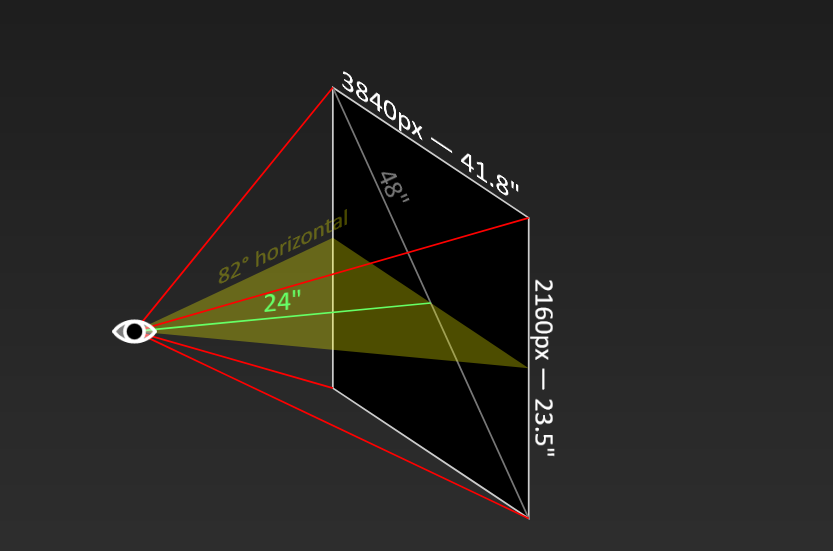
46.7 ppd is below 20/20 vision. You will likely need strong anti-aliasing to hide artifacts.
A 82 degree viewing angle resulting in the same 46.7 PPD at 4k on all of these monitor sizes at their respective distances:
48" 16:9 display = 24" view distance (2')
42" 16:9 display = 21" view distance (~ 1' 9")
31.5" 16:9 display = 15.7" view distance (~ 1' 4")
27" 16:9 display = 13.5" view distance (~ 1' 2")
Last edited:

- Joined
- Jun 10, 2011
- Messages
- 441
I use the CX 48" at a desk and ~4 feet is the minimum distance where it's not uncomfortable to my eyes & neck. It's equivalent to my 27" 4K Predator X27 at arm's length.
t1337duder
Gawd
- Joined
- Sep 7, 2014
- Messages
- 783
Do you leave HDR on all the time? ASBL is significantly more aggressive with HDR on.So just playing around with BetterClearTypeTuner and someone else mentioned they used Greyscale, but on mine this looks downright awful. What actually looks the best is unchecking the enable font anti aliasing box, which I'm assuming is just turning clear type completely off? In any regard none of the settings, including turning off clear type, reduce the ghosting with text. I read in another thread that this was expected behavior somewhat with OLED's, but I can't find that thread anymore. It's really distracting and between this and the horrendous ASBL I'm really close to just returning this, BUT... it just looks so damn good in games.
- Joined
- May 5, 2006
- Messages
- 5,937
Perfect, that was the benchmark I looked for!
My internet connection is a nominal 250/100 MBit Download/Upload fiber connection connected at ↓ 283,2 Mbit/s ↑ 113,3 Mbit/s
My results are:
PC Gigabit Ethernet
270,1 down - 107,1 up - 6ms ping
LG TV wired ethernet connection
100,5 down - 99,5 up - 8ms ping
LG TV wireless ac 5GHz AP far away
42,5 down - 69,5 up - 12ms ping
LG TV wireless ac 5GHz AP closeby
125 down - 105 up - 12ms ping
LG TV wired usb30-ethernet connection
135,5 down - 107,5 up - 8ms ping
It seems as if the usb30 adapter on the tv's usb 2.0 port is capped at 135,5 Mbit/s
My wireless off of the LG's 5Ghz is more like your far away one but up close on mine (almost on top of the router).. 42.5mb/s (5.3MB/sec) down for you, 48 for me (6MB/sec).
The usb3 ethernet adapter I used also got 47 down though were yours got 136 down.
I didn't test my CX's own ethernet adapter before I started but I'll try it out eventually. If it's 100mb/s (12.5MB/sec) on the TV's port vs 136mb/s (17MB/sec) on the usb 3 ethernet adapter I don't think it would make that much difference so I'd remove the adapter.
I might run the tests again at some point but there could be some other bottleneck in the browser or the tv OS like someone said. And yes not only did they not put a gigabit ethernet port on the TV but apparently the USB port is only usb 2.
https://www.avsforum.com/threads/20...posts-1-6-no-price-talk.3119288/post-60012784
mrtickleuk
Cool. The important thing is that we have established that your TV is not faulty.Bill Sanders said:
Well if ur getting 239 using a gig WiFi and I’m reaching around 103 on 350mbps then we’re pretty much even.
..75Mb/s from an Ethernet port which is max 100Mb/s anyway (and that max is difficult to hit) isn't bad. Replacing cables should get you closer to 85Mb/s. But the important thing is that we have established that your TV is not faulty.Bill Sanders said:
The TVs just a joke for connection. I reach 75 wired and 103 WiFi. Disappointment.
Since Netflix's max streams are 15Mb/s, you already have a full 60Mb/s of "overhead" there. What other service are you streaming from that you think you need faster speeds into the TV?
..True. But the built in ethernet port on the CX is only a 10/100 port. Using a USB Ethernet adapter that can handle 10/100/1000 will get you better speeds even though USB 2.0 maxes out 480Mbps.
That guy ended up getting unreliable speeds on his TV's wifi and went back to using his playstation for streaming instead
-----------------------------------------------------------
Regarding DTS - apparently you can go into your plex client settings and disable DTS. Then plex will transcode DTS-MA 7.1/5.1 to multichannel AAC. The problem I've read is that it also transcodes the video when that happens which drops HDR. So if you have any DTS-master 7.1/5.1 HDR titles this could be a problem for those. Otherwise at least you'd get your sound.
Edit: I disabled DTS in the plex webOS app on the LG CX and it will play titles with HDR. There is probably a slight loss of audio quality when transcoding but you get multichannel AAC. Hopefully only thing you would lose is whatever audio quality is diminished due to transcoding (rather than remuxing completely which would preserve full fidelity). That is assuming that the metadata is passing hdr1000 and the HDR isn't just flagged with no metadata defaulting to hdr4000, and assuming the video isn't being transcoded to a loss in fidelity. Since only DTS is lost and transcoded sound-wise, ATMOS data and dolby TrueHD titles will be untouched. Unfortunately as far as I can tell Emby has no option to disable DTS like plex does. (I just like the emby library interface a little better but plex is good).
I haven't messed with it enough to see if the quality is worsened noticeably. The titles I was using were old film transfers with a lot of film grain even though they were HDR.
To get full gigabit LAN speeds and get full DTS-MA sound fidelity without transcoding (and maybe less compressed HDR tonemapping and less transcoded video depending on how it works with Plex) I might still get a shield pro eventually and connect it the old way to the receiver and then to the tv rather than using earc on that signal chain. That or use my ps4 in the meantime. However outside of dts not being supported and that the few rare largest file sizes choke and stall (90 - 100gb mkv) ,the PLEX app in the LG webOS seems to work fine so far - at least using optical audio out currently.
Last edited:
GeForce Hotfix Driver Version 461.51 is out for anyone who updated to 461.40 and has the CX reported as not being Gsync-compatible.

- Joined
- Feb 15, 2011
- Messages
- 2,877
No wonder Dishonored 2 looks like such a choppy mess... I didn't even know G-Sync was broken! I started the game on this driver and just assumed it was the engine after NVCP showed G-Sync was checked. Thanks for this!GeForce Hotfix Driver Version 461.51 is out for anyone who updated to 461.40 and has the CX reported as not being Gsync-compatible.
- Joined
- May 5, 2006
- Messages
- 5,937
yeah from MrTX's link (thanks)
..........[461.40] LG CX OLED TVs (2020) are not recognized as G-SYNC Compatible displays [3244055]
GeForce Hotfix display driver version 461.51 is based on our latest Game Ready Driver 461.40.
The hotfix addresses the following issues:
- [Ampere] Chrome/Edge may experience random TDR while browsing [3195894]
- [G-SYNC][Edge of Eternity/Hitman 2]: The games experience stutter and low FPS when Hardware-accelerated GPU scheduling in windowed mode [200685971]
- Wallpaper Engine app may crash on startup or upon resume from sleep. [3208963]
- [461.40] LG CX OLED TVs (2020) are not recognized as G-SYNC Compatible displays [3244055]
- [Surround][RTX 30 series] PC may display no signal message when enabling NVIDIA Surround [3230565]
- On some Notebooks ‘Maximum Graphics Power’ information missing in NV Control Panel - System Information [200697069]
Click the appropriate link to download:
Windows 10 64-bit Standard Driver - Click Here
Windows 10 64-bit DCH Driver - Click Here
GeForce Hotfix Driver Version 461.51 is out for anyone who updated to 461.40 and has the CX reported as not being Gsync-compatible.
I wonder why this isn't in GeForce experience. Oh well I just did the direct download/install, hoping it helps with the frequent driver crashes I have with the CX.
Now that the HDMI 2.1 gremlins have been worked out and the color-spacing issues are gone, the LG CX is a game-changing display. There is not another display on the market that offers 4K120, 10-bit, RGB, VRR/GSYNC/Freesync, ALLM, HDR, and Dolby Vision all in a single display... nevermind the fact that this thing is FRICKIN OLED!!!!!!It always amazes me that we always see the flaws or should I say look for them rather than just enjoying this monitor for what it is, an absolute beast of a display. For anyone on the fence just buy it you will not be disappointed. If this monitor does not work for you or you are not completely blown away then maybe your negativety is something you should look at. Enjoy it for what it is, not for what it is not. You can always return it.
At this point, all gripes about this display are minor and personal preference. There are no longer any game-breaking bugs; LG has fixed 99% of the issues we complained about. That level of post-purchase support has earned them a very happy customer that has no problem recommending their product to anyone that wants a no-compromises display.
This is the best all-around PC display on the market. Period. Full stop. Crazy stuff considering that this thing is a Smart TV.
nighty2k20
n00b
- Joined
- Dec 2, 2020
- Messages
- 28
I'm not sure what the bottleneck is but I tested using the web browser and a few speed test web pages. That is using the web browser that comes with the TV in the OSD when you hit the home button (it looks like a globe).
My wireless off of the LG's 5Ghz is more like your far away one but up close on mine (almost on top of the router).. 42.5mb/s (5.3MB/sec) down for you, 48 for me (6MB/sec).
The usb3 ethernet adapter I used also got 47 down though were yours got 136 down.
I didn't test my CX's own ethernet adapter before I started but I'll try it out eventually. If it's 100mb/s (12.5MB/sec) on the TV's port vs 136mb/s (17MB/sec) on the usb 3 ethernet adapter I don't think it would make that much difference so I'd remove the adapter.
I might run the tests again at some point but there could be some other bottleneck in the browser or the tv OS like someone said. And yes not only did they not put a gigabit ethernet port on the TV but apparently the USB port is only usb 2.
I am in the process of getting a used cheap ac1200 ap with gigabit ports and put that up directly behind the TV as dedicated AC AP. Let's check speeds then

Now that the HDMI 2.1 gremlins have been worked out and the color-spacing issues are gone, the LG CX is a game-changing display. There is not another display on the market that offers 4K120, 10-bit, RGB, VRR/GSYNC/Freesync, ALLM, HDR, and Dolby Vision all in a single display... nevermind the fact that this thing is FRICKIN OLED!!!!!!
At this point, all gripes about this display are minor and personal preference. There are no longer any game-breaking bugs; LG has fixed 99% of the issues we complained about. That level of post-purchase support has earned them a very happy customer that has no problem recommending their product to anyone that wants a no-compromises display.
This is the best all-around PC display on the market. Period. Full stop. Crazy stuff considering that this thing is a Smart TV.
To be fair, LG has simply fixed the things that should not have been broken in the first place. It took for HDMI 2.1 GPUs to come to market for them to fix a lot of this stuff and the next gen consoles probably helped push them to do it as well. I still don't expect to see for example the pixel shift toggle to ever be fixed or LG to add a user control for automatic static brightness limiter. With the C1 series launching soon I would expect any further development on the CX series to grind to a halt.
The support provided by monitor manufacturers in general is awful. They make a model, fix at best its most glaring issues, make a new model that solves any real problems and the cycle repeats. For high priced products they are very poorly supported. For example Samsung could easily bring some of the improvements they made on their G9 superultrawides to its predecessor the CRG9 but just doesn't because they want to sell the new model. It's like the old Android phones where you get at best one generation of Android OS updates and needed to buy the new phone or install a custom ROM to get the latest and greatest.
I do agree that the LG CX works very well now. Even with the Club3D adapter I use I haven't seen any issues for a long time now. The problem at the moment is with Nvidia driver quality being shit for several months now so I really hope they can get their ducks in a row.
- Joined
- May 5, 2006
- Messages
- 5,937
I'm glad the gremlins are pretty much gone, and I'd like the ducks.. but overall features-wise I'm still getting screwed by the 3000 series stock pipeline feeding the scalper leeches.
I don't regret buying the CX since experiencing OLED and HDR is amazing on it, but by the time I get a 3000 series gpu the 2021 model could be out and maybe even 3080tis being fed to scalpers at this rate so I can't help but be a little salty about it. It's not LG's fault though.
I don't regret buying the CX since experiencing OLED and HDR is amazing on it, but by the time I get a 3000 series gpu the 2021 model could be out and maybe even 3080tis being fed to scalpers at this rate so I can't help but be a little salty about it. It's not LG's fault though.
I know how you feel man. I struggled to get my 3080 for weeks before being successful, and that was before the launch of the RX 6000 GPUs. We all assumed that with AMD's amazing supply of GPUs that the RTX 3000 cards were going to be much easier to get after that.I'm glad the gremlins are pretty much gone, and I'd like the ducks.. but overall features-wise I'm still getting screwed by the 3000 series stock pipeline feeding the scalper leeches.
I don't regret buying the CX since experiencing OLED and HDR is amazing on it, but by the time I get a 3000 series gpu the 2021 model could be out and maybe even 3080tis being fed to scalpers at this rate so I can't help but be a little salty about it. It's not LG's fault though.
Well.... we all know how that one went.
- Joined
- May 5, 2006
- Messages
- 5,937
I had a 3090 order fully completed on newegg with a "congratulations!" .. and "there may be a 2 - 3 day delay due to" (covid) etc.. Then later that night I got an email saying the order was canceled due to lack of stock. So even completing an order isn't enough to get one. I don't know exactly how their ordering system works internally (virtual items instead of actual stock items) but I can't help feeling like I got robbed for someone to pick it for scalping.
nighty2k20
n00b
- Joined
- Dec 2, 2020
- Messages
- 28
I had a 3090 order fully completed on newegg with a "congratulations!" .. and "there may be a 2 - 3 day delay due to" (covid) etc.. Then later that night I got an email saying the order was canceled due to lack of stock. So even completing an order isn't enough to get one. I don't know exactly how their ordering system works internally (virtual items instead of actual stock items) but I can't help feeling like I got robbed for someone to pick it for scalping.
Lucky to snatch a 3060TI Aorus Master for 587 Euro. Things seem to get even worse:
https://www.thefpsreview.com/2021/0...-virtually-non-existent-warns-dutch-retailer/
You guys can join one of the tracking Discord channels (if you haven't), like ATR or StockDrops. Once the GPU goes in stock, you get a ping, then you can try to check out ASAP. I got my 5900X from Amazon and 3080 FE from Best Buy thanks to these channels. (Originally wanted the Asus 3080 TUF but with tariff price, no thanks.)
Back on topic,
I recently started playing Horizon Zero Dawn in HDR. Wow, it's beautiful on the CX! But at ingame night, it's so dark I can barely see lol.
Back on topic,
I recently started playing Horizon Zero Dawn in HDR. Wow, it's beautiful on the CX! But at ingame night, it's so dark I can barely see lol.
- Joined
- Jul 5, 2012
- Messages
- 4,716
You guys can join one of the tracking Discord channels (if you haven't), like ATR or StockDrops. Once the GPU goes in stock, you get a ping, then you can try to check out ASAP. I got my 5900X from Amazon and 3080 FE from Best Buy thanks to these channels. (Originally wanted the Asus 3080 TUF but with tariff price, no thanks.)
Back on topic,
I recently started playing Horizon Zero Dawn in HDR. Wow, it's beautiful on the CX! But at ingame night, it's so dark I can barely see lol.
You probably need to adjust the brightness slider in game until you get good results.
t1337duder
Gawd
- Joined
- Sep 7, 2014
- Messages
- 783
In principle I agree but as far as high-end TV's go (and electronics in general) - issues like these are par for the course. Sometimes they don't even get fixed. With new technology like HDMI 2.1 - it's really a gamble. It's definitely worth being happy about.To be fair, LG has simply fixed the things that should not have been broken in the first place.
Let's point to the A/V receivers released this year. They advertise 4k/120Hz. Do they actually work? Nope. Will it be fixed or otherwise acknowledged? Nope. Is there anyone here out with their pitch forks, protesting this issue? Nope. Welcome to the world of high end A/V.
In principle I agree but as far as high-end TV's go (and electronics in general) - issues like these are par for the course. Sometimes they don't even get fixed. With new technology like HDMI 2.1 - it's really a gamble. It's definitely worth being happy about.
Let's point to the A/V receivers released this year. They advertise 4k/120Hz. Do they actually work? Nope. Will it be fixed or otherwise acknowledged? Nope. Is there anyone here out with their pitch forks, protesting this issue? Nope. Welcome to the world of high end A/V.
That's what I'm saying; all of these devices are basically computers with displays. They are incredibly complex pieces of tech, so when you start pushing what is actually possible, you run into issues. The C9/CX are still very much state-of-the-art as far as technology goes. The fact that we now have 4K/120hz + GSYNC + 10-bit + RGB + HDR + OLED is astounding; no other display currently on the market does this. LG pulled it off, even though they did not have a GPU with HDMI 2.1 when they originally designed the chipset. It was a shot in the dark, and they pulled it off.
Yet they worked with Nvidia on these things for G-Sync support so I am sure procuring a pre-production 3080 would not have been much of a problem. They must have had some way to test HDMI 2.1 anyway even if it is backwards compatible. Remember that the 2019 C9 series was already fully HDMI 2.1 but suffered from some of the same issues the CX had so it took them quite a long time to fix them. Glad they did, but they do deserve some flack for not testing well enough in the first place as many of the issues are easy to replicate and were discovered early after release by end users.That's what I'm saying; all of these devices are basically computers with displays. They are incredibly complex pieces of tech, so when you start pushing what is actually possible, you run into issues. The C9/CX are still very much state-of-the-art as far as technology goes. The fact that we now have 4K/120hz + GSYNC + 10-bit + RGB + HDR + OLED is astounding; no other display currently on the market does this. LG pulled it off, even though they did not have a GPU with HDMI 2.1 when they originally designed the chipset. It was a shot in the dark, and they pulled it off.
I blamed some of the issues on my Club3D adapter but turns out things like wrong color spaces for HDR and some of the handshake issues were totally problems with the TV.
Before we begin throwing shade at LG over this, lets consider that most issues that were discovered were somewhat niche and only discoverable by people putting the TV through its paces. That's not me making excuses for LG, but it is literally impossible for them to correct every bug before pushing the product to market.Yet they worked with Nvidia on these things for G-Sync support so I am sure procuring a pre-production 3080 would not have been much of a problem. They must have had some way to test HDMI 2.1 anyway even if it is backwards compatible. Remember that the 2019 C9 series was already fully HDMI 2.1 but suffered from some of the same issues the CX had so it took them quite a long time to fix them. Glad they did, but they do deserve some flack for not testing well enough in the first place as many of the issues are easy to replicate and were discovered early after release by end users.
I blamed some of the issues on my Club3D adapter but turns out things like wrong color spaces for HDR and some of the handshake issues were totally problems with the TV.
Before we begin throwing shade at LG over this, lets consider that most issues that were discovered were somewhat niche and only discoverable by people putting the TV through its paces. That's not me making excuses for LG, but it is literally impossible for them to correct every bug before pushing the product to market.
Keep in mind that using a large TV as a computer monitor is a niche. Yes, these TV's cater to that niche, but only a fraction of these TV's will ever be used for that purpose. Therefore, it's not surprising that these issues take more time to identify and fix than they would if we were talking about console or other things like cable TV, streaming, etc. There is also no way for them to test all the possible GPU and software combinations out there ahead of time. It's not surprising that they have to fix issues on an ongoing basis after release.
There were some quite obvious ones like the pixel shift at 4K 120 Hz blurring the image that anyone would easily see. Overall it seems that testing for HDMI 2.1 and 4K 120 Hz was not very extensive considering how many issues that particular setup caused. Not to mention the CX was worse in this regard compared to the C9 which did not suffer from the same issues.Before we begin throwing shade at LG over this, lets consider that most issues that were discovered were somewhat niche and only discoverable by people putting the TV through its paces. That's not me making excuses for LG, but it is literally impossible for them to correct every bug before pushing the product to market.
High end TVs and monitors are generally not cheap products so seeing them dumped on the market with various issues all the time is annoying. While all products will have some problems, displays are at the bottom of the barrel for getting fixes and improvements. LG has been better at it than many other manufacturers but the situation could still be a lot better.
mirkendargen
Limp Gawd
- Joined
- Dec 29, 2006
- Messages
- 435
But then they'd need to actually have compelling features to make you buy next year's model instead of just fixing some bugs with the previous year's.There were some quite obvious ones like the pixel shift at 4K 120 Hz blurring the image that anyone would easily see. Overall it seems that testing for HDMI 2.1 and 4K 120 Hz was not very extensive considering how many issues that particular setup caused. Not to mention the CX was worse in this regard compared to the C9 which did not suffer from the same issues.
High end TVs and monitors are generally not cheap products so seeing them dumped on the market with various issues all the time is annoying. While all products will have some problems, displays are at the bottom of the barrel for getting fixes and improvements. LG has been better at it than many other manufacturers but the situation could still be a lot better.
You can use an Android phone with an IR blaster and the LG Service Menu app.Quick question, are the days when we could use something else than MKJ39170828 to access the service menu gone now? I recall there used to be an app etc for it.
Thanks. I guess that few Androids phone still have IR blasters these days so I imagine its still back to the old trusted remote control.You can use an Android phone with an IR blaster and the LG Service Menu app.
mirkendargen
Limp Gawd
- Joined
- Dec 29, 2006
- Messages
- 435
You can use a Harmony remote too I believe. I personally used an ancient Note 3 with an IR blaster, heh.Thanks. I guess that few Androids phone still have IR blasters these days so I imagine its still back to the old trusted remote control.
Yeah, I used an old Samsung Galaxy S4 to do it.Thanks. I guess that few Androids phone still have IR blasters these days so I imagine its still back to the old trusted remote control.
Costs a few bucks. Less than the service remote if you have a phone that works for that. For me the service remote would have been more expensive due to shipping from abroad.Is the app free or does it cost a few bucks?
I mean, the service remote is only like $8, so pretty cheap anyway.
I use the same eyes for movies and games... I guess it is the same for you.The recommendations from THX are for viewing movies, not playing video games.
This is even more important for games than movies: you generally do not want to move your neck around to compensate for the blurriness near the sides of the screen (which is due to the decreased resolution in the eyes beyond 45 degree of vision).
- Joined
- May 5, 2006
- Messages
- 5,937
Some games benefit from immersive sides a little more , like racing and flying games, especially if running an ultrawide resolution. Those types of games where you aren't looking at the sides all of the time but being immersed by them in your periphery. Some RTS type games are also fine with moving your eyes around a little or being able to see movement in your periphery since it's typically just a big war map you can pan around to move a different area in to the center.
The viewing angle in relation to what kind of game is important. I agree that extreme viewing angles for some games is bad. Personally I want most of the types of games I play to be visible in my main view for the most part ..
....but the other important factor is the PPD.
20/20 vision threshold is 60 PPD which starts at (meaning no closer than)
33.5" viewing distance and 64 degree viewing angle for a 48" 16:9 4k screen (and starts at ~1.5' on a 27" 4k)
Sitting any closer will be much poorer text and aliasing. You can try to compensate with aggressive AA and try to tweak subpixel sampling on text but it's still not optimal.
While
33.5" - 60 PPD - 64deg is the nearest you can sit while still within the 20/20 vision threshold, personally I think what's best for this screen is:
38" -- 41" - 44.4" - 48" view distance
66.6 - 72 -- 76 - -- 81.5 PPD
58 - - 54 -- 50 --- 47 degree horizontal viewing angle
The viewing angle in relation to what kind of game is important. I agree that extreme viewing angles for some games is bad. Personally I want most of the types of games I play to be visible in my main view for the most part ..
....but the other important factor is the PPD.
20/20 vision threshold is 60 PPD which starts at (meaning no closer than)
33.5" viewing distance and 64 degree viewing angle for a 48" 16:9 4k screen (and starts at ~1.5' on a 27" 4k)
Sitting any closer will be much poorer text and aliasing. You can try to compensate with aggressive AA and try to tweak subpixel sampling on text but it's still not optimal.
While
33.5" - 60 PPD - 64deg is the nearest you can sit while still within the 20/20 vision threshold, personally I think what's best for this screen is:
38" -- 41" - 44.4" - 48" view distance
66.6 - 72 -- 76 - -- 81.5 PPD
58 - - 54 -- 50 --- 47 degree horizontal viewing angle
Last edited:
Well if a manufacturer says its product will do something then yes the consumer has every right to expect it to work out of the box as advertised. I get the whole bug problem issue but I also expect there to be no bugs to begin with. I dont care what the product is. This is why we have such buggy things in our lives because manufacturers think we consumers wont notice or care when we do. I will give LG kudos for with sticking their product, caring about their consumer and fixing it however. I'm glad they have done that. Their commitment is commendable but it shouldn't leave the factory fully untested and working as advertised. Just my two cents.Before we begin throwing shade at LG over this, lets consider that most issues that were discovered were somewhat niche and only discoverable by people putting the TV through its paces. That's not me making excuses for LG, but it is literally impossible for them to correct every bug before pushing the product to market.
Since everything nowadays is software driven, every single thing you use has bugs. The difference is bugs that happen in edge cases or a small fraction of systems vs bugs that happen to everyone. You want to get rid of the ones that happen to everyone but we see it all the time that game and hardware gets released with severe issues. I bet behind every one of those has a team of developers or engineers saying "it's not ready" and management goes "but muh Q2 fiscal numbers!" and incomplete things get put on the market and take the next 6 months to get fixed.Well if a manufacturer says its product will do something then yes the consumer has every right to expect it to work out of the box as advertised. I get the whole bug problem issue but I also expect there to be no bugs to begin with. I dont care what the product is. This is why we have such buggy things in our lives because manufacturers think we consumers wont notice or care when we do. I will give LG kudos for with sticking their product, caring about their consumer and fixing it however. I'm glad they have done that. Their commitment is commendable but it shouldn't leave the factory fully untested and working as advertised. Just my two cents.
The display industry is such a weird beast where despite making extremely iterative products, it takes forever for a new display model to get to stores and then arrives in a very half-baked state when last year's model that was 90% the same was perfectly fine.