• Some users have recently had their accounts hijacked. It seems that the now defunct EVGA forums might have compromised your password there and seems many are using the same PW here. We would suggest you UPDATE YOUR PASSWORD and TURN ON 2FA for your account here to further secure it. None of the compromised accounts had 2FA turned on.
    Once you have enabled 2FA, your account will be updated soon to show a badge, letting other members know that you use 2FA to protect your account. This should be beneficial for everyone that uses FSFT.

LG 48CX

Well if a manufacturer says its product will do something then yes the consumer has every right to expect it to work out of the box as advertised. I get the whole bug problem issue but I also expect there to be no bugs to begin with. I dont care what the product is. This is why we have such buggy things in our lives because manufacturers think we consumers wont notice or care when we do. I will give LG kudos for with sticking their product, caring about their consumer and fixing it however. I'm glad they have done that. Their commitment is commendable but it shouldn't leave the factory fully untested and working as advertised. Just my two cents.
How do you expect them to do this? As someone who works in the tech industry, I try my best when I deploy a change to our environment to make sure it is free of bugs and going to work as designed. 95% of the time it does, but we also have to support that change as time goes on as the environment around it may change as well, and we cannot hope to account for all of the changes that happen after this deployment. I also cannot hope to test every single scenario that my item may be subjected to, as I am time constrained in most cases. So I do my best, make sure the item is well tested and working as designed, and then I deploy it.

A smart TV is 1000x more complex than a piece of code, especially when that TV supports things that have never been supported before in that capacity... it also supported something that was unreleased at the time (HDMI 2.1 devices), so the testing pool for this was severely limited. How could LG hope to predict the future on this?

I understand consumer frustration, but most consumers don't understand the extremely complex environment the these manufacturers work in. To expect a product like a Smart TV to release without bugs is to either expect it to release in a very simplified state using tech that has been proven from years past, or to, simply put, expect the impossible.
 
How do you expect them to do this? As someone who works in the tech industry, I try my best when I deploy a change to our environment to make sure it is free of bugs and going to work as designed. 95% of the time it does, but we also have to support that change as time goes on as the environment around it may change as well, and we cannot hope to account for all of the changes that happen after this deployment. I also cannot hope to test every single scenario that my item may be subjected to, as I am time constrained in most cases. So I do my best, make sure the item is well tested and working as designed, and then I deploy it.

A smart TV is 1000x more complex than a piece of code, especially when that TV supports things that have never been supported before in that capacity... it also supported something that was unreleased at the time (HDMI 2.1 devices), so the testing pool for this was severely limited. How could LG hope to predict the future on this?

I understand consumer frustration, but most consumers don't understand the extremely complex environment the these manufacturers work in. To expect a product like a Smart TV to release without bugs is to either expect it to release in a very simplified state using tech that has been proven from years past, or to, simply put, expect the impossible.
And as has been pointed out, HDMI 2.1 was, until now, uncharted territory for display and GPU manufacturers. I'm not surprised at all that everything wasn't working 100% out of the box and without some teething issues. Tech is almost always that way. LG had the HDMI 2.0 part figured out already, so it was only a matter of time. I applaud them for their dedication to delivering the CX as advertised (even if not out of the box) rather than throwing their hands up and saying "Sorry folks, we're new to this HDMI 2.1 thing, we'll try again next year so be sure to buy the C11 to get what you were expecting!"
 
And as has been pointed out, HDMI 2.1 was, until now, uncharted territory for display and GPU manufacturers. I'm not surprised at all that everything wasn't working 100% out of the box and without some teething issues. Tech is almost always that way. LG had the HDMI 2.0 part figured out already, so it was only a matter of time. I applaud them for their dedication to delivering the CX as advertised (even if not out of the box) rather than throwing their hands up and saying "Sorry folks, we're new to this HDMI 2.1 thing, we'll try again next year so be sure to buy the C11 to get what you were expecting!"
Exactly. HDMI 2.0 worked flawlessly on my RTX 2070 Super when coupled with 1440P120 and GSYNC. HDMI 2.1 amped that up further, but it also changed the signaling, which is why you may need a new cable for HDMI 2.1 to work properly. LG Advertised 4K120 + GSYNC + HDR + 4:4:4 Chroma on both the LG C9 and CX, both of which launched before HDMI 2.1 devices were available... and as advertised, both the C9 and CX now work with HDMI 2.1 and its available features.

Having a company that is willing to fix unforeseen bugs after a customer has purchased a product is all I can really ask for. That's how a company earns repeat business.
 
If you don't want to get burned by a company not fixing the bugs then....just don't buy the product until you know all the problems are fixed? Anyone who early adopts and then gets burned by unfulfilled/broken promises later well that's kinda your fault too IMO. That's the risk you take yourself. I bought my CX knowing that at worst I might only be able to get it working properly with 4:2:0 SDR.
 
If you don't want to get burned by a company not fixing the bugs then....just don't buy the product until you know all the problems are fixed? Anyone who early adopts and then gets burned by unfulfilled/broken promises later well that's kinda your fault too IMO. That's the risk you take yourself. I bought my CX knowing that at worst I might only be able to get it working properly with 4:2:0 SDR.
Same here. HDMI 2.0 worked flawlessly on my RTX 2070 Super, so I assumed HDMI 2.1 would work, knowing full well that nobody had a way to test it prior to HDMI 2.1 GPUs being released. If LG was unable to fix it, it would have really hurt my trust in the company moving forward. But they did fix it, and they did so somewhat quickly. They also fixed it for their C9 line, which was 1.5 years old at the time of HDMI 2.1 GPU release.

If that doesn't give you confidence in a company supporting their products, nothing will.
 
For anyone here who uses the Cable Matters USB3-to-Ethernet adapter AND LG SmartShare app:
For some reason, if I connect the TV through wifi or internal ethernet, the SmartShare app sees the LG CX as a Connected Player asap, but if I connect using the USB-to-Ethernet adapter, sometimes SmartShare will see the CX and sometimes it doesn't, which prevents me from streaming movies from PC to CX. Do you guys have this problem?

----------------

On another note, I tried Emby (thanks elvn for mentioning it). Gotta say, I'm liking it. It can direct play 4K HDR movies (HDR passthrough) without transcoding the video. It did struggle with some audio files (TrueHD which needed to transcode/convert on the fly and DTS XLL which it can't play at all). Though I can easily convert the audio to AC3 and repacked the file, so I'm fine with that. And embedded subtitle (PGS) seems to cause the HDR video to go into SDR mode, but external SRT sub plays fine, so that's an easy fix.

Also, I'm very impressed with the LG's TrueMotion. I tried Natural and Smooth and I gotta say, it's equal to or even better than SVP Pro, with less artifacts, and no CPU/GPU processing needed (which means no need for the fans to spin and no noise from them).
 
  • Like
Reactions: elvn
like this
I finally got an Asus VG289Q for doing office work on. It's a great panel! Sharp fonts, good colors, and the Asus stand/OSD are really great. I can highly recommend this if you're looking for a "day screen" while leaving your CX for gaming and content.
 
I can't imagine the stress of using one of these as a monitor. I stress enough just about watching TV on mine. I pretty much hate it.
 
I can't imagine the stress of using one of these as a monitor. I stress enough just about watching TV on mine. I pretty much hate it.
Oh my.

Been using mine for work + entertainment since release. Usually 6-8+ hours per day. No burn-in. No image retention. No stress.

Relax a bit. I had that same apprehension when I first got my B7 because it was my first OLED, but that soon went away. I used that display as a monitor for over 2.5 years with no ill effects. These are more resilient than you think.
 
Oh my.

Been using mine for work + entertainment since release. Usually 6-8+ hours per day. No burn-in. No image retention. No stress.

Relax a bit. I had that same apprehension when I first got my B7 because it was my first OLED, but that soon went away. I used that display as a monitor for over 2.5 years with no ill effects. These are more resilient than you think.
I don't watch the local news anymore because they have a blue bar and logo. I don't watch national news when some current event is happening because the news stations all have bars. I don't watch documentaries from National Geographic or the Smithsonian channel anymore because they have yellow logos.

I went from having the TV on five or six hours a night and and all day on the weekends, to almost never watching it. I turn it on to watch a show or movie, and turn it right back off.

It has negatively changed my day to day life. I am about to just let it burn in and go back to an LCD. The much better viewing angles and slightly better blacks aren't worth it.
 
If you were that worried about it you should have bought it from best buy with the 5vyr warranty, which is the only warranty afaik that has confirmed covering burn in. . That comes out to around $66 a year insurance over 5 years. If the model tv isn't available years down the line, they'd have to replace it with a newer comparable model.
 
If you were that worried about it you should have bought it from best buy with the 5vyr warranty, which is the only warranty afaik that has confirmed covering burn in. . That comes out to around $66 a year insurance over 5 years. If the model tv isn't available years down the line, they'd have to replace it with a newer comparable model.
I did.
 
I don't watch the local news anymore because they have a blue bar and logo. I don't watch national news when some current event is happening because the news stations all have bars. I don't watch documentaries from National Geographic or the Smithsonian channel anymore because they have yellow logos.

I went from having the TV on five or six hours a night and and all day on the weekends, to almost never watching it. I turn it on to watch a show or movie, and turn it right back off.

It has negatively changed my day to day life. I am about to just let it burn in and go back to an LCD. The much better viewing angles and slightly better blacks aren't worth it.
Just breathe, it'll be ok buddy.

1613327158292.png
 
I don't watch the local news anymore because they have a blue bar and logo. I don't watch national news when some current event is happening because the news stations all have bars. I don't watch documentaries from National Geographic or the Smithsonian channel anymore because they have yellow logos.

I went from having the TV on five or six hours a night and and all day on the weekends, to almost never watching it. I turn it on to watch a show or movie, and turn it right back off.

It has negatively changed my day to day life. I am about to just let it burn in and go back to an LCD. The much better viewing angles and slightly better blacks aren't worth it.

I can't speak for the 7 or 8 series OLEDs, but my CX has been solid. Granted, I don't abuse it (HDR = Brightness 100, but most content is SDR = Brightness 0-30), but no image retention or burn-in.

Most content I watch is news as well, and so far, no logo burn-in. The CX does a great job of identifying logos and dimming them so that they don't abuse the TV as much.

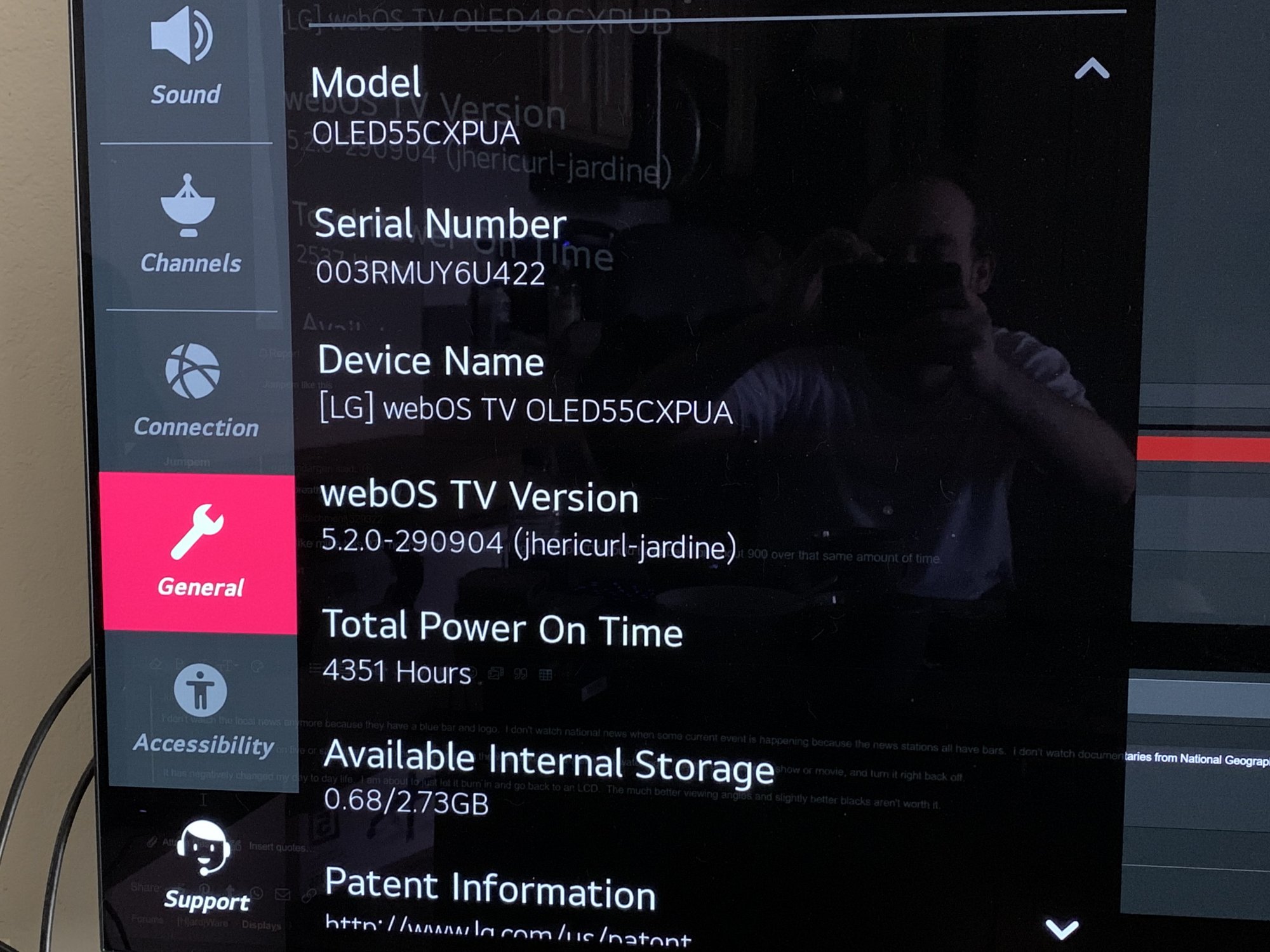
If anyone has a higher "Power On Time", please feel free to chime. I have a feeling mine is super high compared to most users.

CX.jpg
 
I haven't had mine that long. I waited until most of the issues were fixed in firmware updates before I decided to buy.

I pretty much only use the OLED for media and games, having side monitor(s) for desktop/app real-estate.

I do watch a lot of HDR movie content on it but that is dynamic. Morning news via OTA antenna from a HDHOMERUN to an app does have some static logos but there are commercials (way too many commercials) that change the screen where those logos are pretty regulalry and it's usually just a half hour news program if that (I usually exit when the sports section comes on).


I also play HDR games. If given the choice I'll choose HDR content so it won't be showing SDR material all of the time by a long shot. I didn't buy it to not use the full HDR. I just finished "Jedi: Fallen Order"in HDR on Jedi Master difficulty but I used an ini edit to remove the HUD completely (which also made the game harder), so that wasn't concerning HUD/log wise considering there was none.. Now I've started in on Nioh 2 which is also HDR and looks gorgeous. I set it's peak HDR brightness around 800nit in game but I could probably set it to 1000 and let the TV do static tone mapping like it does movies. I played a few sessions with the full HUD on and it has a lot of readouts on the HUD which is a big switch from how I was playing Jedi:fallen order. I think you could toggle the HUD visible/hidden using F3 in Nioh (1) though so I might try that out next time. Otherwise I'll just try to be wise about it and rely on the best buy warranty rather than be paranoid about it.

The fact that I can hit the mic button and tell it to "turn off the screen" without it going into full standby makes using the TV a lot more unfettered to me. That was a big relief. It doesn't drop my windows and app positions or anything., continues running apps as if it was on (including sounds), and it lights right back up in a fraction of a second so it's super convenient to do compared to turning the screen off and on or just leaving a paused or static running game on while I do something on the side or go afk.
 
Last edited:
My C7 55 OLED has 13,300 hrs run time by now (I use it a lot). It was perfect up until ~8000hr mark. After that the refresher was not keeping up anymore and I started getting "shadows" which is basically burn in. It started on red first then green then blue and finally now even on white.

Also the central area is now less bright than the edges. This is most noticeable with red colors. This is because I used the central area more than edges (I have black background). I also noticed a few dead pixels that were not there when the panel was new.

At 13k hours the OLED is still useable. I am going to replace it with 2020 or 2021 model once I get a hold of hdmi 2.1 video card but it is not urgent.

So expect at least 8000 hours of perfect video from your LG OLED and twice that with some imperfections.

If you do the math using the panel every day for 8 hours will be about 3000 hours per year.
 
My C7 55 OLED has 13,300 hrs run time by now (I use it a lot). It was perfect up until ~8000hr mark. After that the refresher was not keeping up anymore and I started getting "shadows" which is basically burn in. It started on red first then green then blue and finally now even on white.

Also the central area is now less bright than the edges. This is most noticeable with red colors. This is because I used the central area more than edges (I have black background). I also noticed a few dead pixels that were not there when the panel was new.

At 13k hours the OLED is still useable. I am going to replace it with 2020 or 2021 model once I get a hold of hdmi 2.1 video card but it is not urgent.

So expect at least 8000 hours of perfect video from your LG OLED and twice that with some imperfections.

If you do the math using the panel every day for 8 hours will be about 3000 hours per year.

Very interesting. Does that 8K count factor in a screen saver? How bright have you been running it?

In any case, that's still some mileage out of a screen, which though not cheap, is much less expensive than it was.
 
My CX gets mild image retention after a few weeks if I use the Blank Screen screensaver rather than letting it power off. It clears up after powering it off.
 
My CX gets mild image retention after a few weeks if I use the Blank Screen screensaver rather than letting it power off. It clears up after powering it off.
You should turn off your TV every day, so it can do a soft pixel refresh (which it does after every 4 hours of continuous use).
 
I can't speak for the 7 or 8 series OLEDs, but my CX has been solid. Granted, I don't abuse it (HDR = Brightness 100, but most content is SDR = Brightness 0-30), but no image retention or burn-in.

Most content I watch is news as well, and so far, no logo burn-in. The CX does a great job of identifying logos and dimming them so that they don't abuse the TV as much.

If anyone has a higher "Power On Time", please feel free to chime. I have a feeling mine is super high compared to most users.

View attachment 329332
I thought I might have a lot myself but quick maths say I got about half of what you got. Similarly low SDR brightness and due to COVID lockdowns I've played an old MMO with a static HUD (which can be considered somewhat "abusive") a LOT - probably 1k hours.
And yes the set still looks absolutely perfect.

I don't know how to see the runtime on the EU version of the set sadly :(

I don't give myself headaches over it but I'm not careless either, I just take the simple precautions that don't have any downsides for me and quickly become reflexes - blank screen when I walk away, low OLED light for SDR + dark room etc. Once in a while I might forget and the screen will "burn" a bit while I'm afk or something but who cares if it's only occasional. Minuscule impact in the long run.
 
'New' firmware out on the Korean LG site... last few months, they are releasing these mid-month each month - like clockwork.

Oddly enough the build number is the same as previously. 03.21.16 but timestamped Feb-17th 2021 (Korean time).
 
Last edited:
If you were that worried about it you should have bought it from best buy with the 5vyr warranty, which is the only warranty afaik that has confirmed covering burn in. . That comes out to around $66 a year insurance over 5 years. If the model tv isn't available years down the line, they'd have to replace it with a newer comparable model.

That's why I got the Microcenter screen protection for 3 years, I rarely keep a TV longer than that anyway. My blood pressure still goes up sometimes though with the stupid ABL. I turned off ASBL, but the ABL still kicks on in very weird ways. Just browsing a webpage and if I scroll up or down the ABL kicks on if there is a portion of the webpage with lighter sections. I can sit there and go up and down and make the ABL go on and off at will, really really annoying. I'm also still getting dimming after time even though I fully turned ASBL off in the service menu (yep I turned off both TCP and GSR). My return period ended yesterday and I thought really hard about returning it, but the only viable alternative IMO would be a Q series Samsung and those have their own sets of issues.

Oh well, I've taken some precautions like enabling a screen saver and using solid black backgrounds/taskbar. But I'm not going to bother being very careful with it. If I get burn in then I'll warranty it and learn my lesson about using OLEDs as a PC monitor.
 
I cut my CX weekly hours by almost 80% now using a 4k LCD as my day monitor. I honestly wouldn't care if I wasn't WFH, but with WFH the hours were racking up really fast. Maybe it's dumb though, since I do have a 5 year burn in protection plan.
 
  • Like
Reactions: elvn
like this
I cut my CX weekly hours by almost 80% now using a 4k LCD as my day monitor. I honestly wouldn't care if I wasn't WFH, but with WFH the hours were racking up really fast. Maybe it's dumb though, since I do have a 5 year burn in protection plan.

I use 4k side monitor(s) too and I'm very happy with that scenario. I have used a similar setup for a long time now. Previously I had been using a 31.5" 1440 GK850G VA g-sync screen as my gaming monitor in the middle, dedicated to gaming. What's different now is that before my side 4k monitor(s) were better contrast (~6100:1) than the gaming VA (~2800 to 3000:1).. so I would default to them for media playback outside of games - where now the OLED is the best for both gaming and media, also with a huge upgrade to quality HDR capability.

I usually use the turn off the LG CX screen via mic method while home and awake. I power the screen down to standby when I leave the house or when I go to sleep so it gets to cycle and have downtime daily once or more.

I played jedi:fallen order in HDR with no HUD using an ini edit. The "turn the screen off" trick came in handy throughout my playthrough so that I was never leaving a static HDR screen on when AFK or multitasking. "Turn of the screen" doesn't drop the CX from the monitor array so it doesn't clunkily drop the fullscreen exclusive + HDR mode game and shuffle windows around, put the game on a different screen, etc. It just blanks the screen emitters and when you click the remote it pops back instantly with the game still running.

I haven't found a way to toggle the HUD on and off or turn off the HUD entirely in Nioh2 (PC) yet. Nioh2 is also HDR and it has a lot of HUD elements but I've found that I'm pulling up the inventory screen often which completely displaces the HUD elements so that should help.
 
I use 4k side monitor(s) too and I'm very happy with that scenario. I have used a similar setup for a long time now. Previously I had been using a 31.5" 1440 GK850G VA g-sync screen as my gaming monitor in the middle, dedicated to gaming. What's different now is that before my side 4k monitor(s) were better contrast (~6100:1) than the gaming VA (~2800 to 3000:1).. so I would default to them for media playback outside of games - where now the OLED is the best for both gaming and media, also with a huge upgrade to quality HDR capability.

I usually use the turn off the LG CX screen via mic method while home and awake. I power the screen down to standby when I leave the house or when I go to sleep so it gets to cycle and have downtime daily once or more.

I played jedi:fallen order in HDR with no HUD using an ini edit. The "turn the screen off" trick came in handy throughout my playthrough so that I was never leaving a static HDR screen on when AFK or multitasking. "Turn of the screen" doesn't drop the CX from the monitor array so it doesn't clunkily drop the fullscreen exclusive + HDR mode game and shuffle windows around, put the game on a different screen, etc. It just blanks the screen emitters and when you click the remote it pops back instantly with the game still running.

I haven't found a way to toggle the HUD on and off or turn off the HUD entirely in Nioh2 (PC) yet. Nioh2 is also HDR and it has a lot of HUD elements but I've found that I'm pulling up the inventory screen often which completely displaces the HUD elements so that should help.

I wouldn't worry about it too much. I have played a shit ton of games on consoles with the C9 that have plenty of HUDs on screen and so far no issues.
 
Nice, LGD is ramping from 200k units to 1mil units for 2021 of the 48". It would be great to see these panels get even cheaper. Maybe they'll MSRP for £1400 in 2021?

It also looks like the 48CX has price dropped to £1300 everywhere in the UK and box.co.uk is a new retailer as far as I know. The 48" hype is real, many PC gamers are buying this. Interesting times for OLED panels.


Not quite disposable pricing but good news. :D


---------------------------------------------


I finally got around to hooking up my shARC.. the input I put it on nearly blasted me out of the room at first volume wise .. oops. After a scramble to turn it down I started messing with it.

Apparently LG did not support TrueHD/Atmos uncompressed over eARC via the Plex WebOS app, at least on the C9 so I don't know if they ever fixed that even now on the CX. No matter what I've tried to make it pass the original without transcoding, it will only transcode the video untouched but always transcodes the 7.1 TrueHD or Atmos tracks to ---> eac3()

"Cannot direct play with protocl: codec: truehd. Not found in profile.
"App cannot direct play this item. Direct play is disabled"


I tried playing the same files off of mpc-hc on the pc input using the default audio renderer (the LG CX) and I kept getting mutichannel PCM there too.

They both sound decent but I'd like to use TrueHD and Atmos untouched.


from a sept 2019 LG C9 post on AVSforum:

"While the C9 supports HD audio over eARC it does not support it over the WebOS media player, they forgot to update it or over looked it.

So yeah you need a Shield to play the audio, you can plug the Shield directly into the TV with eARC and it will send the TrueHD 7.1 Atmos"

"Be aware also the C9 does not support PCM 7.1 over eARC something else LG over looked."


I'll have to scour the avsforum threads on the LG CX about trueHD/atmos pass though via webOS apps like Plex and Emby or on pc via mediaplayer I guess.


I might just spring for another nvidia shield to blow past any issues in the end, (and get an upgraded processor/plex server and good AI upscaling for 1080p).
 
Last edited:
Not quite disposable pricing but good news. :D


---------------------------------------------


I finally got around to hooking up my shARC.. the input I put it on nearly blasted me out of the room at first volume wise .. oops. After a scramble to turn it down I started messing with it.

Apparently LG did not support TrueHD/Atmos uncompressed over eARC via the Plex WebOS app, at least on the C9 so I don't know if they ever fixed that even now on the CX. No matter what I've tried to make it pass the original without transcoding, it will only transcode the video untouched but always transcodes the 7.1 TrueHD or Atmos tracks to ---> eac3()

"Cannot direct play with protocl: codec: truehd. Not found in profile.
"Aoo cannot direc tplay this item. Direct play is disabled"


I tried playing the same files off of mpc-hc on the pc input using the default audio renderer (the LG CX) and I kept getting mutichannel PCM there too.

They both sound decent but I'd like to use TrueHD and Atmos untouched.


from a sept 2019 LG C9 post on AVSforum:


I'll have to scour the avsforum threads on the LG CX about trueHD/atmos pass though via webOS apps like Plex and Emby or on pc via mediaplayer I guess.


I might just spring for another nvidia shield to blow past any issues in the end, (and get an upgraded processor/plex server and good AI upscaling for 1080p).
What happens if you bitstream Atmos from a PC?
 
Well this sucks. Yesterday the Logitech speaker system fell off the shelf and the cable yanked the Optical digital Audio out connector loose from the LG48cx. It is still working but very loose and it wouldn't surprise me if it becomes so loose that it loses connection. I tried to reseat it hoping it would pop back ino place, but no luck.

Can anyone advise how I might set it back in place? Obviously I prefer to not have to open the TV up.

Its hard to tell from the photo, but the connector is hanging down and loose.

IMG_20210218_111639.jpg
 
Well this sucks. Yesterday the Logitech speaker system fell off the shelf and the cable yanked the Optical digital Audio out connector loose from the LG48cx. It is still working but very loose and it wouldn't surprise me if it becomes so loose that it loses connection. I tried to reseat it hoping it would pop back ino place, but no luck.

Can anyone advise how I might set it back in place? Obviously I prefer to not have to open the TV up.

Its hard to tell from the photo, but the connector is hanging down and loose.

View attachment 330671

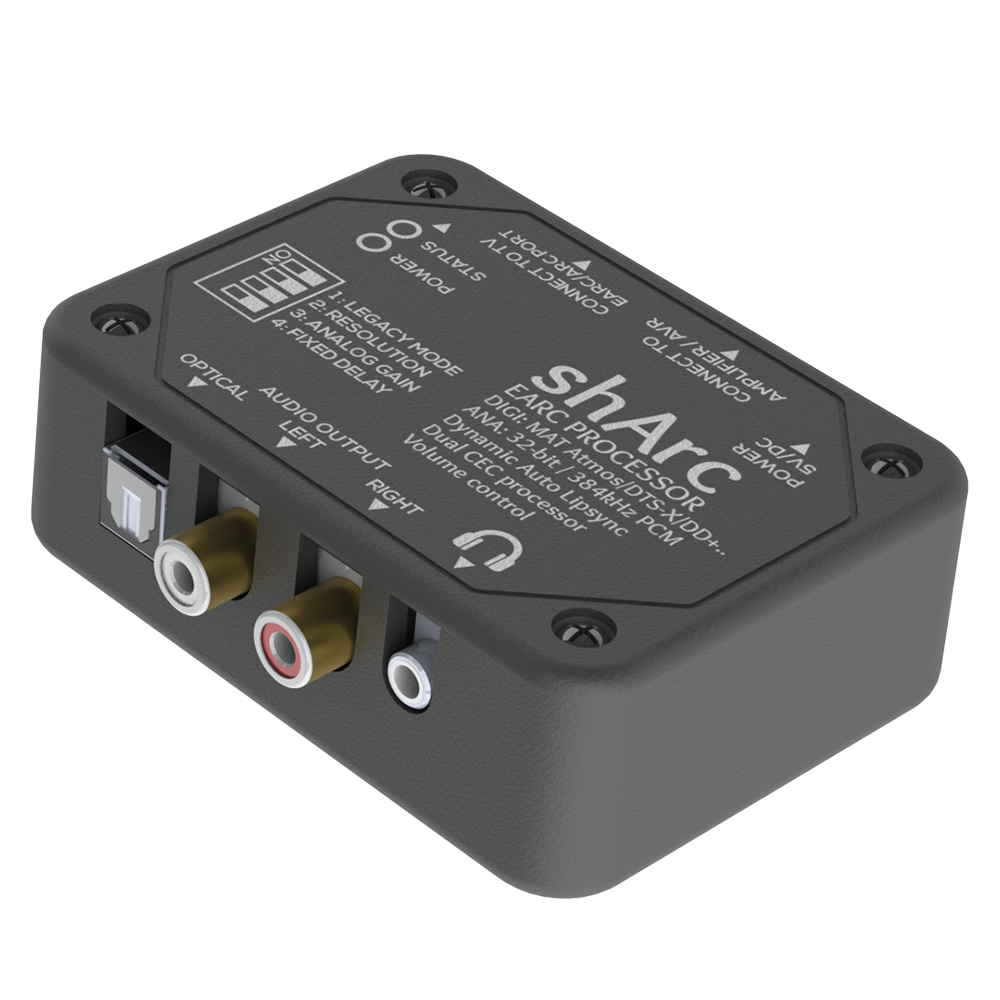
It's not a cheap option at ~$150 but the shARC breakout box not only "adds an eArc port" to one of the hdmi inputs on a receiver but also has an optical and rca analog output. there are probably some other hdmi breakout boxes that split optical off of hdmi that might be cheaper.

SHARCSIDE.png

Other things I'd look into are
-- See if the TV is still in the mfg warranty period.
-- (at your own risk) you could consider trying some plumber's putty to hold it in place, maybe make a small plastic or cardboard square plane around the connector that snaps over it and then making a raised crater rim of plumber's putty around the connection. I'd say gell super glue or two part epoxy rather than plumber's putty but that's more permanent so would be harder to reverse/remove and so would probably void your warranty.
 
Very interesting. Does that 8K count factor in a screen saver? How bright have you been running it?

In any case, that's still some mileage out of a screen, which though not cheap, is much less expensive than it was.

I have brightness+OLED set to max on my panel (when I used it for work from home I would lower it as mostly white screen was too much at 100%). If you run with lower brightness the panel should last longer.

I had screen saver set to 1 min (turn off screen) which then triggers the TV own rotating pictures for a few minutes before it turns off.

For the first year and a half I had rotating pictures as background in windows, after that I switched to just black background. I moved static elements like taskbar/icons to a small secondary monitor on the side.

My recommendations for maximizing your OLED lifetime:

Do not light up any pixels you are not actively using. Use black background, dark theme. Use dark reader addon for web browser. Either move windows desktop taskbar/icons to 2nd monitor or run with a clean desktop.

You can run with lower brightness but I bought OLED to have bright vivid pictures so I ran at 100% (and if that means lower lifetime so be it).

Your red color pixels will decline the fastest (this is actually most visible on magenta color). The youtube red progress bar was one of the first offenders. The burn in is however not visible unless you have large areas of uniform color. In normal usage as TV/gaming monitor you will not see it even at 13k hours.
 
Last edited:
It's not a cheap option at ~$150 but the shARC breakout box not only "adds an eArc port" to one of the hdmi inputs on a receiver but also has an optical and rca analog output. there are probably some other hdmi breakout boxes that split optical off of hdmi that might be cheaper.

View attachment 330678

Other things I'd look into are
-- See if the TV is still in the mfg warranty period.
-- (at your own risk) you could consider trying some plumber's putty to hold it in place, maybe make a small plastic or cardboard square plane around the connector that snaps over it and then making a raised crater rim of plumber's putty around the connection. I'd say gell super glue or two part epoxy rather than plumber's putty but that's more permanent so would be harder to reverse/remove and so would probably void your warranty.
Thanks. Yeah I have a similar breakout box but was going to sell it bc I don't have a lot of spare USB inputs to spare on my laptop.

I bought the TV at Christmas so I assume it would be within warranty but the thought of packing this up to ship it or take it someplace is daunting, plus this issue is totally my fault.

Will consider the last suggestion. I am all elbows when it comes to mechanical repair work so I am worried I would make a mess of it
 
I cut my CX weekly hours by almost 80% now using a 4k LCD as my day monitor. I honestly wouldn't care if I wasn't WFH, but with WFH the hours were racking up really fast. Maybe it's dumb though, since I do have a 5 year burn in protection plan.

The LG OLED is not an ideal work from home/office monitor. The ABL itself can be a nuisance. In my case since I primarily used VNC I just made myself a 1440p VNC window to workplace and used it that way (leaving the rest of screen dark). In general for that usage an LCD will work better.
 
I have brightness+OLED set to max on my panel (when I used it for work from home I would lower it as mostly white screen was too much at 100%). If you run with lower brightness the panel should last longer.

I had screen saver set to 1 min (turn off screen) which then triggers the TV own rotating pictures for a few minutes before it turns off.

For the first year and a half I had rotating pictures as background in windows, after that I switched to just black background. I moved static elements like taskbar/icons to a small secondary monitor on the side.

My recommendations for maximizing your OLED lifetime:

Do light up any pixels you are not actively using. Use black background, dark theme. Use dark reader addon for web browser.
Either move windows desktop taskbar/icons to 2nd monitor or run with a clean desktop.

You can run with lower brightness but I bought OLED to have bright vivid pictures so I ran at 100% (and if that means lower lifetime so be it).

Your red color pixels will decline the fastest (this is actually most visible on magenta color). The youtube red progress bar was one of the first offenders. The burn in is however not visible unless you have large areas of uniform color. In normal usage as TV/gaming monitor you will not see it even at 13k hours.
Yes, this. And if I notice any burn in/wear after 3-4 years I will happily buy another one to replace it. These aren't inexpensive, but they are that good. I will not go back to LCD, period. The true blacks and motion handling are unsurpassed...this is a holy grail display to be sure.
 
Well this sucks. Yesterday the Logitech speaker system fell off the shelf and the cable yanked the Optical digital Audio out connector loose from the LG48cx. It is still working but very loose and it wouldn't surprise me if it becomes so loose that it loses connection. I tried to reseat it hoping it would pop back ino place, but no luck.

Can anyone advise how I might set it back in place? Obviously I prefer to not have to open the TV up.

Its hard to tell from the photo, but the connector is hanging down and loose.

View attachment 330671

It depends what optical socket is LG using, it should looks like this, so there is possibility that these plastic legs which are suposed to keep socket in place are snapped and socket is just hanging on leads until some of them breaks. There is a change these legs just pooped out so you could possibly push them back if you line the socket correctly.
1613669212941.png
 
Last edited:
It depends what optical socket is LG using, it should looks like this, so there is possibility that these plastic legs which are suposed to keep socket in place are snapped and socket is just hanging on leads until some of them breaks. There is a change these legs just pooped out so you could possibly push them back if you line the socket correctly.
View attachment 330702
Thanks for this. I am hoping they can be popped back into place. Do I risk damaging it if I try again to slot it back into place? I can't see anything so I can't tell if its lined up.
 
You could also get a short optical audio cable and a fem/fem connector barrel looking union, then just zip tie the cable to your HDMI or power cable or something so it never moves again. Could prob do the same with the HDMI cable(s) (if there are any hdmi 2.1 ones), maybe run a sleeved metal cable off of the back of the tv mounting screws or vesa stand if you have one and use black zip ties (+ trimmed ends) -- so you never have to worry about the ports getting yanked ever again.

They do make optical ext cables F/M but I think they are overpriced:
ital-Audio-Extension-Cable-for-Speaker.jpg_640x640.jpg


You could probably use a short optical cable with a barrel union to your longer regular cable instead:

610Yhj5mXRL._SL1200_.jpg


I actually ruined a hdmi cable off of my side 4k TV once due to yanking it while installing the new samsung TV when the original TCL TV's backlight died. One hdmi cable rather than the port at least.
 
Back
Top