• Some users have recently had their accounts hijacked. It seems that the now defunct EVGA forums might have compromised your password there and seems many are using the same PW here. We would suggest you UPDATE YOUR PASSWORD and TURN ON 2FA for your account here to further secure it. None of the compromised accounts had 2FA turned on.
    Once you have enabled 2FA, your account will be updated soon to show a badge, letting other members know that you use 2FA to protect your account. This should be beneficial for everyone that uses FSFT.

LG 48CX

Anyone else have issues with the TV just freezing up for several seconds and then re acquiring a signal? I had read some had issues with this and game response being enabled, I turned that off and I still get it, but it's sporadic, sometimes it's every few minutes and other times it doesn't happen for hours. Source is a 3070. I did replace the cable with an ultra certified (Zeskit off of Amazon) as I thought that was the culprit, but no change. I'm running 4k/120hz RGB 10 bit.

I'm really frustrated with this TV, between the crappy ASBL/ABL, the fear of burn in and now this I'm tempted to exchange it. But what else is out there? I already had the Samsung Q80T and that is unable to connect at 4k/120hz with HDR and Samsung seems like they don't want to address the issue. I guess HDMI 2.1 is just too new.
Check that please: solved my blackouts/no signal: YFI: In my case I also thought it's the cable, however it turned out that intermittent blackouts where caused by a setting in Nvidia Control panel in the scaling section. Make sure scaling is set to "display" not "gpu"
 
  • Like
Reactions: SD777
like this
I'm still on my 1080ti sc hybrids so I still have the screen itself on 8bit w/dithering 60hz til I get a 3000 series gpu.

Mine says, from a HDR mkv on pc in MPC-HC + madVR:

8bit, RGB, Full

smooth motion on (settings)
....my preference since from a pc no interpolation options are available from the TV's OSD and OLED shows low frame rate motion limitations more than LCD

D3D11 fullscreen windowed (10 bit)
P010, 10 bit, 4:2:0

matrix BT.2020 (says upstream)
primaries BT.2020 (says upstream)
HDR 729 nits, BT.2020 -> DCI-P3

mine says "limited range (says upstream)" in MAD VR further down the list after "(OS HDR, 8bit RGB, full)" at the top.. but that could be b/c I'm not running 10 bit. In the OLED TV OSD I'm running "'Black Level' setting at auto, and it will be dictated by the selected RGB output of your graphics card - which you want to ensure is set to full range RGB" (as per tftcentral).

I'm happy with how HDR movies and games look but I can't wait to get a 3090 for 120hz 10bit 444.

from TFTcentral: https://www.tftcentral.co.uk/reviews/lg_cx_oled.htm

yO6L3i8.png
 
Last edited:
I had my arm mount attached to the side of my desk since, like you said, the CX was simply too big for me to mount the arm anywhere in the back of my desk. Lifting the whole monitor on/off your desk seems a lot more annoying lol.

Haha, it's fine! If it gets annoying enough I'll try the mount out. I used to swap out my graphics card every day for work, because nvidia doesn't work with wayland on Linux. So each day I'd open my case, swap out my nvidia card and stick in a cheapo AMD card, then in reverse to play games in the evening. Now that was annoying. I only stopped that because I'm pretty sure it broke my 980ti after swapping out a couple hundred times. Which led me to get a 3080, then a LG CX and here I am. 🤣
 
I'm still on my 1080ti sc hybrids so I still have the screen itself on 8bit w/dithering 60hz til I get a 3000 series gpu.

Mine says, from a HDR mkv on pc in MPC-HC + madVR:

8bit, RGB, Full

smooth motion on (settings)
....my preference since from a pc no interpolation options are available from the TV's OSD and OLED shows low frame rate motion limitations more than LCD

D3D11 fullscreen windowed (10 bit)
P010, 10 bit, 4:2:0

matrix BT.2020 (says upstream)
primaries BT.2020 (says upstream)
HDR 729 nits, BT.2020 -> DCI-P3

mine says "limited range (says upstream)" in MAD VR further down the list after "(OS HDR, 8bit RGB, full)" at the top.. but that could be b/c I'm not running 10 bit. In the OLED TV OSD I'm running "'Black Level' setting at auto, and it will be dictated by the selected RGB output of your graphics card - which you want to ensure is set to full range RGB" (as per tftcentral).

I'm happy with how HDR movies and games look but I can't wait to get a 3090 for 120hz 10bit 444.

from TFTcentral: https://www.tftcentral.co.uk/reviews/lg_cx_oled.htm

View attachment 322291
Thanks for the info. I do have RGB 10 bit full range in NVCP. And my Black Level is also set to Auto in the TV and Dynamic Tone Mapping OFF on both madVR and TV. It's just weird how the stat is staying "NV, 8bit, 4:2:0" under "D3D11 fullscreen windowed (10 bit)". As for the BT.709 thing, I'm not even sure what it is anymore. I previously thought it should be BT.2020, but I checked my TV and I have Gamma set to 2.2 (not any of the BT.XXXX stuff), as per rtings recommended settings.

Btw, in madVR, did you select "this display is already calibrated"? I set mine as "this display is calibrated", BT.2020, and check "report BT.2020 to dosplay (Nvidia only)" even though my TV isn't really professionally calibrated. Also tried setting it to "disable calibration controls for this display", but it makes no difference.

Anyway, as long as the colors, contrast, etc, look like playing it directly on the TV USB, I guess I shouldn't complain. lol
 
Annoyingly the voice commands have stopped working for me. "Turn screen off", now returns "Sorry power control is not supported yet". Not sure what's going on - may be because of the recent update?
 
I'm guessing you are running a 3000 series gpu since your player says HDR 10 bit RGB full at the top. I'm running my 1080ti(s) at 8bit rgb full (dithered to '10bit) and I have madvr set to "10bit (or higher)" in it's settings.

Both : D3D11 fullscreen windowed (10bit)

Yours: NV12, 8 bit, 4:2:0 ... mine P010, 10bit , 4:2:0

Yours: chroma > NGU Standard (high) Mine: Chroma > Bilinear

yours: matrix BT.709(best guess) .. mine: matrix BT.2020 (says upstream)

yours: primaries BT.709(best guess) ... mine: primaries BT.2020 (says upstream)

yours: HDR, unknown properties ... mine: HDR 729 nits, BT.2020 -> DCI-P3

yours: limited range (best guess) .. mine limited range (says upstream)


I really didn't change many settings in madvr..

devices -> LG properties -> PC levels (0-255)
native display depth is: 10 bit (or higher)

calibration: disable calibration for this display

HDR: passthrough HDR to display

smooth motion: enable -> always

dithering: random dithering (I think this was default)

trade quality for performance: unchecked compromise on tone and gamut mapping accuracy (unchecked that recently, not sure if this matters or not)


in MPC-HC I set
options -> playback

Playback: play 1 times
After Playback: exit

-> output: madVR

-> fullscreen...
.. Fullscreen monitor: \\Display1 (my OLED)
.. launch files in fullscreen
.. exit fullscreen at the end of playback
..hide controls in fullscreen (show when hovering control, hide after) 0ms
..hide docked panels
 
  • Like
Reactions: MrTX
like this
Annoyingly the voice commands have stopped working for me. "Turn screen off", now returns "Sorry power control is not supported yet". Not sure what's going on - may be because of the recent update?

It probably thinks you are trying to turn the unit off. Try saying "turn off the screen" instead of "turn screen off" to see if that works.
 
  • Like
Reactions: hhkb
like this
So apparently, the non-fullscreen video colors, brightness, and contrast are not true HDR (sometimes I get a washed out version, sometimes I get a super vivid version lol). I tested this by playing the movie directly on the TV USB port and comparing it to PC mpcHC+madVR in fullscreen and got somewhat similar colors, brightness, contrast, etc.

What is weird is when displaying the stats (CTRL+J), it shows "matrix BT.709", "primaries BT.709", and "limited range" (see middle of pic 2). Shouldn't these be BT.2020 and full range? The display is definitely showing as "HDR, 10 bit, RGB, full" on top though, so I'm kinda confused and not sure if madVR is passing the correct HDR metadata. If you don't mind, can you share a screenshot of your stats while playing an HDR movie in fullscreen?
One of the filters in the playback chain is not reporting the metadata correctly. That's what it means when you see "best guess" in madVR. It could be a decoder, or intermediate video processing filter. MPC-HC is obsolete - use MPC-BE.
 
MPC-BE didn't support HDR directly in the default install awhile back and still needed ext filter like madVR but I guess that's changed.

My MPC-HC + madVR doesn't have the "best guess" and seems to be working properly, just passing the HDR metadata to the display. I'm willing to try out MPC-BE too though. It's based on the same interface so will feel familiar.

If you haven't tried it apparently kodi player also supports HDR recently since december 2020 according to this thread:

https://forum.kodi.tv/showthread.php?tid=349861&page=77
You have to set "use hdr capabilities - on" under settings /player
"Auto switch HDR mode and color space. Enable this feature from "Settings > Player > Use HDR display capabilities" = ON."
*No need to install external programs or addons. madVR, MPC-HC, LAV filters, DSPlayer are not needed.*


https://kodi.tv/tags/pre-release

Still fixing some things but the HDR passthrough is working it seems.

thexai commented 29 days ago​


Description​

  • Tonemap Kodi GUI to HDR PQ while in playback of HDR pass-through mode.
  • Fixes very bright OSD, subtitles, etc. and wrong color space (oversaturated).

Motivation and Context​

While in playback HDR pass-through Windows color space is switched to HDR PQ and since Kodi GUI is still SRD, the colors and brightness are totally altered.
SDR GUI (BT.709) needs to be "tone mapped" to HDR color space (BT.2020) and from Gamma transfer to PQ transfer. In this way it is achieved that the Kodi GUI has a peak brightness of 100 nits while the video HDR content can have a peak brightness of 1000 nits for example. PQ uses an absolute scale, so the normal pure white (SDR) must still have 100 nits maximum on the PQ scale and all over 100 nits to 10000 nits is HDR range...
In other words: the GUI will still look the same as when in SDR mode.
 
Last edited:
HDR metadata passthrough to the TV does not and has never worked on PC. When HDR mode is activated, the TV is permanently in the 4000 nit tone-mapping curve if DTM is off. You have to use the HDMI Signalling Override menu to set Mastering Peak to 1000 nits manually. Or just use HGIG mode if you don't need other processing on the TV.
 
Last edited:
It's much easier to use LG Smart Share and watch it directly on the TV than mess with all the windows HDR BS. Then you get the correct framerate, color, etc, and best picture quality possible without having to worry about anything.
 
kodi looked pretty good on hdr material (with it's enable HDR slider on) at a glance but that interface is super clunky and it was a huge resource hog.

I didn't have any luck getting BE to pass hdr metadata when I messed with it and filters, it was converting HDR to SDR by default. I'm assuming it could work just like MPC-HC does passing-through with filters if I messed with it enough.

MPC-HC + madvr is passing HDR metadata to my CX and it looks good. It's showed HDR 729 nits on the file I tested in the media player details, BT2020 DCI-P3. Nothing is pale. Some of the HDR nature material I've watched in MPC-HC + madVR looked incredible. The light sources and highlights looked amazing and so did the blacks. 4000 nit static tone mapping (a curve over 4x higher than the range and peak of the OLED) sounds like it would look terrible and obvious. The only other HDR content I have been running to compare is Jedi fallen order at the moment and I think that game looks great too.

You can enable madVR's own tone mapping and set the target peak nits to that of your display as well as set the tone mapping curve e.g. BT.2390 or some custom things.. and a few other drop down tweaks to taste if you wanted to. I am not doing that. I have it set to pass through HDR.

However as I have read and understand, TVs always static tone map higher HDR ranges down to within their own automatically. Dynamic tone mapping just tries to augment/diminish by trying to automatically interpret how to adjust as the scene content changes - but it's not accurate doing it on the fly so it's recommened it be turned off. Dolby Vison and HDR10+ (not HDR 10 "regular") content both have dynamic tone mapping per se but it has been baked in to the metadata after people selected and mastered each scene individually for a manually tweaked hopefully expert tone mapping result.
 
Last edited:
kodi looked pretty good on hdr material (with it's enable HDR slider on) at a glance but that interface is super clunky and it was a huge resource hog.

I didn't have any luck getting BE to pass hdr metadata when I messed with it and filters, it was converting HDR to SDR by default. I'm assuming it could work just like MPC-HC does passing-through with filters if I messed with it enough.

MPC-HC + madvr is passing HDR metadata to my CX and it looks good. It's showed HDR 729 nits on the file I tested in the media player details, BT2020 DCI-P3. Nothing is pale. Some of the HDR nature material I've watched in MPC-HC + madVR looked incredible. The light sources and highlights looked amazing and so did the blacks. 4000 nit static tone mapping (a curve over 4x higher than the range and peak of the OLED) sounds like it would look terrible and obvious. The only other HDR content I have been running to compare is Jedi fallen order at the moment and I think that game looks great too.

You can enable madVR's own tone mapping and set the target peak nits to that of your display as well as set the tone mapping curve e.g. BT.2390 or some custom things.. and a few other drop down tweaks to taste if you wanted to. I am not doing that. I have it set to pass through HDR.

However as I have read and understand, TVs always static tone map higher HDR ranges down to within their own automatically. Dynamic tone mapping just tries to augment/diminish by trying to automatically interpret how to adjust as the scene content changes - but it's not accurate doing it on the fly so it's recommened it be turned off. Dolby Vison and HDR10+ (not HDR 10 "regular") content both have dynamic tone mapping per se but it has been baked in to the metadata after people selected and mastered each scene individually for a manually tweaked hopefully expert tone mapping result.
Passthrough of HDR metadata does not work in any player, period. You must use a HDR-aware renderer like madVR with MPC-BE to output BT.2020 PQ and manually set the HDMI signal parameters on the TV based on the content you're watching or the TV will use the wrong tone mapping curve. Alternatively you can leave the TV in HGIG mode for the most accurate image. Use madVR's tone mapping to 800 nits in HGIG mode if you want to preserve highlights instead of hard clipping.

madVR just copies the decoded video into the BT.2020 PQ framebuffer already setup by Windows when HDR is globally enabled. No metadata from the content is send to the TV. If HDR is broken in the decoder chain, madVR will convert the colour space of the video to BT.709 Gamma 2.2 and map it within the Windows' BT.2020 PQ signal.
 
Last edited:
Anyone else have issues with the TV just freezing up for several seconds and then re acquiring a signal? I had read some had issues with this and game response being enabled, I turned that off and I still get it, but it's sporadic, sometimes it's every few minutes and other times it doesn't happen for hours. Source is a 3070. I did replace the cable with an ultra certified (Zeskit off of Amazon) as I thought that was the culprit, but no change. I'm running 4k/120hz RGB 10 bit.

I'm really frustrated with this TV, between the crappy ASBL/ABL, the fear of burn in and now this I'm tempted to exchange it. But what else is out there? I already had the Samsung Q80T and that is unable to connect at 4k/120hz with HDR and Samsung seems like they don't want to address the issue. I guess HDMI 2.1 is just too new.
Hello, I'm not native so I hope you can forgive some of my yoinky phrasings.

I now use the 48cx as my main and only monitor, about 5 hours on works days and up to 14hours on weekend days. I believe it now when some of you said that there is nothing better even as a monitor.
I have however some issues
Text rendering is absolute trash at 100% scaling, I was prepared for that. Disabling cleartype is basically trading a flavor of bad for another. Nothing to do about that.
Colors which are rich in green look very wierd, as if there is a line on the left that is black. Looks like a byproduct of the wierd pixel structure but I could be wrong (try but putting a light green square on a gray background)

Finally the issue pointed by SD777, which is the most annoying one, happens to me on a regular basis, it did 5-6 times this morning. Sometimes it does it 5 times an hour, sometimes never.

More data:

I also have a 3070 (msi ventus) and the display is set to 4K/120hz/10bit, TV is set to PC mode, screen shift disabled.
However it seems to always happens when web browsing, on doing general desktop things.
It never happens when playing, be it full screen or windowed, or even when watching videos.
I use a seemingly good cable which is 2 meter long

I believe it is a problem from the graphics card, but it could also be the TV is twitching channels by itself for some reason. I originally thougt it was the anti-burn in pixel refresh procedure, but this should only activate when the TV is turned on and only every 4hr as I understand.
Check that please: solved my blackouts/no signal: YFI: In my case I also thought it's the cable, however it turned out that intermittent blackouts where caused by a setting in Nvidia Control panel in the scaling section. Make sure scaling is set to "display" not "gpu"
Turn out I already had this set
1611576285363.png

Changing override setting does nothing.

Maybe it is linked to the faulty hdmi 2.1 chips in most early 2.1 hardware. RTX Could be some of those.
Last thing I did was disable HDMI audio from the nvidia control panel.
No signal losing since then, by it could just be luck.
Will keep updating on this.

Edit 2 mins after posting :
It did it again, lost signal 5 times in a row over the course of 30seconcs. It seems to get in and out of the PC/game mode, as I could see the color temperature and brightness change. It did it immediately after launching paint.net, so it is certainely linked to activity on the PC, or to a sudden change in the image.
 
Last edited:
So I tried moving around my paint.net window as it seems to trigger the anomaly easily.
It crashed the nvidia display drivers and made me blue screen.

Maybe this should be reported to nvidia ?
 
So I tried moving around my paint.net window as it seems to trigger the anomaly easily.
It crashed the nvidia display drivers and made me blue screen.

Maybe this should be reported to nvidia ?

Have you tried turning off hardware accelerated GPU scheduling? Having this ON caused me lots of problems.

1611579048704.png
 
been using the cx for a few weeks now with my 3090 and the colors/features are amazing! (when they work that is)

recently though, I realize that if the TV turns off while my PC stays on (for example, if I have to go afk for a hr, I would want to turn off my TV to limit burn in, but won't necessarily turn off my PC if stuff is running), turning on my TV again will never let me get the awesome 4K @ 120hz again (in NVCP, the max setting under "PC" is 2560x1440 @ 120, or 4K@60 under HDTV) until I reboot my PC.

I'm assuming this is a software/Windows 10 bug, what do you guys think? I have yet to try a new cable because I have one of those certified Ultra High Speed HDMI 2.1 cables from zeskit, so I would assume that cabling isn't the issue here(?)
I assume you're not unplugging the TV but turning it off with the remote. Also make sure you have quickstart+ enabled, I suspect this keeps the hdmi link active since it just goes into suspend mode.

I found though nvidia cards have some bugs with this TV for some reason. I have frequent problems with complete lock ups related to the TV being off, or the hdmi cable getting disconnected. I always make sure the TV is on before I wake up my computer, that seems to avoid any problem. Or use the "Turn off the screen" voice command, it avoids all problems as well.
 
I was going by this with my madVR setup , setting mad vr to passthrough, hdmi black level auto, tone mapping off on tv and in madvr. There were no "best guesses" in my renderer info in mpc.

https://www.avforums.com/threads/madvr-on-pc-as-a-video-processor.2249335/post-28011078
(May 2020)
Hello @NM20, it's been a while since I've touched my settings. See the below excellent guide, which helped me set madVR up with Kodi. You can still apply the guide to other media applications and a lot of it is universal:


HOW TO - Set up madVR for Kodi DSPlayer & External Players

My settings are as per option one, with Kodi not set to limited in its settings and my NVIDIA settings set to 12 bpc, colour depth: Highest (32-bit). I use YCbCr422 - and I forget exactly why! Everyone will tell you you should use RGB, at least with a PC. But this option allows me to do everything and it covers me for gaming, 3D, SDR and HDR, with Windows 10 auto-switching into HDR correctly for video games. I think I will set it back to RGB, though.

"Option 1:

If you just connect an HDMI cable from PC to TV, chances are you'll end up with a signal path like this:

(madVR) PC levels (0-255) -> (GPU) Limited Range RGB 16-235 -> (Display) Output as RGB 16-235

madVR expands the 16-235 source to full range RGB and it is converted back to 16-235 by the graphics card. Expanding the source prevents the GPU from clipping the levels when outputting 16-235. Both videos and the desktop will look accurate. However, it is possible to introduce banding if the GPU fails to use dithering when compressing 0-255 to 16-235. The range is converted twice: by madVR and the GPU.

This option isn’t recommended because of the range compression by the GPU and should only be used if no other suitable option is possible.

If your graphics card doesn't allow for a full range setting (like many Intel iGPUs or older Nvidia cards), then this may be your only choice. If so, it may be worth running madLevelsTweaker.exe in the madVR installation folder to see if you can force full range output from the GPU.

Option 2:

If your PC is a dedicated HTPC, you might consider this approach:

(madVR) TV levels (16-235) -> (media front-end) Use limited color range (16-235) -> (GPU) Full Range RGB 0-255 -> (Display) Output as RGB 16-235

In this configuration, the signal remains 16-235 all the way to the display. A GPU set to 0-255 will passthrough all output from the media player without clipping the levels. If a media front-end is used, it should also be configured to use 16-235 to match the media player.

When set to 16-235, madVR does not clip Blacker-than-Black (0-15) and Whiter-than-White (236-255) if the source video includes these values. Black and white clipping patterns should be used to adjust brightness and contrast until 16-235 are the only visible bars.

This can be the best option for GPUs that output full range to a display that only accepts limited range RGB. Banding should not occur as madVR handles the only conversion (YCbCr -> RGB) and the GPU is bypassed. However, the desktop and other applications will output incorrect levels. PC applications render black at 0,0,0, while the display expects 16,16,16. The result is crushed blacks. This sacrifice improves the quality of the video player at the expense of all other computing.

Option 3:

A final option involves setting all sources to full range — identical to a traditional PC and computer monitor:

(madVR) PC levels (0-255) -> (GPU) Full Range RGB 0-255 -> (Display) Output as RGB 0-255

madVR expands 16-235 to 0-255 and it is presented in full range by the display. The display's HDMI black level must be toggled to display full range RGB (Set to High or Normal (0-255) vs. Low (16-235)).

When expanding 16-235 to 0-255, madVR clips both 0-15 and 236-255, as reference black, 16, is mapped to 0, and reference white, 235, is mapped to 255. Clipping both BtB and WtW is acceptable as long as a correct grayscale is maintained. The use of black and white clipping patterns can confirm video levels (16-235) are displayed accurately.

This is usually the optimal setting for those with displays and GPUs supporting full range output (the majority of users). Both videos and the desktop will look correct and banding is unlikely as madVR handles the only required conversion. A PC must already convert from a video color space (YCbCr) to a PC color space (RGB), so the conversion of 16-235 to 0-255 is simply done with a YCbCr -> RGB conversion matrix that converts directly from limited range YCbCr to full range RGB. No additional scaling step is necessary.

Recommended Use (RGB output levels):

Banding is prevented when the GPU is set to passthrough all sources that occurs when set to RGB 0-255. Both Option 2 and Option 3 configure the GPU to 0-255. Option 3 should be considered the default option because it maintains correct output levels for all PC applications, while Option 2 only benefits video playback.

To confirm accurate video levels, it is a good idea to use some test patterns. This may require some adjustment to the display's brightness and contrast controls to eliminate any black crush or white clipping. For testing, start with these AVS Forum Black and White Clipping Patterns (under Basic Settings) to confirm the display of 16-25 and 230-235, and move on to these videos that can be used to fine-tune "black 16" and "white 235."".

Win - HOW TO - Set up madVR for Kodi DSPlayer & External Players ..... (but applied for MPC-HC)
https://forum.kodi.tv/showthread.php?tid=259188&pid=2238942#pid2238942


----------------------------------------------------------------------------


Passthrough of HDR metadata does not work in any player, period. You must use a HDR-aware renderer like madVR with MPC-BE to output BT.2020 PQ and manually set the HDMI signal parameters on the TV based on the content you're watching or the TV will use the wrong tone mapping curve. Alternatively you can leave the TV in HGIG mode for the most accurate image. Use madVR's tone mapping to 800 nits in HGIG mode if you want to preserve highlights instead of hard clipping.

madVR just copies the decoded video into the BT.2020 PQ framebuffer already setup by Windows when HDR is globally enabled. No metadata from the content is send to the TV. If HDR is broken in the decoder chain, madVR will convert the colour space of the video to BT.709 Gamma 2.2 and map it within the Windows' BT.2020 PQ signal.

4-2017
https://forum.kodi.tv/showthread.php?tid=295362&pid=2566122#pid2566122

As I mentioned in my earlier post, when you enable HDR and advanced color in Windows 10, the output HDMI signal has ST 2084 and BT.2020 already set in HDMI InfoFrame. Samsung TVs can be put into HDR mode just by the ST 2084 flag. However in this Windows HDR implementation, HDMI output doesn't transmit the full static HDR10 metadata that are required for proper tone and color gamut mapping on your TV. If you look for it carefully, you may be able to pick the differences between your TV's native player and madVR HDR playback.


Thanks for the info. Yes some subtle difference according to that 2017 post but not always noticeable without looking for it, no horrible clipping like I would expect from a 4000nit curve for example. I'm not experiencing any of the washed out issues some people have. Granted this is my first HDR tv and my first big oled display. (I have a samsung 8.5" oled tablet and a s20+ oled phone). Though not related to the windows player apps issues, I've also run jedi fallen order for hdr gaming and have no stand out issues (like pale HDR for example), running with dynamic tone mapping off in the TV OSD.

Has anyone got the emby server on the LG CX's "pictures and video" app to play mkv in full 4k? I tried that but I'm only getting 1920x804 even after turning off all transcoding on the PC's emby user side. I'd really like to serve from my pc.... or my ps4 as middleman if I had to. I haven't tried the ps4 yet. That would require switching to another input on the TV which I was hoping to avoid but if I had to in order to make everything work more accurately I could deal with it. I also have a few 2015 shields in the house but they are on my living room and bedroom tvs.
 
Last edited:
Have you tried turning off hardware accelerated GPU scheduling? Having this ON caused me lots of problems.
Thank you, I already have HW acceleration disabled as I already had trouble with it in the past :(
 
Thank you, I already have HW acceleration disabled as I already had trouble with it in the past :(
This is really strange! I don't have any dropouts at all. But it seems like it is happening to a few people.

If I was you I'd try to narrow down the problem further. You could try running an Ubuntu liveCD for example for a few hours, make sure to enable the nvidia drivers, and see if you still experience the problem. If you do, then you know it's a hardware issue. Also you can try running at 8-bit to reduce bandwidth for a while.

One other random thing I can think of - it can be sometimes hard to make a secure HDMI connection on the back of the graphic card. I know some cases don't line up w/ the slots quite right, so the slot itself on the case can block being able to fully push the cable in. It might be the issue, in which case you can try adjusting your card a bit so it makes a better connection. I'm not sure what else it could be.
 
Thanks guys. I’ve got a 3080 on the way and I’m currently using a Monoprice 8K cable. I’m obviously hoping it works fine, but it’s good to have options if it doesn’t.
FYI my Monoprice cable works perfectly at 4K/120/10bit/RGB with GSync. Really nice to have everything working with this screen.

Monoprice Ultra 8K High Speed HDMI Cable - 6 Feet - Black, 48Gbps, 8K, Dynamic HDR, eARC - DynamicView Series https://www.amazon.com/dp/B07WNM2NJ5/ref=cm_sw_r_cp_api_glc_fabc_UnVdGb30RGR9H?_encoding=UTF8&psc=1
 
As an Amazon Associate, HardForum may earn from qualifying purchases.
Well plex doesn't support HDR on PS4 at all apparently so that's an even worse route to take. Emby supposedly can run via the ps4 web browser but I have to dig up my password for it since it does the pin to your phone thing. I don't have a lot of confidence that that will work right either.

The LG TV's "pictures & video " emby app drops the resolution, doesn't play HDR and doesn't play some files at all.. so that's out.

However, perhaps I can set up a different file server that the LG CX can access from it's media page. I'll have to look into it. If it turns out like the emby app on the LG it will be junk for streaming though.

[edit: I'm setting up plex DLNA server that got picked up by LG webos so I'll test that out too...]

I can also look into getting a newer shield for attaching directly to the oled, that is assuming those can work to stream HDR properly. My other two 2015 shields are clients of my pc emby server right now on different SDR tvs. I don't know if the LG can even pick up a shield server remotely but I don't want to infringe on the shield's functionality on the tvs they are connected to so if buying a newer model is viable for connecting directly to the LG OLED for streaming hdr to the oled I'd be willing to go that route.

So for now I'll stick with mpc-hc + madVR as nothing else is working any better for streamed mkvs for me at the moment and I am getting very rich colors, deep blacks, and bright highlights even if there is some inaccurate mapping that might crush the whites a little or something. There is also the fact that hooking up another device requires me to switch inputs on the tv and fragment what audio is playing through my receiver. I'd have to swtich to my headphones to get any pc sound whenever I was running a movie (with the movie input device's sound coming out of my surround speakers).. or set up some other pc speakers on a different output from my motherboard sound card like 3.5mm out ... or switch my audio output for pc to the hdmi sound and crappy tv speakers on one of my other screens. I'd rather not have to do that.
 
Last edited:
Plex DLNA serving HDR looks promising so far. Will save me the price of a 2019 shield. They still aren't a bad option though since they have really good AI upscaling and a lot more open apps wise.
 
So the 2021 48" C1 model is on the USA LG website now (no 42" listed btw):

https://www.lg.com/us/tvs/lg-oled48c1pub-oled-4k-tv

I'm seeing absolutely no differences vs the 2020 (CX) model besides a9 "Gen 4" processor which I'm assuming is nothing but marketing garbage that probably doesn't even benefit in game mode anyway as most of that junk is turned off. Sound about right or did I miss anything?
 
I have the following set-up:

RTX 3070 (latest drivers)
OLED48CXPUG (these are connected by a certified 48Gb cable) (HDMI input set to "PC")
Windows 10 (latest patch)

I get occasional drop outs where the signal seems lost for a second and then returns. When it comes back "HDR" shows at the top and my settings remain the same. It never happens in-games, mostly when I am browsing. (Firefox)

Anyone have any ideas?

Thanks!

P.S. The picture quality during gaming is stunning!
 
So the 2021 48" C1 model is on the USA LG website now (no 42" listed btw):

https://www.lg.com/us/tvs/lg-oled48c1pub-oled-4k-tv

I'm seeing absolutely no differences vs the 2020 (CX) model besides a9 "Gen 4" processor which I'm assuming is nothing but marketing garbage that probably doesn't even benefit in game mode anyway as most of that junk is turned off. Sound about right or did I miss anything?
It mentions "Stadia" in the gaming section. Is it built-in?
 
Last edited:
elvn
Yes, I'm using RTX 3080 FE.

One of the filters in the playback chain is not reporting the metadata correctly. That's what it means when you see "best guess" in madVR. It could be a decoder, or intermediate video processing filter. MPC-HC is obsolete - use MPC-BE.
Thanks. That was it. After hours of testing with MPC-HC+madVR, MPC-BE+madVR, Kodi (HDR version), I found the issue for me. The reason I'm getting "best guesses" and "BT.709" was because of an external filter I added to MPC-HC aka "ffdshow raw video filter". I needed to add this to MPC-HC for my SVP Pro to work. When playing the HDR movie using MPC-BE+madVR (which didn't have this external filter added) or Kodi, I'm getting correct passthrough HDR stats (I'm assuming...see pic below). Guess now I gotta keep a separate player for HDR movies or research into Smart Share like sharknice said.

4K HDR pasthrough (MPC-HC/BE + madVR and no external filter)
2021-01-25 14_59_19-mpc BC madvr (avengers).png  -  FastStone Image Viewer 7.5.png
 
So the 2021 48" C1 model is on the USA LG website now (no 42" listed btw):

https://www.lg.com/us/tvs/lg-oled48c1pub-oled-4k-tv

I'm seeing absolutely no differences vs the 2020 (CX) model besides a9 "Gen 4" processor which I'm assuming is nothing but marketing garbage that probably doesn't even benefit in game mode anyway as most of that junk is turned off. Sound about right or did I miss anything?

I would also think that the C1 is using the OLED panels that are being made in that recently opened plant in China so now there's the possibility that the panels themselves might up being lower quality as well over the CX. All in all, absolutely zero reason to choose a C1 over a CX unless they are the same price.
 
Thanks for the info. Yes some subtle difference according to that 2017 post but not always noticeable without looking for it, no horrible clipping like I would expect from a 4000nit curve for example. I'm not experiencing any of the washed out issues some people have.
The 4000-nit curve results in reduced clipping, not more clipping, by reducing peak brightness and rolling off above 480 nits. Washed out colours are due to a broken decoder chain not reporting BT.2020 PQ - that has nothing to do with HDR.
 
Last edited:
I needed to add this to MPC-HC for my SVP Pro to work. When playing the HDR movie using MPC-BE+madVR (which didn't have this external filter added) or Kodi, I'm getting correct passthrough HDR stats (I'm assuming...see pic below). Guess now I gotta keep a separate player for HDR movies or research into Smart Share like sharknice said.
Use the new AviSynth beta filter in SVP Pro in the installer, and uninstall ffdshow. It works with HDR in MPC-BE.

You can also use mpv from the installer. Here is my mpv.conf. Exclusive mode audio must be disabled for Dolby Atmos for headphones to work in Windows.
Code:
#
# THIS FILE WILL BE OVERWRITTEN WITH THE PACKAGE UPDATE
# Use %APPDATA%/mpv/mpv.conf
# OR SVP's menu -> Information -> Add. information -> mpv config. file
#     to define your own customized configuration
#
# Sample mpv configuration
#

# this is required for SVP to "catch" the mpv
input-ipc-server=mpvpipe

# hardware video decoder
hwdec=d3d11va
hwdec-codecs=all

vo=gpu
gpu-api=d3d11
gpu-context=d3d11

# high quality video output, require rather fast video card
profile=gpu-hq

# use ANGLE if you have problems with default d3d11 renderer
# gpu-context=angle
# OR the newest VULKAN API
# gpu-api=vulkan

# miscellaneous options

# fixes audio desync
hr-seek-framedrop=no

# this can't be used with SVP cause it also saves vf's states
save-position-on-quit=no

# "ReClock" replacement
# video-sync=display-resample
# video-sync-max-video-change=5

#log-file=mpv.log

ao=wasapi
# audio-exclusive
audio-spdif=ac3,dts,dts-hd,eac3,truehd
audio-channels=auto

# icc-profile-auto
 
Last edited:
elvn
Yes, I'm using RTX 3080 FE.


Thanks. That was it. After hours of testing with MPC-HC+madVR, MPC-BE+madVR, Kodi (HDR version), I found the issue for me. The reason I'm getting "best guesses" and "BT.709" was because of an external filter I added to MPC-HC aka "ffdshow raw video filter". I needed to add this to MPC-HC for my SVP Pro to work. When playing the HDR movie using MPC-BE+madVR (which didn't have this external filter added) or Kodi, I'm getting correct passthrough HDR stats (I'm assuming...see pic below). Guess now I gotta keep a separate player for HDR movies or research into Smart Share like sharknice said.

4K HDR pasthrough (MPC-HC/BE + madVR and no external filter)
View attachment 322644

I figured you had to have set up something different when you were getting such different results. That's why I tried to go into detail about what few things I'd altered.

If you followed my posts wandering through the woods of different players on pc and ps4 today you'll see that I eventually found out in the end that LG CX's webos would pick up a plex sever if you enable the plex dlna server. That will send the hdr data to webos player built into the tv and the result and playback info ... reports HDR.

Emby also showed up but I had no luck getting emby to enable or pass HDR and emby via webos was telling me a lot of files were unplayable etc. on that server for some reason while they play fine on emby app on my shield on a different SDR tv.

You have to run audio from the tv in order to use the webOS player though, which in my current iteration steals the receiver completely cutting of the PC sound. The other problem with going through the tv is that it doesn't work with DTS sound. I was under the impression that I could force plex on the server end to I'm going to have to figure out a better sound setup eventually..


I think plex dlna server on LG webos is probably my best bet for now, unless I get a 2019 nvidia shield eventually. I have zero interest in plugging directly into the usb on the tv as it doesn't suit my overall network usage scenario.
 
I tried LG Smart Share today. It played a 4K HDR movie connected from a USB HDD to my PC. There were a few network stutters, even though my PC is connected via LAN and my CX is connected via wireless. I thought it would have enough bandwidth, but I guess not.

Monstieur​

I don't really need SVP Pro to work for 4K HDR movies, so I'm gonna keep my current setup (mpc-HC+madVR+SVP Pro for SDR videos). After trying out Kodi, I actually like it and will keep it because of it's 1 click-and-play, no need to install additional filters, config crazy settings, or manual toggle HDR on/off. It just works. It even turns off my secondary monitor while playing the movie on the CX. GPU usage is also low (7-12%), which is far less than when my SVP Pro activates for SDR movies (~22%). And in my eyes, picture quality seems identical to watching it via Smart Share or directly through TV USB port.
 
The 4000-nit curve results in reduced clipping, not more clipping, by reducing peak brightness and rolling off above 480 nits. Washed out colours are due to a broken decoder chain not reporting BT.2020 PQ - that has nothing to do with HDR.

I heard so many people talking about washed out colors and mine never had that one I had mpc+madvr set up properly. I assumed hdr wasn't kicking in at all for them - which I guess it kind of isn't with the broken decoder chain you mentioned. After that when you said 4000 nit curve as a basis I guess I assumed it was stretching it thin somehow across the much taller 4000 range.

I guess it's bad to use the two terms interchangeably but people sometimes say it that way to generically describe the fact that the top range is being lost somehow, even if it's not the correct term:
"- when viewing HDR content the highlights get quite clipped, or rather they plateau and get squished at the top."

Clipping - the detail it out of bounds so no data shown , snipped off to white usually
When a monitor has a low contrast ratio or doesn’t operate with HDR, it is common to see color tones being “clipped” at both the light and dark ends of the spectrum. When detail in an image is clipped, it means that detail in that part of an image was not recorded and therefore cannot be seen.

Rolling off..... the last portion is compressed/squashed rather than snipped...

https://www.technicolor.com/themes/...oads/2017/04/HDR-Explained-ICG-April-2017.pdf
PQ spaces the 1024 code values, in a 10-bit signal, up to 10,000 nits. As a frame of reference, today’s consumer SDR TVs display peak luminance of 100–350 nits, while OLED HDR TVs display peak luminance of 540 nits and higher; LCD HDR TVs support peak luminance of more than 1,000 nits. Typically, PQ is used for images that want to maintain as much of the original light characteristic that can be handled by a given display.

So if you have an image that was graded to 1,000 nits presented on a consumer display that supports 600 nits, then working with PQ may maintain the image accurately to 540 nits and then roll off (or compress) the additional highlight detail into the remaining 60 nits. While PQ was designed as a perceptual distribution of light, it was not optimized for compressed home delivery. This means it can potentially limit the image quality by the time it reaches the home because most current encoding technologies – which compress images – were designed before PQ existed.

either way(clipping or rolling off) it's exhibiting lost details in the brights at the extent of the range which is what I was getting at as the trade off for using mpc-hc+madVR method.

According to that technicolor article the difference can be smaller though.. The 600nit peak display example rolling off / compressing after 540 nits - compressing the highlight detail into the last 60 nits. If that example was based on a peak of 729 rather than 600 it would be after 656nit not 540nit and not 480nit. If that were the case ranging well to 656nit and then compressing/squashing bright color detail range (rather than clipping to white) I don't think it would look as bad to most people (especially those like me for who this is their first HDR display). Would that be the case with HDR1000 mastered uhd HDR material rather than those mastered at HDR4000? Is 4000 where you are getting the 480nit rolloff starting point from? Why is the basis 4000, does the curve default to that? (I know there are a few that uhd HDR titles that are even mastered at HDR10,000 like blade runner too). Of course rolling off after even 656nit would not be optimal but HDR especially within the sweet spot would all look great.


What do you think of how I ended up running DLNA plex server to webos player? Nothing else seems viable to me. I'm definitely interested in getting the relative "best" performance out of HDR content without going too crazy with configuring things.

Thanks for any answers I enjoy learning about how it works.
 
Last edited:
I tried LG Smart Share today. It played a 4K HDR movie connected from a USB HDD to my PC. There were a few network stutters, even though my PC is connected via LAN and my CX is connected via wireless. I thought it would have enough bandwidth, but I guess not.

Monstieur​

I don't really need SVP Pro to work for 4K HDR movies, so I'm gonna keep my current setup (mpc-HC+madVR+SVP Pro for SDR videos). After trying out Kodi, I actually like it and will keep it because of it's 1 click-and-play, no need to install additional filters, config crazy settings, or manual toggle HDR on/off. It just works. It even turns off my secondary monitor while playing the movie on the CX. GPU usage is also low (7-12%), which is far less than when my SVP Pro activates for SDR movies (~22%). And in my eyes, picture quality seems identical to watching it via Smart Share or directly through TV USB port.

Both my tv and my pc are wired on a gigabit network but I'll need some more time to test the plex dlna server in the CX webos player to see if it drops out during playback. It did stutter at least once and it dropped playback off once already but I'm not writing it off yet. The other problem is that dts audio HDR titles have no sound of course. I thought I'd be able to force the plex server on the pc to automatically transcode all audio to pcm but now I'm not sure if that is possible.

If the stuttering and/or drop-outs end up being chronic I'll probably end up buying a 2019 nvidia shield to keep on the tv instead if HDR works properly on those. I'm interested to hear what Monstieur says about both the Plex DLNA server serving HDR titles in webOS player and the nvidia shield 2019 HDR methods.

I do agree though the madvr method looks really good once it's working "properly"... it could just come down to that last segment of detail-in-brightest-colors being squashed a little, when things that bright are visible in a scene.
 
Last edited:
If I'm not mistaken, the CX ethernet port is inferior to its wifi, according to the spec. Or did you use a USB to 1Gbps ethernet adapter?
 
oof that's still true on the cx? damn that's cheezy. No I didn't use one of those but I do have one in my laptop bag.
 
I tried LG Smart Share today. It played a 4K HDR movie connected from a USB HDD to my PC. There were a few network stutters, even though my PC is connected via LAN and my CX is connected via wireless. I thought it would have enough bandwidth, but I guess not.

Monstieur​

I don't really need SVP Pro to work for 4K HDR movies, so I'm gonna keep my current setup (mpc-HC+madVR+SVP Pro for SDR videos). After trying out Kodi, I actually like it and will keep it because of it's 1 click-and-play, no need to install additional filters, config crazy settings, or manual toggle HDR on/off. It just works. It even turns off my secondary monitor while playing the movie on the CX. GPU usage is also low (7-12%), which is far less than when my SVP Pro activates for SDR movies (~22%). And in my eyes, picture quality seems identical to watching it via Smart Share or directly through TV USB port.

I've found wired both works best. Also if you're doing something CPU heavy on the computer it can cause some stutters. It's also possible the HDD is your issue, or also if you're using the HDD for other things (like downloading another movie) at the same time you're watching it can cause issues.

Following the above recommendations I almost never get any stuttering and I'm using a pretty old PC and old HDDs. And almost everything I watch is the highest quality 4k HDR you can find. Even Gemini Man at 60 fps which I highly recommend watching.
 
I appreciate the suggestions but I stream to my 2 shields regularly off the same drives and network with no stutters or drop outs. They also load the thumbnails faster (but use a different system to retain them unlike how the dlna server in webos seems to work to to be fair). I've only tried a few videos so far so it's too early to weigh in on the reliability yet though.

If it ends up not being reliable I'll spring for a 2019 shield for this tv too.., gigabit, processor and specs are very good. (they can also pass dts audio if you skip passing their audio through the LG tv)
shield-tv-pro-interface-dl.jpg


I have a 2015 on both my living room and bedroom tvs with no regrets.
 
Last edited:
If that example was based on a peak of 729 rather than 600 it would be after 656nit not 540nit and not 480nit. If that were the case ranging well to 656nit and then compressing/squashing bright color detail range (rather than clipping to white) I don't think it would look as bad to most people (especially those like me for who this is their first HDR display). Would that be the case with HDR1000 mastered uhd HDR material rather than those mastered at HDR4000? Is 4000 where you are getting the 480nit rolloff starting point from? Why is the basis 4000, does the curve default to that? (I know there are a few that uhd HDR titles that are even mastered at HDR10,000 like blade runner too). Of course rolling off after even 656nit would not be optimal but HDR especially within the sweet spot would all look great.
The curves are arbitrarily decided by LG and don't follow a standard roll-off. There does exist the BT.2390 standard for tone mapping which madVR supports (when using HGIG mode).

LG's 1000-nit curve is accurate up to 560 nits, and squeezes 560 - 1000 nits into 560 - 800 nits.
LG's 4000-nit curve is accurate up to 480 nits, and squeezes 480 - 4000 nits into 480 - 800 nits.
LG's 10000-nit curve is accurate up to 400 nits, and squeezes 400 - 10000 nits into 400 - 800 nits.

I would use only the 1000-nit curve or HGIG for all movies, even if the content is mastered at 4000+ nits. All moves are previewed on a reference monitor and are designed to look good at even 1000 nits. It's fine to clip 1000+ nit highlights. HGIG would clip 800+ nit highlights.

LG defaults to the 4000-nit curve when there is no HDR metadata, which a PC never sends.
 
Last edited:
Anyone else have issues with the TV just freezing up for several seconds and then re acquiring a signal? I had read some had issues with this and game response being enabled, I turned that off and I still get it, but it's sporadic, sometimes it's every few minutes and other times it doesn't happen for hours. Source is a 3070. I did replace the cable with an ultra certified (Zeskit off of Amazon) as I thought that was the culprit, but no change. I'm running 4k/120hz RGB 10 bit.

I'm really frustrated with this TV, between the crappy ASBL/ABL, the fear of burn in and now this I'm tempted to exchange it. But what else is out there? I already had the Samsung Q80T and that is unable to connect at 4k/120hz with HDR and Samsung seems like they don't want to address the issue. I guess HDMI 2.1 is just too new.

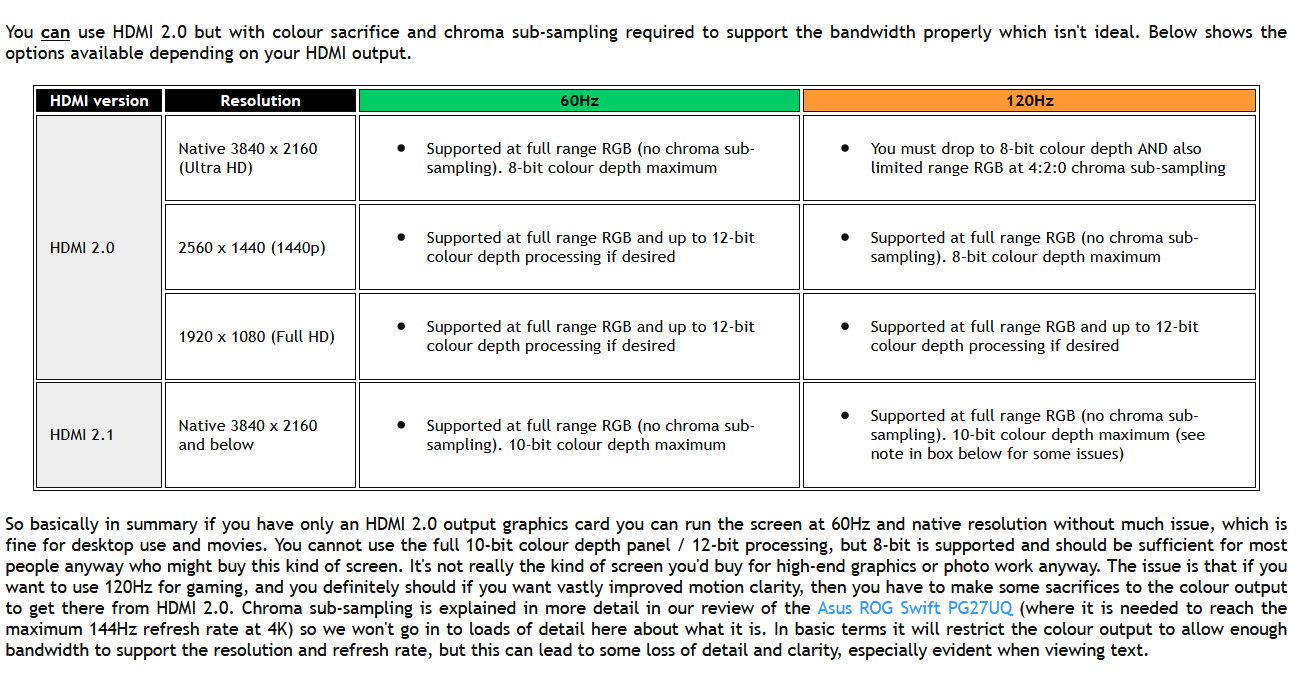
I have the following set-up:

RTX 3070 (latest drivers)
OLED48CXPUG (these are connected by a certified 48Gb cable) (HDMI input set to "PC")
Windows 10 (latest patch)

I get occasional drop outs where the signal seems lost for a second and then returns. When it comes back "HDR" shows at the top and my settings remain the same. It never happens in-games, mostly when I am browsing. (Firefox)

Anyone have any ideas?

Thanks!

P.S. The picture quality during gaming is stunning!

I am investigating the issue. It seems to more or less consistent.
I would be getting the crash more consistently, for example

- At 99% loading for minecraft, but only when a youtube video is playing in the background. Did it 8 times consistently.
- Sometimes when opening new tabs in firefox, but only certain websites.
- For me, it seems to happen more frequently when the TV or PC is "cold", ie. only been on for less than half an hour. It could just be a coincindence tho.
- All three of us have the rtx 3070 and the same problem, there seems to be correlation here, we are probably all using the lastest nvidia drivers.

What is happening is : The TV loses video signal, because the display driver crash and restart.
I am sure about this, because it'd crash any game launched, freeze video playback, black out powershell prompts. it is the same phenomenon as the flicker you see when you install/update the graphics drivers.

It was getting worse and worse for me, I did a completely clean display driver installation, which didn't fix the problem but seems to have made it less apparent.
We need more data. My most probable idea about this is that the rtx 3070 has shit HMDI 2.1 integration, be it hardware (HDMI 2.1 controller) or software (drivers)
I only have the CX for a few weeks so I don't know if this a a new issue or not.
 
Back
Top