• Some users have recently had their accounts hijacked. It seems that the now defunct EVGA forums might have compromised your password there and seems many are using the same PW here. We would suggest you UPDATE YOUR PASSWORD and TURN ON 2FA for your account here to further secure it. None of the compromised accounts had 2FA turned on.
    Once you have enabled 2FA, your account will be updated soon to show a badge, letting other members know that you use 2FA to protect your account. This should be beneficial for everyone that uses FSFT.

LG 48CX

I am investigating the issue. It seems to more or less consistent.
I would be getting the crash more consistently, for example
Checking the google quickly, it seems this issue also happens to people using HDMI 2.1's full power (rtx 3000, 4K120hz12bit) on samsung TV's.
One of them said windows version 20H2 is the cause of this, he has rolled back to an older version and seemingly had no issue.
Nothing sure. Best bet is to report the bug to MS and / or Nvidia, and wait to further updates.

If this is a widespread problem with HMDI 2.1 & some RTX cards, the upcoming collection of HMDI 2.1 monitors coming out will probably make this issue more apparent.

This is the nvidia thread about this
 
If I'm not mistaken, the CX ethernet port is inferior to its wifi, according to the spec. Or did you use a USB to 1Gbps ethernet adapter?
You made me realize that the port is indeed Fast Ethernet (100MBit), totally surprised by that.

* 100Mbit is not enough to use streaming services in an optimal way, because when starting a stream and when jumping forward/backward you need peak bandwidth to fill the buffer again
* My internet access is currently 250/100 MBit (I could upgrade to 1000/250 tomorrow, if wanted)
* WLAN AC at the TVs position would net around 140-180 MBit data rate, so even that would not fully utilize my internet bandwidth, even today

Currently I would need 250MBit at my TV to fully utilize my internet connection
 
Last edited:
I keep getting blackouts on my CX.. I sit in Windows doing idle stuff like browsing or editing in lightroom (never when I game) it will just randomly cut to black and say "no signal" then jump back to the signal. Whats the deal here? Is it the screen, cable or graphics card?

The cable is a Nedis HDMI 2.1 2m cable https://nedis.com/en-us/product/con...dmi-connector-hdmi-connector-200-m-anthracite
And the graphics card is a ASUS RTX 3070 TUF OC

Anyone else have issues with the TV just freezing up for several seconds and then re acquiring a signal? I had read some had issues with this and game response being enabled, I turned that off and I still get it, but it's sporadic, sometimes it's every few minutes and other times it doesn't happen for hours. Source is a 3070. I did replace the cable with an ultra certified (Zeskit off of Amazon) as I thought that was the culprit, but no change. I'm running 4k/120hz RGB 10 bit.

I'm really frustrated with this TV, between the crappy ASBL/ABL, the fear of burn in and now this I'm tempted to exchange it. But what else is out there? I already had the Samsung Q80T and that is unable to connect at 4k/120hz with HDR and Samsung seems like they don't want to address the issue. I guess HDMI 2.1 is just too new.

YFI: In my case I also thought it's the cable, however it turned out that intermittent blackouts where caused by a setting in Nvidia Control panel in the scaling section. Make sure scaling is set to "display" not "gpu"

Hello, I'm not native so I hope you can forgive some of my yoinky phrasings.

I now use the 48cx as my main and only monitor, about 5 hours on works days and up to 14hours on weekend days. I believe it now when some of you said that there is nothing better even as a monitor.
I have however some issues
Text rendering is absolute trash at 100% scaling, I was prepared for that. Disabling cleartype is basically trading a flavor of bad for another. Nothing to do about that.
Colors which are rich in green look very wierd, as if there is a line on the left that is black. Looks like a byproduct of the wierd pixel structure but I could be wrong (try but putting a light green square on a gray background)

Finally the issue pointed by SD777, which is the most annoying one, happens to me on a regular basis, it did 5-6 times this morning. Sometimes it does it 5 times an hour, sometimes never.

More data:

I also have a 3070 (msi ventus) and the display is set to 4K/120hz/10bit, TV is set to PC mode, screen shift disabled.
However it seems to always happens when web browsing, on doing general desktop things.
It never happens when playing, be it full screen or windowed, or even when watching videos.
I use a seemingly good cable which is 2 meter long

I believe it is a problem from the graphics card, but it could also be the TV is twitching channels by itself for some reason. I originally thougt it was the anti-burn in pixel refresh procedure, but this should only activate when the TV is turned on and only every 4hr as I understand.

Turn out I already had this set
View attachment 322453
Changing override setting does nothing.

Maybe it is linked to the faulty hdmi 2.1 chips in most early 2.1 hardware. RTX Could be some of those.
Last thing I did was disable HDMI audio from the nvidia control panel.
No signal losing since then, by it could just be luck.
Will keep updating on this.

Edit 2 mins after posting :
It did it again, lost signal 5 times in a row over the course of 30seconcs. It seems to get in and out of the PC/game mode, as I could see the color temperature and brightness change. It did it immediately after launching paint.net, so it is certainely linked to activity on the PC, or to a sudden change in the image.

I have the following set-up:

RTX 3070 (latest drivers)
OLED48CXPUG (these are connected by a certified 48Gb cable) (HDMI input set to "PC")
Windows 10 (latest patch)

I get occasional drop outs where the signal seems lost for a second and then returns. When it comes back "HDR" shows at the top and my settings remain the same. It never happens in-games, mostly when I am browsing. (Firefox)

Anyone have any ideas?

Thanks!

P.S. The picture quality during gaming is stunning!

I am investigating the issue. It seems to more or less consistent.
I would be getting the crash more consistently, for example

- At 99% loading for minecraft, but only when a youtube video is playing in the background. Did it 8 times consistently.
- Sometimes when opening new tabs in firefox, but only certain websites.
- For me, it seems to happen more frequently when the TV or PC is "cold", ie. only been on for less than half an hour. It could just be a coincindence tho.
- All three of us have the rtx 3070 and the same problem, there seems to be correlation here, we are probably all using the lastest nvidia drivers.

What is happening is : The TV loses video signal, because the display driver crash and restart.
I am sure about this, because it'd crash any game launched, freeze video playback, black out powershell prompts. it is the same phenomenon as the flicker you see when you install/update the graphics drivers.

It was getting worse and worse for me, I did a completely clean display driver installation, which didn't fix the problem but seems to have made it less apparent.
We need more data. My most probable idea about this is that the rtx 3070 has shit HMDI 2.1 integration, be it hardware (HDMI 2.1 controller) or software (drivers)
I only have the CX for a few weeks so I don't know if this a a new issue or not.
We are all talking about the same issue. Do we all have RTX 3070s? I have a ASUS 3070 TUF OC. Its in silent mode (Performance vs silent) and no OC. Dead stock.

I have tried using 8bit since a week ago. And while I havent lost signal as much, I still do. I think its a coincidence it happens less now. Has nothing to do with 8bit vs 10bit (IE the cable not supporting enough data). But I can of cause not be certain.

For me it never happens when I game. I am running in borderless windowed mode at 3840x1600 when I game. Red Dead Redemption 2 fx.. No signal is lost. Its only when I am "in windows". Happens mostly when I am in Lightroom editing or just browsing the internet. (maybe because that is what I do the most?).
 
Check that please: solved my blackouts/no signal: YFI: In my case I also thought it's the cable, however it turned out that intermittent blackouts where caused by a setting in Nvidia Control panel in the scaling section. Make sure scaling is set to "display" not "gpu"

Yeah I definitely checked that when I saw the post, but mine was already enabled to display. I just received an ultra certified Belkin cable that many were saying fixed their issues, I'll be giving that a try. The weird thing about the blackouts is they are random, sometimes I can get several in a row a few minutes apart, other times I can go hours without getting one.
 
Hello, I'm not native so I hope you can forgive some of my yoinky phrasings.

I now use the 48cx as my main and only monitor, about 5 hours on works days and up to 14hours on weekend days. I believe it now when some of you said that there is nothing better even as a monitor.
I have however some issues
Text rendering is absolute trash at 100% scaling, I was prepared for that. Disabling cleartype is basically trading a flavor of bad for another. Nothing to do about that.
Colors which are rich in green look very wierd, as if there is a line on the left that is black. Looks like a byproduct of the wierd pixel structure but I could be wrong (try but putting a light green square on a gray background)

Finally the issue pointed by SD777, which is the most annoying one, happens to me on a regular basis, it did 5-6 times this morning. Sometimes it does it 5 times an hour, sometimes never.

More data:

I also have a 3070 (msi ventus) and the display is set to 4K/120hz/10bit, TV is set to PC mode, screen shift disabled.
However it seems to always happens when web browsing, on doing general desktop things.
It never happens when playing, be it full screen or windowed, or even when watching videos.
I use a seemingly good cable which is 2 meter long

I believe it is a problem from the graphics card, but it could also be the TV is twitching channels by itself for some reason. I originally thougt it was the anti-burn in pixel refresh procedure, but this should only activate when the TV is turned on and only every 4hr as I understand.

Turn out I already had this set
View attachment 322453
Changing override setting does nothing.

Maybe it is linked to the faulty hdmi 2.1 chips in most early 2.1 hardware. RTX Could be some of those.
Last thing I did was disable HDMI audio from the nvidia control panel.
No signal losing since then, by it could just be luck.
Will keep updating on this.

Edit 2 mins after posting :
It did it again, lost signal 5 times in a row over the course of 30seconcs. It seems to get in and out of the PC/game mode, as I could see the color temperature and brightness change. It did it immediately after launching paint.net, so it is certainely linked to activity on the PC, or to a sudden change in the image.

I've also noticed that text looks fairly crappy on my Cx as well, even after playing with clear type or trying to just turn it off. My issue is letters, especially lighter colored letters, have a lot of ghosting and halo around them.

Also how do you get those options in scaling, the ones for integer scaling, etc. My Nvidia control panel only has a single drop down box for scaling or display, I don't have the option to select a scaling mode and don't have the option to override scaling either. I'm on a 3070 and do have the latest drivers.
 
As an Amazon Associate, HardForum may earn from qualifying purchases.
I have the following set-up:

RTX 3070 (latest drivers)
OLED48CXPUG (these are connected by a certified 48Gb cable) (HDMI input set to "PC")
Windows 10 (latest patch)

I get occasional drop outs where the signal seems lost for a second and then returns. When it comes back "HDR" shows at the top and my settings remain the same. It never happens in-games, mostly when I am browsing. (Firefox)

Anyone have any ideas?

Thanks!

P.S. The picture quality during gaming is stunning!

Yeah I'm getting this also. I also don't have it happen in games. I suspect it's the cable, I have the Zeskit ultra certified cable but have a Belkin cable I am going to test.
 
I am investigating the issue. It seems to more or less consistent.
I would be getting the crash more consistently, for example

- At 99% loading for minecraft, but only when a youtube video is playing in the background. Did it 8 times consistently.
- Sometimes when opening new tabs in firefox, but only certain websites.
- For me, it seems to happen more frequently when the TV or PC is "cold", ie. only been on for less than half an hour. It could just be a coincindence tho.
- All three of us have the rtx 3070 and the same problem, there seems to be correlation here, we are probably all using the lastest nvidia drivers.

What is happening is : The TV loses video signal, because the display driver crash and restart.
I am sure about this, because it'd crash any game launched, freeze video playback, black out powershell prompts. it is the same phenomenon as the flicker you see when you install/update the graphics drivers.

It was getting worse and worse for me, I did a completely clean display driver installation, which didn't fix the problem but seems to have made it less apparent.
We need more data. My most probable idea about this is that the rtx 3070 has shit HMDI 2.1 integration, be it hardware (HDMI 2.1 controller) or software (drivers)
I only have the CX for a few weeks so I don't know if this a a new issue or not.

Interesting, I don't get this at all inside of video games, not even once. I did reinstall my drivers and that seemed to greatly help, now the blackouts are just once in a while, but as mentioned sometimes they are several in a row just minutes apart and other times I go hours without any blackouts.

About the driver crash, have you looked at your event viewer? I'm not seeing any video driver crashes logged there, but I haven't been looking very closely. Next time I get blackouts I'll keep an eye out on my event viewer.
 
Does the Game video mode do anything special for playing games? I rather prefer the Cinema Home mode but wasn't sure if I was sacrificing anything by not using the Game video mode. I do have Ultra HDMI and Game response enabled. Also where do you all set your in game HDR brightness to? I've seen some mention 5% window, but on Rtings they only have 2/10/25/50/100% windows.
 
Interesting, I don't get this at all inside of video games, not even once. I did reinstall my drivers and that seemed to greatly help, now the blackouts are just once in a while, but as mentioned sometimes they are several in a row just minutes apart and other times I go hours without any blackouts.

About the driver crash, have you looked at your event viewer? I'm not seeing any video driver crashes logged there, but I haven't been looking very closely. Next time I get blackouts I'll keep an eye out on my event viewer.
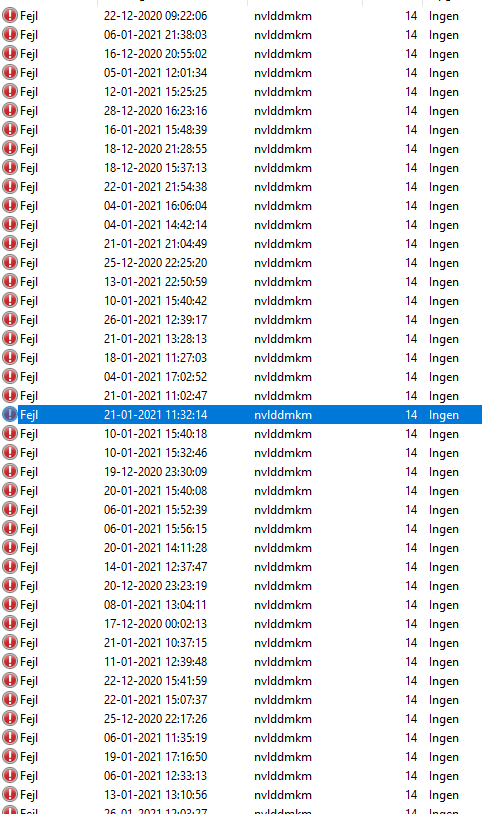
They do appear as display driver crash in the event viewer for me
We all have the exact same issue
1611666622755.png


1611666629534.png

As you can see, driver crash, then a restart 7 seconds later.
1611666647465.png


Additionnal note : Just like gaming and video playback, it never crashed when in a microsoft teams meeting.
 
They do appear as display driver crash in the event viewer for me
We all have the exact same issue
View attachment 322844

View attachment 322845
As you can see, driver crash, then a restart 7 seconds later.
View attachment 322846

Additionnal note : Just like gaming and video playback, it never crashed when in a microsoft teams meeting.

I haven't looked at my event log. I'll check tonight.

I am using a stock ASUS TUF 3070 OC.

I've also tried two different, 48Gbps cords. One is certified. There is no difference in the frequency of occurrence between the cords. I used the non-certified cord for the XBOX Series X on my 65" OLEDE9 without issue.
 
Does the Game video mode do anything special for playing games? I rather prefer the Cinema Home mode but wasn't sure if I was sacrificing anything by not using the Game video mode. I do have Ultra HDMI and Game response enabled. Also where do you all set your in game HDR brightness to? I've seen some mention 5% window, but on Rtings they only have 2/10/25/50/100% windows.
Game mode has lower input lag than any other mode. You can mostly match cinema home simply by copying the settings from that preset to game mode. I would recommend copying the ones from the expert modes though.

For HDR, just leave brightness on the TV at 100 and in games it's a case by case thing depending on how the game handles HDR configuration. HDTVTest recommends that instead of setting for the "where some logo is almost invisible" in games, you set for one step up from there where it is invisible so you are not limiting the brightness/black level ranges.
 
I've also noticed that text looks fairly crappy on my Cx as well, even after playing with clear type or trying to just turn it off. My issue is letters, especially lighter colored letters, have a lot of ghosting and halo around them.

Also how do you get those options in scaling, the ones for integer scaling, etc. My Nvidia control panel only has a single drop down box for scaling or display, I don't have the option to select a scaling mode and don't have the option to override scaling either. I'm on a 3070 and do have the latest drivers.
Put it in Game mode.
 
I don’t understand why every one is playing 4k movies in windows. I always use the Plex app built into the TV. It does HDR and Dobly Vision. Granted I have a 42tb local server and 700tb in the cloud. I have no issues using the app local or streaming from the cloud. The new Plex server even does tone mapping for 4k hdr to 1080p sdr. It works well use it when streaming to older TVs.
 
So the 2021 48" C1 model is on the USA LG website now (no 42" listed btw):

https://www.lg.com/us/tvs/lg-oled48c1pub-oled-4k-tv

I'm seeing absolutely no differences vs the 2020 (CX) model besides a9 "Gen 4" processor which I'm assuming is nothing but marketing garbage that probably doesn't even benefit in game mode anyway as most of that junk is turned off. Sound about right or did I miss anything?

The main functional difference is the panel can get brighter. We're not sure how much exactly until someone measures it. LG hasn't said much I think, except it is "20% more efficient", which means the brightness can get higher since voltage is the main limiter on these panels for brightness. I read 1000 nits somewhere - note the CX is claimed 850 nits, but a 10% patch only gets ~600-650 nits. So it means the C1 will probably get 750-800 nits at a 10% patch which is a nice bump.

Otherwise it doesn't seem like there is much improvement at all. Certainly not worth upgrading from a CX for! There might be some killer feature people discover when the units start getting reviewed. But in reality the panels haven't changed much since the 7 series.

Disappointingly, it still has the awful stand that makes it stick out too much.
 
Last edited:
The main functional difference is the panel can get brighter. We're not sure how much exactly until someone measures it. LG hasn't said much I think, except it is "20% more efficient", which means the brightness can get higher since voltage is the main limiter on these panels for brightness. I read 1000 nits somewhere - note the CX is claimed 850 nits, but a 10% patch only gets ~600-650 nits. So it means the C1 will probably get 750-800 nits at a 10% patch which is a nice bump.

Otherwise it doesn't seem like there is much improvement at all. Certainly not worth upgrading from a CX for! There might be some killer feature people discover when the units start getting reviewed. But in reality the panels haven't changed much since the 7 series.

Disappointingly, it still has the awful stand that makes it stick out too much.
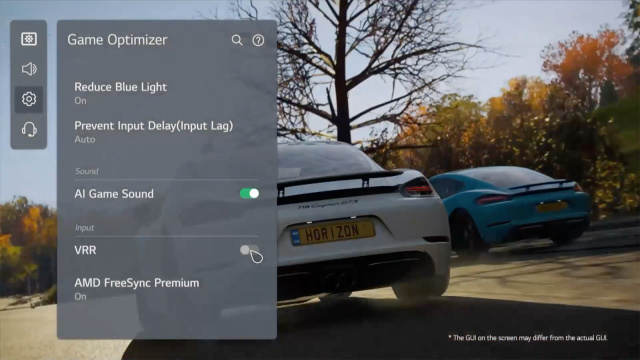
They added more AI processing functions to the image processor. There is a new "Game Optimizer" that is supposed to be able to detect the type of game you're playing and automatically adjust the image accordingly. Input lag with HDR at 4K is also supposed to be improved over the X-series. The latter sounds interesting, but the former sounds useless to me since I don't want my color settings being messed with once calibrated.
 
Whats the difference with just hitting the Windows+S and start typing and only hitting Windows key and start typing?

Either works. It just brings up a different panel with recents and quick searches. I do it more out of habit I guess since I use win+ other keys all of the time. I'm always hitting Win+ <whatever key>.

There are more but these below are the windows key ones I mainly have in my routine b/c i find they are useful. They also are all within reach of my left hand on the keyboard while my hand is still on the mouse.

-------------------------------------------

Win+A = action center
.............. I use this to check it if I miss the popup on the primary monitor since I usually keep my taskbar hidden on a different monitor)
Ctrl + Win + B = switch to the program that displayed a message in the notification area

Win+D = show/hide desktop toggle (minimize/restore everything all at once)
Win+E = open the default file explorer
..............mine is directory opus, I usually manage the file browser using streamdeck button tied to displayfusion hotkeys rather than using this though
Win + G = open the xbox game bar.
.............This xbox overlay has some neat readouts and things in it's popup overlay. Performance meter (cpu, gpu, ram, fps), resource by app meter, volume per app sliders, mic mute/unmute toggle, audio device selection, clock, capture functions and gallery, etc.
Win+L = lock the device (to login/pin page)
Win+R = run
Win+V = open the clipboard pin


Win+X = open the quick link menu (shows a simplified menu of all of the win10 menu categories and power/restart etc.)
............... once that menu is up you can then hit another plain letter key to open any of the headings as outlined from the link and quotes below.
................The search menu works just as easily now though for most of that, or even cortana if you are into using that.
.................It's also easy to map these to a streamdeck's buttons in a "subfolder" of streamdeck buttons and slap a picture/icon on the button to represent them.

................ https://www.isumsoft.com/windows-10/keyboard-shortcuts-for-winx-quick-link-menu.html

Windows + X + U + D = Disconnect

Windows + X + U + I = Sign Out

Windows + X + U + U = Shutdown

Windows + X + U + R = Restart

Windows + X + A = Starts PowerShell with administrative privileges
Windows + X + E = Starts Explorer (same as Windows + E)
Windows + X + F = Starts Apps & Features
Windows + X + G = Starts Computer Management (compmgmt.msc)
Windows + X + I = Starts PowerShell in user mode
Windowx + X + K = Starts Disk Management (diskmgmt.msc)
Windows + X + M = Starts Device Manager (devmgmt.msc)
Windows + X + N = Starts Windows Settings (formerly control.exe)
Windows + X + O = Starts Power & Sleep
Windows + X + R = Starts Run dialog (same as Windows + R)
Windows + X + S = Starts Search Dialog
Windows + X + T = Starts Task Manager
Windows + X + U = Starts Shut down or Sign out
Windows + X + V = Starts Event Viewer (eventvwr.msc)
Windows + X + W = Starts Network Status
Windows + X + Y = Starts About
 
Might be a dumb question, has anyone had any luck finding a 12-15ft HDMI 2.1 cable that works to spec?
 
They added more AI processing functions to the image processor. There is a new "Game Optimizer" that is supposed to be able to detect the type of game you're playing and automatically adjust the image accordingly. Input lag with HDR at 4K is also supposed to be improved over the X-series. The latter sounds interesting, but the former sounds useless to me since I don't want my color settings being messed with once calibrated.
I thought the Game Optimizer was just this stupid menu that gathers together game related things that are already in other menus on the CX?

l=640%2C&quality=95&image_uri=https%3A%2F%2Fs.yimg.jpg
 
Copper HDMI 2.1 cables are only rated up to 3m / ~9ft. So unfortunately for that length, you'll have to get an expensive fiber optic cable like this one from monoprice: https://www.monoprice.com/product?p_id=38629. Costs $129!

Edit: They seem to have a certified 15ft copper cable but not sure I'd trust it... https://www.monoprice.com/product?p_id=42682

Next question is, is there any decent adapter out there to convert Display Port to HDMI 2.1 and maintain 4k 120 and 10 bit color? My EVGA 3090 only has 1 HDMI 2.1, and I have both an LG CX 48, and a C9 65 in the same room.
 
Next question is, is there any decent adapter out there to convert Display Port to HDMI 2.1 and maintain 4k 120 and 10 bit color? My EVGA 3090 only has 1 HDMI 2.1, and I have both an LG CX 48, and a C9 65 in the same room.

Nope - displayport 1.4 is only capable of 32Gbps - you need 40Gbps to do 4k120 RGB 10-bit. That's why people like the AIB cards with 2 HDMI ports.
 

Attachments

  • Udkli222p.PNG
    Udkli222p.PNG
    66.6 KB · Views: 0
Next question is, is there any decent adapter out there to convert Display Port to HDMI 2.1 and maintain 4k 120 and 10 bit color? My EVGA 3090 only has 1 HDMI 2.1, and I have both an LG CX 48, and a C9 65 in the same room.
Yes, the Club3D CAC-1085. I use this with a 2080 Ti and it works great now with the latest firmware on adapter and TV. VRR is the only feature that is missing, I don't know if they will ever make it work.

For USB-C you could look into the CableMatters "48 Gbps" USB-C to HDMI 2.1 adapter if you want things even easier. I think you can get it on Amazon in the US, they said March for EU. Again VRR is not possible with this.
 
Nope - displayport 1.4 is only capable of 32Gbps - you need 40Gbps to do 4k120 RGB 10-bit. That's why people like the AIB cards with 2 HDMI ports.

I believe the Club3D adapter supports DSC so that allows you to get 4k120 10bit RGB over DP 1.4 - HDMI 2.1
 
Game mode has lower input lag than any other mode. You can mostly match cinema home simply by copying the settings from that preset to game mode. I would recommend copying the ones from the expert modes though.

For HDR, just leave brightness on the TV at 100 and in games it's a case by case thing depending on how the game handles HDR configuration. HDTVTest recommends that instead of setting for the "where some logo is almost invisible" in games, you set for one step up from there where it is invisible so you are not limiting the brightness/black level ranges.

Put it in Game mode.

Just to clarify I'm not talking about Game Response, that's already enabled. I'm talking about the picture mode setting named game, other settings are cinema home, cinema, vivid, etc.
 
Just to clarify I'm not talking about Game Response, that's already enabled. I'm talking about the picture mode setting named game, other settings are cinema home, cinema, vivid, etc.
Putting the Picture Mode to the Game setting cleared up all my issues with text rendering on my Win 10 system.
 
Putting the Picture Mode to the Game setting cleared up all my issues with text rendering on my Win 10 system.

Interesting, I don't notice much of a difference. What I don't like about the game setting is it seems whites and light colors are really drab. I've tried playing around with it, but can't figure it out. The closest I've come is if I enable HGIG the desktop is drab, but then in games it's much more accurate. But in Cinema mode you can only do tone mapping, no HGIG, with tone mapping on the desktop looks much nicer. I guess I'll just use Cinema mode for the desktop and game for games.
 
I've found wired both works best. Also if you're doing something CPU heavy on the computer it can cause some stutters. It's also possible the HDD is your issue, or also if you're using the HDD for other things (like downloading another movie) at the same time you're watching it can cause issues.

Following the above recommendations I almost never get any stuttering and I'm using a pretty old PC and old HDDs. And almost everything I watch is the highest quality 4k HDR you can find. Even Gemini Man at 60 fps which I highly recommend watching.
I've played the 4K HDR movie using the USB HDD directly on PC fine with no stutters (via Plex). It only stutters with SmartShare. So it can't be the HDD. Also, I'm using 5900X + 3080, so my PC is plenty powerful. I'm still leaning toward a network lag causing the stutters. I'll find some free time to test SmartShare via ethernet on the TV (even if it's just 100Mbps) to see if it was the wifi interference causing the stutters.

For HDR, just leave brightness on the TV at 100 and in games it's a case by case thing depending on how the game handles HDR configuration. HDTVTest recommends that instead of setting for the "where some logo is almost invisible" in games, you set for one step up from there where it is invisible so you are not limiting the brightness/black level ranges.
Is that a typo and you mean leave OLED Light at 100? Brightness by default is 50 iirc.
 
Interesting, I don't notice much of a difference. What I don't like about the game setting is it seems whites and light colors are really drab. I've tried playing around with it, but can't figure it out. The closest I've come is if I enable HGIG the desktop is drab, but then in games it's much more accurate. But in Cinema mode you can only do tone mapping, no HGIG, with tone mapping on the desktop looks much nicer. I guess I'll just use Cinema mode for the desktop and game for games.
The desktop is the worst place to have tone mapping on. It will negate your brightness setting and make white blinding no matter what.
 
They do appear as display driver crash in the event viewer for me
We all have the exact same issue
View attachment 322844

View attachment 322845
As you can see, driver crash, then a restart 7 seconds later.
View attachment 322846

Additionnal note : Just like gaming and video playback, it never crashed when in a microsoft teams meeting.

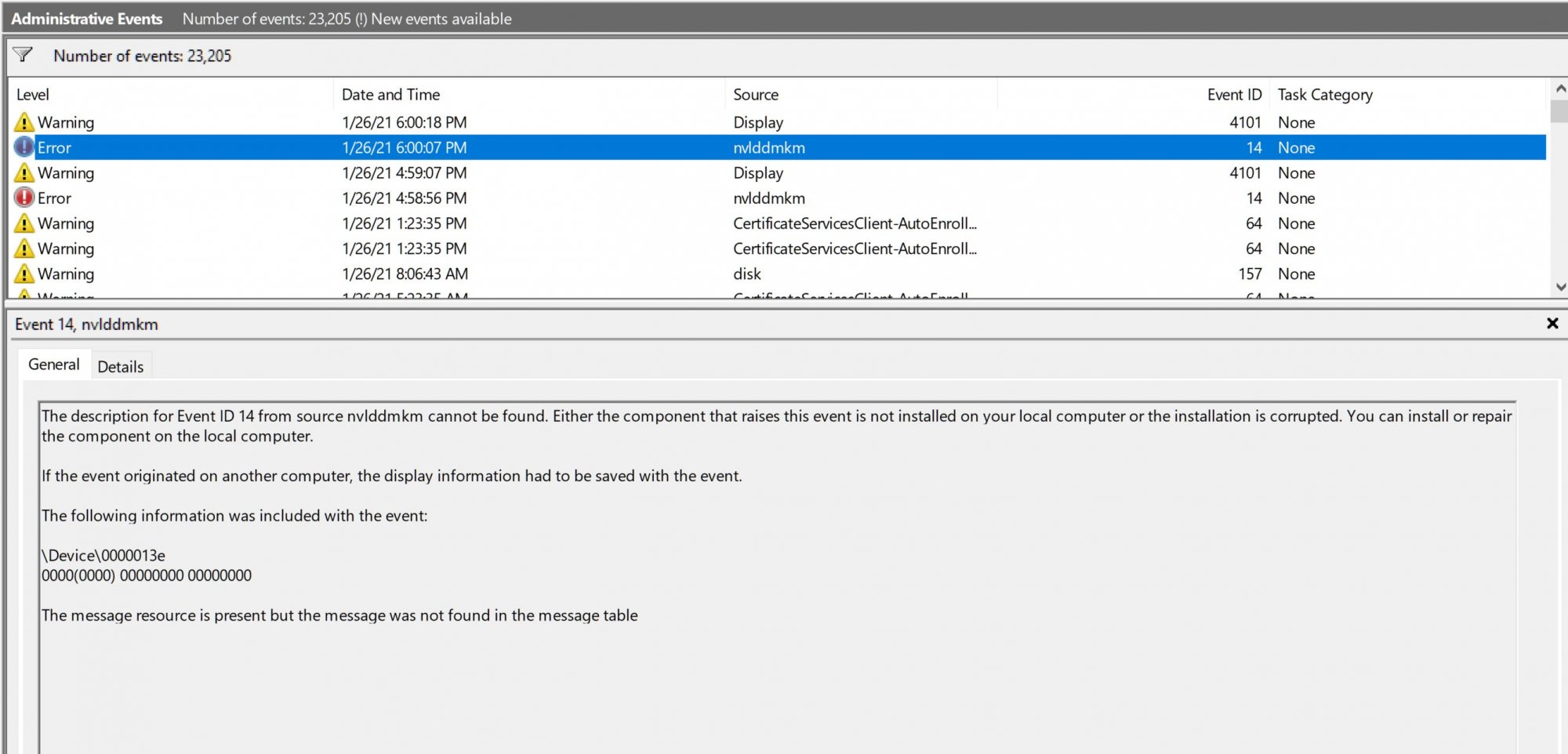
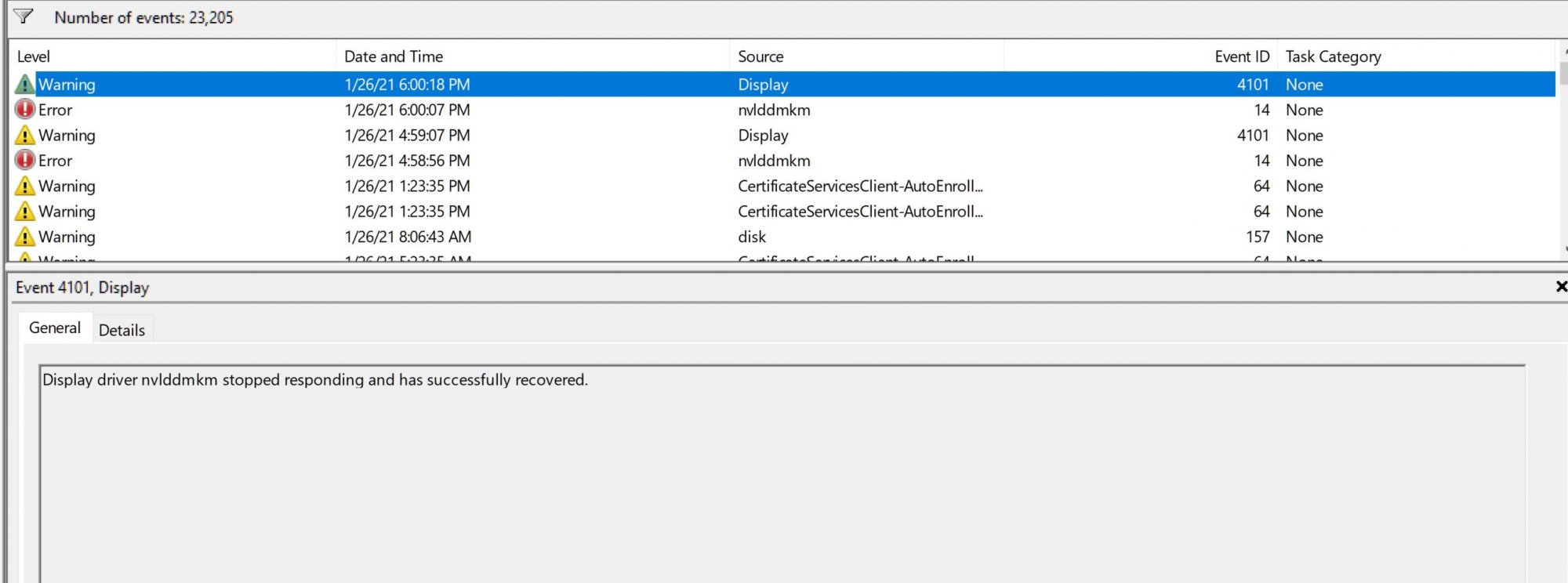
yep indeed I'm also having driver crashes when I get the blackouts. Bad news, I tried the Belkin cable and within a few minutes I had 2 crashes seconds apart so I guess that is going back to Amazon. This seems more like an issue with Nvidia than with LG though.

crash1.JPG

crash2.JPG
 
The desktop is the worst place to have tone mapping on. It will negate your brightness setting and make white blinding no matter what.

Interesting, I feel like it looks better with tone mapping on. With tone mapping off anything white or lighter looks really drab, even with OLED to 100.
 
Yes, the Club3D CAC-1085. I use this with a 2080 Ti and it works great now with the latest firmware on adapter and TV. VRR is the only feature that is missing, I don't know if they will ever make it work.

For USB-C you could look into the CableMatters "48 Gbps" USB-C to HDMI 2.1 adapter if you want things even easier. I think you can get it on Amazon in the US, they said March for EU. Again VRR is not possible with this.
Unfortunately this EVGA 3090 just had 3 DP 1.4 and 1 HDMI 2.1 out. I wish it had a usb-c and another HDMI 2.1
 
Checking the google quickly, it seems this issue also happens to people using HDMI 2.1's full power (rtx 3000, 4K120hz12bit) on samsung TV's.
One of them said windows version 20H2 is the cause of this, he has rolled back to an older version and seemingly had no issue.
Nothing sure. Best bet is to report the bug to MS and / or Nvidia, and wait to further updates.

If this is a widespread problem with HMDI 2.1 & some RTX cards, the upcoming collection of HMDI 2.1 monitors coming out will probably make this issue more apparent.

This is the nvidia thread about this

I also had a similar issue with a Samsung Q80T on the HDMI 2.1 port. I didn't get to test it much because after a day the TV refused to run 4k 120hz and HDR at the same time, I exchanged it for the CX at that point. But now I wonder if the issue really was my 3070.
 
Interesting, I feel like it looks better with tone mapping on. With tone mapping off anything white or lighter looks really drab, even with OLED to 100.
This is the correct appearance. The brightness is controlled with the HDR / SDR brightness balance slider in Windows, not OLED Light which must always be 100.
 
I found a game to test my RTX 3080 at 4K120 10-bit RGB w/ GSYNC (capped framerate at 115 FPS).

Forza Horizon 4.

All settings maxed, MSAA 4x (to keep framerate higher than 8x), motion blur off.


All I have to say is SWEET JESUS!!! Rock solid 100-115 FPS, no stuttering, and not a frame tear in sight. Unbelievably colorful, smooth motion, incredibly responsive... I don't say this lightly, but the RTX 3080 + CX is gaming perfection on the Forza Horizon 4. Same experience on Doom Eternal as well.

Unbelievable. Just unbelievable. LG... you done good. Not much else I can ask for in a gaming display.
 
Back
Top