• Some users have recently had their accounts hijacked. It seems that the now defunct EVGA forums might have compromised your password there and seems many are using the same PW here. We would suggest you UPDATE YOUR PASSWORD and TURN ON 2FA for your account here to further secure it. None of the compromised accounts had 2FA turned on.
    Once you have enabled 2FA, your account will be updated soon to show a badge, letting other members know that you use 2FA to protect your account. This should be beneficial for everyone that uses FSFT.

LG 48CX

It’s obvious though


Anyone here calibrate one of these? Doing some reading on avsforum, seems like the i1display pro with Calman Home for LG is a good solution? I’m not that happy with the gradient handling on my set, and hoping calibration can help. Grey and yellow gradients in particular are pretty bad on the Eizo monitor test. White balance shifts rather significantly depending on luminance in both. Certain greys look more blue or red, certain yellows look too green. Green is blown out with no change at all once it gets 5/6 of the way across the screen.

Thinking if I can fix that it might help with the posterization issue too.
I calibrated with the autocal in Calman Home for LG and an X-Rite i1Display Pro Plus, worked great, I documented it a few dozen, maybe 100 pages back in this thread, heh.
 
I finally got a service remote so I could check my hours (EU model). I recommend NOT doing this, I messed up and pressed the IN STOP button. All my hours got reset. Nothing else seemed to be affected at least, the factory WB calibration still is intact. Still, pretty damn annoying and I'm beating myself up about it. I should have read up more about it before pressing buttons lol. Be careful with those service remotes!
 
Just watched a few episodes of The Expanse in native 4K. Wow. Haven't gamed yet but if it looks as good as watching TV shows in 4k, then I am psyched.

BTW what 4K video player do you all use? I used VLC Player and it hiccuped a few times.
 
Can somebody tell me how's the experience @60Hz with Motion Pro at low/mid/high settings? Any headache, eye strain? I heard people complain that strobing is too noticeable at such refresh rates and it does not help much in terms of clarity.

With 60hz the only usable setting is high and motion clarity is excellent but brightness only adequate for pitch black room. The flickering is noticeable and depending on content different people will like it or hate it.

Other settings have motion artefacts, don't even bother.
 
Just watched a few episodes of The Expanse in native 4K. Wow. Haven't gamed yet but if it looks as good as watching TV shows in 4k, then I am psyched.

BTW what 4K video player do you all use? I used VLC Player and it hiccuped a few times.

Media player classic with the k-lite codec pack.

But I think the best way is to use LG smart share and watch directly on the tv so you don't have to deal with any windows hdr nonsense or anything else it does to negatively affect picture quality.
 
Media Player Classic is still good but depricated and no longer being developed... few years now. VLC was great 15+ years ago.

For a screen such as these recent LG OLEDs and a Win10 machine with a HDMI 2.0b or 2.1 GPU with some x264/265/266 encoded HDR content... go directly to MPC-BE plus mpc video renderer (latest 0.5 builds from github).

Works perfect with HDR and SDR content and switches HDR on off on its own, support DXVA, etc
 
I've used K-lite Mega codec pack for.... forever. It is still being constantly updated and uses MPC-HC plus optional components you can choose during install. It does switch HDR on and off automatically and even recognizes when I drag the rendering window to my other screen and kicks HDR off.

No problem playing 4k, HDR, Atmos, 10bit, etc etc latest compression video files.
 
K-lite Codec Pack, MadVR and MPC-HC had their place in software history but are all long in the tooth as we kick off the third decade of the century.

It's lame how with all the processing power riddled across modern CPUs, GPUs, xPUs - so very little has been done in the 'simple' video processing and process off-loading department. x264/5/6 should be the norm for all media by now with hardware decoding by the cheapest consumer grade devices.

I guess it is still better than the regression that has taken place in the hardware accelerated spacial audio processing department. Long gone are the days of A3D and similar. Sad.
 
I finally got a service remote so I could check my hours (EU model). I recommend NOT doing this, I messed up and pressed the IN STOP button. All my hours got reset. Nothing else seemed to be affected at least, the factory WB calibration still is intact. Still, pretty damn annoying and I'm beating myself up about it. I should have read up more about it before pressing buttons lol. Be careful with those service remotes!
You can check your hours with the regular remote in the regular menu, or is this somehow different on EU models?
 
Last edited:
I have to say I am enjoying the CX 48. I was using a Alienware AW3418DW since Feb. of 2018. My GPU is a EVGA 2080Ti FTW3 Ultra and while it is not a 2.1 hdmi I may upgrade in the future. Mostly play fps games such as BF4 and The Division 2. The resolution is set to 3840 X 2169 under the PC header at 120Hz. No issues at all.View attachment 312096View attachment 312097View attachment 312098
Came from the same monitor and while I enjoyed it, this one is so much more fun to use. Used it with a 2080ti and it was fine, using a 3080 now and it is worth it, but really does not detract from enjoying it.
 
I calibrated with the autocal in Calman Home for LG and an X-Rite i1Display Pro Plus, worked great, I documented it a few dozen, maybe 100 pages back in this thread, heh.

I don't remember if anyone posted if they calibrated with HDR turned on in windows 10 but at SDR brightness levels using the slider. I know the brightness setting's nits were tested with the HDR slider value lower but I'm not sure that an apples to apples comparison of SDR mode in windows to "HDR mode at the same SDR brightness level" in windows was ever done to see if there would be any difference across every other parameter. Just curious if everything measures the same at the same brightness value SDR vs win10 HDR using slider to same nits.


Just watched a few episodes of The Expanse in native 4K. Wow. Haven't gamed yet but if it looks as good as watching TV shows in 4k, then I am psyched.

BTW what 4K video player do you all use? I used VLC Player and it hiccuped a few times.


I've just been using mpc-hc with madvr.. if you set the madvr settings properly it works great.

Wherever you are viewing it from - I'd recommend you try some of the planet earths, blue planets, and other 4k/UHD HDR documentaries developed over years and made with very expensive cameras. Their quality shows the best of what regular tvs can do but on OLED HDR they are astounding.


...........................


Unfortunately plex doesn't work with HDR properly yet. You can pass plex server to kodi though I guess but I haven't tried it yet. It's really a shame they haven't updated plex to stream hdr across the board. It's a great interface even for use on the same local machine. I'll have to take a shot at getting it to work through kodi eventually since it's browser menu is similar so should provide a similar result.
https://forum.kodi.tv/showthread.php?tid=223175&pid=1972183#pid1972183
DSPlayer Features:

  • Compatibility with most custom DirectShow filters such as LAV Filters, Xy-SubFilter, Haali Media Splitter, AV Splitter, FFDShow, AC3Filter, etc.;
  • Full integration with madVR video renderer including a customized madVR gui and access to all madVR post-processing features;
  • Custom video renderers: Enhanced Video Renderer (EVR) and Video Mixing Renderer 9 (VMR9);
  • Complete settings gui for DSPlayer-related controls and options;
  • Extended audio streams and subtitle choice dialogs;
  • Ability to add filters and assign media rules through the Kodi interface.
Warnings: (see details in the link above)

2020
--------------
Firstly you have to follow the instructions very carefully form the DSPlayer website in terms of what filters are being used by Kodi and DS player. I.e. ensuring firstly it is using the DS player and not internal player.


Secondly, once running a movie you have to open the MadVR control panel (from the taskbar notification area), and enable HDR passthrough in MadVR under the display settings I believe (this is what is doing the passthrough specifically).
.
https://forums.plex.tv/t/howto-4k-hdr-and-mvc-3d-in-plex-for-kodi-on-windows/219727


......................................................................................
From 2017, the file versions are newer now but the basic formula should still work:
-------------------------------------------------------------------------
I have been using 17.7 x64 version of Kodi DS player with plexkodiconnect.

Kodi DSPlayer 17.7 60

Works perfectly. I use Kodi to play and for the GUI, but plex manages the content. Took some fiddling, but it does hdr passthrough as well as bitstream all hd audio.


The basic ingredients are these. Note I always used 64 bit versions of everything.


  1. Install everything listed above.
  2. Replace Kodi DSPlayer’s internal filters with the external ones: copy all the files files from C:\Program Files (x86)\LAV Filters\x64 to C:\Program Files\Kodi\system\players\dsplayer\LAVFilters, replacing files at the destination.
  3. Disable stereoscopic 3D in the nVidia control panel. With the current drivers, enabling it causes crashes in madVR when Direct3D 11 is enabled and it goes full screen.
  4. I have HDR and Advanced Color disabled in the Windows 10 display settings. MadVR enables it during playback as needed, and it makes the desktop look bad when it’s on.
  5. In Plex for Kodi Settings, enable HEVC streaming.
  6. On the LG OLED TV settings, disable Screen Shift. This setting shifts the image around by 1 pixel every few minutes, which will result in the line-interlaced image output by madVR not being aligned with the FPR (3D filter), which results in the left and right eyes being swapped. Note this will increase the risk of image retention.
  7. MadVR settings (just the required stuff, other settings you should probably mess with, lots of other guides on that):

  • rendering -> general settings: Use Direct3D 11 for presentation (required for 10-bit color output)
  • rendering -> stereo 3D: enable stereo 3D playback. Leave everything else unchecked.
  • Devices -> -> properties: the native display bitdepth is 10 bit or higher (required for 10-bit color output).
  • Devices -> -> properties: 3D format is Line Alternative (this works for passive displays like LG OLEDs, not for any other kind of display)
  • Devices -> -> hdr: passthrough HDR content to the display, and send HDR metadata to the display
 
Last edited:
I don't remember if anyone posted if they calibrated with HDR turned on in windows 10 but at SDR brightness levels using the slider. I know the brightness setting's nits were tested with the HDR slider value lower but I'm not sure that an apples to apples comparison of SDR mode in windows to "HDR mode at the same SDR brightness level" in windows was ever done to see if there would be any difference across every other parameter. Just curious if everything measures the same at the same brightness value SDR vs win10 HDR using slider to same nits.
This wouldn't work with autocal in Calman, the pattern generator is internal to the TV and doesn't care what Windows says about how to display SDR content in an HDR signal. The way to test this would be to calibrate HDR with autocal in Calman, then use Displaycal or something similar to calibrate with patterns from Windows and see where it's at. If it's way off you COULD then make an ICC profile to "fix" Windows when HDR is on...but I think that might mess up actual HDR content. I'll check if the SDR-in-HDR is way off in a few days, a friend is borrowing my colorimeter at the moment.
 
  • Like
Reactions: elvn
like this
Is it common for Windows 10 to see the LG CX48 as a "Generic PnP Monitor"? I ask because I'm have no issues using HDR is any games, except, The Long Dark. When I have HDR enable in Windows, the game is a washed out mess, however, when I disable, it looks perfect. Wasn't sure if this is connected to the Generic PnP or something else?

Or should I be calibrating this TV and not using Windows HDR?
 
Last edited:
Media Player Classic is still good but depricated and no longer being developed... few years now. VLC was great 15+ years ago.

For a screen such as these recent LG OLEDs and a Win10 machine with a HDMI 2.0b or 2.1 GPU with some x264/265/266 encoded HDR content... go directly to MPC-BE plus mpc video renderer (latest 0.5 builds from github).

Works perfect with HDR and SDR content and switches HDR on off on its own, support DXVA, etc
One of the original devs is still doing some small updates for Media Player Classic - Home Cinema. you can check it here https://github.com/clsid2/mpc-hc
with madVR it still should have no issues.
 
  • Like
Reactions: elvn
like this
OK, so can I not plug devices into the TV and have my computer recognized them? With the HP ZR30w I am replacing, there's a USB Type A port that I would plug a USB A to B cable in and into my computer, enabling Windows to recognize any devices I plug into the other USB slots in the monitor.

Right, if you want to share your videos between your TV and PC, look up DLNA media streaming.

I use universal media server on my C7

You can try wireless peripherals
 
Just watched a few episodes of The Expanse in native 4K. Wow. Haven't gamed yet but if it looks as good as watching TV shows in 4k, then I am psyched.

BTW what 4K video player do you all use? I used VLC Player and it hiccuped a few times.
mpv works pretty well, especially the 4k upscaling options.
You can check your hours with the regular remote in the regular menu, or is this somehow different on EU models?
For whatever reason, the EU firmwares don't show the hours in the regular menu. It's the entire reason I bought the service remote. Who knew pushing one button performs a factory reset including up time hours. Why is it not called "NUKE TV". At least I've only had the panel for 7 weeks so not much time recorded was lost. Anyways, at least now I can calibrate white balance directly from the service menu if I want.
 
I use JRiver Media Center and some old version of MPC-BE (zero reason to update it since it is stable and the app itself does almost nothing) combined with madVR and LAV filters manually configured (latest version of those).

madVR is capable of very high quality upscaling (if you have some spare GPU power on that machine and no thermal/noise issues), which funnily enough makes 99.9% of 1080p blu-rays look just as sharp and detailed as their UHD counterparts (minus the HDR part, of course - which is totally worth the upgrade when done properly).
 
madVR etc is pretty old and fiddly to set up in my opinion. I recommend just using mpv with the modern ML based upscalers that work really, really well. See https://freetime.mikeconnelly.com/archives/5371 for good default setup. The only thing lacking with mpv is a UI, so I guess if you really need that then you should stick with MPC/etc. and madVR. But you'll get better results with mpv and it's simpler to setup in my opinion (just download a few config files and stick them in the right folder, then associate all movie files to mpv). It even supports HDR files.
 
madVR and LAV filters are undeniably more of a power user kind of thing but I don't think it's that difficult either if you follow some of the simple guides around. Default settings aren't bad either and HDR works fine too (except sometimes when nvidia/AMD break their own drivers...). They're older but still being worked on and the devs are very easy to reach through various forums (or by reporting bugs on their respective websites). But yeah I've been using them almost since day one so you could say I'm used to it.
 
This wouldn't work with autocal in Calman, the pattern generator is internal to the TV and doesn't care what Windows says about how to display SDR content in an HDR signal. The way to test this would be to calibrate HDR with autocal in Calman, then use Displaycal or something similar to calibrate with patterns from Windows and see where it's at. If it's way off you COULD then make an ICC profile to "fix" Windows when HDR is on...but I think that might mess up actual HDR content. I'll check if the SDR-in-HDR is way off in a few days, a friend is borrowing my colorimeter at the moment.

I’d be interested in your findings for sure. The whole SDR in HDR thing in Windows is pretty convenient and would be great if it’s accurate. I have my i1display coming soon so will check as well.
 
https://www.avsforum.com/threads/advanced-mpc-hc-setup-guide.1357375/

It says "advanced" but the #1 post shows the basic easy setup which works fine. There are step by step screenshots so it's like paint by numbers.

You don't even need to set as many options as there are screenshots for just to get HDR metadata streamed but it doesn't hurt to run through them all once.

The primary ones are:

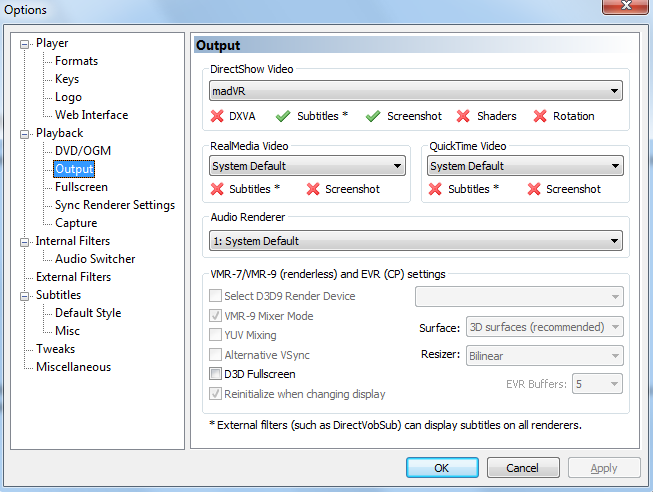
Then, to install madVR, extract the zip file and run the install.bat for it. To tell mpc-hc to use madVR, open mpc-hc, press “o” for options, go to ouput, and select madVR under directshow video.

That’s it for installation. I’ll cover reclock in its own section, as you may or may not need to install it.

"Run the MPC-HC x86 installer. Note that it gives you the option to reset settings if you’ve messed around with other guides or codec packs, and want to start fresh."
zJmqmft.png


MPC-HC settings (press "o" for options)
0C1T2Go.png

"To access the video decoding options, open mpc hc, press o for options, go to internal filters, and click Video Decoder at the bottom."

D8ZjsmW.png
The important things to note here are the hardware acceleration options on the upper right side. In general, dxva copyback is the one to use to decode the video through your gpu. You also can use the “none” option if you want to use your CPU. Hardware acceleration lowers cpu usage on supported formats, such as 8 bit HEVC, 8 bit H264, VC-1, mpeg 2, etc, depending on the GPU and what is ticked in the video decoder options.

-------------------------------------
MadVR setting (right-clicking the system tray icon when video is running or at least open and paused)

https://www.reddit.com/r/htpc/comments/bhhbrk/if_madvr_is_set_to_passthrough_the_hdr_signal_to/
...recommend as far as display settings in MadVR go:
Properties:
this display expects the following RGB output levels: 0-255
the native display bit depth is: auto
3d format: auto (or none)
Calibration:
Choose "this device is already calibrated"
the display is calibrated using the following primaries/gamut: BT.2020
the display is calibrated to the following transfer function/gamma: pure power curve and [insert whatever the gamma setting is on your own tv here] (for me it's 2.20, but you may have set yours to a different gamma level - you can find it in your TV settings)
Display Modes:
switch to matching display mode (checked): when media player goes fullscreen
restore original display mode (checked): when media player leaves fullscreen
list of all display modes MadVR may switch to: 2160p23, 2160p24, 2160p25, 2160p29, 2160p30, 2160p50, 2160p59, 2160p60 (add the equivalent 1080p modes if you want - I just use MadVR for 4k HDR files so I just have 4k modes in mine - adding 1080p modes will disable upscaling)
Color and Gamma:
everything should be zero, do not check enable gamma processing
HDR:
passthrough HDR to display
check "send HDR metadata to the display"

A few other things:
1.) Make sure on your TV settings that you have the input from your HTPC set to full or enhanced HDMI - since you're seeing HDR10 this is likely already set but wouldn't hurt to double check if you don't remember doing it yourself
2.) In the MPC-HC settings, under Playback -> Fullscreen make sure "use autochange fullscreen monitor mode" is checked and all the formats you entered in MadVR are also listed here. You probably will also want to check "Apply default monitor mode on fullscreen exit" and "Restore resolution on program exit"
3.) Make sure MadVR is selected under DirectShow Video for Playback --> Output in MPC-HC's settings
4.) Make sure MadVR is listed and selected under External Filters in MPC-HC's settings

So, unlike where the bullet is in this screenshot, you'd normally set this instead to "pass through HDR to display" since the LG CX's tone mapping quality is pretty advanced. Note that the selected the display device first on the dropdown menu under "devices". I didn't mess with the other settings below the bullet since I am just passing the HDR metadata through.
madvr-png.png

====================================

Finally, I want to pass along that apparently EMBY, an alternative to PLEX, allows pass through to external players so could be useful as a video content browser in windows that can launch titles to MPC-HC. So emby might be worth using, at least locally on the LG CX machine, since PLEX doesn't do HDR across the board yet.

post-396798-0-98925300-1546580178.jpg

Plex used to be able to "Fling" to different devices like casting, but I don't think it works to open videos on a separate app like MPC-HC on a local pc.
 
Last edited:
I used to configure MadVR and LAV filters deep and had a setup I would backup and bring over as needed.
Complete overkill.

No need anymore, since the newer solutions out there do just as good if not better job up/downscaling (including chroma upscaling) with far less processing overhead - even on modern CPU/GPU combos.
Plus their config is as simple as a few clicks, GUI or not.

Visuals are on par or better on a calibrated CX65. Blue Planet I & II, Our Planet, and especially Night on Earth.
 
Last edited:
yeah what I posted is not deep at all.. it's mainly just setting it up to pass through HDR using madVR when playing on mpc-hc.

MPC-HC menus:
..Set the output to MADVR
..Set the video accel type to turn it on or off (to use gpu accel or just cpu)

MadVR menu:
..set it to pass through HDR to the display.
.. don't need to adjust anything else since it's passthrough.
 
Buut but its old codebase, maintenance mode software solution. The guide might have been useful for noobs 5+ years ago - not so much now. Just sends them down a legacy rabbit hole.

MPC-BE x64 (latest stable or beta build) and MPC Video Rendered x64 v0.51 and done. Codec packs, additional shaders, etc are not needed anymore.
 
yeah I'm not using codec packs or anything outside of mpc-hc's base install (and madVR as renderer with a simple drop down menu selection) .. so no I'm not sending down any hole..

That process I showed just
..ports MadVR as the renderer with a simple drop down in mpc-hc options
.. sets madVR option to pass through the HDR metadata.

I'm not doing all of the massive additions and tweaking "under the hood" people used to do in order to upscale/supersample 480p dvds. :confused:
.. I mean outside of default addition of MadVR and having it pass through HDR metadata untouched.. I'm not doing anything.

But whatever works for you if you like a newer build/code-base nothing wrong with that. 🍻
 
has anyone tried the LG CX48 with any slim wall mounts? Wanted to get as close to the wall as possible. Wish id gotten the GX instead but too late.

Which mount would you recommend,
 
Asked this early but perhaps not correctly....
Would there be a reason I don’t see the toggle in display options for “Enable HDR for Games and Apps”? I only see the enable HDR. Unless I keep looking in wrong place haha.

I ask because I have one game that won’t enable its HDR or conflicts with Windows HDR... the game looks fine with windows HDR off.
 
If I'm not mistaken, there is no Games/Apps specific toggle and neithet will switch HDR on/off for you on the fly (except HDR aware media players when they detect SDR vs HDR content).

For Games - you either toggle Win 10s HDR to on before you launch a game and then if it has HDR support it will allow you to toggle it in-game

OR you leave HDR off in Windows and any launched game will not recognize HDR capability and run as if SDR only.

This is why HDR quick toggle tools (taskbar HDR, etc) scattered around the interweb githubs are a blessing. At least until Windows and Game/App implementation matures enough to become seamless - circa 2025.
 
If I'm not mistaken, there is no Games/Apps specific toggle and neithet will switch HDR on/off for you on the fly (except HDR aware media players when they detect SDR vs HDR content).

For Games - you either toggle Win 10s HDR to on before you launch a game and then if it has HDR support it will allow you to toggle it in-game

OR you leave HDR off in Windows and any launched game will not recognize HDR capability and run as if SDR only.

This is why HDR quick toggle tools (taskbar HDR, etc) scattered around the interweb githubs are a blessing. At least until Windows and Game/App implementation matures enough to become seamless - circa 2025.
Thank you! I think I had a total knucklehead moment... I don’t believe the Long Dark supports HDR on PC, but does on consoles.

I’ll take a look for a good HDR toggle!

So I guess my other question is, is it worth keeping windows 10 HDR on at all?
 
Discussed a few pages back - Vegetable the 4th.

Short answer - no.

Slightly longer answer - somewhat fixed. Latest hotfix driver, latest non-engineering firmware.
 
C9 question...
Just hooked up my 3090 to my c9. if instant game response is on at 4k 120 the tv acts likes it loses the signal once the card goes into 3d and on the desktop I get random blinks and sometimes the tv gets big black strips like part of the panel lost signal or something....I believe igr has to be on for g-sync or 120hz to work? 4k60 and 1440p 120 works fine just like on my 2080ti

Any ideas? Everything is updated tried all the ports on the tv ect. Could it be the cable? I brought the cheapest 2.1 one at bb
 
Randomly I will lose signal to my monitor. The image just freezes for a split second and then the screen goes blank and say "No signal" for then to imidiately go back to a signal where it will say the usual "Game mode". I see that Windows Night mode/light does not work after this. So I have to disable and enable it. This happens in idle just browsing the internet.

Is this my screen, GPU or Windows that is causing this? I cannot believe its the cable as I have tried to different with no change. My setup is of cause the 48" CX and then a RTX 3070 TUF OC from ASUS.
 
C9 question...
Just hooked up my 3090 to my c9. if instant game response is on at 4k 120 the tv acts likes it loses the signal once the card goes into 3d and on the desktop I get random blinks and sometimes the tv gets big black strips like part of the panel lost signal or something....I believe igr has to be on for g-sync or 120hz to work? 4k60 and 1440p 120 works fine just like on my 2080ti

Any ideas? Everything is updated tried all the ports on the tv ect. Could it be the cable? I brought the cheapest 2.1 one at bb
I have the same problem. Instant game response only seems to work with 4k 60Hz (and then only 8-bit, not 10 or 12). Whenever I enable G-SYNC, half of the screen is blacked out (split screen), which is solved by changing refresh rate or switching HDR on/off. Running the Pendulum demo to test G-SYNC only works correctly at 60Hz. At 100Hz or 120Hz the screen blacks out completely and the tv loses the signal. I have the latest firmware (05.00.10) which was supposed to fix this issue. Tested multiple cables, no dice. Running 4k 120Hz 12-bit without G-SYNC enabled works perfectly though, so I doubt it's the cables fault.
 
I have the same problem. Instant game response only seems to work with 4k 60Hz (and then only 8-bit, not 10 or 12). Whenever I enable G-SYNC, half of the screen is blacked out (split screen), which is solved by changing refresh rate or switching HDR on/off. Running the Pendulum demo to test G-SYNC only works correctly at 60Hz. At 100Hz or 120Hz the screen blacks out completely and the tv loses the signal. I have the latest firmware (05.00.10) which was supposed to fix this issue. Tested multiple cables, no dice. Running 4k 120Hz 12-bit without G-SYNC enabled works perfectly though, so I doubt it's the cables fault.
Sounds exactly like what I'm having. so120hz works without instant game response you just lose g-sync?
 
Sounds exactly like what I'm having. so120hz works without instant game response you just lose g-sync?
Yes, 120Hz works without a problem, just G-SYNC doesn't work. I leave G-SYNC disabled for now, to avoid the issues. Hopefully it will be resolved in a future update. Btw, I have a 3090 as well, don't know if it is the cause of the issues 🤔
 
Yes, 120Hz works without a problem, just G-SYNC doesn't work. I leave G-SYNC disabled for now, to avoid the issues. Hopefully it will be resolved in a future update. Btw, I have a 3090 as well, don't know if it is the cause of the issues 🤔
3090 over here and gsync works for me at 120hz and instant game response pops up every time.

Pendulum demo runs fine also at 120hz with gsync.

My settings are 4:4:4 and 12bits in nvcp.
 
has anyone tried the LG CX48 with any slim wall mounts? Wanted to get as close to the wall as possible. Wish id gotten the GX instead but too late.

Which mount would you recommend,
I recently purchased (12/20/20) the Vogels 546 Thin mount full motion for my LG CX 48. The screen should be around 3.5 inches from the wall once mounted. Bought it off of Amazon for $349.52. It connects to 1 stud on the wall. However my wall studs are off centered and I need to buy a 3/4 plywood to mount to the wall studs so I can center the mount on the plywood. I have not installed it as of yet. I went to my local Best Buy, Home Depot, and Lowes and looked at their offerings for wall mounts. Home Depot and Lowes had limited offerings at best as I knew they would. Best Buy mounts that I looked at from Sanus were more then the Vogels mount. There were some offerings in the mid $200 range but the reviews were all over the place. Once again I am looking for a full motion mount. Searching Youtube I came across a review for the Vogels mount. I have attached the video.
 
Last edited:
has anyone tried the LG CX48 with any slim wall mounts? Wanted to get as close to the wall as possible. Wish id gotten the GX instead but too late.

Which mount would you recommend,
I used the ECHOGEAR Low Profile. I had to use a few extra washers I had laying around because the screws they provided were a bit too long for the CX48. But once it's on the wall, it looks gorgeous.
 
As an Amazon Associate, HardForum may earn from qualifying purchases.
Back
Top