• Some users have recently had their accounts hijacked. It seems that the now defunct EVGA forums might have compromised your password there and seems many are using the same PW here. We would suggest you UPDATE YOUR PASSWORD and TURN ON 2FA for your account here to further secure it. None of the compromised accounts had 2FA turned on.
    Once you have enabled 2FA, your account will be updated soon to show a badge, letting other members know that you use 2FA to protect your account. This should be beneficial for everyone that uses FSFT.

3DMark11 Score

imo 3dmark11s are very sensitive to what processor you have and most importantly what video card you are using. i think they finally got it right with 3dmark11.

The only flaw I see with 3dMard11 is the fact that is it DirectX11 only. While 3DMark06 has it's flaws at least it works with everything else and was widely accepted as the standard.
 
How is that a flaw?

It is a Dx11 benchmark,.... live with it or get a card that will run DX11.

you can complain all day, not going to make it change.
 
It's your hexacore, it really makes that much of a difference. That damn benchmark loves extra cores. Plus I'm like 300 mhz behind. I would be past your score with a decently overclocked Thuban, I'm pretty sure of it.

I'm no so sure it multi socket aware though. I have 8 real cores and my physics score areent good. 3DMark 06 scales quite nicely though.
 
P3222 3DMarks

On Q6600@stock
gtx470 sli @stock

of course, sli isn't working yet. Time to overclock, I think.

edit: overclocked to 3.2ghz didnt change much, P3231 3DMarks. Wish I knew how to get SLI working.

MisterClean,


Would you mind posting your full SLI and non-SLI results?
 
Need help.

3DMark11 keeps freezing up at the PhysX portion of the benchmark. I'm running a 5870 with 10.8 version drivers. I know my GPU doesn't support PhysX, but my CPU should be able to run it right? I can't figure out why the benchmark keeps freezing/crashing at that part.
 
Need help.

3DMark11 keeps freezing up at the PhysX portion of the benchmark. I'm running a 5870 with 10.8 version drivers. I know my GPU doesn't support PhysX, but my CPU should be able to run it right? I can't figure out why the benchmark keeps freezing/crashing at that part.

It doesn't use PhysX, it uses Bullet Physics.

Is anything overclocked that may cause crashes?
Anything (CPU?) getting too hot?
Tried other drivers?
 
It doesn't use PhysX, it uses Bullet Physics.

Is anything overclocked that may cause crashes?
Anything (CPU?) getting too hot?
Tried other drivers?

My CPU is overclocked. I'm running an i7-930 @ 4.00Ghz, but it stays at only 72C under full load, so I don't think it's a heat issue. I'll try downclocking it to see if that helps. I have the 10.12 drivers I can install, but they seem to give me lower fps on games compared to my 10.8 drivers.
 
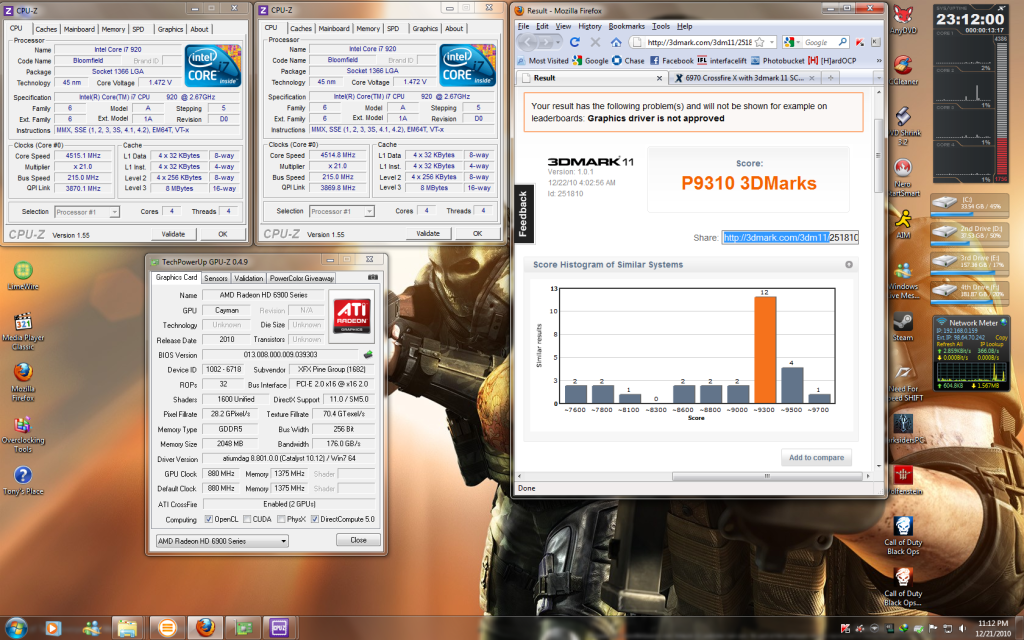
Just downloaded the 3dmark11 software and tested it out on my crossfire hd 5770's. With my 1090t @ 3.8ghz and the 5770's at stock clocks I scored only P3604.

Is it just me or does a P3604 seem kind of low for Crossfire 5770s?

EDIT: With a little Overclocking to my crossfire 5770's(1.150v, 875mhz core clock, 1250mhz memory clock), I squeaked out a P4708. It wont let me post it because it claims that my graphics driver(CCC 10.12) isnt approved.
3dMark11score.png
 
Last edited:
You guys with ATI cards can quit hammering them on this benchmark if trying to compete with Nvidia...it is not ATI friendly at all. :(
 
Zarathustra[H];1036585401 said:

My 3D Mark 11 Score by mattlach, on Flickr

Click for access to the full res.

Had to rotate my screen in order to screen shot this without having to patch it together afterwards :p

This is on my Core i7-920 and single GTX580 all at stock speeds, power limiter disabled.

Next I'm going to test how much I can push it by OC:ing.

I haven't OC:ed yet, but I did do something else interesting..

Here is my score using my laptop with an external desktop GTX460 over a DIY Vidock solution.

2187

It's kind of low for a GTX460, but thats probably because its limited to only 1x PCIe due to the expresscard slot...

Still a hell of a lot better than the built in graphics, though I can't test for comparison, as the Core i5 Arrandale core is DX10 only :p
 
Zarathustra[H];1036629084 said:
I haven't OC:ed yet, but I did do something else interesting..

Here is my score using my laptop with an external desktop GTX460 over a DIY Vidock solution.

2187

It's kind of low for a GTX460, but thats probably because its limited to only 1x PCIe due to the expresscard slot...

Still a hell of a lot better than the built in graphics, though I can't test for comparison, as the Core i5 Arrandale core is DX10 only :p

Test vantage on both configurations please if you can....would be good to see :).
 
Test vantage on both configurations please if you can....would be good to see :).

I hope 3DMark06 will suffice. (For some reason Vantage would not complete on th einternal video, failing with a Physics engine error. My guess is it was looking to run PhysX on the geforce, since it found the Nvidia drivers, but was unable to cause it was disconnected)

Here's the comparison 3DMark 06 Results:

Arrandale Core i5 Graphics Result: 1710

GTX460 Via DIY Vidock Result: 5351

The 460 is a little bit weaker than I'd like here, but again, it's on 1X PCIe. Some people have reported vastly better results using nvidias Optimus drivers and editing the inf file to add the desktop video card you are trying to use. Apparently these drivers do something to make the 1x PCIe less of an issue (Compression?).

I have been unable to do this on mine though, as you need both the internal graphics and the geforce running at the same time for the optimus drivers to work, and on my laptop I just have not been able to fit both of them in the 36bit address space for this to work. This is probably because my laptop is a business model, so its set up to use 32bit address sapce for system ram as much as possible, as business users mainly still use XP...

I might have had more luck if my laptop were a home model, but hey, I get to use it free, cause my employer bought it :p
 
Thanks for the effort. That's still a healthy gain in performance over the internal gpu.
 
Even though 3DMark reports 2 5870 in crossfire, they are actually a XFX 5870 and a Sapphire 5850.
3dmark11.jpg
 
Even though 3DMark reports 2 5870 in crossfire, they are actually a XFX 5870 and a Sapphire 5850.
3dmark11.jpg

That is strange because I thought that if you run the two cards it has to downgrade the 5870 to the 5850 to run in crossfire:confused:

you doing any OC, even in CCC, you should be able to get above 7000+ with that setup. but your CPU most likely will be the hang up.
 
That is strange because I thought that if you run the two cards it has to downgrade the 5870 to the 5850 to run in crossfire:confused:

you doing any OC, even in CCC, you should be able to get above 7000+ with that setup. but your CPU most likely will be the hang up.

The 5870 is running at stock and the 5850 is overclocked to near-5870 speeds. I'm sure I could get a higher score if I oc'ed the CPU past 4Ghz. The Asus mobo is doing the automatic overclock and the CPU is watercooled but I don't feel like getting into the mobo's overclocking settings to get it to 4ghz. It's just too time consuming and I have quite a few games to beat before college break ends.
 
What do you do to get the "P" score? My score starts with an X and is around 2000, much lower than the "p" scores I've been seeing.
 
Back
Top