• Some users have recently had their accounts hijacked. It seems that the now defunct EVGA forums might have compromised your password there and seems many are using the same PW here. We would suggest you UPDATE YOUR PASSWORD and TURN ON 2FA for your account here to further secure it. None of the compromised accounts had 2FA turned on.
    Once you have enabled 2FA, your account will be updated soon to show a badge, letting other members know that you use 2FA to protect your account. This should be beneficial for everyone that uses FSFT.

Show Your LCD(s) setups!!!

No this is NOT correct.

The 30 is 2560x1600 and the 20's are 1200x1600. Flawless setup imo.

I really hope you need that setup for some sort of spreadsheet program other wise it seems like a waist of space. Also you need ultramon
 
I'm assuming this kid is somewhere from 15-18, his setup is damn good and he worked for it. Why the negative comments? I wish my parents would have let me spend money like that when I was a kid but spending over 200 dollars for them on computer pieces even when it was my money was a no no. I think some people are just jealous, anyways props kid enjoy it while it lasts real life is expensive
 
I got my 42" westy yesterday...

fdd00004381d.jpg
 
I know for a fact, that picture does NOT do your monitor justice.. When I take pictures of my 42" Westy, it looks "small".. But in real life, it completely covers the corner of my room where it sits on my desk.. Congrats on a nice monitor!!
 
IMG_0100.jpg


That's my Gateway XHD3000 flanked by 2 Dell 2001FP's and my Q6600, 4Gig, 8800GT/7900GT rig.


I could not be happier:D save for that one Aero issue I'm having w/ Vista Ultimate 64!

those dells line up perfectly with the gateway 30"

i'd imagine you need 2 video cards to have 3 monitors (i'm not a tech wiz)...right now a gateway 30 + a samsung 22 pivoted vertically is a nice setup for me, but greed gets the better of me after looking at your setup :D
 
I'm assuming this kid is somewhere from 15-18, his setup is damn good and he worked for it. Why the negative comments? I wish my parents would have let me spend money like that when I was a kid but spending over 200 dollars for them on computer pieces even when it was my money was a no no. I think some people are just jealous, anyways props kid enjoy it while it lasts real life is expensive

yeah, I work 20 hours a week at minimum wage and that got me what I've got running right now with tons to spare. 6 more months with my parents, then I go to college and start paying rent - I'm enjoying it while I can!

bandit390 - that westy looks SWEET. and Huge. I personally know how big the G15 and Ratpadz are and it makes them look small :D
 
bandit390 - that westy looks SWEET. and Huge. I personally know how big the G15 and Ratpadz are and it makes them look small :D

For consoles and moves its great, but for computer use and games it blows. The pixels are blocker than I thought they would be and the color looks washed out, no matter what I do. After playing TF2 for about an hour, most of the in game text was unreadable. Anyways, I got 30 days and I might try the sharp 32 to see if that helps.

QUESTION
I have a

westy 42"
pc - DVI
x-fi sound card
Logitech 5300 speakers
ps3 - HDMI
wii - component
xbox360 - Component

How do I go about plugging them all up for the sound to come from my logitech5300?

Right now I have line 1,2,3 going from my logitech to my pc and my consoles going into the westy.
 
when you're a teenager with no expenses you can seriously buy whatever you want. i did some part time work at a law office from feb. to september and made around 5k, mostly just working 16hrs a week except in the summer, which was maybe 24 or 40 hours. everything in my sig except the centurion box/parts was paid for with my money, and that was only because my sister's pc broke and my parents decided to give her my old x-qpack so I got a new one out of it. i bought all accessories, monitors, consoles, tv, games, and the macbook.

18 years old.
 
those dells line up perfectly with the gateway 30"

i'd imagine you need 2 video cards to have 3 monitors (i'm not a tech wiz)...right now a gateway 30 + a samsung 22 pivoted vertically is a nice setup for me, but greed gets the better of me after looking at your setup :D

7wu3408.jpg
 
I'm assuming this kid is somewhere from 15-18, his setup is damn good and he worked for it. Why the negative comments? I wish my parents would have let me spend money like that when I was a kid but spending over 200 dollars for them on computer pieces even when it was my money was a no no. I think some people are just jealous, anyways props kid enjoy it while it lasts real life is expensive

16, and I don't know what's with the negative comments. And yes, I know life is expensive, but I worked for the shit and i'm lovin it ;D
 
Don't have to worry about that, he said fuck girls after he got into computers.
Too bad my audio setup(s) are better.
42" Westy, PSSH.
Get a 61" Samsung LED DLP or an A200XU then I will give you props.

HAHA...

For consoles and moves its great, but for computer use and games it blows. The pixels are blocker than I thought they would be and the color looks washed out, no matter what I do. After playing TF2 for about an hour, most of the in game text was unreadable. Anyways, I got 30 days and I might try the sharp 32 to see if that helps.

QUESTION
I have a

westy 42"
pc - DVI
x-fi sound card
Logitech 5300 speakers
ps3 - HDMI
wii - component
xbox360 - Component

How do I go about plugging them all up for the sound to come from my logitech5300?

Right now I have line 1,2,3 going from my logitech to my pc and my consoles going into the westy.

There's only 3 inputs on your 5500's...
I am using 2, my PC and my 360.
PC is hooked up using the direct (3 analog's), and 360 is hooked up using Optical.

With all the things you want to hook up, I'd see if you can find some sort of switch, that you can plug all your devices into and then run them into your control pod. I don't know if they exist, and I don't know what type of connections your Wii and PS3 use.

Here, after some searching, I found and optical audio switch. This will allow you to hook up your 360 and PS3 and PC if you can use Optical out on your's. Or just hook your PC via Direct connections and your 360 and PS3 using this switch via optical..
http://www.amazon.com/SW100-Digital-Optical-Selector-Connections/dp/B000812QC6


As far as the Wii goes, I have no idea how the heck to hook that thing up to it...
 
As an Amazon Associate, HardForum may earn from qualifying purchases.
16, and I don't know what's with the negative comments. And yes, I know life is expensive, but I worked for the shit and i'm lovin it ;D

Good man...Enjoy it, I won't knock ya...Most people are just jealous that you don't have any bills...LOL
 
SNC11524.JPG


New monitor. Still needs tidying up and then I'll take better shots. I need to get my Nikon back from a friend that borrowed it also.
Nick -- What are the specs for your LCD? How's it performing w/games and apps? I'm looking for a bigger LCD in the 27" - 32" range.
 
HAHA...


There's only 3 inputs on your 5500's...
I am using 2, my PC and my 360.
PC is hooked up using the direct (3 analog's), and 360 is hooked up using Optical.

With all the things you want to hook up, I'd see if you can find some sort of switch, that you can plug all your devices into and then run them into your control pod. I don't know if they exist, and I don't know what type of connections your Wii and PS3 use.

Here, after some searching, I found and optical audio switch. This will allow you to hook up your 360 and PS3 and PC if you can use Optical out on your's. Or just hook your PC via Direct connections and your 360 and PS3 using this switch via optical..
http://www.amazon.com/SW100-Digital-Optical-Selector-Connections/dp/B000812QC6


As far as the Wii goes, I have no idea how the heck to hook that thing up to it...

I have 5300, not 5500. From the 5300 I only have 3 plug ins. I have to have my pc at 5.1, but the rest I would be happy with fronts/sub. I searched, but came up with nothing. Is there a cable that goes from 3 analong (which will be in my logitech) and splits into 2 sets of 3 analong, one going to my pc and the other going into a switch (or westy?) and having spdif coming from my westy to the switch?
 
As an Amazon Associate, HardForum may earn from qualifying purchases.
I have 5300, not 5500. From the 5300 I only have 3 plug ins. I have to have my pc at 5.1, but the rest I would be happy with fronts/sub. I searched, but came up with nothing. Is there a cable that goes from 3 analong (which will be in my logitech) and splits into 2 sets of 3 analong, one going to my pc and the other going into a switch (or westy?) and having spdif coming from my westy to the switch?

My bad man...Perc's make reading fun..=) gotta love having surgery..

Oh well, wasted search time FTW!
 
Heres my setup

Main monitor is the black friday 22" Westy and 2nd one is my 19" samsung one from way back in the day
out.php


BTW Why wont that picture come up, why is it a link ?
 
Heres my setup

Main monitor is the black friday 22" Westy and 2nd one is my 19" samsung one from way back in the day
out.php


BTW Why wont that picture come up, why is it a link ?


first off the pic is to small to see anything. Next you should try to upload it to www.imageshack.us, then you need to use the "insert image" button at the top to put in the image addy.
 
Just got the Deller the other day, and Acer x221w on clearance at best buy. I'm not a real stickler for displays and such like some of you are on here. It looks excellent to me, so I'm pretty happy. :D

DSC01351.jpg

DSC01352.jpg

DSC01353.jpg

DSC01354.jpg

DSC01355.jpg


The desk, I believe, is from as far back as 1930's. I think it was in one of the houses we moved into, and my dad refinished it. The TV is a NEC from 1987! GAH! I need a new tv...
 
Your background looks like its from Multnomah Falls, Oregon. Pretty place. Oh - and badass monitor setup too :cool:

Aye it is...home *sigh*. I miss it.

And thank you. It took a lot of work to get to where I can "afford" that rig.


And I live rent free right now, so I'm not one to complain about the wallpaper ;)
 
Nick -- What are the specs for your LCD? How's it performing w/games and apps? I'm looking for a bigger LCD in the 27" - 32" range.

This is the 37". They make a 32" also. Right now I wouldn't recommend it due to the blacks being enormously crushed, you can't see detail at all on a photo with a lot of blacks in it. It doesn't seem bad for games or regular applications but looking at pictures on it is terrible. I'm trying to decide whether to return it, actually. The blacks are so bad I wonder if I got a defective monitor.
 
nope, worked all summer for it. NONE of it was contributed by my parents. Did 40-50 hours a week. btw, I work as a baker at a coffee shop called tim hortons.

So, seeing as you work at Tim's, you wouldn't be in the GTA would you? Does that mean free coffee for anyone who asks for you and uses the code word "HARD"?

PS: Great job working for all that yourself. Feels good doesn't it?
 
My Setup...
FullDesk.jpg


Rig.jpg


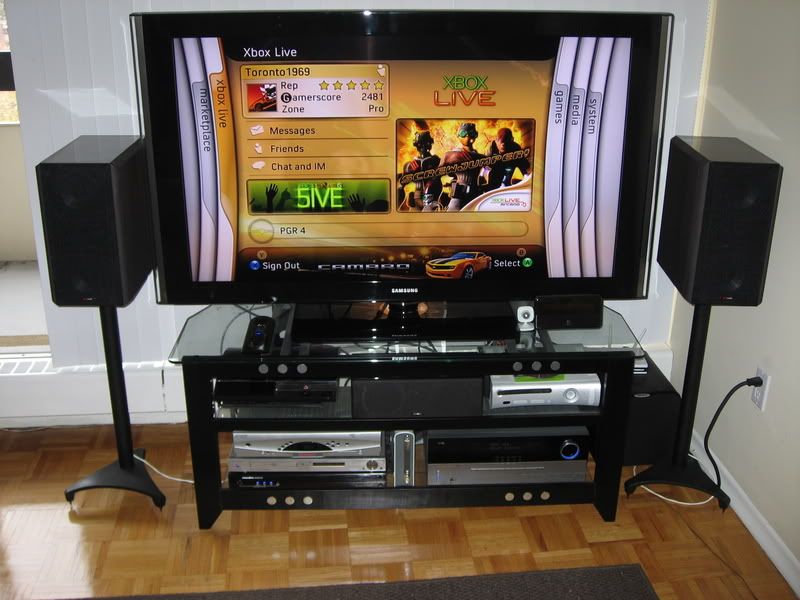
Any my console gaming setup...

Samsung LN-T5271
Theater.jpg


PS3, Xbox 360 with HD DVD unit, Samsung HD-850 DVD, Harman Kardon AVR-240, Scientific Atlanta HD PVR, Panamax line conditioner, Polk Audio LS series left and right speakers, Energy RC-Center, Velodyne Mini-Vee sub, and my latest gadget, the Slim Server from Logitech. This thing is the cat's meow if you have music on your PC and a system in another room. All controlled by a Harmony 890pro for now, I have a Philips TSU-9400 on order...can't wait. Also working on replacing the receiver as it doesn't do HDMI switching.
TheaterGear.jpg
 
Back
Top