![[H]ard|Forum](/styles/hardforum/xenforo/logo_dark.png)
Navigation
Install the app
How to install the app on iOS
Follow along with the video below to see how to install our site as a web app on your home screen.
Note: This feature may not be available in some browsers.
More options
-
Some users have recently had their accounts hijacked. It seems that the now defunct EVGA forums might have compromised your password there and seems many are using the same PW here. We would suggest you UPDATE YOUR PASSWORD and TURN ON 2FA for your account here to further secure it. None of the compromised accounts had 2FA turned on.
Once you have enabled 2FA, your account will be updated soon to show a badge, letting other members know that you use 2FA to protect your account. This should be beneficial for everyone that uses FSFT.
You are using an out of date browser. It may not display this or other websites correctly.
You should upgrade or use an alternative browser.
You should upgrade or use an alternative browser.
Show Your LCD(s) setups!!!
- Thread starter Zardoz
- Start date
What about another Dell 24" monitor setup? There hasnt been enough dell displays in this thread

Love the simplicity and mood of this setup. Nice job!

What about another Dell 24" monitor setup? There hasnt been enough dell displays in this thread
minimalist setup...AWESOME
Youri Carma
Gawd
- Joined
- Dec 3, 2006
- Messages
- 538
Nice Idea with this Gaming figure....gonna copycat that TnX!sorry about that mess, second monitor is disconnected because its not working now...it will be back soon

Youri Carma
Gawd
- Joined
- Dec 3, 2006
- Messages
- 538
Which game is this?
Neeed a new desk bad, my consoles have to live on teh floor
Probably the tidiest the desk has been for a long time! lol
thefewtheproud
Gawd
- Joined
- Oct 23, 2006
- Messages
- 935
Which game is this?
I think that is just his background
Youri Carma
Gawd
- Joined
- Dec 3, 2006
- Messages
- 538
Nice BedMy rig with pictures at last
wide view

Not bad for a 16 year old huh


Acer_Sheep
[H]ard|Gawd
- Joined
- May 18, 2007
- Messages
- 1,201
the photo was edited in WoW model viewer, that night elf girl is sitting on the front of my PCNice Idea with this Gaming figure....gonna copycat that TnX!
Using NVidia's nView Desktop Manager, get the desktop picture to span across 2 monitors ...


...
Just put mine together today.
2 Samsung SyncMaster 305Ts
2 x ( 2560 x 1600 )


crashthenet44
Limp Gawd
- Joined
- Jan 31, 2006
- Messages
- 367
Using NVidia's nView Desktop Manager, get the desktop picture to span across 2 monitors
Totally off topic question, but I'm gonna ask it anyway.
Where are you getting those F1 wallpapers from?
dariuslatamus
n00b
- Joined
- Mar 12, 2005
- Messages
- 56
Here's my setup.
Powerbook > Dell 2407WFP-HC via VGA (w/ VGA to DVI adapter)
Shuttle > Dell 2407WFP-HC via DVI (connected using DVI to HDMI cable through HDMI Switch)
PS3 > Dell 2407WFP-HC via DVI (connected using HDMI to HDMI cable through HDMI Switch
HDMI 4-in-1 Switch > Dell 2407WFP-HC via DVI (connected using HDMI to VGA cable)
Logitech MX Duo setup using KVM Switch to switch between Mac and PC.
Also, logitech Z-5500 speakers are setup in 5.1 fashion with rear speakers setup at ceiling corners. PS3 audio is setup through optical audio.
4 external Lacie Porsche drives (500GB each). 2 for powerbook, 2 for Shuttle.
Hope you like it
- darius


Powerbook > Dell 2407WFP-HC via VGA (w/ VGA to DVI adapter)
Shuttle > Dell 2407WFP-HC via DVI (connected using DVI to HDMI cable through HDMI Switch)
PS3 > Dell 2407WFP-HC via DVI (connected using HDMI to HDMI cable through HDMI Switch
HDMI 4-in-1 Switch > Dell 2407WFP-HC via DVI (connected using HDMI to VGA cable)
Logitech MX Duo setup using KVM Switch to switch between Mac and PC.
Also, logitech Z-5500 speakers are setup in 5.1 fashion with rear speakers setup at ceiling corners. PS3 audio is setup through optical audio.
4 external Lacie Porsche drives (500GB each). 2 for powerbook, 2 for Shuttle.
Hope you like it
- darius
GCTonyHawk7
Limp Gawd
- Joined
- Oct 5, 2007
- Messages
- 179
I'd actually like to know what camera is being used.
The EXIF data says that it is the Canon EOS 30D. Pretty click desktop setup man, loving the way everything matches and contrasts.
dariuslatamus
n00b
- Joined
- Mar 12, 2005
- Messages
- 56
The EXIF data says that it is the Canon EOS 30D. Pretty click desktop setup man, loving the way everything matches and contrasts.
Yep, good eye
Canon 30D with 24-70 f/2.8 lens.
I just got the PS3 a few days ago and I was just surprised at how big it was. Kinda scary to think that it's bigger than my Shuttle!
Wish the Dell had an HDMI input so I didn't have to get an HDMI switch.
- darius


Syndication
Limp Gawd
- Joined
- Apr 7, 2007
- Messages
- 142
Isn't this a thread about LCD setups? Not pictures of things on your LCD screen?
I don't know but I want to.wow, that dynex looks much better than I expected it to. Does anyone know who makes the panel?
Love this setup, the lamp gives a real warm feel.What about another Dell 24" monitor setup? There hasnt been enough dell displays in this thread
is it me or do you not have any speakers? just a headphone guy?
also everyone asks this, but id like to know the name of that desk.. looks ikea'ish hehe.
Love this setup, the lamp gives a real warm feel.
is it me or do you not have any speakers? just a headphone guy?
also everyone asks this, but id like to know the name of that desk.. looks ikea'ish hehe.
i second that. There are a lot of nice monitor setups in this thread...
Keep them comin!
minimalist setup...AWESOME
Love the simplicity and mood of this setup. Nice job!
Love this setup, the lamp gives a real warm feel.
is it me or do you not have any speakers? just a headphone guy?
also everyone asks this, but id like to know the name of that desk.. looks ikea'ish hehe.
Thanks for the comments! Simplicity is the way to go =)
Ryle: Youre correct, there is no speakers. Ive got the receiver and speakers to my left. I dont sit at my computer much so i havent felt the need to have another pair of speakers...
The desk is called MIKAEL (darkbrown & white) and costs just about nothing on IKEA.

[DFR]Random
Limp Gawd
- Joined
- Sep 23, 2007
- Messages
- 128
Man, that street is GAY!
15" Macbook Pro, 24" Soyo, Dell 2005fpw
The Soyo and Dell are both hooked to my Desktop which is core2duo at 3.4ghz and a 8800gts with 2gb of ram. Not too bad for a college student


Older picture of the desktop in a different apartment, but it's all still the same.
The Soyo and Dell are both hooked to my Desktop which is core2duo at 3.4ghz and a 8800gts with 2gb of ram. Not too bad for a college student
Older picture of the desktop in a different apartment, but it's all still the same.
thefewtheproud
Gawd
- Joined
- Oct 23, 2006
- Messages
- 935
Hey I will agree that that term accurately depicts the idea of something big and bulky since I just took the beast out today to clean it! I forgot just how big it was. I still like the design though...I dont know what it is.xbox huge!
thefewtheproud
Gawd
- Joined
- Oct 23, 2006
- Messages
- 935
Here's my setup.
Powerbook > Dell 2407WFP-HC via VGA (w/ VGA to DVI adapter)
Shuttle > Dell 2407WFP-HC via DVI (connected using DVI to HDMI cable through HDMI Switch)
PS3 > Dell 2407WFP-HC via DVI (connected using HDMI to HDMI cable through HDMI Switch
HDMI 4-in-1 Switch > Dell 2407WFP-HC via DVI (connected using HDMI to VGA cable)
Logitech MX Duo setup using KVM Switch to switch between Mac and PC.
Also, logitech Z-5500 speakers are setup in 5.1 fashion with rear speakers setup at ceiling corners. PS3 audio is setup through optical audio.
4 external Lacie Porsche drives (500GB each). 2 for powerbook, 2 for Shuttle.
Hope you like it
- darius
http://www.aci.on.ca/~arvinz/_MG_0925.jpg
http://www.aci.on.ca/~arvinz/_MG_0926.jpg
http://www.aci.on.ca/~arvinz/_MG_0935.jpg
http://www.aci.on.ca/~arvinz/_MG_0950.jpg
http://www.aci.on.ca/~arvinz/_MG_0930.jpg
http://www.aci.on.ca/~arvinz/_MG_0932.jpg
http://www.aci.on.ca/~arvinz/_MG_0942.jpg
http://www.aci.on.ca/~arvinz/_MG_0933.jpg
http://www.aci.on.ca/~arvinz/_MG_0934.jpg
http://www.aci.on.ca/~arvinz/_MG_0937.jpg
http://www.aci.on.ca/~arvinz/_MG_0938.jpg
http://www.aci.on.ca/~arvinz/_MG_0940.jpg
http://www.aci.on.ca/~arvinz/_MG_0945.jpg
http://www.aci.on.ca/~arvinz/_MG_0948.jpg
http://www.aci.on.ca/~arvinz/_MG_0947.jpg
awesome setup but you should mount your center speaker to the wall. The stand and everything makes the monitor look smaller imho. Otherwize its great!
zmjone2992
[H]ard|Gawd
- Joined
- Jul 3, 2007
- Messages
- 1,033
15" Macbook Pro, 24" Soyo, Dell 2005fpw
The Soyo and Dell are both hooked to my Desktop which is core2duo at 3.4ghz and a 8800gts with 2gb of ram. Not too bad for a college student
Older picture of the desktop in a different apartment, but it's all still the same.
what dvd is that? gotta love incubus
Spare-Flair
Supreme [H]ardness
- Joined
- Apr 4, 2003
- Messages
- 7,471
awesome setup but you should mount your center speaker to the wall. The stand and everything makes the monitor look smaller imho. Otherwize its great!
Agreed, that one centre speaker ruins the entire thing.
man, you guys have such great setups. have been following this thread for a while now, thought i'd post my set up
got my first Mac recently, not sure if this thread is for Macs too, will delete if it's not ok

since some peeps are posting their LCD tv's too, here is my 40" Samsung with PS3 and Logitech Z5500s:

got my first Mac recently, not sure if this thread is for Macs too, will delete if it's not ok
since some peeps are posting their LCD tv's too, here is my 40" Samsung with PS3 and Logitech Z5500s:

- Joined
- Jul 17, 2006
- Messages
- 14,458
What is wrong with the keyboard?
What is wrong with the keyboard?
Who and what are you babbling about?
Who and what are you babbling about?
What do you think about the apple keyboard? I have used it on some occasions. Honestly, i do not like the feel of it. But i do like the way it looks.
i'm kinda confused, i don't know who is addressing who but...
concerning the new apple keyboard, it was weird at first but now i really like it. i couldn't get used to the Mighty Mouse, it was too weird so i bought a Logitech MX Revolution which is arguably the best mouse in my opinion
anyway, the keyboard is great tho. feels like a laptop when you type, i like it
concerning the new apple keyboard, it was weird at first but now i really like it. i couldn't get used to the Mighty Mouse, it was too weird so i bought a Logitech MX Revolution which is arguably the best mouse in my opinion
anyway, the keyboard is great tho. feels like a laptop when you type, i like it
Syndication
Limp Gawd
- Joined
- Apr 7, 2007
- Messages
- 142
Setup, updated. a bit messy I know.
Imac 24" 2.16ghz C2D
macbook (black) C2D
Nec 20WMGX2 (Sliver) IPS
Sharp 32" LC32GP1U
Samsung 225bw
Powerbook 17" 1.67ghz
Powerbook 15" 1.5ghz

2x Samsung 960BF
1x Samsung 225bw

Two more Nec LCD2190UXi-BK 21.3 on the way discounted from overstock.com
Imac 24" 2.16ghz C2D
macbook (black) C2D
Nec 20WMGX2 (Sliver) IPS
Sharp 32" LC32GP1U
Samsung 225bw
Powerbook 17" 1.67ghz
Powerbook 15" 1.5ghz
2x Samsung 960BF
1x Samsung 225bw
Two more Nec LCD2190UXi-BK 21.3 on the way discounted from overstock.com
man, you guys have such great setups. have been following this thread for a while now, thought i'd post my set up
got my first Mac recently, not sure if this thread is for Macs too, will delete if it's not ok
since some peeps are posting their LCD tv's too, here is my 40" Samsung with PS3 and Logitech Z5500s:
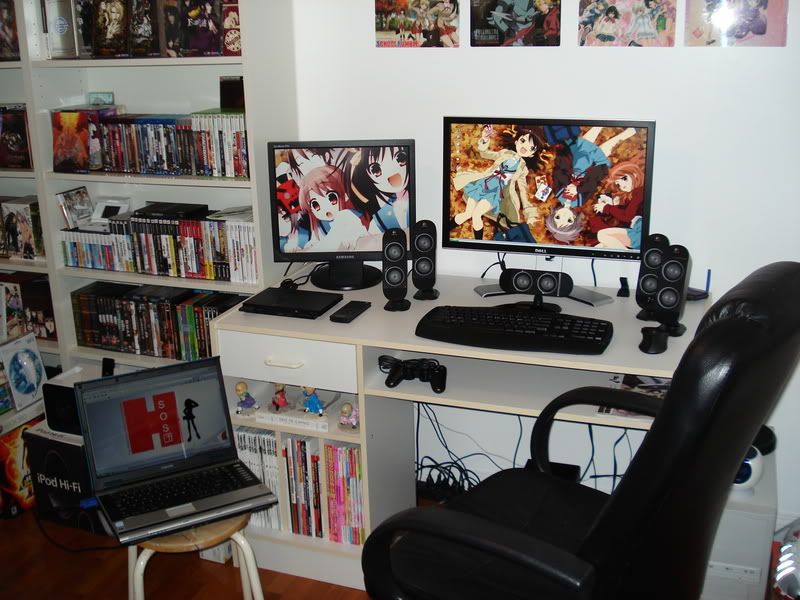
Nice setup lol. Lots of anime you got there
. Haruhism FTW.