• Some users have recently had their accounts hijacked. It seems that the now defunct EVGA forums might have compromised your password there and seems many are using the same PW here. We would suggest you UPDATE YOUR PASSWORD and TURN ON 2FA for your account here to further secure it. None of the compromised accounts had 2FA turned on.
    Once you have enabled 2FA, your account will be updated soon to show a badge, letting other members know that you use 2FA to protect your account. This should be beneficial for everyone that uses FSFT.

RTX 5090 Benchmarks

Yeah got a PG32UCDM for $599.96 open box - my first 4K gaming monitor - I don’t think I can make excuses to not keep my 5090, anymore lol. It’s gorgeous with this panel.
Damn, that's a sweet price.
How come you keep snatching those deals lol.
 
I did almost the same thing.

As an aside: it’s always shocking returning to Red Dead 2 and seeing that it still competes with many contemporary titles. The incredible detail makes up for the aging tech.

Every time I ‘test’ my hardware with this game I find I want to play the game - except I don’t have the time.
One thing I noticed is the smooth generation (generic frame generation) in the Nvidia app doesn't work with Vulcan but if you switch to D3D12 it works perfectly with RDR2. One thing thats nice about the 5090 regarding cyberpunk is you can use all of the 4k texture downloads to really improve the quality of everything in the game. It uses up to 28GB of Vram but it doesn't cost a single FPS of performance loss.
 
Last edited:
Hot damn… that smooth motion is terrific.

Obviously, most demanding contemporary games now have frame-gen, but for the ones that don’t we now have a solution via this smooth motion thing.

I thought I had Avatar running well (maxed out at 4K with DLAA enabled), but I hadn’t actually turned on smooth motion. That was the final piece of the puzzle. It felt exactly like enabling frame-gen.

Jesus… my Avatar results on the 5090 just blow away my 4090 results. Fucking amazing tech!
 
Last edited:
  • Like
Reactions: noko
like this
Got a SUPRIM today, lol...so far not as strong as the MASTER ICE.

Damn man. I used to be like you but then 40 series happened and I just stopped. If I had a MC nearby I would be doing exactly what you are doing!!!
 
Damn man. I used to be like you but then 40 series happened and I just stopped. If I had a MC nearby I would be doing exactly what you are doing!!!
It's bad. Saw on their site they got an open box SUPRIM in (that means 10% off) and swapped out. Frees me from the Gigabyte gelgate crap. A $320 upgrade...I'll take it for peace of mind.
 
  • Like
Reactions: Niner
like this
My 5090 is Metro stable (1 hour) at +384, boosts to 3262 Mhz. But my 9800X3D holds it back in 3D Mark since it's only stable at 5275 MHz.
 
Gigabyte AORUS GeForce RTX 5090 MASTER ICE 32G > GeForce RTX 5090 32G SUPRIM SOC

SUPRIM doesn't OC as well as my MASTER ICE did, but it's close. It is cooler (same fan curve, configuration, case, environment, etc.).

I have zero memory tuning right now (just EXPO) - too lazy to be bothered and I have ASRock mobos which are ticking time bombs with these CPUs if you mess with PBO/etc. haha. Also: lazy.

https://www.3dmark.com/compare/spy/56438275/spy/56471133
 
Gigabyte AORUS GeForce RTX 5090 MASTER ICE 32G > GeForce RTX 5090 32G SUPRIM SOC

SUPRIM doesn't OC as well as my MASTER ICE did, but it's close. It is cooler (same fan curve, configuration, case, environment, etc.).

I have zero memory tuning right now (just EXPO) - too lazy to be bothered and I have ASRock mobos which are ticking time bombs with these CPUs if you mess with PBO/etc. haha. Also: lazy.

https://www.3dmark.com/compare/spy/56438275/spy/56471133
No real world difference there. Also after wanting the Aorus Master for so long I’d take a Suprim or Vanguard now. My Gaming X Trio is still a great card.
 
No real world difference there. Also after wanting the Aorus Master for so long I’d take a Suprim or Vanguard now. My Gaming X Trio is still a great card.
Oh yeah, no regrets. I truly loved the MASTER ICE and think it was a great card. But the igor's lab article had me having buyer's remorse. It's a shame because the LCD and blinky lights on the MASTER series is so sick and they have the best BIOS. I can flash the BIOS and all that but I never get into that level of it. Just seems unnecessary.

I agree MSI has great cards this gen.
 
Last edited:
  • Like
Reactions: Niner
like this
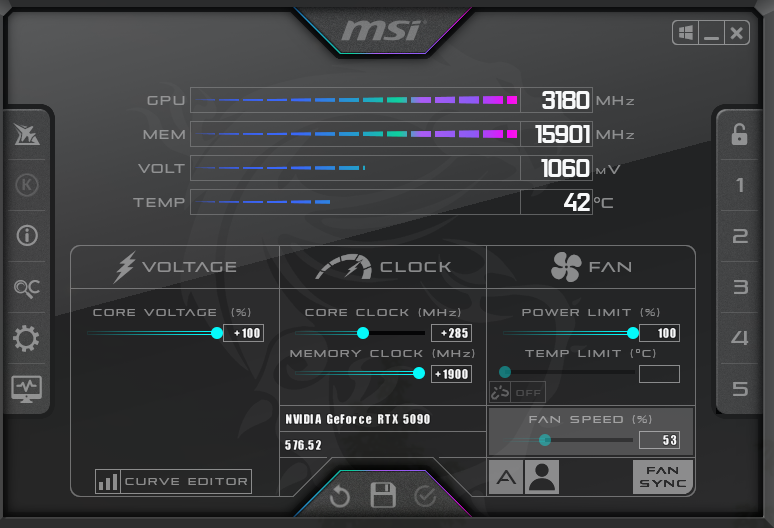
Guess I need to do better and OC my 5090 harder.... lol. Tests with +1800Mhz memory and +300Mhz core. In testing, +2000Mhz on memory for me in a "no-go", it bcomes a stutter fest from ECC when testing in games last night, so clearly not stable that high for me and I backed it off a bit. Core is solid though and can probably go much higher if I want to try.

These cards do seem to scale well with overclocking, pretty impressively too TBH.

http://www.3dmark.com/sn/6737025 - 15160 Steel Nomad

http://www.3dmark.com/spy/56649120 - 38031 Timespy

I'll have to run the other tests later.
 
So, I have been running all my tests without even touching the voltage slider, might have to re-run everything and see how much further I can go. Quick testing going from 0% to 100% is allowing it to boost from 3160Mhz roughly to 3267Mhz+ without even modifying my offset, voltage from 1.05V to 1.1V. Now I'm wondering if I can hit 3300Mhz+ stable. Guess I have more testing to do later and some benchmarks to re-run! It def. increased power though, was hitting 550W+ in what I was testing, but it still was under 55C. Shame the hottest part on these cards is probably that stupid power connector... lol.
 
So, I have been running all my tests without even touching the voltage slider, might have to re-run everything and see how much further I can go. Quick testing going from 0% to 100% is allowing it to boost from 3160Mhz roughly to 3267Mhz+ without even modifying my offset, voltage from 1.05V to 1.1V. Now I'm wondering if I can hit 3300Mhz+ stable. Guess I have more testing to do later and some benchmarks to re-run! It def. increased power though, was hitting 550W+ in what I was testing, but it still was under 55C. Shame the hottest part on these cards is probably that stupid power connector... lol.
How are you checking MHz? MHz reported in 3dmark are all sorts of messed up. Only use the beta MSI Afterburner to check MHz. Maybe HWINFO (latest version) also posts correct MHz. If your card is running 3267 MHz then your score in Steel Nomad should be around 16,400 or higher with 600 watts or higher power draw.
 
How are you checking MHz? MHz reported in 3dmark are all sorts of messed up. Only use the beta MSI Afterburner to check MHz. Maybe HWINFO (latest version) also posts correct MHz. If your card is running 3267 MHz then your score in Steel Nomad should be around 16,400 or higher with 600 watts or higher power draw.
My score in SN (or any test so far) i posted is well below 3100Mhz, I have not tested my new voltage settings yet. I was using AB beta and gpuz to look at clocks. Gpuz seems to match AB beta. All my posted tests so far were observed to be hovering around 3.0ghz
 
My score in SN (or any test so far) i posted is well below 3100Mhz, I have not tested my new voltage settings yet. I was using AB beta and gpuz to look at clocks. Gpuz seems to match AB beta. All my posted tests so far were observed to be hovering around 3.0ghz
3 Gs should be doable easily but claims of over 3150 on pure air cooling are suspect.
Especially sustained clocks. There must be some fuckery going on with the clock speed being posted by the apps you are using.
 
3 Gs should be doable easily but claims of over 3150 on pure air cooling are suspect.
Especially sustained clocks. There must be some fuckery going on with the clock speed being posted by the apps you are using.
Depends on the load of the card and what it is running too, I'll run some tests tonight. For example, loading up CP2077 will give me different clocks than say SOTTR or Valley. Just like SN will give different clocks than TS.

That being said, the 5090 Suprim is the absolute largest HSF assembly for a 5090, so I'm not surprised it runs so cool and is in line with other reports I find online for this specific model. I was playing D4 last night, 4K, max settings, FG on with DLAA and my temps stayed around 55C or lower the entire gaming session (+300 core / +1800 memory). Did not touch the voltage slider until late this morning though.
 
Yeah, I'm going to need multiple profiles to truly push this card. For example, SN I am topping out at ~3075Mhz because I am hitting the power limit, and that is with a CO of +407. However, in TS, I am hitting ~3175Mhz with a CO of +300. But if I use +410 CO in TS, it will crash because it will try to push 3300Mhz+ with too low voltage because I have not hit a power limit yet. :(
 
Last edited:
Yes you need separate curves for each bench.

Timespy curve will crash any other bench
Speedway curve will crash Steel Nomad or Port Royal
Steel Nomad curve will crash Port Royal
Port Royal curve should work on all benches but may crash Timespy extreme

That’s based on my testing.
 
Yes you need separate curves for each bench.

Timespy curve will crash any other bench
Speedway curve will crash Steel Nomad or Port Royal
Steel Nomad curve will crash Port Royal
Port Royal curve should work on all benches but may crash Timespy extreme

That’s based on my testing.
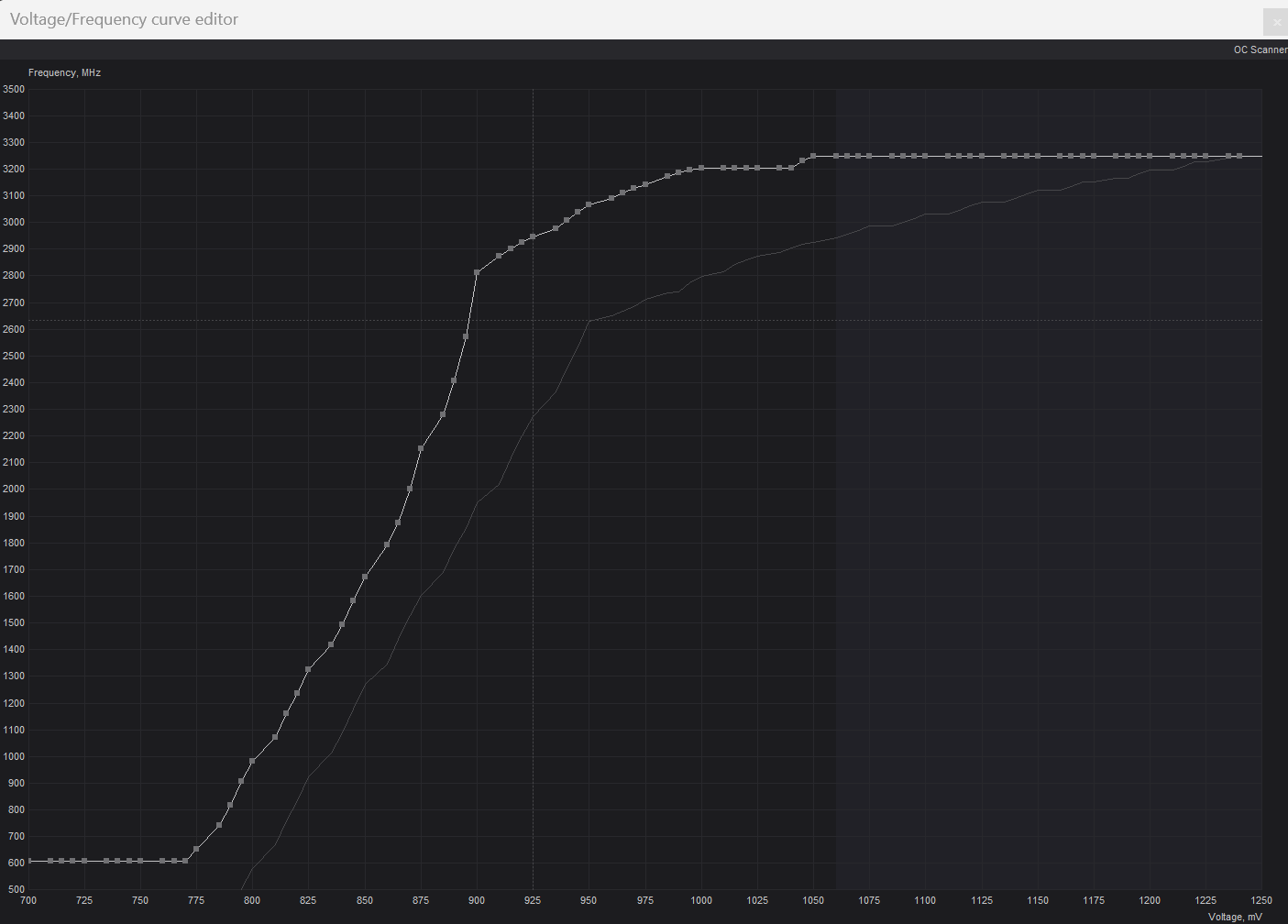
Based on GAME testing, I have landed on this as my 24/7 so far... it is netting me about 3175Mhz steady in games on my specific card, temps top out around 55C~58C, memory about 60C~62C. Honestly, I feel like if this thing was allowed more than 600W and 1.07V it would use it and give more performance... lol. Such a beast.

1749873064493.png
 
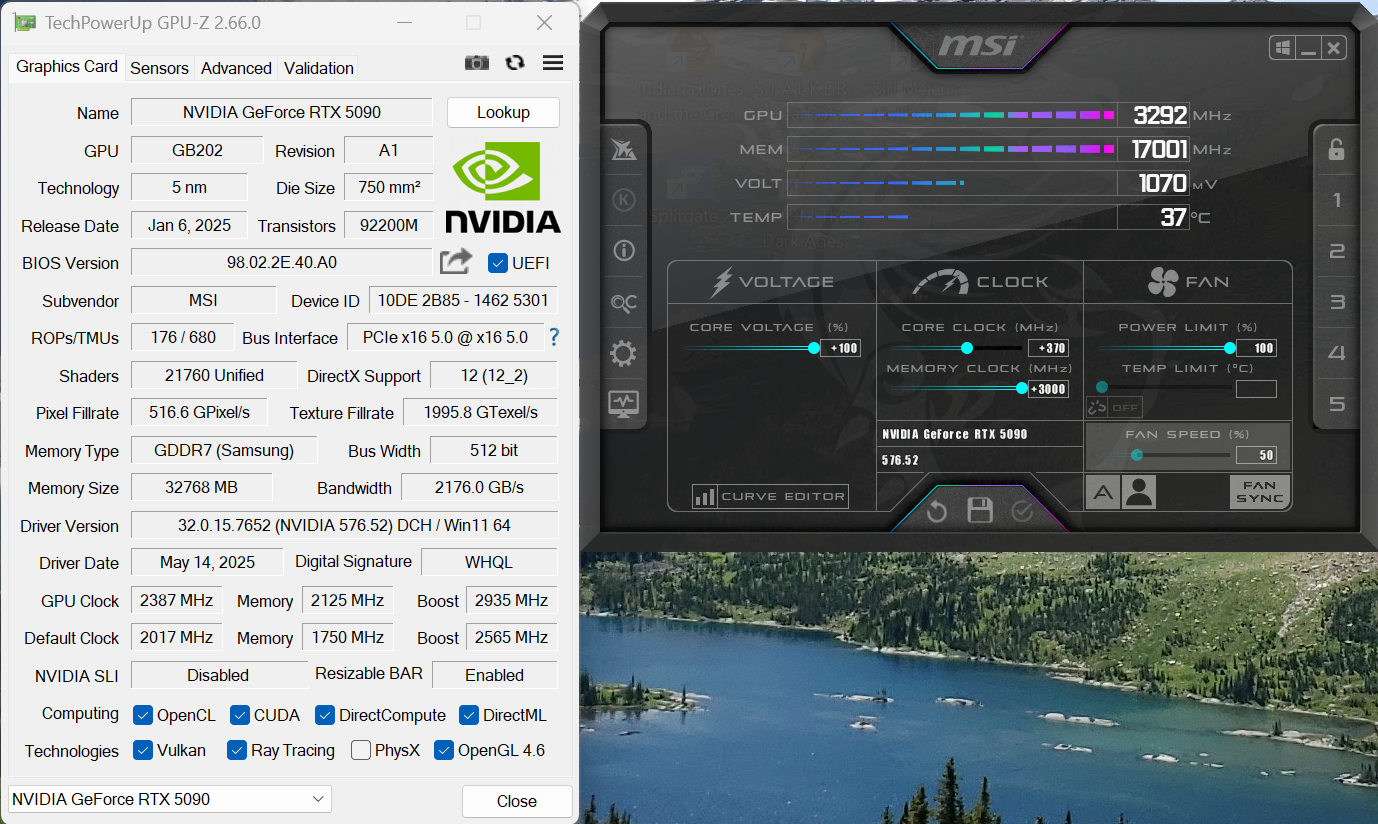
So decided to do the track to get +3000Mhz memory speeds.... and to my surprise, it is stable benchmarking... lol. Also surprising, it made absolutely no difference worth noting (past margin of error) in benchmarking. Seems around +1500 ~ +2000 is about all that matters. It would appear the 5090 can't take full advantage of the extra bandwidth, at least not in the few tests I quickly ran. Might have to try some Ray Tracing benchmarks like Port Royal and some RT heavy games, perhaps it matters more for that. GPUz attached as well, bandwidth increased from the low 1700's to almost 2200. Quite a bit of OC headroom on these if you are willing to push them. Luckily with the oversized cooler, it still does not even get warm. Just gotta ignore the 600W+ power draw tho...

1750107711589.png
 
So decided to do the track to get +3000Mhz memory speeds.... and to my surprise, it is stable benchmarking... lol. Also surprising, it made absolutely no difference worth noting (past margin of error) in benchmarking. Seems around +1500 ~ +2000 is about all that matters. It would appear the 5090 can't take full advantage of the extra bandwidth, at least not in the few tests I quickly ran. Might have to try some Ray Tracing benchmarks like Port Royal and some RT heavy games, perhaps it matters more for that. GPUz attached as well, bandwidth increased from the low 1700's to almost 2200. Quite a bit of OC headroom on these if you are willing to push them. Luckily with the oversized cooler, it still does not even get warm. Just gotta ignore the 600W+ power draw tho...

View attachment 736082
Why not undervolt the card?
What is your max Steel Nomad score with all these updates you are making to the clock speeds?
 
Why not undervolt the card?
What is your max Steel Nomad score with all these updates you are making to the clock speeds?
If I had an FE I'd probably undervolt it because of temps, but I did not spend all that $$$ to just leave performance on the table with this oversized AIB cooler. I could not care less if it is pulling 600W and overclocked as high as I can go when gaming as long as temps remain around 55C gaming and 60C on the memory. Might not be more than a few percentage points in frames at best, but I'll take whatever it can give me.

As for SN, memory from 2000 to 3000 made no difference outside a margin of error.

My PR went up ever so slightly, but once again, I'd almost consider this within a margin of error or reboot. It seems the 5090 is more core limited than memory bandwidth limited once you get around 1500~2000 extra on the memory.
https://www.3dmark.com/pr/3484013
 
Why not undervolt the card?
To elaborate on this, I guess I technically am to achieve higher clocks, I am hoping to bring up the lower voltages for higher frequencies to hold the boost clocks higher and more solid. I would be curious to see your curve to compare. Doing it this way seems to take a lot of time and testing, but it is brining up my scores even more vs. just a plain core increase and forget it. Right now, I am trying to cap at 3.25Ghz because all my crashes seem to happen when I spike above that, but it could have been a combination of things, so trying to get this the best I can before attempting higher clock speeds.

On the plus side, 3.2Ghz is perfectly stable at 1.0V solid. I can hold that speed in "Valley" as a test.

1750169903429.png
 
For me steel nomad is your real speed or real world speed. Anything else is BS or temporary. I would even take Port Royal.
 
For me steel nomad is your real speed or real world speed. Anything else is BS or temporary. I would even take Port Royal.
I dunno, probably a good stresser, but games tend to boost and hold higher than SN, even CP2077 fully maxed cruses around 3125Mhz, whereas SN will barely hold 3030Mhz at the same offset.
 
For me stability has a different meaning. It needs to be set and forget. But sure if it works for you - push it as hard as you want.
 
For me stability has a different meaning. It needs to be set and forget. But sure if it works for you - push it as hard as you want.
Yeah, I already have a "set and forget profile" that provides a nice boost, now I am just trying to see if I can configure the curve in such a way to start breaking top 100 on some / any of the 3dmark tests with this card :) And if it happens to be gaming stable too, sweet... lol.
 
Back
Top