• Some users have recently had their accounts hijacked. It seems that the now defunct EVGA forums might have compromised your password there and seems many are using the same PW here. We would suggest you UPDATE YOUR PASSWORD and TURN ON 2FA for your account here to further secure it. None of the compromised accounts had 2FA turned on.
    Once you have enabled 2FA, your account will be updated soon to show a badge, letting other members know that you use 2FA to protect your account. This should be beneficial for everyone that uses FSFT.

RTX 5090 Benchmarks

Pretty good!

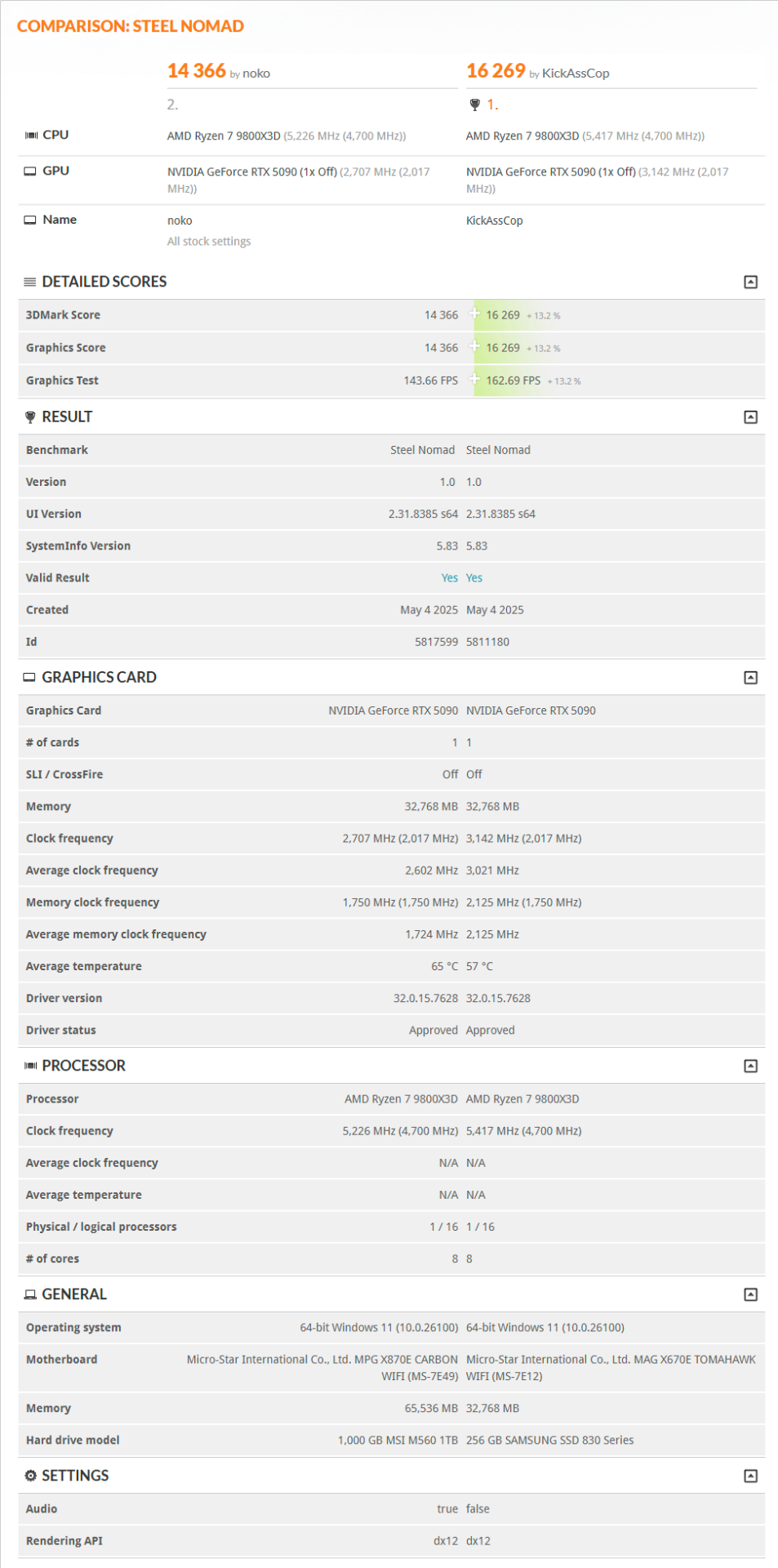
SteelNomad.png
 
What is interesting is my 5090 is showing better than average for a 5090 and 9800X3D Setup for various tests in 3dMark. KAC is 13% over that. One hell of a 5090, Golden sample.

I will give it some time before OCing, make sure it is stable at stock, doesn’t melt down and so on. Definitely puts out a lot of heat.
 
doesn’t melt down and so on. Definitely puts out a lot of heat.
yeah, that is just crazy to me. My 1080 ti would start heating up my room a few degrees, and as of now I have a 4.8ghz FX-8300 and a gtx 680 under my desk (A system I fiddle around with for S&Gs) and that creates a little aura of heat. A pocket, as you will. But ugh, 600w? thats like another 150-250w on top of that rig in the GPU alone!

I would also like to add that when I was running 5ghz @1.49v on that same FX, it drew so much current that my cpu power cable started heating up at the power supply side! I blame Asus though, my board only has a single 8 pin power, no 4 pin auxiliary.
 
yeah, that is just crazy to me. My 1080 ti would start heating up my room a few degrees, and as of now I have a 4.8ghz FX-8300 and a gtx 680 under my desk (A system I fiddle around with for S&Gs) and that creates a little aura of heat. A pocket, as you will. But ugh, 600w? thats like another 150-250w on top of that rig in the GPU alone!

I would also like to add that when I was running 5ghz @1.49v on that same FX, it drew so much current that my cpu power cable started heating up at the power supply side! I blame Asus though, my board only has a single 8 pin power, no 4 pin auxiliary.
Yep, had FX as well 5ghz, 250w plus. Then two Radeon 290’s in cfx. Drawing more power then the 5090 system now when running at max. Then 2x 1070Ti’s then 2x Vega’s short period, before going to Ryzen. That is if I remember right. Anyways have a 18000 BTU/hr A/C unit in room, room wired for 220v as well.
 
How was FX with dual Vegas?? I assume pretty bottlenecked, even at 5ghz. Mine at 5 ghz is still slightly slower in single core compared to a 4?... (Maybe 4.2 ghz) First gen i7.
 
Dependent on game and resolution, I was pushing 4k 60 hz, so not limiting as one would expect. Plus the processor woke up with a fast front side bus and ram. Anyways the power draw with the 5090 is not much different overall to the SLI and CFX systems I used in the past. Just one card vice 2. Some had quad multi GPU systems back then, that takes power.
 
Are you guys not afraid of the burning cables issue ? What you´re doing to mitigate this !?
 
Are you guys not afraid of the burning cables issue ? What you´re doing to mitigate this !?
I'm not afraid at all. I ran my 4090 for 2 1/2 years with no issue and expect the same from my current 5090. Just plug the damn thing in properly and don't put pressure/bend the cable too much where the plug is.
 
I'm not afraid at all. I ran my 4090 for 2 1/2 years with no issue and expect the same from my current 5090. Just plug the damn thing in properly and don't put pressure/bend the cable too much where the plug is.
Like i did with my 4090. Let´s hope it is enough.
 
I'm not afraid at all. I ran my 4090 for 2 1/2 years with no issue and expect the same from my current 5090. Just plug the damn thing in properly and don't put pressure/bend the cable too much where the plug is.
Totally agree with this. A lot of problems going back to the 4090 to now is user error whether people want accept that or not is up to them. Some instances that I have seen failures on are people proving common sense isn’t so common.
 
I said the same thing when the 4090 came out. It's overblown on the internet. Less than 1% have issues. You are more likely to die in a fatal car crash then have your GPU cable melt. I used the single cable on my MSI 1300 watt power supply to plug mine in which was quick and easy while looking neat and tidy. The card sucks up to 630 watts according to MSI afterburner and I've had zero issues just like I had zero issues with my OC 4090 for the last 3 years.
 
Not worried. If it bites it won't be the first electronic device that bites.
Having said that I am running less watts on my 5090 than my 4090. My 4090 ran for over 2 years @ 520 watts OC. My 5090 runs 450 watts and in some games under 400 watts due to the undervolt I have.
 
Totally agree with this. A lot of problems going back to the 4090 to now is user error whether people want accept that or not is up to them. Some instances that I have seen failures on are people proving common sense isn’t so common.
Well let’s start at the beginning. It’s a design fault before a user error. And Nvidia really doesn’t care since they’ve been doing this since the 4 series.
 
It's badly designed power delivery on the cards (courtesy of nvidia, 100%) along with some genuine user errors and some faulty cables, making the whole picture a little messy and confusing.

But the thing is if the power delivery was designed decently on the cards, the cables would at least not melt and the cards would not need repairs in any of those cases: they might crash in the case of faulty cable/bad connection, but they could also manage to re-balance the power on the fly enough to keep running, and throw out warnings via hardware or software when it gets too much. It's kinda ironic that a company so focused on AI makes cards dumb cards (in regards to the power connector).
 
It's badly designed power delivery on the cards (courtesy of nvidia, 100%) along with some genuine user errors and some faulty cables, making the whole picture a little messy and confusing.

But the thing is if the power delivery was designed decently on the cards, the cables would at least not melt and the cards would not need repairs in any of those cases: they might crash in the case of faulty cable/bad connection, but they could also manage to re-balance the power on the fly enough to keep running, and throw out warnings via hardware or software when it gets too much. It's kinda ironic that a company so focused on AI makes cards dumb cards (in regards to the power connector).
it just pisses me off that they tried to reinvent the wheel, it clearly failed, and yet, fthey still try to force the shitty design onto everyone! Admit defeat, nvidia, please, it'll be better for everyone.
 
it just pisses me off that they tried to reinvent the wheel, it clearly failed, and yet, fthey still try to force the shitty design onto everyone! Admit defeat, nvidia, please, it'll be better for everyone.
My understanding is that this happened when they started chasing the smallest PCB size possible, on newer, gigantic GPUs. But yeah it sucks that they never owned up to it. Will my 4090 end up failing like that before the 6000 cards release? Impossible to be sure but sadly a very realistic and daunting possibility...

Larger PCBs would not have hurt sales, but it would probably have made the FE cooler way less elegant, and the cooling a bit worse since the short PCB is used for the "flow through" cooler design.
 
My understanding is that this happened when they started chasing the smallest PCB size possible, on newer, gigantic GPUs. But yeah it sucks that they never owned up to it. Will my 4090 end up failing like that before the 6000 cards release? Impossible to be sure but sadly a very realistic and daunting possibility...

Larger PCBs would not have hurt sales, but it would probably have made the FE cooler way less elegant, and the cooling a bit worse since the short PCB is used for the "flow through" cooler design.
would it kill them to add the few mm for a higher gauge and ol' reliable dual, dual 8 pins (wow, 600w is a lot more insane sounding). But, my gtx 680 has the 8+6 pin stacked. I wonder if they could do sonething similar?
 
Are you guys not afraid of the burning cables issue ? What you´re doing to mitigate this !?
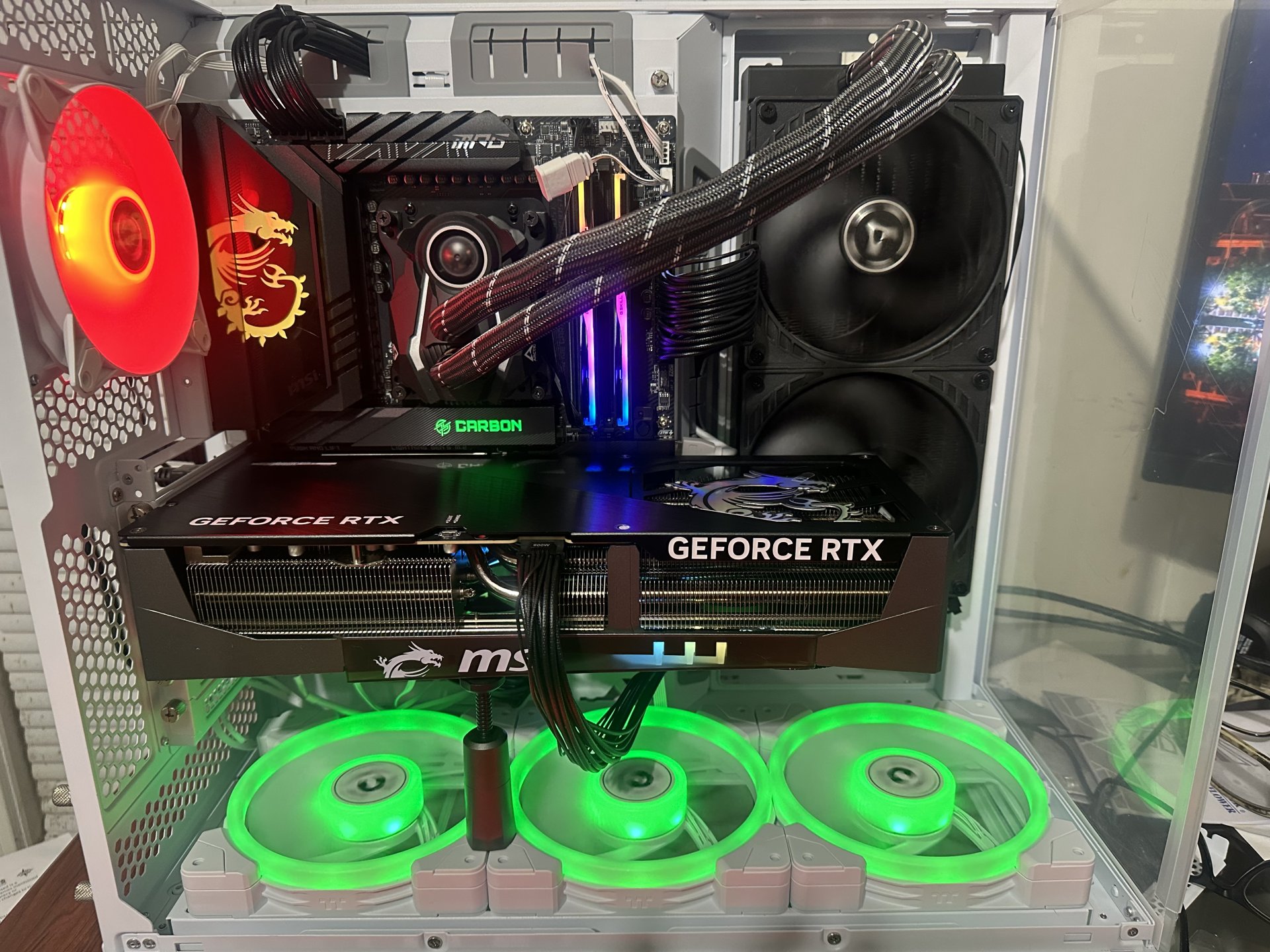
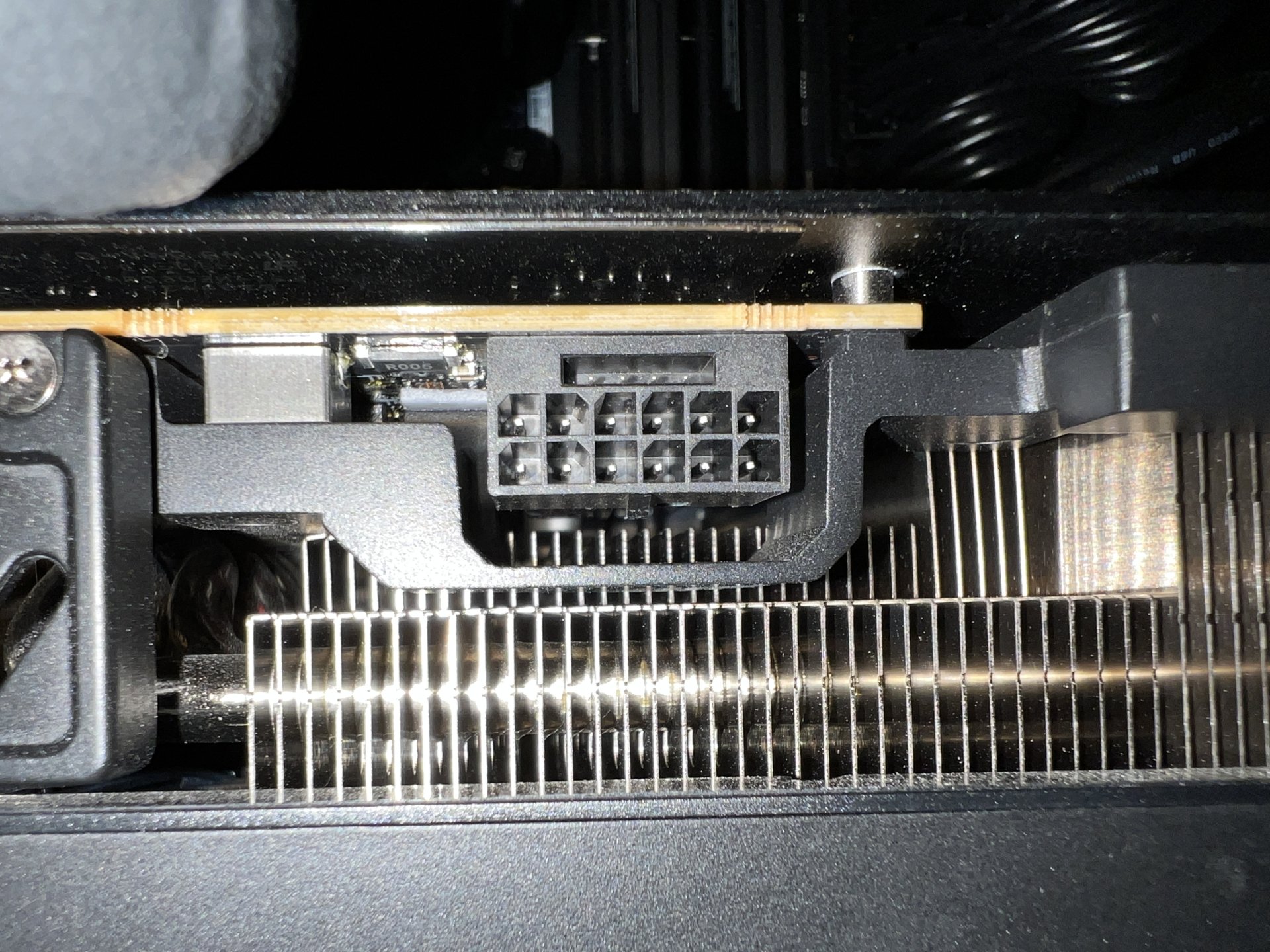
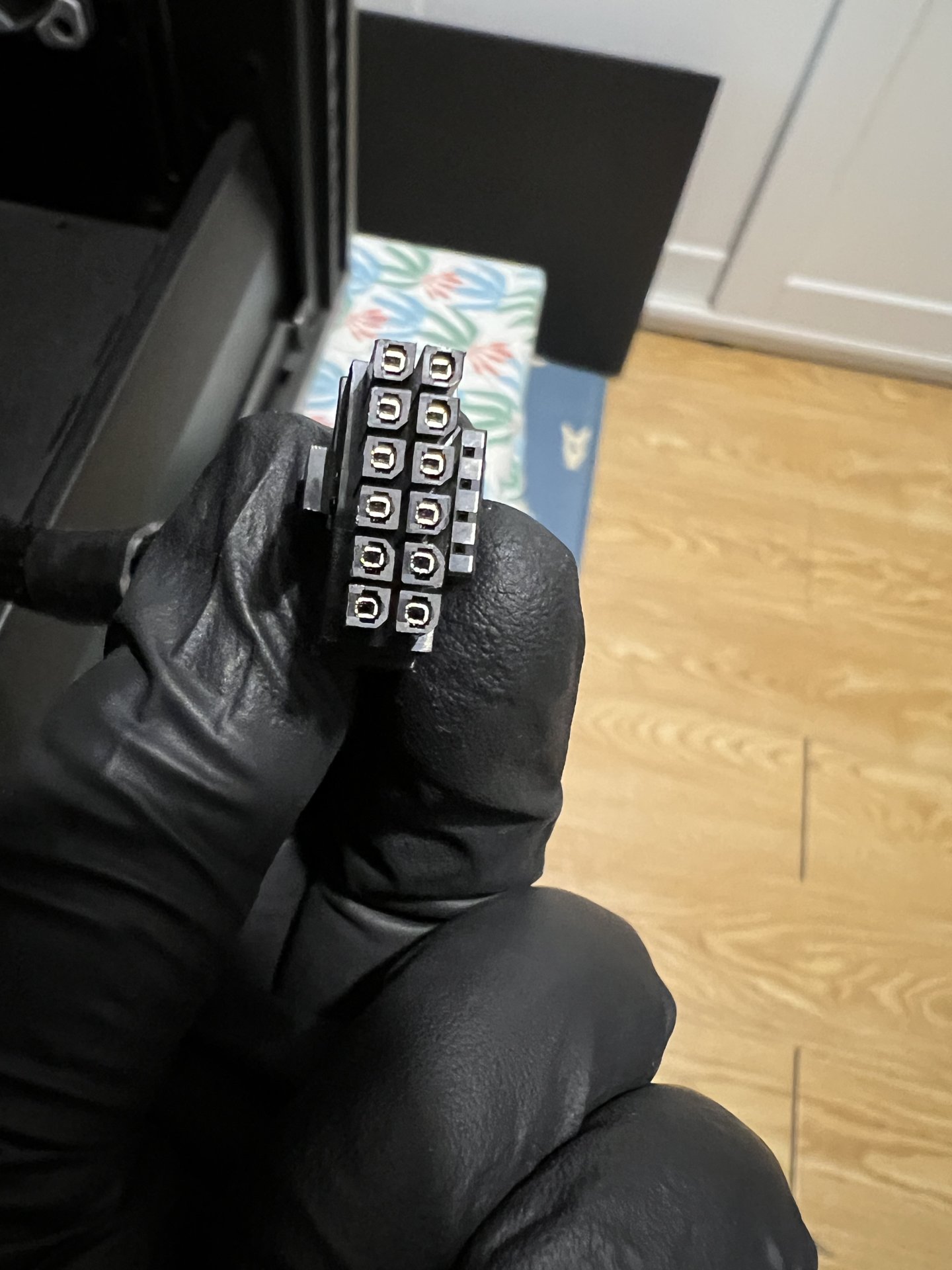
Plug cable in so I don’t see any yellow. MSI cables are extremely tight, especially in the power supply side (This MSI PS has two 2x6 plugs on the cable)

Turn on and feel connectors and wiring, run something that pushes the GPU and let it heat up. So far my cables and plugs are fine.

Took pictures of the plugged in cables, just in case. Now the back plate gets smoking hot which affects where the cable is plugged into. Now the backplate is warmer than the plug. I may cool the backplate, did that with my 3090 at the time, heat sinks and fan.IMG_2674.jpeg
 
Are you guys not afraid of the burning cables issue ? What you´re doing to mitigate this !?
Nope. I bought a brand new PSU to go along with my 5090 upgrade just to be safe. I'm using the OEM 12V-2x6 cable that came with the new PSU and made sure both ends are plugged in fully and securely and not bent or pulled out of place after cable management.

Before I removed the old 4090, I saw zero signs of melting even after over 2 years of frequent gaming.

IMG_7539.JPG
IMG_7538.JPG


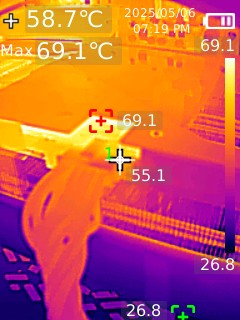
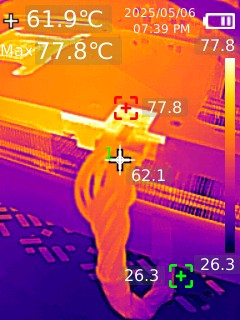
By the way, here are the thermal images of the new 5090 running at 600W. Getting around 55-65C at the connector.

IMG_0022.jpg
IMG_0028.jpg


On topic:

My out of the box benchmark scores:

http://www.3dmark.com/sn/5886364

http://www.3dmark.com/sw/2230741
 
Got a Gigabyte AORUS GeForce RTX 5090 MASTER ICE 32G - day 1 runs:

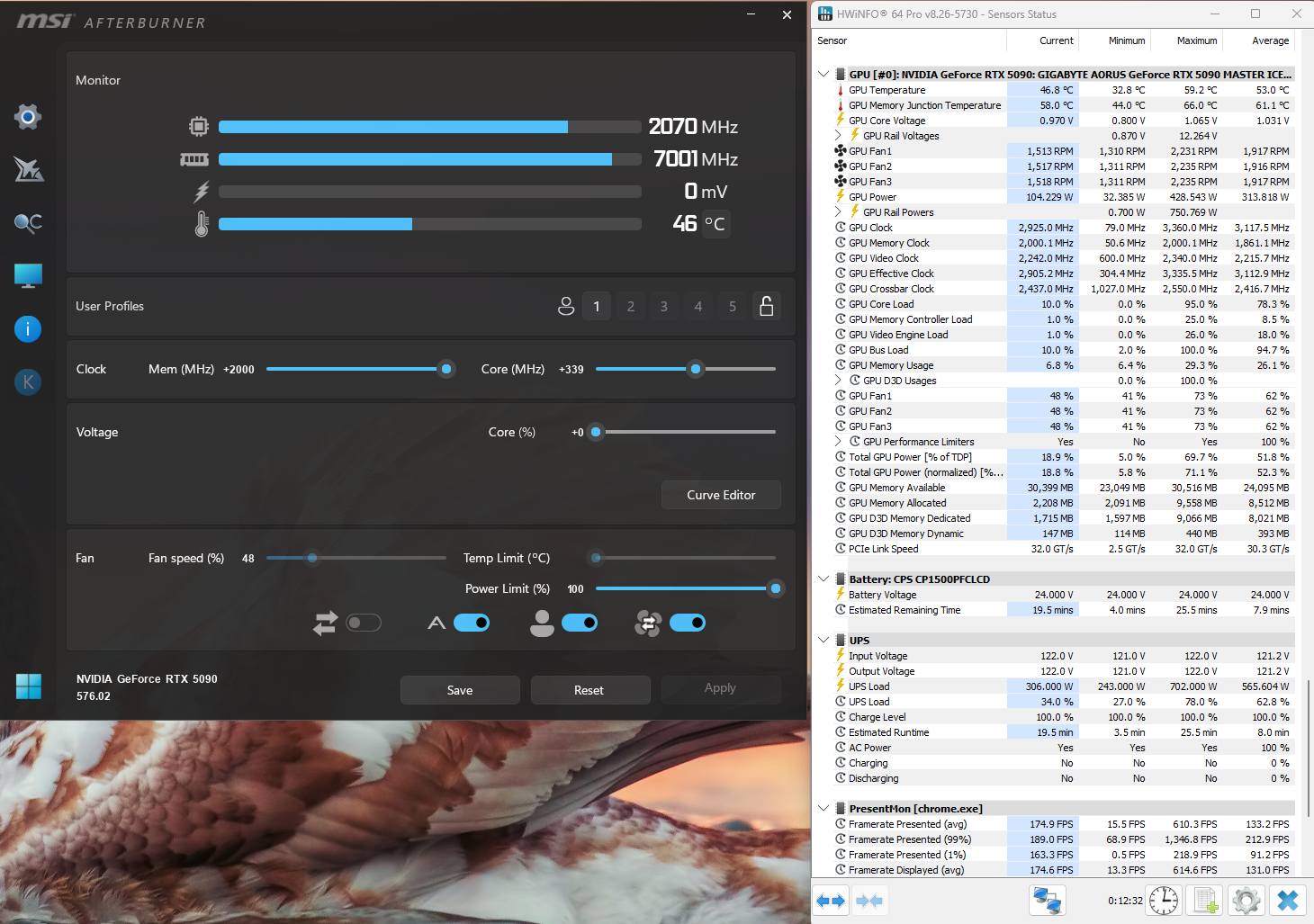
+2000 Memory, +339 MHz Core

Steel Nomad Stress Test - Passed (98.2%)
https://www.3dmark.com/3dm/133986339

Steel Nomad - 15,254
https://www.3dmark.com/3dm/133988574

Port Royal - 39,740
https://www.3dmark.com/3dm/133991406

Speed Way - 15,103
https://www.3dmark.com/3dm/133991592

Time Spy Extreme - 19,570 (27,444 Graphics Score)
https://www.3dmark.com/3dm/133984391

Time Spy - 38,360 (51,044 Graphics Score)
https://www.3dmark.com/3dm/133987941

Rig:
https://valid.x86.fr/04xk96

This has been the best overclocker out of 4 5090s I have had (MSI Gaming OC, TUF OC, Astral OC are the others). Here's after a round of Fortnite:

5090masterice_oc_fortnite.png
 
Last edited:
My 5090 arrived this afternoon and I immediately launched Avatar Frontiers of Pandora, which my 4090, at max settings in 4K with DLAA enabled, could only pump out 40-55 FPS. I’m now at 60-80 FPS and it’s truly frightening how happy this makes me.

I ran Cyberpunk with DLAA enabled in override mode and I pretty much needed to enable Frame Gen X3. Absolutely amazing tech. I’ve never seen such an advanced game running so smoothly with such clarity. Breathtaking almost.

I agree that with most games my gains will be minimal, but anyone who thinks that a 5090 can’t substantially improve certain games over a 4090 just doesn’t know what they’re talking about.

I actually held back from playing Avatar just for this card. I’m happier with this purchase than I thought I would be.
 
For the Suprim liquid or any card really, will the gpu have more power available if we run the fans off the motherboard and turn off rgb's and unnecessary stuff like gigabytes oled display? Or does the card power those through the pcie slot?
 
Last edited:
For the Suprim liquid or any card really, will the gpu have more power available if we run the fans off the motherboard and turn off rgb's and innecessary stuff like gigabytes oled display? Or does the card power those through the pcie slot?
That's a very interesting question, although I suspect in most cases the fans etc. are on a separate 'rail' so to speak and are in addition to whatever the GPU side draws. I mean it would effectively be like if they were connected directly to the power slot pins.
 
For the Suprim liquid or any card really, will the gpu have more power available if we run the fans off the motherboard and turn off rgb's and innecessary stuff like gigabytes oled display? Or does the card power those through the pcie slot?
I don't think it matters where it would draw that power from. The fans/rgb don't take much wattage at all to run.
 
For the Suprim liquid or any card really, will the gpu have more power available if we run the fans off the motherboard and turn off rgb's and innecessary stuff like gigabytes oled display? Or does the card power those through the pcie slot?
I've used 4 different 5090s now - no difference performance-wise. Currently using the OLED and blinky lights RGB MASTER ICE and it performs better than the other 3 so far (just silicon lottery in general and of course they're all within a few percentage points of eachother - MSI Gaming OC, ASUS TUF OC and Astral OC).
 
Except that's easily margin of error. I mean it's cool to do - but I am guessing the PCIe slot power is used for the fans and all of that while the 12VHPWR is for the cards TGP.

Worth the 10 minute effort if it provides a consistent 1-2% improvement. I'll be doing it and running gentle typhoons.
 
Last edited:
So my 5090 arrived just before the weekend and I spent most of Saturday testing it.

The chief difference between my ‘old’ 4090 and my new card is that I can now run every single title in my library at max settings at 4K with DLAA enabled… but for the most demanding games, in order to run DLAA, I have to enable 3X Frame Gen, which I just can’t do on my 4090.

I’m guessing here that most folks would say what the fuck’s so great about DLAA, especially at 4K?

And to that I would say, it’s kind of like getting a new prescription for your eyeglasses. When you put the new glasses on everything is just a little sharper, and although at first it doesn’t seem that extreme, you realize when you put your old glasses back on how much nicer the new glasses actually are.

Take Star Wars Outlaws as an example. Max the thing out completely at 4K and enable DLAA and 3X Frame Gen. The clarity is terrific. Disable DLAA and set DLSS to performance, and it’s smoother now, but that stunning clarity just isn’t there anymore.

With the 5090 I can now choose stunning clarity or I can choose ultra smooth performance, which is an option that just doesn’t exist for every title with my old 4090.

Same deal with Avatar Frontiers of Pandora. Same with Cyberpunk 2077.

Apart from this, the overall 30% gain above my 4090 is damned nice.

Simply put: there’s no going back now. I almost decided to skip this gen, but now that I have the 5090 I’m really glad that I went ahead with the purchase. I feel privileged to own this tech. I’m grateful.
 
Simply put: there’s no going back now. I almost decided to skip this gen, but now that I have the 5090 I’m really glad that I went ahead with the purchase
I was in the same boat and was against purchasing one, but I'm glad I did also. Enjoy your card..:)
 
So my 5090 arrived just before the weekend and I spent most of Saturday testing it.

The chief difference between my ‘old’ 4090 and my new card is that I can now run every single title in my library at max settings at 4K with DLAA enabled… but for the most demanding games, in order to run DLAA, I have to enable 3X Frame Gen, which I just can’t do on my 4090.

I’m guessing here that most folks would say what the fuck’s so great about DLAA, especially at 4K?

And to that I would say, it’s kind of like getting a new prescription for your eyeglasses. When you put the new glasses on everything is just a little sharper, and although at first it doesn’t seem that extreme, you realize when you put your old glasses back on how much nicer the new glasses actually are.

Take Star Wars Outlaws as an example. Max the thing out completely at 4K and enable DLAA and 3X Frame Gen. The clarity is terrific. Disable DLAA and set DLSS to performance, and it’s smoother now, but that stunning clarity just isn’t there anymore.

With the 5090 I can now choose stunning clarity or I can choose ultra smooth performance, which is an option that just doesn’t exist for every title with my old 4090.

Same deal with Avatar Frontiers of Pandora. Same with Cyberpunk 2077.

Apart from this, the overall 30% gain above my 4090 is damned nice.

Simply put: there’s no going back now. I almost decided to skip this gen, but now that I have the 5090 I’m really glad that I went ahead with the purchase. I feel privileged to own this tech. I’m grateful.
If you have to enable 3x frame gen to use DLAA I would assume your base frame rate is around 40FPS? Doesn't the low response times bother you? I agree that DLAA is great and I also think the 5090 made a substantial difference in many titles that I own but I pretty much stay away from 3X and 4X frame gen and would only use it if I was getting 60 base FPS and was using it to push frame rates beyond 120FPS on a 240hz monitor. Cyberpunk is a good example, where I can push DLSS quality mode with 2x frame gen and get a solid 60FPSX2 or 120FPS with frame gen. Turning on DLAA makes the game run at 40FPS or lower and 3x and 4x frame gen can push it up to 120FPS but it looks much more blurry and has noticeable artifacts and a lot of noticeable input lag. The difference in latency is very noticeable and feels laggy but feels and looks flawless with 2x frame gen with DLSS quality mode. I could see using DLSS quality mode at 60fps and then using 4x frame gen to get 240FPS on a 240hz monitor but otherwise I don't agree with you on this point and I think it makes the experience worse for both response times and graphics quality. Cyberpunk is the only game I own that I can't push at 4k with DLAA and 2x FG. Many games can run at 2.5DLDSR at 4k with DLAA using only 2x FG. Pretty impressive card either way.

I used 2.5 DLDSR from the control panel on red dead redemption and forced DLAA through the Nvidia app. This gives me a 70FPS average and I then forced the smooth motion frame generation in the Nvidia app and I'm getting a solid 120FPS. This gets rid of the aliasing problems that DLSS has and fixes the blur issues that TAA has. Looks and feels great. The Hitman trilogy is the same way and runs perfect at 5760X3240 resolution down-sampled to native 4k with DLAA forced through the Nvidia app. Amazing visuals and performance. These settings would cause a 4090 to run at 10FPS because of the bandwidth limitations. The 5090's 2TB memory bandwidth allows you to get away with some insane quality levels. I can manage DLAA at native 4k in stalker 2 but cyberpunk remains in quality DLSS mode with 2x frame gen for me because I'm on a 120hz big screen TV.
 
Last edited:
I used 2.5 DLDSR from the control panel on red dead redemption and forced DLAA through the Nvidia app. This gives me a 70FPS average and I then forced the smooth motion frame generation in the Nvidia app and I'm getting a solid 120FPS. This gets rid of the aliasing problems that DLSS has and fixes the blur issues that TAA has. Looks and feels great. The Hitman trilogy is the same way and runs perfect at 5760X3240 resolution down-sampled to native 4k with DLAA forced through the Nvidia app. Amazing visuals and performance. These settings would cause a 4090 to run at 10FPS because of the bandwidth limitations. The 5090's 2TB memory bandwidth allows you to get away with some insane quality levels. I can manage DLAA at native 4k in stalker 2 but cyberpunk remains in quality DLSS mode with 2x frame gen for me because I'm on a 120hz big screen TV.

I did almost the same thing.

As an aside: it’s always shocking returning to Red Dead 2 and seeing that it still competes with many contemporary titles. The incredible detail makes up for the aging tech.

Every time I ‘test’ my hardware with this game I find I want to play the game - except I don’t have the time.
 
Back
Top