View: https://www.youtube.com/watch?v=ba36aAQVgyQ
I remember when our Fry's used to be one of these.
![[H]ard|Forum](/styles/hardforum/xenforo/logo_dark.png)
Follow along with the video below to see how to install our site as a web app on your home screen.
Note: This feature may not be available in some browsers.


Lol, talk about throwback. I used to just play games there in the Supermall. Never bought anything there, though, too expensive.I'll see your Fry's Electronics and raise you an Incredible Universe.


If you want to overclock it. Make sure to get one of the X870e motherboards that has an external clock generator. That way you can get that 9800x3d to 5.7-5.8ghzI just picked up a 9800X3D last week but as my build is watercooled, its going to be a huge pain in the ass to switch out the motherboard, GPU etc. I'm not going to bother with all that until I can get ahold of the 5090 and a water block for it. I also haven't even bought the board yet. I'm pretty sure I'll be going with one of the higher end GIGABYTE offerings like the GIGABYTE X870E Aorus Extreme AI Top (stupid fucking naming convention), but I'm not 100% committed to that.
 The 5090 from what it looks like could actually use a lil more grunt in the CPU.
Yes it's normal your probably hitting CPU PPT(total socket limit) which includes the cores and memory controller . No game exists yet that will push all threads to 100% so enjoy it without trying to melt it.I just got my 9800x3d build finished, first AMD after two decades of intel.
I ran prime 95 and the CPU is only going to 4.7-4.9ghz instead of 5.2. Is this normal behavior? I shouldn't have thermal throttling. The AIO is keeping temps around 76c.
That doesn't make any sense P95 is the only thing that gets my cpu to 90c.Why is Cinebench the only thing that actually seems to warm up this CPU? When I run Prime or AIDA it just doesn't seem to load the CPU and the fans hardly spin.
Maybe I'm not configuring Prime right.That doesn't make any sense P95 is the only thing that gets my cpu to 90c.

probably this and you have to let it sit for a few minutes to reach full load. i still use v26.6 and just start it with the defaults.Maybe I'm not configuring Prime right.

I have a 13900k and a Z790 motherboard. I mostly play World if Warcraft and BG3
I've read that the 9800X3D is a huge upgrade in MMORPG 's over Intel, mainly in low frames that you might get 50-70fps with Intel will Joe get 120 fps on those heavy areas.
Is that true? And would I notice going to a 9800X3D from my 13900k?

World of Warcraft has always been a very CPU intensive game, more so than GPU. I may very well have started WoW on a Pentium 4! Then I went to Conroe Core 2 Duo, massive gains. Then more gains with every CPU upgrade since.For World of Warcraft the 9800X3D is pretty much the best upgrade you could get.
It's depressingly difficult to find actual WoW benchmarks these days, but in this case Intel themselves provided some helpful information:
View attachment 707666
That Intel marketing slide compares a 13900K to a 5800X3D, and the 5800X3D was clearly faster. Intel definitely has no reason to exaggerate AMD's CPU performance so it's probably safe to assume the numbers are accurate. Not only that, but in the time since those numbers were posted (Shadowlands):
-Intel released microcode updates to fix 13 and 14-series reliability issues, and those updates reduce performance.
-Microsoft released Windows 11 24H2, which improves performance on newer Ryzen CPUs.
So the performance difference between the two CPUs would actually be larger now than what is seen in that graph. And that's just the lowly 5800X3D beating up on the 13900K. We know that the 9800X3D is quite a bit faster, especially due to having 3D cache AND fast clock-speed.
I personally upgraded from a 5800X3D to a 9800X3D a few months ago. Performance in places like Dornogal and during larger raids and big outdoor events absolutely increased. I can pretty much maintain my ~141 fps cap even in those situations now. With my 5800X3D I was often seeing GPU usage on my RTX 4080 FE in the 60% average range with spikes up to 70%. Now with the 9800X3D I'm seeing GPU usage closer to 80% with spikes into the low 90's. That's at 3840x1600 resolution (38" ultrawide) with max settings, but Ray Tracing disabled.
A 9800X3D would be a great way to start Season 2.

Nice! My first AMD chip and it is beyond excellent.I just walked into my local Microcenter yesterday, grabbed a 9800X3D easy, tons of stock.

Well, I finally picked up a 9800X3D. I am not very impressed so far, its slower than my 13700K in everything I've tried, basically matches the 9700X. I'm not seeing this huge exaggerated boost that reviews all showed. Going to try 11 24H2 next just in case, because my B850 board has modules that only work in 24H2 like the Wifi and USB controller.
For me, at least in World of Warcraft, I've seen a huge increase in the low fps, like the big city areas would get my i13900k down to the 50 to 70 frames per second, but the highs were always 200+ fps. Now with the 9800X3D same exact settings, in those city areas, I'm seeing 100 - 120 fps
Probably needs a fresh install?
have you remembered the chipset drivers?

Why would you switch to a B650 board when you can get an X670E for around $200?I've tried the old 2024 drivers from AMD and the newer ones from Gigabyte, no idea why AMD hasn't even updated their site to include B850 yet but its pretty normal for them to be behind the ball. I did a fresh install of Windows 11 24H2 and its so unstable I can't even get to display settings or click the start button, so I'm going to switch to a B650 board.
Why would you switch to a B650 board when you can get an X670E for around $200?

lol, ok fair enough
lol, ok fair enough
which driver though; included in box one, from board makers site, or from wifi maker? id look for updated ones from the wifi oem...I installed the driver
which driver though; included in box one, from board makers site, or from wifi maker? id look for updated ones from the wifi oem...
92? i dont see a 92, but i see a 52...Realtek 8892
92? i dont see a 92, but i see a 52...
there is a asus version of the driver from xmas day, but i do not see anything at all on realteks site, dummies....Whoops sorry, I remembered the number wrong. Its this: Realtek® Wi-Fi 7 RTL8922AE
I just re-did a fresh 11 24H2, did not do any drivers manually and used a USB wifi adapter to get the GCC and let that do the drivers, seems to have done the trick. Now everything is stable and updated, so I'm going to try the games again and see how it does.

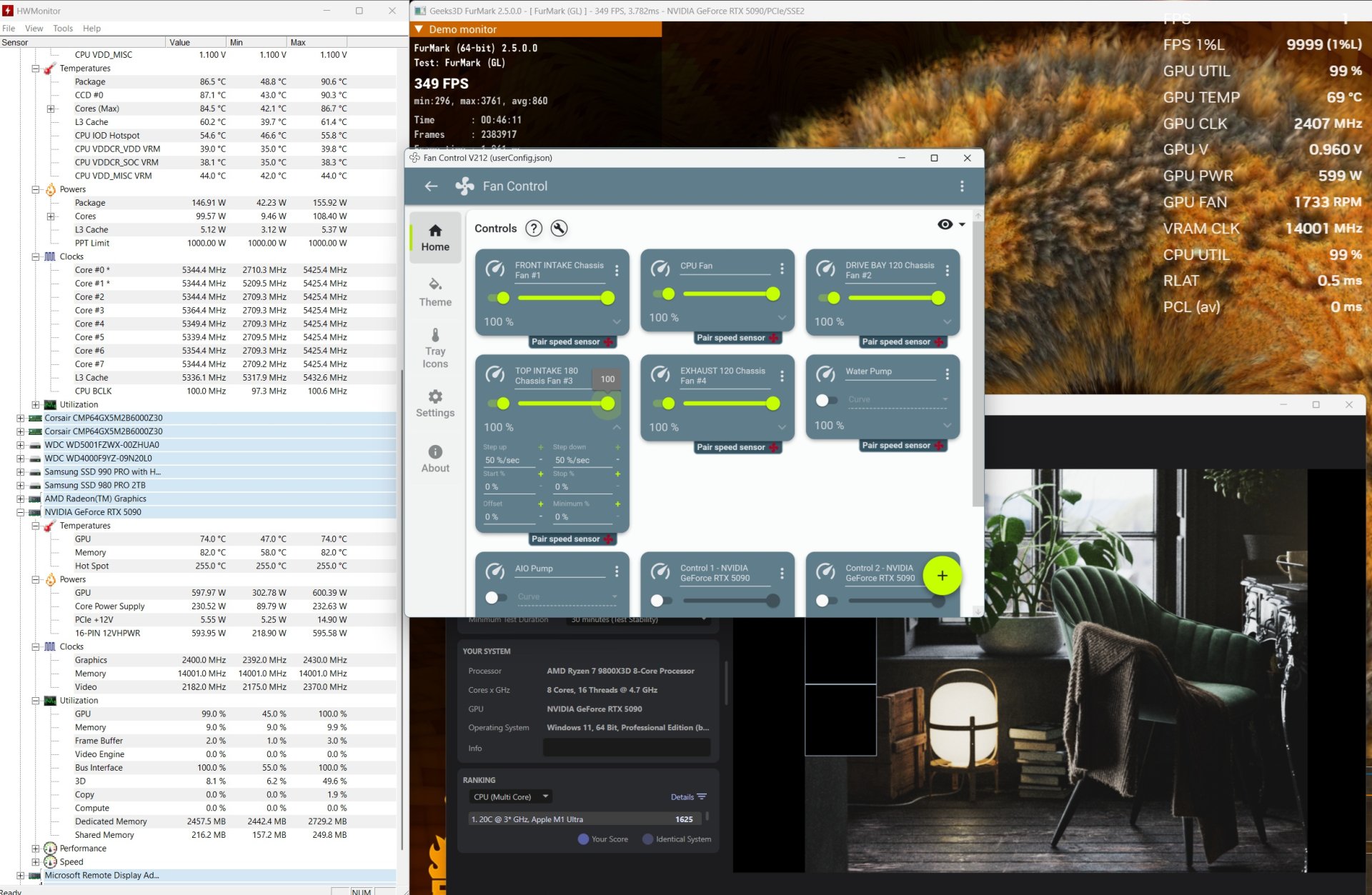
mid thirties is a fantastic idle temp for Zen 4/5Could you guys live with these temps? This is PO -22+200 MHz. This is Furmark and Cinebench running together for worst case scenario. Cooler is Noctua DH15G2.
Bottom line, with 5090FE, CPU temps can get close to 90 and even exceed. GPU hits 600 watts, but GPU temps or throttling is a non-issue. The new FE cooler is brilliant at cooling the GPU. It is the CPU that is the problem. Most of time, CPU at 87ish.
At idle, CPU is like in the low to mid 30s. Wondering if I should repaste.
View attachment 708817
