• Some users have recently had their accounts hijacked. It seems that the now defunct EVGA forums might have compromised your password there and seems many are using the same PW here. We would suggest you UPDATE YOUR PASSWORD and TURN ON 2FA for your account here to further secure it. None of the compromised accounts had 2FA turned on.
    Once you have enabled 2FA, your account will be updated soon to show a badge, letting other members know that you use 2FA to protect your account. This should be beneficial for everyone that uses FSFT.

NEC LCD2690

I just got my "repaired" monitor back. The repair report says "NO PROBLEM FOUND" for the horizontal lines. Are these people blind? Not only that, there's no indication they even checked for backlight bleeding or the power management problem. This is ridiculous. How am I supposed to get this fixed?


Tamlin_WSGF said:
And thats your personal impression of this, based upon your experience and what you've read from others. I fully respect that. Generalizing upon this, claiming it to be a fact however, I would disagree upon.
It's not like I tried one or two monitors. Explain to me how I keep getting monitors with the same problem if the problem is not common on those monitors.

I bet if I were to get a 23" Apple and a 24" Eizo right now, the Apple will have backlight bleeding and the Eizo won't. Maybe I should considering the poor quality of this NEC.

Tamlin_WSGF said:
There is no evidence supporting either that backlight bleed is a general defect of the NEC 2690 or H-IPS panels.
What kind of evidence are you looking for? Several people in this thread have reported the same backlight bleeding. Even that Japanese review shows theirs has some backlight bleeding, although it's mild in comparison. I'm not saying they all have the problem, although I suspect most do, but if backlight bleeding wasn't common with this monitor, people wouldn't be getting replacements with the same problem.

Tamlin_WSGF said:
Reviewers have spoken highly of the backlight uniformity and also about the colorcomp function.
Yeah, and many people have spoken highly of the gaming performance of the Samsung 244T and claimed theirs didn't lag, yet the lag turned out to be real.

The only talk of uniformity I've seen so far is brightness uniformity, which is not the same thing.

Tamlin_WSGF said:
My experience is that I've heard reports of backlight bleed on almost all panels. Especially of consumer grade panels. I have gathered some links about different brands and backlight bleed besides the one about the Gateway. I can present them, or we can agree to disagree upon this.
Of course backlight bleeding can happen on all panels. That's not the point. The point is how common is it?

Tamlin_WSGF said:
Now we're getting somewhere. :) There are reports of the 20WGMX2 with backlight bleed too. Some of them seemed to be pressure related though (like painmans 2690WUXi). I'm open to that there can be variations as well between them and that this can lead to backlight bleed.
I've seen the pictures of backlight bleeding on the 20WMGX2. It's not the same. It's not cloudy. It looks more like the panel was mounted too tightly in the corners. Another thing people mentioned is it improved significantly over time. That doesn't happen on the monitors with cloudy backlight bleeding. Something is definitely different about the 20WMGX2.

Tamlin_WSGF said:
There are many causes of backlight bleed. That the 2690WUXi should be especially vulnerable to backlight bleed, I find hard to believe. This I would want to see proven first. Especially since this H-IPS panel have a different structure then standard S-IPS panels as shown in the Japanese review. ;)
I should clarify. I'm not saying backlight bleeding is inherent with IPS technology. I'm saying it seems to be inherent with the way LG assembles IPS panels, so the same problem makes its way into many monitors with IPS panels. The problem is definitely fixable, but manufacturers don't seem to care.

Tamlin_WSGF said:
Wasn't the Dell 2005WFP modified as well? I seem to remember that it had higher initial brightness and contrast then the panel default and similar panels on the market.
No, not that I know of.

Tamlin_WSGF said:
My point (as originally written to zoner3) is that all panels, brands and models are vulnerable to backlight issues. Backlight bleed has several degrees and causes.
You make it seem like they're all equally vulnerable to backlight bleeding, which is definitely not true. Certain monitors have more reports of backlight bleeding than others, and certain panels have more reports of backlight bleeding than others.

Tamlin_WSGF said:
Colorcomp is a nice tool and help even out the uniformity of the panel, and so did zoner3 experience himself .
ColorComp does not affect black, so it should not affect backlight bleeding.
 
I am thinking of buying a 2690 soon. But after reading about these post about backlight bleed, i am a bit scared. Is it still a common problem for monitors in the latest revision?
 
My first one was the latest revision as far as I know, revision 4B, but it was much worse than the replacement which is older, revision 1E.
 
@Tamlin:

The point is Tamlin that yet again you are trying to hide behind weasel words.

You say "Full black can appear more uniform at first glance on S-PVA's due to this."

What's with this "can appear" and "at first glance" BS? Meaning, yeah but its not really less uniform, its just that you might *think* that it is.

That is complete BS and you know it. The fact is that as a general rule - IPS panel just ARE NOT as uniform as PVA panels. Of course there can be exceptions, but that is the common position.

And regards arguing, I started this by making the simple statement, "The reason I ask this is because the evenness of illumation of the 2690 is demonstrably *inferior* to that of the Eizo S2411W when comparing two *black* screens."

I maintain this is a correct statement. It is you who keeps arguing about it.

Chip
 
I have one 8800GTX, is anyone noticing a significant difference in game or video performance running 2 8800GTX's in SLI with the 2690?

Or any other info or opinion regarding SLI vs. non SLI , with the 2690?
 
wasserkool said:
So i should hold off buying this monitor because the issues are not resolved yet? I am buying it from www.ncix.ca as i am from canada.
For problems to get fixed, they have to be acknowledged first, but that doesn't seem to be happening.

If the possibility of backlight bleeding will bother you, don't bother getting this monitor.

Here's someone complaining about the same kind of backlight bleeding on the NEC LCD1990SXi: http://www.hardforum.com/showthread.php?t=1123902

Once again, replacement with the same problem, and no acknowledgement that a problem even exists.

The backlight bleeding on my replacement is not much of a problem. It should be better considering how much these monitors cost, but it's tolerable compared to the original. The lines bother me more. I didn't expect to run into such a problem considering cheap monitors don't even have this problem. Every time I look at the screen, I see the damn lines.

How can they call this a "color critical" monitor with these sorts of problems?

Edit: Holy crap, I just noticed that the last picture in the above link also mentions some sort of horizontal lines and how they're stronger on the left side of the screen. I don't know if that's the same problem I'm seeing, but it sounds similar. The pictures seem to show that the lines are thicker though.
 
For problems to get fixed, they have to be acknowledged first, but that doesn't seem to be happening.

If the possibility of backlight bleeding will bother you, don't bother getting this monitor.

Here's someone complaining about the same kind of backlight bleeding on the NEC LCD1990SXi: http://www.hardforum.com/showthread.php?t=1123902

Once again, replacement with the same problem, and no acknowledgement that a problem even exists.

The backlight bleeding on my replacement is not much of a problem. It should be better considering how much these monitors cost, but it's tolerable compared to the original. The lines bother me more. I didn't expect to run into such a problem considering cheap monitors don't even have this problem. Every time I look at the screen, I see the damn lines.

How can they call this a "color critical" monitor with these sorts of problems?

Edit: Holy crap, I just noticed that the last picture in the above link also mentions some sort of horizontal lines and how they're stronger on the left side of the screen. I don't know if that's the same problem I'm seeing, but it sounds similar. The pictures seem to show that the lines are thicker though.

Toasty - are you in the US?? If you are I may be able to help.

Secondly backlight bleed is possible on any display. It just so happens that the ones where people point it out or care more often are on the more expensive or color critical ones. I will bet that a cheap acer (just an example) has 10 times more units with bakclight bleed then either of the displays you are talking about but the people who buy them dont notice it or dont care.

As for the lines I have never heard of this complaint.

Considering that fact the customers like GE Healthcare, who use the 1990SXi for medical stations and buys thousands of them a year, almost never complain about backlight bleed or lines I would say that it is not that common of a problem.
 
@Toasty

Its a shame you are sensitive to the problems of S-PVA monitors like the Eizo S2411W. I thought long and hard about whether to go for the Eizo or the NEC and although I liked the idea of the wide-gamut, great viewing angle S-IPS panel in the NEC, I really didn't feel like playing lottery with their quality control.

I simply could not be more pleased with the Eizo and I am so delighted I went for it. It exhibits *none* of these problems and I don't find the viewing angles (and whatever small contrast or colour shifts there may be) to be in any way distracting or problematic.

Lines on the screen, high pitched buzzing noises, backlight bleed and dead pixels would all drive me potty.

Please don't misunderstand - I am in danger of sounding like an Eizo sales rep and I certainly am not. It was a toss up as to whether I went for the Eizo or the NEC and I am sure if I had got a "good" NEC, I would have been equally, or maybe even more delighted.

Cheers

Chippy
 
Theres no NEC 27 inch cause there is a 26 inch. Also the 30 inch is in the works but the input configuration is taking some time. It will have a DVI dual link which can split the screen in to two side by side frames with a single input. basically for side by side x-rays via a single source.

Will the "30 in the works" be a 90 series ? Any new news?
 
Will the "30 in the works" be a 90 series ? Any new news?

Yes it will be a 90 series so all of the features will be in the 30 that are in the others. No real news yet. I just know they are creating a single input that can be split into two sreens. I will check on monday for any other info.
 
Yes it will be a 90 series so all of the features will be in the 30 that are in the others. No real news yet. I just know they are creating a single input that can be split into two sreens. I will check on monday for any other info.

Sounds interesting! This would mean hardware scaling, colorcomp, etc on a 30":)

-Tarc
 
I have been following this thread pretty much since the beginning. I got my NEC 2690 after returning the Dell 2407 I bought previously. I was unhappy with the contrast shift and the lack of detail when looked at straight-on of the Dell (and I hear all VA panels). I am using the monitor for photography, and it's my first (second counting the week-old Dell) LCD.

I have no hum issues, and a single tiny dead subpixel which I have no problem with. I have revision 4B. The initial tests made me happy, but then I noticed something in the corner when watching movies. I am gonna try and be as fair as possible, because sometimes these photographs pick up light that our eyes can't discern and show defects far out of our ability to tell they exist. The viewing angles have nothing to do here, since I took the picture at 3.5 meters (11.4 feet).

So this is about what I see.
150267569-O.jpg


And this is the image tweaked so you can see the real defects.
150254460-O.jpg


Never mind the grid patterns, I figure it's moire, since they don't show when I look at it directly.

But help me out here, travbomb. I am in the US. I think I need to exchange my monitor, the first picture is what I do discern, and especially the upper right corner and the little spot at the border of the lower left part are bad. This shouldn't be happening to professional grade monitors.

By the way, colorcomp is turned on all the way to 5. As long as I keep white luminance about 116-117 cd/m2 (the higest luminance with brightness turned to zero), and black level the same, colorcomp doesn't affect contrast ratio. I does limit the brightness, though. If I wanted to go higher, like 150 cd/m2, then it would limit the contrast, because if I wanted to keep colorcomp on, I would have to up brightness (backlight) and that would up the black point too.

Thanks in advance.
 
I have been following this thread pretty much since the beginning. I got my NEC 2690 after returning the Dell 2407 I bought previously. I was unhappy with the contrast shift and the lack of detail when looked at straight-on of the Dell (and I hear all VA panels). I am using the monitor for photography, and it's my first (second counting the week-old Dell) LCD.

I have no hum issues, and a single tiny dead subpixel which I have no problem with. I have revision 4B. The initial tests made me happy, but then I noticed something in the corner when watching movies. I am gonna try and be as fair as possible, because sometimes these photographs pick up light that our eyes can't discern and show defects far out of our ability to tell they exist. The viewing angles have nothing to do here, since I took the picture at 3.5 meters (11.4 feet).


Never mind the grid patterns, I figure it's moire, since they don't show when I look at it directly.

But help me out here, travbomb. I am in the US. I think I need to exchange my monitor, the first picture is what I do discern, and especially the upper right corner and the little spot at the border of the lower left part are bad. This shouldn't be happening to professional grade monitors.

By the way, colorcomp is turned on all the way to 5. As long as I keep white luminance about 116-117 cd/m2 (the higest luminance with brightness turned to zero), and black level the same, colorcomp doesn't affect contrast ratio. I does limit the brightness, though. If I wanted to go higher, like 150 cd/m2, then it would limit the contrast, because if I wanted to keep colorcomp on, I would have to up brightness (backlight) and that would up the black point too.

Thanks in advance.


Sorry to see you having such problems :( Where did you purchase the monitor from?
 
andyo, I'm confused. What you can see is barely noticeable brightening in the upper right corner (the first picture) correct? Only when you enhance the image to bring out the brightness does it look horrible correct? I mean, you don't actually see what your second picture shows do you? And that little amount of brightness in the upper right corner bothers you when watching movies?

I honestly don't know that I would notice this "flaw" if you hadn't enhanced the image.
 
andyo, I'm confused. What you can see is barely noticeable brightening in the upper right corner (the first picture) correct?

You are joking, aren't you? You are not really suggesting that picture #1 is acceptable are you? Its *dreadful*.

Chippy
 
Maybe it's the CRT I'm using, but if it wasn't pointed out, I don't know that I'd notice it. Of course, I'm not using constantly either, just looking at one picture. But it's useful to me to know what is considered dreadful. However, andyo said he only noticed it when watching movies. So it can't be too dreadful.

I just got my 2490 yesterday. I know what to look for now, although I'm not sure I want to look for it. If I don't know it's there, then I'm happy.
 
andyo, I'm confused. What you can see is barely noticeable brightening in the upper right corner (the first picture) correct? Only when you enhance the image to bring out the brightness does it look horrible correct? I mean, you don't actually see what your second picture shows do you? And that little amount of brightness in the upper right corner bothers you when watching movies?

I honestly don't know that I would notice this "flaw" if you hadn't enhanced the image.

You know what's funny, the calibrated NEC here shows the first picture worse than the monitor at work, a calibrated old Sony SDM-X82, which I think is an excellent monitor, and I am almost sure is also an IPS. I noticed this the other night after posting the pictures and leaving to work. It's maybe that the NEC's colors are so vibrant and saturated. So yeah, in some (most?) monitors the pic may not look so bad, but what I really see is more what I'm seeing in the first picture here at home.

In any case, it also might be your desk area. I am usually in very dim light or total darkness. I have learned now that an IPS does not work well in total darkness. But I still dislike the lack of detail when viewed straight-on of VA technologies worse. Is there any VA monitor that doesn't show that? It is unacceptable for my purposes. I will take the uneven backlight instead as long as it doesn't affect color appreciably. This is what I talk about:

http://forums.dpreview.com/forums/read.asp?forum=1004&message=23058338

So Chippy, he may really not be seeing so much of a bad thing. Anyway, I have read more carefully the posts back some days discussing this, and I tried what painman in his review tried, it seems to be a bit better, though I don't know because it's daytime here. I will try again tonight and see if there's anything better. I also found out that this is not so uncommon, I might try and live with it (if I can improve the situation a bit) until the damn OLEDs and SEDs start rolling out.
 
I will take the uneven backlight instead as long as it doesn't affect color appreciably. This is what I talk about:

http://forums.dpreview.com/forums/read.asp?forum=1004&message=23058338
Thanks for the link. I had given up on reading anything about the NECs over on that forum. I asked a question a few months ago about the 2490 and 2690, but no one had either NEC model and my thread died a premature death :). Glad to see some discussion now (and data to back it up). Those pics in that link are EXACTLY what I was afraid of with the Eizo 2411W. I don't know if the Eizo displays are similar, but the panels are and that was my concern. Doesn't seem to bother some people, but it bothers me. Just like black levels don't bother me but bother some other people. To each his own. But that color shift in those pictures are...shall I say...dreadful :D

So far, I have not noticed the backlight issues with my 2490 that you have with your 2690. Unfortunately, I'm stuck with the smaller gamut though. It was a tough decision for me.
 
But that color shift in those pictures are...shall I say...dreadful :D

So far, I have not noticed the backlight issues with my 2490 that you have with your 2690. Unfortunately, I'm stuck with the smaller gamut though. It was a tough decision for me.

Re: color shift - I agree. I could not put up with that. I am not saying the Eizo is completely immune from this issue, but its nothing like that bad.

Regards your smaller gamut on the 2490 - do you shoot pictures with a camera set to AdobeRGB? If not, then I wouldn't give it a moment's thought. 99% (or 99.9%) of the content you see on your monitor is targeted at the sRGB space anyway and will look better on a monitor working closely to sRGB. Displaying sRGB images on an uncalibrated AdobeRGB capable monitor (which the LCD2690 *nearly* is) will display the *wrong* colors.

It might look "pretty", but it would be wrong.

Chip
 
Thanks for the link. I had given up on reading anything about the NECs over on that forum. I asked a question a few months ago about the 2490 and 2690, but no one had either NEC model and my thread died a premature death :). Glad to see some discussion now (and data to back it up). Those pics in that link are EXACTLY what I was afraid of with the Eizo 2411W. I don't know if the Eizo displays are similar, but the panels are and that was my concern. Doesn't seem to bother some people, but it bothers me. Just like black levels don't bother me but bother some other people. To each his own. But that color shift in those pictures are...shall I say...dreadful :D

So far, I have not noticed the backlight issues with my 2490 that you have with your 2690. Unfortunately, I'm stuck with the smaller gamut though. It was a tough decision for me.

So just to make sure I understand you, are you saying the 2490 doesn't have color shift issues? Could you give us a mini-review of your impressions on it so far? Still can't get over the non-IPS hump, but the more positive reviews from color-conscious users the closer I'll get to being confident that this monitor would be good for photo editing.

Edit: oops, too many NEC threads going around. I thought I was talking about the non-IPS 24" NEC :) Still, it would be nice to know what you think of the 24", maybe in another thread, since this is the 26" thread.
 
Thanks for the link. I had given up on reading anything about the NECs over on that forum. I asked a question a few months ago about the 2490 and 2690, but no one had either NEC model and my thread died a premature death :). Glad to see some discussion now (and data to back it up). Those pics in that link are EXACTLY what I was afraid of with the Eizo 2411W. I don't know if the Eizo displays are similar, but the panels are and that was my concern. Doesn't seem to bother some people, but it bothers me. Just like black levels don't bother me but bother some other people. To each his own. But that color shift in those pictures are...shall I say...dreadful :D

So far, I have not noticed the backlight issues with my 2490 that you have with your 2690. Unfortunately, I'm stuck with the smaller gamut though. It was a tough decision for me.

That's me in the dpreview forum, by the way. I'm stuck with that user name, but what the hell I don't mind one way or the other.

What I would like to know is if all the VA panels behave like this, like all the IPS panels have a purple hue when looking at black at an angle. My main beef with this is that the VA looses detail in the blacks when looked at *straight-on*, at the very BEST angle! I don't mind a bit of purple in the deep blacks at some weird angle, if those are the choices. The colors of the NEC are great. I don't know how it compares with the 2490, but the blue/greens here are outstanding. Better than my CRTs, though admittedly, those were old already.
 
Re: color shift - I agree. I could not put up with that. I am not saying the Eizo is completely immune from this issue, but its nothing like that bad.

Regards your smaller gamut on the 2490 - do you shoot pictures with a camera set to AdobeRGB? If not, then I wouldn't give it a moment's thought. 99% (or 99.9%) of the content you see on your monitor is targeted at the sRGB space anyway and will look better on a monitor working closely to sRGB. Displaying sRGB images on an uncalibrated AdobeRGB capable monitor (which the LCD2690 *nearly* is) will display the *wrong* colors.

It might look "pretty", but it would be wrong.

Chip

There are so many things that can go wrong with color management. Even if your monitor is a "sRGB" monitor the pics will most probably be displayed wrong if it's not calibrated. And your viewing program needs to be color-aware in two ways. It needs to be able to read the picture's profile, and to output to the monitor's profile. Photoshop of course does both, but some strange programs like Windows XP Picture and fax viewer (and its updated RAW viewer) do only the first.

By the way, this monitor... the colors. I haven't really had much experience with "professional grade" monitors, but man... I am almost willing to let go of the backlight issue. The corner bleeding seems to be almost gone away, and I upped the brightness a bit to 150 cd/m2 or so.
 
Re: color shift - I agree. I could not put up with that. I am not saying the Eizo is completely immune from this issue, but its nothing like that bad.

Regards your smaller gamut on the 2490 - do you shoot pictures with a camera set to AdobeRGB? If not, then I wouldn't give it a moment's thought. 99% (or 99.9%) of the content you see on your monitor is targeted at the sRGB space anyway and will look better on a monitor working closely to sRGB. Displaying sRGB images on an uncalibrated AdobeRGB capable monitor (which the LCD2690 *nearly* is) will display the *wrong* colors.

It might look "pretty", but it would be wrong.

Chip

Wouldnt you just set the display to sRGB if you wanted to limit the colors to that??
 
Can you do that? I don't own an LCD2690, so I don't know. If you can, then yes I guess that would be OK.

Chippy


I know you can do it on pretty much any NEC, including the 2690. That is a pretty basic OSM setting. Not sure about other brands.
 
I prefer not wading through 52 pages, so I hope nobody minds me asking where to purchase this display online for the best price and liberal return ppolicy in case of dead/stuck pixels? Also, Lacie's equivalent 526 comes with a nice folding hood. Is an accessory hood available for the NEC2690 separately? Thanks in advance.
 
so I hope nobody minds me asking where to purchase this display on line for the best price and liberal return policy in case of dead/stuck pixels?

You can find both monitors at CDW with a 30 days no questions ask (customer satisfaction) return policy! If you don't like it, they will take it back...and also, NEC has currently a $50 rebate on both the LCD2690 and LCD2490 through June 30th!

I just purchased (two weeks) ago a LCD2470 which by the way is a very nice monitor (see other thread) and may send it back to CDW and replace it for a LCD2690. I do mostly photo work and light CAD...could benefit from the extra color gamut on the LCD2690 but more money!
 
I have greatly appreciated this long discussion.

I am very interested in a 2690 or a 2490. I currently have a Dell 2405 that needs to be replaced. I do not know of someone that has an IPS display, so I can not solve the problem that is holding me back from purchasing one of these monitors. The main use that this monitor will be used for that I have a concern is for HD video playback and editing and Photoshop work.

My main and last concern is what these screens look like in a very low light room environment. The screen will be viewed straight on and the concern is that there will be a problem with dark areas of the screen not being dark or look somewhat grey or purple. Is it also necessary to have room light to show the colors properly?

If this can be overcome, then the only other thing I need to decide is if the 2690 is that much softer or grainier than the 2490. I do not think there would be any problem with Photoshop but I am concerned with the quality of the picture viewing and editing HD video in the larger screen size. My eyes would like the larger size for Office and PDF work. I currently sit at 30 inches away from the screen but can adjust that back several inches if needed.
 
@ ToastyX and Tamlin_WSGF

Your brightness/luminance quarelling was needless. :D

Read the original english PRAD-Report (not the dreadful Google-Translation):

*click*


cheers *burp*
 
sosrah said:
A collection of pics of 2690wuxi, his menus, photos and movies visualization.

http://product.pcpop.com/000034330/Picture.html
His black screen picture also shows cloudy backlight bleeding:
http://product.pcpop.com/000034330/Picture/000351038.html

That's basically how my replacement looks like. I think it's safe to say that backlight bleeding is common with this monitor.


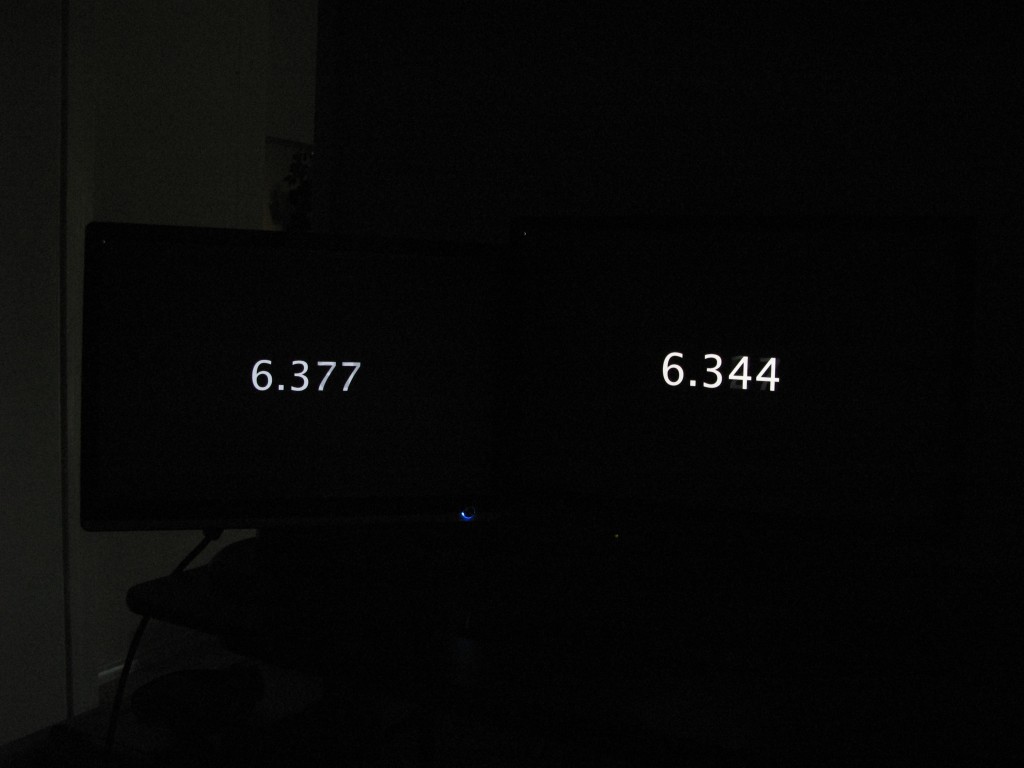
I tried a Samsung 226BW and noticed I didn't feel any lag on it, so I decided to test it against the NEC. To make it fair, I used a DVI splitter so both monitors get the same signal:


Samsung 226BW (left) vs. NEC LCD2690WUXi (right):


Both monitors are running at 1920x1200, which isn't even fair for the Samsung because it has to scale the image down, yet it's still two frames ahead of the NEC, just like the CRT.


Also, here's a video of the tearing at 480p:
http://www.toastyx.net/lcd2690wuxi/tearing.mp4


I also noticed another problem a couple of weeks ago. This monitor can't display checkerboard pixel patterns properly, and the problem is worse in the bottom-left corner of the screen.

This image is especially revealing:
http://www.toastyx.net/lcd2690wuxi/pattern1.png

When I display that image in the bottom-left corner, the square rings turn red, and the rest of the image turns green. The image is supposed to be black and white.

Here is another image:
http://www.toastyx.net/lcd2690wuxi/pattern2.png

When I display that image in the bottom-left corner, the checkerboard pixel pattern bleeds into the gray, which is supposed to be solid.


I will say one good thing. The H-IPS panel used in this monitor has better black viewing angles than S-IPS panels. Black turns green when looking from the left and red when looking from the right, but the effect is not as strong as the orange and purple glow on S-IPS panels. For some reason, the green glow was stronger on the original with the bad backlight bleeding.

Also, for anyone who's worried about the anti-glare coating, this monitor has a mild anti-glare coating, not aggressive like I've seen on some other monitors.
 
@ ToastyX and Tamlin_WSGF

Your brightness/luminance quarelling was needless. :D

Read the original english PRAD-Report (not the dreadful Google-Translation):

*click*


cheers *burp*

Thanks for that. Did PRAD take their English language section off their site for a while? I kept getting 'the application could not be found' when I tried going there previously
 
My two cents...

I am posting here with some editing on what I wrote in a different thread but in reality it belong here also as my final decision on purchase was made based mainly out this discussion and others.

I purchased a 2470 three weeks ago and concluded to be a very good monitor for the price...no dead pixels, perfect. It replaced a LaCie Photonvision 20" (entry level three years old). I mainly do besides web related programs, Photoshop and light CAD work. It calibrated very well using the GretagMcbeth Display One colorimeter with its own software iMatch 3. While color performance was better to my eyes than the LaCie, I decided I wanted (needed) a wider color gamut...now the choker, I returned the 2470 and in spite all the talk, discussions and weeks of reading here...I purchased a 2690WUXi (thanks Travbomb) a week ago. I was also contemplating the 2490 (same electronics but not the same wide color gamut as the 2690)...

I can only say that it is the best monitor I have ever had period...no dead pixels, no noise, hum, buzz, etc., and only very light bleeding on the top left at the edge...not an issue for me as it does not affect final performance! I have never seen colors display this good using Photoshop and Lightroom...especially green and red in any monitor in the past! Now, keep in mind that has only been software calibrated (as above) in native form with brightness set at 50%. I have to play more with various settings as the choices are very ample and perhaps is still a little on the bright side.

I can only imagine what colors will finally look like when I get the Spectraview software, and take full benefit of internal hardware (14 bit) calibration!

Whoever is looking at a 2490 for color work applications...do yourself a favor and spend the extra "couple hundreds" and go for the 2690...you will not regret it!!
 
...do yourself a favor and spend the extra "couple hundreds" and go for the 2690...you will not regret it!!

... unless you get a bad one, which you might well because the quality control doesn't seem to be that great.
 
... unless you get a bad one, which you might well because the quality control doesn't seem to be that great.

Do you have buyers remorse Chippy? :p I haven't had much time to spend on [H] lately unfortunately to write, but I have had time enough to read. Most of your posts since I last wrote have been about bashing the NEC. Your intentions seems the same as when I last posted.

ToastyX have at least the screen and he's making interesting observations that he finds (though he is starting to sound a bit repeatative on some points its still interesting).

You chose Eizo's quality control and missed out on a great screen. Get over it already! :rolleyes:
 
Back
Top