• Some users have recently had their accounts hijacked. It seems that the now defunct EVGA forums might have compromised your password there and seems many are using the same PW here. We would suggest you UPDATE YOUR PASSWORD and TURN ON 2FA for your account here to further secure it. None of the compromised accounts had 2FA turned on.
    Once you have enabled 2FA, your account will be updated soon to show a badge, letting other members know that you use 2FA to protect your account. This should be beneficial for everyone that uses FSFT.

NEC LCD2690

You seem to be missing every point I'm trying to make.

I'm not native english, so maybe some shades got lost in translation... Sorry about that. :)

I thought you were still talking about shades lost due to larger gamut.

When using the sRGB preset, shades are not lost, but the monitor is not calibrated. The sRGB preset cannot be hardware calibrated. It can be calibrated through the video card, but that totally defeats the purpose of this monitor. I can do that with any monitor. Calibrating through the video card causes shades to be lost, which degrades the image. I got this monitor because it can be hardware calibrated, but now I know this monitor cannot be hardware calibrated to sRGB. That's not good if you need to work with or view mostly sRGB content.


This is true. Its partially the same issues people have with Eizo Flexscan screens (S2410W) vs. their ColorEdge counterparts (CE240W) when it comes to calibration.

As far as I have understood from the Spectraview profiler, its capable of calibrating with a 16-bit LUT profile and most newer GFX cards support 16-bit LUT (though output is limited to 8-bit/10-bit on some). I assume its the same with Spectraview II also. For most users, this will be accurate enough and fewest would require a higher accuracy, but I wish NEC would have made it possible to calibrate the screen directly instead to sRGB. I'm happy you bring this up though, since NEC USA at least see this. :)

This is not an issue for me really. If I was working in a lightning controlled enviroment doing soft-proofing, then it would have been an issue.

Quote:Originally Posted by bjxxx
After reading ToastyX's post, it pretty much rules out me buying two of these monitors, I'm not going to pay £1800 (USD$3500) for monitors with those problems

If you could read what I had to say about any monitor I've tried, you'd probably never buy a monitor. I'm thinking of starting a review site because I tend to notice every little problem, even ones that never get mentioned. For example, the HP L2335 dithers colors, but I've never seen this mentioned anywhere. I tried three different units with different manufacturing dates, and they all had the same dithering. I've gone through so many monitors trying to find a decent monitor that it's turned into a crazy obsession, but I've learned a lot in the process.

I plan to do a very extensive review of this monitor in a few weeks, once I have everything I need.

You should really be a reviewer. No screen of today would manage to go through a ToastyX review unharmed! :D

I kinda like it. Its seldom I see a screen being checked with a magnifying glass like this and I find it very healthy that the good, bad and ugly about screens go out to us consumers.

I'd definitely visit your site!

I wondered if you could check something and others too:
Those lines on the left side you speak of, did you test the screen with other input devices/another PC? I can see the lines clearly in his photo, but not when I put up a similar patch of blue in PNG format. Hopla checked his screen too and no lines. Its strange also that it occurs only on one side of the screen and not the whole screen.

Here is his post with the image with lines:
http://www.hardforum.com/showpost.php?p=1030893118&postcount=791

Davidc:

I have normal hearing and can't detect sound from front of screen even up close. I have tried with only connecting a DVD player to the screen to make things silent around. I do hear the sounds from putting my ear to the vents though, so though I don't hear it with normal hearing, I don't know if it would be audiable for someone with supersensitive hearing. A blind friend of mine who also are a musician is coming over next week, so I thought maybe he could check this out also. He has exeptional hearing! :)

Someone here with conservatory training didn't notice any sound on his/her screen, so there should be hope still if you find someone in NEC customer support that actually know a thing or two about customer service. Even if you should give the screen to your son, it should be worth the effort getting a unit without sound issues.
 
Tamlin_WSGF
I am glad for you that your display is silent. I will stick with the 2690 for the time being and will maybe get a replacement later; I assume that all the reconditioned units at the moment are very early ones (like mine). I want to get a reconditioned higher revision model. I'll think about this in a few months time.

David
 
Tamlin_WSGF
I am glad for you that your display is silent. I will stick with the 2690 for the time being and will maybe get a replacement later; I assume that all the reconditioned units at the moment are very early ones (like mine). I want to get a reconditioned higher revision model. I'll think about this in a few months time.

David

Thank you, so am I! :) But I will make my friend test it even so, since there are sounds from the vent and maybe someone sensitive can pick them up from front as well. If I want to share information about this, then I want it to be as accurate as possible. Otherwise it won't help anyone and rather be damaging.
I don't know if I have a higher revision then you or lower. Its either revision 3 b, or revision b 3 according to dots on screen and box. My serial number starts with 711. No review I've read about this screen from a review site have complained about noise issues either. But then again, they haven't checked them for noise. There have been at least one US screen with noise, so its not limited to EU electricity. Maybe a bad batch or manufacturing problems. I don't know. But, since I sit infront of a screen that hasn't been returned, which doesn't make noise, and there are several out there with screens that doesn't make noise, I don't think this apply to all 2690's.
 
I thought it might apply to all 2690s because the Tech who worked on my display (fitting the official "fix") said that all 2690s had some noise. This also means that "some noise" is presumably within NEC specs. My display serial number is also 711xxxxxxx.

If I was using the display for playing games the high pitched tone would not worry me because it would be hidden by the game audio. As I work 50cms from my screen I'm going to hear any noise that it makes.

Anyway, that's enough on this issue.

David
 
Painman said:
Could be drivers. I noticed this behavior in some games (HL2 that I recall for certain) while playing around with some nV betas. VSync was on (I never have it off).
The tearing happens with the PS3, not my computer.

I may have jumped the gun on the 720p issue. The tearing only seems to happen in MotorStorm, so it might just be the game. I don't see it in the PS3 interface or Ridge Racer 7 when set to 720p.

The tearing at 480p is another story. I see that in all games and in the PS3 interface when set to 480p.


Tamlin_WSGF said:
Those lines on the left side you speak of, did you test the screen with other input devices/another PC?
Yes, I can see the lines with the PS3.

Tamlin_WSGF said:
Its strange also that it occurs only on one side of the screen and not the whole screen.
I think the problem does affect the whole screen, but it's much worse on the left side, and it seems to be worse on the replacement.

When I drag the example image to the left side of the screen on both monitors, it either doubles or cancels out the lines on the monitor.

With the replacement, that also happens on the right side of the screen, which means the lines are there as well but are too faint for me to see.

With the original, that doesn't happen on the right side of the screen, but the lines in the image are harder to see than on my 20WMGX2.


davidc said:
I thought it might apply to all 2690s because the Tech who worked on my display (fitting the official "fix") said that all 2690s had some noise. This also means that "some noise" is presumably within NEC specs. My display serial number is also 711xxxxxxx.
The sound on my 711* revision 1E unit sounds different from the sound on my 721* revision 4B unit, so see if you can get a newer one.

I don't hear either of them from a normal viewing distance, but I'm in the US.


I called NEC today, but it was fruitless. I spoke with someone named Lloyd.

I told him about the lines, but he said he's not sure if something that subtle is considered a problem since it's a class II (consumer grade) monitor. Then he put me on hold for a minute to find out more information. When he came back, he said the lines are probably inherent with the monitor. He said it seems like this monitor is not the right monitor for me and suggested that I return the monitor to the place of purchase for a refund.

I mentioned that if I create an image with similar lines, I can't view the image properly because the lines on the monitor cancel out the lines in the image. He asked me if I could take a picture of the lines, but I said the lines are faint enough that the camera can't capture it. He told me if the camera can't see it, then it's not a problem.

I mentioned that someone else with the same monitor can see the lines in my image but not on their monitor. He asked me if I tried it on another computer. I mentioned that I tried it with the PS3, and the lines were still there. Then he asked if I tried another DVI cable, which I did, but that didn't make a difference. He reiterated that this monitor is probably not the right monitor for me and recommended that I return the monitor.

Then I told him about the standby mode problem. He asked me if unplugging the monitor from the computer causes the monitor to go into standby mode, which it does. He told me that means the computer is still sending some kind of signal. I mentioned that I didn't have this problem with any other monitor, but he said different monitors handle the signal differently. He said I could send it in for repair, but chances are they won't see a problem and won't do anything about it, and by then, it will be too late to return the original.

Then I mentioned the lag, but it was obvious nothing was going to get done about any of the problems, so I gave up. Now I don't really know what to do.
 
hi guys,

Just bought this new monitor 2 days ago for 1445 from pricegrabber site. I had a bad experience with benq 24 wz and sharp aquos 32gp1u monitors which I have returned. No dead pixels and no noise whatsoever with this one. Best monitor so far I have come across:) .

My main use is as computer monitor, editing my digital photgraphs( I am just a starter) and playing with my ps3. I am not able to afford a colorimeter at this point and find the manual adjustments quite confusing from the manual. can some help me to fine tune my monitor by sharing their settings or guide me where I can find them.My monitor is the normal version.

Thanks mucho:D
 
I am playing Need for speed carbon at the moment on my ps3 and it looks great. Can you tell where shud I look for tearing? Thx
 
I am playing Need for speed carbon at the moment on my ps3 and it looks great. Can you tell where shud I look for tearing? Thx
Don't look for it. If someone tells you what to look for and you find it, then you'll be unhappy. But if no one tells you, and you're very happy with what you're seeing, then stay happy. Seriously, there is something to be said about "ignorance is bliss".
 
coolguy said:
I am playing Need for speed carbon at the moment on my ps3 and it looks great. Can you tell where shud I look for tearing? Thx
If the game is 1080p or 720p, there won't be any tearing from the monitor.


I determined that the tearing in MotorStorm is in the game itself. I hooked it up to the 20WMGX2, which definitely has tearing at 720p, and I could see the tearing from the monitor AND the tearing from the game. A monitor can't tear in two places at the same time, so the tearing in MotorStorm must be in the game.

The tearing at 480p seems to be the monitor though.
 
"If the game is 1080p or 720p, there won't be any tearing from the monitor."

I am playing it in 1080P. The one addn thing is I bought a hdmi male to dvi female adaptor from monoprice to connect to my ps3. Does the more expensive one from monster in bestbuy make a difference or they r all the same?
 
coolguy said:
The one addn thing is I bought a hdmi male to dvi female adaptor from monoprice to connect to my ps3. Does the more expensive one from monster in bestbuy make a difference or they r all the same?
With digital signals, they're all the same, so it doesn't matter. I'm using an HDMI to DVI cable from Monoprice.

Also, in terms of calibration, if you don't have a colorimeter, just use the default settings.


I called NEC again, and I was told the only option I have is to send it in for repair so someone can take a look at it. I set up a repair but I'm still debating whether or not it's worth the trouble. I'm worried whoever takes a look at it won't see the lines and won't do anything about it. The lines annoy me more than lag because at least lag doesn't affect image quality. These lines should definitely not be there.
 
"I called NEC again, and I was told the only option I have is to send it in for repair so someone can take a look at it. I set up a repair but I'm still debating whether or not it's worth the trouble. I'm worried whoever takes a look at it won't see the lines and won't do anything about it. The lines annoy me more than lag because at least lag doesn't affect image quality. These lines should definitely not be there."

How about returning to the seller if they have a good return policy on this one? It costs less than 20$ on this monitor to ship it in UPS ground.
 
Manny, deep man, deep! LOL!


Thanks..... :)


Way OT :

I am a big believer in Karma,and that we attract into our lives what we want in it.I think this applies at all levels,spiritually,physically,mentally,emotionally,diet,work,etc,etc..

Have you read 'Conversations With God' by Neil Donald Walsh ?

http://search.barnesandnoble.com/bo...42789&crvAll=1&crvStart=1&displayonly=CRV&z=y

I am not a christian,and if you are,this series of books may greatly offend you as they challenge many of the ideas that have been put forth in the bible over the centurys,as well,as most of the other religious texts,most have heard of at least in a passing sense.

I started reading the series,with an extremely critical view of it all,but even I had to admit something special happened to Neil.This is not a Bible or an attempt at an explanation of it,or its books.In fact it has nothing to do with it,or any organized religion you have ever heard of.It is not an introduction into a religion,but a description of an expirience one man had.Even if you dont believe in a god,or never have,or think you never will,you will still get something out of the books,if,you read them with an open mind and heart.

On topic,sort of.... :D

On a another note,my tracking info from Purolator says the screens will be here Monday, before 10:30 am !! :cool:
 
Guys / Gals,

After reading through as many of your posts as I could over the past week I am confused as to the consensus on this LCD Display. I guess what I'm looking for is a roll up of the groups thoughts in a couple of key areas (for me at least). I am not sure what the sound issue is but if these are fluorescent back-lit then it may be humming (some people are sensitive to it and others like myself are not). But, the sound issue aside I am looking for performance opinions in these areas:

1. Adobe RGB screen color accuracy to Print color accuracy (when calibrated of course)? (Bad, Good, Mediocre)?

2. sRGB screen color accuracy for web (what’s the final verdict)? (Bad, Good, Mediocre)?

3. Refresh Rate Quality? Good for Gaming, CG (CAD, Video), Photo Editing, Movies - good or bad in all areas or only in some?

4. Is the wide gamut substatially better than a good quality CRT's or an CG Eizo - or on par? (I say this because I recently compared my CRT's ICC gamut profile graph with some Eizo's and was surprised to find my monitor held up pretty well being 10 years old. With the exception of only 1 LCD, the CG221 which had an impressive gamut graph and price :p ).

I think my other questions are way more of the personal preference nature than these and can't be tested therefore I'll leave them off-topic. Don't flame me if someone has asked all of this in past posts and I just was unable to find it :) . I thank you all in advance for your responses! ;)

Q
 
Guys / Gals,

After reading through as many of your posts as I could over the past week I am confused as to the consensus on this LCD Display. I guess what I'm looking for is a roll up of the groups thoughts in a couple of key areas (for me at least). I am not sure what the sound issue is but if these are fluorescent back-lit then it may be humming (some people are sensitive to it and others like myself are not). But, the sound issue aside I am looking for performance opinions in these areas:

1. Adobe RGB screen color accuracy to Print color accuracy (when calibrated of course)? (Bad, Good, Mediocre)?

2. sRGB screen color accuracy for web (what’s the final verdict)? (Bad, Good, Mediocre)?

3. Refresh Rate Quality? Good for Gaming, CG (CAD, Video), Photo Editing, Movies - good or bad in all areas or only in some?

4. Is the wide gamut substatially better than a good quality CRT's or an CG Eizo - or on par? (I say this because I recently compared my CRT's ICC gamut profile graph with some Eizo's and was surprised to find my monitor held up pretty well being 10 years old. With the exception of only 1 LCD, the CG221 which had an impressive gamut graph and price :p ).

I think my other questions are way more of the personal preference nature than these and can't be tested therefore I'll leave them off-topic. Don't flame me if someone has asked all of this in past posts and I just was unable to find it :) . I thank you all in advance for your responses! ;)

Q


Have you read the reviews on this model ? there are many,try the ones at WSGF for starters.
 
1. Adobe RGB screen color accuracy to Print color accuracy (when calibrated of course)? (Bad, Good, Mediocre)?

When it comes to the Adobe RGB color accuracy, I think you would find through Painmans measurements that its quite good. Painmans review
With a brightness calibrated to 120 cd/m2, he acheived a black depth of 0.27 cd/m2, contrast at 446.9:1 and a DeltaE at 0.44.
Behardware didn't Spectraview profile the screen and didn't access any of the advanced menu functions of this display (like overdrive mentioned earlier). They did however measure the gamut of the screen compared to print colors. Since the screen doesn't cover all of RGB color space, there is a loss of depth in the deepest green. As in all wide gamut screens and RGB color space, there is a minor loss in Cyan vs. print colors. Behardware gave this screen thumbs up though for professional printing. Behardware review

My verdict RGB vs. Print = Good

2. sRGB screen color accuracy for web (what’s the final verdict)? (Bad, Good, Mediocre)?

As ToastyX pointed out, you cannot hardware/LUT calibrate the screen when using the sRGB preset. Since the screen is primarily a wide gamut screen, it will not show sRGB content accurately unless you "dumb" the screen down with the sRGB preset.

There are a few obsticals here. Your profile and the GFX LUT is calibrated to wide gamut also when you choose the sRGB preset. Changing the preset is obviously not good enough for accuracy's sake. You need to make 2 profiles. 1 for sRGB preset and 1 for the wide gamut. Not only is the Spectraview limited when it comes to hardware calibrate the screen in sRGB, but the LUT loader as well when it comes to switching between profiles.

My solution was to use the Spyder2PRO (it comes with the express edition as well I think) lut loader/profile chooser, where you can change profiles "on the fly" and it loads chosen profile into GFX LUT without any restart.

This gave accuracy more then good enough for Web.

My verdict on sRGB accuracy for web:
Only changing preset = bad
Having 2 profiles with Spectraview LUT loader = too much hazzle
Having 2 proflies with Spyder2pro LUT loader = Good!

Spending $79 on the spyder2express would be worth it IMHO just for the lut loader alone if you want to use much sRGB!

3. Refresh Rate Quality? Good for Gaming, CG (CAD, Video), Photo Editing, Movies - good or bad in all areas or only in some?

I have found this great for gaming. The wide gamut gives an edge. So does the custom scaling options for games with a set resolution like Diablo 2 and old Dos games, the saturation option in OSD when you want to have juicer colors and several other features. But, though I haven't tested or "felt" any lag on this screen (I have played a lot of the old UT2004 without lag issues), ToastyX have found it and finds it intrusive. Therefore, I will deem it as good (great actually, but you don't have that grade) according to my experiences, but lag would give it a big minus for many if they experience it as ToastyX did.

When it comes to movies, I find that my color profile made for accuracy doesn't bring out the best of the screen. However, when I connected an external DVD player to VGA(El cheapo actually) and used the auto functions (brightness, auto black etc) the result was way better. I deem it as good if calibrated for video.

For photo editing, look at question 1. Besides this, its great to have a screen where you can actually see the colors outside of sRGB color space and also have the option to work in sRGB color space when wanted.


4. Is the wide gamut substatially better than a good quality CRT's or an CG Eizo - or on par? (I say this because I recently compared my CRT's ICC gamut profile graph with some Eizo's and was surprised to find my monitor held up pretty well being 10 years old. With the exception of only 1 LCD, the CG221 which had an impressive gamut graph and price :p ).

The CG221 is in a class by itself. If to compare with NECs, you should look into Spectraview reference or similar screens that covers RGB completely.

Non-wide gamut CRT's (high quality CRT) and LCD's falls short on many things. Most equiptement for home use even are capable of deeper colors then sRGB. CRT's still have an advantage when it comes to black depth though. sRGB is used because the crappiest of the crap out there normally can display that color space, and the crappiest of the el cheapo printers can print it. But, I don't want to limit myself to the sRGB color space and miss out on some good colors. As Travbomb said, "you can dumb down, but not up", or something like that. You loose some, since you cannot monitor LUT calibrate it in sRGB preset, but you gain options in the RGB color space. Since you have the option to calibrate the GFX LUT with a 16-bit presicion, the result is good nevertheless.

So yes, in my opinion the wide gamut of this LCD is substatially better than a good quality CRT's, but if falls short compared to the wide gamut of the Eizo CG.

Confusion is this LCD good or bad?

I have no dead pixels, no sound issues, no lag experienced, even backlight and love the great colors.
I'm a happy camper and there is no screens on the market today that covers my personal needs as well as this screen. If my choices were good or bad, I'd say good (great would cover it better).

In the 26"/27" size, there is no screen better then the 2690 in terms of color accuracy and professional imaging.
You pay less for the 27"s and the 26" PVA/SPVA though.
Neither the DELL 2707WFP, the Samsung 275T or the ACER AL2616WD can be "dummified" to sRGB as far as I know.
They lack many of the advanced functions found in the 2690 for calibration.
They cannot be monitor LUT calibrated and they operate with a 8-bit LUT vs. the 12 bit LUT and 12 bit gamma correction of the NEC.
Their image constency is lower due to PVA matrix.
They are not bad screens, but have strenghts in other areas like deep blacks (0.2 cd/m2 after calibration), more analoge inputs and PIP capabilities. For photography, there is no screen better then the 2690 in the 26"/27" segment. Thats for sure.

Thats my two cents at least. :)
 
I'm still trying to pick between this LCD2690WUXi and the 2707WFP.

What is the likelihood of getting a LCD2690 with problems if I was to buy it here in the UK?

Shall I wait a month or so for the current early faulty batch to be sold?
 
Manny: Thanks for the forum reference!

Tamlin: Thanks for the 2 cents :D you provided it really looks like a great display and I think that Lacie's selected this panel for their new 526 display so another plus. Thanks for the summary on the sRGB and the "dumbing down" - I have an eye-one display 2 that I use so hopefully this would allow me to calibrate it for that space. I agree a color meter is a good investment for the cost. I must have skipped the custom scaling in my research and using it for old releases sounds interesting. On the lag I guess that some might be experiencing it more as stated, due to the type of gaming they are doing so, I'd have to gauge that as well. But, overall you paint an overall great experience with the monitor thanks again for sharing the info. :cool:

Now if only I can get over my need for color accuracy / OSD features against the need for super sized screen real estate (26" at 1920x1200 versus 30" at 2560x1600)! ;)

Q
 
coolguy said:
How about returning to the seller if they have a good return policy on this one? It costs less than 20$ on this monitor to ship it in UPS ground.
Then what monitor would I use? I've been looking for a decent 1920x1200 monitor for two years now. I can't believe it's been that long.

I don't understand why IPS panels have such quality control problems. By quality control problems, I mean defects like backlight bleeding, more than three stuck pixels, and faint lines that shouldn't be there. Every 23+" monitor I've tried with an IPS panel had at least two of those problems, which is ridiculous considering I've tried three HP L2335s, five 23" Apple Cinema Displays, one Sony SDM-P234, and now two of this monitor.

The only problems I've had with PVA panels are design limitations like lag, poor viewing angles that wash out colors, and poor overdrive implementations that cause strong color trailing. Those are the reasons I returned the Eizo CE240W. The backlight was perfectly uniform, and there were no faint lines. It was also silent, even when I put my ear up to the vents. Eizo's support is excellent as well. They actually looked into the lag and overdrive problems for me, but they determined the problems were by design, so they let me return it for a refund. If those problems don't bother you, then get an Eizo and spare yourself the trouble.

The only reason I keep trying IPS panels is because I can't stand the way viewing angles wash out colors on PVA panels. I don't like lag either, but manufacturers don't seem to care about lag since hardly anyone notices it.


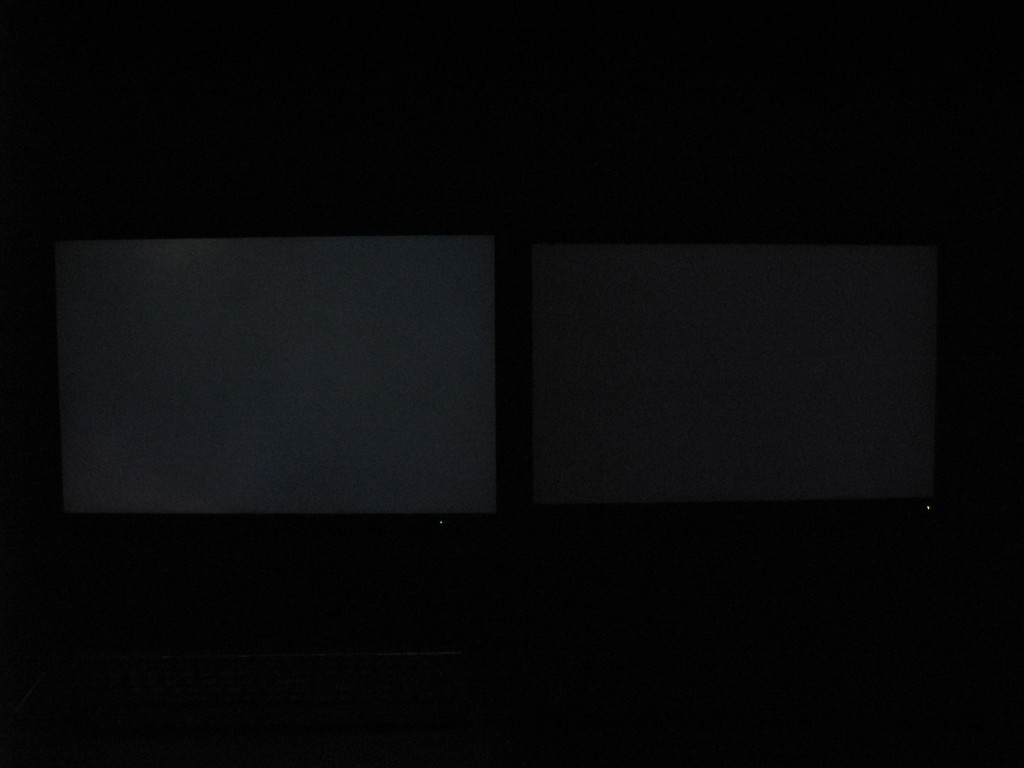
Here's a picture of the backlight bleeding on the replacement side by side with a Samsung 244T:

I can't use the Samsung 244T because of the horrendous lag, but it doesn't have backlight bleeding or faint lines.

This is the best picture I could get of the lines:
lines.jpg

It's still very hard to tell in the picture. If you look carefully, every other line is slightly lighter than the other. It's hard to capture it with a camera. It's more visible in person. The lines are visible with any color, not just greenish blue like on the Apple.

This monitor would be decent if it didn't have those two problems. I'd like the lag and other problems to be fixed as well, but I care about basic image quality first.

This monitor is the most capable monitor I've tried so far and offers more control than any other monitor out there. I really don't want to return it if the problems can be fixed. Otherwise, I really have no alternative.

I've considered the BenQ FP241W, but I don't know how P-MVA panels are like. It also has the same amount of lag anyway according to digitalversus.com, and I know it can't scale 480p to 4:3, but it can accept 480i and 1080i.

That reminds me. This monitor is capable of handling a 1080i signal, but the feature is intentionally blocked. It warns you that interlaced signals are not supported and will only let you show the picture for three minutes after pressing RESET+EXIT. Why would they intentionally block such a useful feature? It's obviously capable of handling 1080i since you can make it show the picture for three minutes. The Samsung 244T can handle 1080i and 480i over DVI.
 
ToastyX


this comes half toungue in cheek and half serious....


Have you given any thought about going with LED based models ? Instead of carrying on with this,splash out big and get a really ultra high end model LCD ? If Eizo and Nec both cannot satisfy you.... maybe its that time to look at CRT's again,or grab any CRT,and be done with it.I get the strong feeling,you are one that will never be satisfied with the current state of LCD tech.You are eithier living a cursed exixtence,or are just extremely unlucky,or both.

You yourself have said,that an Eizo and several other high end LCD's,as well as this Nec 2690Wuxi,have done nothing but failed you,or not meet up with your overly stringent expectations.You have hawk like hearing (which I sort of envy,and am also glad I dont have in a way.........I think if I had your vision.and hearing,my AKG K601's,and my new Beyerdynamic DT250-80's headphones,would fast find themselves in the garbage) And this and other specimens,have failed your electron microscope level visual inspections.

....jk ;)

I think it may be time to throw in the towel and accept that almost nothing out on the market currently will pass your muster.Take it back,sell it,or step up and hope for the best.I would have given up and moved on a while ago.If the best of the best cannot do it for you,what will ? CRT ? maybe LED based models ?
 
Manny Calavera said:
Have you given any thought about going with LED based models ? Instead of carrying on with this,splash out big and get a really ultra high end model LCD ?
Those monitors are overkill for me, and they don't have the features I want. This monitor has the features I want.

You're making it seem like I'm not satisfied with current LCD technology, which is not true at all. All I want is a monitor with an IPS panel that can do 1920x1200 and doesn't have defects like backlight bleeding, stuck pixels, or faint lines. I don't see how that's overly stringent, especially considering how much these monitors cost.

Why does an expensive color-critical monitor have these problems when many cheaper consumer monitors don't? It doesn't make sense.
 
Those monitors are overkill for me, and they don't have the features I want. This monitor has the features I want.

You're making it seem like I'm not satisfied with current LCD technology, which is not true at all. All I want is a monitor with an IPS panel that can do 1920x1200 and doesn't have defects like backlight bleeding, stuck pixels, or faint lines. I don't see how that's overly stringent, especially considering how much these monitors cost.

Why does an expensive color-critical monitor have these problems when many cheaper consumer monitors don't? It doesn't make sense.

Agreed. And it's not like this one isn't more expensive than many other 26-27" monitors too. Right now I'm being dissuaded from getting it due to the quality control problems and tech support issues.
 
You're making it seem like I'm not satisfied with current LCD technology, which is not true at all. .


I am doing nothing of the sort,you are ! :eek: Have you in all honesty read your own posts ? You come across as extremely critical of everything,irregardless of brand,or make,or panel,or backlight tech,or asic set.You just posted how you have tried them all pretty much,and been sourly let down with them all.

What was it that happened to your PS3? :confused: It seems you are having problems with everything,your words,not mine. I am not trying to argue with yout.For all the hassle you have gone through,it would have been far better for you,to have started out at the top of the food chain sort a speak,and be done with it.Go big or stay home as my wife loves to say ;) No it is not unreasonable to want quality,and a working screen,but there comes a time when you have to start to wonder.... It just seems allot of hassle to continue to go through.You mentioned in an earlier post how a CS rep at Nec,told you that you should maybe take it back and get a refund and move on as... "This is not the screen for you' ...hint hint.In any industry when a CSR gets a customer repeatedly calling to complain and swap out a premium screen product like this (or any product) for that matter,they usually get thier case file flagged,after a while.And after a point the company just wants to get rid of them,even if it means losing a customer permanently.My wife was a CSR for a very large chain restaurant and saw allot of this.The people who would call back weeks later to complain about the hair in thier pizza,or how it was 25 seconds late on a 40 minute or its free policy,and demand a free pizza and a full credit ! all the while screaming and yelling about how they are all incompetant fuck's,etc,etc,etc.... Now she is a DSM,and instead of just apologizing and handing out free's and replacemets,she is visiting the customers homes and stores to 'check up on things'

She has told me allot of ...stories... :D Now,I am NOT trying to suggest you are one of those,but,I am trying to tell you how 99.999999999999999% of companies look at certain customers after a while.

When you posted about the CSR telling you that this model 'just isnt for you' I kinda went...Uh huh... :eek: I used to do CSR for road runner,and Concast :D Now I am in Uni,as a second year Registered Nursing student,and work one day a week at a chain computer store here in town.I have left being a CSR behind,and would never go back.

I honestly wish you luck in your search though,and no hard feelings. :)


Edit : Qs_Corner, your all too welcome,good luck in your search ! :)
 
The only problems I've had with PVA panels are design limitations like lag, poor viewing angles that wash out colors, and poor overdrive implementations that cause strong color trailing. Those are the reasons I returned the Eizo CE240W. The backlight was perfectly uniform, and there were no faint lines. It was also silent, even when I put my ear up to the vents. Eizo's support is excellent as well. They actually looked into the lag and overdrive problems for me, but they determined the problems were by design, so they let me return it for a refund. If those problems don't bother you, then get an Eizo and spare yourself the trouble.

Backlight bleed, dead pixels/stuck pixels and such are something you can get with any panel type unfortunately. Also screens without these issues fortunately. This goes for S-PVA panels too. From the "dreaded X" where you saw backlight bleed from 4 corners forming an X to minor bleed throughout the panel.

This display also has poor brightness uniformity: on a black screen, you can clearly see light emanating from three of the four corners.
Cnet about the 2707WFP

As you can see, Cnet got a bad unit. It doesn't say all 2707WFP have bleed from 3-4 corners, only that their unit had that defect.

I took a picture earlier of the 2690 with full blue screen. Its a supermacro picture. The camera is not the best of the bunch, the picture is taken without tripod and imageshack needed to resize the picture to get it under 1.5 mb.

Still, its taken close enough to see the pixel pitch between the pixels (though more vertically then horizontal since camera was hard to hold completely still). As you can see, there is no alternate shades of blue in this picture. The pixels shows blue in the same shade, so there is no creation of lines. Lines are not inherited with this screen and so far its only happened on your screen(s).

http://img219.imageshack.us/my.php?image=hpim2472xi5.jpg
 
Tamlin: Thanks for the 2 cents :D you provided it really looks like a great display and I think that Lacie's selected this panel for their new 526 display so another plus.
Q

Ok, it was maybe 2 cents give or take a couple of dollars... :D

It IS a great display. Even ToastyX admits that its a keeper if he gets one without the lines and with even backlight. He pretty much wants my screen... :cool:
 
Is it possible to have 2 monitors calibrated. I have a G5 wtih the 2690 and i wanted to hock up my Lacie CRT next to it so i could view SRGB correclty. I have spectraview 2 for the 2690 and the eye-one2 puck and software for calibration. if it works will they have to be mirror images? I'm redoing my web site with flash8 at the moment and the colors are too much on my 2690. so i'm trying to find a solution for the SRGB content.

If i try and dumifie my 2690 to SRGB how would i do it? would it be best to use the eye one software to be in 8bits?

Thanks
 
Could somebody please, if they wouldnt mind, measure the actual viewing area inside the bezel, the screen itself.

thanks:)
 
Could somebody please, if they wouldnt mind, measure the actual viewing area inside the bezel, the screen itself.

thanks:)

Just calculate it with the Pythagorean Thereom.

26^2 = (16x)^2 + (10x)^2

22.05 x 13.78
 
Can the hood that comes with the SV version be purchased separately? How much is it in the US and do you have a link? I searched the NEC site and couldn't find it.
 
Is it possible to have 2 monitors calibrated. I have a G5 wtih the 2690 and i wanted to hock up my Lacie CRT next to it so i could view SRGB correclty. I have spectraview 2 for the 2690 and the eye-one2 puck and software for calibration. if it works will they have to be mirror images? I'm redoing my web site with flash8 at the moment and the colors are too much on my 2690. so i'm trying to find a solution for the SRGB content.
Yes, you can have 2 monitors calibrated.
For XP, you should download this program before you start:
http://www.microsoft.com/windowsxp/using/digitalphotography/prophoto/colorcontrol.mspx
For MAC you need another alternative to handle several profiles.
You don't need to run the monitors in clone mode/mirror images. The color profiles aren't critical upon what content you wish to show on each monitor. All you need is one profile for the NEC and another profile for the LaCie.

If i try and dumifie my 2690 to SRGB how would i do it? would it be best to use the eye one software to be in 8bits?

Thanks

You don't have to dummify your GFX as well. All newer cards support 16-bits LUT even though output is limited to 8-bits.

I don't know how agressive Spectraview 2 is about wanting to access DDC/CI, so you should start by entering advanced menu (Power off monitor -> power on while holding input in and then press menu when screen is on). Navigate to tag 9 and choose DDC/CI off. Then move to color control (tag 6) and choose sRGB. Now the screen is ready for calibration and shows sRGB color space. However, your profile and GFX lut is still calibrated to wide gamut. Use spectraview and choose sRGB gamma curve. Let it do its thing and create a profile for you. Now your screen is dummified to sRGB. :)
With the lut loader of Spyder2, I can choose my wide gamut profile when I use that option and change preset on screen + sRGB profile when I want sRGB mode. Both calibrated and in working order! :D
 
Can the hood that comes with the SV version be purchased separately? How much is it in the US and do you have a link? I searched the NEC site and couldn't find it.

It can only be bought seperately in the US, we do not sell it packaged. The hoods should be posted for sale soon on www.nm-select.com
 
PRAD just finished their review, and gave it glowing remarks. They measured 1-2 frames of lag (33ms) consistently. Here is a Google German-to-English LINK
 
Manny Calavera said:
You come across as extremely critical of everything,irregardless of brand,or make,or panel,or backlight tech,or asic set.You just posted how you have tried them all pretty much,and been sourly let down with them all.
That's true. I'm very critical, but I only mention problems that definitely shouldn't be there so people are aware of them before purchasing the monitor.


Tamlin_WSGF said:
Backlight bleed, dead pixels/stuck pixels and such are something you can get with any panel type unfortunately. Also screens without these issues fortunately. This goes for S-PVA panels too. From the "dreaded X" where you saw backlight bleed from 4 corners forming an X to minor bleed throughout the panel.
I realize any type of panel can have those problems, but those problems seem to be much more common with IPS panels, not only in my experience, but also from seeing other people report the same problems time after time for monitors with IPS panels. Every monitor I've tried with an S-IPS panel was also very sensitive to image persistence, which doesn't seem to be a problem with PVA panels. The good news is that hasn't been a problem with this monitor so far, so maybe that was improved with H-IPS panels.

I've sent away the replacement for repair. Hopefully they won't make things worse.


zoggdar said:
Is it possible to have 2 monitors calibrated
Yes, it's possible to have two monitors calibrated at the same time on a Mac. They don't have to be mirrored.


PRAD just finished their review, and gave it glowing remarks. They measured 1-2 frames of lag (33ms) consistently.
33 ms is not 1-2 frames. It's exactly two frames.

"The evaluation of the switching flank photos points an average representation delay out of 33 ms with the LCD2690WUXi, which corresponds to rather accurately two Frames with an image repetition frequency of 60 cycles per second."

That's the same result I got, and the same result lesnumeriques.com/digitalversus.com got.

Two frames is excessive. No amount of processing should cause that much lag. Otherwise, it'd fall behind more and more as it processes each frame. It's buffering the frames intentionally for some reason with no way to turn that off. What bothers me the most is nothing will ever get done about it because very few people notice it, so people usually assume it's an isolated problem with the user's computer.
 
Dell shipped me a 2690 on Monday, 4/23. What are the chances that this is a newer unit with the manufacturing fix for the noise problem? Does Dell sell many of these monitors so their stock turns over quickly? I am supposed to receive it on Friday.
 
Dell shipped me a 2690 on Monday, 4/23. What are the chances that this is a newer unit with the manufacturing fix for the noise problem? Does Dell sell many of these monitors so their stock turns over quickly? I am supposed to receive it on Friday.

Dell doesnt really stock much of our product so I woudl imagine they either pullled it from distribution or from our warehouse so my guess is you are fine. Not to mention this has been almost a non issue here in the states.
 
PRAD just finished their review, and gave it glowing remarks. They measured 1-2 frames of lag (33ms) consistently. Here is a Google German-to-English LINK

WOW!!! Glowing remarks indeed! :D My complements to Prad.de for actually testing out the advanced features on this feature-packed monitor! I love the detailed reviews they make.
Great ratings for gaming, movies and color critical works. And they didn't have to use Spectraview 2 in order to get full certification for UGRA (though they advice getting it...).

Nice! :D
 
WOW!!! Glowing remarks indeed! :D My complements to Prad.de for actually testing out the advanced features on this feature-packed monitor! I love the detailed reviews they make.
Great ratings for gaming, movies and color critical works. And they didn't have to use Spectraview 2 in order to get full certification for UGRA (though they advice getting it...).

Nice! :D

Indeed great review, I found the part about brightness homogeneity especially interesting.
Around 1% with ColorComp turned on...

Thanks for the link Aquila76!!

Tarc
 
Tarc said:
Indeed great review, I found the part about brightness homogeneity especially interesting.
Around 1% with ColorComp turned on...
They didn't make it clear that the contrast ratio suffers with ColorComp turned on. They say it reduces brightness, but it actually reduces contrast, so you have to raise the luminance of the backlight to get the same white level, but then the black level suffers.

Just sayin'... :p
 
Back
Top