• Some users have recently had their accounts hijacked. It seems that the now defunct EVGA forums might have compromised your password there and seems many are using the same PW here. We would suggest you UPDATE YOUR PASSWORD and TURN ON 2FA for your account here to further secure it. None of the compromised accounts had 2FA turned on.
    Once you have enabled 2FA, your account will be updated soon to show a badge, letting other members know that you use 2FA to protect your account. This should be beneficial for everyone that uses FSFT.

LG 48CX

I know it's an old tired question but my lg 48C1 is coming today.
I always used IPS up to this point, so please help me find what windows and chrome settings to use to avoid burnin. Also TV settings tips would be appreciated.

I know to autohide taskbar and to use black background or randomized wallpapers if I want.

Make sure to turn the screen off when you aren’t using it. Also, keep all the burn-in reduction features turned on. Screen savers can help. Beyond that, I’m personally not going too crazy with worrying about burn-in for my CX.
 
...Taskbar hider set to a hotkey to lock the taskbar away (show/hide toggle). Translucent taskbar app to make it and it's edge see-through.

...Dark themes in windows and browsers/browser add-ons ("color changer", "turn off the lights") to make the backgrounds dark on a per site basis..
...True black (empty of art) desktop wallpaper.

...Low (relatively low to SDR levels) HDR brightness on desktop using the HDR color control menu slider.
...Keep all the burn-in reduction tech on (like Derangel said), including ABL, ASBL, logo dimming, etc.

...Activate the remote's voice functions so that you can hold down the mic button and tell it to "turn off the screen" (which leaves everything running and just turns off the emitters after a 5 second countdown). I do that any time I walk away from my pc (afk) even if just for a minute because I can get sidetracked and/or forget that I left a game running in a static/paused state on the tv.

...Don't rely on pc/android etc system screensavers because systems/apps/video device itself can crash/freeze rarely. Crashed app notifaction windows can take top layer above a screen saver. Stuck on bios screen (or even just the log on screen) on a spontaneous reboot can happen too. You might want to change your logon screen too for this reason. A lot of 3rd party apps let you customize the logon screen.

...I think the best thing you can do besides that (other than buying at bestbuy and adding the bestbuy warranty that reportedly covers burn-in for ~ $66/yr over 5 yrs) is to use a 2nd monitor for static desktop/apps and keep the OLED usage scenario as a gaming/video/multimedia "stage".

Screen dimming will turn on by default if you leave a static screen on for too long though and it's pretty dim so that would will definitely help already aside from doing all of the above. That doesn't happen the same when people turn off dimming when trying to use the OLED as a static app/desktop monitor. If you keep a set of settings just for desktop that is well below the ABL level then you will avoid ABL but you won't avoid ASBL unless you go into the service menu and disable it.

---------------------------------------------------------------

I'm pretty sure this info from Rtings.com 's C9 OLED review would still work:
The C9 has a new Peak Brightness setting, which adjusts how the ABL performs. Setting this to 'Off' results in most scenes being displayed at around 303 cd/m², unless the entire screen is bright, in which case the luminosity drops to around 139 cd/m². Increasing this setting to 'Low', 'Med', or 'High' increases the peak brightness of small highlights. If ABL bothers you, setting the contrast to '80' and setting Peak Brightness to 'Off' essentially disables ABL, but the peak brightness is quite a bit lower (246-258 cd/m² in all scenes).

Otherwise just keeping HDR on all of the time on the desktop and turning the HDR Color slider down low enough should do similar and wouldn't affect the color brightness scaling for HDR content/metadata - so that is what most people do I think. I keep the HDR slider down to where SDR images still pop, so more like a SDR image level of color brightness/nits but some people set this brightness slider very low because they use a lot of static text based stuff on their screen since it is usually their only screen in that case.
 
Last edited:
Burn-in is a non-issue. I used a B7 on the desktop with HDR always enabled at ~140 nits for years and didn't take a single protective measure. I left it on with static browser icons and taskbar for thousands of hours without any visible burn-in.
 
48” C1 now in stock on LG website for the predicted $1,500 USD price.

https://www.lg.com/us/tvs/lg-oled48c1pub-oled-4k-tv

Might as well just buy right now if you’re on the fence about a 48”. Price didn’t come down a single dollar since last years model (unlike all other sizes, which went down hundreds of dollars) and didn’t go on sale for a single dollar during the Black Friday sales or the entire year (unlike all other sizes, which the sale prices were hundreds of dollars cheaper) except maybe a random piddly $50 discount here or there.

Could even just buy a CX if you happen to find one for an ok discount. The CX and C1 are basically the same TV selling for the same price. The C1 doesn't even have hardware level fixes for VRR issues.
 
After seeing the C1 non-changes and the G1 price/slight changes, I got a 77" CX for the living room for $2799 including tax/shipping off Greentoe. 48" CX's might be had there at a discount as well.
 
Could even just buy a CX if you happen to find one for an ok discount. The CX and C1 are basically the same TV selling for the same price. The C1 doesn't even have hardware level fixes for VRR issues.
The C1 is also on sale for $1275 if you work for a large company that does business w/ LG. Check out the LG partners mall.
 
Make sure to turn the screen off when you aren’t using it. Also, keep all the burn-in reduction features turned on. Screen savers can help. Beyond that, I’m personally not going too crazy with worrying about burn-in for my CX.

...Taskbar hider set to a hotkey to lock the taskbar away (show/hide toggle). Translucent taskbar app to make it and it's edge see-through.

...Dark themes in windows and browsers/browser add-ons ("color changer", "turn off the lights") to make the backgrounds dark on a per site basis..
...True black (empty of art) desktop wallpaper.

...Low (relatively low to SDR levels) HDR brightness on desktop using the HDR color control menu slider.
...Keep all the burn-in reduction tech on (like Derangel said), including ABL, ASBL, logo dimming, etc.

...Activate the remote's voice functions so that you can hold down the mic button and tell it to "turn off the screen" (which leaves everything running and just turns off the emitters after a 5 second countdown). I do that any time I walk away from my pc (afk) even if just for a minute because I can get sidetracked and/or forget that I left a game running in a static/paused state on the tv.

...Don't rely on pc/android etc system screensavers because systems/apps/video device itself can crash/freeze rarely. Crashed app notifaction windows can take top layer above a screen saver. Stuck on bios screen (or even just the log on screen) on a spontaneous reboot can happen too. You might want to change your logon screen too for this reason. A lot of 3rd party apps let you customize the logon screen.

...I think the best thing you can do besides that (other than buying at bestbuy and adding the bestbuy warranty that reportedly covers burn-in for ~ $66/yr over 5 yrs) is to use a 2nd monitor for static desktop/apps and keep the OLED usage scenario as a gaming/video/multimedia "stage".

Screen dimming will turn on by default if you leave a static screen on for too long though and it's pretty dim so that would will definitely help already aside from doing all of the above. That doesn't happen the same when people turn off dimming when trying to use the OLED as a static app/desktop monitor. If you keep a set of settings just for desktop that is well below the ABL level then you will avoid ABL but you won't avoid ASBL unless you go into the service menu and disable it.

---------------------------------------------------------------

I'm pretty sure this info from Rtings.com 's C9 OLED review would still work:


Otherwise just keeping HDR on all of the time on the desktop and turning the HDR Color slider down low enough should do similar and wouldn't affect the color brightness scaling for HDR content/metadata - so that is what most people do I think. I keep the HDR slider down to where SDR images still pop, so more like a SDR image level of color brightness/nits but some people set this brightness slider very low because they use a lot of static text based stuff on their screen since it is usually their only screen in that case.
Thanks.
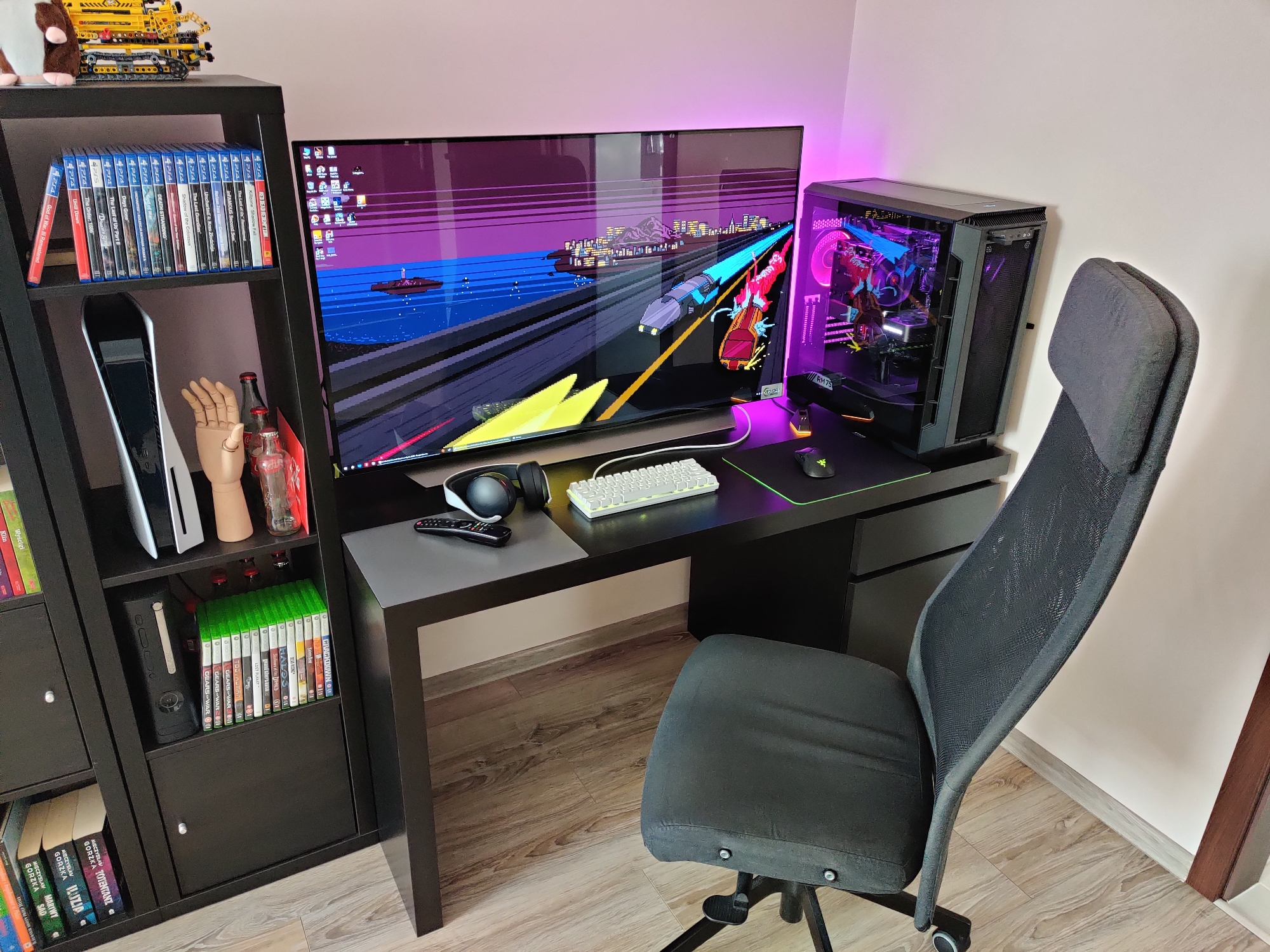
The tv is here and I've been using to a few hours. The picture and motion quality is downright stunning. Fantastic thing. Even sound is good.
I don't know if I will get used to it. I play leaned back. It's fine with controller as I can move back a bit more but with mouse and keyboar.. idk.
I know I sit further from the screen than I did to my 27" but is still seems more straining.

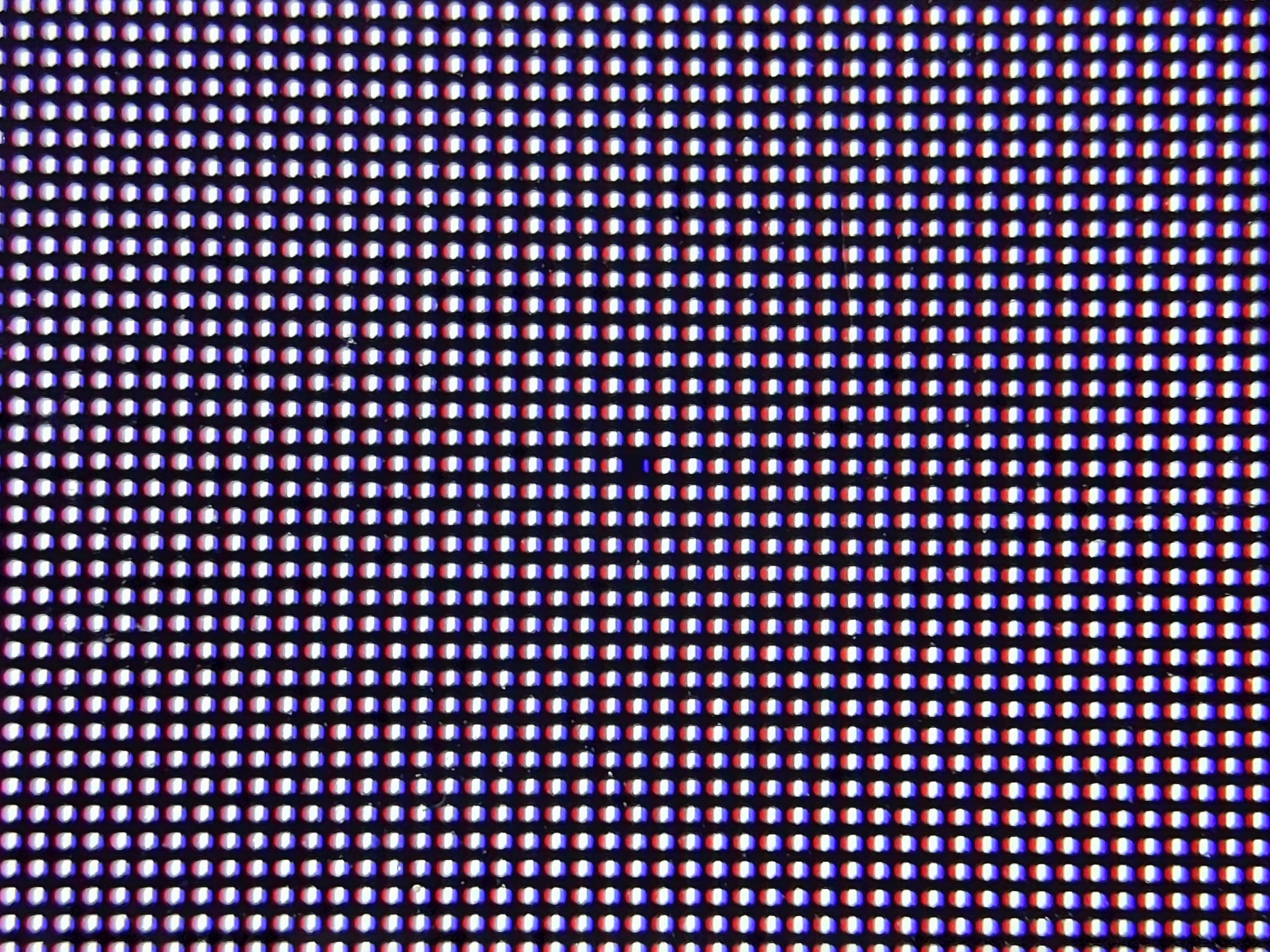
Also -I have 1 dead pixel.
maC4Wrp.jpg
dw1rPlg.jpg
 
I had the same experience. Absolutely amazing monitor that blows everything else out of the water, and works great for controller gaming. But I could just never get mouse and keyboard to work. What I ended up doing was buying a TV stand that fit right behind the desk - this one - and that gave me the little extra room I needed to make it work with mouse + keyboard.

Unfortunately, it made my standing desk useless, and I am one that actually switches between modes a lot. So I ultimately sold it :(.
 
Could even just buy a CX if you happen to find one for an ok discount. The CX and C1 are basically the same TV selling for the same price. The C1 doesn't even have hardware level fixes for VRR issues.
May as well get the C1, then. The 48" is probably selling too well for them to reduce the price of the CX. I'll still be watching for sales as the C1 proliferates at retailers.
 
May as well get the C1, then. The 48" is probably selling too well for them to reduce the price of the CX. I'll still be watching for sales as the C1 proliferates at retailers.

If they are the same price sure but IF you can save 200 or so I'd take the CX.
 
Thanks.
The tv is here and I've been using to a few hours. The picture and motion quality is downright stunning. Fantastic thing. Even sound is good.
I don't know if I will get used to it. I play leaned back. It's fine with controller as I can move back a bit more but with mouse and keyboar.. idk.
I know I sit further from the screen than I did to my 27" but is still seems more straining.

Also -I have 1 dead pixel.
View attachment 343337
View attachment 343338
While I don't have a C1, I have a 48" 4K on my desktop and yours is closer than mine is by a good bit by the looks of it - that is a big factor in making it something I can live with it long term (for me). I know some others have adjusted to a closer depth and yet others have moved the monitor to a floor or wall stand and moved the desk out a smidge when the desk is not deep enough and you don't feel like changing the entire desk.
 
Thanks.
The tv is here and I've been using to a few hours. The picture and motion quality is downright stunning. Fantastic thing. Even sound is good.
I don't know if I will get used to it. I play leaned back. It's fine with controller as I can move back a bit more but with mouse and keyboar.. idk.
I know I sit further from the screen than I did to my 27" but is still seems more straining.

Also -I have 1 dead pixel.
View attachment 343337
View attachment 343338

Yeah looks really close to me. You need a deeper desk I think. At minimum, get an after market stand, you should be able to push it towards the end of your desk that way. I have an 80cm deep desk, with an aftermarket stand so it's about 70cm from me and I find this works well for mouse+kb. But still took some adjustment to get used to.
 
Thanks.
The tv is here and I've been using to a few hours. The picture and motion quality is downright stunning. Fantastic thing. Even sound is good.
I don't know if I will get used to it. I play leaned back. It's fine with controller as I can move back a bit more but with mouse and keyboar.. idk.
I know I sit further from the screen than I did to my 27" but is still seems more straining.

Also -I have 1 dead pixel.
View attachment 343337
View attachment 343338
The LG's are really weird with dead pixels. From my experience, it's not like normal LCD's. I've had multiple 55" LG OLED's, and the dead pixels just come and go at random. I usually find 1-2 dead pixels on my screen, then a few months later I look for them and they're no longer there, but there's 1-2 dead pixels somewhere else, and it just repeats somewhere else. From my experience with LCD's, when you get dead/stuck pixels, they're usually permanent (even with stupid pixel refreshing fixes), and if they're not already on your screen the first time you use it then you should be good to go in the long term. I'm usually very OCD about dead/stuck pixels, it's a 100% return on my part usually, but the screen is so large, and I sit so far back, and they usually go away anyway, that it truly doesn't bother me. Just my personal experience though.
 
I don't know if I will get used to it. I play leaned back. It's fine with controller as I can move back a bit more but with mouse and keyboar.. idk.
I know I sit further from the screen than I did to my 27" but is still seems more straining.
Your setup to me looks like it has a good amount of empty vertical space, so obviously the solution is to rotate the entire screen 90 degrees in a portrait orientation and use it as a 2160px wide display with a horizontal screen size similar to a 27" monitor. :p

...I mean, it could work, but in the last 6 months or so when I came up with that idea, I've realized that most people seem to much prefer the "immersion" provided by the larger screen to the point of people even using it in conjunction with a custom ultrawide resolution like 3840x1600, but of course running it in portrait eliminates that immersion.

Perhaps it's just my insane suceptibility to motion sickness that makes any such "immersive" view-port typically a complete non-starter for me and so my train of thought never even goes there.

But yeah, outside of my crazy "run it in portrait!" idea, there is the option of running a custom ultawide resolution in order to make it have a smaller vertical size in-game. 3840x1600 should have similar vertical height to a 35" 16:9 monitor while 3840x1080 would have similar vertical height to a 24" 16:9 monitor. Perhaps a balance between the two would be ideal, such as 3840x1280 and 3840x1440 which should be a similar height to 28" and 32" 16:9 monitors respectively.
 
Since it works over Bootcamp it's clearly not a hardware limitation but driver like you said. Now that you mention it, my PG278Q does indeed only go up to 120 Hz with the Cablematters USB-C to DP 1.4 adapter.

I really like MacOS but they really never get around to fixing this kind of bullshit. It's ridiculous that their latest and greatest cannot handle high refresh rate displays.
HDR does not work at all on macOS when using the adapter, and it defaults to YCbCr with no way to change to RGB without an EDID override.
 
Thanks.
The tv is here and I've been using to a few hours. The picture and motion quality is downright stunning. Fantastic thing. Even sound is good.
I don't know if I will get used to it. I play leaned back. It's fine with controller as I can move back a bit more but with mouse and keyboar.. idk.
I know I sit further from the screen than I did to my 27" but is still seems more straining.

Also -I have 1 dead pixel.
View attachment 343337
View attachment 343338

You could try a stand like others have said and see if kitty-cornering the desk starting at that doorway would fit. Otherwise maybe move that cabinet out and set the desk away from the short wall to doorway where the TV would have it's back against the short wall. Personally I keep my monitors on one desk and bought a 2nd island desk on caster wheels for my peripherals since I have a small room just for the pc.
viewing angle/distance and PPD:

http://phrogz.net/tmp/ScreenDensityCalculator.html

---------------------------
Some games benefit from immersive sides a little more , like racing and flying games, especially if running an ultrawide resolution. Those types of games where you aren't looking at the sides all of the time but being immersed by them in your periphery. Some RTS type games are also fine with moving your eyes around a little or being able to see movement in your periphery since it's typically just a big war map you can pan around to move a different area in to the center.

The viewing angle in relation to what kind of game is important. I agree that extreme viewing angles for some games is bad. Personally I want most of the types of games I play to be visible in my main view for the most part ..
....but the other important factor is the PPD.
------------------------------------


20/20 vision threshold is 60 PPD which starts at (meaning no closer than)
33.5" viewing distance and 64 degree viewing angle for a 48" 16:9 4k screen (and starts at ~1.5' on a 27" 4k)


Sitting any closer will be much poorer text and aliasing. You can try to compensate with aggressive AA and try to tweak subpixel sampling on text but it's still not optimal.

While
33.5" - 60 PPD - 64deg is the nearest you can sit while still within the 20/20 vision threshold, personally I think what's best for this screen is:

38" -- 41" - 44.4" - 48" view distance
66.6 - 72 -- 76 - -- 81.5 PPD
58 - - 54 -- 50 --- 47 degree horizontal viewing angle
 
HDTVtest posted their G1 review:


Also, I can't be the only one that finds it annoying that he uses 24fps telecine'd to 60fps for the "talking head" portions of his review videos. I inquired about that in the past, and he basically replied that the presence of telecine shouldn't cause issues if it's just for the talking head portions (I personally disagree, but now is not the time for that discussion), and he had no interest in recording those talking head parts at a higher framerate like 30fps or even 60fps to avoid telecine judder (and also showed no interest in recording them at 25fps and the rest of the video at 50fps as an alternative solution to avoiding telecine judder).

42" maybe next year and that will be the best stopgap until a 32" from JOLED starts hitting gaming displays. Some good news on that front: https://www.tftcentral.co.uk/blog/j...shipment-of-22-27-and-32-monitor-oled-panels/

I mean, if money is no object and you're willing to experiment, there's nothing stopping anybody from trying to run a custom resolution that has a refresh rate greater than 60Hz on one of the already-announced 27" 4k OLED monitors like the one LG announced at CES.
 
Last edited:
HDTVtest posted their G1 review:


Also, I can't be the only one that finds it annoying that he uses 24fps telecine'd to 60fps for the "talking head" portions of his review videos. I inquired about that in the past, and he basically replied that the presence of telecine shouldn't cause issues if it's just for the talking head portions (I personally disagree, but that's now is not the time for that discussion), and he had no interest in recording those talking head parts at a higher framerate like 30fps or even 60fps to avoid telecine judder (and also showed no interest in recording them at 25fps and the rest of the video at 50fps as an alternative solution to avoiding telecine judder).


I mean, if money is no object and you're willing to experiment, there's nothing stopping anybody from trying to run a custom resolution that has a refresh rate greater than 60Hz on one of the already-announced 27" 4k OLED monitors like the one LG announced at CES.


I believe those 60Hz monitors lack VRR.
 
Ok I got used to the 48" c1. I am keeping it. That 1 dead pixel is ok. I notice it only when I look for it up close on white background.
I got Free 150usd headphones with the tv (lg fn7) so I can let it go :p

Anyway, I only peeled the protection film from front and back today. Hope it did not caused any damage. I used the tv about 8 hours before I decided to keep it.

btw - there is no more warm 1 and 2 like in reviews. now there is a slider which goes from 50 cold to -50 warm.... so I keep it at -20 so far.
DO I need to change SDR contrast? It defaults to 85 in pc game mode. Oled light I set to 25% for sdr for now

btw I don't post too often but I've been here all these years. Back in 2007 when samsung 226bw was all the rage. Look where we are now! It is special to always share new display info here
 
Last edited:
Ok I got used to the 48" c1. I am keeping it. That 1 dead pixel is ok. I notice it only when I look for it up close on white background.
I got Free 150usd headphones with the tv (lg fn7) so I can let it go :p

Anyway, I only peeled the protection film from front and back today. Hope it did not caused any damage. I used the tv about 8 hours before I decided to keep it.

btw - there is no more warm 1 and 2 like in reviews. now there is a slider which goes from 50 cold to -50 warm.... so I keep it at -20 so far.
DO I need to change SDR contrast? It defaults to 85 in pc game mode. Oled light I set to 25% for sdr for now

btw I don't post too often but I've been here all these years. Back in 2007 when samsung 226bw was all the rage. Look where we are now! It is special to always share new display info here

LG's OLED TVs are something special. They seamlessly blend entertainment and performance together in a way in which neither is compromised. Every other TV or Monitor I know of has compromises, while the LG CX has almost none (except for it's giant). Hell, the price is even good considering the performance you get out of it. We're at a turning point in display tech where monitors and TVs merge. I, for one, welcome it.
 
HDR does not work at all on macOS when using the adapter, and it defaults to YCbCr with no way to change to RGB without an EDID override.
Yup, another ridiculousness of MacOS - not having color format and bit depth controls! It does work fine with an EDID overrive but how many end users are skilled enough to do that? I posted a guide on Reddit when I figured it out so hopefully someone finds it.
 
Ok I got used to the 48" c1. I am keeping it. That 1 dead pixel is ok. I notice it only when I look for it up close on white background.
I got Free 150usd headphones with the tv (lg fn7) so I can let it go :p

Anyway, I only peeled the protection film from front and back today. Hope it did not caused any damage. I used the tv about 8 hours before I decided to keep it.

btw - there is no more warm 1 and 2 like in reviews. now there is a slider which goes from 50 cold to -50 warm.... so I keep it at -20 so far.
DO I need to change SDR contrast? It defaults to 85 in pc game mode. Oled light I set to 25% for sdr for now

btw I don't post too often but I've been here all these years. Back in 2007 when samsung 226bw was all the rage. Look where we are now! It is special to always share new display info here

50 cold to -50 warm? Huh weird. I'm guessing whatever the setting in cinema is the warm 2 neutral setting.
 
Good news!

Nvidia driver 465.89 finally fixes the "Realtek Displayport-to-HDMI 2.1 protocol converter clock limited to 600MHz pixel clock [3202060]" issue that has been plaguing the drivers for several months and made it impossible to get 4K 120 Hz 4:4:4 with the Club3D adapter.

Installed and confirmed all is working as expected again.
 
LG would own the monitor market with 32” and 38” OLED monitors.

LG already has a 32" OLED monitor coming out (OK fine it's actually 31.5") but the problems are that

1. It's going to be too expensive compared to their TV lineup
2. It's 60Hz
3. No VRR

Thankfully the OLED panel that's being used isn't even an LG panel, but instead one from JOLED so hopefully someone else takes that same panel, gives it 120Hz + VRR and a lower price.
 
TECHNICALLY the 55" Alienware "monitor" was an LG panel. But it was overpriced and had it's brightness gimped. The only plus side is that since it was a "monitor" it handled normal monitor power off sleep signals and stuff.
 
TECHNICALLY the 55" Alienware "monitor" was an LG panel. But it was overpriced and had it's brightness gimped. The only plus side is that since it was a "monitor" it handled normal monitor power off sleep signals and stuff.

Another weakness of the Alienware 55 Oled is it did not hold up when my woman threw a shoe at my head, missed, & smashed the screen.

Stupid Dell / Alienware not building monitors to withstand projectile high heels!!!!
 
Another weakness of the Alienware 55 Oled is it did not hold up when my woman threw a shoe at my head, missed, & smashed the screen.

Stupid Dell / Alienware not building monitors to withstand projectile high heels!!!!

True story? What did you do to get a shoe thrown at you lol
 
Guys, I forgot and cannot find it - what are the nits values for these OLED light settings:
10 OLED light
20
30
100

I think we've calculated it in the past, but cannot find those posts.
 
LG already has a 32" OLED monitor coming out (OK fine it's actually 31.5") but the problems are that

1. It's going to be too expensive compared to their TV lineup
2. It's 60Hz
3. No VRR

Thankfully the OLED panel that's being used isn't even an LG panel, but instead one from JOLED so hopefully someone else takes that same panel, gives it 120Hz + VRR and a lower price.
Yeah, I should have specified monitors with VRR and native 120Hz.
 
As I mentioned on the previous page, there's always the chance of a custom resolution enabling higher refresh rates.

And while technically you could try force-enabling VRR via a custom EDID as well, that's obviously going to be way more hit-and-miss.
 
Back
Top