G5 is essentially the best TV you can buy right now.Any thoughts on the LG G5? S95F isn't available here yet, and G5 is 400 off deal atm (so £1999 vs £2499 for S95F at release). They both seem pretty similar, so go cheaper?
![[H]ard|Forum](/styles/hardforum/xenforo/logo_dark.png)
Navigation
Install the app
How to install the app on iOS
Follow along with the video below to see how to install our site as a web app on your home screen.
Note: This feature may not be available in some browsers.
More options
-
Some users have recently had their accounts hijacked. It seems that the now defunct EVGA forums might have compromised your password there and seems many are using the same PW here. We would suggest you UPDATE YOUR PASSWORD and TURN ON 2FA for your account here to further secure it. None of the compromised accounts had 2FA turned on.
Once you have enabled 2FA, your account will be updated soon to show a badge, letting other members know that you use 2FA to protect your account. This should be beneficial for everyone that uses FSFT.
You are using an out of date browser. It may not display this or other websites correctly.
You should upgrade or use an alternative browser.
You should upgrade or use an alternative browser.
LG 48CX
- Thread starter gan7114
- Start date
- Joined
- Jul 5, 2012
- Messages
- 4,712
Any thoughts on the LG G5? S95F isn't available here yet, and G5 is 400 off deal atm (so £1999 vs £2499 for S95F at release). They both seem pretty similar, so go cheaper?
G5 is just as good if not better than the S95F. You really cannot go wrong with either set, I was actually planning to get the G5 myself but I managed to get the S95F for $400 less while the G5 was unavailable for the entire month of April. Seems like you have the opposite case where the S95F is unavailable and the G5 is discounted, I would just pull the trigger.

- Joined
- Feb 15, 2011
- Messages
- 2,877
Check the AV forums on G5 before making the plunge, on paper it's fantastic but appears to have a few teething issues at the moment. Fixes should be rolling out but it's something to be aware of.
Sony Bravia 8 II is also one to look out for. Expensive and limited to 120Hz, but that processing!
Sony Bravia 8 II is also one to look out for. Expensive and limited to 120Hz, but that processing!

XoR_
2[H]4U
- Joined
- Jan 18, 2016
- Messages
- 2,145
Did LG fix something called "near-black chrominance overshoot" with these new panels?
EDIT://
View: https://www.youtube.com/watch?v=oUStGH1KJds&t=671s
From this review it looks pretty bad. Especially at 12:12 it looks like LG heavily regressed and G5 flashes much more than L4 did.
Also each and every review mentions near-black issues.
Apparently LG is working on the fixes - which sounds like total and utter BS.
Maybe they will fix some screw ups but flashing pixels is panel issue and cannot be fixed.
17:41 - wow, reviewer mentioning cyan cast and difference in colors it can make
Cyan light is an issue on all WOLED panels I have ever seen and while it doesn't look so much cyan as it looks like strangely looking white-ish color cast it does seem to be seen differently by different people and differently by different cameras. I can even make myself not perceive color differences between WOLED and QD-OLED depending on how I focus my vision and because I can and because I its more like I used vision in the past I assume this is how most people see colors and why most people don't seem to perceive this particular issue.
Nice to see some reviewer mentioning this.
That said if he saw it like I do he would never ever recommend any WOLED panel ever
EDIT://
View: https://www.youtube.com/watch?v=oUStGH1KJds&t=671s
From this review it looks pretty bad. Especially at 12:12 it looks like LG heavily regressed and G5 flashes much more than L4 did.
Also each and every review mentions near-black issues.
Apparently LG is working on the fixes - which sounds like total and utter BS.
Maybe they will fix some screw ups but flashing pixels is panel issue and cannot be fixed.
17:41 - wow, reviewer mentioning cyan cast and difference in colors it can make
Cyan light is an issue on all WOLED panels I have ever seen and while it doesn't look so much cyan as it looks like strangely looking white-ish color cast it does seem to be seen differently by different people and differently by different cameras. I can even make myself not perceive color differences between WOLED and QD-OLED depending on how I focus my vision and because I can and because I its more like I used vision in the past I assume this is how most people see colors and why most people don't seem to perceive this particular issue.
Nice to see some reviewer mentioning this.
That said if he saw it like I do he would never ever recommend any WOLED panel ever
Last edited:
- Joined
- Jul 5, 2012
- Messages
- 4,712
Did LG fix something called "near-black chrominance overshoot" with these new panels?
EDIT://
View: https://www.youtube.com/watch?v=oUStGH1KJds&t=671s
From this review it looks pretty bad. Especially at 12:12 it looks like LG heavily regressed and G5 flashes much more than L4 did.
Also each and every review mentions near-black issues.
Apparently LG is working on the fixes - which sounds like total and utter BS.
Maybe they will fix some screw ups but flashing pixels is panel issue and cannot be fixed.
17:41 - wow, reviewer mentioning cyan cast and difference in colors it can make
Cyan light is an issue on all WOLED panels I have ever seen and while it doesn't look so much cyan as it looks like strangely looking white-ish color cast it does seem to be seen differently by different people and differently by different cameras. I can even make myself not perceive color differences between WOLED and QD-OLED depending on how I focus my vision and because I can and because I its more like I used vision in the past I assume this is how most people see colors and why most people don't seem to perceive this particular issue.
Nice to see some reviewer mentioning this.
That said if he saw it like I do he would never ever recommend any WOLED panel ever
Maybe they will finally axe the white subpixel when they go blue pholed, but that's coming to smartphones first: https://www.flatpanelshd.com/news.php?subaction=showfull&id=1746074116
or maybe not who knows...I had originally thought that tandem RGB already got rid of the white subpixel but nope.
Did LG fix something called "near-black chrominance overshoot" with these new panels?
EDIT://
View: https://www.youtube.com/watch?v=oUStGH1KJds&t=671s
From this review it looks pretty bad. Especially at 12:12 it looks like LG heavily regressed and G5 flashes much more than L4 did.
Also each and every review mentions near-black issues.
Apparently LG is working on the fixes - which sounds like total and utter BS.
Maybe they will fix some screw ups but flashing pixels is panel issue and cannot be fixed.
17:41 - wow, reviewer mentioning cyan cast and difference in colors it can make
Cyan light is an issue on all WOLED panels I have ever seen and while it doesn't look so much cyan as it looks like strangely looking white-ish color cast it does seem to be seen differently by different people and differently by different cameras. I can even make myself not perceive color differences between WOLED and QD-OLED depending on how I focus my vision and because I can and because I its more like I used vision in the past I assume this is how most people see colors and why most people don't seem to perceive this particular issue.
Nice to see some reviewer mentioning this.
That said if he saw it like I do he would never ever recommend any WOLED panel ever
Some people complain samsung qd oled panels look purple if you shine a light on them. I sit in mostly the dark when i use my s90c, never notice it. Some people have different visual pet peeves. My friends G2 is noticeably dimmer than my tv and the colors are worse. The technology seems like its 4-5 years away from a real upgrade over current qd-oled.
- Joined
- Jul 5, 2012
- Messages
- 4,712
Some people complain samsung qd oled panels look purple if you shine a light on them. I sit in mostly the dark when i use my s90c, never notice it. Some people have different visual pet peeves. My friends G2 is noticeably dimmer than my tv and the colors are worse. The technology seems like its 4-5 years away from a real upgrade over current qd-oled.
True. Just like how WOLED suffer from their share of problems, so do QD OLEDs. The raised blacks is actually super noticeable to me so I had to adjust my room lighting so that it doesn't become an eyesore. Lighting setup alone might completely rule out QD OLED for some so I guess it's a pick your poison kind of deal because Samsung isn't going to "fix" this just like how LG can't fix their WOLED problems.
Because that MBP has probably 2.5-3x the pixel density.So what IS the panel to get now? MiniLED? The panel on my MBP M4 looks better than the CX it sits next to
Are you asking about laptops or TV's?
Because that MBP has probably 2.5-3x the pixel density.
Are you asking about laptops or TV's?
TV
- Joined
- Jul 5, 2012
- Messages
- 4,712
So what IS the panel to get now? MiniLED? The panel on my MBP M4 looks better than the CX it sits next to
Really depends on your use case scenario.
Just like it's always been. I find Samsung's TV user interface to also be pretty horrid, which you will encounter if you need to configure any settings on it. Unless this has changed with recent models, that stuff is several menus deep whereas on LG it's been pretty quick to access even if it's far from perfect.True. Just like how WOLED suffer from their share of problems, so do QD OLEDs. The raised blacks is actually super noticeable to me so I had to adjust my room lighting so that it doesn't become an eyesore. Lighting setup alone might completely rule out QD OLED for some so I guess it's a pick your poison kind of deal because Samsung isn't going to "fix" this just like how LG can't fix their WOLED problems.
I'm still happy with the CX, and there's just no real upgrade route if you want a signficant upgrade in most specs. Refresh rates are barely up from 120 Hz, HDR brightness is way better for peaks but still middling for larger window sizes, and 8K is not a realistic option.
Near-field gaming and productivity.Really depends on your use case scenario.
Have zero burn-in on my CX that has over 2600 hours on it.
- Joined
- Jul 5, 2012
- Messages
- 4,712
Just like it's always been. I find Samsung's TV user interface to also be pretty horrid, which you will encounter if you need to configure any settings on it. Unless this has changed with recent models, that stuff is several menus deep whereas on LG it's been pretty quick to access even if it's far from perfect.
I'm still happy with the CX, and there's just no real upgrade route if you want a signficant upgrade in most specs. Refresh rates are barely up from 120 Hz, HDR brightness is way better for peaks but still middling for larger window sizes, and 8K is not a realistic option.
The larger window size brightness is actually one of the biggest improvements. The CX does 400 nits on a 25% and 240 nits on a 50% while the G5 does 1000 on a 25% and 700 on a 50%. That is a 2.5x and 2.9x increase. The 100% window gets the biggest improvement going from a measely 130 nits to 400 which is just over 3x brighter. High APL scenes actually look like high APL scenes now on the G5/S95F. If you saw the G5/S95F in person it really makes the CX look almost like SDR by comparison.
- Joined
- Jul 5, 2012
- Messages
- 4,712
Near-field gaming and productivity.
Have zero burn-in on my CX that has over 2600 hours on it.
2600 hours is very little given that CX is now 5 years old. But if you are looking to upgrade, are you using it in a pretty bright room? If so I can't really recommend QD OLED since your picture will start getting washed out and might end up looking something like this:


IMO I would rather take flashing whites or cyan tint or whatever other drawbacks vs having my picture look like that, BUT if you can adjust lighting conditions then yeah QD OLED is the way to go.
Wow is that from the Matte coating? My brother has an s95d but I guess I've only watched it in the dark.2600 hours is very little given that CX is now 5 years old. But if you are looking to upgrade, are you using it in a pretty bright room? If so I can't really recommend QD OLED since your picture will start getting washed out and might end up looking something like this:
View attachment 728087 View attachment 728088
IMO I would rather take flashing whites or cyan tint or whatever other drawbacks vs having my picture look like that, BUT if you can adjust lighting conditions then yeah QD OLED is the way to go.
- Joined
- Jul 5, 2012
- Messages
- 4,712
Wow is that from the Matte coating? My brother has an s95d but I guess I've only watched it in the dark.
Nah I believe it's from lack of a polarizer and not the matte coating, even the glossy S90D/S90F suffers from this. If you view it in the dark then it's a non issue but we shouldn't just pretend the problem doesn't exist as long as it's only happening in a bright viewing environment.
Wouldn't say its real bright. Standard yellow-ish light from an LED fan/light in the room and blackout shades/blinds on the solitary window. Its not a bright in here as it appears.2600 hours is very little given that CX is now 5 years old. But if you are looking to upgrade, are you using it in a pretty bright room? If so I can't really recommend QD OLED since your picture will start getting washed out and might end up looking something like this:
View attachment 728087 View attachment 728088
IMO I would rather take flashing whites or cyan tint or whatever other drawbacks vs having my picture look like that, BUT if you can adjust lighting conditions then yeah QD OLED is the way to go.
It's not as dusty in here as it looks. MBP screen looks scary lol, must be the angle. Its brand new, less than 2 weeks.

Oh I'm not I just haven't noticed itNah I believe it's from lack of a polarizer and not the matte coating, even the glossy S90D/S90F suffers from this. If you view it in the dark then it's a non issue but we shouldn't just pretend the problem doesn't exist as long as it's only happening in a bright viewing environment.
How's your cat doing?Wouldn't say its real bright. Standard yellow-ish light from an LED fan/light in the room and blackout shades/blinds on the solitary window. Its not a bright in here as it appears.
It's not as dusty in here as it looks. MBP screen looks scary lol, must be the angle. Its brand new, less than 2 weeks.
View attachment 728121
How's your cat doing?
No cats lol. Fuck sum cats
AH I figured that was what was causing the little prints on your OLED, lolNo cats lol. Fuck sum cats
AH I figured that was what was causing the little prints on your OLED, lol
That's from me after I cough or sneeze and forget to turn my head.
I'm actually terrified to clean it and scratch it.
XoR_
2[H]4U
- Joined
- Jan 18, 2016
- Messages
- 2,145
Technically I don't see cyan tint but what looks like white color cast.IMO I would rather take flashing whites or cyan tint or whatever other drawbacks vs having my picture look like that, BUT if you can adjust lighting conditions then yeah QD OLED is the way to go.
This cyan light is pretty much grayscale and it changes color expression/qualia.
Just to be perfectly clear - seeing this light is more like result of how you focus your vision than property of the eye. Imho children see these colors to some degree and we loose this ability in early teens as we grow up. Maybe during pruning or something? Some people seems to either not (completely) grow out of it or grow in to it. I did kinda both and I can control it including making colors even more TV-like than I had in my teens.
I mean colors on TV even if your camera is perfect and display is perfectly calibrated look fake. I mean like realty - depends on your vision
Some cameras might pick WOLED as having cyan color tint and QD-OLED as having purple tint but its due to imperfections of these cameras to perfectly capture only what cones would capture. They expect average level of cyan light which in most places is about the same with very minor fluctuations so even though normally colors might not look exactly but they look close enough but glowing examples like these two OLED panel types will throw them off. Another good example of cyan-heavy display tech is B&W CRTs which in my photos always comes of like it had cyan tint. RGB-LED IPS always looked pink/purple just like QD-OLED but even more so.
Anyways, these new tandem WOLED imrpove upon this and might even be more optimal for human eyesight.
I would not jump to them until LG fixes outstanding issues. The last thing I want from my upgrade is the same if not worse near-black handling. And it must be especially bad if so many reviews specifically point it out as something visible. Typically such things fly below radar...

- Joined
- Aug 7, 2004
- Messages
- 19,734
LolHave zero burn-in on my CX that has over 2600 hours on it.

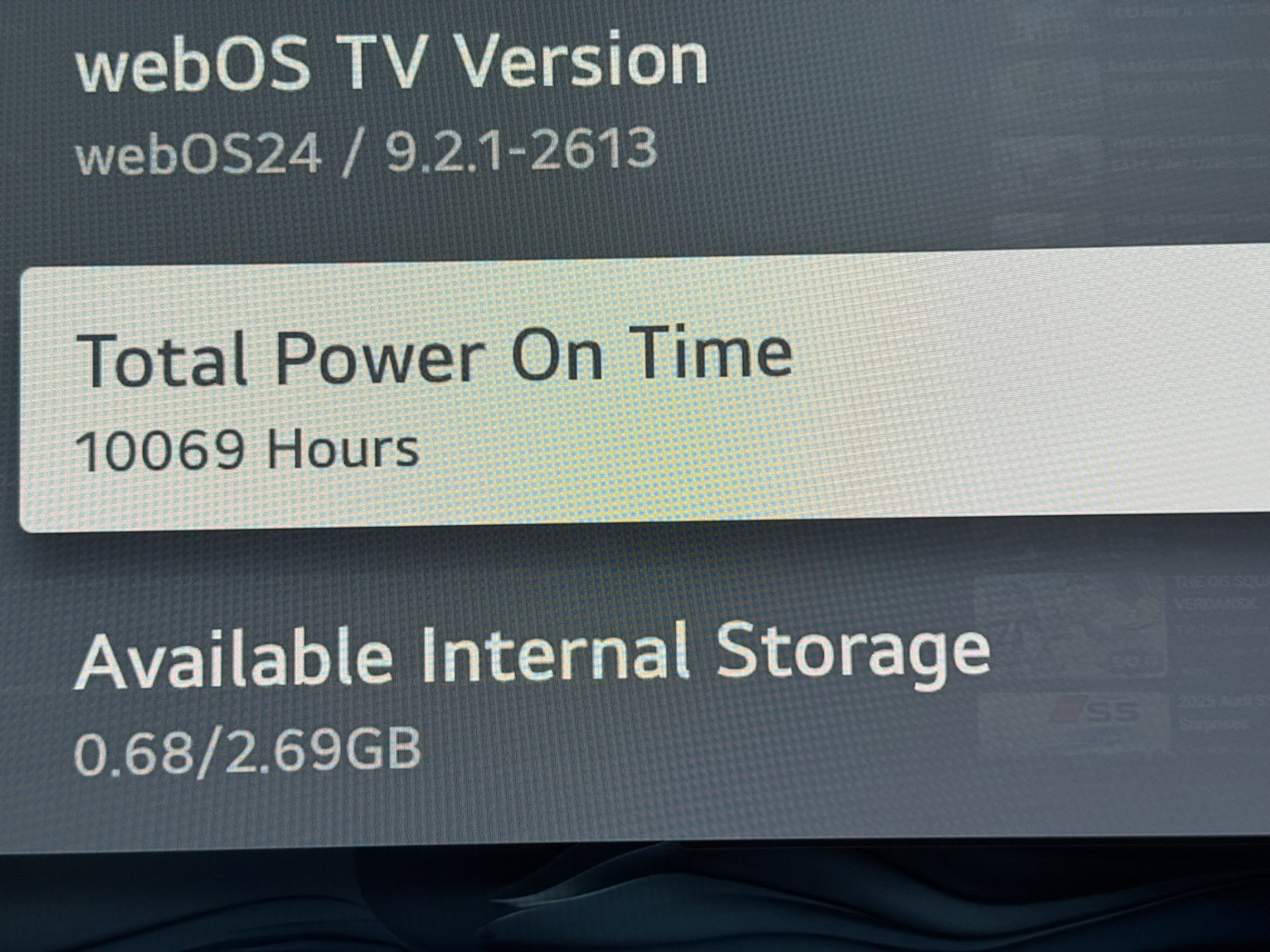
Still burn-in free here also. Might as well drive the wheels off of this thing at this point. It's been an outstanding monitor - no wonder this thread grew to be one of the largest in this subforum.

Lol
View attachment 728199
Still burn-in free here also. Might as well drive the wheels off of this thing at this point. It's been an outstanding monitor - no wonder this thread grew to be one of the largest in this subforum.
Fuckin' showboat
Lol
Still burn-in free here also. Might as well drive the wheels off of this thing at this point. It's been an outstanding monitor - no wonder this thread grew to be one of the largest in this subforum.
I just hit this the other day on my C2 from Jan 2023 and plan to keep it going. I remember seeing this thread back in 2020 thinking huh, that would be neat as a monitor. I'm SO glad I finally bit the bullet.
- Joined
- Aug 18, 2006
- Messages
- 11,747
FW900 thread says hi.Lol
View attachment 728199
Still burn-in free here also. Might as well drive the wheels off of this thing at this point. It's been an outstanding monitor - no wonder this thread grew to be one of the largest in this subforum.
But damn that's incredible hours. Good for you man. Who'd have thought the CX would have been one of the best displays LG ever released. 4ms BFI baby.

sharknice
Supreme [H]ardness
- Joined
- Nov 12, 2012
- Messages
- 5,183
Lol
View attachment 728199
Still burn-in free here also. Might as well drive the wheels off of this thing at this point. It's been an outstanding monitor - no wonder this thread grew to be one of the largest in this subforum.
15k for my CX and not a hint of burn in either.
20k hours on my 48" CX and I do have burn-in but it's very hard to spot in test patterns, and invisible in real content.
So, still going strong although the missing pixels at the top are very noticeable now. I'd say 5-10 rows of pixels maybe. The other few dead pixels on the edges are still a non-issue from a normal viewing distance.
So it's now a 3840x2150 display! (but without performance gains since those are still rendered *cries*).
Looking at prices now and my current budget, I will probably get a LG C4 soon-ish. Or maybe I can bear this another year or two, and go QD-OLED. We'll see.
I considered the 32" monitors as well, but once you go big you cannot go back. I won't go lower than 48" anymore as my main driver.
So, still going strong although the missing pixels at the top are very noticeable now. I'd say 5-10 rows of pixels maybe. The other few dead pixels on the edges are still a non-issue from a normal viewing distance.
So it's now a 3840x2150 display! (but without performance gains since those are still rendered *cries*).
Looking at prices now and my current budget, I will probably get a LG C4 soon-ish. Or maybe I can bear this another year or two, and go QD-OLED. We'll see.
I considered the 32" monitors as well, but once you go big you cannot go back. I won't go lower than 48" anymore as my main driver.
Last edited:
- Joined
- Jul 5, 2012
- Messages
- 4,712
20k hours on my 48" CX and I do have burn-in but it's very hard to spot in test patterns, and invisible in real content.
So, still going strong although the missing pixels at the top are very noticeable now. I'd say 5-10 rows of pixels maybe. The other few dead pixels on the edges are still a non-issue from a normal viewing distance.
So it's now a 3840x2150 display! (but without performance gains since those are still rendered *cries*).
Looking at prices now and my current budget, I will probably get a LG C4 soon-ish. Or maybe I can bear this another year or two, and go QD-OLED. We'll see.
I considered the 32" monitors as well, but once you go big you cannot go back. I won't go lower than 48" anymore as my main driver.
Yeah it wasn't burn in that got me to upgrade, it was the dead pixels. It's super noticeable now since a lot of them are in "clusters" of like 6-8 making them easier to spot. It's great to see all these pictures showing 10k 20k hours, but how about some pictures of the how the edges of your screens are looking people? I'd wager a good amount now look like this.
Attachments

A picture of the top left, so you can see how many pixels I am missing up there (the Edge window is in fullscreen), in addition to the scattered dead pixels:
View attachment image.webp
The upper right side is less tragic, and the left/right and bottom edge are fairly clean, very few dead pixels and pretty much impossible to see. Rest of the screen is pristine.
My understanding is that this was a very specific defect on the CX series, where the sealant used around the edges was not up the expected quality standards and starts going bad after a few years.
View attachment image.webp
The upper right side is less tragic, and the left/right and bottom edge are fairly clean, very few dead pixels and pretty much impossible to see. Rest of the screen is pristine.
My understanding is that this was a very specific defect on the CX series, where the sealant used around the edges was not up the expected quality standards and starts going bad after a few years.
- Joined
- Aug 7, 2004
- Messages
- 19,734
Yeah - I have posted about my dead pixels around the edges before, and feel it's something I'm capable of determining when it's severe enough to bother me. As it is, they aren't something that I have ever noticed during day-to-day/regular use so at least for now it isn't something that even enters my thought process until I check this thread and someone is talking about it. I understand others may have had worse luck and/or different use cases where they were more noticeable and thus prompted a warranty replacement or an upgrade to a different set sooner.
- Joined
- Jul 5, 2012
- Messages
- 4,712
A picture of the top left, so you can see how many pixels I am missing up there (the Edge window is in fullscreen), in addition to the scattered dead pixels:
View attachment 728305
The upper right side is less tragic, and the left/right and bottom edge are fairly clean, very few dead pixels and pretty much impossible to see. Rest of the screen is pristine.
My understanding is that this was a very specific defect on the CX series, where the sealant used around the edges was not up the expected quality standards and starts going bad after a few years.
Oh geez mine hasn't gotten to that point yet, but then again I didn't rack up 20k hours on my CX I was probably around 9-10k so about half the amount of hours that you have. I mean yeah if it bothers you enough then I wouldn't feel bad about upgrading now given that you managed to get a solid 20k hours of use out of it. I was really hoping to be able to hold out until we get blue PHOLED panels in TVs but that's still at least 2 years away based on the most recent articles about it.
sharknice
Supreme [H]ardness
- Joined
- Nov 12, 2012
- Messages
- 5,183
I have some near the very top edge, not very many compared to what other people have shown. I notice them once and a while in the top toolbar on full screen windows. I use dark mode for everything so that probably makes tthem less noticable. I've never noticed them in games or videos.
I don't see any reason to upgrade yet. 165hz is slightly tempting but not enough. 240hz could maybe convince me. Simultaneous VRR BFI would for sure.
I don't see any reason to upgrade yet. 165hz is slightly tempting but not enough. 240hz could maybe convince me. Simultaneous VRR BFI would for sure.
Looks like 3.4ms if I'm correctly interpreting the graph RTINGS posted.FW900 thread says hi.
But damn that's incredible hours. Good for you man. Who'd have thought the CX would have been one of the best displays LG ever released. 4ms BFI baby.
Legendary display indeed. (Still hoping LG brings back rolling scan and makes it less special though...)
Simultaneous VRR BFI would for sure.
What's the deal with BFI? Why is it good/related to VRR?
I just haven't kept up with display tech
Wow, that's pretty bad.A picture of the top left, so you can see how many pixels I am missing up there (the Edge window is in fullscreen), in addition to the scattered dead pixels:
View attachment 728305
The upper right side is less tragic, and the left/right and bottom edge are fairly clean, very few dead pixels and pretty much impossible to see. Rest of the screen is pristine.
My understanding is that this was a very specific defect on the CX series, where the sealant used around the edges was not up the expected quality standards and starts going bad after a few years.
For me it's just like maybe at most a few pixels on all edges, totally unnoticeable in real use. Especially since it's my living room TV and even PC gaming I'm using it from the sofa.
I really would love to upgrade, but I also want a 55" 4K 240 Hz model. Just so it doesn't feel like "the same thing but brighter HDR".
- Joined
- Jul 5, 2012
- Messages
- 4,712
Wow, that's pretty bad.
For me it's just like maybe at most a few pixels on all edges, totally unnoticeable in real use. Especially since it's my living room TV and even PC gaming I'm using it from the sofa.
I really would love to upgrade, but I also want a 55" 4K 240 Hz model. Just so it doesn't feel like "the same thing but brighter HDR".
You could literally say the same thing about 240Hz. "It's the same thing but more frames". It isn't just brighter for the sake of being brighter, colors POP way more than they ever would on the CX. 240Hz is something that's been around for many years already so most likely you've experienced it in some other display and more or less know what to expect and that it's a solid upgrade over 120Hz. But when it comes to HDR, there has not been a single OLED that could do over 2000 nits peak brightness while maintaining great color volume until this year so you haven't seen just how big of a difference it makes.
Last edited:
sharknice
Supreme [H]ardness
- Joined
- Nov 12, 2012
- Messages
- 5,183
What's the deal with BFI? Why is it good/related to VRR?
I just haven't kept up with display tech
With a normal display you get sample and hold motion blur from fast motion.
If you look at this https://www.testufo.com/framerates-versus there is text over each of those characters and you can't really read it as it scrolls by. If you had BFI you would be able to easily read the text.
When your display is showing something moving it's showing it in one spot, then it nearly instantly teleports to the next spot. Your eyes and brain add blur to this unnatural movement. BFI solves this by flashing each frame then just showing black inbetween, your eyes and brain naturally handle this and everything is clear.
For whatever reasons very few displays have BFI and almost none have simultaneous BFI VRR.
If you don't have VRR you need to maintain a constant 120 FPS to get smooth motion and have BFI work well, which isn't really possible unless you're playing an old game or on low settings. That's not really worth it to me so I always choose VRR. If BFI worked with VRR you could get the best of both worlds.