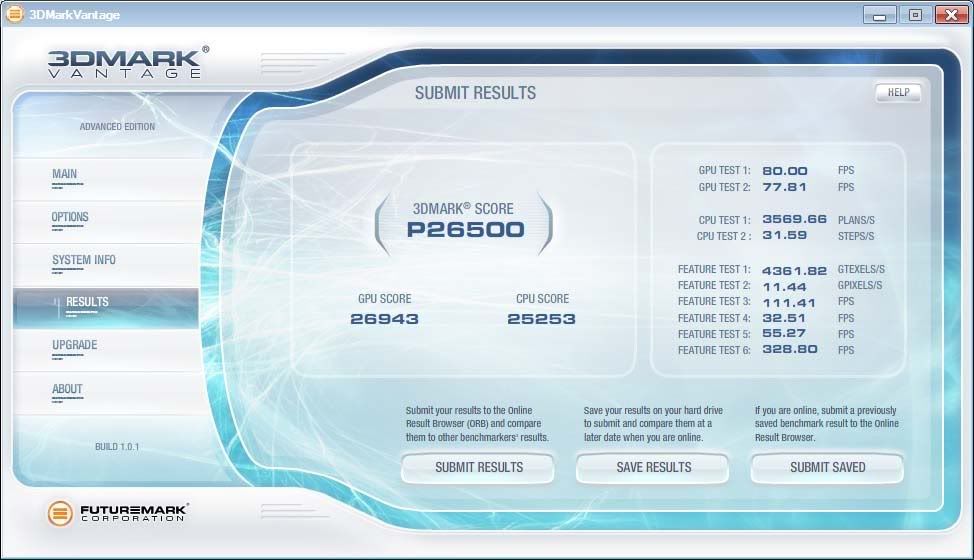
HIS 5970 is here!!!

on the other Vantage scores you ran the feature tests, you didn't on the last one?

You are correct sir,but it just takes so long to run and I was not trying for a high score.
Well I can tell you with an 8000point difference in vantage,it made no difference in game benchmarks.
I reran the test with all things,what ya know same score,
 
Here are some Furmark 5970 OC scores. I'll run Vantage again next.

Here are the OC results when overclocking both cores:

5970 @950/1150 x2 ATI Standard Overvolt
Furmark5970_950_1150x2_8xaa.jpg


5970 @ 950/1200 x2 ATI Standard Overvolt.
Furmark5970_950_1200x2_8xaa.jpg
 
I believe ATI Tray Tools and RivaTuner will both do custom game profiles. Although with Batman, I thought nVidia put something in the game that borks AA for ATI cards? Maybe someone can clarify.

Ati tray tools work with 5xxx cards ???
 
Those scores look kind of low for the 5970, vjc..

Here are my scores from the benchmark from running at 5760x1080 w/ maxed settings and 8x FSAA

sfivbenchmark.jpg


I'm running a single stock clocked 5870. Yours should be in a different league, than mine I'd think..
 
1080p SF4 results were 25% slower than 1920x1200 for me with the exact same settings. :confused:

I haven't hooked up the 30" monitor yet or I'd have checked that resolution too.
 
gerardfraser: can you post a screenshot of your Vantage settings?

also if you have time could you run the Heaven benchmark and post your screenshot for that?

thanks!
 
Yay, at last :)

Thanks Gerardfraser, finally some clocks with above 1.1625v on the core. So 1.212v achieved 1010Mhz core, thats 100% fanspeed but 70 degress on each core max?

This is good news, although im not sure I'll be running my card at them settings its nice to know it can cope, I'll definately test that high but for actual day to day use I think Im going to stick to 5870 clock speeds, basically get the card back up to 5870x2 status :)

Also, is that the max clocks you can get or did you just decide to stop at 1Ghz?
 
Last edited:
Yay, at last :)

Thanks Gerardfraser, finally some clocks with above 1.1625v on the core. So 1.212v achieved 1010Mhz core, thats 100% fanspeed but 70 degress on each core max?

This is good news, although im not sure I'll be running my card at them settings its nice to know it can cope, I'll definately test that high but for actual day to day use I think Im going to stick to 5870 clock speeds, basically get the card back up to 5870x2 status :)

Also, is that the max clocks you can get or did you just decide to stop at 1Ghz?

No not really stopped just messing around to see whats stable.Is been over 5 hrs at those clocks and there still room to go.
I am not trying to get high scores just messing around,also havent benched memory yet due to voltages on memory not sticking if you reboot.
I am not sure if ya even need to clock the memory.

As far as running 24/7 if this ends up being max clock I am fine with that.This card is beating my 3x285 setup in some games.LOL.


gerardfraser: can you post a screenshot of your Vantage settings?

also if you have time could you run the Heaven benchmark and post your screenshot for that?

thanks!
Um vantage settings are default,so I post a pic of the options,if ya want something else let me know.
Heaven bench,have 2 of them.
First DX11 1920x1200 8AA 16AF and then DX10 same Maxed settings.
 
No not really stopped just messing around to see whats stable.Is been over 5 hrs at those clocks and there still room to go.
I am not trying to get high scores just messing around,also havent benched memory yet due to voltages on memory not sticking if you reboot.
I am not sure if ya even need to clock the memory.

As far as running 24/7 if this ends up being max clock I am fine with that.This card is beating my 3x285 setup in some games.LOL.

Cool, so looks like a lot of the people waffling about crap OC on the 5970 can now give up, it's obvious they overclock well. What PSU do you have by the way?

Is it actually an MSI card? I'm trying to determin if that MSI tool works on non-MSI cards.
 
OHH sorry its Sapphire OC edition LOL with a corsair hx1000w.
All cards work on the MSI thing.The dude does some great work with riva,evga percision,msi overclock.
If anyone is interest I seen this benchmark so I tried it out.
StreetFighter4 1920x1200 Maxed
 
Hmmm those are some nice overclocks. I just wish that the Afterburner would support Memory voltage OC in addition to the core voltage OC.
 
In start,run type regedit.

Press find and type: ENABLEULPS
the default is 1.

Modify/Set this to 0, reboot and your done.
 
OHH sorry its Sapphire OC edition LOL with a corsair hx1000w.
All cards work on the MSI thing.The dude does some great work with riva,evga percision,msi overclock.

Ah cool, it's the Sapphire 5970 OC that I have on the way, hopefully on sat, so MSI overvolt works out the box..that's great to hear.

Can you mix that with another overvolt tool to get the memory voltage up also? Getting the core that high will need a decent mem overclock to match for performance to be optimal.
 
I can't get my 5970 to 1ghz. I think I might be PSU limited. Only have a 750W plus have to feed the juice to a PPU as well. Considering getting rid of the PPU to see if that helps. But how much does a 9600 GSO draw?

950/1200 to 950/1250 appears to be the tops my card can reach.
But it does so with some flickering issues.
Perhaps if the MSI Afterburner tool allowed OC of memory as well, this would fix the flickering?

Also my ATI overvolt tool has gone flakey:
"cannot obtain appropriate hwservice instance"
I don't know why I'm getting this message but it won't start up anymore.

I have my gpus set up for 850/1200 now.

Furmark5970_850_1200x2_8xaa.jpg
 
Last edited:
Ah cool, it's the Sapphire 5970 OC that I have on the way, hopefully on sat, so MSI overvolt works out the box..that's great to hear.

Can you mix that with another overvolt tool to get the memory voltage up also? Getting the core that high will need a decent mem overclock to match for performance to be optimal.

Yes you can mix it up.ATI overvolt.
I hear ya bout the matching up for performance,but I did not volt the memory eyt,running at stock volts and seems fine.
Shoot ran this overclock long enough,maybe I might bump up the voltage.

Still trying to figure out how to get fan control on my Sapphire OC edition
Here ya go and there are pictures and everything.
http://www.overclock.net/ati/614095-5970-bios-update-fan-control-fix.html
 
I can't get my 5970 to 1ghz. I think I might be PSU limited. Only have a 750W plus have to feed the juice to a PPU as well. Considering getting rid of the PPU to see if that helps. But how much does a 9600 GSO draw?

950/1200 to 950/1250 appears to be the tops my card can reach.
But it does so with some flickering issues.
Perhaps if the MSI Afterburner tool allowed OC of memory as well, this would fix the flickering?

Also my ATI overvolt tool has gone flakey:
"cannot obtain appropriate hwservice instance"
I don't know why I'm getting this message but it won't start up anymore.

I have my gpus set up for 850/1200 now.

What voltages are you using?

You mention the ATI overvolt tool which is actually just a preset of 1.1625v and 1.15v but to get overclocks like Gerardfraser you'll need higher voltage settings using MSIs afterburner.

About ~935Mhz core is the max you'll get using 1.1625 volts, theres plenty of 5870 users pumping in way more voltage into the core to get over 1000Mhz core so actually it's a pretty conservative overvolt, Gerardfraster is at 1.212v to get 1000Mhz and that's not maxing out. Cmon Gerard we want to see what the max on the core is, these are supposed to be hand picked GPUs :)
 
What voltages are you using?

You mention the ATI overvolt tool which is actually just a preset of 1.1625v and 1.15v but to get overclocks like Gerardfraser you'll need higher voltage settings using MSIs afterburner.

About ~935Mhz core is the max you'll get using 1.1625 volts, theres plenty of 5870 users pumping in way more voltage into the core to get over 1000Mhz core so actually it's a pretty conservative overvolt, Gerardfraster is at 1.212v to get 1000Mhz and that's not maxing out. Cmon Gerard we want to see what the max on the core is, these are supposed to be hand picked GPUs :)

I went to 1.212v and trying 1ghz core/1100 memory = instant lockup, time to reboot.
Anything above 950 core seems to cause lockup and/or visible issues.
950/1200 for benches seems doable, but It doesn't look 24/7 stable to me. 850/1200 seems to be working pretty decently though. I run that at the 1.1625.

I'm considering getting an Antec Trupower Quattro 1200W for my overclocking. But there are no reviews out on this unit yet. Looks pretty nice though, modular with each 12v rail giving 38A. 8x PCIE connectors, etc.

http://www.newegg.com/Product/Product.aspx?Item=N82E16817371032&cm_re=antec-_-17-371-032-_-Product
 
Hmm i have the Antec Quattro 850W, starting to get a bit worried about my overclocking potential, although it's rated to 18A on each 12v rail and AMD recommends for overvolting 20A on the 8pin and 16A on the 6 pin.

Is 1.212v the max allowed on the MSI overvolt tool by any chance or were you just copying Gerard? chances are 1000Mhz is do-able you just need the right amount of power, obviously there is a limit and pushing towards it is risky, I've read some people are putting 1.3v into their 5870s to get 1000Mhz core, im not sure if thats approaching dangerous or not?
 
Hmm i have the Antec Quattro 850W, starting to get a bit worried about my overclocking potential, although it's rated to 18A on each 12v rail and AMD recommends for overvolting 20A on the 8pin and 16A on the 6 pin.

Is 1.212v the max allowed on the MSI overvolt tool by any chance or were you just copying Gerard? chances are 1000Mhz is do-able you just need the right amount of power, obviously there is a limit and pushing towards it is risky, I've read some people are putting 1.3v into their 5870s to get 1000Mhz core, im not sure if thats approaching dangerous or not?

Hey there 1.3 is max volts on core,and the card runs fine at those volts.I just got up out of bed after a long run benching.
I will see how high the core will go and if its stable for a few hrs I will post back.
I can say for the last few days.I have no problems with crashing,card is stable.Now dont get me wrong it took me a few hrs when I started to figure out how the card works and then modded the Bios for the fan control.

After I max the core .I will tackle the MEMORY.Now that might be a different story cause the ram is only rated to run at 5000.
 
Hey there 1.3 is max volts on core,and the card runs fine at those volts.I just got up out of bed after a long run benching.
I will see how high the core will go and if its stable for a few hrs I will post back.
I can say for the last few days.I have no problems with crashing,card is stable.Now dont get me wrong it took me a few hrs when I started to figure out how the card works and then modded the Bios for the fan control.

After I max the core .I will tackle the MEMORY.Now that might be a different story cause the ram is only rated to run at 5000.

I was wondering why MSI showed 3 GPU cores. I noticed in another thread you are using a nVidia 285 as well. Your Vantage scores were a lot higher than I've seen with other 5970's but it all makes sense now. A lot of people have found that 1300Mhz on the memory(on the 5870) is the sweet spot...over that there are not many gains to be had....and over 1350 people have found it starts to HURT performance. good luck!
 
Nice one, let us know the results of the core at 1.3v if you dare go that high :)

My card is due to be in stock today and hopefully ship today which is set for sat delivery, I have a sneaky feeling the stock will either be delayed or just not get in quick enough and I'll miss a whole weekend of no work and get the bloody thing on monday (or worse)...just worrying now...really want to get my hands on this hardware!
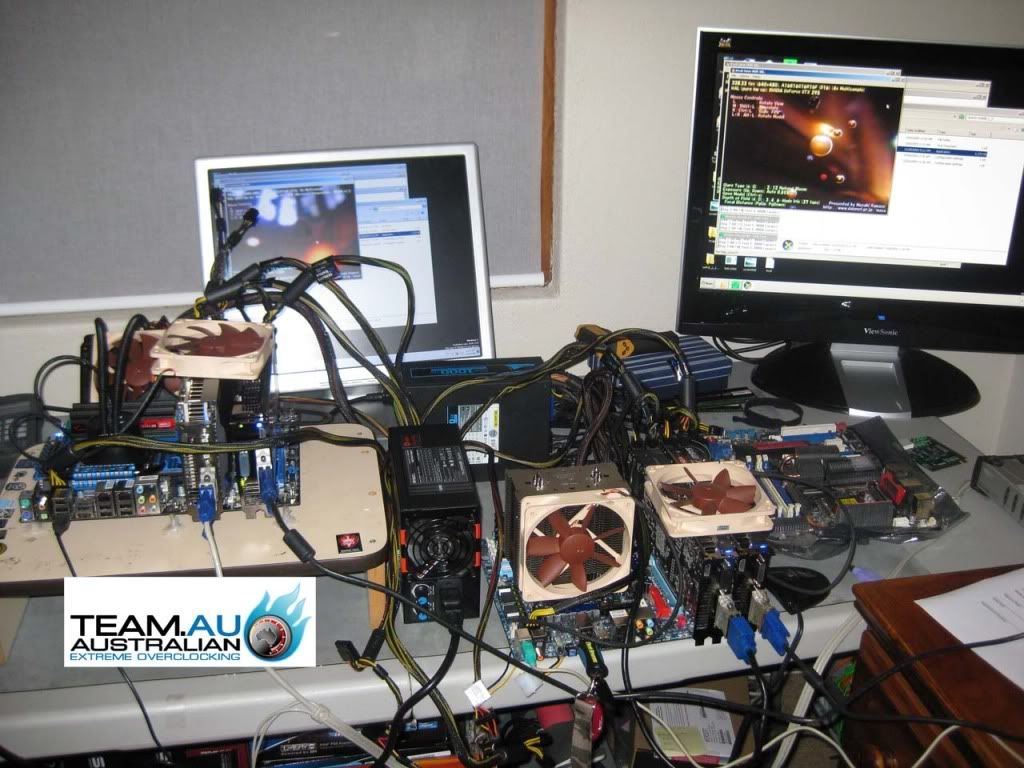
 
Nice one, let us know the results of the core at 1.3v if you dare go that high :)

My card is due to be in stock today and hopefully ship today which is set for sat delivery, I have a sneaky feeling the stock will either be delayed or just not get in quick enough and I'll miss a whole weekend of no work and get the bloody thing on monday (or worse)...just worrying now...really want to get my hands on this hardware!

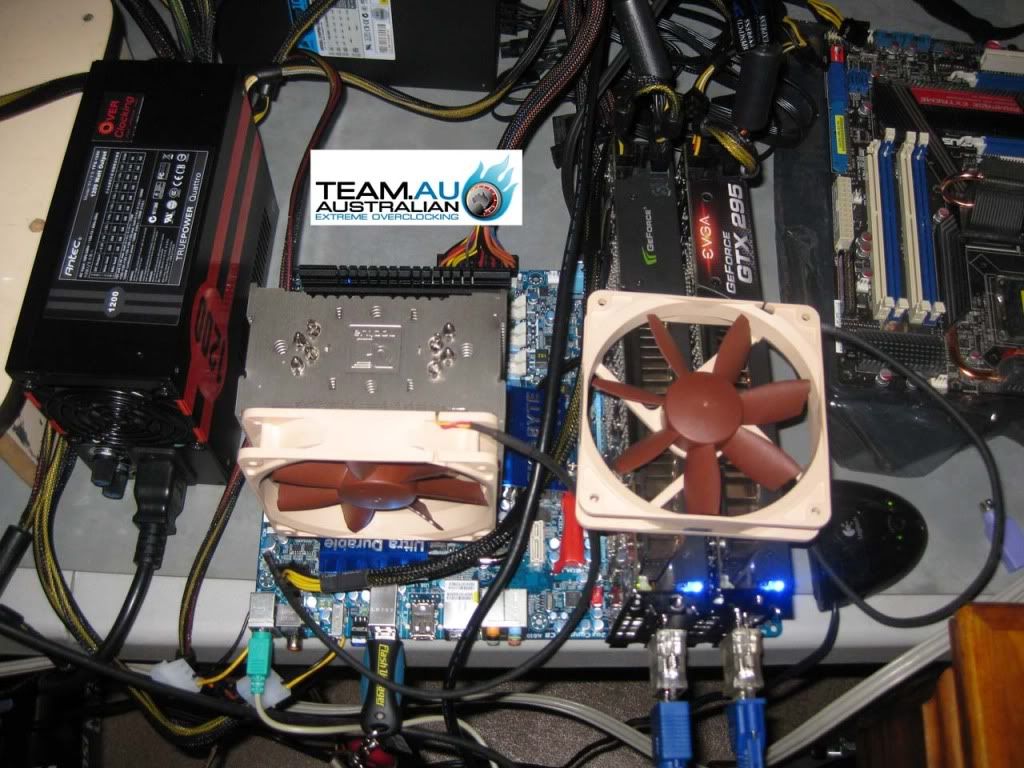
Man Ncix did that delay thing on me with a card.Its a harsh reality especially when you want to get your epeen hard LOL.

Now onto the sucky part.Grabbed my Bios and was all set to get rid of the AMD limits and I started to read that they do a digitally signed thing and its not wise to override the encrypted key.Or am I just being paranoid cause I never actully edited a ATI Bios before and I always do have a backup just incase.

So i am going to wait until someone bypasses the encrypted key.
I also heard that someone has a trick to bypassupto 1075 on core but I cant find it.
This card is begging for 1100 on core.
 
I went ahead and ordered the Antec TPQ-1200 Watt. =) Performance on the OC edition is apparently rock solid, being able to power 2 systems at once!

IMG_0916.jpg


IMG_0918.jpg


So once this baby gets here, I'll know for sure if the PSU is the limitation or if it's just the video card.
Apparently the main difference between the retail version I'm getting and the OC edition are some adjustment knobs for fan/12v and the OC edition has 12 PCIE and mine will have 8 PCIE connectors.
This PSU might be slightly overkill, but it preps down the road for when I can afford to get another 5970. =)
 
Last edited:
Dragon Age: Origins benchmark. 5970 @ 850/1200x2

Mage Tower's Basement

Min FPS 90
Max FPS 238
Avg 147.733

BTW This game locks and crashed at 1.162v Seems to run stable at 1.174v at the above clocks. Seems to me that the 5970 is a power hungry video card even with modest overclocks. And I certainly heard my video card working. Also Dragon Age Origins impressed me with its multicpu usage - at times it used as many as 5 of the 8 cpu cores. HT is enabled. Overall CPU usage peaked in the 40s, overal GPU usage went as high as 99% on both cores and got as hot as 94c. This Afterburner graph should give you a visual on how the 5970 was being used in that runthrough.

ABmonitorDragonAge.jpg


There is still this slight flickering on the primary monitor that is annoying me in 2d mode. I'm gonna see if increasing voltages fixes it.

PS Increased Voltage does not fix the flickering! However when I reduce memory speed from 1200 to 1000 it goes away! Do I have faulty memory chips? They are supposed to be rated at 5000!

Conclusion: I need memory overvolting, not just core overvolting to fix the flicker. Unfortunately Afterburner does not offer this!

Update: Running from safe mode now after a crashed attempt at 1000/1250 and 1.3v core with Furmark. Afterburner does not appear to recover well from crashes. Apparently, its settings must remain at the highest ones before the crash and even if I click, no 'don't allow' afterburner to change my system settings my screens are completely unusable. I think I need to uninstall and reinstall Afterburner again. Sigh.
 
Last edited:
I just started DA:O night before last as a test on my 5970 and I actually got some pretty unreal frame rates, but also some very big dips. I am hopeful that it's just an optimization issue though, because for the most part with everything maxed it seemed to have no trouble whatsoever at 2560x1600.
 
5970 1Ghz core reached! SUCCESS!! At 1Ghz core/1100 memory on both gpu cores.

5970Furmark1000_1100x28xaa.jpg


But the Furmark performance numbers are not higher than 950/1200. Looks like Furmark benefits more from high memory bandwidth than GPU core clocks.
In addition it looks like if you want higher core, you need to go with lower memory speeds. Particularly since Afterburner doesn't offer overvolt for the memory.
And oh yeah... 100% fan speed. LOL.

UPDATE: 3dmark Vantage Bench at 1000/1100. The fans are obnoxiously loud at 100%!!
5970VantageBench1000_1100.jpg


GPU-Z screenshot
gpuz59701000_1100.jpg


RE5 variable benchmark @ 1000/1100 8xaa highest quality settings
RE5DX102009-11-2710-33-52-02.jpg
 
Last edited:
Glad to see your doing the 1000 thing.I also run with a lower memory.
I do not think I will even bother to OC memory do to volts not sticking after restart,that would just cause headaches.
 
Oh and I tried to up the ante to 1000/1200 but that was FAIL!! Got about halfway through the 3dmark Vantage benchmarks before system locked up and had to reboot. The memory clock speeds on the 5970 are disappointing. And I have a feeling from the numbers that once the cores are running at 1Ghz, they are waiting on the memory so we are not seeing the full potential of the 5970 unleashed. We need an OC tool that will overvolt both the core AND the memory. And beyond the levels that ATI initially released, 1.1625 and 1.15 respectively?

I don't think I'll be running the 5970 at anywhere close to 1Ghz core on a daily basis since the core performance seems to be somewhat wasted with the memory not keeping up. Not to mention the noise level is just too obnoxious. Right now its going to be 850/1200. But I need something for the 2d app flickering!

I'm even starting to wonder if I should step back down to a 5870?? Or maybe I should just wait for the d5970 rivers to mature. Is it the drivers or the hardware? (or my PSU?) Hmmm.

PS Core won't go above 1000 because CCC won't go above 1000 and Afterburner won't go above what CCC will allow. Also core/memory clock changes made in afterburner are SAVED to CCC. I figured out that's why my system was crashing after bad OC runs. The solution is to NOT start MSI Afterburner on windows startup, so that you can access CCC quickly and detune to a lower speed before system locks up. Which means this adds an additional hassle step of starting up Afterburner for the overvolts but... it's better than having to uninstall and reinstall Afterburner each time after a bad OC attempt/crash.
 
vjcsmoke, i have a sapphire 5870 if u want to step down, maybe we can work out a deal. Just thought i would put that out there
 
Being sick is really not cool. Sore throat and all that. OCing is a time consuming process with its share of frustrations as well.

I'm going to wait until my TPQ-1200 Watt PSU comes in and then see if it helps any with benches and OC stability. Of course I might also consider getting another 5970 once the 1200 watter arrives, but that's down the road.
 
Being sick is really not cool. Sore throat and all that. OCing is a time consuming process with its share of frustrations as well.

I'm going to wait until my TPQ-1200 Watt PSU comes in and then see if it helps any with benches and OC stability. Of course I might also consider getting another 5970 once the 1200 watter arrives, but that's down the road.

I think the PSU is your main issue right now. Considering Anandtech hit around 640w with a i7 at 3.33GHz and yours is clocked is much higher, I'd say you are already above 700w even at 5870 stock speeds. Going beyond that is probably too much for stable operation on a 750w.
 
I think the PSU is your main issue right now. Considering Anandtech hit around 640w with a i7 at 3.33GHz and yours is clocked is much higher, I'd say you are already above 700w even at 5870 stock speeds. Going beyond that is probably too much for stable operation on a 750w.

Took 4-5 system restarts this morning before the video card kicked in and activated the monitors. Maybe it is the PSU? Hmmm. Hadn't experienced that previously though.
 
My card is due to be in stock today and hopefully ship today which is set for sat delivery, I have a sneaky feeling the stock will either be delayed or just not get in quick enough and I'll miss a whole weekend of no work and get the bloody thing on monday (or worse)...just worrying now...really want to get my hands on this hardware!

Sigh...phoned up ebuyer.com friday (availability day) to check to make sure my pre order was on time for dispatch that day and was told they don't yet have stock. So I had to explain it was a pre order and the availability date was today. After a long time of waiting on hold I was told that no stock for deliverys today and they don't have anyone that can check right now (it was late on a friday) so apparantly I'm going to get an email on monday once a manger is back in to let me know the score.

A few other sites like overclockers also had a 27th stock date which was missed so I'm just wondering what happened, if it's a few days delay then fine but if they're just selling hardware they have no predicted date for stock I'm going to be pretty mad.

Anyway enough rambling!

Thanks people posting more overclocking information and benchmark results, much appreciated. vjcsmoke, it might be worth checking your PSUs maximum output of current through the 8pin and 6 pin connectors, AMD recommend 20A and 16A respectively, I know I'm only running 18A max per 12v rail (x4) so I might also run into power issues, although like you I will not be running mine at 1Ghz for standard operation, I'll be overvolting and using 5870 speeds until I need more FPS which won't be for a while I hope :D
 
I bought and paid for 5970 cards.Yes they took the cash,no I do not have the cards.The one I have is the one where I went to the store and bought.
So I know where your coming from man,and it sucks hard.They may not send the card until late December.If you have extra cash,Time to start calling stores for stock.
 
Back
Top