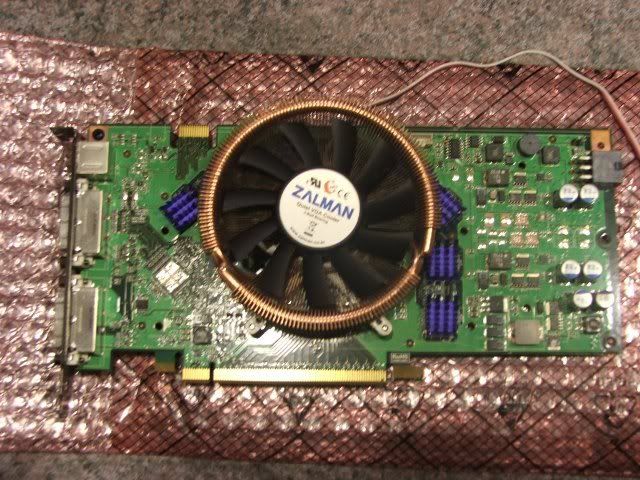
8800GT coolers....

Well I am glad that I can say that the stock cooler is working great for me as is. Right now I have my card clocked at: 740/1800/1900 and I idle on average at about 46C and load on average at about 56C (haven't tried Crysis yet though). I can attribute the good temps to my Stacker 830 Case with 8 Thermaltake fans in it. My card gets excellent circulation. I am glad I don't have to buy an aftermarket hs for it :D.
 
Well I am glad that I can say that the stock cooler is working great for me as is. Right now I have my card clocked at: 740/1800/1900 and I idle on average at about 46C and load on average at about 56C (haven't tried Crysis yet though). I can attribute the good temps to my Stacker 830 Case with 8 Thermaltake fans in it. My card gets excellent circulation. I am glad I don't have to buy an aftermarket hs for it :D.

I guess your case really picks up the slack. Mine hits 80c fully loaded with the fan at around ~46%. Any louder than that and it really sticks out noise wise compared to anything else in my case. I just went ahead and ordered another vf900 from newegg, along with some extra heatsinks to play around with putting them on the mosfets and such if i need to.
 
I got a Zotac which came slightly overclocked to 660/1600/1800. I upped those to 720/1720/2000 and the stock fan did the job until I played the Crysis Demo and it froze after 1/2 hour. I dropped memory to 1950 and that seemed to work okay. However, I found that the fan was set much too low out of the box: 29%. So, I upped it to 60% and Crysis plays with no problems with memory back at 2000. Before increasing the fan speed, temps were 55c idle and 85c in Crysis. Later, I got 47c idle with about 71c in Crysis. So, the stock fan seems fine. Mind if your case or ambient temp or fan noise is an issue, it might be worth getting a new fan. BTW this fan is quiet even at 60%. I tried 80% and it gave a small but inoffensive increase in noise.
 
I guess your case really picks up the slack. Mine hits 80c fully loaded with the fan at around ~46%. Any louder than that and it really sticks out noise wise compared to anything else in my case. I just went ahead and ordered another vf900 from newegg, along with some extra heatsinks to play around with putting them on the mosfets and such if i need to.

Very true - 46% is the exact figure I set my card to whilst gaming. Any higher then it's the loudest component in my case. Let us know how your temps look with the VF900. I'm interested in putting one of these on too.
 
Rivatuner doesn't work for me when setting the fan to run at a higher RPM when in 3d mode. When I make it say 70% for 3d mode (and I only move the slider for the 3d section) it also moves it for my 2d section and makes it 70% as well. The feature is broken for me in RT2.06
 
For those that are using the VF900 are you using the Zalman supplied thermal paste or something else like AS5? Just curious which would be better or if it even makes a difference.
 
For those that are using the VF900 are you using the Zalman supplied thermal paste or something else like AS5? Just curious which would be better or if it even makes a difference.

as5 is always better, but not gonna make a huge difference.. Ive got some laying around here that i will use. I wouldnt make a special order for it or anything, but if your ordering some stuff from somewhere id go ahead and throw it in. Always good to have around.

Btw my card got up to 82c after playing world in conflict for a while. Vf900 should be here tues/wed. I will post differences.
 
For those that are using the VF900 are you using the Zalman supplied thermal paste or something else like AS5? Just curious which would be better or if it even makes a difference.

I did not use AS5 with my VF900 on the 8800GT (picture page 4). I just used the Zalman compound, I don't believe there would be a huge difference, however every bit help of course.

In the end I chose to point a fan at the Mosfets opposed to extra Ram sinks, has worked well and I am happy with the results.
 
Alright guys, I need some advice. Are there any aftermarket coolers for the 8800GT that take up 1 single slot? One of the main reasons I replaced my 8800GTS was for a 8800GT SLI setup was to be able to fit more stuff in. So 600 bucks later, I have these babies running really hot. My 8800GTS usually ran 54c/62c idle/load. I got this figure even lower after replacing the cheap gunk in the GTS with 2 tubes of AS5.

These 8800GT cards are running 78c on idle--well this is the EVGA KO version 675/975 X 2

I used to have a VF900 for a Radeon X1950XT that i bought from the egg for 150 bucks a year ago. That worked really well. But I forgot if it was 1 slot or 2 slots? The radeon bracket was for 2 slots. Anyway just wondering if I can still fit 2 VF900s

Also, have you guys applied AS5 to just the stock heatsink? I was thinking about this too since I love the new low profile thing.

Thanks!

PS: ATI Tools .27 b2 screws up the SLI setup... the 3d low per just drops down to 0.00 and my system hangs. I'll have to flash the bios
 
The VF900 takes up two slots unfortunately.

Adding AS5 will only help temps by about 2 or 3 degrees (assuming there is only a transparent layer of it). Having good case airflow is probably much more effective.


But more importantly, where are all the 8800gt's with an aftermarket-like cooler? Ya know, like an xfx passive (7950gt), or a weird looking leadtek cooler, or a gigabyte with a zalman cooler already on it (7900gs). It seems like Sparkle is the only one so far with their passive and twin calibre.
 
Installed my Zalman VF-900cu off my old 7950GT onto my 8800GT last night.

Temperatures before

Idel = 56C
Laod = 82C (Crysis Demo 5 mins+)


Temperatures after

Idel = 41C
Laod = 62C (Crysis Demo 5 mins+)


As you can see my load temp dropped a very solid 20C. I would also like to point out the entire card now seems a LOT cooler to touch and there is next to no ambient heat radiating from it like there was under the stock cooler.

As JohnleMVP pointed out above, there are power fets that the stock heatsink covered. The power fets are only warm (upper warm) to touch and I personally believe they will be cooler like this opposed to the baking under that reference cooler that was scorching to touch. I will prob grab some sinks and cover them, but I honestly don't feel this is a huge concern especially running at stock.

8800GTZalaman.jpg

Nice change in temps, I'm going to get this cooler. I've always liked the quietness of the Zalman coolers.
 
Thanks for the picture of the VF-900cu installed on a 8800GT. I bet the noise level went down substantially.

Can you please share the installation procedure with us? Anything to watch out?
 
Thanks for the picture of the VF-900cu installed on a 8800GT. I bet the noise level went down substantially.

Can you please share the installation procedure with us? Anything to watch out?

It's dead easy. To take off the heatsink just unscrew the screws at the back of the card. Pull the old 'sink off. Then clean off the core and memory modules with some Articlean 1 and 2 with a piece of kitchen roll of baby cotton buds (q-tips).

To put the Zalman on follow this, I'd use some AS5 if possible. If not the Zalman paste will do just fine

http://www.zalman.co.kr/eng/product/view_flash.asp?strFlash=/upload/product/VF900.swf

Battleneter2 - is there anything else to watch out for. Are the power fets covered in crap too, if so what did you use to clean them off?
 
It's dead easy. To take off the heatsink just unscrew the screws at the back of the card. Pull the old 'sink off. Then clean off the core and memory modules with some Articlean 1 and 2 with a piece of kitchen roll of baby cotton buds (q-tips).

To put the Zalman on follow this, I'd use some AS5 if possible. If not the Zalman paste will do just fine

http://www.zalman.co.kr/eng/product/view_flash.asp?strFlash=/upload/product/VF900.swf

Battleneter2 - is there anything else to watch out for. Are the power fets covered in crap too, if so what did you use to clean them off?

With the VF900, can you still set the fan speed by RivaTuner?
 
With the VF900, can you still set the fan speed by RivaTuner?

No the VF900 does not plug into the fan header on the video card (at least not on my 7900GT). The fan header on my 7900GT was some kind of micro-plug that was not pin compatible with the standard 3-pin fan connector on the VF900. Instead you plug it into a fan header on the motherboard. As a result, the software controls won't work with the VF900. It does, however, include the Fanmate 2 fan speed controller, which is basically an in-line rheostat that allows you to manually change the fan speed with the twist of a knob. This fan controller has long cables and an adhesive back, so you could snake it out of the back of the case and stick the controller back there for easy access. I don't change my fan speed much, so I have it stuck just inside my case. It's still fairly easy to access but I have to take off the side panel to get to it.
 
No the VF900 does not plug into the fan header on the video card (at least not on my 7900GT). The fan header on my 7900GT was some kind of micro-plug that was not pin compatible with the standard 3-pin fan connector on the VF900. Instead you plug it into a fan header on the motherboard. As a result, the software controls won't work with the VF900. It does, however, include the Fanmate 2 fan speed controller, which is basically an in-line rheostat that allows you to manually change the fan speed with the twist of a knob. This fan controller has long cables and an adhesive back, so you could snake it out of the back of the case and stick the controller back there for easy access. I don't change my fan speed much, so I have it stuck just inside my case. It's still fairly easy to access but I have to take off the side panel to get to it.

Spicey: Can you please confirm this?

If the fan cannot be controlled by external application (Riva Tuner), I hope it is at least controlled by temperature: the hotter, the faster the fan speed.
 
Spicey: Can you please confirm this?

If the fan cannot be controlled by external application (Riva Tuner), I hope it is at least controlled by temperature: the hotter, the faster the fan speed.


You can run the VF900 off the manual speed controller that comes with it or plug it straight into the 12V rail via a motherboard extra fan connector to run at constant full speed.

There is NO need for any type of temperature control for the simple reason that at full speed it is barely audible over most case PSU fans etc. If you run it at 80% speed it is unbelievably quiet. At 80% speed it heavily outperforms the stock 8800GT cooler running at near full speed and sounding like a jet engine.

Basically chuck the VF900 on, set to about 80% and forget. Hope that clears it up,
 
So what is the best aftermarket cooler? I am ready to buy one, I just need to know what to get.

Links anyone? I probably don't want to spend more than $30 or so.
 
when I overclock much past 720ish my computer has the screen go black a time or two, or just locks while on the desktop, even though Rivatuner shows the temperatures as 50ish for my SLI pair. I have upgraded air cooling (Thermaltake ND1's). Also having it lock if I go into 3D when overclocked, though I can run the Crysis GPU bench over and over without issue at its 675/1950 "KO" speeds. Another thing that's making me think it's the PSU is that ATItool can heat the cards up to about 66, but it locks sometimes after 5-6 minutes, sometimes after 1-2, even when the temps aren't as high as it's gone before without locking.

I don't think lock ups come from a bad PSU.

Though I would get a digital multimeter, find a lose molex and check the 12V under load to make sure that's at least stable.
 
No the VF900 does not plug into the fan header on the video card (at least not on my 7900GT). The fan header on my 7900GT was some kind of micro-plug that was not pin compatible with the standard 3-pin fan connector on the VF900. Instead you plug it into a fan header on the motherboard. As a result, the software controls won't work with the VF900. It does, however, include the Fanmate 2 fan speed controller, which is basically an in-line rheostat that allows you to manually change the fan speed with the twist of a knob. This fan controller has long cables and an adhesive back, so you could snake it out of the back of the case and stick the controller back there for easy access. I don't change my fan speed much, so I have it stuck just inside my case. It's still fairly easy to access but I have to take off the side panel to get to it.

While I don't have the same video card, I did have the same problem with my x800xt. I wanted to control the fan using atitool but that would only work if I plugged in the vf900 into the fan header on the card itself. So that's what I did, I modified the fan header on the videocard by, well, pulling the white plastic header off ( this leaves the pins intact, lol no worries) and plugged in the vf900! I just had to make sure the polarity was correct by plugging in the vf900 the way the stock fan plugged in with respect to which color wire going to which pin.
 
"Run at a higher RPM when in 3d mode"

Rivatuner is a bit flaky at the moment when detecting changed 3d modes. A better answer is to set up speed profiles for it

http://home.comcast.net/~boogieman1954/8800 fan speed guide.htm

An even better option is to mess with the fan's low level settings

Mine read
dmin 38%
dmax 100%
tmin 35.4
TRANGE 20


Ok it sounds like a hurricaine when gaming at the moment( I choose 100% fan at 60 %). But I'm just waiting for some ramsinks. I do get 178, 1075 and shader 1765 (not fully optimised - I'm sure i could squeeza a bit more out with a bit of messing.)

But you can set these values to get the fan to run at whatever speed you choose, Anything's better than the default 29%!

Remember that with the low level rivatuner options, that you don't have to have the rivaruner monitoring enabled. It all works off the ADT chip. But do read up and know exatly what you are doing before going down that route.
 
Well I installed the FC-ZV9 I previously had on my 7900GT and used whatever extra ramsinks I had temporarily for the mosfets until I get the MC21s from Newegg which I'll be receiving in a few days. So here's my initial results, room temp was 71F at the time. My only worry right now is the ramsinks.They went on really loose, to the point where I'm worried they will fall off randomly. They will all soon be epoxied. Good thing eVGA warranties if anything ever goes wrong and I can't remove them.

740/1782/2000 ATi Tool, 3D06, and Crysis Demo stable so far. Also, the second temperature - the GPU ambient, is also a good amount lower relative to the core temperature. With stock cooler, the GPU ambient always registered about 10C less than the core temperature. Not anymore.

14502 3DMark06 (single GT)

740coreca0.jpg


(All high, 1680x1050 no AA/AF)
timedemoag9.jpg
 
Just got off the phone with Justin at west coast computers.. My full card waterblocks on my 7900gt's will NOT work on the 8800gt. If it was just the GPU block they would but not the ones that cover memory too =(

p.s. Crysis is a slide show on 7900gt sli w/opty 165@2700 1680x1050 medium settings.

I jsut may put off cyrsis until another gen or two of vid cards comes out.
 
Guys I am very tempted on getting one of those Zalmans at my local Compusa but let me ask you, what do you do if you need to RMA the card? How you would you make it look unmodded?
I removed a NV Silencer once from a BFG 6800GT and BFG replaced it without questions but I dont think eVGA is as flexible is it?
 
...They will all soon be epoxied. Good thing eVGA warranties if anything ever goes wrong and I can't remove them.
...


I don't believe eVGA warranties epoxied RAM chips. That's considered physical damage to the card.
 
Guys I am very tempted on getting one of those Zalmans at my local Compusa but let me ask you, what do you do if you need to RMA the card? How you would you make it look unmodded?
I removed a NV Silencer once from a BFG 6800GT and BFG replaced it without questions but I dont think eVGA is as flexible is it?


As long as the card is not physically damaged, eVGA will replace it.
 
I guess I can try that 9000 or whatever Zalman I saw at Compusa (I hate waiting for stuff) and use regular easy to remove thermal paste or whatever you guys recommend so if I need to RMA they wont notice. :cool:
 
you can buy doublesided 3m thermal tape (frag tape) in small chunks (1" x 6") from most any place..

i've been trying to find a place that sells it on the roll, so you don't have to pay more $$ for someone to cut you off a small piece, but i haven't found any places yet.

this is the same stuff that is on the ram sinks to begin with..
 
Back
Top