• Some users have recently had their accounts hijacked. It seems that the now defunct EVGA forums might have compromised your password there and seems many are using the same PW here. We would suggest you UPDATE YOUR PASSWORD and TURN ON 2FA for your account here to further secure it. None of the compromised accounts had 2FA turned on.
    Once you have enabled 2FA, your account will be updated soon to show a badge, letting other members know that you use 2FA to protect your account. This should be beneficial for everyone that uses FSFT.

LG 48CX

Has anybody got an AMD Radeon 6800 card and have they tried on this TV? I have the BX version which is similar to the CX version and I have an AMD 4350G with a A520 motherboard which supports HDMI 2.1. However, I'm limited to 4:2:0 colour chroma at 2160p/120Hz as I was told the BX models is also capable of running 4:4:4 at 2160p/120Hz.

Not sure if it is a limtation with my APU and motherboard, I was under the impression that having a HDMI 2.1 source can output full RGB at 120Hz.
 
Has anybody got an AMD Radeon 6800 card and have they tried on this TV? I have the BX version which is similar to the CX version and I have an AMD 4350G with a A520 motherboard which supports HDMI 2.1. However, I'm limited to 4:2:0 colour chroma at 2160p/120Hz as I was told the BX models is also capable of running 4:4:4 at 2160p/120Hz.

Not sure if it is a limtation with my APU and motherboard, I was under the impression that having a HDMI 2.1 source can output full RGB at 120Hz.
I’m also curious about the latest AMD cards. I’m debating between a 6900XT and a (rumored) 3080Ti, and the decision partly hinges on how they behave with this screen.
 
I was under the impression that having a HDMI 2.1 source can output full RGB at 120Hz.

HDMI 2.1 features =/= HDMI 2.1 bandwidth, you need HDMI 2.1 bandwidth for 3840x2160 8/10bpc 120Hz 4:4:4.

This distinction of HDMI 2.1 features vs HDMI 2.1 bandwidth is most obviously seen with the Xbox One X (not a typo) which supports HDMI Forum VRR (the variable refresh rate spec that's part of HDMI 2.1) despite having only HDMI 2.0 bandwidth. And while the Xbox One X also supports freesync-over-HDMI, keep in mind that XB1X's VRR function even works on the likes of the C9, and the C9 does not support freesync-over-HDMI*, only HDMI Forum VRR.

*the C9 technically can run freesync-over-HDMI but this requires creating a custom resolution via the likes of CRU - something you obviously can't do on an Xbox One X
 
Hi All,

Super excited this bad boy is being delivered tomorrow and my 3080 arrived yesterday along with all my other sff components.

I could use some help please:

1) What is the ideal viewing distance to enjoy 4k gaming but to also make it effective for work (excel, outlook, etc)? I think it is around 36" but I wanted to be sure.

2) What is the ideal height for the screen? Do I want my eyes looking straight at the center of the screen when my head is in a neutral position?

3) Is there any software that is helpful to make the most of the screen? Tiling software for multi window usage etc?

Thanks
 
1) Just my opinion but I like it as far away as I can possibly use it to keep it from overwhelming my field of view for focus and brightness in a dim room. 36" would be a bleeding minimum. I keep mine in the 46" to 50"-something range and run some scaling. These aren't screens you sit right on top of and and run native scaling. You'd be moving your head all over and the screen would dominate your peripheral vision to the point that focus will become difficult and straining.

2) neutral to slightly low. This is one area where the complaint people have of the stand being too low for a speaker bar... is actually just right for a monitor. Use it as is flat on the desk. Your head will probably be slightly above the mid point of the screen. You don't want to be looking UP at all if you are going to use the screen for hours at a time.

3) not really, win 10 has good window control.

EDIT - Spend time learning the brightness controls and try to get a OLED Light setting under 30 for SDR desktop content, and don't leave the screen in HDR mode for desktop work (because the OLED Light setting will be 80-100 for HDR to be any good). So remember to turn it off. Basic anti-burn in. I also have had great luck just leaving the screen shift on. I honestly don't notice it near as much as I thought I would. And logo detection needs to be left on LOW and not turned off, also keep the screen saver on. Don't set yourself up to make a mistake where if you have to go do something else and forget the screen is on a static image for hours. It's completely doable, just take the time to learn how the screen works immediately and don't put it off...
 
Last edited:
So I have a few weird issues:

1. When the sound is passed through to my soundbar there is a bout a 100ms Delay. Anyone able to get rid of this delay? I tried setting the Sound to Pass through for the last 4 hrs and it sucks.

2. GSync does not seem to be enabled for 120FPS in games like overwatch. If I set it to VSync it caps the FPS at 70. GSync says enabled in Display options so this is very weird.

My setup is:
Cable 1: PC HDMI ---> LG
Cable 2: LG HDMI ---> Creative SOnic Carrier Soundbar

I could try buying a third HDMI cable and a HDMI to display port adapter and go from the PC to Soundbar.

However this still wont solve the issue of this 100MS sound delay. The settings only allow a positive lag, not a negative. Anyone fall into this issue?
 
I tried eARC again with my x4700h....still garbage. lol

It's possible to make it kinda work sometimes but just now I played an Atmos movie through Kodi for a few minutes(it was fine) then played a couple games for about an hour(still fine) but then sitting here on the desktop with no sound playing it started bugging out with the tv flipping between TV Speaker and ARC. If I remember correctly from when I first bought this, I can probably shut things down and restart and be ok again for some period of time.....sometimes a couple hours and sometimes 5 minutes.

I bought a displayport to hdmi adapter a long time ago and never looked back. eARC just doesn't work with the CX. That said, I think I had regular ARC working just fine in the past but I paid too much money for all this stuff to have lesser audio.

I certainly WISH I could try all this with a 3090...maybe next year when I finally find one in stock I'll try eARC again.

Same issue! No idea how to solve it, which adapter did you get to make it work?
 
Hi guys, I'm planning to buy CX48 for my PC to be main monitor.
I've read dozens of pages here and would like to ask for a short summary:)
So I understand that there is some issue with setting it up to 4K VRR 120MHz and nvidia cards? LG said they will fix it with new firmware, is that right?
 
I just bought one too, as it seems, from the few people that have upgraded the firmware to a version that has not yet been released, seems to have addressed most of the issues. So I am hoping by the time it gets here, that firmware will be available OTA. Either way it is a big upgrade from what I have so I am sure I won't really notice any limitations in the short term.
 
I have had this set for awhile using a 2080ti and a 3080 and really enjoy it. I did update the firmware to the one released on the Korean site and while it did resolve the stutter issue, I really did not notice it much before, but that may be because I am not the sensitive to it. You will really enjoy the set.
 
Hi guys, I'm planning to buy CX48 for my PC to be main monitor.
I've read dozens of pages here and would like to ask for a short summary:)
So I understand that there is some issue with setting it up to 4K VRR 120MHz and nvidia cards? LG said they will fix it with new firmware, is that right?
If you're on a 2070 Super, there are no issues. 4K VRR works fine as long as you run 4K120 4:2:0 8-bit.

For RTX 3000 cards, LG has released a beta firmware version that seems to fix it. Some people have tested it here and say it worked.
 
Hi All,

Super excited this bad boy is being delivered tomorrow and my 3080 arrived yesterday along with all my other sff components.

I could use some help please:

1) What is the ideal viewing distance to enjoy 4k gaming but to also make it effective for work (excel, outlook, etc)? I think it is around 36" but I wanted to be sure.

2) What is the ideal height for the screen? Do I want my eyes looking straight at the center of the screen when my head is in a neutral position?

3) Is there any software that is helpful to make the most of the screen? Tiling software for multi window usage etc?

Thanks
1. I found many recomendations in distance about 100-120cm I am personaly about 110cm which is fine.
2. You should position it as lower as possible. if you move it too high your neck could suffer. Some people goes even for 2 table setup with lower height table for tv.
3. I personaly would reccomend displayfusion software. They are updating it for more than 10 years, you can set multiple profiles there with different layouts, and also use virtual screens to divide screen to multiple and also use various shortcuts, various wallpaper configurations, etc. You can get it also on steam with better price I think (about 15$ in last sale).
 
Hi guys, I'm planning to buy CX48 for my PC to be main monitor.
I've read dozens of pages here and would like to ask for a short summary:)
So I understand that there is some issue with setting it up to 4K VRR 120MHz and nvidia cards? LG said they will fix it with new firmware, is that right?

If you're on a 2070 Super, there are no issues. 4K VRR works fine as long as you run 4K120 4:2:0 8-bit.

For RTX 3000 cards, LG has released a beta firmware version that seems to fix it. Some people have tested it here and say it worked.


Glad they seem to have fixed it.

There is still one VRR issue though it's more minor depending how you feel about it. The lower your frame rate during your frame rate graph goes below 120fps, the brighter the blacks get until they are more like grey blacks aka "raised blacks".

The screen's gamma is based on 120Hz. From tech reports like hdtvtest, it's not likely to be able to be fixed in these generations (C9, CX) since it's a hardware level oversight/omission.

You can lower your black level/brightness/gamma slightly in the OSD to compensate but then the blacks will end up crushing some. Otherwise you can try to keep your frame rate graph running in the deep end of the pool and try to stay out of the shallow end throughout the frame rate graph. It's supposedly not horrible even when the blacks are lightened but some report it to be particularly bad on particular game palletes and frame rate swings where it will alternate between deeper black and lighter grey black quickly.
 
Last edited:
If you're on a 2070 Super, there are no issues. 4K VRR works fine as long as you run 4K120 4:2:0 8-bit.

For RTX 3000 cards, LG has released a beta firmware version that seems to fix it. Some people have tested it here and say it worked.

Thanks for confirming.
I'm planning to use RTX 3070 - well, once I'll be able to buy one;)

So it sounds like it is really the best PC monitor money can get right now?
 
Just recieved my 48" CX.
I also have a 38" LG 38GL950G UltraGaming monitor.

I have some concerns regarding SDR PC gaming.

Now, for some reason my CX 'game (user)' picture setting is very dull in color and Dim. I have followed mostly all the settings instructions here:
https://www.reddit.com/r/OLED_Gaming/comments/ixhy39/lg_cx_gamingpc_monitor_recommended_settings/
I also have the latest Australian firmware installed 03.11.25.

Yet still, my 'Game (user)' is very very dull and dim in comparison to my LG 38GL950G. I tried to stuff around with settings and could not get any desirable image quality.

But when I select 'Vivid' picture setting, everything looks absolutely gorgeous! I feel a massive difference in image quality.

But my concern is that I don't think SDR PC gaming was intended to be done with Vivid picture setting. Am I suppose to be using game picture instead? I don't feel much difference in input delay when I use Vivid, and I also still get the notification 'instant game response' when I launch a game in Vivid setting.

Can anyone chime in here, Am I doing something wrong?

I am using RTX 3090.
 
So I have a few weird issues:

1. When the sound is passed through to my soundbar there is a bout a 100ms Delay. Anyone able to get rid of this delay? I tried setting the Sound to Pass through for the last 4 hrs and it sucks.

2. GSync does not seem to be enabled for 120FPS in games like overwatch. If I set it to VSync it caps the FPS at 70. GSync says enabled in Display options so this is very weird.

My setup is:
Cable 1: PC HDMI ---> LG
Cable 2: LG HDMI ---> Creative SOnic Carrier Soundbar

I could try buying a third HDMI cable and a HDMI to display port adapter and go from the PC to Soundbar.

However this still wont solve the issue of this 100MS sound delay. The settings only allow a positive lag, not a negative. Anyone fall into this issue?

Same issue! No idea how to solve it, which adapter did you get to make it work?

Everybody has that lag while VRR is one, there is also a notice in the TV Menu that sound will become lag when when VRR is on.

A Second HDMI oder DP to HDMI would not work, i ve tried that... VRR isn´t working when a second hdmi device is attached that doesnt support VRR.

But i found a solutiuon: bought a toslink cable and connected my pc direct to the AVR, installed a modded chipset driver for realtek chips which enables DD and DTS reencode over a realtek chip. The name is: AAFAudioPackDCHFix-6.0.8996.1 (do not download the newer one which is also available.

HDMI Cables: I am using a 5M Amazon Basics HDMI Cable and have no issues whil 4k@120hz with a 3090.
 
Thanks for confirming.
I'm planning to use RTX 3070 - well, once I'll be able to buy one;)

So it sounds like it is really the best PC monitor money can get right now?
Depends on what you care about. Awesome PQ with great response times? Then yes!

If you prioritize low PC input lag over everything else though, a 240Hz TN panel will likely serve you better. Or if you prefer smaller screens, then it's not going to be great.
 
Just recieved my 48" CX.
I also have a 38" LG 38GL950G UltraGaming monitor.

I have some concerns regarding SDR PC gaming.

Now, for some reason my CX 'game (user)' picture setting is very dull in color and Dim. I have followed mostly all the settings instructions here:
https://www.reddit.com/r/OLED_Gaming/comments/ixhy39/lg_cx_gamingpc_monitor_recommended_settings/
I also have the latest Australian firmware installed 03.11.25.

Yet still, my 'Game (user)' is very very dull and dim in comparison to my LG 38GL950G. I tried to stuff around with settings and could not get any desirable image quality.

But when I select 'Vivid' picture setting, everything looks absolutely gorgeous! I feel a massive difference in image quality.

But my concern is that I don't think SDR PC gaming was intended to be done with Vivid picture setting. Am I suppose to be using game picture instead? I don't feel much difference in input delay when I use Vivid, and I also still get the notification 'instant game response' when I launch a game in Vivid setting.

Can anyone chime in here, Am I doing something wrong?

I am using RTX 3090.
Yes you should use Gaming mode for minimal latency (although there is some evidence it doesn't matter if you set HDMI to PC mode).

Hard to know what "dull and dim" means. Like not very bright? It's possible you are used to oversaturated colors and high brightness, which is the default setting on many monitors (showroom or vivid mode), so maybe you just need to get used to normal colors and normal brightness.
 
Sometimes when i boot up my pc, the default settings switches to 1024x768 if i then choose UHD, Windows sets the display to 119.997Hz insteaed of 120Hz. If that happens, VRR is stuck at 120Hz. You can enable the freesync menu while hitting the green button 5 times.

Seems like a Bug on Windows or Nvidias end
 
A Second HDMI oder DP to HDMI would not work, i ve tried that... VRR isn´t working when a second hdmi device is attached that doesnt support VRR.

You can try this. Mine came in but I don't have the LG OLED yet to test it with. The specs, promotional material and reviews say it works with VRR active. So it will work with 4k 10bit 444 VRR on the display while sending anything audio-wise including atmos to your receiver on the other hdmi line. This is made to work with receivers without an eARC connection, porting the audio into one of the hdmi inputs on the non eARC receiver. Since it would be bypassing your LG CX audio-wise, it should work with DTS also which would eliminate another issue (or at least avoid the need to transcode dts to pcm).

https://www.amazon.com/Thenaudio-SHARC-Converter-Processor-384kHz/dp/B083QPCNQN/
 
Last edited:
As an Amazon Associate, HardForum may earn from qualifying purchases.
Thanks for confirming.
I'm planning to use RTX 3070 - well, once I'll be able to buy one;)

So it sounds like it is really the best PC monitor money can get right now?
The CX is the leader as far as Picture Quality and pixels response goes. If you're looking for a large PC Monitor, the LG CX is king.

As hhkb pointed out, though, there are monitors out there with faster response times and faster refresh rates. If you're a competitive gamer, a 240hz or 360hz monitor will serve you better.
 
You can try this. Mine came in but I don't have the LG OLED yet to test it with. The specs, promotional material and reviews say it works with VRR active. So it will work with 4k 10bit 444 VRR on the display while sending anything audio-wise including atmos to your receiver on the other hdmi line. This is made to work with receivers without an eARC connection, porting the audio into one of the hdmi inputs on the non eARC receiver. Since it would be bypassing your LG CX audio-wise, it should work with DTS also which would eliminate another issue (or at least avoid the need to transcode dts to pcm).

https://www.amazon.com/Thenaudio-SHARC-Converter-Processor-384kHz/dp/B083QPCNQN/
As i said, it does not work! I ve tried it... But my solution with toslink and realtek Audio Chip works fine.
 
As an Amazon Associate, HardForum may earn from qualifying purchases.
Didnt see it asked yet and guessing the answer will be no but did anyone get their hands on a AMD 6800 or 6800XT and try it on the 48CX yet? I'm curious how the tv performance will be when compared to AMD's cards.
 
6 months in and most of the kinks have been worked out through firmware updates with more to come I'm sure...I'm still at 4K/120Hz/4:2:0 and continue to be impressed with this display every day. I use it all day for work and always look forward to how stunning games and video content looks. This is one hell of a gift to PC enthusiasts. I had adapted to my 55B7 but have to say the 48 is much more practical for PC distances when viewing full screen content. I actually paid more for the 48CX than my 55B7 but it's worth it for the size and additional features. Thanks to everyone for their input in terms of issues you've had as well as what's working well now after firmware fixes. It's been a lot to keep up with but this thread has been a great source of info. Once I'm able to score an HDMI 2.1 GPU it's end game for me. I hope they continue the 48" size with the C11 and wonder what improvements it'll bring besides a new processor. It's hard to see how they can improve much on what's here other than minor tweaks.
 
Does anyone know how to use a custom resolution for ultrawide on this and have the portion that is being displayed moved up or down so the black bars are either completely on top or below?

Here is what it currently does and below is what I'd like it to do. Ignore the resolutions it was taken from another post about another display.

Currently

Would like
 
Yes you should use Gaming mode for minimal latency (although there is some evidence it doesn't matter if you set HDMI to PC mode).

Hard to know what "dull and dim" means. Like not very bright? It's possible you are used to oversaturated colors and high brightness, which is the default setting on many monitors (showroom or vivid mode), so maybe you just need to get used to normal colors and normal brightness.

You can try this. Mine came in but I don't have the LG OLED yet to test it with. The specs, promotional material and reviews say it works with VRR active. So it will work with 4k 10bit 444 VRR on the display while sending anything audio-wise including atmos to your receiver on the other hdmi line. This is made to work with receivers without an eARC connection, porting the audio into one of the hdmi inputs on the non eARC receiver. Since it would be bypassing your LG CX audio-wise, it should work with DTS also which would eliminate another issue (or at least avoid the need to transcode dts to pcm).

https://www.amazon.com/Thenaudio-SHARC-Converter-Processor-384kHz/dp/B083QPCNQN/

Having the SAME issues.

My issues which I spent the last 2 days trying to figure out

1. Game mode looks VERY dull, my old Samsung JS9000 had a brighter picture in gaming. On Game mode, it almost looks Dull with HDR set to on in windows 10.
Check this thread:
AV Forum Audio Delay - LG C9 / CX Gsync Surround Sound ISSUES

They seem to be helping me figuring this out but crossing my fingers. I tried the rtRatings and TF settings but when I utilize game mode the brightness plummets. While if you use film mode or an option I forgot the oled brightens up.

I also can't seem to get G-Sync or any games to play at 120FPS. Overwatch, for example it is locked at 70FPS. That thread gave some ideas so will try it out but I cannot be the only person with an Nvidia 3090 + CX 55" + Atmos sound bar.

I set Nvidia Control Panel:
FAST Vsync
Performance Mode
Max Frame set to 120FPS

In Overwatch I have to set it to Custom Frame Rate but it feels no different to how my Samsung was, if anything it has more tearing so I know I am doing something wrong. I thought I would have this feeling of smoothness everyone mentioned and brighter colors so I 1000% have to be doing something wrong.

2. MAJOR Audio Lag wtf!? Had no issues with my Samsung 2015 with HDMI converting to DOlby Atmos. At one point there was lag but I made it negative value and #ProblemSolved.
So now it seems the issue is that LG is 'notorious' for having audio delay problems.

Solution: Zone-2 eArc Audio box I am not so pleased that I need to spend another $200 to not have an Audio Delay.
When the HDMI from the TV to Creative Sonic Carrier receiver is set there is a HUGE Audio Delay. I don't want to use the speaker on the TV so at a loss but I guess I will fork over more money :(.
 
As an Amazon Associate, HardForum may earn from qualifying purchases.
I have a asus pg34 ultrawide 100hz. Is this monitor an upgrade? Im thinking about this monitor or the lg 38950.
 
I'm just going by reviews but the SHARC audio device splits off before the TV and sends one HDMI cable to your (non eARC capable) audio receiver and the other cable to your TV for video. The reviewers have said it works fine with VRR even from an xbox's VRR.


It's not passing audio through the TV at all so idk why it would have any issue from the TV. It's splitting the signal from the GPU itself when running off of a PC.

from a reddit reply:
The main thing people get wrong is they put the sharc into the arc port on their avr. It should actually be put into a regular hdmi in port, not arc in. Should be - > Tv - arc/e-arc - sharc - hdmi in - avr.

You can also go into your AVR's settings and disable ARC entirely if it has it since the SHARC uses regular hdmi input and isn't using arc/eARC at all.

As i said, it does not work! I ve tried it... But my solution with toslink and realtek Audio Chip works fine.

You can not get uncompressed HDMI audio formats like dolby TrueHD or dolby Atmos (dolby TrueHD + atmos metadata added) when running toslink/spdif optical. You have to run HDMI for uncompressed audio formats.
 
Last edited:
6 months in and most of the kinks have been worked out through firmware updates with more to come I'm sure...I'm still at 4K/120Hz/4:2:0 and continue to be impressed with this display every day. I use it all day for work and always look forward to how stunning games and video content looks. This is one hell of a gift to PC enthusiasts. I had adapted to my 55B7 but have to say the 48 is much more practical for PC distances when viewing full screen content. I actually paid more for the 48CX than my 55B7 but it's worth it for the size and additional features. Thanks to everyone for their input in terms of issues you've had as well as what's working well now after firmware fixes. It's been a lot to keep up with but this thread has been a great source of info. Once I'm able to score an HDMI 2.1 GPU it's end game for me. I hope they continue the 48" size with the C11 and wonder what improvements it'll bring besides a new processor. It's hard to see how they can improve much on what's here other than minor tweaks.
I have the same experience. While it has not been exactly a smooth ride with difficulties on mounting, viewing distance, Club3D adapter, firmware problems...at this point I like using it everyday for work and for personal things.
 
Having the SAME issues.

My issues which I spent the last 2 days trying to figure out

1. Game mode looks VERY dull, my old Samsung JS9000 had a brighter picture in gaming. On Game mode, it almost looks Dull with HDR set to on in windows 10.
Check this thread:
AV Forum Audio Delay - LG C9 / CX Gsync Surround Sound ISSUES

They seem to be helping me figuring this out but crossing my fingers. I tried the rtRatings and TF settings but when I utilize game mode the brightness plummets. While if you use film mode or an option I forgot the oled brightens up.

I also can't seem to get G-Sync or any games to play at 120FPS. Overwatch, for example it is locked at 70FPS. That thread gave some ideas so will try it out but I cannot be the only person with an Nvidia 3090 + CX 55" + Atmos sound bar.

I set Nvidia Control Panel:
FAST Vsync
Performance Mode
Max Frame set to 120FPS

In Overwatch I have to set it to Custom Frame Rate but it feels no different to how my Samsung was, if anything it has more tearing so I know I am doing something wrong. I thought I would have this feeling of smoothness everyone mentioned and brighter colors so I 1000% have to be doing something wrong.

2. MAJOR Audio Lag wtf!? Had no issues with my Samsung 2015 with HDMI converting to DOlby Atmos. At one point there was lag but I made it negative value and #ProblemSolved.
So now it seems the issue is that LG is 'notorious' for having audio delay problems.

Solution: Zone-2 eArc Audio box I am not so pleased that I need to spend another $200 to not have an Audio Delay.
When the HDMI from the TV to Creative Sonic Carrier receiver is set there is a HUGE Audio Delay. I don't want to use the speaker on the TV so at a loss but I guess I will fork over more money :(.

I'm just going by reviews but the SHARC audio device splits off before the TV and sends one HDMI cable to your (non eARC capable) audio receiver and the other cable to your TV for video. The reviewers have said it works fine with VRR even from an xbox's VRR.


It's not passing audio through the TV at all so idk why it would have any issue from the TV. It's splitting the signal from the GPU itself when running off of a PC.


You can not get uncompressed HDMI audio formats like dolby TrueHD or dolby Atmos (dolby TrueHD + atmos metadata added) when running toslink/spdif optical. You have to run HDMI for uncompressed audio formats.
Right but we want to keep Gsync so
PC 4k HDMI Cable ----> LG TV

HDMI from LG TV ---> Shark eArc Box ----> HDMI OUT Sonic Carrier?

Or should we have:

PC HDMI ---> LG HDMI
PC Displayport ---> Displayport / Hdmi Adaptor -----> Creative Sonic Carrier
LG CX HDMI ---> Shark EArc Box ---> HDMI OUT Sonic Carrier

Only because I have a Nintendo Switch, Xbox X, ChromeCast in the Sonic Carrier. They would need to output their Video to the LG TV.
If that is the case I need HDMI video to the TV and Still need to get the Audio from the TV Apps to the Sonic Carrier

Whats the most efficient with least FPS lag / audio lag?
 
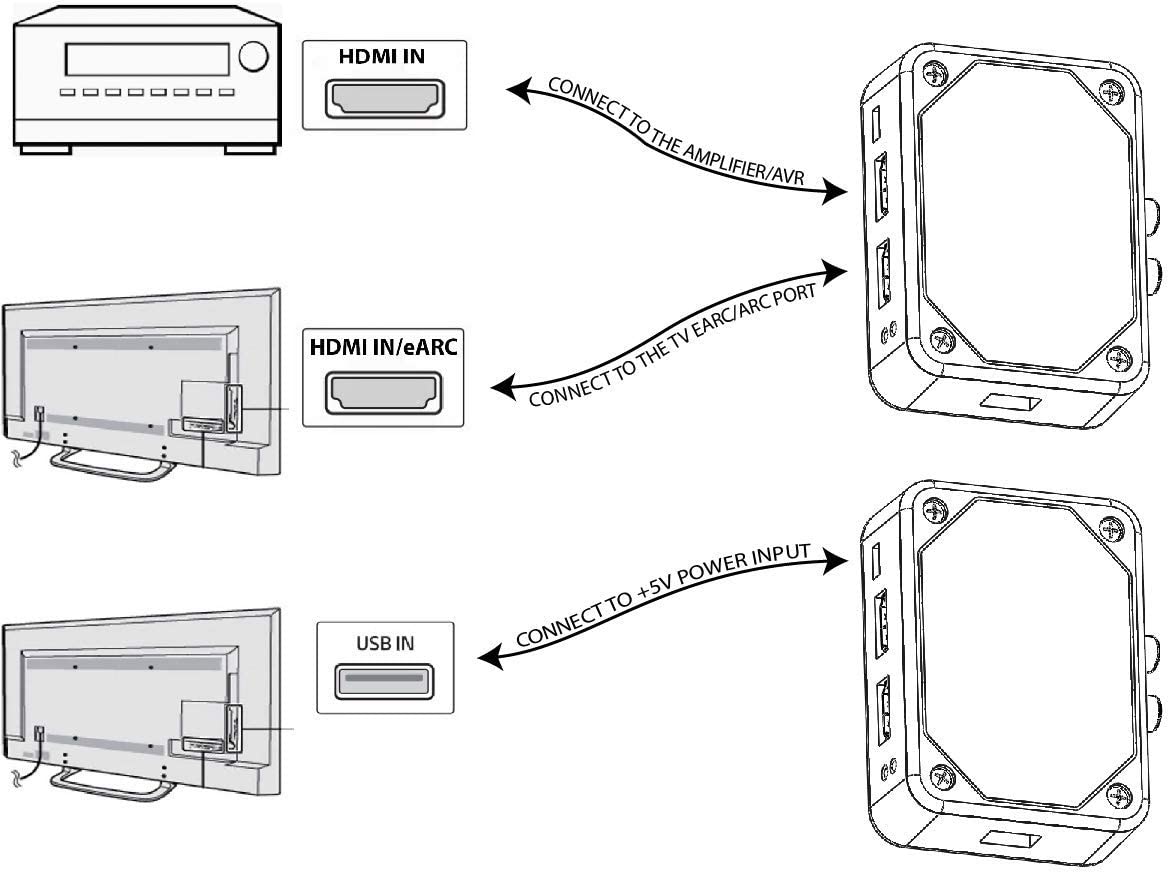
I went through the sharc site to learn how to set it up. It seems it makes the split after the eARC output from the TV so it would still be subject to the LG CX's hard pass through limitations (e.g. no DTS) and other possible firmware related issues. It basically "adds and eARC port" to a slightly older receiver that has arc or that has no arc at all (like the old onkyo I'm using at my pc).

SHARC receives audio from TV via eARC channel and converts the incoming audio formats suitable for the existing sound system that has no eARC support.


Additionally eARC audio using PCM can be output via the analog line-level outputs as well as head-phones output.

Connect your devices to the hdmi 2.1 ports of the LG CX (pc, ps5 for example). The LG CX has 4 ports but one has to be used for eARC audio out so that leaves 3 inputs.

Then you connect the eARC OUT hdmi of the LG CX to port 1 of the SHARC.
then
Connect sharc port 2 to a HDMI input on the AVR .. make sure it's NOT an ARC capable hdmi input. You can also go into the settings of the AVR and disable arc/eARC too.

Don't put any devices on the other hdmi inputs on the AVR.

Make sure you update the SHARC firmware.

61-7hBSJeRL._AC_SL1207_.jpg


The setup is very simple
  1. Connect eARC/ARC capable TV input port to the SHARC port 1) labeled “CONNECT TO TV eARC/ARC PORT”
  2. Connect one of the AVR/AMPLIFIER/SOUND DEVICE inputs to the SHARC port 2) labeled “CONNECT TO SOUND SYSTEM INPUT PORT”
  3. [OPTIONAL] Connect optical and analog audio outputs to their corresponding devices.
  4. Connect the USB MICRO power cable to a 5V/0.5A power source or to any of the available USB ports on your TV. Do not exceed 5V.
  5. Select the corresponding AVR/AMPLIFIER/SOUND DEVICE input port where SHARC is connected
  6. Remove any connections from AVR/AMPLIFIER/SOUND DEVICE output to the TV (to remove CEC loops)
  7. Turn on TV, ensure CEC control is enabled and eARC/ARC is active. CEC is sometimes called SimpLink/etc depending on TV model
  8. Start audio streaming source, e.g. Netflix / Prime video / .. and listen to audio

If the LG CX passthrough is still too screwed up to be usable due to poor implementation by LG that would really suck. You could revert to using the "phantom monitor trick" by making your receiver into a monitor in the nvidia settings and setting that monitor to be the hdmi audio but that is sloppy. It messes up my displayfusion window settings and saved window position profiles any time I turn the receiver off - for times that I only want to use headphones for example and not keep the hotplate of a receiver on for no reason. It will shuffle window positions every time you turn it on and off even without displayfusion considerations. I thought this TV would be the modern choice for hdmi 2.1 and audio pass through so I hope that it can make it happen or I would consider it disappointing. AFAIK the C9 has no such issues so why take a step backward?
 
Last edited:
Yes you should use Gaming mode for minimal latency (although there is some evidence it doesn't matter if you set HDMI to PC mode).

Hard to know what "dull and dim" means. Like not very bright? It's possible you are used to oversaturated colors and high brightness, which is the default setting on many monitors (showroom or vivid mode), so maybe you just need to get used to normal colors and normal brightness.

I understand, but I also tried my LG E6 2016 model game mode and even that looks way brighter and vivid compared to my CX game mode.

I feel like I have not got something set right. Another use on another forum stated that these Oleds usually need 4hrs or so of use to settle in and they will brighten up.

So far I only have about 2 hrs use.

I have a asus pg34 ultrawide 100hz. Is this monitor an upgrade? Im thinking about this monitor or the lg 38950.
I have both displays. But I only just got my CX and only have 2 hrs use. I still have to work things out on this display before I compare it to my LG 38GL950G.

But the only thing the 38GL950G will definitely win on currently, is the response and smoothness is far superior.
 
Back
Top