
Windows 11 Pro for Workstations not available anymore?

rigurat

Limp Gawd
2FA
Joined
Jun 1, 2010
Messages
291
I had Windows 10 Professional, then upgraded to 10 Pro for Workstations via the MS store app, I paid for it. Then when Windows 11 came out I did a clean install and got the Windows 11 Pro for Workstations in the MS app store, this time it was free (likely because of the previous purchase of the 10 Pro for Workstations upgrade).

I did clean install again recently, same PC, Same Windows 11, but now I don't see the Windows 11 Pro for Workstations in the Microsoft Store App anymore. Is it discontinued?

It seems the upgrade to Windows 11 Pro for Workstations is not available anymore. It doesn't show up anymore on the Microsoft App Store.

I'm currently on:

Windows 11 Pro
Version 21H2
OS build 22000.613
Windows Feature Experience Pack 1000.22000.613.0
Legit retail Windows 10 Professional product key, activated and good to go.

The search for Windows 11 Pro for Workstations in the Microsoft Store shows nothing now. Is it discontinued?
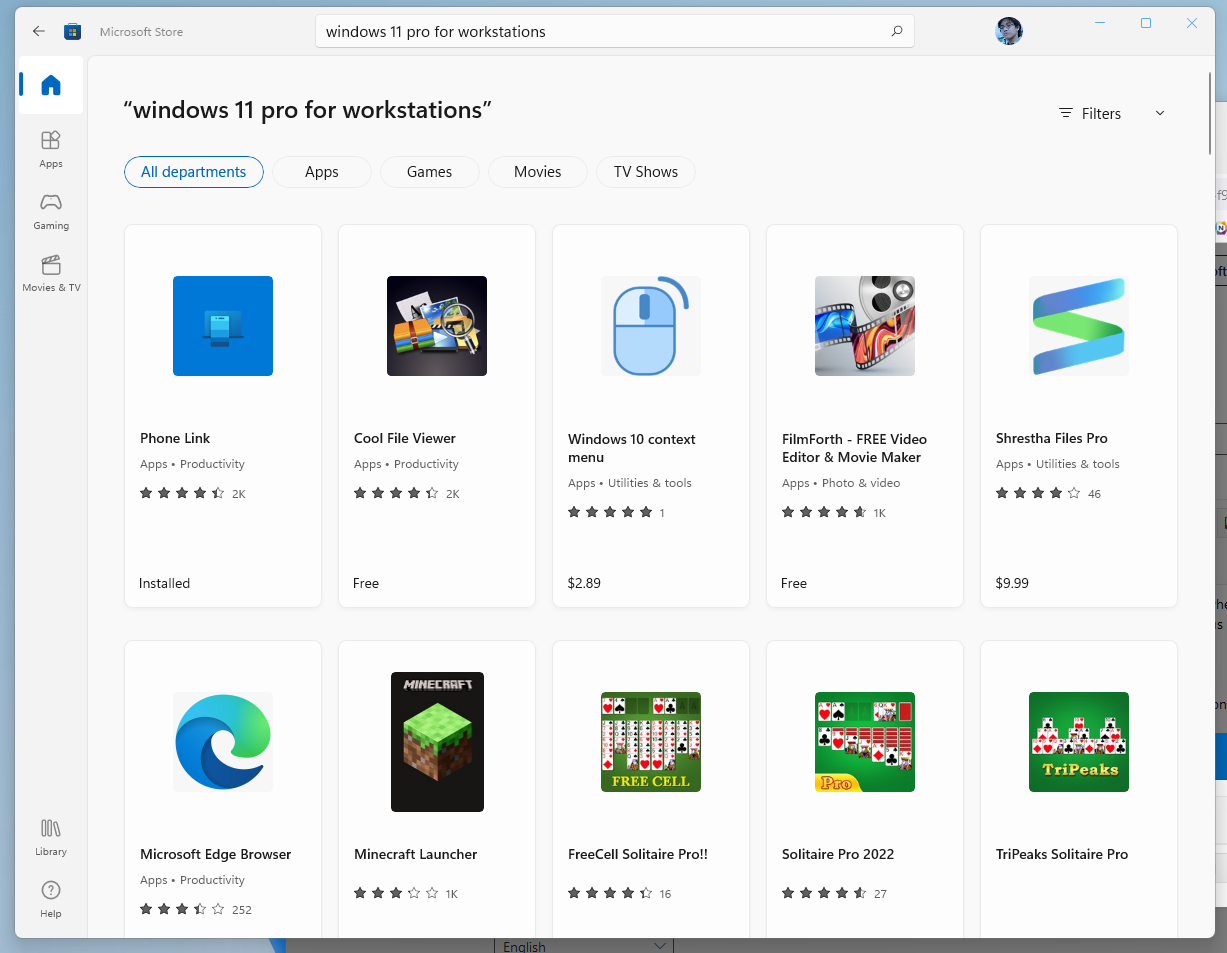
Screenshot 2022-05-08 112036.png


In past it was there and all I had to do was choose it and install it now it's gone!
 
yeah i think its now home, pro, ent and edu. i could be wrong as i do still find older workstation pages...
 
Strange because I was just running Windows 11 Pro for Workstations just before reformatting. I don't see why it would just be taken out.
 
Strange because I was just running Windows 11 Pro for Workstations just before reformatting. I don't see why it would just be taken out.
idk. some results say to nt enter a key, pick workstation and then activate after install.
 
idk. some results say to nt enter a key, pick workstation and then activate after install.

I installed Windows 11 Professional last time using the Windows 10 Professional product key, then installed Pro for Workstations via the MS app store, no fee charged because I had Windows 10 Pro for WS already. I don't see why it wouldn't work again.
 
Holy smokes! OK it IS indeed in the Microsoft App Store. Searching windows, windows 11 pro, windows 11 pro for workstations, workstations, does NOT show the upgrade in the front or even several pages down.

It turns out the search key needed was "upgrade"!

Screenshot 2022-05-09 163406.png


Well that's strange because I didn't have to do that last time. But oh well still free of charge because I already bought it.

@dbwillis thanks for the screenshot, it's what got me the idea to search "upgrade".
 
Holy smokes! OK it IS indeed in the Microsoft App Store. Searching windows, windows 11 pro, windows 11 pro for workstations, workstations, does NOT show the upgrade in the front or even several pages down.

It turns out the search key needed was "upgrade"!

View attachment 472147

Well that's strange because I didn't have to do that last time. But oh well still free of charge because I already bought it.

@dbwillis thanks for the screenshot, it's what got me the idea to search "upgrade".

Is there any reason for a 3700X 48GB Ram 6800XT owner to even bother with the upgrade?
 
Is there any reason for a 3700X 48GB Ram 6800XT owner to even bother with the upgrade?
The only possible thing would be ReFS, and that's janky as hell still. None of the other "features" you get are worth anything, IMO.
 
I will need to necro this because the exact same thing is happening to me again.

I reformatted and did a clean install and now I can't find out how to upgrade back to Windows 11 Pro for Workstations. It was already purchased.

I just need to install it back and I can't find it on the Microsoft Store. No link anywhere in my Microsoft account to download and install this already purchased upgrade.

Screenshot 2025-06-24 192005.jpg
 
So just firing up a new VM, but using my MSDN ISO

en-us_windows_11_business_editions_version_24h2_updated_june_2025_x64_dvd_4cf132a4.iso

ksnip_20250625-112108.png


Checking

en-us_windows_11_consumer_editions_version_24h2_updated_june_2025_x64_dvd_e743555f.iso, it also has the same options, so seems at least for MSDN images MS is just giving the same options.

Next - downloaded the Windows 11 image from https://www.microsoft.com/en-ca/software-download/windows11

And only had all the options (I do choose the "I do not have a product key" and Workstation is also there
1750873698837.png


1750873639858.png


So, I would say do a reinstall, do not enter your serial number during the install, install Pro for Workstation and then activate once Windows is installed.

Or, run the install again from a USB key, and do not enter a serial and see if you can upgrade to Pro Workstation.

Does your MS account show a product key anywhere for your Windows Pro Workstation?
 
Last edited:
it should be attached to the uefi and just work, but if not, ^^^^that. and if all else fails, im pretty sure i saw it in masgrave too....
 
So just firing up a new VM, but using my MSDN ISO

en-us_windows_11_business_editions_version_24h2_updated_june_2025_x64_dvd_4cf132a4.iso

View attachment 738024

Checking

en-us_windows_11_consumer_editions_version_24h2_updated_june_2025_x64_dvd_e743555f.iso, it also has the same options, so seems at least for MSDN images MS is just giving the same options.

Next - downloaded the Windows 11 image from https://www.microsoft.com/en-ca/software-download/windows11

And only had all the options (I do choose the "I do not have a product key" and Workstation is also there
View attachment 738027

View attachment 738025

So, I would say do a reinstall, do not enter your serial number during the install, install Pro for Workstation and then activate once Windows is installed.

Or, run the install again from a USB key, and do not enter a serial and see if you can upgrade to Pro Workstation.

Does your MS account show a product key anywhere for your Windows Pro Workstation?
Can this be done with a complete clean install from a freshly formatted drive? Is the USB you're using different from the one created by the Microsoft Media Creation tool?

My MS account shows no product key for the Pro for Workstations upgrade.

I bought it after installing Windows Pro years back.
 
How does Windows 11 Pro for Workstations compare to Windows 11 Enterprise LTSC?

I am looking for options that hopefully won't have desktop spyware as a feature, or candy crush reinstalled at every update. I have used Win 10 LTSC on workstations in the past, but it seems like now you can't get LTSC without a VLA, and my current employer is resistant to change and spending money.
Windows 11 Pro has some items for optimization, but the core is the same as Pro
https://www.elevenforum.com/t/windo...ions-vs-standard-win-11-pro.26092/post-465800

Windows 10/11 Pro for Workstations is a super-set of Windows 10/11 Pro supporting more CPUs, more RAM and some other hardware stuff like non-volatile RAM. Unless you have a workstation, you are not likely to notice much difference with the default configuration (balanced power plan). You could chose Ultimate power plan (hidden in Windows 10/11 Pro but can be enabled) and force your system to work always at maximum speed.

For work LTSC does require a VLA, you can not run it otherwise and if it is for work, get a VLA then, if the pricing makes sense. Otherwise it is Enterprise and you can do some OS cleaning to remove the bloat.
 
Last edited:
So just firing up a new VM, but using my MSDN ISO

en-us_windows_11_business_editions_version_24h2_updated_june_2025_x64_dvd_4cf132a4.iso

View attachment 738024

Checking

en-us_windows_11_consumer_editions_version_24h2_updated_june_2025_x64_dvd_e743555f.iso, it also has the same options, so seems at least for MSDN images MS is just giving the same options.

Next - downloaded the Windows 11 image from https://www.microsoft.com/en-ca/software-download/windows11

And only had all the options (I do choose the "I do not have a product key" and Workstation is also there
View attachment 738027

View attachment 738025

So, I would say do a reinstall, do not enter your serial number during the install, install Pro for Workstation and then activate once Windows is installed.

Or, run the install again from a USB key, and do not enter a serial and see if you can upgrade to Pro Workstation.

Does your MS account show a product key anywhere for your Windows Pro Workstation?
Thanks big time! This worked. But I had to download the multi edition ISO and USB it via Rufus. The Windows Media Creation tool does not have Pro for Workstations in it.

Strangely I had to use a generic product key because my current one didn't make it PfWS even though I bought the upgrade for it years ago.


It's amazing how the people in this forum are far more knowledgeable and competent than Microsofts own tech support. The tech support I spoke with didn't seem to know Pro for Workstations exists. He kept on insisting my OS is activated. I kept mentioning yes but it's not the upgrade I paid for.
 
Last edited:
Use the MCT tool; don't use it the default way of just running the executable.. Run it at the command line with some specific switches -
(for example below... I renamed the MCT file download to "MCT")

MCT.exe /Eula Accept /MediaLangCode en-US /Retail /MediaArch x64 /MediaEdition Enterprise

This will download the Enterprise/Pro version; not the "consumer" (core/home) ISO. Just use the generic GVLK key from MS when prompted

Windows 11 Enterprise
Windows 10 Enterprise
NPPR9-FWDCX-D2C8J-H872K-2YT43

Also appears there was a new ESD out there in MS land.. so the MCT pulls down that latest build ( 26100.4349 )

Then you can use some DISM commands and see what target editions the image supports switching to..


1751030342427.png


So then if you install enterprise using generic key.. you should then be able to do something similar to this to flip it :
(this prompts for reboot)

"dism /online /Set-Edition:professionalWorkstation /ProductKey:<Insert Key> /AcceptEula"

(ugh... f'ing emoji above... should be a "P" instead of the gd emoji)
 
Code tags ;). Use those whenever posting commands :).

Thanks!

I do stand corrected.. doesn't appear Set-Edition works with online images in client.. It worked in Windows Server.. so anywho lol

*edit*

slmgr /upk
slmgr /cpky
slmgr -ipk NRG8B-VKK3Q-CXVCJ-9G2XF-6Q84J
Reboot
 
Last edited:
Back
Top