• Some users have recently had their accounts hijacked. It seems that the now defunct EVGA forums might have compromised your password there and seems many are using the same PW here. We would suggest you UPDATE YOUR PASSWORD and TURN ON 2FA for your account here to further secure it. None of the compromised accounts had 2FA turned on.
    Once you have enabled 2FA, your account will be updated soon to show a badge, letting other members know that you use 2FA to protect your account. This should be beneficial for everyone that uses FSFT.

Vega Rumors

Pretty dickish responce. The way it reads you would think he dissasembledbefore testing without reaplying thermal paste. That being said it does seem odd that it is still thermal throttling that hard with a better cooler, especially since the strix 1080 and 1080ti benefit greatly from the extra cooling. Power draw must still be too high to be effectively cooled on air.
Heh, I got instantly banned when pointing out how his gtx 970 3.5gb test was bunk (he never entered the ram usage it affected). I was a member since 2002.
 
Impossible, cause a 1080ti by itself gives 3.50 to 4 bucks per card. 1 dollar more from an APU? I don't think Ryzen's APU will be 1/4 to 1/3 the performance of a 1080ti, that's at 1050 levels or rx560 levels. Those APU's just won't have the bandwidth to sustain that much performance.

Now if you were dual mining with the CPU doing other coins outside of what the 1080ti then it might be possible, haven't looked at coins that run off of CPU's so don't have much intel on that. But even then that is a pretty big amount for a CPU, haven't heard any coins that are CPU mineable that have that type of return.

For GPU mining if you can get 2-3 bucks a day, those are great GPU's to mine with right now.

That is what started the GPU mining crazy again.
I said 1700x and yes a little bit over $1 at the time with the 1080Ti. Nicehash will do different blockchain coins on different devices. Today I would expect that to be less due to lower rates.
 
I said 1700x and yes a little bit over $1 at the time with the 1080Ti. Nicehash will do different blockchain coins on different devices. Today I would expect that to be less due to lower rates.


geez that is really low, sending you a pm. oh sorry you ment 1 additional $ ok that is good. What coins are being mined on your CPU? Just pm me.

Those coins will be CPU mining only though, so those won't work with APU's.
 
Last edited:
geez that is really low, sending you a pm. oh sorry you ment 1 additional $ ok that is good. What coins are being mined on your CPU? Just pm me.

Those coins will be CPU mining only though, so those work with APU's.
I don't recall, system is not functional but my other Ryzen system if I get a chance tomorrow I can check. IRMA does not look too good and depending upon what it does can be rather interrupting.
 
I think they were analyzing it as a way of seeing if it was worth using these APU's to run mining rigs for that little bit extra of hashing.
For low effort mining perhaps, but many GPUs will fit in a single rig using risers while CPU/APU obviously won't scale. Maybe some sort of blade server as I can't imagine a smallish APU adding much in regards to mining.
 
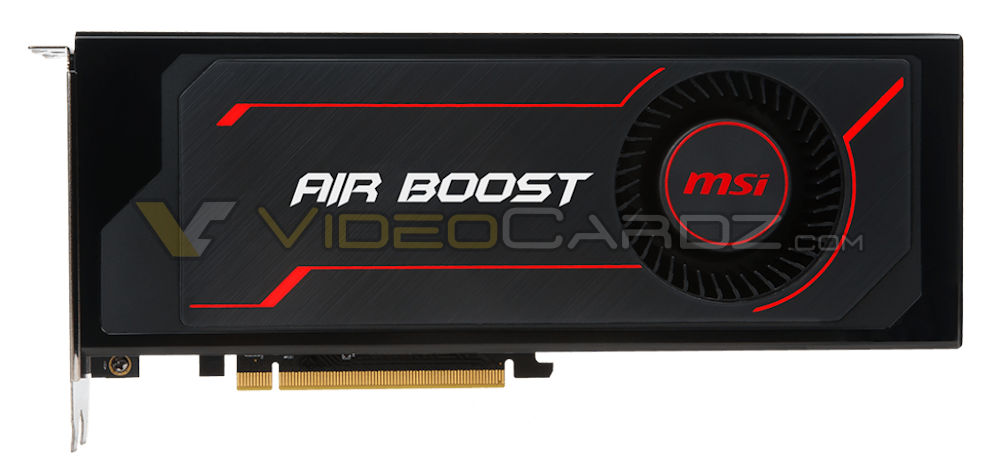
Custom Radeon RX Vega from MSI

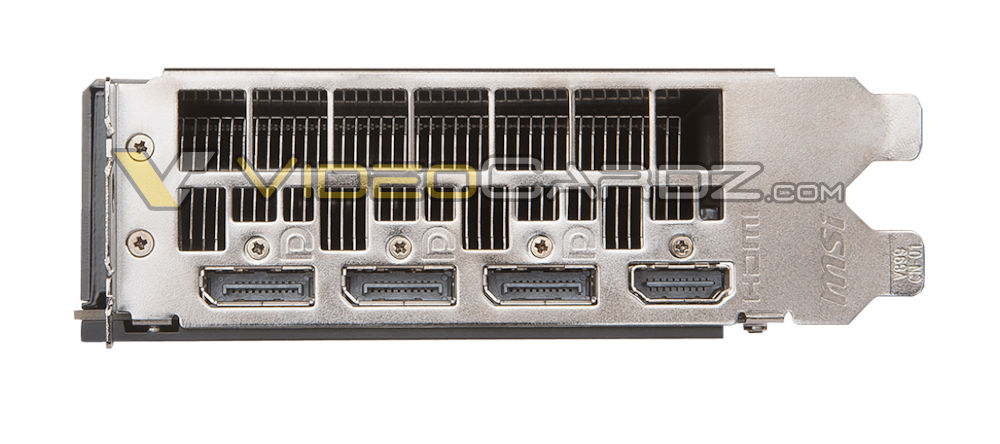
MSI’s own blower-type cooler for RX Vega. The name Air Boost comes from the I/O bracket which has more holes for better air exhaust.

MSI-Radeon-RX-Vega-64-AirBoost-front.jpg
MSI-Radeon-RX-Vega-64-AirBoost.jpg
 
Video card manufacturers did the same for the GTX 1080 in the cheaper variants. I think it looks tacky myself.

Yeah they just look cheap, a little bit of money on cooler design goes along ways, first impressions mean a lot in sales.
 
How it looks is irrelevant to how it performs. If looks matter that much don't have a window on your case. :whistle:
 
I am one of those people. Downloading now.


let us know how it goes, I'm thinking the drivers are just raw. Probably have to modify the drivers because of the longer pipelines, more latency with in the pipelines over two GPU's will throw syncing on the GPU's off.
 
let us know how it goes, I'm thinking the drivers are just raw. Probably have to modify the drivers because of the longer pipelines, more latency with in the pipelines over two GPU's will throw syncing on the GPU's off.
You're right. The drivers are raw. You can see some of the numbers I got here: https://hardforum.com/threads/rx-vega-owners-thread.1941944/page-12#post-1043228758

I was really hoping AMD would come through on this, but the performance I'm getting is not good. Maybe a future driver could fix this, I don't know, but they're not off to a good start.

EDIT: Somehow the AMD driver enabled Chill mode and that messed up performance. With chill disabled I'm getting nice performance.
 
Last edited:
don't the games need updates too to get the best performance?!

Potentially, however if a particular game was doing something that was non-conducive to multi-GPU- or even specifically to Crossfire- it would likely have been identified already. If we're seeing a performance delta when comparing Vega single vs. Vega Crossfire to say RX580 single vs. Crossfire, then those games seeing no scaling/negative scaling with Vega Crossfire likely need optimized drivers.

So more likely, this driver, while enabling baseline (i.e., 'we turned it on') Crossfire support for Vega, isn't optimized for many games, and those with multiple Vega GPUs will need to wait for further driver releases.
 
Wait wait wait. I'm sorry. The settings were wrong. Somehow the AMD driver enabled Chill, which I'm almost certain was disabled before but was On!!!

After disabling Chill I'm getting great performance. GTA V is now at over 100 fps 4K Very High. Far Cry Primal at around 60 fps with 4K Ultra settings. Rise of Tomb Rain 70 fps solid High settings.

Really sorry about that, I should have double checked things. Will continue benching and report back.
 
OK, now with Chill Mode off performance is much better (someone needs to tell AMD that bad performance is not "chill").

GTA V, 4K Max settings (except advanced) getting 75 fps.

Rise of the Tomb Raider, 4K High settings got 70 fps.

Far Cry Primal, 4K Very High settings got 65 fps.

Looks like Crossfire Vega can work for 4K.
 
Eh, he's got a flashed BIOS. If he had a 56 with a 56 BIOS or a 64 with a 64 BIOS and encountered regression I'd be concerned but flashing your BIOS to a 'better' card and then claiming regression is not indicative of the default product.

Not to mention, AFAICT, sample size of one is sample size of one.
 
Eh, he's got a flashed BIOS. If he had a 56 with a 56 BIOS or a 64 with a 64 BIOS and encountered regression I'd be concerned but flashing your BIOS to a 'better' card and then claiming regression is not indicative of the default product.

Not to mention, AFAICT, sample size of one is sample size of one.


well that shouldn't regress the performance, but having said that, how many times have we seen performance regression user mistakes lol.
 
well that shouldn't regress the performance, but having said that, how many times have we seen performance regression user mistakes lol.

Yes, exactly. You know I'm not a rabid supporter of AMD/RTG but one person claiming a problem does not a problem make. If we start seeing a lot more user reports that validate this instance then it may be time to take notice. I note that, after people discovered that the new driver activated the Chill feature (look in the owners thread) and switched it off, there doesn't seem to be any reports of regression of performance. In fact, Chill being re-activated may be a very valid reason for this person to have noticed regression.

Too many variable; too little information.
 
well that shouldn't regress the performance, but having said that, how many times have we seen performance regression user mistakes lol.
or maybe its like in the forza 7 thread, a user found that chill was enabled automatically when he installed 17.9.2...

edit: speeling
 
Last edited:
Not too much testing has been done with chill, performance impact/real gaming impact. Does it impact the gaming experience? How does it work with VR? I am not even sure why bother with it in the first place. It seems to be more applicable to cell phone gaming and mobile gaming when on the battery. Plus Chill should have a setting so you could adjust the minimum frame rate value and sensitivity to the amount of motion - meaning I just don't see ever using it at this time.

Radeon 64 LC, Powersaver mode, 4K, Alien isolation max settings with tweaks to increase shadows map size and something else I don't remember, frames limited to 60 fps (to keep in Freesync range). The benchmark never went below 59fps, pulling around 235w from the wall. I was very surprised on that result and that was without chill on, 17.9.1 drivers. Rendering a frame rate beyond your refresh rate of your monitor or Freesync range not only degrades the gaming experience with tearing, judder etc. but also just waste energy. Only time I can see rendering faster than the max sync rate of your monitor is if you use Fastsync with Nvidia hardware and you are rendering 2x+ over your refresh rate to reduce game latency which for me I would probably not see a significant enough improvement to bother.

I am just totally rethinking what makes better gaming for me and it is just not the average FPS which could be higher but yet has stuttering, missed frames etc. I am finding the 1% threshold or FPS (1% of the frame rate would be below given value) to be a more accurate indication from a numbers standpoint the gaming performance of a GPU. The .1% data I've seen recorded on various sites looks to be very inaccurate due to low sampling of data, I would say you would need 15min + of gaming to get a good .1% data point.
 
Back
Top