![[H]ard|Forum](/styles/hardforum/xenforo/logo_dark.png)
Navigation
Install the app
How to install the app on iOS
Follow along with the video below to see how to install our site as a web app on your home screen.
Note: This feature may not be available in some browsers.
More options
You are using an out of date browser. It may not display this or other websites correctly.
You should upgrade or use an alternative browser.
You should upgrade or use an alternative browser.
The Conroe Overclock Database. (Please read 1st post for posting instructions.)
- Thread starter mentok1982
- Start date
- Status
- Not open for further replies.


At first system was unstablle at FSB 400. Then I followed some tips:
- Leave PCI to Auto (instead of 100)
- Disable Legacy USB support
- And most importantly : increase vcore to 1.376
I left other voltages stock except vDimm +0.1
Now I understand why the e6400 and DS3 make a fine combo. I will not try anything higher on air since 58-59 coretemp is the most I will tolerate considering Intel suggest a max temp of 60.5. Nextstep is finding the lowest vcore at 3200 MHz.
User Name: Blurp
Stability: > 8 hrs Orthos
CPU name : E6400
OC: 3200MHz
Stepping: 6 B2
Week: L626
Code: A228
Vcore: 1.376
Cooling: air
Cooler brand/model: Zalman 9500
Motherboard: Gigabyte GA-965P-DS3
Bios Version: F5E
RAM brand: Mushkin
RAM rated speed: 6400
RAM actual speed: 800
Latency: 5-5-5-12 1.9v

- Leave PCI to Auto (instead of 100)
- Disable Legacy USB support
- And most importantly : increase vcore to 1.376
I left other voltages stock except vDimm +0.1
Now I understand why the e6400 and DS3 make a fine combo. I will not try anything higher on air since 58-59 coretemp is the most I will tolerate considering Intel suggest a max temp of 60.5. Nextstep is finding the lowest vcore at 3200 MHz.
User Name: Blurp
Stability: > 8 hrs Orthos
CPU name : E6400
OC: 3200MHz
Stepping: 6 B2
Week: L626
Code: A228
Vcore: 1.376
Cooling: air
Cooler brand/model: Zalman 9500
Motherboard: Gigabyte GA-965P-DS3
Bios Version: F5E
RAM brand: Mushkin
RAM rated speed: 6400
RAM actual speed: 800
Latency: 5-5-5-12 1.9v

nicepun
2[H]4U
- Joined
- Apr 24, 2005
- Messages
- 2,208
Here my entry for high OC, I'm still working on my highest stable OC:
User Name: nicepun
Stability: N/A
CPU name : E6600
OC: 4006MHz
Stepping: 6 B2
Week: L627
Code: A795
Vcore: 1.675
Cooling: Water
Cooler brand/model: A1-Cooling
Motherboard: Asus P5W DH Deluxe
Bios Version: 1201
RAM brand: Patriot
RAM rated speed: 8000
RAM actual speed: 890
Latency: 4-4-4-4 2.4v

And here's a 32M SuperPI run at a little bit lower OC:

User Name: nicepun
Stability: N/A
CPU name : E6600
OC: 4006MHz
Stepping: 6 B2
Week: L627
Code: A795
Vcore: 1.675
Cooling: Water
Cooler brand/model: A1-Cooling
Motherboard: Asus P5W DH Deluxe
Bios Version: 1201
RAM brand: Patriot
RAM rated speed: 8000
RAM actual speed: 890
Latency: 4-4-4-4 2.4v

And here's a 32M SuperPI run at a little bit lower OC:

Chris Lakies
Limp Gawd
- Joined
- Feb 17, 2005
- Messages
- 395
I have a week 27 E6300 but not all the components yet to test. I will post results hopefully next week.
This is the code on the heat spreader:
SL9SA Malay
L627A440
This is the code on the heat spreader:
SL9SA Malay
L627A440
this reply is for user donnyjepp. Seems like your voltage (1.4) is pretty high for a week 27. Have you tried it at lower voltage? say around 1.35. And was it prime stable?
Actually I should update my sig and stats here. I was able to run my chip dual prime stable for over 6 hours now under 1.36V instead of 1.38. What did I do differently? I manually set the VDIMM (+0.1) and northbridge voltage and fsb voltage (+0.1V). It seems with the DS3 and the F4 bios, setting things to normal will cause bios to increase voltage incrementally with FSB.
Actually I should update my sig and stats here. I was able to run my chip dual prime stable for over 6 hours now under 1.36V instead of 1.38. What did I do differently? I manually set the VDIMM (+0.1) and northbridge voltage and fsb voltage (+0.1V). It seems with the DS3 and the F4 bios, setting things to normal will cause bios to increase voltage incrementally with FSB.
new one of course. The week 28 are getting mad overclocks at xtremesystems e6600, e6400, you name it.
where are you buying your chips to have the option of choosing? And where can I get week 28?
I picked them up off newegg, got 3 week 28's and one week 26. I'm keeping one, and the others already are up on ebay.
mentok1982
Supreme [H]ardness
- Joined
- Sep 17, 2004
- Messages
- 4,385
nooh said:Who has the supertalant modules?
They mentioned in the bottom where mentok1982 is showing what brands people are using but when i searched the table i cant find it.
Weird
RogueR1 has the Super Talent RAM. He has the E6300 processor.
I am also using Super Talent T800UX2GC4, nort in the data base yet but my clocks are on this pagenooh said:Who has the supertalant modules?
They mentioned in the bottom where mentok1982 is showing what brands people are using but when i searched the table i cant find it.
Weird
mentok1982
Supreme [H]ardness
- Joined
- Sep 17, 2004
- Messages
- 4,385
Labor day weekend, shmabor lay feewend.
chrisf6969
[H]F Junkie
- Joined
- Oct 27, 2003
- Messages
- 9,011
Updated my previous post: http://www.hardforum.com/showpost.php?p=1029896409&postcount=385
with new information.
New screenshot, faster ram speed (changed ratio), less vcore, but same CPU speed though
with new information.
New screenshot, faster ram speed (changed ratio), less vcore, but same CPU speed though
cambrian said:this reply is for user donnyjepp. Seems like your voltage (1.4) is pretty high for a week 27. Have you tried it at lower voltage? say around 1.35. And was it prime stable?
Actually I should update my sig and stats here. I was able to run my chip dual prime stable for over 6 hours now under 1.36V instead of 1.38. What did I do differently? I manually set the VDIMM (+0.1) and northbridge voltage and fsb voltage (+0.1V). It seems with the DS3 and the F4 bios, setting things to normal will cause bios to increase voltage incrementally with FSB.
It was prime stable for 4 hours in the original location (up on a table) with the FSB at 350 but then I moved my PC under the desk and it got very not stable, was basically hard freezing at random, was never up and running after I turned my back on it for a couple hours. Since then I dropped the FSB by 15 and it seems to have settled down.
Let me try dropping the voltage a hair. I was sort of wondering why it was running so high without adjustments. I should also note that throughout the Prime95 run where it was fine for 4 hours straight at 350FSB I was seeing core temps approaching 67C, quite toasty.
Edit: Yeah that helped my temps and stability considerably! Set the CPU voltage to 1.375 and my cores are 5-7C cooler. I shall stress test some more.
chrisf6969
[H]F Junkie
- Joined
- Oct 27, 2003
- Messages
- 9,011
donnyjepp said:It was prime stable for 4 hours in the original location (up on a table) with the FSB at 350 but then I moved my PC under the desk and it got very not stable, was basically hard freezing at random, was never up and running after I turned my back on it for a couple hours. Since then I dropped the FSB by 15 and it seems to have settled down.
Let me try dropping the voltage a hair. I was sort of wondering why it was running so high without adjustments. I should also note that throughout the Prime95 run where it was fine for 4 hours straight at 350FSB I was seeing core temps approaching 67C, quite toasty.
Yeah, I kept raising my vcore initially trying to eliminate the instability, until I realized it was the NB. Once I straightened that out. I realized my CPU hits 3Ghz at 1.356v (in BIOS) which under in Windows reads at 1.328 (default voltage after droop). And lowering my voltage from 1.4v to 1.356 dropped me about 2-3C under load!
User Name: Na'Roon
Stability: 5hr 57min
CPU: E6600
OC: 3379
Stepping: 6 B2
Week: L627
Code: A795
Vcore: 1.500
Cooling: Zalman CNPS9500
Motherboard: ASUS P5W DH Deluxe
Bios Version: 1305
RAM brand: Corsair CM2X1024-6400
RAM rated speed: 6400
RAM actual speed: 375
Latency: 5-6-6-18

Stability: 5hr 57min
CPU: E6600
OC: 3379
Stepping: 6 B2
Week: L627
Code: A795
Vcore: 1.500
Cooling: Zalman CNPS9500
Motherboard: ASUS P5W DH Deluxe
Bios Version: 1305
RAM brand: Corsair CM2X1024-6400
RAM rated speed: 6400
RAM actual speed: 375
Latency: 5-6-6-18
importpsycho
n00b
- Joined
- Oct 14, 2005
- Messages
- 50
what happened to the chart?
priming E6400 @ 3.7GHZ
I'll post pics in 4 hours
priming E6400 @ 3.7GHZ
I'll post pics in 4 hours
PC Surgeon
Limp Gawd
- Joined
- Dec 18, 2005
- Messages
- 292
importpsycho said:what happened to the chart?
Ditto.
mentok1982
Supreme [H]ardness
- Joined
- Sep 17, 2004
- Messages
- 4,385
importpsycho said:what happened to the chart?
The pics are loading really slow. Thanks Imageshack!
I am going to update the database and upload new pics right now.
mentok1982
Supreme [H]ardness
- Joined
- Sep 17, 2004
- Messages
- 4,385
They are loading now.
User Name: SLiCkFX
Stability: 8hrs+ Orthos
CPU: E6300
OC: 3.36ghz
Stepping: 6 B2
Week: L625
Code: A705
Vcore: 1.38125
Cooling: Air
Cooling brand/model: Scythe Ninja
Motherboard: Gigabyte 965P-DS3
Bios Version: F4E
RAM Brand: G.Skill
RAM rated speed: 6400
RAM actual speed: 960
Latency: 5-5-5-15
http://valid.x86-secret.com/show_oc?id=118014

Stability: 8hrs+ Orthos
CPU: E6300
OC: 3.36ghz
Stepping: 6 B2
Week: L625
Code: A705
Vcore: 1.38125
Cooling: Air
Cooling brand/model: Scythe Ninja
Motherboard: Gigabyte 965P-DS3
Bios Version: F4E
RAM Brand: G.Skill
RAM rated speed: 6400
RAM actual speed: 960
Latency: 5-5-5-15
http://valid.x86-secret.com/show_oc?id=118014
Minor speed bump...I don't really like to up the vcore, so this will probably be my last entry.
User Name: Jodiuh
Stability: 10+ Orthos (Medium - High IMO)
Temps: Speedfan
Cooling: Air
Stacker 810 w/ 4 Scythe "E" 49CFM, 21DB
Zalman 9500 High
Jing Ting NB Cooler
Ambient: 24C
Idle: 32C (Outlook, Firefox, etc.)
Load: 54C (Orthos 10+ hours)
E6400: 2.130GHz
OC: 3.392GHz
Stepping: 6 B2
Week: L625
Code: A301
Vcore: 1.350V
Mobo: Gigabyte GA-965P-DS3
Bios Version: F4C
Bus: 424
FSB: +0.1V
MCH: +0.2V
Ram: Corsair DDR2-6400C4
Speed: 848Mhz (424*2)
Latency: 5-5-5-15
Vdimm: 2.1V

Case and cooling shots below:
 ---
---  ---
--- 
User Name: Jodiuh
Stability: 10+ Orthos (Medium - High IMO)
Temps: Speedfan
Cooling: Air
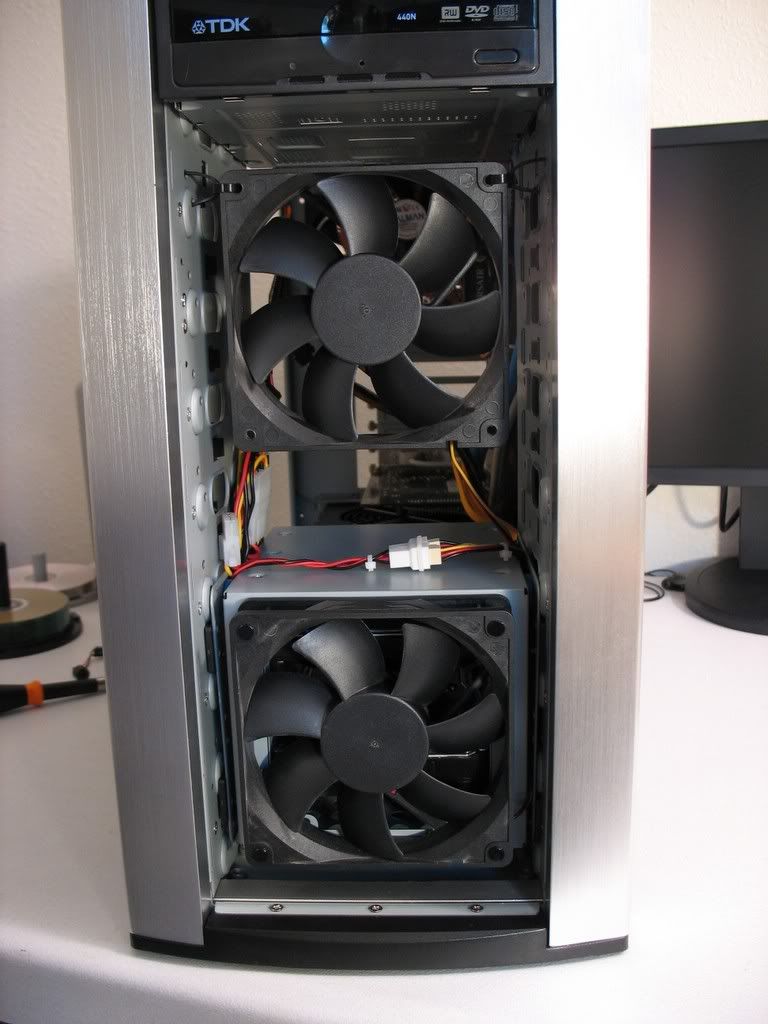
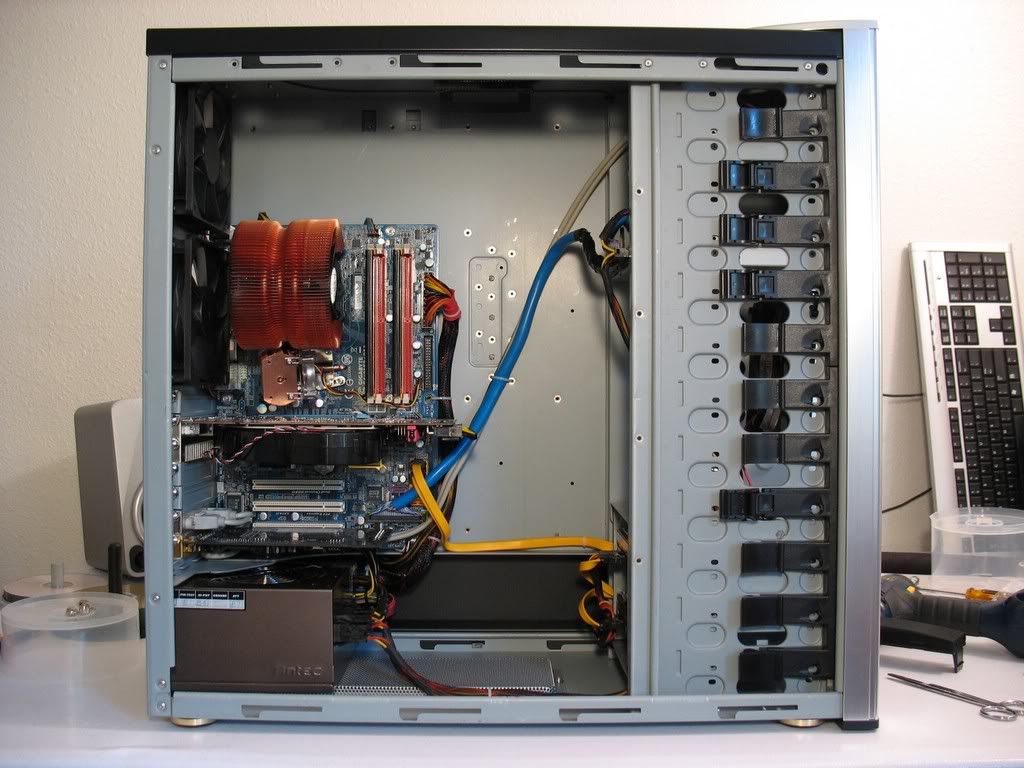
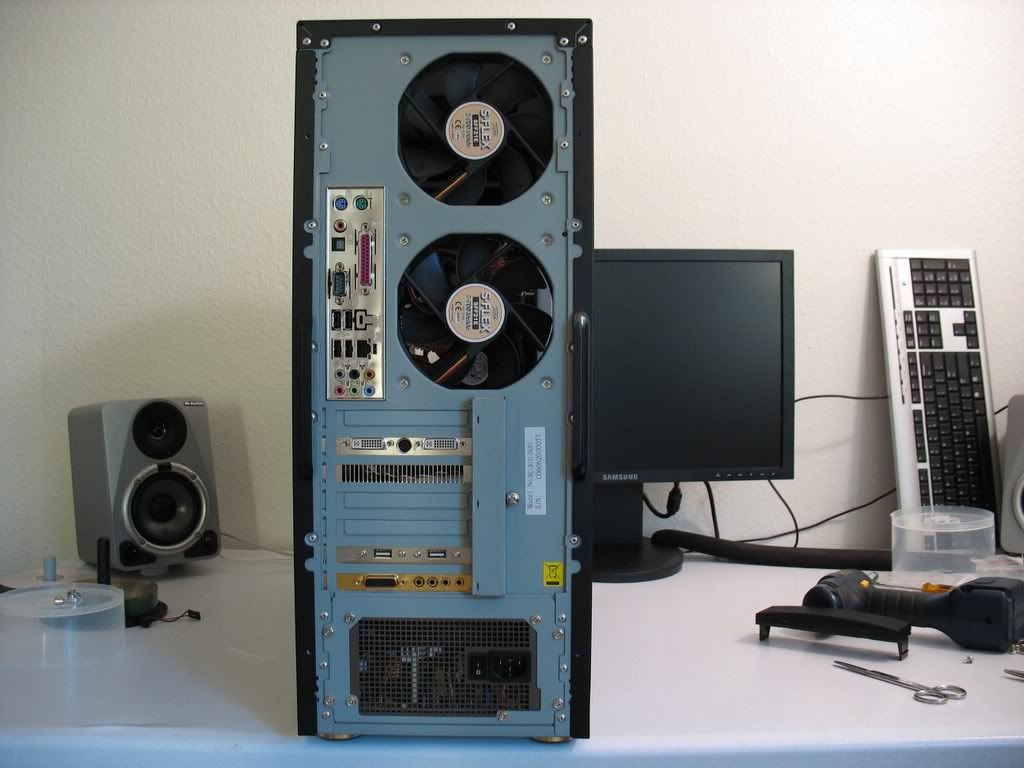
Stacker 810 w/ 4 Scythe "E" 49CFM, 21DB
Zalman 9500 High
Jing Ting NB Cooler
Ambient: 24C
Idle: 32C (Outlook, Firefox, etc.)
Load: 54C (Orthos 10+ hours)
E6400: 2.130GHz
OC: 3.392GHz
Stepping: 6 B2
Week: L625
Code: A301
Vcore: 1.350V
Mobo: Gigabyte GA-965P-DS3
Bios Version: F4C
Bus: 424
FSB: +0.1V
MCH: +0.2V
Ram: Corsair DDR2-6400C4
Speed: 848Mhz (424*2)
Latency: 5-5-5-15
Vdimm: 2.1V
Case and cooling shots below:
 ---
---  ---
--- 
Schmiggy_JK23
Gawd
- Joined
- Aug 16, 2004
- Messages
- 636
*edit* figured it out
thenemesis
Limp Gawd
- Joined
- Mar 30, 2006
- Messages
- 252
Here come's one really long post, as I've been busy
User Name: thenemesis
Stability: 12 hours Orthos
CPU name E6600
OC: 3604
Stepping: 6 B2
Week: L627
Code: A685
Vcore: 1.4875v
Cooling: Water
Cooler brand/model:Corsair Nautilus 500
Motherboard: Asus P5W DH
Bios Version: 1101
RAM brand: G. SKill
RAM rated speed: 6400
RAM actual speed: 800
Latency: 4-4-4-12

User Name: thenemesis
Stability: 12 hours Orthos
CPU name E6600
OC: 3505
Stepping: 6 B2
Week: L626
Code: A080
Vcore: 1.450v
Cooling: Water
Cooler brand/model:Corsair Nautilus 500
Motherboard: Asus P5W DH
Bios Version: 1101
RAM brand: G. SKill
RAM rated speed: 6400
RAM actual speed: 778
Latency: 4-4-4-12

User Name: thenemesis
Stability: 12 hours Orthos
CPU name E6600
OC: 3208
Stepping: 6 B2
Week: L624
Code: A819
Vcore: 1.50v
Cooling: Water
Cooler brand/model:Corsair Nautilus 500
Motherboard: Asus P5W DH
Bios Version: 1101
RAM brand: G. SKill
RAM rated speed: 6400
RAM actual speed: 712
Latency: 4-4-4-12

User Name: thenemesis
Stability: 12 hours Orthos
CPU name E6600
OC: 3604
Stepping: 6 B2
Week: L627
Code: A685
Vcore: 1.4875v
Cooling: Water
Cooler brand/model:Corsair Nautilus 500
Motherboard: Asus P5W DH
Bios Version: 1101
RAM brand: G. SKill
RAM rated speed: 6400
RAM actual speed: 800
Latency: 4-4-4-12
User Name: thenemesis
Stability: 12 hours Orthos
CPU name E6600
OC: 3505
Stepping: 6 B2
Week: L626
Code: A080
Vcore: 1.450v
Cooling: Water
Cooler brand/model:Corsair Nautilus 500
Motherboard: Asus P5W DH
Bios Version: 1101
RAM brand: G. SKill
RAM rated speed: 6400
RAM actual speed: 778
Latency: 4-4-4-12
User Name: thenemesis
Stability: 12 hours Orthos
CPU name E6600
OC: 3208
Stepping: 6 B2
Week: L624
Code: A819
Vcore: 1.50v
Cooling: Water
Cooler brand/model:Corsair Nautilus 500
Motherboard: Asus P5W DH
Bios Version: 1101
RAM brand: G. SKill
RAM rated speed: 6400
RAM actual speed: 712
Latency: 4-4-4-12
importpsycho
n00b
- Joined
- Oct 14, 2005
- Messages
- 50
User Name: importpsycho
Stability: dual SP2004 7hours+
CPU name E6400
OC: 3.6ghz
Stepping: B2
Week: L624
Code: A768
Vcore: 1.48
Cooling: Air
Cooler brand/model: Scythe Ninja
Motherboard: Gigabyte GA-965P-DS3
Bios Version: F4
RAM brand: Team Group
RAM rated speed: 5300
RAM actual speed: 900
Latency: 4-4-4-8

Stability: dual SP2004 7hours+
CPU name E6400
OC: 3.6ghz
Stepping: B2
Week: L624
Code: A768
Vcore: 1.48
Cooling: Air
Cooler brand/model: Scythe Ninja
Motherboard: Gigabyte GA-965P-DS3
Bios Version: F4
RAM brand: Team Group
RAM rated speed: 5300
RAM actual speed: 900
Latency: 4-4-4-8


mentok1982
Supreme [H]ardness
- Joined
- Sep 17, 2004
- Messages
- 4,385
mICKEL said:Same setup, just a new mobo from RMA.

This G.Skill 2GBZX stinks bad with a Conroe/Alendale
Usually I can't trust CPU-Z when it comes to voltage readouts. So what is your voltage?
And is your BIOS version still 0901?
anotherFNG
n00b
- Joined
- Aug 4, 2004
- Messages
- 14
User Name: anotherFNG
Stability: 5+ hours Orthos
Processor Model: E6400 Allendale 2.13GHz
OC Speed: 3.40 GHz (425MHz FSB, 1:1, +59% OC)
Stepping: 6 B2
Week: L624
Code: A851
Vcore: 1.4625v BIOS
Cooling: Air
Cooler brand/model: ThermalRight XP120 w/ Delta GFB220CFM
Motherboard: ASUS P5B (Vanilla)
Bios Version: 0309
RAM brand: Corsair
RAM rated speed: 6400
RAM actual speed: 830MHz
Latency: 5-5-5-12 @ 2.0v
The P5B is my first attempt at OCing and this board is really a pain in
that it's unstable for unknown reasons at many FSB settings. It's unstable
at 333, 350, 400, yet stable at 415, 425.
P5B vanilla owners- please share your stable FSB settings. I came THIS close
to giving up on it and getting a DS3 instead before finding help online
from others' experiences with this board.
ASUS monitor CPU temps are plain wrong. People in other forums have been
remounting their coolers over and over. I almost swapped my XP120 with
the Intel stock but thankfully I checked forums first.
Everest Home edition is out of date and doesn't work with this setup.
However, Everest Ultimate edition will detect the temps per core and I'm
much more inclined to believe the results.
The Delta is setup to launch the air out of the case from the CPU. It's
the dual counter rotating 220CFM model. Idle temps are 45-46C and load
they reach 57-58C. Ambient room temp is pretty hot though - 83F.
Stable BIOS config settings:
3.318GHz
GHz CPU Freq: 415
Memory Freq: DDR2-830
PCI-E 100
PCI 33.33
Spread Spectrum Off
Memory Volt 1.9
CPU Volt 1.4
FSB Termination Volt 1.3
3.400GHz
CPU Freq: 425
Memory Freq: DDR2-850
PCI-E 100
PCI 33.33
Spread Spectrum Off
Memory Volt 2.0
CPU Volt 1.4625
FSB Termination Volt 1.4


Stability: 5+ hours Orthos
Processor Model: E6400 Allendale 2.13GHz
OC Speed: 3.40 GHz (425MHz FSB, 1:1, +59% OC)
Stepping: 6 B2
Week: L624
Code: A851
Vcore: 1.4625v BIOS
Cooling: Air
Cooler brand/model: ThermalRight XP120 w/ Delta GFB220CFM
Motherboard: ASUS P5B (Vanilla)
Bios Version: 0309
RAM brand: Corsair
RAM rated speed: 6400
RAM actual speed: 830MHz
Latency: 5-5-5-12 @ 2.0v
The P5B is my first attempt at OCing and this board is really a pain in
that it's unstable for unknown reasons at many FSB settings. It's unstable
at 333, 350, 400, yet stable at 415, 425.
P5B vanilla owners- please share your stable FSB settings. I came THIS close
to giving up on it and getting a DS3 instead before finding help online
from others' experiences with this board.
ASUS monitor CPU temps are plain wrong. People in other forums have been
remounting their coolers over and over. I almost swapped my XP120 with
the Intel stock but thankfully I checked forums first.
Everest Home edition is out of date and doesn't work with this setup.
However, Everest Ultimate edition will detect the temps per core and I'm
much more inclined to believe the results.
The Delta is setup to launch the air out of the case from the CPU. It's
the dual counter rotating 220CFM model. Idle temps are 45-46C and load
they reach 57-58C. Ambient room temp is pretty hot though - 83F.
Stable BIOS config settings:
3.318GHz
GHz CPU Freq: 415
Memory Freq: DDR2-830
PCI-E 100
PCI 33.33
Spread Spectrum Off
Memory Volt 1.9
CPU Volt 1.4
FSB Termination Volt 1.3
3.400GHz
CPU Freq: 425
Memory Freq: DDR2-850
PCI-E 100
PCI 33.33
Spread Spectrum Off
Memory Volt 2.0
CPU Volt 1.4625
FSB Termination Volt 1.4
mentok1982
Supreme [H]ardness
- Joined
- Sep 17, 2004
- Messages
- 4,385
This is dedicated to one of my heroes, one my favorite people on the planet, Steve Irwin.

I was planning on going to Australia in the future to visit Australia Zoo and now I know that I
will go there and experience the legacy that this great man has left.
I was planning on going to Australia in the future to visit Australia Zoo and now I know that I
will go there and experience the legacy that this great man has left.
FirePhoenixctk
n00b
- Joined
- Sep 4, 2005
- Messages
- 63
User Name: FirePhoenixCtk
Stability: 6 hours orthos
CPU name e6600
OC: 3500mhz
Stepping: 6 b2
Week: L623
Code: A550
Vcore: 1.44
Cooling: water
Cooler brand/model: swiftech storm
Idle:40
load:52
Motherboard: Gigabyte GA-965P-DS4
Bios Version:f3
RAM brand: geil
RAM rated speed: 6400
RAM actual speed: 780
Latency: 4-4-4-12
dimm voltage: 2.1

Stability: 6 hours orthos
CPU name e6600
OC: 3500mhz
Stepping: 6 b2
Week: L623
Code: A550
Vcore: 1.44
Cooling: water
Cooler brand/model: swiftech storm
Idle:40
load:52
Motherboard: Gigabyte GA-965P-DS4
Bios Version:f3
RAM brand: geil
RAM rated speed: 6400
RAM actual speed: 780
Latency: 4-4-4-12
dimm voltage: 2.1

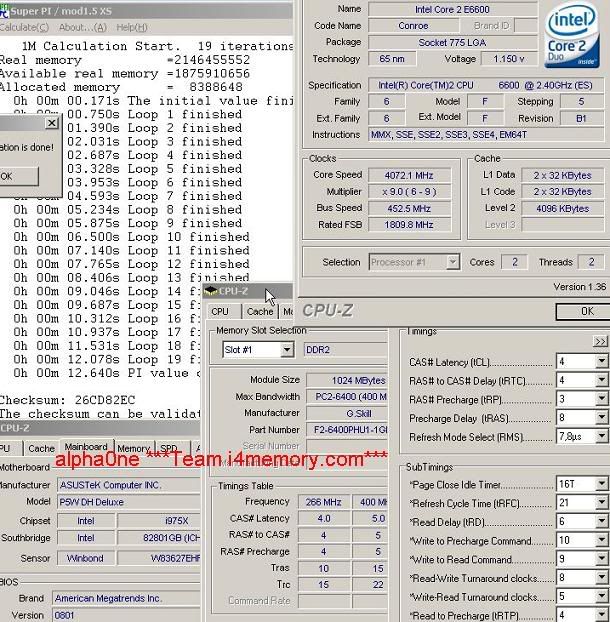
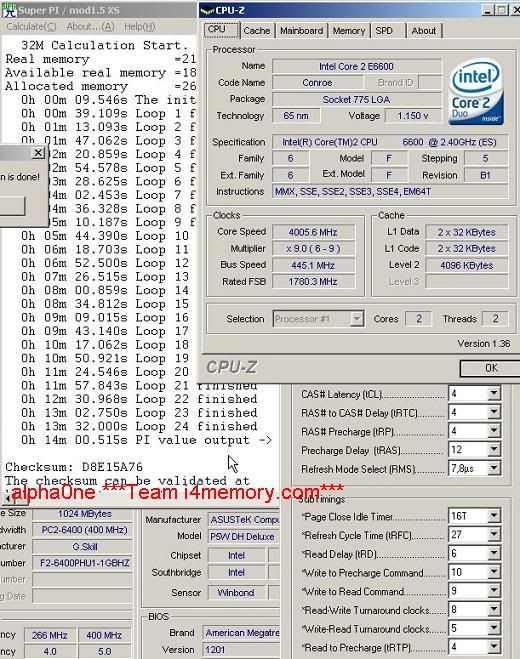
Not 100% stable but a nice OC for an E6600
User Name: alpha0ne
Stability: 1M and 32M Super Pi
CPU name E6600
OC: 4072MHz
Stepping: 6 B1
Week: L617A
Code: A0745
Vcore: 1.6v
Cooling: Water
Cooler brand/model:Apex with Storm Block
Motherboard: Asus P5W DH
Bios Version: 801
RAM brand: G. SKill
RAM rated speed: 6400
RAM actual speed: 800
Latency: 4-4-4-12
1M
32M
User Name: alpha0ne
Stability: 1M and 32M Super Pi
CPU name E6600
OC: 4072MHz
Stepping: 6 B1
Week: L617A
Code: A0745
Vcore: 1.6v
Cooling: Water
Cooler brand/model:Apex with Storm Block
Motherboard: Asus P5W DH
Bios Version: 801
RAM brand: G. SKill
RAM rated speed: 6400
RAM actual speed: 800
Latency: 4-4-4-12
1M
32M
Vcore is 1.4v, BIOS is 1201.mentok1982 said:Usually I can't trust CPU-Z when it comes to voltage readouts. So what is your voltage?
And is your BIOS version still 0901?
AngrySheep
n00b
- Joined
- Sep 3, 2006
- Messages
- 35
CPU name E6300
OC: 3010MHz
Stepping: 6 B2
Week: L623
Code: A865
Vcore: 1.3625v
Vdimm: 2.25v
NB/MCH: 1.45v
Cooling: air
Cooler brand/model: Zalman 9500
Motherboard: Asus P5B Deluxe WIFI
Bios Version: 0507
RAM brand: PNY
RAM rated speed: 6400 (although SPD info shows 5300)
RAM actual speed: 860
Latency: 4-4-4-12
running orthos on large FFT and an instance of prime on blend @ 6 hours 30 minutes right now. load temps 51-52c. vcore a little higher than most, but tolerable. overall very happy considering i had written this chip off as a dud. screen shot to follow
OC: 3010MHz
Stepping: 6 B2
Week: L623
Code: A865
Vcore: 1.3625v
Vdimm: 2.25v
NB/MCH: 1.45v
Cooling: air
Cooler brand/model: Zalman 9500
Motherboard: Asus P5B Deluxe WIFI
Bios Version: 0507
RAM brand: PNY
RAM rated speed: 6400 (although SPD info shows 5300)
RAM actual speed: 860
Latency: 4-4-4-12
running orthos on large FFT and an instance of prime on blend @ 6 hours 30 minutes right now. load temps 51-52c. vcore a little higher than most, but tolerable. overall very happy considering i had written this chip off as a dud. screen shot to follow
AngrySheep
n00b
- Joined
- Sep 3, 2006
- Messages
- 35
called it quits after 13 hours, same settings as above. anyone host my screen capture, i'm having issues with imageshack.
<-------------------------digital photo n00bie
<-------------------------digital photo n00bie
mentok1982
Supreme [H]ardness
- Joined
- Sep 17, 2004
- Messages
- 4,385
I cried so much last night, I only got about 2 hours of sleep.
Still sad.
KEY:
Green=official result (all columns filled)
Black and bold=not official result

Highest overclocks that have not been proven to be stable:

Still sad.
KEY:
Green=official result (all columns filled)
Black and bold=not official result
Highest overclocks that have not been proven to be stable:
nicepun
2[H]4U
- Joined
- Apr 24, 2005
- Messages
- 2,208
I first tried it @ 1.550VCORE and it went through, then @ 1.525VCORE and eventually found that 1.500VCORE was the sweet spot. I'll do more testing but for now this is my entry. All VCORE mentioned are set in BIOS so take into account the vdroop.
User Name: nicepun
Stability: 4hours+ of ORTHOS
CPU name: E6600
OC: 3604MHz
Stepping: 6 B2
Week: L627
Code: A795
Vcore: 1.500
Cooling: Water
Cooler brand/model: 1A-Cooling 1A-HV4
Motherboard: ASUSTek P5W DH Deluxe (NO MODS)
Bios Version: 1201
RAM brand: Patriot
RAM rated speed: 8000
RAM actual speed: 6400 (800)
Latency: 3-3-3-4
Other Settings:
Vdimm: 2.30v
FSB: 1.40v
MCH: 1.55v
ICH: 1.20v
1.500VCORE in BIOS

1.550VCORE in BIOS

User Name: nicepun
Stability: 4hours+ of ORTHOS
CPU name: E6600
OC: 3604MHz
Stepping: 6 B2
Week: L627
Code: A795
Vcore: 1.500
Cooling: Water
Cooler brand/model: 1A-Cooling 1A-HV4
Motherboard: ASUSTek P5W DH Deluxe (NO MODS)
Bios Version: 1201
RAM brand: Patriot
RAM rated speed: 8000
RAM actual speed: 6400 (800)
Latency: 3-3-3-4
Other Settings:
Vdimm: 2.30v
FSB: 1.40v
MCH: 1.55v
ICH: 1.20v
1.500VCORE in BIOS
1.550VCORE in BIOS
- Status
- Not open for further replies.