• Some users have recently had their accounts hijacked. It seems that the now defunct EVGA forums might have compromised your password there and seems many are using the same PW here. We would suggest you UPDATE YOUR PASSWORD and TURN ON 2FA for your account here to further secure it. None of the compromised accounts had 2FA turned on.
    Once you have enabled 2FA, your account will be updated soon to show a badge, letting other members know that you use 2FA to protect your account. This should be beneficial for everyone that uses FSFT.

Samsung 950 PRO [Official Thread]

63C...its throttling....thats why 4K is trash and benches are trash -_- That is your problem. Put a fan on it before you ruin the card and you will be good to go.

put a fan on it. It needs direct airflow not a heatsink. I have a GigaByte 980TI G1 so the GPU fan is the direct airflow. I just have to make sure i turn on the gpu fan when gaming to 70%+ and i stay in 45-55C.

If you read any of these thread -_- we have stated over and over direct airflow is critical for these SSDs.
 
I think getting the card out from under the cover and into an adapter then installing heatsink's will solve the problem. Granted this is using the case as the heatsink the premise is the same. I really don't have an option of a fan to blow directly onto the drive other then using zip ties on the cooling tube close by and a 120mm fan (Ghetto) or the Antec spot cool fan which has blue led's and well that's not appealing to me because of the blue. I guess I could always cut the wires to the led lights. It is the cheaper option and won't be adding a card to the mix. The card costs the same as the spot cool. Then there is another $19.99 for these
 
Just put a Antec Tricool 120mm on High up against the plastic armor where the m.2 is installed doesn't matter temps aren't dropping. A spot cool isn't going to do it. What a crap ass design on Asus's part to hide something that runs this hot where it can't be cooled. External adapter it is. What a shame.
I did get partially better results though until it got up in temp. This ugly ass thing just isn't going to work though. Not efficient enough forget the fact it looks like I built a computer for the first time with it just sitting on my 5tb lol.
Ghetto money
GhSIE9q.jpg


Slightly improved results but killing temp. Dumb move Asus dumb move.
1938VNi.jpg
 
Last edited:
Wait is it literally under one of those shield covers? I couldn't really make out the previous picture but if you installed the drive and put the cover back on couldn't you, like, just take the cover off?
 
Wait is it literally under one of those shield covers? I couldn't really make out the previous picture but if you installed the drive and put the cover back on couldn't you, like, just take the cover off?
lawls hahahahaha..i was wondering that too :D
 
lawls hahahahaha..i was wondering that too :D
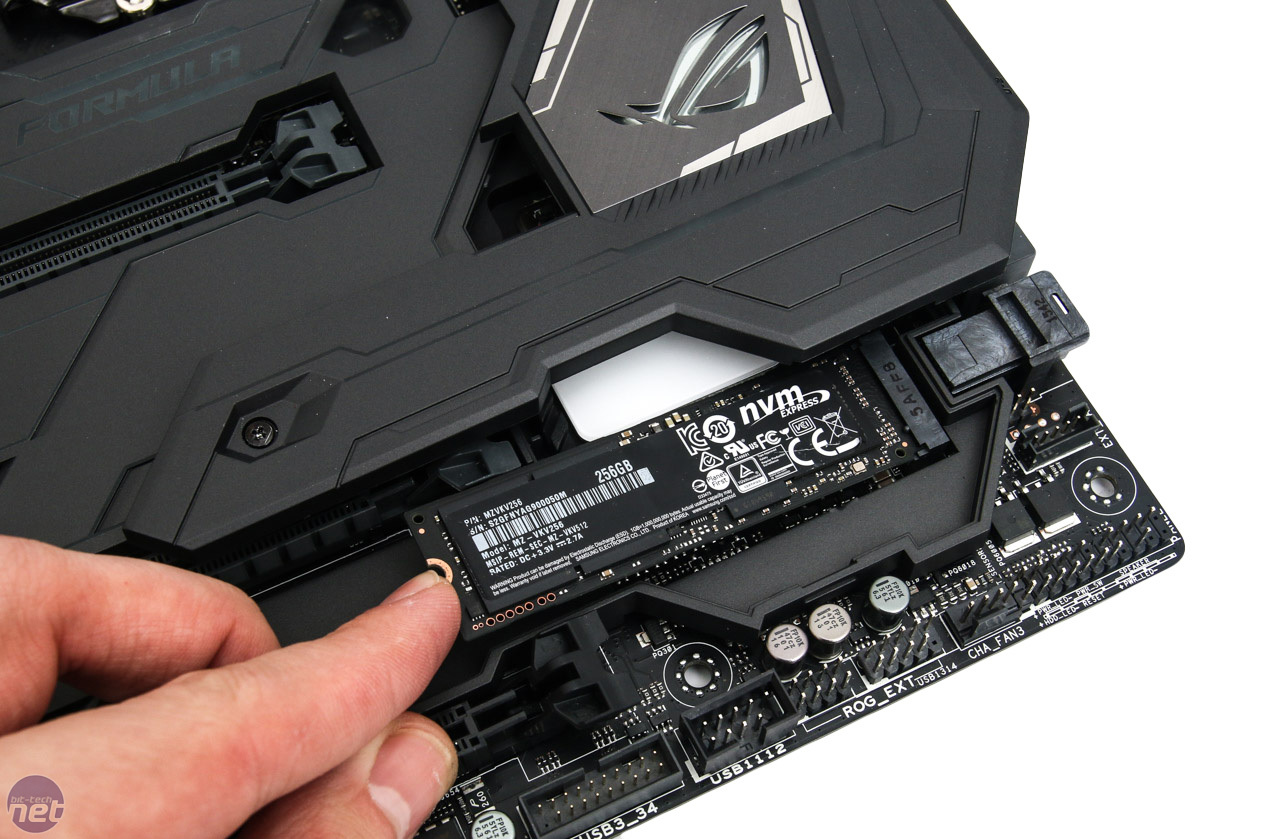
That is how Asus designed the board for the m.2 to be hidden but there is no way for it to be cooled because the engineers didn't design the cover properly. (Plastic instead of aluminum to allow the boards armor plating to cool the drive or at least that section that comes off.

Cover set aside
maximus-viii-formula-6-1280x1024.jpg


cover removed completely and a m.2 installed (FUGLY AS HELL)
08095438892l.JPG


Break down of the board (If I'm not mistaken the back plate is aluminum while the front is all plastic) For a $400 board you would think........
maximus_viii_2.jpg
 
Wow you have to take off that huge panel to access the m.2? Yeah that design is fucked, you're basically sticking it in an oven. You have no good options with that board.
 
Wow you have to take off that huge panel to access the m.2? Yeah that design is fucked, you're basically sticking it in an oven. You have no good options with that board.
It's not really that big but I can't remove it with my gpu installed since it overhangs over the cover. So I'm pretty much dead in the water until my adapter comes in and still debating if I want to wait for the heatsinks to restock at Newegg or pay $4.24 extra and get them on ebay and have them arrive about the same time my performance-pcs order does.
 
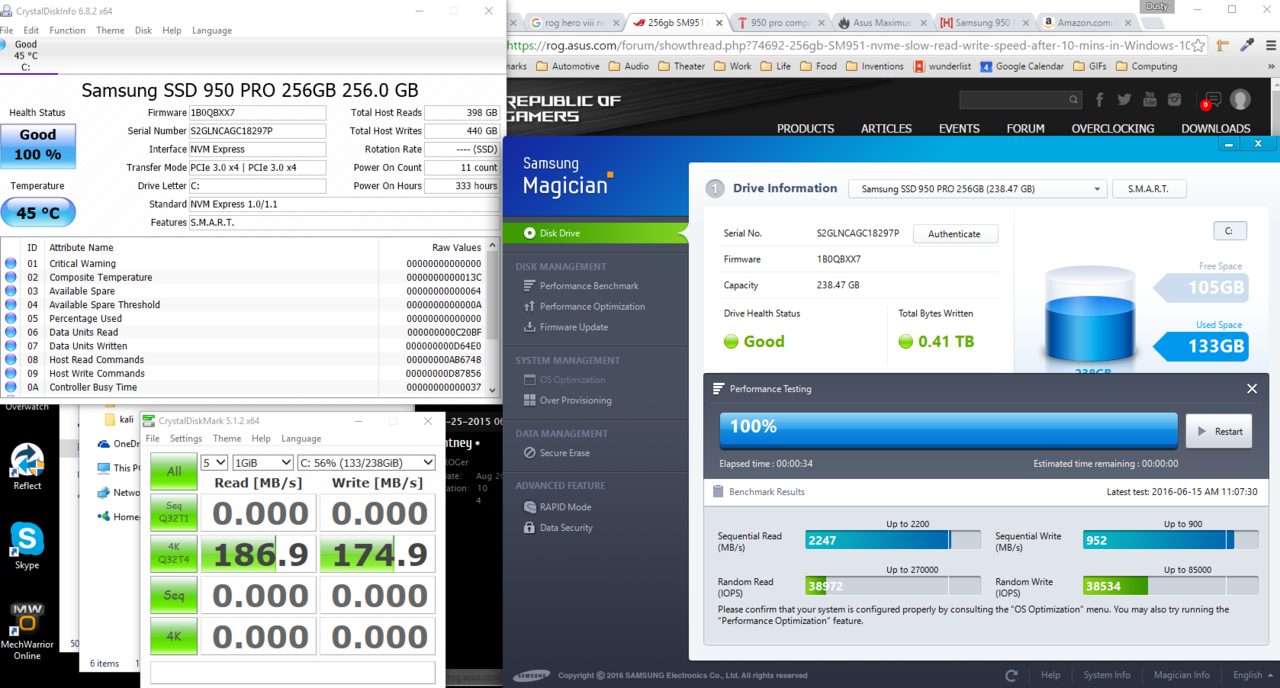
Ugh. Got me a ROG Hero VIII and just got a shiny new Pro 950, and performance hasn't been quick what I'd hoped. So I started benchmarking, and I'm getting IOPS that are like... 1/5th or 1/10th of what I'm seeing other people get.

in the BIOS I've turned off everything I can think of. SATA controller is off, power management is off, Asmedia controller is off, USB 3.1 controller is off. I'm running the samsung NVMe driver, have the latest BIOS (1701 i think) and the latest chipset drivers. here's a screenshot of some relevent numbers

Anyone have any ideas?

slowPro950nvme.PNG

slow950fullbenchmark.PNG
 
Ugh. Got me a ROG Hero VIII and just got a shiny new Pro 950, and performance hasn't been quick what I'd hoped. So I started benchmarking, and I'm getting IOPS that are like... 1/5th or 1/10th of what I'm seeing other people get.

in the BIOS I've turned off everything I can think of. SATA controller is off, power management is off, Asmedia controller is off, USB 3.1 controller is off. I'm running the samsung NVMe driver, have the latest BIOS (1701 i think) and the latest chipset drivers. here's a screenshot of some relevent numbers

Anyone have any ideas?

View attachment 4097
View attachment 4098
same as the last person: Drivers or throttling. See how hot it is running with a program and if it is 60-75C or higher its throttling. If its cold than its drivers...if neither no clue.
 
MWO FTW!!!

Is it staying around the temp in your ss when it's actual benching? If so I doubt it's heat. Which windows are you on? If 7 have you installed the windows hotfix for nvme drives? I'm pretty sure 8.1+ already has the support.It looks like you probably have 10.

What are you settings for CSM under boot? Do you have an actual M.2 section in the bios anywhere? Some of the Asus boards have that feature and some don't. According to your manual the M.2 slot if running in pci-e mode should be utilizing the pciex4_3 in x4 mode see if there is a setting to have it at x2 or x4 just to make sure.
 
same as the last person: Drivers or throttling. See how hot it is running with a program and if it is 60-75C or higher its throttling. If its cold than its drivers...if neither no clue.

In the screenshot above you can see the temperature stays in the mid 40s. Drivers.. I'm just using the Samsung ones, from www.samsung.com/semiconductor/minisite/ssd/download/consumer.html

All motherboard related stuff is the lastest from ASUS.

According to your manual the M.2 slot if running in pci-e mode should be utilizing the pciex4_3 in x4 mode see if there is a setting to have it at x2 or x4 just to make sure.

I had that set at X2 mode, experimenting, and I just switched it to X4. No difference. Benchmark attached.
 

Attachments

  • slow950x4mode.PNG
    slow950x4mode.PNG
    32.8 KB · Views: 64
In the screenshot above you can see the temperature stays in the mid 40s. Drivers.. I'm just using the Samsung ones, from www.samsung.com/semiconductor/minisite/ssd/download/consumer.html

All motherboard related stuff is the lastest from ASUS.


I had that set at X2 mode, experimenting, and I just switched it to X4. No difference. Benchmark attached.
Are you on win 8.1+? If not may be a good idea to try the windows hotfix for windows 7 if that's what your on.
 
Windows 10, 64 bit, pretty fresh install.
10 comes with nvme support native. Your not over heating and you have the samsung driver installed. My guess would be to contact Asus support. Select the Components link punch your information in and tell them what's going on. They may know of a bios setting that isn't getting set properly.
 
In the screenshot above you can see the temperature stays in the mid 40s. Drivers.. I'm just using the Samsung ones, from www.samsung.com/semiconductor/minisite/ssd/download/consumer.html

All motherboard related stuff is the lastest from ASUS.


I had that set at X2 mode, experimenting, and I just switched it to X4. No difference. Benchmark attached.
does crystaldiskinfo eve pull real time temps....i dont recall it does. So that maybe an old temp while benching. If its 45C at idle and 45C in a bench that is not real time temps. Mine will fluctuate at least 5C and that is with GPU fan at 80% and my drive being throttled due to being encrypted. I would wager there should be a solid 10C change from idle even with good air flow since i see a 5C change with a max 300MBps speed due to encryption being CPU limited.
 
yeah but even a 10C change should keep me nicely below throttling levels.

it does to realtime readings. well, its adjustable. ive never seen it over 47. My room is nice and chilly, and i have good airflow
 
yeah but even a 10C change should keep me nicely below throttling levels.

it does to realtime readings. well, its adjustable. ive never seen it over 47. My room is nice and chilly, and i have good airflow

with good airflow!!!!! If you don't have good airflow that 45C will be 75C in seconds....-_-


your benchmark is very similiar to scgt1 and his is from throttling. I said this already. You never even stated your case design we have said numerous times if there isn't direct airflow it will melt and produce your type of benchmarks.
 
Ugh. Got me a ROG Hero VIII and just got a shiny new Pro 950, and performance hasn't been quick what I'd hoped. So I started benchmarking, and I'm getting IOPS that are like... 1/5th or 1/10th of what I'm seeing other people get.

in the BIOS I've turned off everything I can think of. SATA controller is off, power management is off, Asmedia controller is off, USB 3.1 controller is off. I'm running the samsung NVMe driver, have the latest BIOS (1701 i think) and the latest chipset drivers. here's a screenshot of some relevent numbers

Anyone have any ideas?

View attachment 4097
View attachment 4098
image.png


both of your two results are nearly the same....i am betting throttling.

If your on win 10 its not driver issue
if you are getting 2500MBps its not link issue
if writes and 4K are the worst and the only good test is the very first one.....its almost guaranteed to be throttling.

I rest my case. Go get a better program to test temps and look closer at throttling. Also there are 2 temp units according to scgt1 so its possible the one sense that is reporting is irrelevant. depending on some odd use cases and how air is moving
 
Go get a better program to test temps and look closer at throttling.

Do you have a recommendation for software to check that? Is there a way to see flat out if things are throttling?

I mean, I can't believe that this thing is just incapable of being run at all. Cold start, things starts at 35 C, check the temp through the test, it goes up to 45 tops, it starts slow, and stays consistent. It's not like it slows down as the test runs.

It's like 68 degrees in my room and my CPU and GPU are both running cool, I've pulled all the other drives out of the machine so there are two 120mm fans blowing right past the darn thing.
 
I'm beginning to think I just have a faulty unit or something like that. I see other people posting about "slow" performance, and it's still several times faster than what I'm seeing.
 
Do you have a recommendation for software to check that? Is there a way to see flat out if things are throttling?

I mean, I can't believe that this thing is just incapable of being run at all. Cold start, things starts at 35 C, check the temp through the test, it goes up to 45 tops, it starts slow, and stays consistent. It's not like it slows down as the test runs.

It's like 68 degrees in my room and my CPU and GPU are both running cool, I've pulled all the other drives out of the machine so there are two 120mm fans blowing right past the darn thing.
You can manually check it just as fast as you can click the mouse twice with the mark program or set it to check at as quick as 1 min intervals. Keep an eye on the title bar for when crystal mark is actually testing and not an inbetween countdown and just keep refreshing the temp while it's actually testing. It's good enough to give you an idea on if it's throttling or there is a problem with the drive. You can always setup a fan blowing on the drive and see if it performs any better. The board could just not be reporting the temps to crystal mark properly. I think it works good enough to get an idea if throttling is the problem or not. You don't need to stare at it and watch paint dry while testing. Let it get good into the test where you know if it's going to warm up it will be (mine on the other hand because it's behind a cover takes a matter of seconds on cold boot to go from 46C up to 56c while benching with mark and keep climbing over the first test it's rediculous. Performance-pcs stock was wrong on the pcie m.2 adapter I ordered this morning so now I'm hunting elsewhere since they don't have it and it will be over 2 weeks for them to get it. MY ASS!!!. LOL

You refresh manually under settings I think it was. Third option I believe. I could be wrong but it's labeled refresh. There may have even been a shortcut combo to use. I don't remember. I was messing with it tired as hell and I don't have it on right now because of the temps. I think I'm going to disable the drive for now and reinstall my Neutron so I have my game rig. Or maybe I'll just play XBONE until the parts get here. lol
 
Ah, yeah that's what I've been doing, with the F5. It doesn't even get over 50C

EDIT: Well, okay, it does if I run the full suite of tests, but everything else comes up normal every time but the random read test, so I've been running that by itself. It never has a chance to warm up.
 
Ah, yeah that's what I've been doing, with the F5. It doesn't even get over 50C

EDIT: Well, okay, it does if I run the full suite of tests, but everything else comes up normal every time but the random read test, so I've been running that by itself. It never has a chance to warm up.
What does it get to with the full suite? That is the only way to properly bench your ssd anyway (full suite)
 
it touches 55C once or twice

I disagree that that's the only way. If the results are always consistent, that is, the Random Read is always the same regardless of if I do it independently or with the full suite, then the full suite is not necessary.

Remember, what I'm doing right now is decidedly NOT benchmarking. I'm troublshooting. Both the full suite and the specific test show the problem, and the specific test is actually better, because it eliminates variables, and eliminating variables is always good for isolating a problem.
 
That's the exact one that the pricks at Performance-pcs had the stock wrong on. I swear every time I try to give this idiots another chance something goes on over there. I just ordered it and these along with some more Gelid GC Extreme compound since I used the last of it up on my 6700K yesterday when I swapped this hardware in. If I find my QDC3 black 3/8-5/8 compression fittings cheaper after shipping somewhere then per-pcs they are again going to lose my business. I would rather order from FrozenCPU but they don't have both fittings in black that I need. Koolance is a couple dollars more then Performance-Pcs and they just may get my money anyway.
 
As an Amazon Associate, HardForum may earn from qualifying purchases.
Under normal pc use you don't just do one thing though. As you stated your trying to find the root of your problem. What better way then to put the drive through the paces of what it will be doing while your using the computer. The drive does more work it heats up more if you just do select things it's not going to heat up as much and get to the top temp it will if under normal use. The full suite does this for you and you can in fact find for sure if it is thermal throttling. Like I said plop a case fan to where it blows directly on the m.2 drive and see if you have different results with the test whether it be full suite or just select tests. if the fan improves your results then you may be heading down the same road as me with at least installing heatsinks if not actually physically moving the card out for better airflow.
 
no, no, your thinking is backward. the full suite can highlight thermal throttling, yes, but it doesnt prove it. to eliminate throttling as a possibility, you would then want to eliminate a variable... the heat. if you run a full suite and random reads tank, you might think, oh, thermal throttling. if you then chill the drive down and run ONLY the random read test, and it immediately gives the same result, without the drive heating at all, you have just eliminated thermal throttli g as a problem.

you dont NEED the full suite to show the problem because you can duplicate it without it.

Only once you then change something that causes the problem to go away in the SPECIFIC test, do you need to revert to the full suite to see if there are other problems from other interactions

To give an analogy: You have an engine that sounds funny and feels low on power. You do a dyno run. It's low on power. You guess it might be ignition, so you pull the spark plugs. One of the spark plugs is not firing. Now... you don't put the plug back in and keep doing dyno runs every time you changes something. You just check for the spark on that plug. It's pointless to do any other testing until that plug starts firing. There might be other problems with the engine, yes, it might be getting too hot, it might not be getting enough air, but one thing is sure, that plug is NOT firing and any other test will not be valid until you get that working.

EDIT: Sorry if the tone is harsh. I've been throubleshooting various problems for the past couple weeks. The reason I even HAVE this drive is because I was trying to diagnose some performance issues. I've already discovered and highlighted/resovled an unknown problem with Oculus Rift headsets, so this is just like "again?"
 
Last edited:
Getting back to the point, I installed a little USB fan into an internal USB port on a USB car and pointed it right at the SSD. it now runs in the 30C range. Same performance.
 
Getting back to the point, I installed a little USB fan into an internal USB port on a USB car and pointed it right at the SSD. it now runs in the 30C range. Same performance.
don't know. It isn't link issue, if it isn't heat or drivers I have no idea.
 
Incoming question it's a simple yes or no don't need to be made fun of haha

Currently I have an asus 1155 3770k ddr3 Windows 8.0 build on raid 0 2x840pro is there any chance I can just take these two drives And throw them into a new build

1151 mobo new 6700k cpu and ddr4? Question is really based on laziness right now only because I'm not prepared to reformat but don't wanna miss out on an offer I got thanks!
 
Last edited:
Incoming question it's a simple yes or no don't need to be made fun of haha

Currently have a asus 1155 3770k ddr3 Windows 8.0 build on raid 0 2x840pro is there any chance I can just these two drives id say I upgraded to a

1151 new cpu and ddr4? Question is really based on laziness right now only because I'm not prepared to reformat but don't wanna miss out on an offer I got thanks!
can you resay that...i feel like several words are missing and i dont understand
 
Incoming question it's a simple yes or no don't need to be made fun of haha

Currently I have an asus 1155 3770k ddr3 Windows 8.0 build on raid 0 2x840pro is there any chance I can just take these two drives And throw them into a new build

1151 mobo new 6700k cpu and ddr4? Question is really based on laziness right now only because I'm not prepared to reformat but don't wanna miss out on an offer I got thanks!
...how does this involve a 950 PRO? Are you saying you got a good deal on the 950 PRO and you want to buy it now? If your just asking about a RAID 0 carrying over that needs another thread and depending on how the RAID 0 was set up it could migrate with 0 issues.
 
can you tell me if your BIOS recognize the NVMe device please?
mine don't.

the option in this menu:

1000


is disabled and grey out:

1000

A) Did you check in the boot menu, to see if the drive is listed as a choice to boot from ?

B) Did you install the latest firmware for the drive and Samsung's nvme driver ?

I have 2x 950pro's in the rig in my sig, both of which are a YES to the above questions, and they work nottaproblemo :)
 
yes, device is listed to boot from, but I do not have an "NVMe configurarion" menu in my BIOS.

i do have the latest firmware on everything and the samsung driver
 
I'm about to purchase the ASUS Maximus VIII Hero Motherboard with a Samsung 950 Pro M.2 SSD. Has anyone experienced any of the boot time issues with this combination? I assume it can all be fixed with tweaks to the BIOS as outlined in this thread right?
 
I'm about to purchase the ASUS Maximus VIII Hero Motherboard with a Samsung 950 Pro M.2 SSD. Has anyone experienced any of the boot time issues with this combination? I assume it can all be fixed with tweaks to the BIOS as outlined in this thread right?
see page 1 and on. Some talk about Asus BIOS
 
Thanks, one more questoin (sorry) Windows 10 installation, should it be UEFI or legacy to get the most out of the drive. Not sure if that even makes sense but have read something somewhere else about a legacy vs UEFI installation.
 
Back
Top