• Some users have recently had their accounts hijacked. It seems that the now defunct EVGA forums might have compromised your password there and seems many are using the same PW here. We would suggest you UPDATE YOUR PASSWORD and TURN ON 2FA for your account here to further secure it. None of the compromised accounts had 2FA turned on.
    Once you have enabled 2FA, your account will be updated soon to show a badge, letting other members know that you use 2FA to protect your account. This should be beneficial for everyone that uses FSFT.

PSA: Asus DIMM.2 M.2 risers get HOT

Zarathustra[H]

Extremely [H]
2FA
Joined
Oct 29, 2000
Messages
42,404
So, if you have a modern high end Asus motherboard you have probably seen these quirky dual M.2 risers that go into a specially keyed RAM-like slot on the motherboard to provide extra NVME storage options:

1689397190296.png


1689397235676.png


1689397255003.png


I'm here to tell you that these get HOT unless you provide them with extra airflow.

So, I was previously booting off of a 2TB Samsung 980 Pro, and used my old 2TB Sabrent Rocket 4 as my steam library drive (because I don't trust it for data I can't replace, and I can always just redownload the steam library...

Anyway, Amazon's Prime Day sale on the 2TB 990 Pro's was too good to pass on at $129 each, so I decided to just get a couple.

I replaced the 980 Pro and the Sabrent Rocket 4 in the motherboards first two m.2 slots with the new 990 Pro's, and stuck the old ones in the DIMM.2 modules.

I proceeded to boot up from a Linux USB stick in order to duplicate the two old drives to the new 990 Pro's.

I used the dd command under Linux as follows:
dd if=/dev/<source drive> bs=100M status=progress of=/dev/<target drive>

I thought it was odd and disappointing that the average transfer speed was only ~1.4GB/s, but I figured these are TLC drives so I guess I just consumed the faster cache when doing an entire drive image.

Then when it was done, I shut the computer down and removed the DIMM.2 device to do a test boot before I wiped the old drives.

Damn, the DIMM.2 module was hotter than the sun. Like, I'm the kind of guy who when at a restaurant the server says "watch out, this plate is hot" I always have to touch it to feel it for myself. I've never felt a plate that was as hot as this DIMM.2 module. I could barely hold on to it long enough to get it out of the slot. We are talking right up there at the pain threshold, whatever that is.

I can only presume my low speeds were due to thermal throttling. I never monitored the drive temps during the copy operation, but there is no way they weren't at Tj max.

So, if you are going to use this slot, you may need to get extra cooling. At least if you plan to simultaneously sequentially read the entirety of two 2TB drives both in the DIMM.2 module.

I was going to leave the drives in there as extra storage space since I already have them, but now I am questioning that. Maybe they won't get as hot during typical use. After all, it's not every day you sequentially read the entirety of a drive, let alone both of them on the module at the same time.
 
Sounds awful, but the design doesn't look good for thermals at all so I'm not too surprised. I'd try to leave the casing off and use proper heat sinks.
 
I'm betting you have a huge water loop with a bunch of really low speed fans in there to keep it quiet, which means the air in there is basically stagnant. I had to change my methods in the last year or so too because of the massive surge in component wattage and especially overclocked DDR5 is so sensitive to high temps, I had to break out my ancient Corsair ram cooler from the DDR2 Dominator days lol
 
Sounds awful, but the design doesn't look good for thermals at all so I'm not too surprised. I'd try to leave the casing off and use proper heat sinks.
Looks better than an M2 slot that is between pcie slots... ones where you likely cannot put on any heatsink if there are cards in the pcie slot.
 
As an Amazon Associate, HardForum may earn from qualifying purchases.
So, if you have a modern high end Asus motherboard you have probably seen these quirky dual M.2 risers that go into a specially keyed RAM-like slot on the motherboard to provide extra NVME storage options:
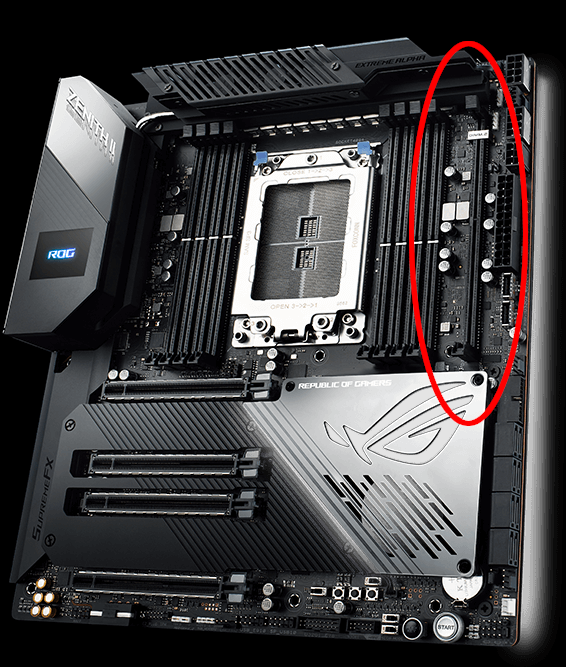
View attachment 583425

View attachment 583426


View attachment 583427

I'm here to tell you that these get HOT unless you provide them with extra airflow.

So, I was previously booting off of a 2TB Samsung 980 Pro, and used my old 2TB Sabrent Rocket 4 as my steam library drive (because I don't trust it for data I can't replace, and I can always just redownload the steam library...

Anyway, Amazon's Prime Day sale on the 2TB 990 Pro's was too good to pass on at $129 each, so I decided to just get a couple.

I replaced the 980 Pro and the Sabrent Rocket 4 in the motherboards first two m.2 slots with the new 990 Pro's, and stuck the old ones in the DIMM.2 modules.

I proceeded to boot up from a Linux USB stick in order to duplicate the two old drives to the new 990 Pro's.

I used the dd command under Linux as follows:
dd if=/dev/<source drive> bs=100M status=progress of=/dev/<target drive>

I thought it was odd and disappointing that the average transfer speed was only ~1.4GB/s, but I figured these are TLC drives so I guess I just consumed the faster cache when doing an entire drive image.

Then when it was done, I shut the computer down and removed the DIMM.2 device to do a test boot before I wiped the old drives.

Damn, the DIMM.2 module was hotter than the sun. Like, I'm the kind of guy who when at a restaurant the server says "watch out, this plate is hot" I always have to touch it to feel it for myself. I've never felt a plate that was as hot as this DIMM.2 module. I could barely hold on to it long enough to get it out of the slot. We are talking right up there at the pain threshold, whatever that is.

I can only presume my low speeds were due to thermal throttling. I never monitored the drive temps during the copy operation, but there is no way they weren't at Tj max.

So, if you are going to use this slot, you may need to get extra cooling. At least if you plan to simultaneously sequentially read the entirety of two 2TB drives both in the DIMM.2 module.

I was going to leave the drives in there as extra storage space since I already have them, but now I am questioning that. Maybe they won't get as hot during typical use. After all, it's not every day you sequentially read the entirety of a drive, let alone both of them on the module at the same time.
please clarify, when you said the DIMM.2 module is hot, you are referring to just the Asus ROG DIMM.2 add-on card is hot, or the m.2 SSD is also hot? Or you mean just the M.2 SSD drive is hot? which is it?

that design is very poor, you can't put any reasonable cooling except a $10 passive heatsink, and w/ PCIe 5 m.2 SSD drive, it won't be enough. 1 side is blocked by the motherboard cable, the other side is blocked by the RAM slot, no wonder some newer motherboard is moving to BTF
 
The NVMe's are what get hot, and heat it up. The entire metal case is meant to act as a heatsink. That's why Z said give it some airflow, and then it stays reasonably cool.

I use one and have 2 NVMe's in it, a big 180mm case fan blows (slowly but always) right on it. No problems with heat.
 
please clarify, when you said the DIMM.2 module is hot, you are referring to just the Asus ROG DIMM.2 add-on card is hot, or the m.2 SSD is also hot? Or you mean just the M.2 SSD drive is hot? which is it?

that design is very poor, you can't put any reasonable cooling except a $10 passive heatsink, and w/ PCIe 5 m.2 SSD drive, it won't be enough. 1 side is blocked by the motherboard cable, the other side is blocked by the RAM slot, no wonder some newer motherboard is moving to BTF
The NVMe's are what get hot, and heat it up. The entire metal case is meant to act as a heatsink. That's why Z said give it some airflow, and then it stays reasonably cool.

I use one and have 2 NVMe's in it, a big 180mm case fan blows (slowly but always) right on it. No problems with heat.

GoodBoy has it exactly right.

There isn't much in the way of electrical components on the DIMM.2 riser that could generate heat. The heat comes from the M.2 drives installed in it. The cover on these things is really more of a heat spreader than it is a heatsink, so it does a somewhat poor job of dispersing that heat. Direct airflow pretty much takes care of it.

If direct airflow isn't an option, I suppose one could get some double sided thermal tape and attach some 3rd party heatsinks to either side of it, which would probably help.

It's just that modern m.2 drives put out a deceptive amount of heat. 5-15W doesn't sound like a lot, but when it is centered on a little m.2 drive it gets pretty hot in a hurry.

Why this was surprising to me was we have traditionally run so many bare drives with very limited heat spreaders on top of them, and I've never gotten close to burning myself on any of those :p I suppose maybe the location is one where it does not get as much airflow, or something.

 
I don't see it being a issue with gen 3 or 4 drives. Unless you are hammering them none stop. I could see it being a issue for gen 5 drives.
 
I don't see it being a issue with gen 3 or 4 drives. Unless you are hammering them none stop. I could see it being a issue for gen 5 drives.

Yeah, my example above was reading the whole drive sequentially of two Gen4 drives in the m.2 riser and writing to two Gen4 drives in the main motherboard slots.

So since they were 2TB at the ~1,400MB/s I sustained, I guess we are talking about 25 minutes of sustained whole drive reads of two drives in close proximity of each other. That probably explains it.

Prior to this I had thought he concept of thermal throttling was odd, as I had never experienced it. Never came close to high safe temps on the drives. Luckily even with this high heat incident, neither of the drives are reporting any time spent above Warning or Critical temps.
 
so in the end, did you keep your drive on your DIMM.2 or do you still think it's too risky?
 
The NVMe's are what get hot, and heat it up. The entire metal case is meant to act as a heatsink. That's why Z said give it some airflow, and then it stays reasonably cool.

I use one and have 2 NVMe's in it, a big 180mm case fan blows (slowly but always) right on it. No problems with heat.
first of all, I don't believe that heatsink can remotely cut it. Not to mention it's not really a heatsink, there is no fin. It's just an Al plate. Regardless, do you have a photo? I rarely seen 180mm fan on a case. My old case has 140mm then jump to 200mm, and I had 3 x 200mm, but my new case is just 120 to 140mm. What brand case uses 180mm fan?
 
I don't see it being a issue with gen 3 or 4 drives. Unless you are hammering them none stop. I could see it being a issue for gen 5 drives.
that would a problem because the industry no longer sell Gen 3 drive. The price of Gen 4 is now the price of Gen 3. And when Gen 4 drive are phase out, all we have is Gen 5 drive
 
first of all, I don't believe that heatsink can remotely cut it. Not to mention it's not really a heatsink, there is no fin. It's just an Al plate. Regardless, do you have a photo? I rarely seen 180mm fan on a case. My old case has 140mm then jump to 200mm, and I had 3 x 200mm, but my new case is just 120 to 140mm. What brand case uses 180mm fan?
The fractal torrent comes with two 180mm fans, I'm sure there are others as well (even if rare now) -- silverstone has 8 models of fan that size.
 
Wut? There are plenty of gen 3 drives still out there.

Gen4 drives were introduced 5 years ago now.

I wonder how many of the Gen3 drives out there are old stock they are still trying to sell off. At best, I'd imagine any Gen3 drives still being made are just taking advantage of old manufacturing lines until they shut them down and repurpose them for something newer.

Samsung still lists one Gen3 drive on their site, the regular non-pro 980.

1729095031544.png


(I'm a little confused by this 980 Gen 3 drive, as I thought all Samsung srives were either Pro or Evo, but this one is neither)


WD seems to have rebranded their entire line. The excellent SN850x is gone, and the rest seem to have a new 4-digit naming scheme. Sadly they don't put PCIe Gen directly in the title, but I have taken the liberty of labeling them.

1729095472442.png


The only Gen3 drive left is one they are marketing for the "industrial" market.


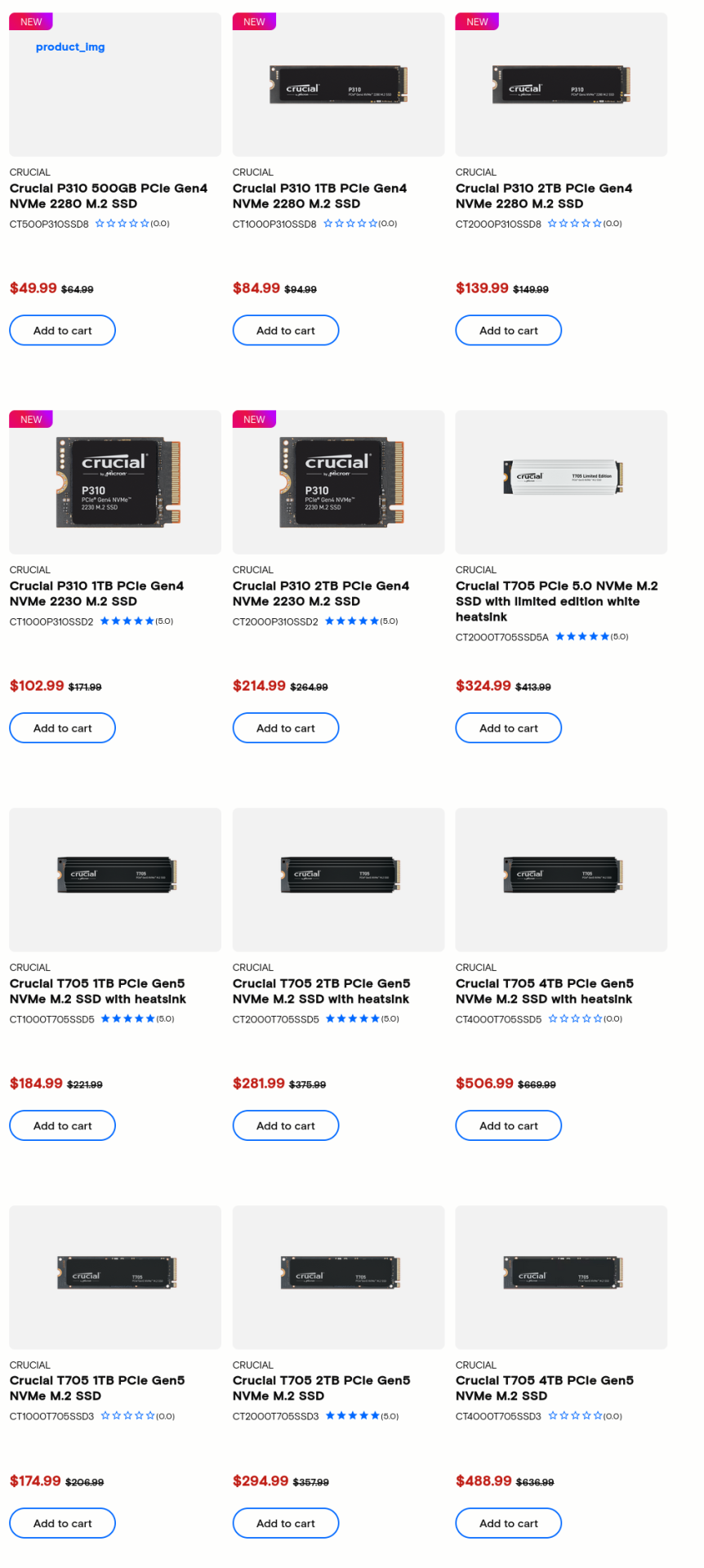
Crucial markets a lot of drives: (but that might just be because they list each size independently)


1729096029128.png

(no idea why that P310 image doesn't load)

Gen 5 and Gen 4 are represented, but none of them are Gen3.


I'm not going to bother digging through the product pages of shitty me too Chinese reference design Phison rebrands, but the above indicates that Gen3 is at the very least on its way out, with only very few still hanging on, and a good chunk for specialty "industrial" purposes, where the latest Gen doesn't matter much anymore.
 
but look at the price of the Gen 3 drive from Samsung, it's $140, and the Gen 4 drive is $155 of the same size 1TB. You gain double the speed, who would save $15, when you are going to use the drive for easily a few year or longer
 
but look at the price of the Gen 3 drive from Samsung, it's $140, and the Gen 4 drive is $155 of the same size 1TB. You gain double the speed, who would save $15, when you are going to use the drive for easily a few year or longer

Yeah, I'm with you. I'd go with the Gen4 version in a heartbeat here.

Though I'll challenge you on the "double the speed" remark. That is only for sequential performance, and that is a minority of what typical desktop PC's do.

You'll get a much better idea of real world performance by looking at 4K random read data. (well, in reality, mixed IO is the important part, but it is best predicted by low queue depth 4k random reads.)

That's what has the biggest impact on things like boot times (when quick-boot is not enabled, as quickboot boots actually do load a sequential hiberfil.sys), Windows updates, loading programs, loading games, loading new levels, and even loading resources in game that can result in stutter.

The 1TB 980 Pro (Gen4) has random reads that are ~25% faster than the 1TB 980 (Gen3) version but it has nothing to do with the PCIe gen. Even if you stick the Gen4 model in a Gen3 slot (and it thus runs at Gen3), it will still be ~25% faster than the Gen3 non-pro model, because random read speeds are far far below the max either the Gen3 or Gen4 interface can support.

The top line sequential read and write speeds are mostly just marketing numbers. Sure, if you frequently copy large files back and forth between fast drives, they matter, but that's not what most people do most of the time.

For system responsiveness, program loads, game loads, Windows Update installs and boot times, 4K Random reads at low queue depths are king.

This is why it is so sad that Intel shut down their Optane memory line. Optane drives were beastly at low queue depth 4k random reads.


IN my owmn testing on my machine. my 2TB Gen4 990 Pro has ~58MB/s low queue depth 4k random reads. Intels last consumer Optane, the Optane 905p (which I use as my boot drive) had a low queue depth 4k random read speed of about 240MB/s. That's over 4x faster. The Optane 905p was only Gen3, but it still absolutely crushes the Gen4 990 Pro in most workloads because of this.

Take a look at this video:


View: https://www.youtube.com/watch?v=tSUMBeaaiOo

Wendell - while intending to create a video about SSD boot times on Optane 905p vs. Samsung 990 Pro he accidentally imaged the test Windows partition right a before during a Windows Update reboot.

As we all know, the first boot after an update can be a pain, especially if you are in a hurry.

On the Samsung 990 Pro that boot took 1m37s
On the Optane 905p that took 32s, a 3rd of the time.

If you were to go by the sequential speeds that everyone seems to care about, the 2TB 990 Pro should be ~2.75x faster than the Optane drive, but in his Windows Update reboot test, yjr Optane was about 3x faster.

I recently built a small utility PC in a small form factor. I opted to use the lower end Optane 800p. It was a much lower end NVMe drive, with only 2x Gen3 lanes. Sequential speeds won't win any awards on that thing, as they max out at about 1450 MB/s, but the 4K random results are shockingly high for such a cheap budget drive. That small form factor PC is very responsive as a result.


Here are my CrystalDiskMark tests:

2TB 4x Gen4 Samsung 990 Pro:
1729112237012.png


960GB 4x Gen3 Optane 905p:
1729112189523.png


118GB 2x Gen3 Optane 800p:
1729112356586.png


If you want the most responsive system ever, that keeps you waiting for a fraction of the time when Windows Updates are installed, and loads your OS, programs and game levels faster, I would argue it maes sense to mostly ignore the top line sequential numbers and instead focus entirely on the bottom left "RND4K Q1T1" column. That matters WAY more in real use.

Sadly, Optane drives are getting harder and harder to get ones hands on. The top level Optane NVMe drive ever made was the enterprise oriented Optane p5800x. It was th eonly one to ever have Gen4 support. It came in 400GB, 800GB and 1600GB sizes. New unused 800GB models are now going for $1,500 on eBay. ONly a couple of months ago they were $1,100. You can still get a used one for about $900. And this isnt as big of a problem as with other SSD's, as Optanes have INSANE write endurance.

If you want the 1600GB model, new and unused its going to cost you an eye watering $4,150. As of right now there arent even any used ones on eBay, so I couldn't tell you what those might go for.

The 400GB models (one could easily get away with just putting OS, and a few high priority programs and games on a 400GB drive) new and unused are going for about $500-$600. Used ones are about the same price for some reason.

If you are OK with the older Gen3 consumer variants (905p, 900p) they can be had at much better pricing, but the 5800x is the king, and apparently lots of people know it, so prices have been driven up.


I always thought I'd order myself a p5800x some day when the prices came down, but it seems like they bottomed out some time late last year / early this year, and now are going up again. They are amazing. They reportedly almost double the 4k Random speeds of the 905p, while at the same time getting similar sequential read speeds as top of the line Gen4 drives. A true zero compromises monster. But you pay for it.
 
first of all, I don't believe that heatsink can remotely cut it. Not to mention it's not really a heatsink, there is no fin. It's just an Al plate. Regardless, do you have a photo? I rarely seen 180mm fan on a case. My old case has 140mm then jump to 200mm, and I had 3 x 200mm, but my new case is just 120 to 140mm. What brand case uses 180mm fan?
asus m2 dimm card.jpg

Fan on the right is a 180mm, fan on the left is a 140mm. Had to swap out that 180 to fit a 3090 a few years ago. Case had 3 180's in the bottom. Silverstone FT02. See other thread for the custom 140mm fan mount (middle fan) which is flush with the case to save every last mm, for more pictures.
 
1) On this photo, what are that bundle of cable for at the bottom of the photo? are they fan controller cables? there must be at least 2 x 7 cables on it
2) how much is your 3D printer job? Why don't you just use a In Win Mars fan instead of going thru all that trouble
3) what material is that adapter from that 3D printer?
4) and on Post#17 on your 2021 thread, what's that card w/ the ribbon cable? I haven't seen a card w/ that kind of ribbon cables for decades

For that DIMM.2, personally I won't use it. It's too risky. The plate is not really a heatsink. I don't know how much a fan can cool it. If there is no space or extra M.2 slot, I would buy a Nvidia video card that has a M.2 slot at the back, that they claim it can deliver PCIE 5 speed on their PCIe 4 slot.
 
The top line sequential read and write speeds are mostly just marketing numbers. Sure, if you frequently copy large files back and forth between fast drives, they matter, but that's not what most people do most of the time.
that is mostly what I do. I download TV show + movie, and unrar these MP4 file to my 18GB RAM drive. I watch it, and when done, del those RAR files

Samsung is really bad news:

a) it's only 3 yr. warranty, Crucial is 5 yr., they are not the same quality

b) Samsung SSD has a similar bug like the Intel 8MB bug. Their 2TB drive collapse to 100MB and even Samsung magician can't read it
 
1) On this photo, what are that bundle of cable for at the bottom of the photo? are they fan controller cables? there must be at least 2 x 7 cables on it
2) how much is your 3D printer job? Why don't you just use a In Win Mars fan instead of going thru all that trouble
3) what material is that adapter from that 3D printer?
4) and on Post#17 on your 2021 thread, what's that card w/ the ribbon cable? I haven't seen a card w/ that kind of ribbon cables for decades

For that DIMM.2, personally I won't use it. It's too risky. The plate is not really a heatsink. I don't know how much a fan can cool it. If there is no space or extra M.2 slot, I would buy a Nvidia video card that has a M.2 slot at the back, that they claim it can deliver PCIE 5 speed on their PCIe 4 slot.
The cable along the bottom is a Cablemod 12vhpwr cable, 4 plugs PSU side to 1 so it has a lot of wires in it. Probably overkill since Seasonics' own cable is just 2 psu side connectors.
The 3d printed adapter was like $25. Completely worth it as I didn't have to buy a new case to fit the larger GPU's. It's a hard plastic and has worked perfectly since I installed it.
That's a raid controller, the small ribbon cables goes to the front panel display for the raid.

The Dimm.2 stays cool. It works great, I love it. Superior to the mobos where the NVMe slots are flat on the mobo in between pcie slots... can't put shit for cooling on some if they are next to the gpu. This is a much better solution.
Great temps for devices that can get as hot as NVMe's do:
1729184293621.png

Idle's at 34C. After running a crystaldisk info bench on it to try to heat it up it went up to 43C, and within a minute was back down to 38C. It works surprisingly well. I would put those temps up against the typical thin heatsinks that come with nvme's.
The Sabrent 8TB nvme is also idling at 34C. Running the crystaldiskinfo bench on it, temp peaked at 49C for the read tests, 50C for the write tests, and quickly dropped on the last part of the write test.
1729185051438.png


The whole time the Sabrent was heating up, the Samsung on the other side of the card stayed at 35C.

Edit: maybe 6 minutes since the bench completed, temp is back down to 34C. From the looks of it, within 2 or 3 minutes it was already cooled off to the base temperature. Pretty good!
1729185475852.png
 
Last edited:
that is mostly what I do. I download TV show + movie, and unrar these MP4 file to my 18GB RAM drive. I watch it, and when done, del those RAR files

Samsung is really bad news:

a) it's only 3 yr. warranty, Crucial is 5 yr., they are not the same quality

b) Samsung SSD has a similar bug like the Intel 8MB bug. Their 2TB drive collapse to 100MB and even Samsung magician can't read it

I've had good expoeriences with Samsung drives. I've owned more Samsung SSD's than any other SSD I've owned over the years, and I have never had a failure. The 990 and 980 firmware bug that caused premature drive wear was pretty bad though. Luckily I avoided that one.

I generally like Samsung Pro drives in my desktops because they tend to have some of the highest 4k Random read performance outside of Opterons, and that is an important spec for me.

Crucial makes good products, if maybe a little less exciting on the performance side of things, though not by much.

The last few SSD purchases I have made I went with 4TB WD Black SN850x drives and they have been great. I use them as cache devices in my NAS, and they ahve performed very admirably there, and perfectly reliable.

My main desktop has a 960GB Opteron 905p right now though. These things are amazing. If I ever feel like spending like a drunken sailor, I may just get an 800GB Opteron p5800dc. That is the end stage SSD for me. At least until something significant changes.

Back in the day I had countless OCZ SSD's fail, all within 2 years. Over the years I adopted a "Samsung and Intel only" policy, as I had never had any of them fail. Then Intel spun off their SSD division, and Samsung had those firmware issues. This left me a little bit lost, to be honest.

These days I've mebraced Optane in a huge way, though sadly they were mostly unaffordable before they were discontinued. For a while there after Intel discontinued them they were being heavily discounted, but now scarcity has driven the prices high again :/

If I can't get optane (or if I don't want to spend on optane for a particular application, which is lots of them) I tend to gravitate towards WD or Samsung these days. I'm interested in testing SK Hynix products (new owners of intel SSD's) at some point, but I havent gotten around to it. (Do they even make consumer SSD's?)

Generally when I go SSD shopping, unless it is a throwaway application I don't care about, I look to avoid all rebranded Phison reference designs (most NVMe drives on the market sadly) and then I start looking at what has the highest 4k random performance. This has led me to stay with Samsung and add WD to my list as well.
 
Last edited:
I'm interested in testing SK Hynix products (new owners of intel SSD's) at some point, but I havent gotten around to it. (Do they even make consumer SSD's?)
https://www.amazon.com/SK-hynix-Gold-PCIe-Internal/dp/B08DKB5LWY/ref=sr_1_1
I've heard these are almost as good as a Samsung 970 Evo, but they use less power and are one-sided, making them more ideal for laptops.

https://www.amazon.com/SK-hynix-Platinum-Internal-Compact/dp/B09QVD9V7R/ref=sr_1_2
Don't know shit about this one.

Like you, I've been interested in giving SK Hynix NVMe drives a whirl, but haven't gotten around to it.
 
As an Amazon Associate, HardForum may earn from qualifying purchases.

GoodBoy​


at the moment, 2 of my 3 drive also idle at 34.5 deg C to 36.3 deg. C, and I use those $10 Jeyi cheap heatsink. I am about to order the Jinshark m.2 - 3, and see if there is a difference in temperature. I always wonder how low in temperature can they get

=====================================================

To Zarathustra[H]

Optane is U.2 inferface and PCIE interface, I haven't seen U.2 for a long time, but the bigger problem is, its speed is only 2.6Gb/s R, 2.2 MB/s Write, so w/ Crucial T705, they are at 12 Gb/s. As to SK Hynix, they do have 5 yr. warranty, but I was using some Intel SSD, and at clients' location, I had 2 failure. 1 of them is a SATA 2.5" , and the other one is a M.2 form factor. So I am glad I switch to Crucial , look at the stock price of Micron , they got to know what they are doing
 
I had a nearly empty M4 256 boot drive die at 98% health.

Because of that, it is crucial that I avoid the brand.
 

GoodBoy​


at the moment, 2 of my 3 drive also idle at 34.5 deg C to 36.3 deg. C, and I use those $10 Jeyi cheap heatsink. I am about to order the Jinshark m.2 - 3, and see if there is a difference in temperature. I always wonder how low in temperature can they get
Download CrystaldiskMark 8 and monitor the temp during the benchmark, before you change the heatsink and after. After running the test, check the temp 5 minutes after the bench finishes and record that temperature as well. Put the results here.
 
Optane is U.2 inferface and PCIE interface, I haven't seen U.2 for a long time,

Various Optane drives come with different interfaces. They have made PCIe AIC's, 2.5" U.2 drives and m.2 versions (though the latter were really only for their lowest end consumer versions, the M10, and 800p)

The AIC's are the hardest to find and most expensive these days. U.2 drives and the low end m.2's are much easier.

Luckily you can get adapters so the interface is mostly irrelevant. Just get the right adapter and hook any drive up to any connector.

I actually bought a 10 pack of tiny 16GB Optane M10 drives on eBay a month or two ago for $30. These were the ones that Intel was using for BIOS based hard drive drive caching for a while there, but they work as regular drives as well. They only use two lanes at Gen3, so they aren't going to break any speed records, and they are very small, but they make for a damn good reliable appliance boot drives. Mirror two (or four of them if you need more space) for something like pfSense, OPNSense, TrueNAS and the like and they are great. I've also used single drives as boot drives for both x86 and ARM SBC's. Great little dirt cheapo drives.

I have collected a few Optane drives at this point:
- 10x Optane M10 16GB (M.2)
- 2x Optane p4800x 375GB (U.2)
- 2x Optane 900p 280GB (U.2)
- 1x Optane 905p 960GB (U.2)

And I might just have an 800GB Optane p5800x incoming in the near future. I potentially have a good deal on one, not sure yet.


but the bigger problem is, its speed is only 2.6Gb/s R, 2.2 MB/s Write, so w/ Crucial T705, they are at 12 Gb/s.

The T705 has spectacular sequential speed. Too bad sequential speed doesn't matter except for some corner cases where people copy large files back and forth between fast drives, high sequential speeds above what 4x Gen3 offers are mostly useless. Anything above 4x Gen4 offers is completely useless.

The metric that really matters to boot times, program load times, game load times and particularly Windows Update completion times is the low queue depth random read speeds (and write in the case of Windows Update) This is also important for games that load assets during game play (like large open world titles) to minimize stutter.

My Optane 905p I currently use as my boot drive absolutely destroys even the Crucial T705 in the RND4K Q1T1 department. (In fact the Crucial T705 is actually slower than its predecessor, the T700 in most random performance, though only slightly.)

Here is a Crystal Disk Mark 8 test on the 2TB T705:

1729267751491.png


My Optane 905p (4 Gen3 lanes) is about 3 times faster where it really counts.

Who cares about a theoretical 14.3GB/s when in 99+% of real use you are going to be reading at the RND4K Q1T1 speeds of just 76.33MB/s? Even a single Gen1 lane is fast enough to support that...

MAYBE if you have very heavy loads of multiple programs accessing the drive at the same time you'll see real world speeds in line with the next one up, the RND4K Q32T1 of 851.64MB/s, but for that even just two Gen2 lanes would be fast enough. And this is really more likely in servers with many parallel processes running at the same time to reach that queue depth of 32. You aren't going to see this very often in a client.

Those big sequential numbers really only matter when doing large sequential file copy operations. Some people might benefit from that, but for every day computing for everything from gaming, to productivity apps and web browsing the RND4k Q1T1 is the most important metric by far. Your fancy 14.3GB Gen5 drive is going to spend 99% of its life putting along at 76.33MB/s reads and 307.82 MB/s writes, and that's a fact.

Even if you do a lot of big sequential file copy operations, what are you copying to or from? Unless you have a second Gen5 drive (in which case you'll be limited by its write speed) or you are copying to RAM, you are going to be limited to whatever you are copying to anyway, so it is mostly pointless.

In my workloads only two things benefit from high sequential speeds.

1.) Suspending/Resuming VM's to disk, by dumping RAM contents to a file.

2.) Windows "fast startup" or whatever they call that feature they introduced in Windows 8 where Windows never really shuts down, it just hibernates, so when you boot, you are really resuming from memory contents stored in "hiberfil.sys".


Both of these would be nice if they were faster, but they are plenty fast enough already as it is, If there were no compromises I'd totally get a faster sequential drive to speed them up, but there is absolutely no way I'd replace a drive that is 3x faster 99% of the time with one that is 7x faster 1% of the time. (I would love to have both though, but sadly no one seems to even be trying here. Intel was with Optane, but that is now dead. No one else is ever trying.


I have lots of big files, but usually I am shuttling them back and forth to the NAS. Even with my massive performance oriented ZFS NAS and 40Gbit NIC's on both the workstation and the server, the NAS winds up being the limiting factor LONG before the local NVMe drive ever does. (40Gbit networking is great, but above 10Gbit, utilization is very poor in single threaded networking loads. It is rare to see above ~21Gbit for a transfer from a single client. Where this type of high speed interface really flexes its muscles is when it is used by a large number of clients at the same time (linking two large switches, or from a switch to a busy server used by many clients) So, at ~21Gbit/s max network speeds to the NAS, about 2.6GB/s is the max I'll ever see, but even that is pretty rare. In typical use 1.6 to 1.8GB/s is more common. So, yeah, even a decent Gen3 NVMe drive is going to be able to keep up with those sequential speeds.


I'd even argue that sequential speeds are best ignored all together when reviewing or comparing drives unless you have very specific requirements that are going to be a minority even among enthusiasts. The big sequential numbers are really just for marketing departments to print on boxes to sell products, and for online epeen bragging rights. In the real world RND4k Q1T1 is what matters most.

Think of it this way.

Remember back when you bought your first SATA SSD, and wow, was it an amazing, transformative, absolutely life changing upgrade over booting from a hard drive?

Well, hard drives have seek times with the heads needing to actually move over the right sector in order to read the right data. This caused hard drives to have very poor RND4k Q1T1 numbers. A typical 5400rpm drive has ~ 0.5 MB/s RND4k Q1T1 read speed. A typical 7200rpm drive lands at about 0.75 MB/s. I never had a 10,000rpm drive, but if I had to wager a guess based on linear interpolation they'd land at about 1MB/s.

Early SATA SSD's were a HUGE upgrade in this regard. They had RND4k Q1T1 read speeds of about 15-20MB/s. We are talking 20-25 times faster than a hard drive. That's why they felt so transformative.

Ever since then every upgrade has felt more incremental, and there is a reason for that. The fastest SATA drive I have ever tested was a Samsung 850 Pro at 26MB/s RND4k Q1T1. Yeah, that's faster than the early SATA SSD's, but only like 30-75%

The first NVMe drive I got in 2015 was Intel's 400GB SSD750. I remember being a little disappointed. Yeah, sure it was faster than my SATA SSD I upgraded from. I could now sequentiually read at 2.2GB/s, but I had expected a similar jump in system responsiveness I had had when going from a hard drive to a SATA drive, and I just didn't get it. The system feel much faster compared to my SATA SSD. Boot times, updates, program and game loads, and the like may have been a little faster, but it wasn't huge.

And now I know why.

That Intel SSD750 had RND4k Q1T1 speeds of about 32MB/s. That's ~20% faster, which is nice, but it is not world changing.

Since 2015's latest and greatest, the SSD750, NVMe drives have improved their RND4k Q1T1 speeds, but it has been in a gradual incremental way.

By 2018, 3 years later my 1TB Samsung 970 EVO registered 49MB/s RND4k Q1T1. That's ~50% but it's over three years.

In 2019 I got my first Gen 4 capable system, and decided I wanted a Gen4 capable SSD. The only one I could find in 2019 was the Sabrent Rocket 4. I got a 2TB one. It only recorded RND4k Q1T1 speeds of 43 MB/s, so it was actually slower, despite being a newer PCIe gen.

In early 2021 I got a 2TB Samsung 980 Pro. It increased RND4k Q1T1 speeds to 83MB/s. This was probably the biggesty speed increase thus far, but still not a life changing jump.

And then last yeart in 2023 I got a good deal on 2TB Samsung 990 Pro's, so I picked up two. They test slightly faster than the 980 pro, but not by much. Only ~85MB/s

Late last year I also bought a couple of 4TB WD Black SN850x drives. I use them as cache drives in the server, but before I popped thm in I did bench test them. Ican't find the image righ tnow, but I remember them testing very slightly behind the Samsung 990 pro.

So right now in my main desktop I have 5 NVMe drives.

1.) 960GB Optane 905p (4x Gen3)
2.) 2TB Samsung 990 Pro (4x Gen4)
3.) 2TB Samsung 990 Pro (4x Gen4)
4.) 2TB Samsung 980 Pro (4x Gen4)
5.) 1TB Samsung 970 EVO (4x Gen3)

*(I have a Threadripper, so Lots of PCIe lanes. One of these is in a PCIe slot, 3 directly in the motherboard, and there is also the DIMM.2 riser in the OP post, whcih has one drive in it, and one empty slot. Considering the board can support 16x/16x/16x/8x PCIe slots, and that I use 1 16x GPU and 1 8x NIC I could technically have 8 NVMe drives in 16x riser cards, 3 on the motherboard, and 2 in the DIMM.2 card for a grand total of 16 NMVe drives all at 4x Gen4 at the same time. If I didnt like having that 8x NIC, I could bring that up to 18.)
Of these the Optane 905p is unquestionably the fastest drive to boot, run programs, do system updates, load games, etc. off of. It isn't even close. And it all comes down to those tasty RND4k Q1T1 Numbers.

I wouldn't trade my Optane 905p for a Crucial T705 any day (even if I did have PCIe Gen5) With its ~230MB/s RND4k Q1T1 speeds it is 2.7x faster than the later Gen Samsung 900 Pro. It's the first drive I've used since 2009 when I got my first OCZ SSD that doesn't just feel like an incremental improvement. It feels like a huge upgrade over much newer and (on paper) faster consumer drives.
So the TLDR summary of my recommendations for SSD shopping go something like this:


1729278902249.png


If I were shopping today I'd - based on the benchmark numbers I have found for RND4k Q1T1 I'd be looking in this order:
1.) Intel Optane p5800x. The only Gen4 Optane. These are absolutely amazing, but enough people know this, and they are bidding them up like crazy, so they will be expensive.
2.) Intel Optane 900p, 905p, p4800x or p4801. About half the RND4k Q1T1 of the p5800x and Gen3, but also amazing and still more than twice as fast as the fastest consumer drives.
3.) Samsung 990 Pro, Samsung 980 Pro, or WD Black SN850x. Fastest RND4k Q1T1 you'll get in a non-Optane drive right now.
4.) Crucial T705. It may be Gen5 and boast amazing sequential speeds, but in real world situations other drives on this list will be faster.
5.) Intel Optane 800p. Get this: It only has 2x Gen3 lanes, so sequential speeds top out under 2GB/s, but RND4k Q1T1 is actually about 180MB/s. That would place it third on this list, but they only come in small sizes (58GB ans 118GB) which limits their usefulness, and the 2x Gen3 lanes limit it enough where the sequential speeds might actually be felt. In an SFF system that doesn't require much storage - however - this would be a fantastic little boot drive. I use one in my Odroid H4 (Intel Processor N100, 4C/4T all E-core) web/youtube machine, and it feels snappier than much faster PC's as a result.

Notably, I'd buy them in this order regardless of whether your motherboard supports Gen5 or Gen4 (or even Gen3), as the RND4k Q1T1 numbers are so far below what even 4x Gen3 can provide, that you'll see the benefit either way.

Note that the Crucial T705 is the only Gen5 drive on this list. The rest tend to embarrass themselves in RND4k Q1T1. I think that is a Phison controller thing. When it comes to consumer drives Samsung Pro models tend to be one of the last to come out on a new Gen, but when they come out they tend to perform better than most drives, even when the next gen comes along.
For consumer drives (no Optanes) I'd take a Samsung Gen3 Pro drive over almost all other manufacturers Gen4 drives, and I'd take a Samsung Gen4 Pro drive over all other manufacturers Gen5 drives launched to date. (I'm sure this will turn into an "almost" as more Gen5 drives hit the market)

I am so over big marketing sequential numbers.
Also worth noting. The RND4k Q1T1 figure is pretty sensitive to latency, and tends to go down A LOT if a drive is installed behind a PCIe (PLX) switch or on lanes going to the chipset instead of to the CPU. At least on most I have seen. So you want not only a drive with high RND4k Q1T1 performance, but you also want to make sure it gets those "direct to CPU" PCIe lanes, or you are probably just wasting it.

As someone who uses an Optane 905p as a main boot drive in my daily driver desktop, I have thus far only seen one drive I would upgrade it to, and that is the Optane DC p5800x. I hope that some day consumer drives will give us more RND4k Q1T1, but until that day I guess I'll just keep using my Optanes. They sure have the write endurance for it.
Anyway, I've wasted enough of my day typing. Time to move on.


As to SK Hynix, they do have 5 yr. warranty, but I was using some Intel SSD, and at clients' location, I had 2 failure. 1 of them is a SATA 2.5" , and the other one is a M.2 form factor. So I am glad I switch to Crucial , look at the stock price of Micron , they got to know what they are doing

Good to know. I hate dealing with drive failures. Warranty on the other hand really isnt a huge priority for me. If a drive fails, I guess that means it is time to upgrade.

My Sabrent Rocket 4 failed, and while I did RMA it (because I could) I never used the replacement drive. I overnighted myself (thanks Prime 1 day) a Samsung 980 Pro and used that to replace it.

Generally these things move so fast, and go down in price so fast, that even if they fail, getting a comparable replacement 3+ years on if you are out of warranty, is relatively cheap. If you instead buy the best on the market, you get a newer faster and larger drive.

My Intel SSD's have been bulletproof. I vaguely remember some of their early consumer SSD's from back in 2009-2010 some time had some failures (X25-M? 320? I can't remember, it's been 15 years) but I never had any of those.

1.) My first Intel SSD was the SSD750 NVMe drive. Its been fine, but I can't draw much of a conclusion off of an n=1 sample. It's getting close to being practically obsolete by modern standards though, so like with most drives, it will be decommed long before it dies.

2.) I used a mirrored pair of their DC3700 enterprise sata drives as SLOG drives for my ZFS pool in my server from like 2014 until 2021 (though they were mostly obsolete in that role the last few years I used them, I just didn't get around to upgrading them) Bulletproof drives. HUGE amount of writes, still working just fine.

3.) Replaced the two DC3700 drives with two 280GB Optane 900P's in 2021. They've taken almost 50TB of writes in that role thus far, and still report 100% remaining write cycles. I don't know exatly how SMART data is recorded internally. I had assumed it rounded to the closest whole percent, but if that were the case, based on Intel's specs of 5.11PBW for endurance, they should have flipped to 1% by now. I guess they just truncate the value instead, so I guess I'll see 1% in the not too distant future.

4.) After I was thoroughly impressed with the 900p's in the server, I decided to test one on the desktop, and bought a 960GB Optane 905p late last year. It replaced my 2TB Samsung 990 Pro in like November last year, and has stayed there since. Very happy with it.

5.) I am currently prepping a coouple of 375GB Optane DC p4800x drives to replace the two 375GB 900p drives that are currently in it. The performance isnt very different between the two, but the DC4800x is technically the data center model, so it felt better to use that in the server. I got a great deal on them, so I figured why not.

Anyway, I have very little experience with Intel's consumer drives. My SSD750 has been rock solid for almost a decade, but that is just an n=1.

I would absolutely swear by Optane drives though. Any one of them. I'd consider them to be the most reliable drive the planet has ever seen.
 
Last edited:
Download CrystaldiskMark 8 and monitor the temp during the benchmark, before you change the heatsink and after. After running the test, check the temp 5 minutes after the bench finishes and record that temperature as well. Put the results here.
I have something better. I have a 6 chnl. lamptron fan controller in which I use metal tape to tape 3 of those chnl. to the heatsink of 3 of my m.2 SSD drive. 2 of my drive is at 34 to 37 deg. C, the last drive is on a PCIe x4 slot and there is no means to get the heat out, as it's sandwich btwn. cards, so sometimes that drive is at 49 deg. C. I'll take some photo prior to an upgrade. As I just ordered 2 x In Win Mars fan to the rescue. I"ll put 1 of them directly on top or at the right side of the PCIe card and see how the temperature.

what do you think I should aim at? Top or right side? (I have 2 x 120mm intake fan , 1 x 140mm intake fan that brings cool air to the semi-open frame case)
 
I had a nearly empty M4 256 boot drive die at 98% health.

Because of that, it is crucial that I avoid the brand.
but that's a mSATA though, look at the surface area, it's NOT 2280. I have a similar thread on those super short Samsung USB drive, people tells me to avoid it, and buy the regular length USB flash drive, as the short ones get overheat, same principle
 

Zarathustra[H]​


1) how did you get that CrystallDisk Mark test result on Crucial T705? do you own a T705? and where's your 905p test result?

see I don't play any PC games. The boot time is important to me, it's currently at around 5 sec. or so. As program load time, I only use WordPerfect, Chrome, Firefox and Excel, Fox PDF, all these s/w loads up under 1 sec. But I do backup on 100GB blu-ray, and I edit 4GB home made video MP4 files. And most of all, my unrar of a 10 to 18GB MKV files takes too long. It takes forever on these PCIe 3 m.2 drives. So I need a T705 drive to unrar them on my RAM drive, and I need to buy 3 of them

out of interest, Amazon Crucial m.2 price is like the stock market, 1 day up and the next day down. They flucutate wildly in a 3 mth. time frame. I got my 1st Crucial P500 back in 2021 for $152, but they really up their price since. So I'm checking daily on Amazon T705

RND4K is not useful to me, my data file is just text file or XLS file, they are only 20K bytes.

P.S. won't touch Samsung ever again: i have too many defective items from them, even if it's free, I won't use it. LIkewise, your friend WD, I have done too many RMA w/ them on behalf of clients and myself, won't touch them again.

As to your friend Intel's Optane, there is no more "buzz". Noone talks about it anymore. If it were as good as you said on RND4K, shouldn't the industry get something new and out equivalent to it, or shouldn't other manufacturer such as your friend Samsung clone the Optane idea and make an professional line drive out of it?
 
As to your friend Intel's Optane, there is no more "buzz". Noone talks about it anymore.
Cuz Intel and Micron killed it off: https://www.theregister.com/2022/07/29/intel_optane_memory_dead/

...shouldn't other manufacturer such as your friend Samsung clone the Optane idea and make an professional line drive out of it?
They would have to license 3D X-Point from Intel or Micron. Samsung makes their own NAND and even their own SSD controllers, but only Intel and Micron made 3D X-Point. And Micron sold the fab that was making the 3D X-Point chips that went into Optane stuff a few years ago. It's a waste though. 3D X-Point is pretty cool (and I seem to recall hearing that it is the first new type of non-volatile memory since NAND in 1989) and has some neat advantages. The potential was there.

I've had good expoeriences with Samsung drives.
Same. In fact, it was Samsung's V-NAND that finally got me to jump into the SSD pool, back in 2014.

I've owned more Samsung SSD's than any other SSD I've owned over the years, and I have never had a failure.
Same.
 
when SK hynix took over Intel's SSD business, and eventually Intel ditch Optane, why doesn't SK Hynix approach intel and pick up that line of business as well?
 
I have something better. I have a 6 chnl. lamptron fan controller in which I use metal tape to tape 3 of those chnl. to the heatsink of 3 of my m.2 SSD drive. 2 of my drive is at 34 to 37 deg. C, the last drive is on a PCIe x4 slot and there is no means to get the heat out, as it's sandwich btwn. cards, so sometimes that drive is at 49 deg. C. I'll take some photo prior to an upgrade. As I just ordered 2 x In Win Mars fan to the rescue. I"ll put 1 of them directly on top or at the right side of the PCIe card and see how the temperature.

what do you think I should aim at? Top or right side? (I have 2 x 120mm intake fan , 1 x 140mm intake fan that brings cool air to the semi-open frame case)
Would need to see a picture first, but the side mounted fan, meaning one of the flat sides of the mobo so that airflow is across the surface, is likely best for case airflow. Front side to back most ideal. Use vented PCI slot covers.

My vented pci slot covers on the empty slots: This is the top of my case. The three 180mm fans are on the bottom, air intake is on the bottom. Each 180mm fan has it's own air filter, and I added a custom made magnetically attached filter. I keep the case on the desk and off of the floor.
20241019_FT02 from the top - Copy.jpg


The three empty slots have the vented slot covers. Air intake is on the opposite side, or front edge of the mobo. This results in best airlfow in most cases. SFF are a different story. So it depends on what you have. Pictures needed.
 
Back
Top