• Some users have recently had their accounts hijacked. It seems that the now defunct EVGA forums might have compromised your password there and seems many are using the same PW here. We would suggest you UPDATE YOUR PASSWORD and TURN ON 2FA for your account here to further secure it. None of the compromised accounts had 2FA turned on.
    Once you have enabled 2FA, your account will be updated soon to show a badge, letting other members know that you use 2FA to protect your account. This should be beneficial for everyone that uses FSFT.

Post Your Workstation 2007

Status
Not open for further replies.
01jw7.jpg


02js7.jpg


03xz3.jpg


Nothing special.

Old school receiver with Paradigm bookshelf speakers?

Awesome.
 
Well, new case...modded it slightly. Comfortable for me so It'll stay like this until I'm motivated to screw it up :)


dscn1188sx9.jpg


These cases have a fan on the lower bottom but they don't have any intake fans right in front. Mainly because there is a hard drive cage that houses like 8 or so HDDs. I took the cage out, put a hole there and that's all she wrote. My HDDs are near the Optical drives which is better for hotswapping. Easy to put back together too.

dscn1172cn8.jpg


Another thing about the case I thought it needed was a side intake fan. I would have loved a window but I wasn't going to dremel my ass off all night. An 80mm hole works wonders.

dscn1196sz6.jpg


A couple of HALO3 stickers for charachter....

dscn1197em8.jpg


...and my N500 cooling system gives me good temps for OCing. I have multiple coolers here at the house. Last week, I had CoolITs Ellimintor and before that, Zalmans 9700 and before that, Ultra's Peltier cooler (forgot the model).

dscn1210ea4.jpg

Finally a person with a Cosmos! Looks great, I love that case. I am really considering buying one. Is it really THAT heavy fully loaded?
 
That case if friggin' huge I just saw it today. Weighs alot. I wouldn't recommend moving it alot.
 
It's not that impossible to see the dimensions listed in the Product Information section on ikea.com.

but seeing the desk in actual application will give a better overall sense if the desk will suit your needs based on hardware and room limitations.

plus that ikea picture is horrid
 
I just measured my deak and compared to the Fredrik work station...

149 dollar Fredrik work station width is about 3-4 inch wider than jerker work station
149 dollar Fredrik work station depth is 7-8 inch shorter than Jerker work station.

119 dollar Fredrik work station width is about 9 inch shorter than jerker work station
119 dollar Fredrik work station depth is 11-12 inch shorter than jerker work station.

Pointless to even mention height.. They all varies based on My/your liking..

Cant compare the Fredrik desk style to Jerker work station.

EDITED: Meh user above me posted a picture while I typed all that... :p
 
I love this desk <3 it was like 150 dollars, not even, and its plenty big for two monitors. The shelves are easily removable, if you need to put an even bigger size mine is a 20'' it should be able to support 24" with two shelves and way more with only 1 shelf. I had the same problem I couldn't find a good picture of a Fredrik anywhere only the Jerker but I eventually decided to go for it.

Edit: To be honest the Fredrik is nicer then the Jerker imo. It's slightly smaller but it looks more modern and minimalistic instead of the more industrial office style of the jerker. There are some addons (sliding keyboard tray), but not as many as the jerker. The Ikea employee told me you can use some Jerker addons with the Fredrik, but he seemed like an idiot so I have no idea how accurate that info was. The wood surface is thinner and doesn't have a the ugly semi circle cut into like the jerker, and it's glossy with higher quality wood then the jerker. Other differences then the Jerker are that it has an extra shelf, and a cable management system.
 
Finally a person with a Cosmos! Looks great, I love that case. I am really considering buying one. Is it really THAT heavy fully loaded?

The Cosmos case is heavy fully loaded. But it's not really meant for hauling very far either. I will tell u that the handles are very strong--without em' you really can't move the case.

MaxPC gave the case an excellent rating. I give it a similar rating with a few exceptions. I hate the lack of cooling in the front where the hdd cages are. CMs argument is that the fan below is just as adequate as a fan in front. I'm old school so I had to have a fan in front too. Did I test to see if they could be wrong? No, and that's because I feel they are right and I'm just being stubborn.

No side cooling bothered me too. But CM uses some pretty innovative features to offset the need for one--like the long plastic piece that helps push air from the bottom 120mm fan (a directional fan that's in addition to the aforementioned HDD fan) into the direction you need cooler air. And because CM emphasizes silence, putting a hole in the side wouldn't help their quest . And mind you, the case it littered with black foam that really works well. I am not that interested in the noise level though I don't want it so loud that I can't hear myself think :).

I knew all this when I purchased this monster. I also knew I liked its simplistic yet very modern look so the decision was a no brainer.

As for sheer weight, I'd like to point out that my hardware weighs allot by themselves. A light case won't make your hardware weigh less though I agree, a light case will help you get it from point A to B easier.

This baby doesn't hold a candle to my Antec 900 for cooling but where it fails in cooling, it makes up for it anesthetically. Still, I can't get myself to get rid of my A900. I'll use it for other projects down the road---and that case aint light either lol!! ;) The value of those cases haven't depreciated much either so you know Antec really had a winner there...IMO of course.
 
I love this desk <3 it was like 150 dollars, not even, and its plenty big for two monitors. The shelves are easily removable, if you need to put an even bigger size mine is a 20'' it should be able to support 24" with two shelves and way more with only 1 shelf. I had the same problem I couldn't find a good picture of a Fredrik anywhere only the Jerker but I eventually decided to go for it.

Edit: To be honest the Fredrik is nicer then the Jerker imo. It's slightly smaller but it looks more modern and minimalistic instead of the more industrial office style of the jerker. There are some addons (sliding keyboard tray), but not as many as the jerker. The Ikea employee told me you can use some Jerker addons with the Fredrik, but he seemed like an idiot so I have no idea how accurate that info was. The wood surface is thinner and doesn't have a the ugly semi circle cut into like the jerker, and it's glossy with higher quality wood then the jerker. Other differences then the Jerker are that it has an extra shelf, and a cable management system.

:) yeah i'm looking to put a 37in westy on it <3

looks very nice
 
The Cosmos case is heavy fully loaded. But it's not really meant for hauling very far either. I will tell u that the handles are very strong--without em' you really can't move the case.

MaxPC gave the case an excellent rating. I give it a similar rating with a few exceptions. I hate the lack of cooling in the front where the hdd cages are. CMs argument is that the fan below is just as adequate as a fan in front. I'm old school so I had to have a fan in front too. Did I test to see if they could be wrong? No, and that's because I feel they are right and I'm just being stubborn.

No side cooling bothered me too. But CM uses some pretty innovative features to offset the need for one--like the long plastic piece that helps push air from the bottom 120mm fan (a directional fan that's in addition to the aforementioned HDD fan) into the direction you need cooler air. And because CM emphasizes silence, putting a hole in the side wouldn't help their quest . And mind you, the case it littered with black foam that really works well. I am not that interested in the noise level though I don't want it so loud that I can't hear myself think :).

I knew all this when I purchased this monster. I also knew I liked its simplistic yet very modern look so the decision was a no brainer.

As for sheer weight, I'd like to point out that my hardware weighs allot by themselves. A light case won't make your hardware weigh less though I agree, a light case will help you get it from point A to B easier.

This baby doesn't hold a candle to my Antec 900 for cooling but where it fails in cooling, it makes up for it anesthetically. Still, I can't get myself to get rid of my A900. I'll use it for other projects down the road---and that case aint light either lol!! ;) The value of those cases haven't depreciated much either so you know Antec really had a winner there...IMO of course.

Thats great, thanks for the info. You see, I also have an Antec 900. I really like it, but the thing that really bothers me is how poor the cable managing is and that it looks very cramped in there, and I really don't want to put holes into it. I also leave my pc on 24/7 in my room, so a quiter case would be pleasant. The size doesn't really bother me, I wouldn't take it to lans or anything. The only moving I would do with it, would be taking it outside and spraying it out with compressed air every few weeks. Do you think it would be worthy to upgrade to a cosmos?
 
Very nice desk Ruzzle.
I am heading up to Atlanta to visit my mother this weekend and am going to hit up the Ikea there for the $150 Frederik Black WS like yours. Could you please tell me how wide (front to back) the adjustable shelves are and how far from the front and back of the Frederik main desk surface they are? I have the other measurements from Ikea but not those. Do you know if you can buy additional Frederik shelves as well from the Brick and Morter Ikea, not online? Thanks.
 
Workstation.jpg


371080P.jpg


Txamsem.jpg


And, since I haven't taken pictures of it...the new Ragnarok.

Ragnarok.jpg


RagnarokOpen.jpg


Anyone remember my original Ragnarok? I don't like re-using PC names, but I never actually did anything with it (Dual Athlons + SCSI never panned out the way I wanted it to...ended up selling that tower and built a Shuttle instead!).

Ah, nostalgia. 1, 2, 3, 4
 
My Fredrik, Overall it's an ok desk. I prefer the black one, but ikea didn't have any more in stock when I went.
CIMG0029.jpg

CIMG0028.jpg

CIMG0027.jpg
 
damn, how do you guys sit so close to those big ass 30" monitors??

I need to sit at least 6 ft away from mine to see everything!
 
Thats great, thanks for the info. You see, I also have an Antec 900. I really like it, but the thing that really bothers me is how poor the cable managing is and that it looks very cramped in there, and I really don't want to put holes into it. I also leave my pc on 24/7 in my room, so a quiter case would be pleasant. The size doesn't really bother me, I wouldn't take it to lans or anything. The only moving I would do with it, would be taking it outside and spraying it out with compressed air every few weeks. Do you think it would be worthy to upgrade to a cosmos?


One more thing, the front cover IS removable--in a good way. You know how some cases will have holes that make it look like it's missing something when removing the cover? Well this one has them on both sides so you can change what side the door opens. I had to change mine so that it opens in my direction versus me having the door to my face.

...and like I said, it looks just as cool without the cover if you want to change things up.
 
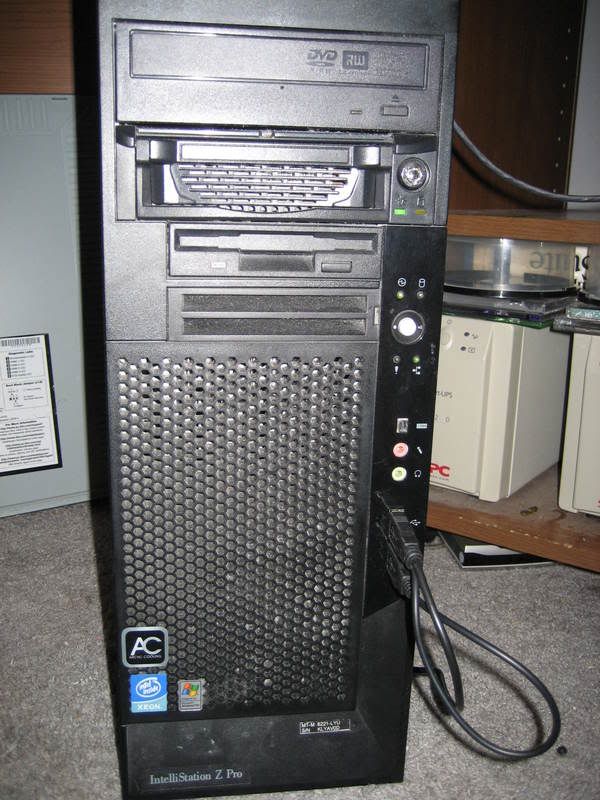
Something i forgot to mention about my IBM
XeonFront.jpg

It has 8 network connections. 4 Gigabit and 4 10/100
Onboard is a broadcom gigabit chip.
1st PCI-X slot is a netgear Gigabit NIC,
2nd PCI-X slot is a dual port intel 10/100 NIC (my old boss at work gave me 10 for free, gave 5 to a friend)
3rd slot is a Dual port gigabit Intel NIC (friend who i gave the 5 dual-ports returned the favor) which replaced a dual port 10/00 NIC
4th slot is another dual port 10/100 Intel NIC
 
Something i forgot to mention about my IBM


It has 8 network connections. 4 Gigabit and 4 10/100
Onboard is a broadcom gigabit chip.
1st PCI-X slot is a netgear Gigabit NIC,
2nd PCI-X slot is a dual port intel 10/100 NIC (my old boss at work gave me 10 for free, gave 5 to a friend)
3rd slot is a Dual port gigabit Intel NIC (friend who i gave the 5 dual-ports returned the favor) which replaced a dual port 10/00 NIC
4th slot is another dual port 10/100 Intel NIC[/QUOTE]

Care to explain why you need so many?
 
Care to explain why you need so many?
why would he need that many NICs and why would you need that much bandwith?
2 Reasons actually.
1.) My IBM's motherboard's PCI-X slots are not backwards comaptible with PCI as per the PCI-X Standard. The manual states this, and I tried various PCI cards and they all caused some really wierd video issues.
2.) They were Free.
its so he can access the full bandwith of his oc-48 of course!
If only :D
He's hosting pr0n :D
Shhhh! If everyone finds out my OC-48 will be satturated!
 
Not quite there just yet.
Notquitethereyet.jpg


I want to run all 3 dispaly off one PC. I also want to replace the 19" Westinghouse L1928NV and 17" VeiwSonic VA721 with the same model as my center 22" Acer AL2223W Widescreen LCD. I also need a new mainboard that support Dual PCI-E or a Matrox Triple Head 2 go. But will cost me about a grand to do all that. :-\ As soon I pay off my paintball credit card... thats what I'm going to do. :)

But dont look promising as those 3 already took the whole space so will I fit 3 22 inch widescreen? Probally not without a special mounting because of the LCD stand. :rolleyes:
 
Not quite there just yet.
Notquitethereyet.jpg


I want to run all 3 dispaly off one PC. I also want to replace the 19" Westinghouse L1928NV and 17" VeiwSonic VA721 with the same model as my center 22" Acer AL2223W Widescreen LCD. I also need a new mainboard that support Dual PCI-E or a Matrox Triple Head 2 go. But will cost me about a grand to do all that. :-\ As soon I pay off my paintball credit card... thats what I'm going to do. :)

But dont look promising as those 3 already took the whole space so will I fit 3 22 inch widescreen? Probally not without a special mounting because of the LCD stand. :rolleyes:

Looks good so far ^_^ As for a 3rd monitor solution check this out http://sewelldirect.com/USB-to-DVI-Adapter-1600x1200.asp That might solve your problem!
 
Looks good so far ^_^ As for a 3rd monitor solution check this out http://sewelldirect.com/USB-to-DVI-A...-1600x1200.asp That might solve your problem!

The only problem is USB video cards can't really handle games. On the detailed specs listed on the right side side of the page it says it can only play dvds at 800x600@16bpp, even though it says it has 256mb onboard video. Its great for casual web surfing, office work, that sort of thing, but nothing high end.
Not quite there just yet.
Notquitethereyet.jpg


I want to run all 3 dispaly off one PC. I also want to replace the 19" Westinghouse L1928NV and 17" VeiwSonic VA721 with the same model as my center 22" Acer AL2223W Widescreen LCD. I also need a new mainboard that support Dual PCI-E or a Matrox Triple Head 2 go. But will cost me about a grand to do all that. :-\ As soon I pay off my paintball credit card... thats what I'm going to do. :)

But dont look promising as those 3 already took the whole space so will I fit 3 22 inch widescreen? Probally not without a special mounting because of the LCD stand. :rolleyes:
Yay! A picture of my picture!
BTW, nice setup
 
Looks good so far ^_^ As for a 3rd monitor solution check this out http://sewelldirect.com/USB-to-DVI-Adapter-1600x1200.asp That might solve your problem!

Thats pretty cool. Never knew such thing exist. But I'm a gamer so that option is out. Right now I have 2 path but not sure which one to go. I'm still exploring my options.

New mainboard with 2 PCI-E Slot and another video card then One card for the center and the other one for the sides. Wont be in SLI/crossfire mode.

ATI Radeon HD 3900 or better and Triple Head 2 Go Digital edition. That way I can play at 3840 x 800 in full screen 3d mode.
 
Nice set-up. Good monitor and thanks for the close up Compaq pr0n. What is that, an Armada? :D

Well, your welcome I guess and yes it is in fact it is a Compaq Armada 2 of them actually(the other one is right under) I figured I would take a shot of one before I try to sell them. They sadly both stopped working..(I know someone is gonna ask how so I will tell you. The first one fell from my desk a couple of months ago it still works but it is ugly now:( and then second well the screen stays black which I later found out the lcd went out...)

But they already got replaced by this and I'm loving every single minute of it.
 
Being at college, I don't get the most space. That and my setup is currently a laptop until I build my new system this winter. I'm happy though, I can run TF2 flawlessly, thats enough until i get my new system for crysis and COD4 around Christmas time.

The laptop is an HEL-80, 22" Samsung, Saitek Keyboard, MX518, external HDD, some cheap Altec Lansing 2.1 speaker (wish i had room for a 5.1 or 7.1 in this room.), and a cooling pad for the laptop.

desk1wa3.jpg


desk2tb3.jpg
 
Status
Not open for further replies.
Back
Top