• Some users have recently had their accounts hijacked. It seems that the now defunct EVGA forums might have compromised your password there and seems many are using the same PW here. We would suggest you UPDATE YOUR PASSWORD and TURN ON 2FA for your account here to further secure it. None of the compromised accounts had 2FA turned on.
    Once you have enabled 2FA, your account will be updated soon to show a badge, letting other members know that you use 2FA to protect your account. This should be beneficial for everyone that uses FSFT.

New Performance Benchmark from Unigine

Nice to see more results and now I'm convinced my scores should be much higher. How is a 980 ti paired with a slower cpu than mine beating my gtx 1080 running the 1080 extreme preset?

~edit~

Just noticed the cpu is oc'ed to 4.6 and is an i7 like mine so I guess 600mhz faster cpu can make a significant difference in this benchmark.
 
Last edited:
Nice to see more results and now I'm convinced my scores should be much higher. How is a 980 ti paired with a slower cpu than mine beating my gtx 1080 running the 1080 extreme preset?

~edit~

Just noticed the cpu is oc'ed to 4.6 and is an i7 like mine so I guess 600mhz faster cpu can make a significant difference in this benchmark.

The 980Ti is no slouch and Maxwell has quite a bit of overclock headroom, especially if cooled properly. This benchmark is designed to really stress the GPU as it doesn't seem to be as CPU sensitive as say 3DMark. I'm running a 4790K @ 4.44Ghz and scoring over 10K in the 4K optimized bench run - GPU OC and cooling can make a big difference. (Rig in sig)
 
Last edited:
My 1080 has a pretty healthy factory OC (1847mhz) on it though so I'm still unsure if there is something amiss with my results. Barely over 4k score on the 1080 Extreme preset seems very low for an OC'ed GTX 1080 and a 4ghz ht i7.
 
My 1080 has a pretty healthy factory OC (1847mhz) on it though so I'm still unsure if there is something amiss with my results. Barely over 4k score on the 1080 Extreme preset seems very low for an OC'ed GTX 1080 and a 4ghz ht i7.

Possibly - can't hurt to do some research/comparisons. That 980Ti may also be on water and throttling less than your 1080.
 
6NN1jp9.png

pHtl4MZ.png
 
Possibly - can't hurt to do some research/comparisons. That 980Ti may also be on water and throttling less than your 1080.

if he's referring to my 980ti result, it has a full cover block and never throttles at 1500/4000
 
eclap also has a GTX 1080 and a cpu that's almost identical to mine except 200mhz faster and his scores are 2k higher. There is definitely something wrong with my system, but unfortunately I have no clue where to start looking. GPU usage is sitting at 99% throughout all runs regardless of settings so while it does seem odd to be getting the results I'm getting, I have to conclude something is wrong when someone with almost an identical system is outscoring me by such a large margin. Not that I care about epeening over scores, just that I wanna know my system is functioning as well as it possibly can and without any major flaws or unresolved issues. Also worth mentioning that my card doesn't seem to be throttling at all and utilization is always at 99-100%.
 
Last edited:
eclap also has a GTX 1080 and a cpu that's almost identical to mine except 200mhz faster and his scores are 2k higher. There is definitely something wrong with my system, but unfortunately I have no clue where to start looking. GPU usage is sitting at 99% throughout all runs regardless of settings so while it does seem odd to be getting the results I'm getting, I have to conclude something is wrong when someone with almost an identical system is outscoring me by such a large margin. Not that I care about epeening over scores, just that I wanna know my system is functioning as well as it possibly can and without any major flaws or unresolved issues. Also worth mentioning that my card doesn't seem to be throttling at all and utilization is always at 99-100%.
Make sure you don't have any global settings for your GPUs. Bit me years ago with Heaven on my GPUs. Saw the same type of issues you are getting now.
 
Like what? I enabled DSR factors for the 4k and 8k runs to display on my 1080 monitor, but that's it. I seem to remember something about 32gb of ram potentially being weaker in terms of performance than just 16gb so maybe that has something to do with it. I have 2 16gb sticks running at XMP of 2666.
 
Like what? I enabled DSR factors for the 4k and 8k runs to display on my 1080 monitor, but that's it. I seem to remember something about 32gb of ram potentially being weaker in terms of performance than just 16gb so maybe that has something to do with it. I have 2 16gb sticks running at XMP of 2666.
Cant think Ram would matter too much nor CPU choice or clock. Seems all 290/390 results are equal to mine. Afew of those with 4790K against my FX8350@ 4.7Ghz with 2200Mhz Ram. I know DSR setting aren't required nor should that be an issue. My problem back then was MSAA/SSAA overrides. Caused about a 30% deficit from what it should have been.
 
eclap also has a GTX 1080 and a cpu that's almost identical to mine except 200mhz faster and his scores are 2k higher. There is definitely something wrong with my system, but unfortunately I have no clue where to start looking. GPU usage is sitting at 99% throughout all runs regardless of settings so while it does seem odd to be getting the results I'm getting, I have to conclude something is wrong when someone with almost an identical system is outscoring me by such a large margin. Not that I care about epeening over scores, just that I wanna know my system is functioning as well as it possibly can and without any major flaws or unresolved issues. Also worth mentioning that my card doesn't seem to be throttling at all and utilization is always at 99-100%.
Make sure ram is running dual channel.
 
also make sure vsync isn't set to enabled in NVC, set it to always off for benchmark runs
 
Ram is running dual channel (I lol'ed when I read that actually, but thanks for your input) and Vsync isn't on. Whatever the issue is, it's very subtle and only a reinstall will likely fix it. I need to reinstall Windows for other reasons anyway, but have been procrastinating. Anyway I monopolized this thread enough, sorry guys and thanks for the feedback.
 
eclap also has a GTX 1080 and a cpu that's almost identical to mine except 200mhz faster and his scores are 2k higher. There is definitely something wrong with my system, but unfortunately I have no clue where to start looking. GPU usage is sitting at 99% throughout all runs regardless of settings so while it does seem odd to be getting the results I'm getting, I have to conclude something is wrong when someone with almost an identical system is outscoring me by such a large margin. Not that I care about epeening over scores, just that I wanna know my system is functioning as well as it possibly can and without any major flaws or unresolved issues. Also worth mentioning that my card doesn't seem to be throttling at all and utilization is always at 99-100%.
Are you running your 1080 at stock? I was scoring in the 15k region with my 1080 at stock with 1080p medium. My scores posted here are with the gpu ruining at 2100mhz core and 11200 vram clocks.
 
so it's more like Furmark or Kombustor and less like 3DMark?...so it's mostly a torture test?...I don't like using those type of tests and prefer general benchmarking tools like Unigine Heaven or 3DMark
 
I ran it at 5280x1050 on my 290X. It was running about 21 FPS on high shaders so I had to drop them to medium.
It's not using much CPU. I ran it with Statuscore @1080P and the 4 cores were only averaging about 1000 GHz.

SuperpositionMed5280x1050.jpg


Here's my 1080P Extreme result:
Superposition1080Pextreme.jpg
 
Last edited:
so it's more like Furmark or Kombustor and less like 3DMark?...so it's mostly a torture test?...I don't like using those type of tests and prefer general benchmarking tools like Unigine Heaven or 3DMark
What on this planet makes you say this is like Furmark or Kombustor?
 
again...first few posts...
It stresses the gpu to 100%, just like any other gpu bench, or any game that is uncapped. I do not get your comment of how this is more like Furmark rather than it is 3Dmark.
 
Last edited:
Furmark/Kombustor do insane things to your GPU that a game or normal graphics benchmark program would never do - they are designed to stress/put the hurt on a graphics card as much as possible - more for stability testing and making sure cooling works properly. This benchmark definitely loads up your GPU, but does so in a good way that focuses on measuring GPU performance.
 
It stresses the gpu to 100%, just like any other gpu bench, or any game that is uncapped. I do not get your comment of how this is more like Furmark rather than it is 3Dmark.
Someone also mentioned higher temps than some game but he is reaching at best to akin this to Furmark.
 
Single Fury X - no overclock
I7-4770K overclocked to 4.5Ghz
MSI Z87-GD65 Motherboard
16GB RAM

I've got my second Fury X out on loan right now to a friend who wanted to try FreeSync--- I'll do a crossfire Fury X when it comes back, and post it up.

Superposition_Benchmark_v1.0_10169_1492404174.png
Superposition_Benchmark_v1.0_4538_1492405093.png
Superposition_Benchmark_v1.0_3319_1492404746.png
 
Last edited:
7700k @ 4.8 1070 Strix GTX. Have a Strix 1080 GTX Ti coming in next week.


RmNjRK2.jpg

oPdO4uY.jpg
 
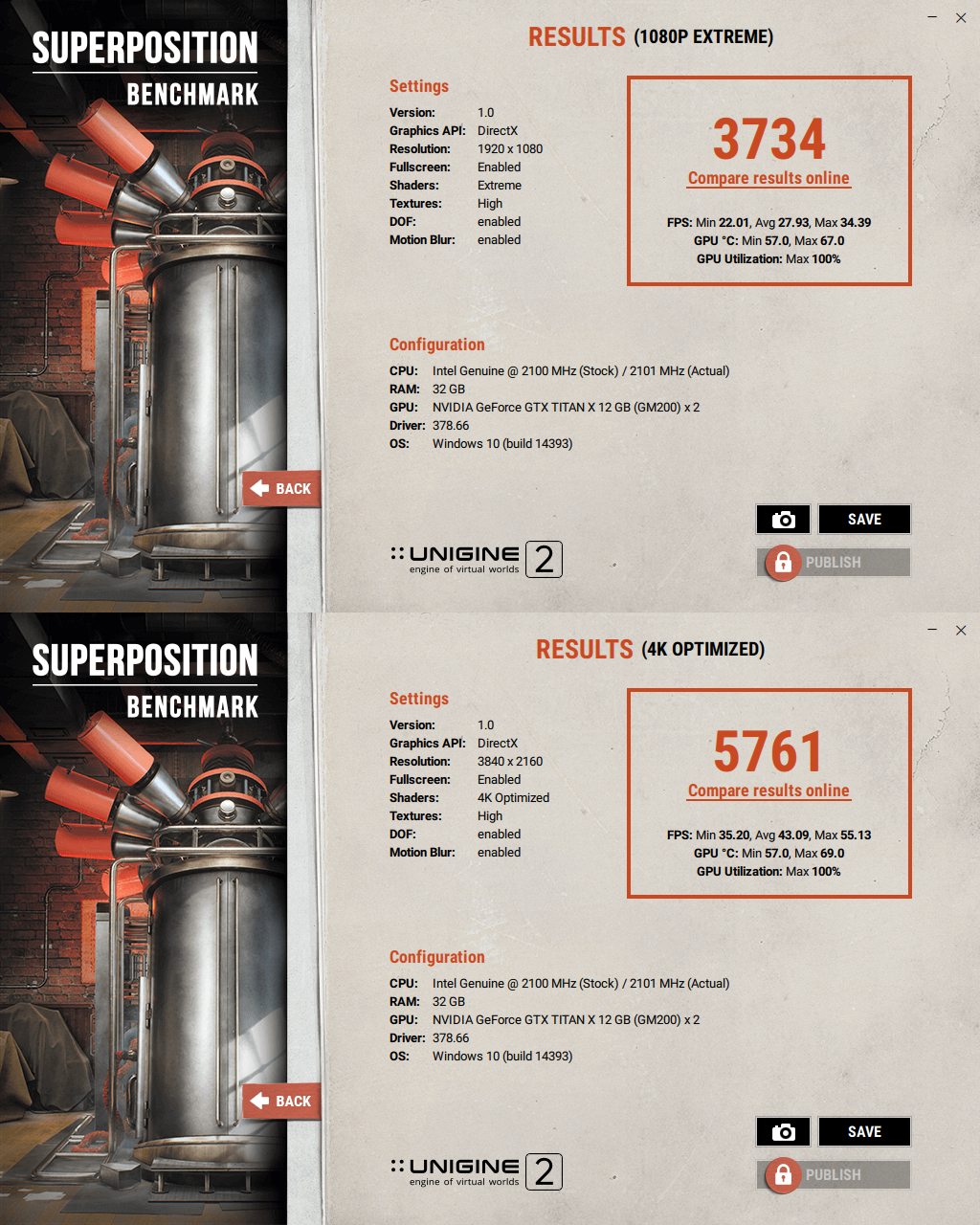
Your 1080p extreme result is incredibly low imo, a Pascal Titan X shouldn't score lower than a 980 Ti

edit: freudian slip, didnt mean maxwell titan x lol

edit2: just downclocked my cpu from 4.7 to 4.4Ghz and my result went from 4342 to 4334

Seems like a driver issue to me (regarding your Titan X)
 
Last edited:
This benchmark seems really buggy to me. All the 16:9 resolutions automatically stretch (or are rendering?) across my entire ultrawide monitor (3440x1440), and when I try to pick the actuala 3440x1440 resolution the screen goes red and I have to ctl+alt+del out of it and it apologizes for crashing. Not sure if this is just my setup. No problems with any other software (and setting 16:9 resolutions on the desktop doesn't stretch those resolutions, so it's doubly weird).
 
Almost forgot to check it out before going to sleep..:eek: Overall I like the benchmark and its presentation is easy on the eyes. The application is incredibly modern compared to Heaven and Valley.

A few results:


I will post my scores from the other thread.

GPU Clock Offset: +188
MEM Clock Offset: +785
Stock cooling

rh50yu.jpg


2wfmhqw.jpg
 
Back
Top