DisrupTer911
[H]ard|Gawd
- Joined
- Oct 14, 2004
- Messages
- 1,193
pix of Poker Keyboards? not a member of geekhacks...
![[H]ard|Forum](/styles/hardforum/xenforo/logo_dark.png)
Follow along with the video below to see how to install our site as a web app on your home screen.
Note: This feature may not be available in some browsers.
Zarathustra[H];1037049163 said:Also, Geekhack is doing pre-orders for Poker Keyboards. Not really for me, but they do look nice, and you can get them with he switches of your choice...
![Zarathustra[H]](/data/avatars/m/9/9298.jpg?1723407683)
Can a member of GeekHack post the photos from that thread? Thanks
from sixty on deskthority
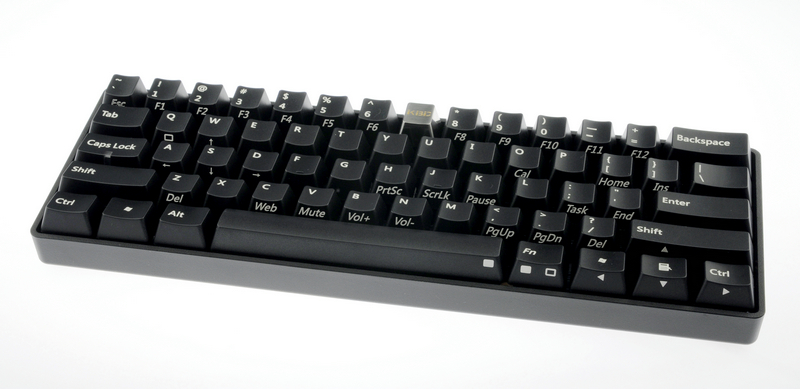
Zarathustra[H];1037050374 said:Oh, it doesn't let you view them? I'll replay them on my Flickr in a moment.
Zarathustra[H];1037050433 said:Agreed. Looks like they are going after HHK but cheaper.


Buy a cheap IBM Model M off of ebay. Is backlighting really that important to you?

I just got my Leopold with Mx browns today via fedex. So far I absolutely love it. The typing feel is very nice and it looks awesome. The size is perfect because I actually have room for my mouse now and it's not up against my keyboard. The mx browns are quite a bit louder than I had expected but maybe thats because i'm bottoming some keys out. I think I'll really like this keyboard I just think my g/f may complain because of the typing noise.
Nice! My Leopold will arrive on Friday.I just got my Leopold with Mx browns today via fedex. So far I absolutely love it. The typing feel is very nice and it looks awesome. The size is perfect because I actually have room for my mouse now and it's not up against my keyboard. The mx browns are quite a bit louder than I had expected but maybe thats because i'm bottoming some keys out. I think I'll really like this keyboard I just think my g/f may complain because of the typing noise.
Nice! My Leopold will arrive on Friday.
Me, too...If you end up not liking it and selling it I'm gonna LOL.
I just got my Leopold with Mx browns today via fedex. So far I absolutely love it. The typing feel is very nice and it looks awesome. The size is perfect because I actually have room for my mouse now and it's not up against my keyboard. The mx browns are quite a bit louder than I had expected but maybe thats because i'm bottoming some keys out. I think I'll really like this keyboard I just think my g/f may complain because of the typing noise.
Any comments on the board's "squeeky spacebar"? Received ship notice last night.
My Leopold came today right as I was leaving for work. I didn't get a chance to type on it yet but I can already tell that the fold out feet and angled stabilizers are useless, on my desk the board slides around with ease.
I'm trying to find a video where there is a true difference in gaming between mechanical and dome. Can anyone post one for me if one is found?
It's a keyboard.
I dunno, I'm just still thinking of a new keyboard. I love this keyboard that I have right now, but I've had it for about 5 or 6 years and maybe a change would be good. I don't want a new mobo right now because I have all the hard drives I need (SATA ports). I don't need a new case. Video card, sound card, CPU, power supply and drives should be fine, even though I could try another Blu-ray burner. I won't give up my MX310 mouse for anything (I trust it COMPLETELY). Maybe a new 5.1 system? I dunno. But the most logical step would probably be to get a new keyboard. Seriously, this thing doesn't have dust on it, it has dust that sticks and would require some hard cleaning.
So yeah, thinking of a new keyboard.
My current keyboard: http://forum.amtech.com.vn/attachme...phim-logitech-vip-gia-sieu-re-de-dsc00451.jpg
The point is that a video isn't really going to show you how they compare because it is a keyboard. You have to really use them to know if they are right for you.
I was thinking maybe someone was playing a game, kind of like in 4 parts, on the bottom 2 squares would be showing the guy press the key, and then above those key video squares, are 2 more squares, showing the action in what is being done and if there are any differences. I was thinking of something like that. And I don't even know if I can even find a mechanical keyboard to even try one out around here. And I'm not a fan of just going into something blind.
I was thinking maybe someone was playing a game, kind of like in 4 parts, on the bottom 2 squares would be showing the guy press the key, and then above those key video squares, are 2 more squares, showing the action in what is being done and if there are any differences. I was thinking of something like that. And I don't even know if I can even find a mechanical keyboard to even try one out around here. And I'm not a fan of just going into something blind.
I don't know, my local brick and motor computer store had 3 mechanical keyboards and I think even Best Buy had the Razer Black Widow and I asked to try them out in the store.
I didn't buy them for gaming though. I bought them for typing. I'm not a professional gamer and the small difference doesn't really make a big difference to me. The one area where I loved the mechanical over the dome was the space bar which I use to crouch was a lot better to use because it wasn't as squishy.
$80 is nuts for a rubber dome, at least grab a unicomp buckling spring if thats around your budget
Huh.
I'm a little surprised by this.
So I guess if I'm going to game on here, I might as well stay with the rubber dome kind of ones? The most I'd ever pay I think for a rubber dome is about 80. I mean, I know it's not much, but I was kinda looking at the Logitech K320 Wireless keyboard. I dunno, just a thought. I know this is for mechanical keyboards... but even on the BB site they say they don't have any. Maybe I have to ask. I live in PA, so no Fry's here. I have BB, HHGregg and some small places. I keep forgetting about one place... but I can never remember what it is. So not many places.
And just saying right now, I game left-handed (ambidextrous mouse with my left hand) and I use the arrow keys on the keyboard to move around and I definitely, definitely use the tenkey pad for such a thing. Also, are there any MX Browns with multimedia controls (play/pause, next, previous is all I really need). Or would I be asking for too much?