• Some users have recently had their accounts hijacked. It seems that the now defunct EVGA forums might have compromised your password there and seems many are using the same PW here. We would suggest you UPDATE YOUR PASSWORD and TURN ON 2FA for your account here to further secure it. None of the compromised accounts had 2FA turned on.
    Once you have enabled 2FA, your account will be updated soon to show a badge, letting other members know that you use 2FA to protect your account. This should be beneficial for everyone that uses FSFT.

Linux performance still a let down on desktop.

Status
Not open for further replies.
Sadly, Bullet didnt find the joke funny...:(

Sorry mate, I meant to reply but got sidetracked!

I did find your joke funny and had a little chuckle, very well said my friend. :D

Fact is, I'm really enjoying testing these distro's, got all sorts of ideas in mind going through the junk pile checking out what old hardware I have available. ;)
 
Sorry mate, I meant to reply but got sidetracked!

I did find your joke funny and had a little chuckle, very well said my friend. :D

Fact is, I'm really enjoying testing these distro's, got all sorts of ideas in mind going through the junk pile checking out what old hardware I have available. ;)
Since you are testing distros, check solus.

I liked it a lot, but when i suggested in their subreddit to only put efforts in their main version (with budgie, instead of budgie and mate edition) the main devs were very unprofessional. That took the passion out of me for the distro and jumped to artegos.
 
Last edited:
Since you are trsting distros, check solus.

I liked it a lot, but when i suggested in their subreddit to only put efforts in their main version (with budgie, instead of budgie and mate edition) the main devs were very unprofessional. That took the passion out of me for the distro and jumped to artegos.

I had the same issue with Dirty Unicorns on Android, the dev was one of the most arrogant and unprofessional individuals I've ever had the intense displeasure of dealing with. Now using pure Nexus and never going back.
 
I had the same issue with Dirty Unicorns on Android, the dev was one of the most arrogant and unprofessional individuals I've ever had the intense displeasure of dealing with. Now using pure Nexus and never going back.
PureNexus is awesome.
 
Spent a couple of hours trying to get Manjaro working.

The fix I found previously does not Work.
https://www.cmscritic.com/how-to-fix-nvidia-screen-tearing-in-xfce-mate-kde-lxde-and-others/

The xorg.conf line no longer fixes the issue.
It could be because Drivers with Manjaro are at 340.101, while Ubuntu based are at 340.102, or it could be some other difference.

Anyone have an idea?

What are you experiencing? Tearing under Firefox, tearing dragging windows or both?
 
What are you experiencing? Tearing under Firefox, tearing dragging windows or both?

Tearing in all the places you see tearing. Dragging windows, that test video.

It's clear the line isn't being accepted in xorg.conf.
 
I just installed vanilla Ubuntu 16.04, no issues whatsoever straight out of the box.

No tearing using the tearing test, desktop composition absolutely perfect using Nouveau across two monitors - I've now got this PC booting 5 separate Linux distro's, still using the 9600GT.

Installed the usual Nvidia-340 drivers and rebooted, no issues whatsoever using the tearing test, no need to enable force composition pipeline in any way whatsoever and didn't even apply any OS updates before testing.

oAtQWXV.png


ctkuOme.png
 
Ok, so Payday2 is free on Steam so I've been playing that all day (so sitting on my arse for extended periods) and mucking around in the workshop playing with Linux distro's standing up for extended periods - Due to an injury as a result of a car accident I suffer from back issues and now my back is killing me. Gonna call it quits for the day I think and get back into it tomorrow in between jobs - Hopefully I can get by on the other workbench.

Been enjoying testing all these distro's, surprised this PC hasn't packed it in on me yet.

gZRpznr.jpg
 
Last edited:
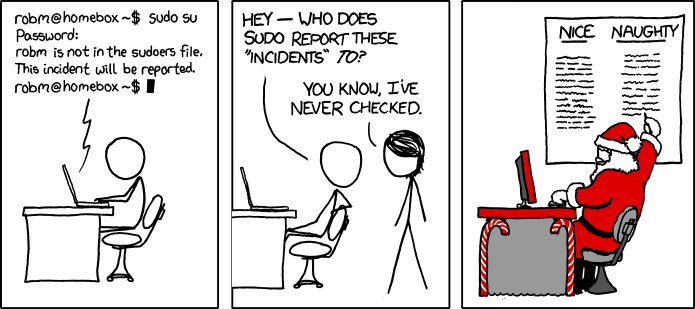
"user is not in the sudoers file. This incident will be reported".

Wtf is this?! That's it I'm switching to Gentoo

On a serious note, is the most comprehensive Linux wiki the one for Arch?
 
Still playing with Kbuntu. No major issues to report with the exception that this 9600GT is more than capable of full hardware acceleration rendering the desktop, it's the CPU that seems to be maxing out - Having said that I still find the system more than usable even considering the demanding KDE WM.

I've been using KDE for years now and I've never really seen any major "demand" on system resources while using it. If you look at my sig you're going to see that my hardware is pretty damn old at this point and yet I've had no issues with KDE. I know it definitely uses more RAM than many other DEs but it's not a lot more. I looked at RAM usage when I was multi-booting a bunch of different distros a while back to see what I was going to mess with next and with a couple of distros I installed multiple DEs to see what I preferred overall. I did not see large resource increases when using KDE over any of the other ones I was considering and I sure didn't notice any performance difference due to resource usage.

My fileserver is lower speced than my sig system with 1/3 the RAM, slower spinner drives, a lower clockspeed and an even older and much weaker 8600GT. It's running the latest stable openSUSE and KDE and I've had no issues. Since it's my fileserver and I hardly ever even have the monitor turned on, I'm pretty sure I'm just running the default open source driver and not the nVidia driver.
 
I've been using KDE for years now and I've never really seen any major "demand" on system resources while using it. If you look at my sig you're going to see that my hardware is pretty damn old at this point and yet I've had no issues with KDE. I know it definitely uses more RAM than many other DEs but it's not a lot more. I looked at RAM usage when I was multi-booting a bunch of different distros a while back to see what I was going to mess with next and with a couple of distros I installed multiple DEs to see what I preferred overall. I did not see large resource increases when using KDE over any of the other ones I was considering and I sure didn't notice any performance difference due to resource usage.

My fileserver is lower speced than my sig system with 1/3 the RAM, slower spinner drives, a lower clockspeed and an even older and much weaker 8600GT. It's running the latest stable openSUSE and KDE and I've had no issues. Since it's my fileserver and I hardly ever even have the monitor turned on, I'm pretty sure I'm just running the default open source driver and not the nVidia driver.

As stated,

The machine used in testing is an Athlon 5600+ dual core processor with 2GB of ram and a 9600GT (probably identical to your 8600GT, but I haven't checked). I posted screenshots and you can see processor usage peaking on both cores in a literal push/pull configuration. Overall processor usage is acceptable, but I'm quite sure using a lighter distro overall resource usage would be lower. I'm more than happy to test this in greater detail if you like to settle things once and for all, as everything's in place for me to do so - It would only take me 5 mins to run some tests performing everyday tasks.

Why are you running a KDE DE on a fileserver lower specced than your sig rig? Can't you just SSH into the server for maintenance?

I also have a Q6600 here that I can test, but that's going to take more time to set up.

Furthermore, settle down. ;)

"user is not in the sudoers file. This incident will be reported".

What distro are you using now? Sudo is very similar to UAC, it's basically saying that your user does not have UAC access and your privileges therefore cannot be elevated. You really should be focusing on the basics rather than distro hopping at this point, you are without a doubt making things harder for yourself.
 
As stated,

The machine used in testing is an Athlon 5600+ dual core processor with 2GB of ram and a 9600GT (probably identical to your 8600GT, but I haven't checked). I posted screenshots and you can see processor usage peaking on both cores in a literal push/pull configuration. Overall processor usage is acceptable, but I'm quite sure using a lighter distro overall resource usage would be lower, I'm more than happy to test this in greater detail if you like to settle things once and for all as everything's in place for me to do so - It would only take me 5 mins to run some tests performing everyday tasks.

Why are you running a KDE DE on a fileserver lower specced than your sig rig? Can't you just SSH into the server for maintenance?

Furthermore, settle down. ;)

I keep a DE installed and running because I do occasionally do other things with the machine, especially when my main system is down for whatever reason or I have something going on my main machine and don't feel like interrupting what I'm doing. It's always handy to have a second machine to use and since I only run two systems nowadays my server gets the job of being my secondary machine.

As for why I use KDE on it? I just like KDE. It's what I've been using for years and just stick with it.

While I realize that the old AMD dual cores aren't as efficient as Core 2 quads (server is Q6600@3.0), I still have to wonder about the CPU usage. I hardly even get a blip of CPU usage no matter what I'm doing in the UI.

As for the 8600GT vs 9600GT, I'm thinking the 9600GT was a decent bit more powerful than the 8600GT although I could be wrong. I've never had a 9600GT and I never actually used this 8600GT for anything 3D based. It was just a card I had laying around and tossed it in to replace the 6600GT which was previously in the system.
 
Ah, cool.

How's Fedora going for ya?

It took a while to get used to things. I think I like KDE better. Gnome definitely looks better but they removed so much functionality its ridiculous. Had to install a bunch of extensions (which isn't even part of the OS). Also every distro you have to learn a new package manager.

If I keep going I'll end up with Arch and doing it all manually :)
 
Fedora also uses Wayland by default so maybe thats why it feels a little snappier? I like dnf. On Debian you have apt-get, apt and aptitude, its madness. dnf has delta updates and a sane syntax, not the nonsense in pacman like -Syu instead of up 'update' :mad:
 
It took a while to get used to things. I think I like KDE better. Gnome definitely looks better but they removed so much functionality its ridiculous. Had to install a bunch of extensions (which isn't even part of the OS). Also every distro you have to learn a new package manager.

If I keep going I'll end up with Arch and doing it all manually :)

I've been using Gnome on my lappy since my mini review on it and I have to say, I'm nearly over it - I'm thinking of switching back to something with the MATE DE. The applications view and the desktop view are just to complicated to navigate with a scratchy touchpad and I keep hitting the wrong thing! It also feels sort of limiting, I know it really isn't, but it feels like it is.
 
BTW. Apt isn't that old, it's a newer, simpler version of apt-get, you can just use either no need to use both.

I prefer apt as the terminal interface is a little cleaner and the command itself is simpler. I've used Arch and while the package manager is different almost everything else is identical. I prefer something a little simpler than Arch these days.
 
As for why I use KDE on it? I just like KDE. It's what I've been using for years and just stick with it.

Out of all the DE's I tried this weekend I just love KDE, it really is a polished and beautiful interface - A lot of great ideas incorporated that make navigating an OS so much easier.
 
BTW. Apt isn't that old, it's a newer, simpler version of apt-get, you can just use either no need to use both.

I prefer apt as the terminal interface is a little cleaner and the command itself is simpler. I've used Arch and while the package manager is different almost everything else is identical. I prefer something a little simpler than Arch these days.

Have you used aptitude? Its like a front end to apt with more features and even has a Gui in the terminal if you want. I agree about Arch, I read their install wiki and it'd take a week to do all those steps.

What do you recommend for partitioning? I don't want to keep wiping out everything when I swtich distros. Fedora has the most complicated setup I've seen, it uses lvm too.
 
Have you used aptitude? Its like a front end to apt with more features and even has a Gui in the terminal if you want. I agree about Arch, I read their install wiki and it'd take a week to do all those steps.

What do you recommend for partitioning? I don't want to keep wiping out everything when I swtich distros. Fedora has the most complicated setup I've seen, it uses lvm too.

If you're distro isn't packaged with a friendly GUI installer use Gparted and a live install of Ubuntu or something. If the distro comes with a nice GUI installer it should have the functionality to set up partitions in the installer, in which case I recommend using that. The nugget rig I'm using for testing now has five distro's installed on it all selectable via GRUB, I just used the partition manager in the installer using default settings, couldn't be easier!
 
If I used it I would have recommended it to you, you sort of use what you use and forget about everything else.

Im glad it's working out for you.
 
Have you tried force full composition pipeline?


After reading up on it full composition pipeline is only adds scaling to the mix.

But that is moot anyway.

Since neither option is in my GUI. Just like with KDE.
https://hardforum.com/attachments/nvidiadriverlinux-jpg.27234/

It's too bad, I had high hopes for Manjaro, it is the only distro that actually loaded up real NVidia drivers instead of the open sources ones right after install.

But Previous fix that worked for Ubuntu Distros (post 284 has link with complete details) fails here.

It's obvious that the xorg.conf update is being rejected, as if you try to update the File it removes the line it doesn't understand, and adds this comment:
#Removed Option "metamodes" "nvidia-auto-select +0+0 { ForceCompositionPipeline = On }"

NVidia driver in Manjaro, just won't accept that change.

So a challenge for those who claim Linux installation is easy:

How do you fix that?
 
Last edited:
Out of all the DE's I tried this weekend I just love KDE, it really is a polished and beautiful interface - A lot of great ideas incorporated that make navigating an OS so much easier.
Just installed it on a VM, using VBox and must agree, it is very nice and polished.

Later on, will try it on "real" hardware. :woot:
 
After reading up on it full composition pipeline is only adds scaling to the mix.

But that is moot anyway.

Since neither option is in my GUI. Just like with KDE.
https://hardforum.com/attachments/nvidiadriverlinux-jpg.27234/

It's too bad, I had high hopes for Manjaro, it is the only distro that actually loaded up real NVidia drivers instead of the open sources ones right after install.

But Previous fix that worked for Ubuntu Distros (post 284 has link with complete details) fails here.

It's obvious that the xorg.conf update is being rejected, as if you try to update the File it removes the line it doesn't understand, and adds this comment:
#Removed Option "metamodes" "nvidia-auto-select +0+0 { ForceCompositionPipeline = On }"

NVidia driver in Manjaro, just won't accept that change.

So a challenge for those who claim Linux installation is easy:

How do you fix that?

Easy, don't use Manjaro, use one of the other thousand distro's out there. I don't use Manjaro and my experience is just fine. The whole idea of force composition pipeline is to change where scaling is performed, force full composition pipeline simply forces the GPU to do the scaling.

If you had the same issue under Windows what would you do? Based on experience with Nvidia drivers under Windows you'd be screwed.
 
Last edited:
Easy, don't use Manjaro, use one of the other thousand distro's out there. I don't use Manjaro and my experience is just fine. The whole idea of force composition pipeline is to change where scaling is performed, force full composition pipeline simply forces the GPU to do the scaling.

If you had the same issue under Windows what would you do? Based on experience with Nvidia drivers under Windows you'd be screwed.

So the ease of Linux installation, is keep trying distros until you can hopefully find one that works. :rolleyes:

After over a week trying to get something usable, the overwhelming impression remains that Linux on the desktop remains a half assed offering.
 
So the ease of Linux installation, is keep trying distros until you can hopefully find one that works. :rolleyes:

After over a week trying to get something usable, the overwhelming impression remains that Linux on the desktop remains a half assed offering.

Well seeing as buying a video card from this decade isn't an option.

https://wiki.manjaro.org/index.php?title=Various_screen_tearing_fixes

Perhaps their is a solution in there.

You also didn't mention what DE your using. Did you install with XFCE or are you running Manjaro with an alternate DE ?

If you are running KDE again...
https://wiki.archlinux.org/index.php/NVIDIA/Troubleshooting#Avoid_screen_tearing_in_KDE_.28KWin.29
the arch wiki is a good place to look for help as well as Manjaro is based on arch of course.
 
So the ease of Linux installation, is keep trying distros until you can hopefully find one that works. :rolleyes:

After over a week trying to get something usable, the overwhelming impression remains that Linux on the desktop remains a half assed offering.

Or there's something wrong on your end which is causing many of the problems and aren't problems inherent in the distros. I said it before and I'll repeat it; I wouldn't be surprised if you have some bad hardware or some hardware in the process of going bad. When hardware gets the age yours is, I definitely expect issues. Now that I think back to it, some of your problems are reminiscent of issues I had when my 8800GT was going bad. I had to bake mine four times to keep it working and the last time it only held for about 24 hours so I had no choice but to replace it. When the card started going downhill after a baking I would get seemingly random errors until I experienced them enough to see that they weren't random. In my case it got to the point where the card wouldn't be detected as anything but a generic VGA card. I do remember specifically what some of the issues I had were when the card was going bad again. Certain features of the card or certain settings in games would cause crashes but if I turned off those features or settings it would be good for a while again.
 
Or there's something wrong on your end which is causing many of the problems and aren't problems inherent in the distros. I said it before and I'll repeat it; I wouldn't be surprised if you have some bad hardware or some hardware in the process of going bad. When hardware gets the age yours is, I definitely expect issues. Now that I think back to it, some of your problems are reminiscent of issues I had when my 8800GT was going bad. I had to bake mine four times to keep it working and the last time it only held for about 24 hours so I had no choice but to replace it. When the card started going downhill after a baking I would get seemingly random errors until I experienced them enough to see that they weren't random. In my case it got to the point where the card wouldn't be detected as anything but a generic VGA card. I do remember specifically what some of the issues I had were when the card was going bad again. Certain features of the card or certain settings in games would cause crashes but if I turned off those features or settings it would be good for a while again.

Well in his defense. Those cards do seem to be hit and miss. Bullet suggested it was the specific non-stock card he had awhile back and I tend to believe that. Card MFGs back then didn't stick to the reference design very often... I mean they still create their own designs today. However I find most stick pretty close to the reference these days. I think the older Nvidia cards using the older and Nvidias first line of unified drivers are a lot more touchy that way.

I guess what I'm saying is basically this cards of that vintage do have some tearing issues with Linux in general... it is detailed their are suggested fixes for most major distros. Still some people have cards from the same vintage that have ZERO issues and work exactly as you would expect them to. My assumption is the ones that just work are the ones that where pretty much stock reference designs.

I have installed lots of NV hardware and ATI, I have never ran into any of these tearing issues. Still I know they can happen... fixes have been detailed so it does happen. For myself I guess most quatro cards and the like I have installed for clients are tested rigerously by NV to just work... for my own use I almost always buy reference type cards I never spend the extra few bucks for the bigger cooler smaller/larger PCBs or what have you that they sell for the "gaming" cards. Its a guess but it seems to fit with what I have been reading.
 
Or there's something wrong on your end which is causing many of the problems and aren't problems inherent in the distros. I said it before and I'll repeat it; I wouldn't be surprised if you have some bad hardware or some hardware in the process of going bad. When hardware gets the age yours is, I definitely expect issues. Now that I think back to it, some of your problems are reminiscent of issues I had when my 8800GT was going bad. I had to bake mine four times to keep it working and the last time it only held for about 24 hours so I had no choice but to replace it. When the card started going downhill after a baking I would get seemingly random errors until I experienced them enough to see that they weren't random. In my case it got to the point where the card wouldn't be detected as anything but a generic VGA card. I do remember specifically what some of the issues I had were when the card was going bad again. Certain features of the card or certain settings in games would cause crashes but if I turned off those features or settings it would be good for a while again.


Except it isn't like that at all. The cause of tearing is obviously a software issue, that is quite widespread.

The behavior is strictly based on proprietary driver availability which is hit and Miss on Linux. I have tried 8 distros. All the Ubuntu Distro were eventually workable, because they were all using the same driver base.

OpenSuse, and CentOS were just a complete shit show to install Proprietary drivers so I never got them installed. Manjaro for some reason doesn't have the February udpate(340.102), and is stuck on the Dec verion (340.101). I speculate this is why the ForceCompositionPipeline was rejected on Manjaro.

This is all direct cause and effect of software and settings.

Set ForceCompositionPipeline and it works properly, don't set it and it doesn't.

It really doesn't get more obvious than that.
 
So the ease of Linux installation, is keep trying distros until you can hopefully find one that works. :rolleyes:

After over a week trying to get something usable, the overwhelming impression remains that Linux on the desktop remains a half assed offering.
Guys, the man made up his mind from post 1, let him really believe that linux sux. He will be happy, we will be happy and the sun can go back to his vr world.
 
Status
Not open for further replies.
Back
Top