• Some users have recently had their accounts hijacked. It seems that the now defunct EVGA forums might have compromised your password there and seems many are using the same PW here. We would suggest you UPDATE YOUR PASSWORD and TURN ON 2FA for your account here to further secure it. None of the compromised accounts had 2FA turned on.
    Once you have enabled 2FA, your account will be updated soon to show a badge, letting other members know that you use 2FA to protect your account. This should be beneficial for everyone that uses FSFT.

LG 48CX

There have been monitors that combined BFI and VRR, but those implementations were not very good if I recall correctly.
I don't mean w/ VRR, I mean BFI just needs to work at whatever static refresh rate you choose.

Like I should be able to set my game to 80hz, and have BFI work. Currently, that's not the case. In my understanding, the LG will be strobing the pixels at 100hz or 120hz even though Windows is outputting 80hz. Which would give some pretty ugly motion artifacts.
 
I don't mean w/ VRR, I mean BFI just needs to work at whatever static refresh rate you choose.

Like I should be able to set my game to 80hz, and have BFI work. Currently, that's not the case. In my understanding, the LG will be strobing the pixels at 100hz or 120hz even though Windows is outputting 80hz. Which would give some pretty ugly motion artifacts.

Lol that is exactly what BFI + VRR does, at least in the monitors that it's implemented in. You want BFI working at 80Hz? Cap your FPS to 80 and the monitor will strobe at 80Hz. Honestly I don't see why you want to go through the process of manually settings the refresh rate EVERY SINGLE TIME you want a specific strobing Hz, VRR+BFI makes this so much easier. Just enable it and cap your fps to whatever you want. This beats going into the NVCP to manually set my refresh rate to 75 or 85 or 95 every time I want some random strobe Hz value. You wouldn't be utilizing VRR for fluctuating fps, but rather to be able to get strobing working at ANY Hz just by capping your fps to whatever target value you want.
 
at least in the monitors that it's implemented in.
This is the key thing. Of cours VRR+BFI would be the best thing, but it's not available on TV's, and pretty rare on monitors. It's not easy to implement, and sometimes when it is, it isn't implemented correctly.

Capping your frame rate to 80fps does not make the monitor strobe at 80hz. If your monitor is set to 120hz, it will be strobing at 120hz. And on LG TV's, they don't strobe correctly at other refresh rates that aren't 60, 100, or 120.

You can see for yourself here that capping a framerate while running at a different refresh doesn't look good: www.testufo.com/framerates-versus#photo=dota2-bg.jpg&pps=960&framepacingerror=0&direction=rtl&framerate=40&compare=2&showfps=0

And lots of games let you pick a refresh rate. But I don't mind switching at the desktop beforehand if they don't
 
..... Re-posting some relevant info:

BFI isn't tied to the frame rate like LCD backlight strobing is. Since BFI can blank per pixel it can "strobe" it's rate independently of the refresh rate, and even fractionally at scan line ~ "rolling scan".

per blurbuster's site and forums, from mark R:


" , strobing on most OLEDs are almost always rolling-scan strobe (some exceptions apply, as some panels are designed differently OLED transistors can be preconfigured in scanout refresh, and then a illumination voltage does a global illumination at the end). "

"rolling strobe on OLED can be fractional refreshes, so OLED BFI can actually be arbitrary lengths unrelated to refresh cycle length. Since the off-pass can chase behind the on-pass simultaneously on the same screen at an arbitrary distance"

"Black duty cycle is independent of refresh rate. However, percentage of black duty cycle is directly proportional to blur reduction (at the same (any) refresh rate). i.e. 75% of the time black = 75% blur reduction. Or from the visible frame perspective: Twice as long frame visibility translates to twice the motion blur.

Does not matter if full strobe or rolling scan, as it is per-pixel duty cycle. "

" That said, non-global illumination can cause artifacts (e.g. skewing during scan of any CRT, OLED (including strobed and nonstrobed rolling scans) or nonstrobed LCD "

 
This is the key thing. Of cours VRR+BFI would be the best thing, but it's not available on TV's, and pretty rare on monitors. It's not easy to implement, and sometimes when it is, it isn't implemented correctly.

Capping your frame rate to 80fps does not make the monitor strobe at 80hz. If your monitor is set to 120hz, it will be strobing at 120hz. And on LG TV's, they don't strobe correctly at other refresh rates that aren't 60, 100, or 120.

You can see for yourself here that capping a framerate while running at a different refresh doesn't look good: www.testufo.com/framerates-versus#photo=dota2-bg.jpg&pps=960&framepacingerror=0&direction=rtl&framerate=40&compare=2&showfps=0

And lots of games let you pick a refresh rate. But I don't mind switching at the desktop beforehand if they don't

Right now yes capping your fps to 80 the TV will still strobe at either 100 or 120 depending on what you set the refresh rate to. But instead of asking for the ability to strobe at any Hz, why not just ask for BFI+VRR instead where the TV will strobe at whatever the fps/Hz value is.
 
Right now yes capping your fps to 80 the TV will still strobe at either 100 or 120 depending on what you set the refresh rate to. But instead of asking for the ability to strobe at any Hz, why not just ask for BFI+VRR instead where the TV will strobe at whatever the fps/Hz value is.

If you varied the strobing to match an actual varying Hz rather than a locked frame rate minimum when using VRR - congratulations, you just re-invented brightness changing PWM more or less. That is extremely eye-aggravating. Most people avoid PWM screens when possible. But sure if you had that ability but then locked your FPS to a frame rate minimum that could work.

This is the key thing. Of cours VRR+BFI would be the best thing, but it's not available on TV's, and pretty rare on monitors. It's not easy to implement, and sometimes when it is, it isn't implemented correctly.

Capping your frame rate to 80fps does not make the monitor strobe at 80hz. If your monitor is set to 120hz, it will be strobing at 120hz. And on LG TV's, they don't strobe correctly at other refresh rates that aren't 60, 100, or 120.

You can see for yourself here that capping a framerate while running at a different refresh doesn't look good: www.testufo.com/framerates-versus#photo=dota2-bg.jpg&pps=960&framepacingerror=0&direction=rtl&framerate=40&compare=2&showfps=0

And lots of games let you pick a refresh rate. But I don't mind switching at the desktop beforehand if they don't

Lower Hz matched to BFI or backlight strobing flicker more noticeably and can cause more eye fatigue over time (whether you personally say you "see" it or not conciously - it's hitting your eyes). Essentially, the lower the strobe the more aggressive it would be to your eyes. It can fatigue anyone's eyes but some people have faster eyesight than others and can conciously see strobing even in some lightbulbs.


https://www.oled-info.com/pulse-width-modulation-pwm-oled-displays
Pulse-Width Modulation, or PWM, is one of the ways display makers can use to adjust the display's brightness. PWM is considered to be an easy (or cost-effective) way to control the brightness, but it has serious drawbacks, such as flicker that may cause eye strain and headaches. In this article we'll discuss PWM and its effects on OLED displays.
Display-PWM-duty-cycles-img_assist-400x206.jpg

-------------------------------------

I think LG CX's BFI at 100%/full is a full black frame per Hz (resulting in the lowest brightness of the three settings, just like very low brightness setting on PWM LED) .. and the other settings are less often.

-----------------------------------

https://iristech.co/pwm-flicker-test/


eye-pwm-flicker.gif


------------------------

Technically OLED doesn't have to flash or black frame the entire frame like the backlight did in the old lightboost method. It can use rolling scan -- independent of the refresh rate, down to the pixel.

(blurbusters Mark R.)
"rolling strobe on OLED can be fractional refreshes, so OLED BFI can actually be arbitrary lengths unrelated to refresh cycle length. Since the off-pass can chase behind the on-pass simultaneously on the same screen at an arbitrary distance"

"Black duty cycle is independent of refresh rate. However, percentage of black duty cycle is directly proportional to blur reduction (at the same (any) refresh rate). i.e. 75% of the time black = 75% blur reduction. Or from the visible frame perspective: Twice as long frame visibility translates to twice the motion blur.

Does not matter if full strobe or rolling scan, as it is per-pixel duty cycle. "

" That said, non-global illumination can cause artifacts (e.g. skewing during scan of any CRT, OLED (including strobed and nonstrobed rolling scans) or nonstrobed LCD "

-- but that can cause artifacts if it's not full screen black frames ~ is non-global illumination.. so yeah that's not optimal either.
 
If you varied the strobing to match an actual varying Hz rather than a locked frame rate minimum when using VRR - congratulations, you just re-invented brightness changing PWM more or less. That is extremely eye-aggravating. Most people avoid PWM screens when possible. But sure if you had that ability but then locked your FPS to a frame rate minimum that could work.

Uhhh no? I already tested out an Asus ELMB-SYNC monitor and brightness remains constant even with varying fps, at least between 80-155 which is what I set the gsync pendulum demo to. It is possible to have varying backlight strobing without fluctuating brightness levels. As for the varying level of PWM causing more eye strain, can't speak for that since I immediately returned the monitor back to Amazon the next day and only used it briefly for a few hours.
 
Your are right 👍, they figured out how to vary the brightness dynamically. :D
edit: apparently they are using double strobes instead of actually varying the brightness output by voltage and it causes a lot of crosstalk.:eek:.. unless they changed that in some other model

Still, BFI doesn't work that way, at least on LG oleds where my PWM comparison (PWM at 25% static brightness somethiing like BFI at 75% since both their strobes reduce the brightness 75%) still stands. BFI/strobing typically reduce the brightness by the same % they reduce the blur.
Also, even though those ELMB-Sync monitors exist, the implentation is poor according to the quotes I put below from the blurbuster's forums.


https://www.tftcentral.co.uk/reviews/asus_tuf_gaming_vg279qm.htm
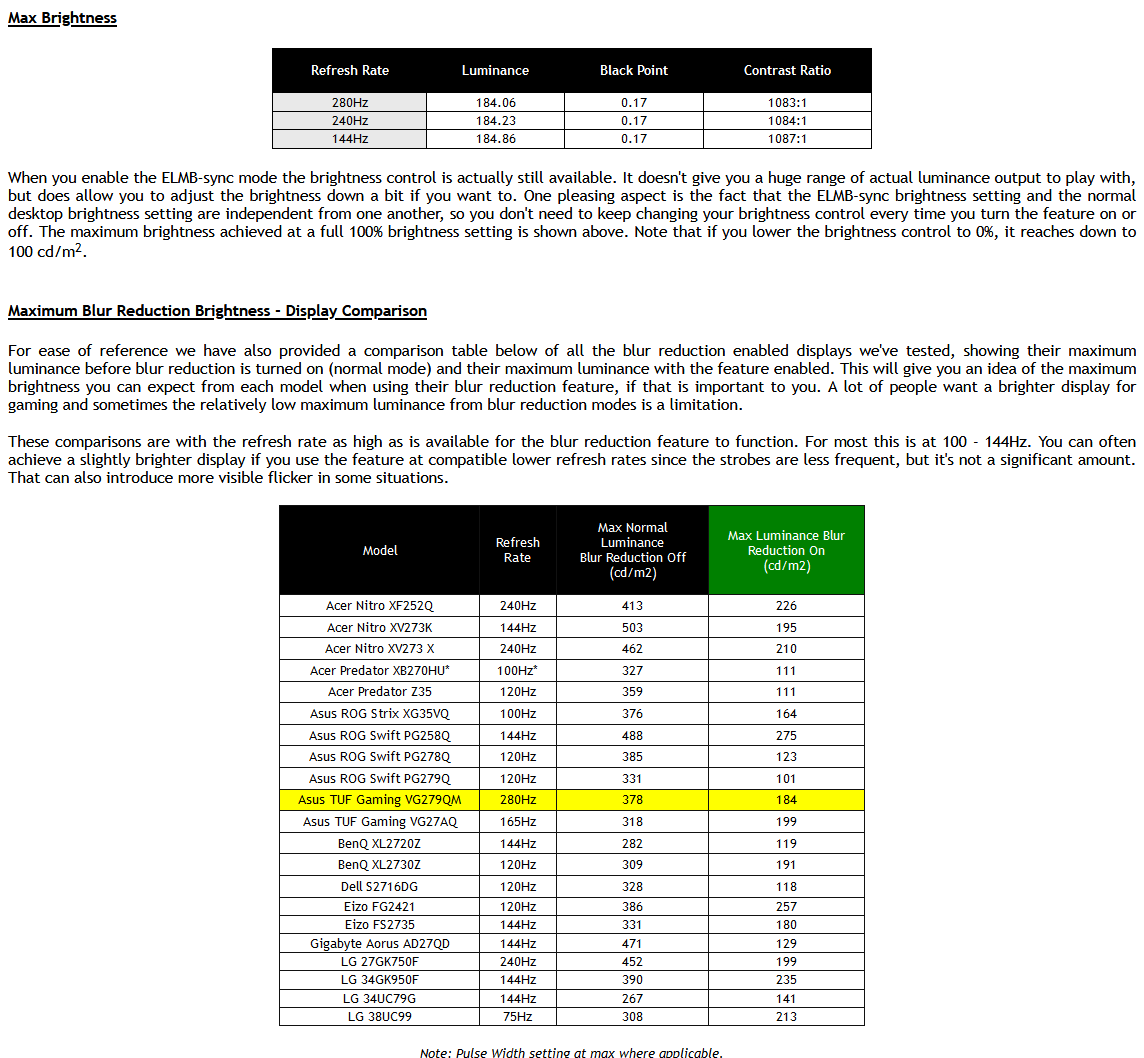
We measured the on/off strobing using our oscilloscope and confirmed that the strobing is in sync with the refresh rate. So at 280Hz for instance (shown above) the backlight is turned off/on every 3.57ms (280 times per second). As you reduce the refresh rate the strobing remains in sync with it well as you would hope.
The 'on' period reduces as the refresh rate increases as with most blur reduction backlights, which would normally mean that the image becomes a bit darker with the higher refresh rates. However, because this feature is designed to be used with VRR, Asus needed to develop it to avoid changes in brightness as the refresh rate changes. That would have been pretty distracting in use. While the strobing frequency and 'on' periods will change with the refresh rate, the backlight intensity is also being dynamically controlled to make up for it. We measured the same maximum brightness at a range of refresh rates as shown below. So there are no noticeable fluctuations in brightness as the refresh rate changes which is great news.​

These comparisons are with the refresh rate as high as is available for the blur reduction feature to function. For most this is at 100 - 144Hz. You can often achieve a slightly brighter display if you use the feature at compatible lower refresh rates since the strobes are less frequent, but it's not a significant amount. That can also introduce more visible flicker in some situations.
Wgyrala.png

=================================

From here, regarding an Asus XG279Q with ELMB-Sync, at least according to that user. Maybe other models are better though idk.

https://forums.blurbusters.com/viewtopic.php?f=4&t=6386

ELMB-Sync is absolutely fucking amazing......on about 1/3 of the screen. It brings crystal clear CRT like motion clarity. The issue is the other 2/3 of the screen are full of crosstalk images where they actually make motion WORSE than when it was off. Theoretically this could be a non issue in fps type games if the good part was actually dead center on the crosshair or could be calibrated. Unfortunately, this isn't the case. On mine I have crosstalk starting at about the crosshair location and up so a target I'm aiming at commonly has different corona type effects applied to the same model, which is....a bit distracting. If you get lucky you can maybe get one that has the butter zone a bit more centered although the top and bottom 2/3rds will still be full of horrible crosstalk.

Is it decent? Yeah, I use it when I play CS and disable it for all other games. Would I choose this monitor instead of a GL850 if I were to go again? No. The BFI significantly dims the screen where I find that I need to run on 1.8 gamma instead of 2.2, while also increasing the brightness in games, which washes out the scene quite a bit. This is why CSGO is the only game I can really do it since I am not seeking eye candy. Also for fps standards CSGO is a slow moving game focusing around holding angles. So this system kinda works. Playing a very fast paced game like quake or Apex exacerbates the crosstalk further to make the choice less cut and dry than simply saying FPS game + ELMB = Good. Also as FPS gets lower, even in the 120s the crosstalk gets worse. So to effectively use this technology you need 1. Washed out colors or have an extremely difficult time spotting enemies on dark backgrounds. 2. at least 144+ fps. 3. Even in best case scenario you WILL have crosstalk blur on at minimum half of your screen. So this is a lot to sacrifice just for smoother motion on a small part of the screen. Why not just buy a TN panel since after all these compromises a TN panel will probably end up looking much brighter and still have better motion blur?

....
with ELMB-Sync On they apply double-strobe all the time, no matter what frequency is active ! Rtings.com and TFTCentral both confirm this atrocious strobe algoritm behavior icon_e_sad.gif Obviously constant double-strobe destroy the motion blur reduction experience with overlapped images. Is very ridiculous see this in a modern gaming monitor, thats good for Aprils Fools Day.

They use this algorithm to compensate brighness with all frequencies icon_lol.gif They should have worked to compensate this brightness changes using automatic dinamic backlight brightness, in the same way dinamic Overdrive work in GSync module monitors, setting the correct voltaje value at each frequency. Is very fustrant... icon_e_sad.gif seeing the marketing all is perfect and all work fine
 
Last edited:
The implementation of elmb sync was absolutely poor which is why I returned it the next day lol. As much as I do love me some excellent motion clarity having used a CRT until late 2011, I have started to care less and less as more time passes. I can't even remember the last time I used BFI on my CX. If LG ever implements BFI Sync and it's excellent, great. If not then oh well.
 
OLED has multiple advantages that should allow a unique implementation- it can have sub 1ms persistence and easily run an underlying 1000hz strobe if the processing existed. In a VRR situation you could run a rolling strobe at the exact rate of the current frame if you could predict the next one (i.e. the duration for which the current frame would stay up) without introducing much lag or brightness variations but without buffering that is not really possible.
One way to go around BFI+VRR is keep repeating the frames at a constant 1ms with rolling strobe and use the next frame rollover at the next 1ms window to do VRR. This would theoretically slightly affect frame rate and lag but sub-1ms compared to a perfect VRR implementation so no real loss.
You would get a clean implementation with VRR, BFI sharp motion, low lag. It is also a relatively simple algorithm if you can get a good 1000hz processing capable display, which is the challenge. I am pretty sure Valve (or maybe Microsoft?) tested a 1000hz display for Vr/MR and saw the benefits of lower input to photon delay, which is a whole other discussion.
 
  • Like
Reactions: elvn
like this
Yes you could theoretically develop a very good interpolation method that duplicated frames without bad artifacting or input lag. One method without VRR could be to do that off of a healthy fps minimum for good motion definition/path articulation/animation cycle frames to start with. Say 100fps for example x10 interpolated = 1000fps at 1000hz internally. At 1000fps + 1000 Hz it would be "zero" sample and hold blur like a crt (1px) , so you wouldn't need any black frame insertion/strobing at all.

Blur Busters Law: The Amazing Journey To Future 1000Hz Displays

KlIRG0B.png
 
Last edited:
Hardware Unboxed did a review of the C1 48"

In summary, he's a a fan.


I been abscent from HF for some time. Is the 48 C1 a newer model than the 48 CX? I may be getting my hands on a 3080 so I'm looking into 4k again. Last when I looked it was the 48 CX that was the 4k tv king for gaming. Well the whole CX line anyway.
 
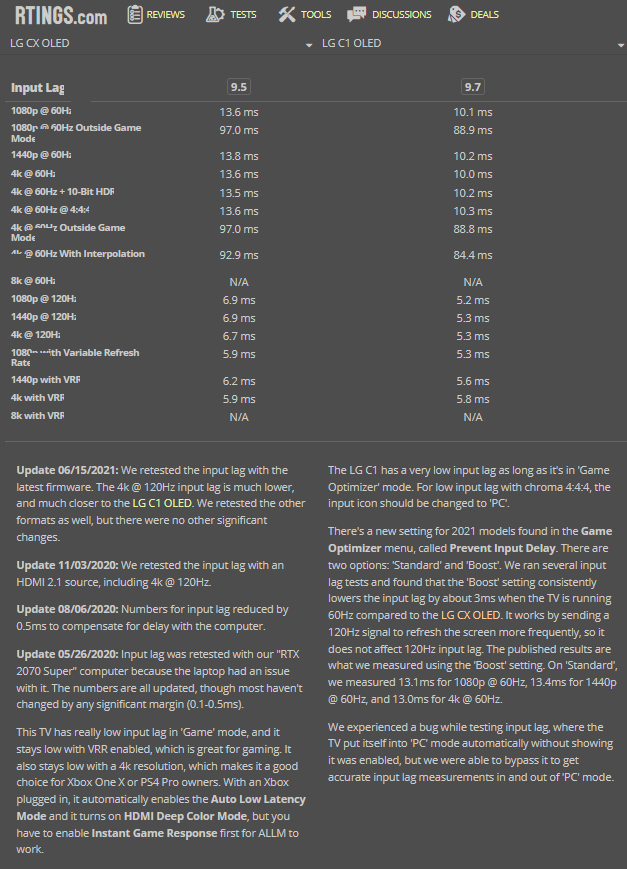
In general usage the C1 probably not that big of a difference. It also has a game boost thing for 60hz content that drops the lag down for ~13 ms to ~10ms. It actually makes lag worse at 120hz according to HDTVtest.


https://www.rtings.com/tv/tools/compare/lg-cx-oled-vs-lg-c1-oled/10619/21421?usage=11&threshold=0.10
The LG C1 OLED replaces the LG CX OLED, and overall they're very similar TVs. The biggest differences are that the C1 comes in a larger 83 inch variant, has the newest version of webOS, and includes new 'Game Optimizer' settings, including an input lag boost that reduces input lag by a few milliseconds. Our unit of the C1 has poor out-of-the-box color accuracy and lower brightness compared to the CX, but this could just be due to panel variation. All things considered, if none of the minor additions are essential to you, the CX may offer a slightly better value.

Differences in brightness between this and the LG CX OLED may simply come down to panel variation. If you want something that has the new evo panel and gets brighter, then check out the LG G1 OLED.

---------------
https://www.rtings.com/tv/tools/compare/lg-cx-oled-vs-lg-g1-oled/10619/21422?usage=11&threshold=0.10
The LG G1 OLED and the LG CX OLED are two excellent TVs. They each have an OLED panel with a near-infinite contrast ratio and similar gaming features. The main difference is that the G1 has the new evo OLED panel, allowing small highlights to get brighter in HDR, but the CX still gets brighter in SDR. The GX has a unique design meant to sit flush against the wall with the dedicated wall-mount, while the CX comes with a stand. Other than that, there's very little difference between each TV, and they each deliver exceptional picture quality.

-----------------

 
So I see Rtings tests input lag at the middle of the screen. And I presume they don't subtract the typical "scan out" time? So at 60hz a CRT, you'd get 8ms at the middle because that's how long scanout takes to get to the middle.

So if they're getting 10ms on the middle of the screen, and not subtracting scanout, then it's literally only 2ms slower than a CRT.
 
The input lag on the CX/C1 is seriously negligible, well as long as you are in Game Mode. Nobody is going to feel any lag on these sets unless maybe you were the top 0.01% of competitive gamer, in which case you wouldn't be doing your competitive gaming on this display anyways. For 99.99% of users the input lag is an absolute non issue.
 
Looks like a new non-engineering test/alpha CX series firmware was pushed out in Korea at the end of June - 03.23.10 and then as the next post mentions - 03.23.15 a few days ago (mid July).

No info on what's changed or been updated since 03.23.06 or 03.23.10.
 
Last edited:
I been abscent from HF for some time. Is the 48 C1 a newer model than the 48 CX? I may be getting my hands on a 3080 so I'm looking into 4k again. Last when I looked it was the 48 CX that was the 4k tv king for gaming. Well the whole CX line anyway.
C1 is the newest version. It has a few more goodies and gets slightly brighter than the CX. The C1 is also has a bit less input lag (unless you're an extreme hardcore gamer, you won't notice this).

In short, if the prices are equal, the C1 is the superior product. If the CX is any cheaper (even $100), get the CX. You won't notice the difference.
 
C1 is the newest version. It has a few more goodies and gets slightly brighter than the CX. The C1 is also has a bit less input lag (unless you're an extreme hardcore gamer, you won't notice this).

In short, if the prices are equal, the C1 is the superior product. If the CX is any cheaper (even $100), get the CX. You won't notice the difference.

According to RTings the C1 isn't really brighter in practice but the G1 is.

CX vs C1 HDR

XhSBP7f.png

=======================================================================================

CX vs G1 HDR

ZUAgN1E.png


=====================================

Input lag CX vs C1

wmBVC3x.png

============================


Those input lag numbers with the latest tests on the latest firmware and on hdmi 2.1 are pretty low at 120hz 4kx with VRR.

If I'm reading it right, they are listing 4k + VRR as being 5.9ms vs 5.8ms , and 4k 120hz (no vrr) as 6.7ms vs 5.3ms.

That's faster than most people are being fed the next new frame to be seen after they act (e.g. 100fps = 10ms later, 117fps capped ~ 8ms later) locally.

Also much lower than the tick rate of online game servers (50ms + another 50ms interp_2 buffer on 20tick servers. Though the 2nd (interp_2) amount gets subracted mostly in lag compensation history re-writes by net code sort-of.

And that input lag is a drop in the bucket compared to the spans of time it takes the fastest gamer to react with reaction times of 150ms to 180ms (to 250ms in general), after they see a new netcode biased/constructed/guessed action state from the server's next tick.


=====================================
Valorant: 128tick
Specific paid matchmaking services like ESEA: 128tick
CSGO ("normal" servers): 64tick
Overwatch: 63
Fortnite: 60 (I think, used to be 20 or 30)
PubG: 60
COD Modern Warfare mp lobbies: 22tick
COD Modern Warfare custom lobbies: 12tick

COD Warzone: 20 tick


Some have guessed that League of Legends tick rate is around 30.
ESO PvE / PvP: ??
WoW PvE / PvP ?? .. World of warcraft processes spells at a lower 'tick rate' so is a bit more complicated, but overall the tick rate probably isn't that great.
https://us.forums.blizzard.com/en/wow/t/is-classic-getting-dedicated-physical-servers/167546/81


https://happygamer.com/modern-warfa...or-a-game-that-wants-to-be-competitive-50270/


---------------------------------------------

Keep in mind that a higher tickrate server will not change how lag compensation behaves, so you will still experience times where you ran around the corner and died.
-----------------------
An example of lag compensation in action:
  • Player A sees player B approaching a corner.
  • Player A fires a shot, the client sends the action to the server.
  • Server receives the action Xms layer, where X is half of Player A's latency.
  • The server then looks into the past (into a memory buffer), of where player B was at the time player A took the shot. In a basic example, the server would go back (Xms+Player A's interpolation delay) to match what Player A was seeing at the time, but other values are possible depending on how the programmer wants the lag compensation to behave.
  • The server decides whether the shot was a hit. For a shot to be considered a hit, it must align with a hitbox on the player model. In this example, the server considers it a hit. Even though on Player B's screen, it might look like hes already behind the wall, but the time difference between what player B see's and the time at which the server considers the shot to have taken place is equal to: (1/2PlayerALatency + 1/2PlayerBLatency + TimeSinceLastTick)
  • In the next "Tick" the server updates both clients as to the outcome. Player A sees the hit indicator (X) on their crosshair, Player B sees their life decrease, or they die.
Note: In an example where two players shoot eachother, and both shots are hits, the game may behave differently. In some games. e.g. CSGO, if the first shot arriving at the server kills the target, any subsequent shots by that player that arrive to the server later will be ignored. In this case, there cannot be any "mutual kills", where both players shoot within 1 tick and both die. In Overwatch, mutual kills are possible. There is a tradeoff here.
----------------------------------------
  • If you use the CSGO model, people with better latency have a significant advantage, and it may seem like "Oh I shot that guy before I died, but he didn't die!" in some cases. You may even hear your gun go "bang" before you die, and still not do any damage.
  • If you use the current Overwatch model, tiny differences in reaction time matter less. I.e. if the server tick rate is 64 for example, if Player A shoots 15ms faster than player B, but they both do so within the same 15.6ms tick, they will both die.
  • If lag compensation is overtuned, it will result in "I shot behind the target and still hit him"
  • If it is undertuned, it results in "I need to lead the target to hit them".
 
Last edited:
It's still limited by backlighting. I have yet to find a backlighting tech that can even get close to OLED's per pixel brightness control.
MicroLED is probably equivalent, but needs a few years to be ecumenical to get down to 55" and smaller form factors. But yes, right now nothing comes close to OLED. Technologies like MiniLED are just trying to hide LED/LCD's increasingly obvious flaws.
 
Until they get it down near to pixel level it won't be the same but the tinier the better. When you have zones that encompass a decent area of pixels you can't really do highlights on edges and sbs (stars twinkling in dark night sky, edge of a spaceship on ink black space background, twinkling reflections on a black nightime lake, etc. ). When trying to show very bright right next to very dark, the firmwares have to play the zones off against each other and either have the darker area larger or the brighter area ( I call it a "dim halo" vs a "glow halo" effect). That lowers the actual nits shown and loses details in the scene either way. The smaller the zones the less often that will be obvious but in HDR highlights it will probably still be a trade-off until nearer the pixel level. It would have to be near 1080p worth of backlights on a 4k screen. That would be 2,073,600 backlights, one for every 4 pixels. Compare to 8,294,400 pixels and more subpixels lit individually on an OLED with side by side contrast up to inf black to 1

Dual layer LCD made per nearly pixel backlight out of a 2nd LCD screen in monochrome + light filtering for black depth but LCD's always have way worse response time. Those also had to deal with heat. They used a 1080p layer as a monochrome backlight similar to what I was outlining above for a microled threshold. Some of the top eizo and sony mastering screens (@$35k+) are dual layer LCD now instead of OLED in order to avoid ABL and peak brightness trade-offs and burn in concerns but there was only one 55" tv released in china afaik.
 
MicroLED is probably equivalent, but needs a few years to be ecumenical to get down to 55" and smaller form factors. But yes, right now nothing comes close to OLED. Technologies like MiniLED are just trying to hide LED/LCD's increasingly obvious flaws.

I thought MicroLED was a self emmisive technology like OLED and doesn't use a backlighting but rather each pixel is it's own light.
 
https://www.flatpanelshd.com/focus.php?subaction=showfull&id=1617864153
(april 2021)

Like OLED (organic LED), an LED (inorganic LED) display does not require a backlight. It is defined as self-emissive, meaning that each LED generates its own light. The challenge is to make the LEDs small enough to serve as pixels. For 4K resolution, you need 24.88 million LEDs – one for each sub-pixel. For 8K, you need almost 100 million. Mind-boggling.

That is why the industry likes to refer to it as LED, miniLED, microLED and even nanoLED. There are some important distinctions here. Conventional LEDs are relatively large so you can typically only fit a handful into the backlight behind the LCD panel. With miniLED, that number goes up to thousands or tens of thousands in the LED backlight behind the LCD panel.

However, you need 24.88 million LEDs for a 4K LED TV. That is what Samsung has achieved and many refer to it as microLED. After having showcased microLED prototypes and commercial units for a few years, the company has just launched its first consumer 'Micro LED TV'.

The 110-inch version will cost a dizzying $155,000 / €150.000 while a smaller 99-inch will cost 130.000 Euro. The company will launch 88- and 76-inch versions later.

.......


https://www.microled-info.com/why-microled-displays-may-take-longer-expected-reach-market

........................

 
Picked up a 6900 XT for use with my CX. 3090 is being used for the Acer X27 now since that's a Gsync only monitor. So far so good, just noticed that you cannot enable VRR unless Freesync Premium on the TV is turned on, which currently makes you lose Dolby Vision but apparently LG is working on a firmware update to address that.
 

Attachments

  • 20210721_142841.jpg
    20210721_142841.jpg
    382.5 KB · Views: 0
Picked up a 6900 XT for use with my CX. 3090 is being used for the Acer X27 now since that's a Gsync only monitor. So far so good, just noticed that you cannot enable VRR unless Freesync Premium on the TV is turned on, which currently makes you lose Dolby Vision but apparently LG is working on a firmware update to address that.
Almost everyone I've seen has used Nvidia GPUs with the LG CX and C1. Would love to hear how the CX handles Freesync + HDR and how performance is.
 
Almost everyone I've seen has used Nvidia GPUs with the LG CX and C1. Would love to hear how the CX handles Freesync + HDR and how performance is.

Based on my limited testing, it all works perfectly fine. I'd say better even, since the flickering that was present on loading screens on the 3090 is either reduced or even gone altogether on the 6900 XT. For HDR gaming I've tested Shadow of the Tomb Raider, Horizon Zero Dawn, Warzone, and AC Valhalla and everything works.
 
Based on my limited testing, it all works perfectly fine. I'd say better even, since the flickering that was present on loading screens on the 3090 is either reduced or even gone altogether on the 6900 XT. For HDR gaming I've tested Shadow of the Tomb Raider, Horizon Zero Dawn, Warzone, and AC Valhalla and everything works.
Sounds like a pretty glowing endorsement. LG has done their homework on the CX/C1. No other display can compare.
 
Sounds like a pretty glowing endorsement. LG has done their homework on the CX/C1. No other display can compare.

Yeah nowhere on the box of the CX does LG make any mention of AMD and Freesync branding, just Gsync. Yet Freesync and AMD gpus are working flawlessly.
 
I have a RX6800 paired with my C1, been great once I got the display order I wanted set. Freesync Premium VRR works great in game mode for the things I've thrown at it so far (pretty limited compared to some of you; mostly WoW, FC5, Doom 2016/Eternal, Borderlands3)
 
Just got notification about new OTA update available: 03.23.15
1. Improvement

1) Software update contains minor bug fix

anyone already tested ? any new issues with this version ?
 
Does anybody know how Best Buy ships these things? Do they just use regular carriers like UPS or do they do it more professionally to ensure the box stays upright and doesn't get tossed around? It's looking like the backseat of my car may be slightly too narrow to fit the box. I guess another option is renting a truck from Home Depot or something.
 
Every TV I've ordered from Bestbuy has used a 3rd party trucking/delivery company that has called me before their ETA and brought the TV inside.

Not sure if it's size specific but yeah, BB handles TV's well IMO.
 
Does anybody know how Best Buy ships these things? Do they just use regular carriers like UPS or do they do it more professionally to ensure the box stays upright and doesn't get tossed around? It's looking like the backseat of my car may be slightly too narrow to fit the box. I guess another option is renting a truck from Home Depot or something.

Mine was delivered with OnTrac and they did a pretty good job of making sure my box didn't get banged up during transport, of course YMMV. Only annoying part was that they just knocked and left it right at my door for the entire world to see that I bought a CX48.
 
It blows me away that software updates saying "bugfixes and general performance improvements."
If I was a software engineer on this stuff I'd be furious. Oh that project I've been slaving away on? Management considered it, officially
"Computer stuff or whatever."

No way consumers, or other companies would want to know what got fixed, why it happened, or how they fixed it.
 
Back
Top