• Some users have recently had their accounts hijacked. It seems that the now defunct EVGA forums might have compromised your password there and seems many are using the same PW here. We would suggest you UPDATE YOUR PASSWORD and TURN ON 2FA for your account here to further secure it. None of the compromised accounts had 2FA turned on.
    Once you have enabled 2FA, your account will be updated soon to show a badge, letting other members know that you use 2FA to protect your account. This should be beneficial for everyone that uses FSFT.

LG 48CX

Why did you have to send your set in?
"No signal" displayed at all times, i.e. all HDMI ports dead. The menus and internet TV were all working fine, just none of the inputs. I'm glad the shop has taken it back and are looking at a repair - I would prefer a replacement though, as I can never trust faulty electronics after a repair....

Have no fear - it's nothing related to disabling ASBL!
 
ASBL is now disabled on all inputs on your unit ! :inpain:

Good luck with getting back in action with it soon. (not sarcasm that time). 👍
 
48 CX is still $1250 at best buy. 5-yr Warranty comes out to $300 on that price, or $60/year "insurance".
https://www.bestbuy.com/site/lg-48-...4k-uhd-smart-webos-tv/6416732.p?skuId=6416732


The 77" CX is under 3k at $2999.99

https://www.bestbuy.com/site/lg-77-...4k-uhd-smart-webos-tv/6401914.p?skuId=6401914

Also same at amazon and I think costco but their warranties don't reputably cover burn-in afaik. Best Buy charges around 20% of the list price so it's pretty expensive to get the warranty on a 77" at $600, or $120 a year.
 
Last edited:
ASBL is now disabled on all inputs on your unit ! :inpain:

Good luck with getting back in action with it soon. (not sarcasm that time). 👍
Thanks dude - I REALLY MISS IT! It's such a great screen.

Apparently it is coming back on Thursday which is really quick... I am suspicious, either a) it's not fixed, or b) it is fixed, or c) the store is just replacing it with a new model. I'm really hoping it's c)!
 
Thanks dude - I REALLY MISS IT! It's such a great screen.

Apparently it is coming back on Thursday which is really quick... I am suspicious, either a) it's not fixed, or b) it is fixed, or c) the store is just replacing it with a new model. I'm really hoping it's c)!
Good news - got my screen back and it's fully repaired!

Apparently a faulty mainboard, but they also replaced the OLED screen too, which surprised me as I thought it was fine.

Feels as good as new (but had to turn off ASBL again, so annoying lol)
 
can't wait for OLED to be so omnipresent that you can buy one of aliexpress for like $250.
remember the korean 1440p monitor days? haha good times..
 
Can anyone who still has the LG C1 box tell me if it has "TV" anywhere on it? And if its prominent
 
Do you even see the boxes for these TVs in stores or really anywhere until you buy one? They typically don't have boxes of TVs sitting in the stores unless it's some super cheap model at walmart. Usually they have a TV actually connected and on display and you have to ask someone to get you one.
 
Do you even see the boxes for these TVs in stores or really anywhere until you buy one? They typically don't have boxes of TVs sitting in the stores unless it's some super cheap model at walmart. Usually they have a TV actually connected and on display and you have to ask someone to get you one.
Best Buy had them sitting out on the floor when I was there a few weeks ago.
 
Any idea how to stop C1 (heard same with g1) from changing audio mode to "Game optimizer" on every reboot and hdr windows on/off activation ?!
I am dying having to switch audio profile multiple times a day as optimizer sounds terrible compared to cinema audio.

The only solution I've found is to disable vrr/gsync. So I am 99% sure, every time gpu driver refreshes, it gets redetected as gsync device and TV switches to game audio. every... fucking... time. Even on new software
 
Doom Eternal got the Ray Tracing/DLSS patch yesterday.

This means that Doom Eternal is now the poster child for the LG C9/CX/C1.
  • 4K
  • 120 hz
  • HDR
  • 10 - bit color
  • RGB
  • GSYNC
  • Ray Tracing
  • DLSS
  • Extremely Fast Gameplay
This is now the benchmark for the best gaming experience you can have on Doom Eternal.
 
Gonna get hate for this but the game never looked impressive fidelity wise and is why it performed so well.

I'll give the RT update a try. Wish they expanded it's features beyond reflections though.
 
Gonna get hate for this but the game never looked impressive fidelity wise and is why it performed so well.

I'll give the RT update a try. Wish they expanded it's features beyond reflections though.
I actually thought Doom (2016) looked better, but I think that's because the devs went for a more vivid look. I tend to agree; It's a good looking game, but it was never a great looking game IMO.
 
Doom is optimized well but it's also a corridor shooter mainly so it can get a higher frame rate than more expansive games. Even considering DLSS's fps boost, the nature of the game helps because RTX lowers fps. So it makes sense that it would be a good place to showcase framerate reducing technologies that increase eye candy.

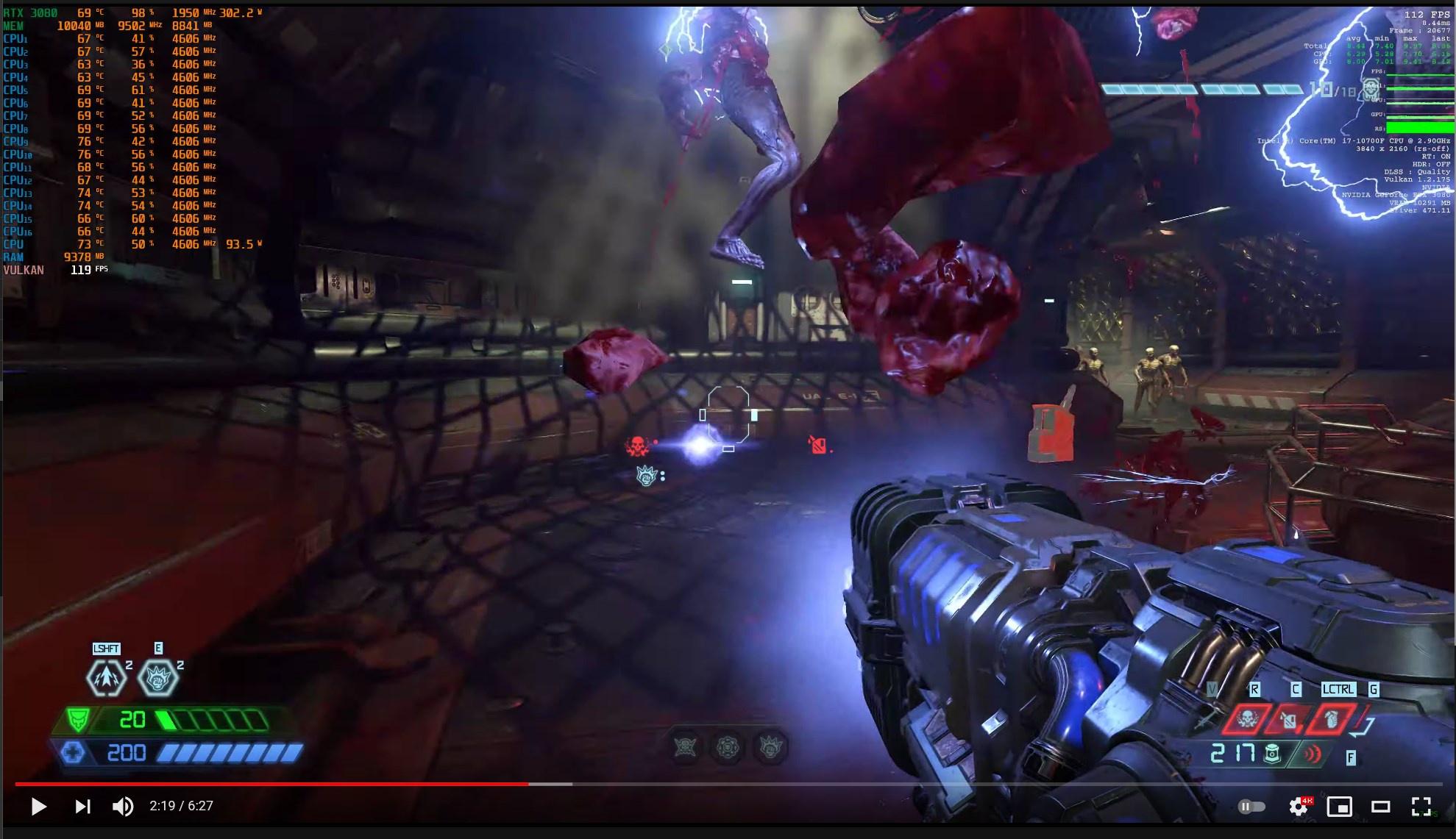
tNOA4Mf.jpg


MxBenchmarkPC : Doom Eternal at 4K DLSS 2.1 Quality with RTX On and Ultra Nightmare settings on i7 10700F + RTX 3080

 
Last edited:
https://www.dsogaming.com/news/nvidia-dlss-may-soon-support-a-new-ultra-quality-mode/

from

https://videocardz.com/newz/nvidia-preparing-ultra-quality-mode-for-dlss-2-2-9-0-version-spotted

https://twitter.com/Dachsjaeger/status/1410272673746370570

For those of you playing Doom Eternal on an NV GPU and using DLSS - I recommend finding thr latest 2.2 DLL file on the Web and using that with the game - in my experience it will offer better DLSS resolve with all the benefit that Version has.
 
Last edited:
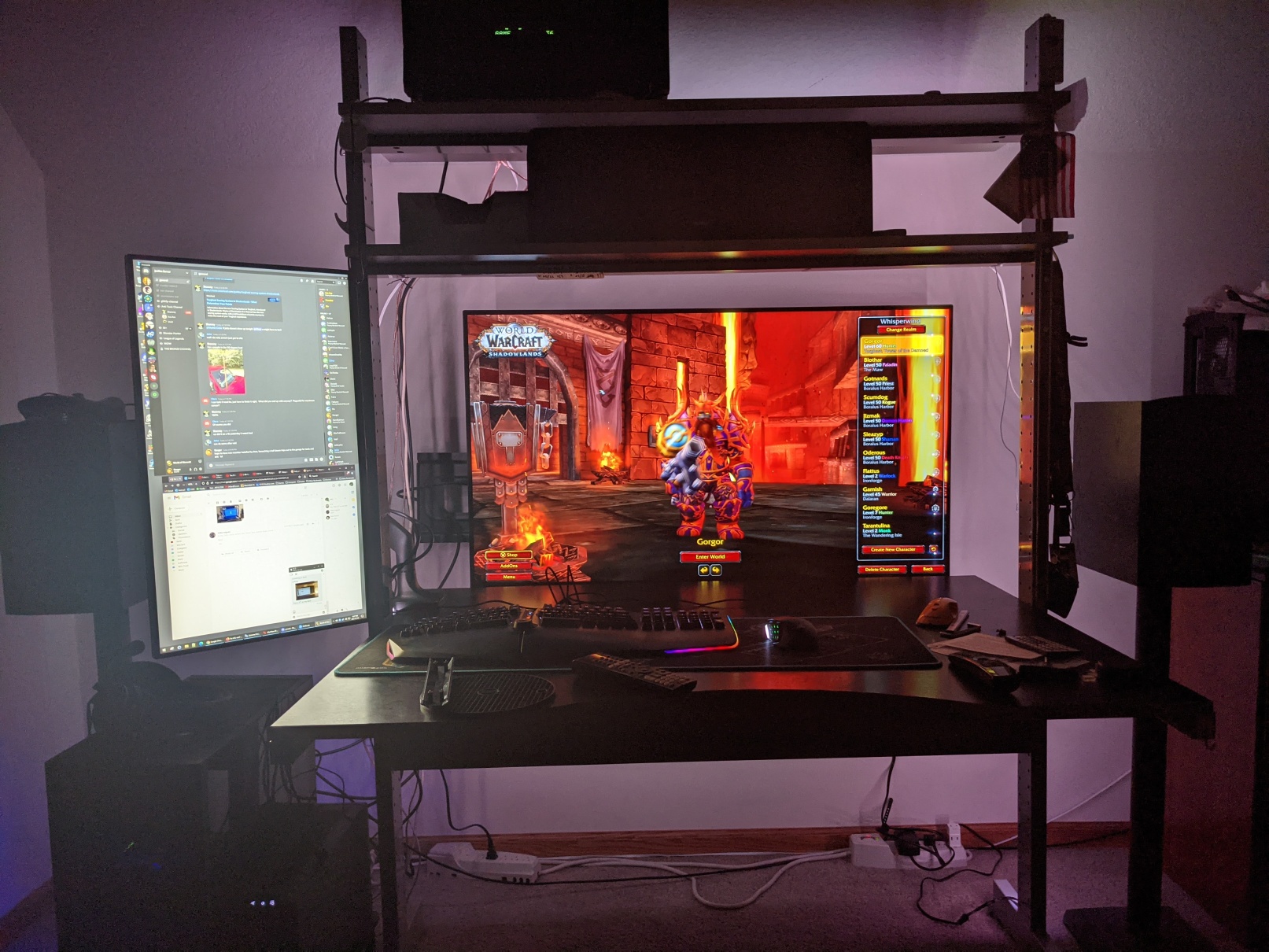
I tried to read up on this thread as much as I could before I decided to buy a 48C1, but I gotta say I love it so far:
Not liking this Dell in portrait though, it is a VA panel and doesn't look so hot when vertical.
 

Attachments

  • lg-48c1-oled.jpg
    lg-48c1-oled.jpg
    611.8 KB · Views: 0
I tried to read up on this thread as much as I could before I decided to buy a 48C1, but I gotta say I love it so far:
Not liking this Dell in portrait though, it is a VA panel and doesn't look so hot when vertical.
Throw away the dell and rearrange. That tv seems a bit far for 4k gaming.
GRATZ !!!!!!!
 
  • Like
Reactions: Jake
like this
Throw away the dell and rearrange. That tv seems a bit far for 4k gaming.
GRATZ !!!!!!!
I need something in portrait for when I am working from home, don't have another choice right now.

The C1 is 36" away from me, near perfect for field of view. Am still tweaking windows/ui scaling for when not gaming, somethings are fine at 150% some not.
 
thanks guys, if the C1 is just a minor step from the CX I can see why this thread lasted so long.

Any immediate tricks or tips for using as a pure monitor? No sound, no switching, no apps.
 
thanks guys, if the C1 is just a minor step from the CX I can see why this thread lasted so long.

Any immediate tricks or tips for using as a pure monitor? No sound, no switching, no apps.
  • Keep display brightness as low as possible for longevity. (obviously, crank it up for HDR)
  • Set Screen Shift On
  • Set Logo Luminance Adjustment to Low.
  • Set Game Mode On (for fastest response)
  • On the Home Dashboard, set the HDMI port you have your PC plugged into as "PC" (it does change some settings).
  • Set you desktop background to flat black
  • Set a Screen Saver to 5 minutes.
  • Set Automatic Screen off (in Windows) to 1 hour or less.
  • Put a bucket under your mouth to catch the drool.
 
Any immediate tricks or tips for using as a pure monitor? No sound, no switching, no apps.

Adjust cleartype.

Also maybe set up the screen so that you can quickly turn off the screen via the remote while still having the actual TV electronics still powered on, probably ideally via an OSD shortcut since I'm guessing that you don't have your C1 set up for voice commands (which also requires an internet connection) if you're just using it as a monitor.
 
Last edited:
  • Like
Reactions: Jake
like this
What madpistol said. I keep my screen in SDR mode with a very low OLED light setting for general work and SDR gaming (~25-30). It only enters HDR mode when HDR content is displayed in my media player software or when a game turns it on, then I let the brightness crank up. I fully realize that HDR mode should be allowed to take the pixels to 100%, but I use my screen in a dim office only so I have set my HDR max to 80% OLED light... the HDR effect is still great compared to any consumer HDR monitor. It really is. These screens aren't about getting 1000 nits in HDR... they're about everything else. The image is so ridiculously good compared to ANYTHING else on the market that having the absolute brightest pop on a bright HDR scene just doesn't seem that important.

Sure, someday maybe we can have it all on brightness, but this is by far good enough for now. Every single evening when I get home and turn it on, I'm instantly struck by how much better it is than EVERY other top end IPS or VA panel I've ever used. PC or TV... it's just a world better.

And that makes me want to baby it just a LITTLE BIT because I want to get a bunch of years out of it before having to live with any burn in.

So I would also recommend:

Use dark mode religiously on all your common web sites, set the task bar to auto hide and set it to a dark grey color.

It really doesn't hurt to have a second monitor if you need to keep static info up for many hours on end or if you have to run something with solid white backgrounds all day long. I'm personally not willing to run Word or Excel or Fusion 360 full screen all day long at static full white on my CX. I think you could for several years at a low brightness. But it's personal choice. I put those on the secondary monitor for the mundane work. But I do browse and youtube and game etc. on it all night.

Just keep the remote in front of you and TURN IT OFF when you know you are walking away for a long period of time.
 
I suggest TranslucentTB for the taskbar. With a black desktop background the only thing visible when the tasbar is hidden is the little slivers of color for the active app/window.
 
  • Like
Reactions: Jake
like this
Ok I did update the firmware and then shut the wifi off on it, and some of these things don't seem to be in the same menus, names, or order anymore.

48C1 settings:
brightness 30, oled brightness 85
set the HDMI I'm using to PC
have "Game optimizer" on
under game optimizer I turned on 'reduce blue' to level 1, it scorches my eyes otherwise
edited the quick menu to have "Screen Off" and "Sleep Timer" on there.
"Adjust Logo Brightness" is set to low

Windows stuff:
made sure I've got Freesync on
screen set to turn off after 45min (screen saver didn't show setting??)
black desktop, will check out that taskbar mod
have been using dark mode on many things

Haven't needed Cleartype yet, but I might if I muck with Win10 UI scaling again.

and I have been just turning it off when I walk away for more than a few min
 
Last edited:
Haven't needed Cleartype yet
Cleartype is enabled by default... which is the exact problem - Cleartype expects a traditional RGB or BGR sub-pixel arrangement and doesn't know how to account for the white sub-pixel on LG's WOLED panels.

For this reason, setting it to "greyscale" or turning it off altogether can make text look better and/or clearer.


and I have been just turning it off when I walk away for more than a few min
It's my undertanding that, in a multi-monitor configuration, turning off the TV the traditional way causes it to disappear from the OS which can mess up the placement of open programs and stuff which is why I mentioned the whole "turning off only the screen" ability that keeps the display visible to the OS.
 
Cleartype is enabled by default... which is the exact problem - Cleartype expects a traditional RGB or BGR sub-pixel arrangement and doesn't know how to account for the white sub-pixel on LG's WOLED panels.

For this reason, setting it to "greyscale" or turning it off altogether can make text look better and/or clearer.


It's my undertanding that, in a multi-monitor configuration, turning off the TV the traditional way causes it to disappear from the OS which can mess up the placement of open programs and stuff which is why I mentioned the whole "turning off only the screen" ability that keeps the display visible to the OS.
Strange thing, nothing changes when I turn it off. It resets window positions when I turn it back on.
 
thanks guys, if the C1 is just a minor step from the CX I can see why this thread lasted so long.

Any immediate tricks or tips for using as a pure monitor? No sound, no switching, no apps.

screen savers / avoiding static content where possible

https://hardforum.com/threads/lg-48cx.1991077/post-1044971422

----
https://hardforum.com/threads/lg-48cx.1991077/post-1045026138

https://www.reddit.com/r/OLED/comments/j0mia1/quick_tip_for_a_fast_way_to_turn_off_the_screen/

http://www.itsamples.com/taskbar-hider.html

----------------------
View distance vs. text quality and AA

https://hardforum.com/threads/lg-48cx.1991077/post-1044972495

---
93ppi 48" 4k at 33.5" = 163 ppi 27" 4k at 18.85"

Same sharpness and density, Pixels Per Degree on your eyeballs. Sitting farther it will be even higher density per degree.

So he and some other people who complain about the ppi (and I suspect even text subsampling to a large degree) - are almost certainly sitting too close, perhaps much too close for this screen.
 
Last edited:
Last night was the first time I've ever seen the screen give me the message that it was about to start a pixel refresher routine and that if I saw a white line that it was normal, that it would take awhile, etc. I hit the OK button and let it run.

I don't know if when that activates goes by # of hours run just to check in case, or if by measuring brightness degradation somehow. If by # of hours the tv is on, I do leave it on but with the emitters off with the "turn off the screen" trick part of the time so it might be logging more hours on than actual hours of wear. I do play mostly HDR and fakeHDR reshade filtered games on it though so HUDs could be degrading a little.

From what I've read LG OLEDs reserve the first 25% brightness for evening wear so it should last a long time I think. I do have the BB warranty that covers burn in though if it ever game to that within 5yrs.
 
Last edited:
Strange thing, nothing changes when I turn it off. It resets window positions when I turn it back on.

One of the latest windows updates supposedly fixed the windows shuffling issue.
However whenever you turn the screen off entirely to standby, you do lose eARC sound if you are using that method so you'd have to switch to a different sound device while the screen was off if you still wanted to hear anything.

I use displayfusion pro which has a window position save function where you can save window positions to one or multiple named profiles.

I also set my regularly used apps to displayfusion window moving functions so they all have their own "home" position. I set those each to their own hotkey in displayfusion and link those hotkeys each to their own streamdeck button with a little icon for each app.
I cobbled together some displayfusion user scripts from different functions so that each time I hit an apps button it:
--checks to see if the app is open or not, if not, opens it and moves it to set position.
--if it's open it checks to see if it's minimized.
--If it's open and not minimize it.
--If it's open and minimized, restore it to the set position.

... I can hit the same button a few times and get the particular app window back to the home position or minimize/restore it bascially
... I also have a window position profile button on the streamdeck set to the displayfusion window position profile hotkey - so I can simply shuffle them all back at once without having to use the scripted function buttons.

-------

Personally I use side monitors for static desktop/app material and reserve the oled as a media and gaming "stage". I use the "turn off the screen" without going into standby trick as a way to sort of "minimize" whatever I have paused on the OLED, or whenever I go afk since I tend to get sidetracked.
 
It gives that message at the 2000 hour mark for the deep/extensive compensation cycle.
 
  • Like
Reactions: elvn
like this
For everyone new to the thread, this is a good place to post the link to the "Better Cleartype Tuner" again. Setting the cleartype to "greyscale" is the best overall compromise option for the sub pixel arrangement of the CX / C1. Turning cleartype off is not really an option it looks far worse. Leaving it stock has minor visible color halos around text.

https://github.com/bp2008/BetterClearTypeTuner/releases

If you are sitting at a more reasonable distance for a 48" screen (30+ inches) it will largely solve any complaints about text. If you keep it right in your face, nothing will completely solve it at this time as Microsoft doesn't support non-standard subpixel arrangements with cleartype.

I was totally satisfied after switching to greyscale.
 
For everyone new to the thread, this is a good place to post the link to the "Better Cleartype Tuner" again. Setting the cleartype to "greyscale" is the best overall compromise option for the sub pixel arrangement of the CX / C1. Turning cleartype off is not really an option it looks far worse. Leaving it stock has minor visible color halos around text.

https://github.com/bp2008/BetterClearTypeTuner/releases

If you are sitting at a more reasonable distance for a 48" screen (30+ inches) it will largely solve any complaints about text. If you keep it right in your face, nothing will completely solve it at this time as Microsoft doesn't support non-standard subpixel arrangements with cleartype.

I was totally satisfied after switching to greyscale.
This literally fixed the text in windows file explorer by setting it to RGB as that was the only issue I was having with text. My LG C1 is now perfect. :D Thanks!
 
What madpistol said. I keep my screen in SDR mode with a very low OLED light setting for general work and SDR gaming (~25-30). It only enters HDR mode when HDR content is displayed in my media player software or when a game turns it on, then I let the brightness crank up. I fully realize that HDR mode should be allowed to take the pixels to 100%, but I use my screen in a dim office only so I have set my HDR max to 80% OLED light... the HDR effect is still great compared to any consumer HDR monitor. It really is. These screens aren't about getting 1000 nits in HDR... they're about everything else. The image is so ridiculously good compared to ANYTHING else on the market that having the absolute brightest pop on a bright HDR scene just doesn't seem that important.

Sure, someday maybe we can have it all on brightness, but this is by far good enough for now. Every single evening when I get home and turn it on, I'm instantly struck by how much better it is than EVERY other top end IPS or VA panel I've ever used. PC or TV... it's just a world better.

The crazy part about this screen is that it may "only" hit 750-nits in HDR, but it feels much brighter than that. That's because each pixel is self-lit, which means you can have insane bright spots in the screen surrounded by total darkness. This is most apparent on a game like Doom Eternal; HDR is painful to look at on this screen because it is able to produce violently bright splashes of color instantly, then die back down; it doesn't give our eyes time to adjust, which makes the image unbelievably punch. I have a Samsung Q90R which can hit 1500+ nits peak brightness with HDR, and believe me when I say that it doesn't punch nearly as hard as the CX does on Doom Eternal.

People get obsessed about how many nits their HDR screen can put out... it's a useless measure. LG's OLED tech is the ONLY HDR experience anyone should be gaming with. The stupidly fast pixel response + per-pixel brightness control puts OLED on another level compared to it's LCD counterparts. It's just that good.
 
Yeah it's why I sold my PG32UQX. Even though it's capable of 1400nits full field, 90% of HDR content outside of high APL scenarios looked better on the CX. Stuff with highlights like the flamethrower in Metro definitely had much more impact on the Asus but under scrutiny came at the cost of really bad surrounding light pollution (haloing) as well as just overall worse image quality due to the huge difference in contrast.

Also the first time I put up a 100% full field white HDR slide neither me or my wife could look at the screen head on. I really don't think that brightness level is healthy for your eyes but thankfully not much content requires a sustained flash like that.
 
The crazy part about this screen is that it may "only" hit 750-nits in HDR, but it feels much brighter than that. That's because each pixel is self-lit, which means you can have insane bright spots in the screen surrounded by total darkness. This is most apparent on a game like Doom Eternal; HDR is painful to look at on this screen because it is able to produce violently bright splashes of color instantly, then die back down; it doesn't give our eyes time to adjust, which makes the image unbelievably punch. I have a Samsung Q90R which can hit 1500+ nits peak brightness with HDR, and believe me when I say that it doesn't punch nearly as hard as the CX does on Doom Eternal.

People get obsessed about how many nits their HDR screen can put out... it's a useless measure. LG's OLED tech is the ONLY HDR experience anyone should be gaming with. The stupidly fast pixel response + per-pixel brightness control puts OLED on another level compared to it's LCD counterparts. It's just that good.

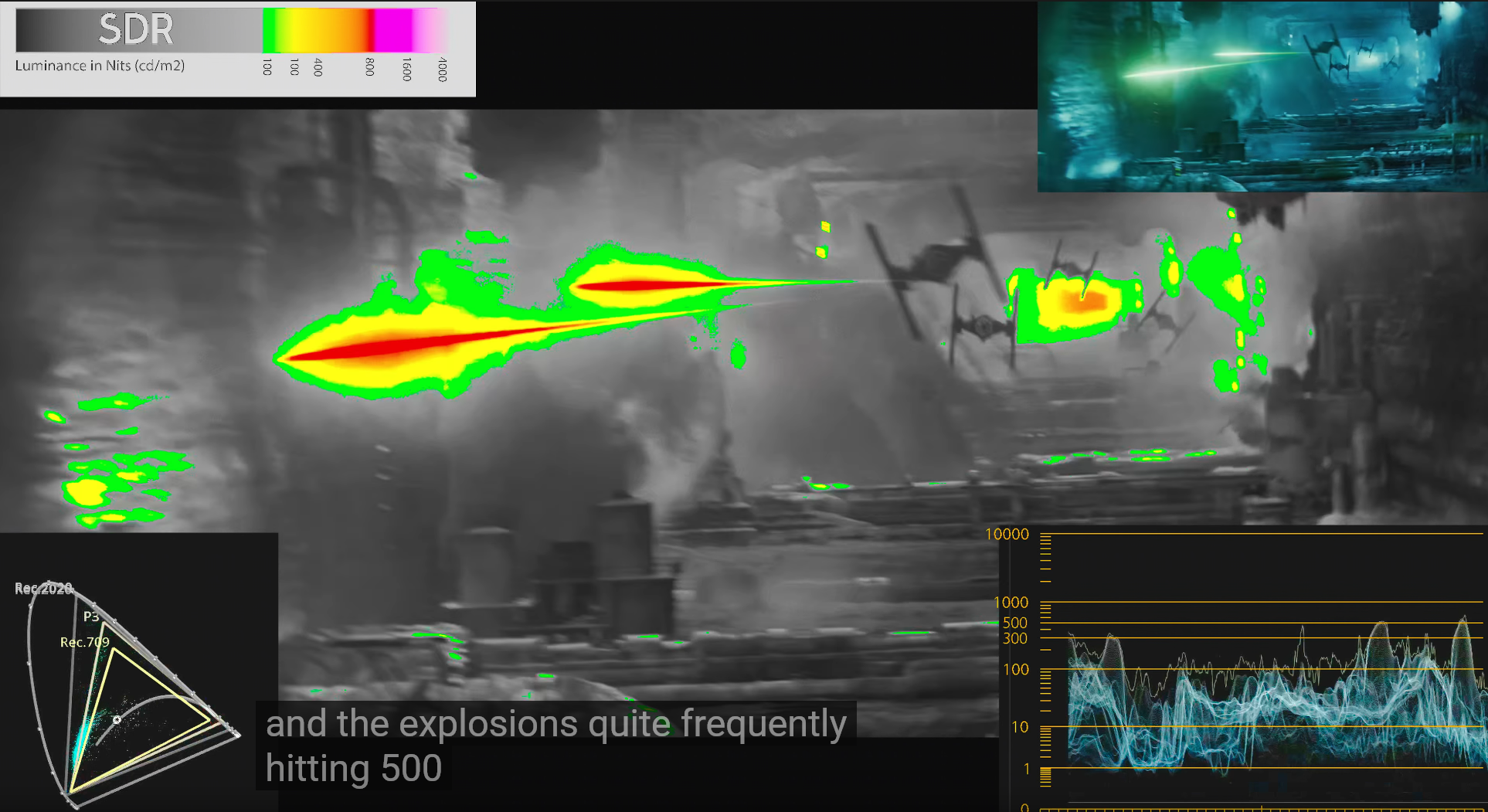
Yes if you watch HDTVTEST's HDR temperature map footage of one of the newer star wars movies you can see that most of the scene is in SDR and what is in HDR range is often not higher than 700 in most places. He always says that in blind tests people always like OLED HDR better since FALD has to play zones off against each other.


https://hardforum.com/threads/lg-48cx.1991077/post-1044646108

459643_7X2ncu9.png


Yeah it's why I sold my PG32UQX. Even though it's capable of 1400nits full field, 90% of HDR content outside of high APL scenarios looked better on the CX. Stuff with highlights like the flamethrower in Metro definitely had much more impact on the Asus but under scrutiny came at the cost of really bad surrounding light pollution (haloing) as well as just overall worse image quality due to the huge difference in contrast.

Also the first time I put up a 100% full field white HDR slide neither me or my wife could look at the screen head on. I really don't think that brightness level is healthy.

Not surprising. Vincent on HDTVTest often states that in order to do mixed/constrasted area scenes, FALD displays have to more or less make a dim or glow "halo" area in relation to each other or they would overwhelm one of the other area, Therefore outside of the brightest overall scenes (without darker areas, shadows, etc mixed in) they can't hit their quoted peak numbers. They also lose detail when they offset their zones against each other, where contrasted areas meet.


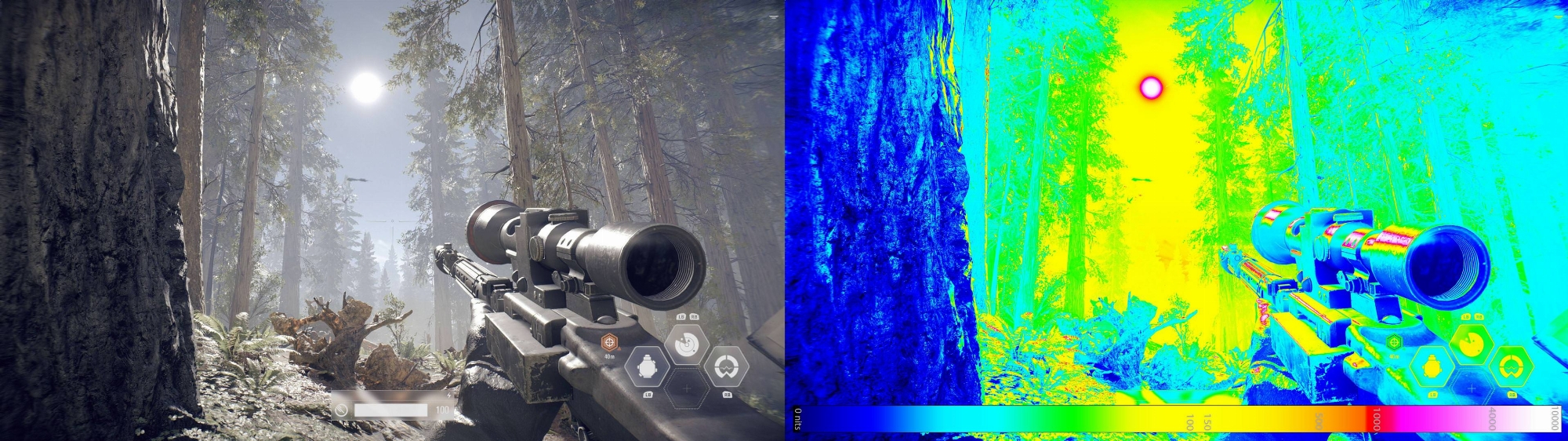
Temperature map of a HDR 10,000 capable game here shows that only the sun and the brightest reflection of it on the gun barrel would be that bright. I don't think it would be worth the FALD zone issues to see that highlight at more than 750-800nit. I'm all for 10,000 nit HDR where it would mostly be things like the sun and the sun's reflections off a a gun barrel because it would add realism if at the per pixel level someday. It would almost never be a full field of white if ever. In fact every tv has % window for what % of the screen is capable of different peak nits to begin with.
459651_jE1pSgZ.jpg

Per pixel emissive is way better overall. Ultimate black depth side by side with colors at the pixel level is way better than trading off to LCD and FALD issues that lose out in black depth, side by side contrast and details lost in competing zone vs zone. LCD is also slow response time and usually has uniformity issues (very badly if not FALD). Some of the newer LCD FALD TV's also use a viewing angle filter that reduces their contrast ratio and black depth by a lot.

Stuff with highlights like the flamethrower in Metro definitely had much more impact on the Asus

There is a lot of variance in the settings people use on their screens and in different games. By default, game mode on the LG CX is pretty low saturation. I've been using Reshade with FakeHDR filter, LightroomFilter, and a sharpness filter that helps the render look. I also turned the game mode's color setting up in the TV's OSD to start with before adjusting everything in Reshade. The result is hugely different than the default game mode's appearance for SDR games. Darksiders3 is the only game I've been playing in SDR (with Reshade filters and increased OSD color) and I love how it looks now. The other two games I played and finished since I got the LG CX, jedi:fallen order and Nioh2, are HDR so have their own color metadata that is way more bright and saturated than the default dull game mode. The next two games I have to play are AC:Odyssey and Immortals:Fenyx rising which both have great HDR.
 
Last edited:
Back
Top