So is there a way with the new 3080 to be able to play some titles in 1080p but with AI upscaled to 4K and it would probably look better than 1440p ?1080p is crystal clear because it's an even 4:1 pixel ratio. 1440p isn't perfect but honestly doesn't look bad at all in my opinion.
![[H]ard|Forum](/styles/hardforum/xenforo/logo_dark.png)
Navigation
Install the app
How to install the app on iOS
Follow along with the video below to see how to install our site as a web app on your home screen.
Note: This feature may not be available in some browsers.
More options
You are using an out of date browser. It may not display this or other websites correctly.
You should upgrade or use an alternative browser.
You should upgrade or use an alternative browser.
LG 48CX
- Thread starter gan7114
- Start date
This is a mighty mighty long thread...Is the TL;DR consensus that this is currently the best 4k 40"+ option for gaming and movies? I've held off upgrading from using 2 HP ZR30w 30" 2K IPS monitors for like a decade now, mainly b/c I wanted a 4K monitor that would work great for photo editing and gaming. I don't take photos anymore so now it's just gaming, which makes choosing a lot easier.
Unless there is something totally awesome around the corner in Q4 this year or Q1 next year, I might buy myself one of these.
Thanks in advance for any answers.
Now that the RTX 3000 GPUs are being released with HDMI 2.1, the LG CX 48" (and any CX size) is the best large format gaming monitor you can currently buy, full stop. No if's, and's, or but's. 4k120hz, HDR, 10-bit 4:4:4, GSYNC, Freesync, VRR, Dolby Vision... There is not another display out there that even comes close to the features this bad boy offers. All of the stuff would be amazing on an LCD... but this is OLED, which makes it even better.
BTW, this is a smart TV, which means that it can do way more than just be a computer monitor.
How is the text clarity on the 48CX due to the WRGB pixels? Can someone show a photo of text in notepad and Windows explorer on a 48CX?
I want to compare it to my current monitor / TV, Samsung UE43MU6100 which has a VA RGB panel.
Planning on upgrading to a 48CX if a text is not an issue and also upgrade to a RTX 3080.
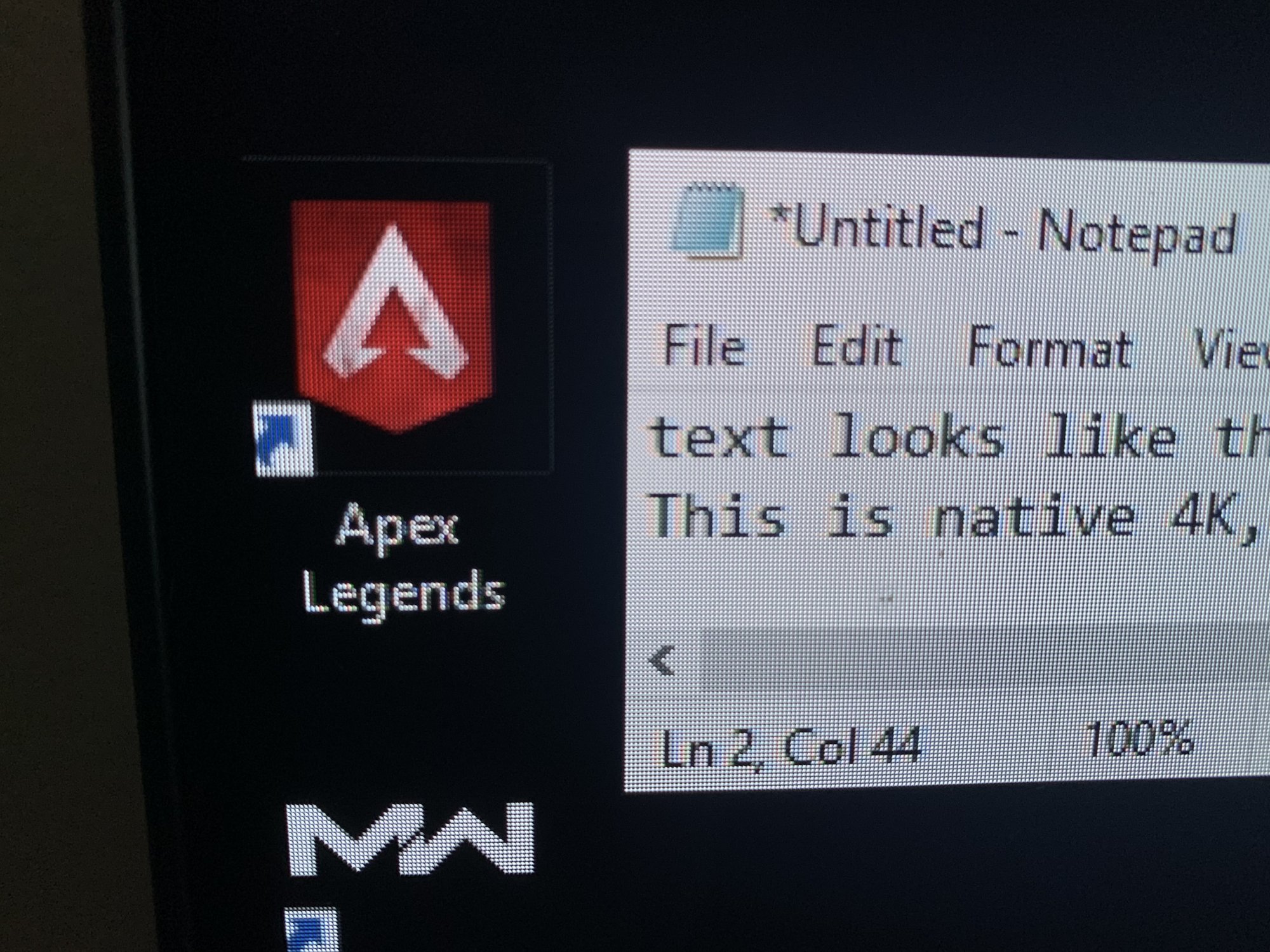
Black text looks great. White text is going to look odd compared to an RGB subpixel matrix. It doesn't bother me, but if you read a lot of text, it's been said that an IPS monitor will look better.
How does it look in non-native resolution ? say you want to play some titles at 120hz at 1080p or 1440p instead of 4k - does it not look blurry ? I mean even with a 3080, you're not going to see 60FPS in Flight Simulator ...
1080p looks great.
1440p IMO looks great as well, but if you're sitting close to the screen, you will see some pixelation. Again, it doesn't bother me, especially in 120hz gaming. 120hz ANYTHING on this display is just amazing. You will not find another screen that displays as clear of a picture in motion.
mirkendargen
Limp Gawd
- Joined
- Dec 29, 2006
- Messages
- 435
Once HDMI 2.1 bandwidth is available to do integer scaling on 1080p (make a 4k image by adding pixels in between each 1080p pixel that splits the difference between the adjacent ones), yeah it should look pretty good. The "AI upscaling" you're describing is literally what DLSS is, and it's already here, and it's amazing....but it needs to be supported at the game level unfortunately, it isn't just something you toggle on in NVCP. Hopefully with cards that support it becoming mainstream and DLSS 2.0 being much easier for developers to implement it will become more universal going forward.So is there a way with the new 3080 to be able to play some titles in 1080p but with AI upscaled to 4K and it would probably look better than 1440p ?
And I already get 60FPS+ at 4k in FlightSim with a 2080ti I think?
- Joined
- Jul 5, 2012
- Messages
- 4,740
Good to see the Ampere announcement spark a lot of new interest in the CX. I've personally been having a great experience on a 2080 Ti and can't wait to upgrade to a 3090.
Nice! Yeah the only issue with DLSS is that it's not widely supported right now. Hopefully more and more games will support it. As for the 'integer scaling' - Is it something that will be automated or something that will need to be manually configured ?Once HDMI 2.1 bandwidth is available to do integer scaling on 1080p (make a 4k image by adding pixels in between each 1080p pixel that splits the difference between the adjacent ones), yeah it should look pretty good. The "AI upscaling" you're describing is literally what DLSS is, and it's already here, and it's amazing....but it needs to be supported at the game level unfortunately, it isn't just something you toggle on in NVCP. Hopefully with cards that support it becoming mainstream and DLSS 2.0 being much easier for developers to implement it will become more universal going forward.
And I already get 60FPS+ at 4k in FlightSim with a 2080ti I think?
Pretty exciting times anyhow. I have my CX 48 preordered (Should be delivered sometimes in October, silly Canadian market). Running a 1080 right now, will be buying a 3080 or 3070ti (if they get confirmed)
3080/3090 + CX 48 does seems like the way to go. Haven't been this excited in a long time.Good to see the Ampere announcement spark a lot of new interest in the CX. I've personally been having a great experience on a 2080 Ti and can't wait to upgrade to a 3090.
mirkendargen
Limp Gawd
- Joined
- Dec 29, 2006
- Messages
- 435
Nice! Yeah the only issue with DLSS is that it's not widely supported right now. Hopefully more and more games will support it. As for the 'integer scaling' - Is it something that will be automated or something that will need to be manually configured ?
Pretty exciting times anyhow. I have my CX 48 preordered (Should be delivered sometimes in October, silly Canadian market). Running a 1080 right now, will be buying a 3080 or 3070ti (if they get confirmed)
Integer scaling is an option in the "Adjust desktop size and position" section of NVCP and is universal when enabled. Not sure if those settings are saved per resolution or what once set.
Thanks. I'm such a boomer now and been out of the game for too long.Integer scaling is an option in the "Adjust desktop size and position" section of NVCP and is universal when enabled. Not sure if those settings are saved per resolution or what once set.
- Joined
- Jul 5, 2012
- Messages
- 4,740
3080/3090 + CX 48 does seems like the way to go. Haven't been this excited in a long time.
Absolutely. I was leaning towards the 3080 initially but running the calculations has made the 3090 worth it, even if it is only 15% faster than a 3080. I'm estimating the 3080 to be no more than 30-40% over a 2080 Ti, and if the 3090 is 15% faster than a 3080, that would make the 3090 a whopping 50-60% faster than a 2080 Ti.
mirkendargen
Limp Gawd
- Joined
- Dec 29, 2006
- Messages
- 435
Absolutely. I was leaning towards the 3080 initially but running the calculations has made the 3090 worth it, even if it is only 15% faster than a 3080. I'm estimating the 3080 to be no more than 30-40% over a 2080 Ti, and if the 3090 is 15% faster than a 3080, that would make the 3090 a whopping 50-60% faster than a 2080 Ti.
I'm gonna get a 3090 too....but today they released an actual FPS comparison between a 2080ti and a 3080 in Doom Eternal and the 3080 is a 50% gain....so a 3090 may well be a 75%+ gain over a 2080ti in at least some games.

- Joined
- Jul 5, 2012
- Messages
- 4,740
I'm gonna get a 3090 too....but today they released an actual FPS comparison between a 2080ti and a 3080 in Doom Eternal and the 3080 is a 50% gain....so a 3090 may well be a 75%+ gain over a 2080ti in at least some games.
Doom Eternal is definitely a cherry picked scenario. Digital Foundry also saw 90% performance uplift from 2080 to 3080 in Doom Eternal. However, they saw lesser gains in other games like BFV and BL3 at around 70%. Regardless though, I don't expect the 3090 to be any less than a 50% gain over a 2080 Ti. The only way that would happen is if the 3090 is a lot less than 15% faster than a 3080 which is highly unlikely. We've already seen the performance gain in 5 games from a 2080 to 3080 so it's pretty safe to say how much faster the 3080 is, only thing that remains a mystery is the 3090 vs 3080.
- Joined
- Jul 5, 2012
- Messages
- 4,740
Bam.
Bam.
Which is what we've been waiting for. I'm still holding off on purchasing a CX until I see some reviews with the 3000 series to make sure there aren't any undiscovered problems, but everything looks pretty much good to go.
- Joined
- Sep 15, 2011
- Messages
- 3,498
Geez, reading all this has me even more interested. Could the wait for a truly kickass 4k 120hz with no significant shortcomings finally be over?
Geez, reading all this has me even more interested. Could the wait for a truly kickass 4k 120hz with no significant shortcomings finally be over?
Well there are still shortcomings like size, burn-in possibility, automatic static brightness limiter that needs to be disabled via service menu (needs service remote from eBay or Android phone with IR blaster) if you want to use it as a desktop monitor. But those are pretty manageable shortcomings comings compared to all the benefits of the monitor.
It is without doubt the best 4K consumer monitor you can buy at the moment.

- Joined
- May 5, 2006
- Messages
- 5,955
brightness safety controls incl abl, etc. are what greatly reduce the chance of burn in. You can set up another named setting in the OSD for text/reading within specific OSD control settings (recommended from rtings) than stay below the abl limit so that it will never kick on. Then you can just swap to that named setting with the remote and back as needed. Personally I'm going to use my OLED as a multimedia/gaming stage, not for desktop/app use. I'll have other monitor(s) in the array for that.
You probably dont want to replace your mobo but if I were to want to run two 3090s I'd look to Asus WS (Work Station) mobo models. They are made for running up to four GPUs so that may give you the room maybe for two 3090 cards. I have used the WS mobos in the past and they are very good but pricier than a normal mobo. I'm assuming they have the new chipsets mobos but haven't looked at them lately. You may want to check them out. Just a suggestion anyway.Ok so I had planned on SLI 3090's for my triple CX48 setup. But I just learned the 3090 is over 5 inches WIDE. Like, how in the HELL are you supposed to fit those in even the biggest of cases, let alone maintain a second sound card for SimVibe? Madness.
I need to find out if a single 3090 is better than two Pascal Titans. I hate that the new cards are this wide. Insane.
- Joined
- Sep 15, 2011
- Messages
- 3,498
Can someone recommend a good desk mounted VESA monitor arm with rotation capability for this so I can easily tilt the monitor to portrait mode and then back again to landscape mode? My walls are brick so I have to mount it to my desk.
Thanks!
Thanks!
- Joined
- May 5, 2006
- Messages
- 5,955
Ok so I had planned on SLI 3090's for my triple CX48 setup. But I just learned the 3090 is over 5 inches WIDE. Like, how in the HELL are you supposed to fit those in even the biggest of cases, let alone maintain a second sound card for SimVibe? Madness.
I need to find out if a single 3090 is better than two Pascal Titans. I hate that the new cards are this wide. Insane.
1080ti SC hybrids were probably my last sli build. Before that I Diy modded AiOs with nzxt brackets onto a few 780 ti SC. While some games still support sli and others via hacks/workarounds.. with the power of these new gpus along with the promise of DLSS frame rates while giving results similar to supersampling - I decided to just pay the "Titan Early Tax" and get a 3090 hybrid/neptune.. rather than wait for a somewhat lower priced Ti to double down on with Sli like I had my last two gpu upgrades.
That and the increased cost of this gen, plus the fact that SLI isn't being utilized in VR (even though it could have had a perfect scenario of one gpu per eye). Personally I'd get a 4k per eye vr kit rather than run triple gaming monitors now if I were spending that kind of money on immersion, or wait for the next gen of VR where those kinds of resolutions should become more standard.
Last edited:

- Joined
- Aug 7, 2004
- Messages
- 19,747

mirkendargen
Limp Gawd
- Joined
- Dec 29, 2006
- Messages
- 435
You probably dont want to replace your mobo but if I were to want to run two 3090s I'd look to Asus WS (Work Station) mobo models. They are made for running up to four GPUs so that may give you the room maybe for two 3090 cards. I have used the WS mobos in the past and they are very good but pricier than a normal mobo. I'm assuming they have the new chipsets mobos but haven't looked at them lately. You may want to check them out. Just a suggestion anyway.
I think he read the dimensions wrong. They're triple slot at most, and that isn't 5" "wide" in terms of mobo real estate. I think they're 5" "tall" in the way I would think of things, but that might be listed as width in physical dimensions.
- Joined
- Jul 5, 2012
- Messages
- 4,740
Funny part is that this pretty much happens ALL the time. Titan X Maxwell and GTX 1070 anyone? GTX 1070 offered Titan X Maxwell performance for only $380 vs $1000. Original GTX Titan vs GTX 970? GTX 970 offered Titan performance for only $320, AND that was not even 2 years later. Really anybody who bought a 2080 Ti the day it came out all the way back in 2018 should not feel hosed at all, you got 2 years worth of performance no other card could even come close to. And 2 years is an eternity in the PC world. I will gladly buy a 3090 and enjoy a level of performance that no card will match for 2+ years, and even when a "4070" comes out offering the same performance as a 3090 for "only $499", I'm not gonna feel any buyer's remorse. The only people who should feel bad are those who bought a 2080 Ti this year.
mirkendargen
Limp Gawd
- Joined
- Dec 29, 2006
- Messages
- 435
Funny part is that this pretty much happens ALL the time. Titan X Maxwell and GTX 1070 anyone? GTX 1070 offered Titan X Maxwell performance for only $380 vs $1000. Original GTX Titan vs GTX 970? GTX 970 offered Titan performance for only $320, AND that was not even 2 years later. Really anybody who bought a 2080 Ti the day it came out all the way back in 2018 should not feel hosed at all, you got 2 years worth of performance no other card could even come close to. And 2 years is an eternity in the PC world. I will gladly buy a 3090 and enjoy a level of performance that no card will match for 2+ years, and even when a "4070" comes out offering the same performance as a 3090 for "only $499", I'm not gonna feel any buyer's remorse. The only people who should feel bad are those who bought a 2080 Ti this year.
Yeah I honestly prefer the way things went last cycle and (presumably) this cycle compared to "Buy an x80 card, it gets blown out of the water a year later by an x80ti card" that happened for the 9 and 10 series. This way you can feel reasonably good about a purchase for 2 years, instead of perpetually alternating between "waiting for the ti to come out" then "waiting for the next gen to come out" every year.
- Joined
- Aug 7, 2004
- Messages
- 19,747
Funny part is that this pretty much happens ALL the time. Titan X Maxwell and GTX 1070 anyone? GTX 1070 offered Titan X Maxwell performance for only $380 vs $1000. Original GTX Titan vs GTX 970? GTX 970 offered Titan performance for only $320, AND that was not even 2 years later. Really anybody who bought a 2080 Ti the day it came out all the way back in 2018 should not feel hosed at all, you got 2 years worth of performance no other card could even come close to. And 2 years is an eternity in the PC world. I will gladly buy a 3090 and enjoy a level of performance that no card will match for 2+ years, and even when a "4070" comes out offering the same performance as a 3090 for "only $499", I'm not gonna feel any buyer's remorse. The only people who should feel bad are those who bought a 2080 Ti this year.
Yeah, buying a 2080Ti at launch (or soon after) was really the best case scenario considering the price never really dropped (thanks AMD!) and resale value remained extremely high until recently. Folks who bought in later essentially paid the same price and didn’t get nearly as much use out of it before something came along to wallop it...which is soon. Assuming that we’ll actually be able to get our hands on one!
- Joined
- May 5, 2006
- Messages
- 5,955
Personally I considered the 2000 series a "tick" and the 3000 series a big "TOCK". I skipped the 2000 series as I found it incremental and mediocre from my position (although I have 1080ti SLI not single card). The fact that the 2000 series was incremental compared to the 3000 series was even admitted to by Jensen Huang in his speech and his charts showing 1000, 2000, and 3000 series' performance.
"Every couple of generations, the stars align as it did with Pascal and we get a giant generational leap"
"Pascal was known as the perfect 10. Pascal was a huge success and set a very high bar."
"It took the "Super Family" of Turing to meaningfully exceed PAscal on game performances without ray tracing"
"With ray tracing turned on, Pascal, using programmable shaders to compute ray-triangle intersections, fell far behind Turing's RT core."
(However)
"Turing with ray tracing ON reached the same performance as pascal with raytracing OFF."
"So we doubled down on everything. Twice the shaders, twice the ray-tracing, and twice the Tensor Core. The triple double. Ampere knocks the daylights out of Pascal on ray tracing. And even with ray tracing on, crushes Pascal on frame rate. To all my Pascal gamer friends, it is safe to upgrade now".

"Every couple of generations, the stars align as it did with Pascal and we get a giant generational leap"
"Pascal was known as the perfect 10. Pascal was a huge success and set a very high bar."
"It took the "Super Family" of Turing to meaningfully exceed PAscal on game performances without ray tracing"
"With ray tracing turned on, Pascal, using programmable shaders to compute ray-triangle intersections, fell far behind Turing's RT core."
(However)
"Turing with ray tracing ON reached the same performance as pascal with raytracing OFF."
"So we doubled down on everything. Twice the shaders, twice the ray-tracing, and twice the Tensor Core. The triple double. Ampere knocks the daylights out of Pascal on ray tracing. And even with ray tracing on, crushes Pascal on frame rate. To all my Pascal gamer friends, it is safe to upgrade now".

- Joined
- Jul 5, 2012
- Messages
- 4,740
1080 Ti is a good card no doubt. I've held onto mine for my 2nd PC this entire time, but I was not happy with the performance I was getting at 4k on my Acer X27. 2080 Ti was around ~35% average performance uplift over a 1080 Ti in 4k. That meant the difference between getting 50-60 fps and getting 70-80 and actually making some use of >60Hz on my monitor.
- Joined
- May 5, 2006
- Messages
- 5,955
yes I stuck with 1440p until I considered 4k at over 60hz more meaningful and achievable (and even capable display hardware wise) at native resolution.
This will be a big milestone for me for that and for OLED and for that matter some HDR.
------------
I usually shoot for 100fps average on a 120hz+ display for something like a:
(70)/85fps <<< 100fps >>> 115 (130) fps range, or better.
I'll have to see what I can get with a 3090 on some games. I could always tweak settings if necessary to dial in, especially the obvious of turning down/off raytracing. DLSS on supported titles could also be huge.
-----------
I'm still holding out to see november LG OLED deals and what Vizio's OLED offering is like but I'm keeping my eye out for TV stands ahead of time. According to reviews this one is sturdy. Between the wheels and the 15 degree tilt up/down it looks like it would offer a lot of adjustment even if not an articulating arm outward. I'd have it stuck behind a bench like desk anyway and so would move my peripheral island desk on wheels forward or back if I needed to for a racing game or something, rather than moving the OLED forward out of line with the other monitor(s) in the array alongside it.
https://www.amazon.com/1homefurnit-Mobile-Display-Trolley-Locking/dp/B074TB5MG5/
(I'd omit installing the tray)

This will be a big milestone for me for that and for OLED and for that matter some HDR.
------------
I usually shoot for 100fps average on a 120hz+ display for something like a:
(70)/85fps <<< 100fps >>> 115 (130) fps range, or better.
I'll have to see what I can get with a 3090 on some games. I could always tweak settings if necessary to dial in, especially the obvious of turning down/off raytracing. DLSS on supported titles could also be huge.
-----------
I'm still holding out to see november LG OLED deals and what Vizio's OLED offering is like but I'm keeping my eye out for TV stands ahead of time. According to reviews this one is sturdy. Between the wheels and the 15 degree tilt up/down it looks like it would offer a lot of adjustment even if not an articulating arm outward. I'd have it stuck behind a bench like desk anyway and so would move my peripheral island desk on wheels forward or back if I needed to for a racing game or something, rather than moving the OLED forward out of line with the other monitor(s) in the array alongside it.
https://www.amazon.com/1homefurnit-Mobile-Display-Trolley-Locking/dp/B074TB5MG5/
(I'd omit installing the tray)

As an Amazon Associate, HardForum may earn from qualifying purchases.
Sorcerer_Tim
Limp Gawd
- Joined
- Oct 8, 2009
- Messages
- 183
Well, my CX came today and holy cow!! Did not disappoint. Gaming is fantastic and Display Port carrying the sound via Display Port to HDMI into receiver works like a champ. So glad I did it. This thread was very helpful in making my decision. Thank you. Now to pore over the 100 pages to find the settings people seem to like best.
https://www.forbes.com/sites/johnar...uesbut-cant-promise-a-quick-fix/#1c68897813af
Hopefully they can fix these issues down the line, instead of acknowledge and leave it.
Hopefully they can fix these issues down the line, instead of acknowledge and leave it.
- Joined
- Sep 15, 2011
- Messages
- 3,498
I've got an Alienware/Dell gaming laptop, and probably should determine if this can run the LG 48CX monitor properly (4k, 120hz, mid-range graphics quality settings) before I get too excited. I'd be playing Cyberpunk 2077 on it, and probably some Elite Dangerous and Subnautica.
Alienware m15
Intel(R) Core(TM) i7-8750H CPU @ 2.20GHz
32768MB RAM
NVIDIA GeForce RTX 2070
24310 MB
Alienware m15
Intel(R) Core(TM) i7-8750H CPU @ 2.20GHz
32768MB RAM
NVIDIA GeForce RTX 2070
24310 MB
Ok so we finally have some comparative RTX 3090 performance metrics.
https://images.hothardware.com/cont...ontent/small_geforce-rtx-3090-performance.jpg
It's roughly 50% faster than a RTX Titan which in turn is about 3-5% faster than a 2080 Ti so the ballpark estimates of a 3090 being only 15-20% faster than a 3080 seem accurate.
Looks like the 3090 will be right in the 50-55% range faster than a 2080 Ti. Now the question is how will it scale with a moderate core/memory OC and whose cooler can handle 400w.
https://images.hothardware.com/cont...ontent/small_geforce-rtx-3090-performance.jpg
It's roughly 50% faster than a RTX Titan which in turn is about 3-5% faster than a 2080 Ti so the ballpark estimates of a 3090 being only 15-20% faster than a 3080 seem accurate.
Looks like the 3090 will be right in the 50-55% range faster than a 2080 Ti. Now the question is how will it scale with a moderate core/memory OC and whose cooler can handle 400w.
- Joined
- Jul 5, 2012
- Messages
- 4,740
Ok so we finally have some comparative RTX 3090 performance metrics.
https://images.hothardware.com/cont...ontent/small_geforce-rtx-3090-performance.jpg
It's roughly 50% faster than a RTX Titan which in turn is about 3-5% faster than a 2080 Ti so the ballpark estimates of a 3090 being only 15-20% faster than a 3080 seem accurate.
Looks like the 3090 will be right in the 50-55% range faster than a 2080 Ti. Now the question is how will it scale with a moderate core/memory OC and whose cooler can handle 400w.
Those slides could be fake. But it is definitely what I am actually expecting though. 2080 Ti to 3080 is simply not big enough of a performance gain for me at ~40% max. 3090 it is.
mirkendargen
Limp Gawd
- Joined
- Dec 29, 2006
- Messages
- 435
Ok so we finally have some comparative RTX 3090 performance metrics.
https://images.hothardware.com/cont...ontent/small_geforce-rtx-3090-performance.jpg
It's roughly 50% faster than a RTX Titan which in turn is about 3-5% faster than a 2080 Ti so the ballpark estimates of a 3090 being only 15-20% faster than a 3080 seem accurate.
Looks like the 3090 will be right in the 50-55% range faster than a 2080 Ti. Now the question is how will it scale with a moderate core/memory OC and whose cooler can handle 400w.
It'll really depend what the OC (probably dictated by power unless Samsung's fab process is shit, and solder/liquid metal/pencils can likely overcome power limits) can get up to. I run my 2080ti at 2.1ghz solid no problem. It's on water, never gets above 40c, never throttles, etc. Hopefully 3090's can at least do similar, or that performance delta will get cut down some. If they can do 2.3Ghz+ or something, it will be truly awesome.
Those slides could be fake. But it is definitely what I am actually expecting though. 2080 Ti to 3080 is simply not big enough of a performance gain for me at ~40% max. 3090 it is.
Its directly from Nvidia briefing today
https://hothardware.com/reviews/nvidia-geforce-rtx-30-series-ampere-details
3080 FE cooler is looking pretty unimpressive to me although it is only 2 slots. 2 dBa quieter and 3C cooler but it is dealing with 80w more heat so I guess that's quite an achievement.
EDIT: There are 3090 cooler slides as well where it looks like 28 dBa @ 75C. Also given 150w per 8pin and a addition 75w from the PEG slot, the FE will be pretty handicapped compared to all the 3 8pin equipped partner cards. I'm starting to reconsider getting an FE now.
Last edited:

imsirovic5
Limp Gawd
- Joined
- Jun 21, 2011
- Messages
- 417
Does anyone have any thoughts on 3080's 10gb memory becoming eventually handicap @4k resolution? Sure today its plenty, but how about a year from now? Just trying to justify getting 3090 - but (to me) its almost silly to pay over 2x cost for potential 15% to 20% in extra performance. This is such a tough decision to make coming from 1080 Ti.......
- Joined
- Jul 5, 2012
- Messages
- 4,740
Does anyone have any thoughts on 3080's 10gb memory becoming eventually handicap @4k resolution? Sure today its plenty, but how about a year from now? Just trying to justify getting 3090 - but (to me) its almost silly to pay over 2x cost for potential 15% to 20% in extra performance. This is such a tough decision to make coming from 1080 Ti.......
Just get the 3090. It will be the top dog GPU for at least 2 years and you don't have to worry about nvidia hosing you with either
A. 20gb 3080
B. 3080 Ti
C. Both
Last edited:
Does anyone have any thoughts on 3080's 10gb memory becoming eventually handicap @4k resolution? Sure today its plenty, but how about a year from now? Just trying to justify getting 3090 - but (to me) its almost silly to pay over 2x cost for potential 15% to 20% in extra performance. This is such a tough decision to make coming from 1080 Ti.......
If a game like RDR2 requires running 8K resolutions to fill the memory of the 2080 Ti's 11 GB then 10 GB for 4K will be perfectly fine. Nvidia has said on Reddit that they are looking at cost vs what developers are going to use and landed on the current amounts based on that. At the same time there are rumors of a 16 GB 3070 Ti and 20 GB 3080 so who knows.
IMO 10 Gb is plenty. Just because there are games that extensively cache stuff in VRAM does not mean they actually need that much. They just make better use of the available resources.
To me the 3080 is the card to buy. It's in that zone where it is faster than the already blazing fast 2080 Ti while being a lot cheaper. With the 3090 offering a modest 20-30% performance boost it does not seem worth the extra cost to me. This is of course if you consider practical, cost effective choices rather than just buying the 3090 because you can afford it and you want the best.
I would not buy at launch though. There is bound to be a Cyberpunk 2077 bundle in November and by that time also benchmarks, AMD's cards and who knows maybe even some in-between models from Nvidia if AMD's turn out to be very good.
If the 3080 can run most AAA games at 100 fps average (4K max or near max settings), then I consider it a good buy to go with this TV. Otherwise, might have to pony up for the 3090.
....or wait 9 months-1year for the 3080 Ti/Super. Can't wait for benchmarks.
....or wait 9 months-1year for the 3080 Ti/Super. Can't wait for benchmarks.
IMO the 3080 will run most AAA games in the 60-80FPS range when maxed out at 4K (no DLSS). The 3090 will add 10FPS to this.
Of course the smart thing to do is optimize settings that do absolutely nothing for IQ but tank performance.
I'm basing this off the fact that my 2080 Ti was borderline 60FPS in many games and regularly dropped to the 50's and this was with mixed settings.
Of course the smart thing to do is optimize settings that do absolutely nothing for IQ but tank performance.
I'm basing this off the fact that my 2080 Ti was borderline 60FPS in many games and regularly dropped to the 50's and this was with mixed settings.