• Some users have recently had their accounts hijacked. It seems that the now defunct EVGA forums might have compromised your password there and seems many are using the same PW here. We would suggest you UPDATE YOUR PASSWORD and TURN ON 2FA for your account here to further secure it. None of the compromised accounts had 2FA turned on.
    Once you have enabled 2FA, your account will be updated soon to show a badge, letting other members know that you use 2FA to protect your account. This should be beneficial for everyone that uses FSFT.

LG 48CX

?
If you do this, GSYNC is not working at all. And the Hz-value changing rapidly is the whole point, that's how it works.
When running at a locked 118 fps with G-SYNC, the Hz value should not change. It's 5.5 Hz at a locked 120 fps, and IIRC 5.4 Hz at 118 fps. If the Hz value changes rapidly while running at the same fps, that is the G-SYNC stuttering problem due to the Enable settings for the selected display model checkbox being selected. The Hz value should change only when the framerate is actually varying. It's easy to tell G-SYNC is in fact working, because there is no tearing, stuttering, or input lag (in case it was actually Vsync).
 
Last edited:
Did you try the Enable settings for the selected display model checkbox? This is the only thing has been shown to work.

Low Latency Mode should be Off by default. It's not compatible with many games and it's a mistake to switch it on globally.
Yes. My low latency is off globally. I tried that Gsync "Enable settings" checkbox on/off, I tried the VRR setting in Windows on/off, and Freesync on TV on/off. And all combos between. Still see stuttering/tearing on the Pendulum test, as well as in games

I'm still not on a certified 2.1 HDMI cable but that shouldn't be a big deal at 4K 60Hz (full 10), and it can handle 4K 100Hz 10bit just fine too. I'll update when I get the new cable tomorrow, but my stutter/tearing issue matches what quite a few people are saying here and on reddit so I doubt it's the cable
 
I just discovered something else. If you reboot the PC with Enable settings for the selected display model unchecked, G-SYNC doesn't activate on the CX after booting. You must check and uncheck the box once again after each reboot. If you forget to do this and have an fps limit configured, it will run in Vsync mode and result in stuttering.
 
When running at a locked 118 fps with G-SYNC, the Hz value should not change. It's 5.5 Hz at a locked 120 fps, and IIRC 5.4 Hz at 118 fps. If the Hz value changes rapidly while running at the same fps, that is the G-SYNC stuttering problem due to the Enable settings for the selected display model checkbox being selected. The Hz value should change only when the framerate is actually varying. It's easy to tell G-SYNC is in fact working, because there is no tearing, stuttering, or input lag (in case it was actually Vsync).

Sorry I totally overlooked that locked fps part.
 
Yes. My low latency is off globally. I tried that Gsync "Enable settings" checkbox on/off, I tried the VRR setting in Windows on/off, and Freesync on TV on/off. And all combos between. Still see stuttering/tearing on the Pendulum test, as well as in games

I'm still not on a certified 2.1 HDMI cable but that shouldn't be a big deal at 4K 60Hz (full 10), and it can handle 4K 100Hz 10bit just fine too. I'll update when I get the new cable tomorrow, but my stutter/tearing issue matches what quite a few people are saying here and on reddit so I doubt it's the cable
The pendulum demo is broken on G-SYNC Compatible displays - I cannot even select G-SYNC most of the time even though the display is running in VRR mode.

Are you sure G-SYNC is actually active in-game? Use the Display > G-SYNC Compatible Indicator menu option in NVCP (it only appears while Set up G-SYNC is selected).
 
The pendulum demo is broken on G-SYNC Compatible displays - I cannot even select G-SYNC most of the time even though the display is running in VRR mode.

Are you sure G-SYNC is actually active in-game? Use the Display > G-SYNC Compatible Indicator menu option in NVCP (it only appears while Set up G-SYNC is selected).
I'll give it a try in games. I have the Gsync indicator on but I've only been using Pendulum to test configurations; I don't leave Gsync enabled when I'm playing games simply because of the stuttering/tearing issues when testing it on Pendulum

EDIT: Still getting tearing and stuttering, even when the Gsync indicator is on. Avengers felt juddery at full refresh rate and had visible screen tearing when dropping below refresh rate, even when Gsync indicator was on. Turning Gsync back off made it feel good again
 
Last edited:
I'll give it a try in games. I have the Gsync indicator on but I've only been using Pendulum to test configurations; I don't leave Gsync enabled when I'm playing games simply because of the stuttering/tearing issues when testing it on Pendulum

EDIT: Still getting tearing and stuttering, even when the Gsync indicator is on. Avengers felt juddery at full refresh rate and had visible screen tearing when dropping below refresh rate, even when Gsync indicator was on. Turning Gsync back off made it feel good again
Does the FreeSync Information menu show a variable Hz value when running at a locked fps?
 
I don't think that all of this is strictly related to the .25/.26 firmware.

I'm still on .10.20 (somehow I don't get an OTA update) and a 2070 Super @ 1440p120 and I sometimes get stuttering or tearing, depending on vsync settings after launching GTA5..

I didn't have this 3 days ago (was buttery smooth until today) and the only thing I did was playing around with the TV settings.. I also had similar behaviour on my old Philips Momentum 43 at times (FreeSync / G-Sync compat too).

Slowly I'm thinking that this may not be an exclusive CX/30 series issue, but rather Windows 10 / NVIDIA related..

PS: I'm wondering if any of those issues exist on AMD cards? Anyone here crazy enough to run a 5700XT or something?
 
Last edited:
I don't think that all of this is strictly related to the .25/.26 firmware.

I'm still on .10.20 (somehow I don't get an OTA update) and a 2070 Super @ 1440p120 and I sometimes get stuttering or tearing, depending on vsync settings after launching GTA5..

I didn't have this 3 days ago (was buttery smooth until today) and the only thing I did was playing around with the TV settings.. I also had similar behaviour on my old Philips Momentum 43 at times (FreeSync / G-Sync compat too).

Slowly I'm thinking that this may not be an exclusive CX/30 series issue, but rather Windows 10 / NVIDIA related..

PS: I'm wondering if any of those issues exist on AMD cards? Anyone here crazy enough to run a 5700XT or something?
I believe I’m the only one running a 5700xt. Mine runs super smooth with VRR on and it does 120hz at all custom resolutions. Playing WOW at the moment and FPS dips a lot anything from 45fps to 120fps. But it’s super smooth . Knock on wood I haven’t had any issues. Only one I have had is when game mode clicks over I was getting a black screen but that just started since this last OTA on the lg.
 
On another note that just hit me: shouldn't I be able to drive 2560x1440@120Hz RGB with 10bit and HDR?

If I calculated right (meaning: used the right calculator) it should come out < 16gbps, well under the 18gbps HDMI 2.0 limit..?

I can only select 8bit in the control panel..

//Edit: nevermind.. stupid nvidia hdmi 2.0 limitation of only 8 and 12 bit..
 
Last edited:
And the 48CX I'm still getting used to the weird subpixel arrangement which is enough to be bothersome
Does setting ClearType to greyscale, or straight-up disabling ClearType altogether, not aleliviate the issue? (this can be easily achieved via Better ClearType Tuner)

Or is that exactly what the issue is - that you're not used to using text that is rendered without sub-pixel anti-aliasing?
 
Does setting ClearType to greyscale, or straight-up disabling ClearType altogether, not aleliviate the issue? (this can be easily achieved via Better ClearType Tuner)

Or is that exactly what the issue is - that you're not used to using text that is rendered without sub-pixel anti-aliasing?

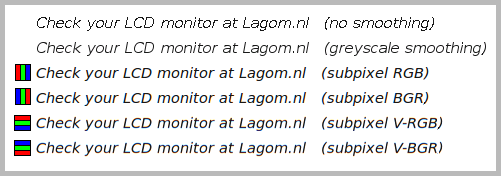
To me RGB ClearType is plainly better-looking than greyscale - this wasn't the case prior to enabling Ultra HD Deep Color on the TV though. I tried taking some photos about an inch from the screen. I normally sit a bit more than an arm's length away and definitely cannot see individual pixels.

..from this page:
cleartype1.jpg


..and this image from www.lagom.nl/lcd-test
subpixel-font.png

cleartype3.jpg
 
Last post I saw in this thread mentioned that custom, ultrawide resolutions weren't working perfectly with the Club-3D CAC-1085. Anyone able to confirm if that's still the case? Looks like it might still be a while before I can find a Strix 3090 so I'm considering a temporary solution...
 
To me RGB ClearType is plainly better-looking than greyscale - this wasn't the case prior to enabling Ultra HD Deep Color on the TV though. I tried taking some photos about an inch from the screen. I normally sit a bit more than an arm's length away and definitely cannot see individual pixels.

..from this page:
View attachment 290372

..and this image from www.lagom.nl/lcd-test
View attachment 290375
View attachment 290374
RGB subpixel smoothing has clear fringing effects that are not present with grayscale. Also you can't use that image as a reference, it's meant to represent how the different subpixel rendering looks like on any monitor, it's the "Rendering of your browser below:" that you need to be looking at. That only changes when you change subpixels smoothing. Also it's best to restart your browser if you change subpixel rendering as it might not follow it right away.

Grayscale to me is the best compromise but it's still a bit rubbish compared to grayscale antialiasing on MacOS.
 
My CX just updated to 3.11.25 this morning. Going to check GSYNC compatibility later (currently have my 2070 Super installed)
 
My CX just updated to 3.11.25 this morning. Going to check GSYNC compatibility later (currently have my 2070 Super installed)

I just got the 03.11.25 OTA update this morning as well. Still on my 1080 Ti until a 3080 can be found...looking forward to your results.
 
RGB subpixel smoothing has clear fringing effects that are not present with grayscale.
compared to an LCD or just in general? it's the nature of cleartype that it adds color to the edges - if you used it on an LCD screen then it works just as well on the CX. I had poor results at first and I thought it might be due to there being a different subpixel layout but after finding and enabling the HDMI Ultra HD Deep Color setting now it looks great and I think the subpixel layout is certainly RGB - if there's an extra W inbetween it mustn't be addressable.
 
I just got the 03.11.25 OTA update this morning as well. Still on my 1080 Ti until a 3080 can be found...looking forward to your results.
I just put my RTX 3080 back in, installed drivers, and did 2 tests.

Euro Truck Simulator 4K/120
Pendulum Demo 50-110 FPS

I did the little green button VRR screen to verify, and it is running 4K/120 VRR 4:4:4 10-bit.

Both passed with flying colors. LG seems to have fixed it, and it looks beautiful!!!!

I am officially a happy 3080 and LG CX owner. Feels good!
 
I just put my RTX 3080 back in, installed drivers, and did 2 tests.

Euro Truck Simulator 4K/120
Pendulum Demo 50-110 FPS

I did the little green button VRR screen to verify, and it is running 4K/120 VRR 4:4:4 10-bit.

Both passed with flying colors. LG seems to have fixed it, and it looks beautiful!!!!

I am officially a happy 3080 and LG CX owner. Feels good!

Thank you. That's great to hear, man! I'm really, really enjoying this display even without having the equipment to fully unleash its capabilities. Can't imagine what your experience must be like with a 3080 running the thing at 4:4:4 10-bit with VRR!
 
Can you confirm if you can do 4:4:4, 10-Bit, HDR, GSYNC, 120HZ all at the same time without stuttering or other issues?
 
I installed the new firmware. Had some general desktop weirdness after setting 4k 120Hz 444 10bpc in the NVCP... but that was resolved after setting my second display to 60Hz. It appears I cannot run both displays at 120Hz G-Sync simultaneously. No worries though, because I just tried a few games on the CX @ 4k and it's amazing! I haven't encountered stutter yet but I definitely need to test out more games.
 
What about with HDR? Looking for someone to confirm this is working properly with all of the main settings HDR, GSYNC, 4:4:4, 10-Bit, 120hz
 
Nope. Definitely see some stuttering around 100-120 FPS. My test case is Battlefield 1.

Does anyone know a fix for this? The display seems fine from what I can tell, so I dunno.
 
Last edited:
Nope. Definitely see some stuttering around 100-120 FPS. My test case is Battlefield 1.

Does anyone know a fix for this? The display seems fine from what I can tell, so I dunno.
Unchecking the Enable settings for the selected display model checkbox fixes this. You can test for stuttering by looking at the Hz value in the FreeSync Information screen on the CX when running at a constant framerate capped below 120 fps. If the Hz value changes while the frame rate is constant, G-SYNC is stuttering.
 
What about with HDR? Looking for someone to confirm this is working properly with all of the main settings HDR, GSYNC, 4:4:4, 10-Bit, 120hz
It works fine. That's what I use globally on the desktop and in all games. The G-SYNC stuttering fix is posted above.
 
Does setting ClearType to greyscale, or straight-up disabling ClearType altogether, not aleliviate the issue? (this can be easily achieved via Better ClearType Tuner)

Or is that exactly what the issue is - that you're not used to using text that is rendered without sub-pixel anti-aliasing?
I had to settle for greyscale, because Cleartype just added too much fringe to the edges that really stood out at times. Some apps/colors/fonts are fine, but you'll occasionally get a combo that Cleartype butchers


Certain text on certain colors just adds super strange fringe. Like the green edge on that white text. It stands out from a mile away and really catches your eye as off. Cleartype has been designed and honed on the RGB pixel arrangement, and the RGBW and slightly different sized sub-pixels will stand out in certain edge cases that Cleartype never could have anticipated

And greyscale isn't perfect either—because I'm not used to a greyscale edge on text, text looks like it has a slight shadow, like it's been over sharpened. Makes my eyes feel like they aren't focused. Again this stands out most on certain colors combos


That soft white shadow on the edge of the 4 and inside the 0? My brain can't not see it. I'm not sitting close enough to see individual pixels, but the panel is so sharp—and this subpixel not being normal—that text is just always going to be an issue personally. In Windows at least
 
It works fine. That's what I use globally on the desktop and in all games. The G-SYNC stuttering fix is posted above.
So with the workaround all of these together work properly at the same time: HDR, GSYNC, 4:4:4, 10-Bit, 120hz? So no more compromises with this screen and latest firmware? Just trying to be clear.
 
Unchecking the Enable settings for the selected display model checkbox fixes this. You can test for stuttering by looking at the Hz value in the FreeSync Information screen on the CX when running at a constant framerate capped below 120 fps. If the Hz value changes while the frame rate is constant, G-SYNC is stuttering.

Unfortunately, this doesn't work. It says VRR, but the refresh is static. You can tell because there is tearing when running Heaven 4.0 around 70-80 FPS.
 
Certain text on certain colors just adds super strange fringe. Like the green edge on that white text. It stands out from a mile away and really catches your eye as off. Cleartype has been designed and honed on the RGB pixel arrangement, and the RGBW and slightly different sized sub-pixels will stand out in certain edge cases that Cleartype never could have anticipated
having spent some time tuning cleartype on this screen - I think you have your contrast too high if you can see that green edge. I know when a white edge splits a pixel you get full red + full green + no blue and it looks just like that even on an LCD. I repro'd it on my screen and took this picture - the green edge is clearly visible in the photo but I cannot see it unless I place my nose about 6" from the screen - and from that close it looks no different than an LCD:
20201019_151036.jpg


..the only edge that sticks out and is definitely not present on an LCD is the the red edge on the left side of the yellow block - though I've lowered my contrast to the point where I can't even see that from an arm's length away (I'm using contrast 50, brightness 50, oled 75, and everything else 0, warm 1 white balance, and the gpu is all zeros w/temp at 6500K)
 
Unfortunately, this doesn't work. It says VRR, but the refresh is static. You can tell because there is tearing when running Heaven 4.0 around 70-80 FPS.
Well, if he's disabling display specific VRR settings for the display it could fix the stuttering but yeah, you'd think it would disable VRR for that display which means tearing or reverting to regular v-sync (or fast sync) if either of those was still enabled.

He's talking about this panel.


aid_4768_compatible.png

I am all for a working fix but it seems like there are varied reports at the moment with a lot of people still having stuttering issues with VRR.
 
Unfortunately, this doesn't work. It says VRR, but the refresh is static. You can tell because there is tearing when running Heaven 4.0 around 70-80 FPS.
Powercycle the TV and disabling G-Sync, apply, reenable G-Sync.

I have the same (or at least a similar) issue with my 2070S on HDMI 2.0 on both the .20 and .25 firmwares and also had similar issues on my old Momentum 43" FreeSync.

I think that weird stuff is either caused by Windows 10 or the nvidia drivers.. sometimes I even have to reboot the PC..

I *think* shit starts happening when switching resolutions/color depth/vsync while G-Sync is active.

The only way I can safely reproduce it is when I turn vsync on/off ingame in GTA5. Then all sorts of bs starts happening and I have to reboot..

PS: I can't safely say we're experiencing the _same_ issues as I don't have an HDMI 2.1 capable card, but it at least sounds similar..
 
Last edited:
Powercycle the TV and disabling G-Sync, apply, reenable G-Sync.

I have the same (or at least a similar) issue with my 2070S on HDMI 2.0 on both the .20 and .25 firmwares and also had similar issues on my old Momentum 43" FreeSync.

I think that weird stuff is either caused by Windows 10 or the nvidia drivers.. sometimes I even have to reboot the PC..

I *think* shit starts happening when switching resolutions/color depth/vsync while G-Sync is active.

The only way I can safely reproduce it is when I turn vsync on/off ingame in GTA5. Then all sorts of bs starts happening and I have to reboot..

PS: I can't safely say we're experiencing the _same_ issues as I don't have an HDMI 2.1 capable card, but it at least sounds similar..

But that's where things get "weird". My 2070 Super has NONE of these issues; I can game at 2560x1440 120hz GSYNC and cap the frame rate to 116 in NVCP, and it is smooth all day long, even with HDR. As you pointed out, though, this is HDMI 2.0b, not HDMI 2.1

I also noticed that using the secret FreeSync display on the CX, if you're using a 3080/3090, it goes up to 5.5Hz, but if you're using an HDMI 2.0b GPU (like the 2070 Super), it goes up to 120hz. I really do think that LG still doesn't have this issue completely figured out yet. Worse, I've begun to wonder if this is a limitation of the TV that no firmware will fix. I really hope it isn't, because there are a lot of people that bought a CX with the intention of doing 4k120 HDR and GSYNC once HDMI 2.1 GPUs released.

Well... HDMI 2.1 GPUs are here. Lets go Nvidia and LG. This is your flagship setup (CX + 3080/3090). Prove to the world that a whole bunch of gamers didn't just make a huge mistake by buying into the hype.
 
And greyscale isn't perfect either—because I'm not used to a greyscale edge on text, text looks like it has a slight shadow, like it's been over sharpened. Makes my eyes feel like they aren't focused. Again this stands out most on certain colors combos

That soft white shadow on the edge of the 4 and inside the 0? My brain can't not see it
Well then the obvious solution is to turn off cleartype altogether. :p

(I know I know, then you gets jaggies and aliasing out the wazoo)
 
So there is some (slightly) good news.

Apparently GSYNC works fine on the RTX 3000 cards if you use 8-bit color. If you go above that, that's when you start running into the 100-120 FPS stuttering bug.

LG is making progress. Now we just need them to get 10-bit GSYNC 4:4:4 to work.
 
So there is some (slightly) good news.

Apparently GSYNC works fine on the RTX 3000 cards if you use 8-bit color. If you go above that, that's when you start running into the 100-120 FPS stuttering bug.

LG is making progress. Now we just need them to get 10-bit GSYNC 4:4:4 to work.
I'm using 10-bit RGB. Are you sure G-SYNC is active in-game? The CX says VRR even when G-SYNC is not working in-game. Does the G-SYNC Compatible Indicator show up if you enable it? I sometimes have to disable and enable G-SYNC for it to start working.

Try a different game like Dota 2. Pan the camera with the arrow keys - it's a dead giveaway for when G-SYNC is or isn't working. Cap the frame rate in-game with fps_max 110 etc. to test below the refresh rate. When you cap the frame rate at different values, the Hz value on the CX should change.

Also ensure Low Latency Mode is Off.
 
compared to an LCD or just in general? it's the nature of cleartype that it adds color to the edges - if you used it on an LCD screen then it works just as well on the CX. I had poor results at first and I thought it might be due to there being a different subpixel layout but after finding and enabling the HDMI Ultra HD Deep Color setting now it looks great and I think the subpixel layout is certainly RGB - if there's an extra W inbetween it mustn't be addressable.
Comparing the OLED with different subpixel antialiasing setups. RGB and BGR have clear fringing that I don't spot on LCDs so the subpixel structure of the CX 48 is not ideal for these. Grayscale works fine to my eyes but took me a bit to get used to it as Windows does a bit of fuckery with it for some fonts on legacy apps.
 
Unchecking the Enable settings for the selected display model checkbox fixes this. You can test for stuttering by looking at the Hz value in the FreeSync Information screen on the CX when running at a constant framerate capped below 120 fps. If the Hz value changes while the frame rate is constant, G-SYNC is stuttering.
Unchecking that box just disables Freesync afaik.
 
But that's where things get "weird". My 2070 Super has NONE of these issues; I can game at 2560x1440 120hz GSYNC and cap the frame rate to 116 in NVCP, and it is smooth all day long, even with HDR. As you pointed out, though, this is HDMI 2.0b, not HDMI 2.1

I also noticed that using the secret FreeSync display on the CX, if you're using a 3080/3090, it goes up to 5.5Hz, but if you're using an HDMI 2.0b GPU (like the 2070 Super), it goes up to 120hz. I really do think that LG still doesn't have this issue completely figured out yet. Worse, I've begun to wonder if this is a limitation of the TV that no firmware will fix. I really hope it isn't, because there are a lot of people that bought a CX with the intention of doing 4k120 HDR and GSYNC once HDMI 2.1 GPUs released.

Well... HDMI 2.1 GPUs are here. Lets go Nvidia and LG. This is your flagship setup (CX + 3080/3090). Prove to the world that a whole bunch of gamers didn't just make a huge mistake by buying into the hype.
I also see the 5.5Hz bug on the VRR hidden osd, spontaniously jumping up and down when I get into the mentioned situations on my 2070S..

I'm starting to get a bit scared that this either isn't fixable or won't get fixed by MS/nvidia/LG (whoever is the culprit).

I've got about a week to return the TV, but I'm almost certain I won't fet another deal for the 55CX for 1200EUR where I live and there aren't any alternatives on the horizon.. :/ I also don't see the 48CX dropping ever in my region, that's about 1600 EUR here - if you can even grab one.. even the B9s are going for 1500+.. hmmm
 
Back
Top