HP SAS Expander Owner's Thread

That looks interesting. How to make sure it works?

Well, you could buy one and give it a try :)

Here is a word of caution though:

During my experimentation and subsequent discovery of why these HP SAS expander cards wouldn't boot up in the particular motherboard I used, I discovered that the PWRGD (power good) signal on pin A11 of the PCIe connector NEEDS to be pulled high for proper and RELIABLE operation of the expander card! The PWRGD signal should be pulled to the +3.3VAUX (auxiliary voltage) as found on pin B10 of the PCIe connector via a 10kOhm resistor. If the PWRGD signal is left floating, which may be the case in some of these riser cards as they are intended to be plugged into a motherboard which would normally take care of driving this line to the appropriate voltage levels, the HP SAS expander card may sporadically reset itself!
To perform some of the measurements in my system, I covered the PWRGD signal pin on the PCIe connector with some Kapton tape and basically disconnected the signal from the motherboard. This left the PWRGD signal on the HP SAS expander card floating and while I attached the measurement probe either from my digital fluke meter or the oscilloscope, it caused the expander to reset!
Even the high impedance inputs of my measuring equipment was sufficient enough to pull the PWRGD signal below the reset threshold!
So if you do intend on using a riser card to power an HP SAS expander card in an external enclosure, I would highly recommend you verify that the PWRGD signal is indeed pulled high to +3.3V otherwise you may end up with corrupted data on your RAID storage system as the expander could reset at any given time. Diagnosing issues like this can be VERY hard especially since you wouldn't expect this kind of behavior from the expander card!
 
Do you guys think this will work?
http://www.ieiworld.com/product_gro...=08144525522649184530&id=08142307868185999261
o.jpg
 
Last edited:
In case you didn't notice I posted photos and a write-up of a working power board earlier in the thread- http://www.hardforum.com/showthread.php?t=1484614&page=15

However that backplane board above might work too. I notice Orbitmicro has it for $26 -- might be worth a try as a lower cost alternative to the power board I used. http://www.orbitmicro.com/global/hpe-3s2-r10-p-9398.html

Since its a PICOe backplane you likely won't be able to turn it on with the front panel momentary switch that's on the front of your server case. You'll probably have to permanently jumper the red ATXCTL 3-pin like I did, which means the switch on your power supply effectively becomes the power switch for the case. For me this wasn't a big deal for a JBOD enclosure since it stays on all the time anyway. Only other unknown is whether the mounting holes would line up with ATX holes.
 
Last edited:
you do realize i already tested photos of a working power board earlier in the thread, right?

Have you verified that those power boards actually drive or at least pull that PWRGD signal high???

The card may appear to be working just fine even if that signal is not actively driven or pulled high, however because the signal maybe floating, the card can reset at any given moment!

I wouldn't leave it to chance! Better make sure and check that the signal is pulled to 3.3V as the card unfortunately doesn't do that on it's own!
 
Yes. But PE-2SD1-R10 is at least $46 shipped. This one is <$30

And doesnt have a standard ATX PSU port so you are going to have wire it up yourself.
Doesnt have standard mounting holes.

Yes it will prob work but I would rather pay an extra $20 for something I dont have to mess with to get it to work.
 
It has, just angled. Look at the white connector marked ATXPWR1
And doesnt have a standard ATX PSU port so you are going to have wire it up yourself.
Doesnt have standard mounting holes.

Yes it will prob work but I would rather pay an extra $20 for something I dont have to mess with to get it to work.
 
I just had a quick look at the images odditory posted earlier and the the pictures of the board hotneutron posted. Neither images are high resolution enough to tell for sure, but I would say neither of them provide a proper PWRGD signal. Especially the HPE-3S2 doesn't appear to have anything other than power for the PCIe connector!
 
can you take a second look? A bigger one:

o.jpg


I also write to IEI tech support to ask the following questions:
1) Looks like the PCIe X4 is open-ended. Is that true?
2) Is the PWRGD on Pin 11-A of PCIex4 connect to the ATX Pin8 PWRGD or to the backplane?

Also bigger one for PICMG 1.3 board:
o.jpg
 
Last edited:
My guess is the PCIe signals are connected to the BP_CONNB1. Let me dig in PCI/PICOe documents.
I just had a quick look at the images odditory posted earlier and the the pictures of the board hotneutron posted. Neither images are high resolution enough to tell for sure, but I would say neither of them provide a proper PWRGD signal. Especially the HPE-3S2 doesn't appear to have anything other than power for the PCIe connector!
 
I'm picking up my backplane on the 23rd when I get back from my vacation. The place odditory ordered his from is literally a mile from my house, so it certainly is convenient. That means you can pick one up too if you don't feel like having it shipped to your place nitrobass (though they currently don't have them in stock).
 
Except they don't stock either board (just checked) and you're looking at a couple weeks lead time.
 
I just had a quick look at the images odditory posted earlier and the the pictures of the board hotneutron posted. Neither images are high resolution enough to tell for sure, but I would say neither of them provide a proper PWRGD signal. Especially the HPE-3S2 doesn't appear to have anything other than power for the PCIe connector!

regardless, my power board has been powering an HP expander 24x7 for almost 3 weeks now without a single hiccup, and if the expander card had ever surreptitiously reset, I would've seen it in the event log of the Areca card. at this point I'm not too worried- it's working beautifully.
 
Well, I'd certainly be worried if I had a floating reset line. Any static charge or voltage surge could trigger a reset.

Has anyone seen a compatibility list from HP for the SAS Expander? What I'm getting at is that I wonder whether every motherboard HP has used in its servers has pulled PWRGD high. If not, then they should have a compatibility list for which of their servers work and which do not. But I cannot find such a list.
 
can you take a second look? A bigger one:

o.jpg


I also write to IEI tech support to ask the following questions:
1) Looks like the PCIe X4 is open-ended. Is that true?
2) Is the PWRGD on Pin 11-A of PCIex4 connect to the ATX Pin8 PWRGD or to the backplane?

They don't appear to pull the signal up on the backplane. My guess would be that the signal is connected between the PCIE1 and the BP_CONNB1 connectors. If that' the case, you would still need to pull the signal high!
I don't think that the PCIe PWRGD signal is connected to the ATXPWR1 pin 8 PWR_OK signal as the PWRGD signal is a 3.3V signal and if memory serves me right, the PWR_OK signal coming from the PSU is a 5.0V signal!

You would need to have an open ended PCIe x4 connector since the HP SAS expanders use a x8 edge connector.

Has anyone seen a manual (hopefully with signal descriptions of the connectors) for the HPE-3S2???
 
Well, I'd certainly be worried if I had a floating reset line. Any static charge or voltage surge could trigger a reset.

My point exactly. I've had a design (actually thousands of units installed in the field all over the continent) that worked fine for 4+years and all of a sudden a problem emerged. Thankfully the solution was simple, a pull-up resistor solved the sporadic character generation on a serial communication line. Goes to show that things that you 'thought' are working perfectly turn out to be anything but....

Has anyone seen a compatibility list from HP for the SAS Expander? What I'm getting at is that I wonder whether every motherboard HP has used in its servers has pulled PWRGD high. If not, then they should have a compatibility list for which of their servers work and which do not. But I cannot find such a list.

As I mentioned before I think what happens in those motherboards that the expander cards don't seem to work in is the following:

During the system boot process, the BIOS will scan each I/O card and request the information to determine the necessary resources it needs to allocate to each card. To do that they most likely set the PWRGD signal high for the card to respond via the SMBus and once this negotiation phase is complete they set the line low until all slots have been queried. I believe that since the HP SAS expander card does not require any other resources other than power, the expander does not respond to the query process and hence the BIOS is not aware that there is anything plugged into this slot. Because of this, the BIOS does not release the PWRGD signal for that slot and hence the expander card is not released to boot up!

Now some motherboards implement this signal differently, like a general PWRGD signal rather than individual PWRGD signals. If that's the case, than it wouldn't matter if an I/O cards responds or not or even if there is anything plugged into a slot or not as the PWRGD signal will be released and all cards power up at the same time.

That's basically what I did with the modification on my motherboard. I moved the PWRGD signal of the two black PCIe connectors from an individual to a general PWRGD signal.
 
As I mentioned before I think what happens in those motherboards that the expander cards don't seem to work in is the following:

During the system boot process, the BIOS will scan each I/O card and request the information to determine the necessary resources it needs to allocate to each card. To do that they most likely set the PWRGD signal high for the card to respond via the SMBus and once this negotiation phase is complete they set the line low until all slots have been queried. I believe that since the HP SAS expander card does not require any other resources other than power, the expander does not respond to the query process and hence the BIOS is not aware that there is anything plugged into this slot. Because of this, the BIOS does not release the PWRGD signal for that slot and hence the expander card is not released to boot up!

Now some motherboards implement this signal differently, like a general PWRGD signal rather than individual PWRGD signals. If that's the case, than it wouldn't matter if an I/O cards responds or not or even if there is anything plugged into a slot or not as the PWRGD signal will be released and all cards power up at the same time.

Sure, that is reasonable. But it does not change my point that it seems unlikely that every motherboard used in an HP server will always keep PWRGD high. If some do not, then HP should have a compatibility list for their SAS Expander card.
 
I marked the image so that you can see where the PWRGD pin is located on the PCIe connector. I also marked the area next to the connector, those are decoupling capacitors for the 3.3V supply located on pins B8, A9 and A10. I can't see any resistors that would do the pull-up on the PWRGD signal, there may be parts on the backside, but since I don't have a picture of the backside, I can't comment on that. Judging from the front however, leads me to believe that they only connected this signal to the BP_CONNB1 connector (if at all).


The second image shows the board odditory used in his setup. There appears to be something on the board (I circled the traces and parts in red on the front and back) that may actually be connected to the PWRGD signal. But without a schematic or looking at the actual board (the images aren't to clear and the angle the images were taken from block the view of the pin in question somewhat), I can't say for sure those traces are actually for the PWRGD signal.

 
Another thing I am wondering about is why HP made the expander with an x8 edge connecctor, when presumably they could have used an x1 or even an x0 (since we think the card only uses the first 22 pins).
 
It's like that because that's the configuration present within HP's servers.
 
It does look like HP only uses x16 and x8 length slots even if the slot is only x4.
 
It's also for mechanical stability. If you look at how much force those SFF8087 cables can exert on the card, you understand. In my case they started warping the board so I had to pre-bend the cables a bit to reduce the pressure on the board. What's nice about the Chenbro enclosure I use is that it has a bar that goes across all the I/O cards with individually adjustable card retainers/support arms. Actually quite neat and helps to keep the boards from bending.

product0972010074.jpg
 
I'm using the 1680(ix-12) and the HP expander connected via a 1m SFF8088-to-SFF8088 cable on an Asrock H55M Pro motherboard.
H55M%20Pro%28Enlarge%29.jpg


The top slot is x16 and the bottom is electrically x4. The expander works just fine in that slot. PCI-E lanes are hardwired and can't be adjusted between the slots.

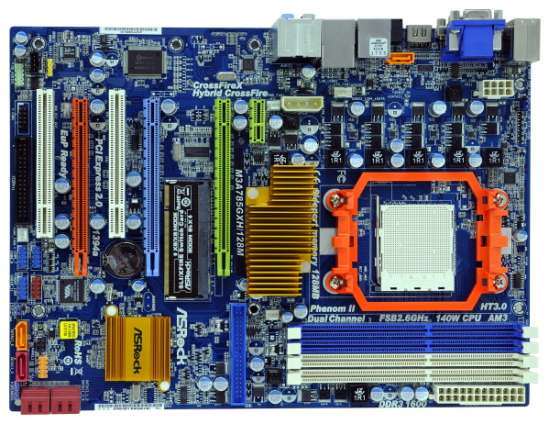
I agree that unless you have some way of fixing the PCI-E lane allocation to the slots (hardwired, in BIOS, or a literal physical toggle like this AMD board below--the DIMM-like thing between the green and blue x16 slots), things can be iffy with non-server motherboards.
asrocklarge.jpg
 
Actually, if you look at the image below, the two white connectors on the top right hand corner are PWRGD (left) and SMBUS (right, closer to the edge of the board). I wonder if this is the same signal as on the PCIe connector. If they only connected the PWRGD signal between the PCIe and the SMB backplane connector, then the signal would most likely still only be floating!


o.jpg
 
Any ZFS/JBOD users tried the HP Expander with the Atto SAS 6.0Gbit cards?

Atto look pricey but they support up to 256/512 drives per card.

UPDATE: They ARE supported with the PMC Sierra Expanders. They are infact using a PMC Sierra chipset themselves:
http://www.attotech.com/pdfs/interops/Interop_6Gb_ESASHBA.pdf

Atto H644 + HP Expander + Linux Raid sound good? (Dont think there is BSD support unfortunately)
 
Last edited:
$400+ seems like a lot to pay for a host adapter, but I don't see why it wouldn't work.
 
Lulz -- just finished testing a 32-drive Raid6 array (temporary- not sure I'd want to run 32-drive array longterm), so obviously connecting drives to all 8 of the SFF-8087 connectors is not a problem. Connected the HP SAS Expander to Areca 1680 via SFF-8088 cable on the external port. Screenshots to follow.

Also I highly recommend a 40x40x10mm fan for this card, not to mention any raid card that has a heatsink but shipped without a fan. Reason being the HP SAS Expander was designed with high CFM airflow HP server cases in mind, and so lower airflow cases like a Norco 4220 might allow the expander chip to heat up, and when it gets too hot I notice I/O throughput drop a lot lower on benchmarks, and on one occasion when it got too hot, some drives weren't being seen by the array controller anymore- that situation was my fault since I had placed it between two other cards with no airflow.

I've bought several of these fans and stuck them on my expanders, Areca and Adaptec cards that didn't already have a fan. Comes with screws that let you attach fan directly to heatsink.
http://www.newegg.com/Product/Product.aspx?Item=N82E16835119049

Hey odditory...I was wondering if you had a picture of the fan on the heatsink on the expander. Just curious. :D
 
Do you have your HP SAS Expanders cascaded/daisy-chained, or do you have one HP connected to each port on the 1680i? If you haven't tried cascading the HPs, would you give it a try and let me know if it works?

Hi John,

I tried the daisy chain setup and I'm sorry to have to report that with the cable I used (controller-to-backplane) it doesn't seem to work :(

Maybe a controller-to-controller cable works or a cable with no sideband signals. Actually what happens if I daisy chain the controllers is that no drives at all show up in the drive pool!

I just did a quick test by removing one of the cables going from the controller to the 2nd expander and then running a spare cable from port 2C of the first expander to port 8C on the second expander and left all other cables connected to my backplanes with all drives plugged in. Once I remove the cable between the two expanders, 24 drives showed up in the drive pool.
 
UPDATE: They ARE supported with the PMC Sierra Expanders. They are infact using a PMC Sierra chipset themselves:
http://www.attotech.com/pdfs/interops/Interop_6Gb_ESASHBA.pdf

Interesting compatibility list. Odd that they do not list the Supermicro enclosures with SAS expanders as either approved or not approved. But they do list "LSI 3 Gb" under SAS expanders.

If only there were a master list that shows compatibilities AND incompatibilities between most common SAS controllers and expanders.
 
I tried the daisy chain setup and I'm sorry to have to report that with the cable I used (controller-to-backplane) it doesn't seem to work :(

Maybe a controller-to-controller cable works or a cable with no sideband signals. Actually what happens if I daisy chain the controllers is that no drives at all show up in the drive pool!

Thanks for trying it!

I suppose it makes sense that a special cable may be required. I know that the Supermicro EL1 expander backplanes have one port designated as host and another for cascading. I'm not sure if the ports are actually different, but they could be. Also, Supermicro sells an assembly that fits into a slot opening with an SFF-8088 connector on a bracket, and an SFF-8087 cable to plug into the backplane. Perhaps those are wired differently than a standard SFF-8087 cable.
 
Last edited:
Anyone else still willing to test one of these expanders with a controller? I am very interested in one of these cards, though not at a $250 price tag when it may not work... So if someone is willing to test a controller that would be outstanding since i have a couple spares around the shop. Shoot me a PM please.
 
Do these expander cards change the order of the drives?

If I connect the SFF-8087 cable from a backplane with 4 drives to the ARC-1680i controller direct, The controller identifies the drives starting with the first drive on the left and with the last drive on the right. Now if I put the expander in between the controller and the backplane, the drives are now ordered right to left!

Has anyone else noticed that on their setup??
 
yeah the order of the drives gets reversed, and I'm guessing because of the way the drive cages are pinned out on HP's servers - which are what these expanders were only ever intended for design-wise.

not the end of the world as long as you remember your drive order goes right to left. the difference is really only psychological. of course this only affects people with miniSAS connector based backplanes. people using SATA connector backplanes like the Norco 4020 can of course compensate by reversing the order of the SATA connectors, which is what I did in one of my cases.

@treadstone have you started your build thread yet?
 
The SAS specifications as well as the SGPIO specifications have a section that allows the order to be reversed for easier board layout and cabling. If properly implemented, it is supposed to take care of the ordering so that even though the physical connections are reversed, the logical setup is supposed to be corrected so the the numbering would be left to right.
 
Anybody successfully using the expander with one of these x1-to-x16 adapters? (you need 3 motherboard standoffs to mount the whole setup securely to your case)

12-200-157-S01
 
Last edited:
Back
Top