• Some users have recently had their accounts hijacked. It seems that the now defunct EVGA forums might have compromised your password there and seems many are using the same PW here. We would suggest you UPDATE YOUR PASSWORD and TURN ON 2FA for your account here to further secure it. None of the compromised accounts had 2FA turned on.
    Once you have enabled 2FA, your account will be updated soon to show a badge, letting other members know that you use 2FA to protect your account. This should be beneficial for everyone that uses FSFT.

Fractal Torrent

I have zero issues with cable management in the Define 7 XL, however I also could probably fit a whole damn studio apartment in that thing.

I'm also sure it's probably well over 75lbs, and that's with entirely air cooling and no radiators.
 
I have zero issues with cable management in the Define 7 XL, however I also could probably fit a whole damn studio apartment in that thing.

I'm also sure it's probably well over 75lbs, and that's with entirely air cooling and no radiators.
ok. any comments on the thread topic?
 
I just received the full-size Torrent, and am struggling with cable management on the front side of the board. The issue is I have an E-ATX board, and the various cable passthrus on the forward edge of the board are 80% covered. I can just barely get the 24-pin thru the passthrough right beside it, but the GPU 8-pins only seem to have a path via the passthrough all the way at the top forward corner of the case, which seems like an awfully long route to have exposed cables, especially right in front of the CPU cooler. Anyone else out there running an E-ATX setup in a Torrent that can share what you ended up doing to keep things tidy?

I've got a Huanan X99 F8D in the Torrent - EATX and covering all of the holes on the front to 100%.

Here you can see how i've routed my cables. ATX and dual 8pin 12V are on the top of the board.

1646467742944.png
 
any one have any issues or input on psu temps to alleviate some concern?
I noticed some higher temps with my PSU. Don't have actual readings, but I quit using my Torrent case mostly because of this. That and the cable routing behind the motherboard was very tight. You can see my post earlier in this thread to see my configuration. Much happier with my 5000X.
 
Found some threads on Reddit about PSU temp issues, but seemed to be only certain PSUs.
 
Adding an additional rear fan helps reducing the issue with the psu temps
 
  • Like
Reactions: Whach
like this
So these have been out for a couple months now, anyone had a chance to try the Nano out? Seems more people have tried the Compact instead.

After several weeks of dealing with other things (don't we all love how life gets in the way sometimes) I've finally come back here and also started looking again at a new build with one of the two of these, or possibly the Meshlicious.

Reviews for the compact seem pretty good minus the frustrating cable management, but the few reviews I've read about the Nano show it to be much easier to work in and also that the cooling is on par with the other two sizes. Can anyone attest to that? I'm hoping to decide on a case in the next couple weeks.
 
I bought the Fractal Torrent full size back in January. I have had no issues with this case. I have really liked it and has been one of the best cases I have own.
 
I just got this case to replace my ancient Haf X. The temperatures for the CPU went down 10 to 15 degrees. Same cooler, Arctic Freezer II 360, mounted in front for the Torrent and was on top for the Haf X. Temperatures for my GPU, RTX 3090, went up around 10 degrees. I just did a FurMark test for about 5 minutes and got 85 on the GPU, 96 for the memory, and 100.3 for the hotspot. A little on the high side? I don't have the large 180 mm fans up front, just the fans that came with the radiator. I have the 3 140mm fans at the bottom. This case is kind of disappointing to me. Seems like this case is better for air cooling.

Edit: There was something wrong with my RTX 3090 FE, not the case. I have a RTX 4090 FE now and my temps are GPU 62 degrees, Memory 58 degrees, and hot spot temperature was 71 degrees on FurMark. I put my 3090 FE in my daughter case (Corsair 4000d) and noticed my clock speeds were downclocking to 1000 MHz. I tried new repasting with thermal grizzly and new gelid pads with minimal improvements. There was pitting in my RTX 3090 cold plate but no damage to the GPU itself. Went with Hydro X cooling and still no improvement on my hotspot temperature. I noticed I wasn't getting full contact between the cooler and the GPU when I took the Corsair XG7 apart, so I applied a thick coating of thermalright tfx and new gelid pads and my hotspot temperature dropped from 104 degrees to 58 degrees! I still think the Fractal Torrent is better for air cooling since there is only one spot to mount a radiator. Picture of case below, nothing fancy compared to others. Picture of cold plate pitting on my RTX 3090. Last picture of GPU after taking Corsair XG7 water block apart. The included pre applied paste didn't cover the whole GPU. The screws were tight.


thumbnail (1).jpgthumbnail.jpgthumbnail (2).jpg
 
Last edited:
I just got this case to replace my ancient Haf X. The temperatures for the CPU went down 10 to 15 degrees. Same cooler, Arctic Freezer II 360, mounted in front for the Torrent and was on top for the Haf X. Temperatures for my GPU, RTX 3090, went up around 10 degrees. I just did a FurMark test for about 5 minutes and got 85 on the GPU, 96 for the memory, and 100.3 for the hotspot. A little on the high side? I don't have the large 180 mm fans up front, just the fans that came with the radiator. I have the 3 140mm fans at the bottom. This case is kind of disappointing to me. Seems like this case is better for air cooling.
yes its made for air flow. the trade off for front mounting is cooler cpu warmer gpu. if you you put it in the top it will reverse that
 
I just got this case to replace my ancient Haf X. The temperatures for the CPU went down 10 to 15 degrees. Same cooler, Arctic Freezer II 360, mounted in front for the Torrent and was on top for the Haf X. Temperatures for my GPU, RTX 3090, went up around 10 degrees. I just did a FurMark test for about 5 minutes and got 85 on the GPU, 96 for the memory, and 100.3 for the hotspot. A little on the high side? I don't have the large 180 mm fans up front, just the fans that came with the radiator. I have the 3 140mm fans at the bottom. This case is kind of disappointing to me. Seems like this case is better for air cooling.
The haf-x has the added benefit of the side 200mm fan directly cooling your GPU, assuming you were using it. Despite its age, the haf-x is no slouch.
 
If you have a good quality PSU, temps/fan noise wont really be a problem. As for cable management, if you use a lot of extensions, expect to put in a little more work, but don't worry too much about it. As for replacing fans, I would not as most of the case price has the fan cost baked in - its where the value mostly comes from for the airflow. If there was a fanless barebones version for sale at a cheaper price, it would be even better.

Anyway, for my own experiance with it, best case i've ever had. Looks sexy too. Had enough of bland boxy looks.
 
I was glad to move on from the Torrent, with it's lackluster cable management space and the lack of top exhaust (other than your power supply). Great air flow across your components, but the power supply would run hotter than normal which was cause for concern, and it seemed to trap hot air at the top of the case in my observations. I get way better air flow and temps with my 7000D, and plenty of room for cable management.
 
the power supply would run hotter than normal which was cause for concern
I've used a t-probe to measure the PSU temps in the Torrent upper compartment compared to a bottom mounted PSU case (a 5000D airflow when I was initially deciding between the two), and temps in the PSU with no fan spin, were actually a good few degrees lower because the Torrent has so much active airflow. Even with warm airflow, its active & actually moves air out of the external PSU vents as well without the PSU fan needing to spin up. To be honest, modern high capacity PSUs aren't that heat emissive compared to the other components of today.

I found the GPU & CPU cooling advantages of a few low rpm & low noise fans with high air flow compared to the standard case layout (5000D etc) to be much more of an advantage. A couple minutes of cable management work has been much more worth it and performant.
 
I found the GPU & CPU cooling advantages of a few low rpm & low noise fans with high air flow compared to the standard case layout (5000D etc) to be much more of an advantage. A couple minutes of cable management work has been much more worth it and performant.
Trust me I know all about cable management in the Torrent as you can tell by my post in this thread early on. We'll have to agree to disagree. My findings are different than yours, and I cannot recommend this case at all. I've been doing this a very long time, and there is a reason that they got away from putting the PSU at the top of the case to exhaust hot air, because the amount of heat generated by todays components kind of demand better exhaust.The 7000D and 5000X I have used afterwards have been far superior in temps than my Torrent was when I had it. Enjoy yours though, because if you're happy with it then that is what matters.:)
 
Last edited by a moderator:
AHA. I'll agree to agree to disagree with you. So we are now, agreed. On some things. =P

and there is a reason that they got away from putting the PSU at the top of the case to exhaust hot air, because the amount of heat generated by todays components kind of demand better exhaust
and this would be correct when it applied to old cases from the 90's and early 2000's like my Antec Plus 1080 from 20 years ago. There is a reason why the Torrent was designed this way for silent high air flow with massive perforations & fans all over the place. It negates that flaw from old designs, so the PSU could be placed up there with no significant negative effect to it, which it does successfully.

Enjoy yours though, because if you're happy with it then that is what matters
I am and I will for a while!
 
Just switched over our household's two primary systems to the full size version of the torrent; I didn't find cable management particularly tricky, though another 1/4-1/2 inch in width between the mobo and side panel would have been nice. Case was otherwise very spacious. I'm running a completely air-cooled setup with an ASUS TUF 4090 in one setup and EVGA 3080 Ti FTW3 in the other, both are running i9-13900K's on Noctua NH-D15's. Added a 120mm exhaust fan to the rear for both cases, otherwise using the stock fan setup. Temps are excellent; pretty comparable to the Lian Li Lancool Mesh II that I was coming from (hard to do an apples-to-apples comparison since I upgraded CPU, Mobo, and GPU with the switch to the new case).
 
Last edited:
Finished my build in October 2022.

Fractal Torrent RGB Black Mid-Tower Case
MSI Edge Z690 Wifi
i12700k w Thermalright Contact Frame
Noctua Chromax NH-U12A
G. Skill Trident Z5 RGB Cl30 6000Mhz
MSI VENTUS 3080ti
Phanteks Halo 120mm & 3X 400mm Neon RGB Strips
Jmods RGB Sag Bracket and Backplate

This case is amazingly quiet as are the included fans. At idle, light computing and gaming the computer is unnoticeable @ 35db. I do keep the room at about 21c ambient.

The 12700k is overclocked and undervolted in BIOS at 51 p cores and 41 e cores with an adaptive undervolt of -0.060. I can increase to -0.055 with no discernible difference in temps. At -0.065, I'll see crashes. At or above 5.2Ghz I'll see crashes, so the currently dialed in settings seem solid.

Fans are set in BIOS to 30% at 30c, 45% at 55c, 80% @ 70c and 100% at 80c.

CPU temps are 24c at idle, and typically 54c under normal load. On Cinebench the temps rise to 86-89c with a score of 24300 or so. Temps on AIDA64 run 76-78 for 30mins+, Timespy scores are 19600 with CPU at 69c avg and GPU 74c. OCCT passes CPU and GPU tests with no errors.

The 3080ti is overclocked and undervolted to 1800 @ .850 and 1905 on a curve, which boosts to 1920 @ .875. The temps are 72-74c max with 86c hotspot during stress tests with Furmark and OCCT. The typical temps on the Ventus are 64-68c during gaming sessions.

Overall extremely happy with the build and the stats. I typically game 4k at 60fps on my LG 60hz monitors. Witcher 3 and Cyberpunk 2077 are the most stressful games I have. I also do GPU video rendering that nets me 4k 1 hour videos in 14-25 minutes.

If anyone has any comments or suggestions on how to better tweak this set up let me know. I'm locked into dual 4k LG's and don't see a use case for 144Hz at the present time but I've been considering picking up an i13700k eventually, but for the moment it's wholly unnecessary.

I do wonder if the 13700k would throttle under the NH-U12A. 🤔
 

Attachments

  • PXL_20230118_223436600.jpg
    PXL_20230118_223436600.jpg
    429.4 KB · Views: 0
  • PXL_20230118_221035094.MP.jpg
    PXL_20230118_221035094.MP.jpg
    557.5 KB · Views: 0
  • PXL_20230128_062451873~2.jpg
    PXL_20230128_062451873~2.jpg
    345.2 KB · Views: 0
I have a Torrent Compact RGB. Sweet case.

I get a kick out of the people who complain about cable management..

"I've been doing this for a long time now"

Yeah ok there bud.
 
  • Like
Reactions: _cp
like this
I do wonder if the 13700k would throttle under the NH-U12A.
I've used the NH-U12A in a few builds with a 13700K and even a 13900K with no issues with temps or throttling. With you using the Torrent it should have enough air flow passing through it to decrease temps.
 
Planning a Torrent Compact / AM5 / B650E-I ITX / 4090 MSI Suprim build. The Suprim is small among 4090 AIB models at 336 x 142 x 78, but still larger than 4090 FE's 305 x 137 x 61 so need to move things around a fit to accommodate it.

Planning to:
⦿ Swap the Torrent Compact's 2x 180mm front fans for 3x T30 120MM / 30mm thick front fans
⦿ Use additional GPU clearance from fan swap to fit 4090 MSI Suprim
➼ T30's up front should give me 338mm of gpu clearance (5mm < 343mm with 25mm thick fan from manual)
⦿ Move 1x of the 180mm front fans to the bottom rear of the case (possible with ITX / mATX motherboards)

Anything wrong with this plan?

Chances the 12VHPWR cable fitting without strain will be an issue inside the Torrent Compact?

If the right answer is to just get a full sized Torrent if I want to avoid issues I can definitely go that route, would just really prefer the Torrent Compacts much smaller volume (47 liters vs 70 liters).
 
Last edited:
Do you guys get any Hard drive vibration thrum noise from the rear mounts?

There is no way I can see to suspend hard drives in the case. Maybe right up at top in the main bay using velcro straps through the holes there in front of the power supply
Deciding between this case an the Lancool 3, which has space for suspending HD at the bottom in the power supply shroud area, and out of sight

Still using a Fortress FT02, but it's time to move on as the GPU vertical mount makes the video card run quite a bit hotter as the heat pipes don't work as well
 
Do you guys get any Hard drive vibration thrum noise from the rear mounts?

There is no way I can see to suspend hard drives in the case. Maybe right up at top in the main bay using velcro straps through the holes there in front of the power supply
Deciding between this case an the Lancool 3, which has space for suspending HD at the bottom in the power supply shroud area, and out of sight

Still using a Fortress FT02, but it's time to move on as the GPU vertical mount makes the video card run quite a bit hotter as the heat pipes don't work as well
Nope. Not that I've noticed.
 
I bought this case for my new build (the large version with solid side panel)...my question is, I've hearing multiple reports saying that GPU temps are a bit high with the default case fan configuration (CPU temps are great)...default meaning: 2 Fractal 180mm front intake, 3 Fractal bottom 140mm intake

I've been thinking about 2 options:

Option 1) keep the 2 Fractal 180mm front intake fans...replace the 3 bottom Fractal 140mm intake fans with the new Noctua NF-A14x25r G2 140mm fans...add a rear exhaust (also the Noctua 140mm)

Option 2) replace the 2 Fractal 180mm front intake fans with 3 140mm Noctua intake fans...replace the 3 bottom Fractal 140mm intake fans with the new Noctua NF-A14x25r G2 140mm intake fans...add a rear exhaust (also the Noctua 140mm)

thoughts?...opinions?
 
None, remove one fan at the bottom and put it on the rear exhaust.
if you are spending money and you like noctua fans, then go ahead, but in my opinion it is unnecessary.
In my opinion, 2 180mm in front, one at the bottom and one at the rear are more than enough.
 
if anything do that ^^. putting a fan at the back will only help with cpu temps a bit. turn up the ones blowing at the gpu. also, where are you "hearing" this, reddit? or are you actually experiencing it? the 4-5 machines ive built in them had no issues left at stock config. i also wouldnt waste $40/ea on new noctual fans, thats insane.
 
I think the problem with the bottom 3 fans is that the 2 front 180mm ones are so powerful that it's pushing the air out so quickly before it gets a chance to get to the GPU...the open back with all the perforated holes also makes the air coming from the bottom get pushed out rapidly

I want to keep the 2 front 180 Fractal fans but I'm also tempted to replace them with 3 140mm...it will add balance with everything being 140mm...or like the above poster mentioned, use only 1 or 2 fans at the bottom versus 3...this case would have been better if they added top blowhole fans versus the bottom fans (like some of Fractal's previous cases- including my current Fractal Meshify S2)
 
There is another option with only 3 fans and even less noise, it could be the best and the temperature difference is probably very small,gpu maybe a couple of degrees warmer.
airflowwith3fans.jpg
 
I liked that they moved the PSU back to the top...the whole trend of bottom case mounted PSU's never should have taken off...I prefer larger cases and while not a Full Tower in the traditional sense the Torrent is much better than typical Mid Tower cases

I've seen people recommending switching the 2 front 180mm fans to outtake

one YouTuber did a nice Torrent fan placement video...too bad he didn't test using 3 front 140mm intake...


View: https://youtu.be/jQR2dwSagQs?t=558

Torrent.png
 
Last edited:
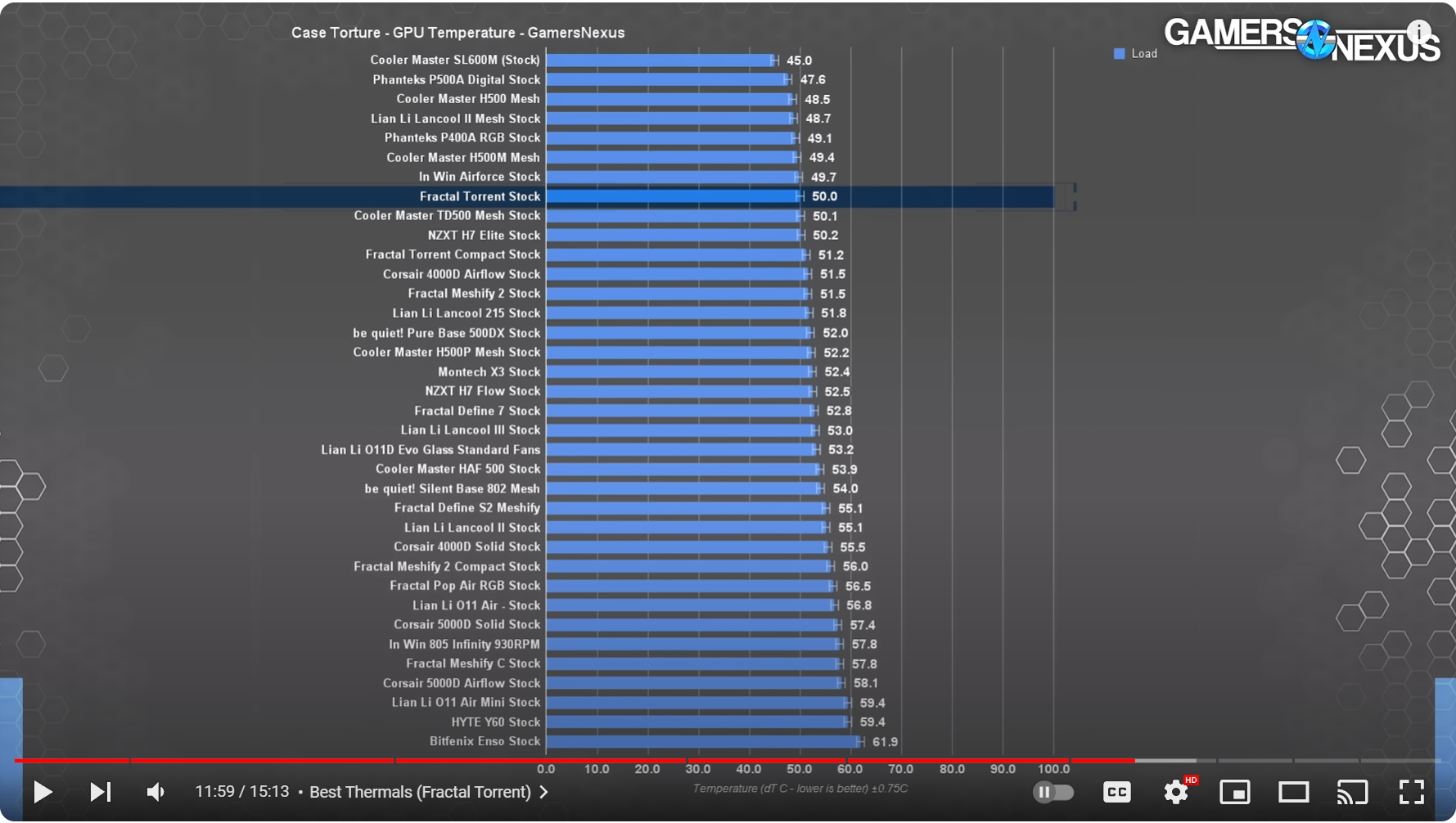
GN did a video roundup comparing the best cases but only used the default fan layout...Torrent was a top notch performer but GPU temps were a bit higher compared to a few other cases...

View attachment 673738
that temp difference is just fine. look at the whole picture, ist still one of the top 10 and easily beats plenty of other good cases.
you could try slowing the front fans to give the bottom ones a chance to push air to the gpu. if your board has a lower x16 slot you could move your gpu closer to them. or maybe even try just disconnecting the bottom front so it doesnt overpower the bottom intakes. id play with what you have before dropping money on new fans or another case.
 
id play with what you have before dropping money on new fans or another case.

I'm definitely not looking for a new case...the Torrent is pretty much perfect...just trying to maximize airflow with the fans...the default config is fine but I've always preferred top blowhole case fans (heat rises so a top exhaust is ideal)...I might just leave one 140mm intake fan at the bottom on the extreme left along with the 2 180mm front intakes and add a rear 140mm exhaust
 
a fan in the middle on the bottom is useless, dont do that. actually, dont listen to any of that, it make zero sense for airflow.
I have a similar case, an inwin 303, those fans at the bottom don't make sense unless you have a blower graphic, especially because the torrent has two big front fans, that's a difference of a few degrees, one in the middle is quite enough.
And let me tell you the disadvantages of the torrent first, it is not very good for water colling, it is also in a bad place for the psu and it heats up more than below, if you have more ssd or hdd disks, they are also in a bad place and do not have any cooling, for that price is very bad.
I have a new case coming that is better than that torrent and costs very very little.
I have experience with many cases, you also have no idea what you are talking about.
In my inwin 303 I have only one fan at the bottom, that case does not have front fans, so my graphics card does not overheat anyway.

Possibly, what else can be done in the torrent is to turn one fan in the opposite direction, so that warm air blows out, the one near the pci slots, and one at the bottom blows in, the one near the front fans.

But if you enjoy the noise of 10 fans in the case, go ahead...
Another disadvantage of this torrent is the non-existent isolation from noise,when you look at the price of that case, it's very bad
 
Back
Top