• Some users have recently had their accounts hijacked. It seems that the now defunct EVGA forums might have compromised your password there and seems many are using the same PW here. We would suggest you UPDATE YOUR PASSWORD and TURN ON 2FA for your account here to further secure it. None of the compromised accounts had 2FA turned on.
    Once you have enabled 2FA, your account will be updated soon to show a badge, letting other members know that you use 2FA to protect your account. This should be beneficial for everyone that uses FSFT.

Everex XT5000T Support thread

I can't for the life of me get 15000 marks in 3dmark 01 like some previous posters. I am on high performance mode with RMclock and I even overclocked the gpu to 520/465. I only get like 11500. I am on the drivers from everex site. I tried downloading some other 7600 mod driver but it was sloooow.

Although I get normal results for 3dmark 05, and 06.

06 I got something like 2300 or so and 05 about 3400?

I am running vista if that makes a difference, on 2 gigs of ram.

I'm not on my Everex right now but I noticed you said your RMClock is on "high performance" mode. It is "performance on demand" if that makes a difference in how things work. Don't remember if there is a "high performance" mode that operates differently or if that is just what you meant. But if your cpu is jumping to max, that is all you can expect so no problem there.

Vid mem at 465 is about max but your gpu core could go higher without increasing temps much. There was a spot that when I went above, idle vid temps jumped. Again can't remember ... maybe 545 and it idles around 80C (wouldn't 60C be nice but we won't see it).

I would use RivaTuner and not nTune just because I hate nTune even though on this system it did not cause me any trouble. I do have nTune installed and it did work but I reversed the settings and use RivaTuner.

nTune is not causing any problems for me at the moment but if it does there is no way I know of getting rid of it. It has a history of problems for people of other systems (not this one that I know). If it becomes a problem you can't get rid of the darn thing. I avoid those stubborn types of installs. Just for what it's worth.

I don't think Vista would matter but I did not test 3dmark2001 on Vista. (I'll have to check if I tested 2006 on Vista compared to XP)

So no help but suggesting you check if cpu is ramping up and raise you gpu core.

Edit: I am running 535/470
 
Oh yeah, yep we are talking about the same mode.. Maximal performance is the mode, and yep I'm running a constant 1.6ghz. Temps wise, I idle at 54C and max out at 78C(at stock voltage, haven't undervolted yet).

I am guessing its a driver or vista issue because it only seems to be 3dmark 2001 thats off. Does anyone else get 11000 for 3dmark 2001 using vista?
 
Yeah I got about 11200 I believe. XP would be much better for gaming but I just don't want the hassle of switching everything right now.
 
Oh yeah, yep we are talking about the same mode.. Maximal performance is the mode, and yep I'm running a constant 1.6ghz. Temps wise, I idle at 54C and max out at 78C(at stock voltage, haven't undervolted yet).

I am guessing its a driver or vista issue because it only seems to be 3dmark 2001 thats off. Does anyone else get 11000 for 3dmark 2001 using vista?

First I am jealous, at 1.6 stock vcore I idle way above 54c. I idle that under voleted and half clock.

Second we are talking different modes ... Maximal Performance and Performance on Demand are different. But would not affect what you are discussing.

Third I checked and Vista actually ran 2006 a little faster than XP.

I am running 535/470

Again ... no help just information.
 
Yeah not sure why there is such a wide range of temps out there. Maybe Everex did something different in later batches?

On another note, I just just ran the newest game, BIOSHOCK. Wow, makes fear look like kiddy drawings. Hmmm, it ran kinda choppy at the 11xx res.. I can't remember the exact resolution but it was one notch under 1280. I don't have the latest drivers though, maybe thats why. But then again, the game selected everything to default at high so maybe that's another reason.

edit - I just found where to download the latest drivers, just download the unified driver for vista 32 bit off of nvidia site.

http://www.nvidia.com/object/winvista_x86_163.44.html

Then you need to download a .INF file from

http://www.laptopvideo2go.com/drivers/vista

then with that you can use the latest nvidia driver. Sorry if this is a repost, I've read through most of the 59 pages and can't recall reading anything like this.. anyhow I'll let you know
if the new drivers help out BIOSHOCK performance.
 
Oh yeah, yep we are talking about the same mode.. Maximal performance is the mode, and yep I'm running a constant 1.6ghz. Temps wise, I idle at 54C and max out at 78C(at stock voltage, haven't undervolted yet).

I am guessing its a driver or vista issue because it only seems to be 3dmark 2001 thats off. Does anyone else get 11000 for 3dmark 2001 using vista?

Your scores are off because you're not undervolting. 2001 doesn't push the video card nearly as hard as the other versions, and the limiting factor is the CPU. Since you're not undervolting you're hitting 78C and the machine is throttling down the CPU to 800 MHz.

Undervolt a bit (say 0.95) and try again. You'll probably get a much higher score.
 
Yeah not sure why there is such a wide range of temps out there. Maybe Everex did something different in later batches?

On another note, I just just ran the newest game, BIOSHOCK. Wow, makes fear look like kiddy drawings. Hmmm, it ran kinda choppy at the 11xx res.. I can't remember the exact resolution but it was one notch under 1280. I don't have the latest drivers though, maybe thats why. But then again, the game selected everything to default at high so maybe that's another reason.

edit - I just found where to download the latest drivers, just download the unified driver for vista 32 bit off of nvidia site.

http://www.nvidia.com/object/winvista_x86_163.44.html

Then you need to download a .INF file from

http://www.laptopvideo2go.com/drivers/vista

then with that you can use the latest nvidia driver. Sorry if this is a repost, I've read through most of the 59 pages and can't recall reading anything like this.. anyhow I'll let you know
if the new drivers help out BIOSHOCK performance.

I test drove the BioShock demo and had to turn the graphics slider to low to get decent gameplay at native resolution.
 
I test drove the BioShock demo and had to turn the graphics slider to low to get decent gameplay at native resolution.

Yeah, i set it to low and it ran quite smoothly at 1280. Haven't tried 1440 though. The first time I ran the game on high, my gpu went up to 100C!
 
We seem to have lost the "extra fan" posts. If someone has added an internal fan, an explanation of what and how would be valuable.
 
Interesting thing I dropped my gpu clock from 535 to 530 and improved my 3dmark01 score (no throttle issue).

530x470
3dmark01x530x470x16076db3.png


3dmark06x530x470x2333ma4.png


I found a nice screen overlay for gpu temp and fps in RivaTuner but my 3d01 started locking up at the nature test so I started dropping the clock and bingo, scores improved.
 
Down8 just plug the new drive into the empty bay and clone away. I use a program called EZ Gig to make my clones and as of yet have not every had to activate again. For a tip dont bother with Partition Magic 8 as it does not play friendly with Vista.
I'm looking into your EZ Gig, b/c when cloning with Acronis, I get a BSOD on using the new HDD as boot.

Any other tips?

-bZj
 
Well I've finally figured out the undervolting hehe.. I am at .75V for 4x and 1V for 8x. Temps seem a tad lower, on idle at 800mhz constant I see some 53C's.

I still get the lower 3dmark2001 score 11500, but 3dmark 2006 I am in the right range. I am using the newest nvidia driver, the 163.44 with modded INF.

Here is a screenshot. I am overclocked GPU wise to 535/460.

03873@dtop.jpg
 
Looks good. Wow that is a nice 06 score. I can't understand why 01 is so low because 01 really does not stress the cpu so throttle should not be the issue. 06 slams the cpu and you don't have a throttle problem there.

I notice your one core is maxed, do you have anything running? Mine did that at idle (in RMClock monitor only) and I flashed most current bios and it took care of it. I don't think that would affect 01 scores. I see you have gimp running, maybe that is doing it. Irfanview works faster for screen caps if you've never tried it.

I bet you could go lower with volts. 4x7 and 8x9 is common. I have to run 4x7.125.
 
Looks good. Wow that is a nice 06 score. I can't understand why 01 is so low because 01 really does not stress the cpu so throttle should not be the issue. 06 slams the cpu and you don't have a throttle problem there.

I notice your one core is maxed, do you have anything running? Mine did that at idle (in RMClock monitor only) and I flashed most current bios and it took care of it. I don't think that would affect 01 scores. I see you have gimp running, maybe that is doing it. Irfanview works faster for screen caps if you've never tried it.

I bet you could go lower with volts. 4x7 and 8x9 is common. I have to run 4x7.125.


Yep I still have the old BIOS, I don't have a USB stick so I'm trying all sorts of things to flash the BIOS. I've tried bootable CD-rom, sd card USB card reader.. Gave up and getting a usb stick in a bit hehe.

I hope the new BIOS solves the problem like it did for you. The CPU load thing is driving me insane.

I'll try the lower volts and torture test it soon.. will be really helpful when I start using my battery hehe.
 
Yep I still have the old BIOS, I don't have a USB stick so I'm trying all sorts of things to flash the BIOS. I've tried bootable CD-rom, sd card USB card reader.. Gave up and getting a usb stick in a bit hehe.

I hope the new BIOS solves the problem like it did for you. The CPU load thing is driving me insane.

I'll try the lower volts and torture test it soon.. will be really helpful when I start using my battery hehe.

Download the Amilo 1526a BIOS from the Fujitsu-Siemens site, making sure you get the Windows version. Then replace the BIOS included with the C1.C from Everex, run the installer, and you should be good to go.
 
Yep I still have the old BIOS, I don't have a USB stick so I'm trying all sorts of things to flash the BIOS. I've tried bootable CD-rom, sd card USB card reader.. Gave up and getting a usb stick in a bit hehe.

I hope the new BIOS solves the problem like it did for you. The CPU load thing is driving me insane.

I'll try the lower volts and torture test it soon.. will be really helpful when I start using my battery hehe.

Or if you wish to use a bootable cd here is a dos cd iso. I would add the bios files to the iso with winiso or similar. It sill may not work because you won't have cdrom drivers. Dang, I have a bootable cd with nts4fdos that I use and have the flash files on C:\ so I can find them. It is hard to find that image on the web for some reason. I guess you could use UltimateBootDisk.

I wouldn't touch a windows flasher with a 10ft pole but people with these units seem to use it without problem. Now you have an option at least.
 
how would I go about using my warranty I purchased, when I bought this laptop off tigerdirect? I can't seem to find the papers they sent me.....is there an online way to look it up?
 
how would I go about using my warranty I purchased, when I bought this laptop off tigerdirect? I can't seem to find the papers they sent me.....is there an online way to look it up?

there was no shipping bill of sale from tiger with your order? if not you can print it off if you log into your account... you would have to contact everex customer service for a rma number and then send your lappy to them..
 
I am starting to use my battery for use at school now.. hmm, it takes awhile to charge maybe 3 hours..

but is it ok to leave the unit plugged in with the fully charged battery? Will that degrade battery life over time do you think? There must be a circuit that stops charging the battery once it reaches 100% right?
 
I am starting to use my battery for use at school now.. hmm, it takes awhile to charge maybe 3 hours..

but is it ok to leave the unit plugged in with the fully charged battery? Will that degrade battery life over time do you think? There must be a circuit that stops charging the battery once it reaches 100% right?

Apparently it all depends upon who you ask. Some say it's fine to leave the battery in, some say you should take it out.

Personally, I think it's ok to leave it in if you're frequently on the go, like at school. But if the machine is going to sit in one place plugged in for an extended period of time (a week or more, like mine does at home) you should probably take it out. Fujitsu-Siemens, who makes the closely-related Amilo 1526a, recommends discharging the battery to around 70% then taking it out.

But again, this is my opinion. One day I too would really like to get the skinny on battery technology to better understand this, not only for this laptop but also for my cellphone, MP3 players, cordless screwdriver, etc.
 
It seems to me more people who know what's up think that removing the battery prolongs battery life. There is disagreement but it makes sense to me. I just started removing the battery with this new laptop so time may tell. I use mine as a "laptop" meaning in my lap and being lighter without the battery is an advantage.

Battery length of operation on this thing is nothing to brag about anyway, but in a motel room it will give you some time to do a few things without plugging it in. I've never had good battery life in laptops so it is hard to disappoint me. When one buys the more powerful units and runs them cranked up, one gives up battery life I guess.

Like WillyWanker, I am still awaiting some definitive proof either way.
 
Personally I leave the battery in. It's like having your own personal battery backup. Another reason would be that I've upgraded the CPU to the TL - 64. With the battery in I'm protected against heavy draws against the Power Supply. So if I Have to change the battery once every year or two That is fine by me.

I upgraded the nVidia drivers and put in the Microsoft hot fix. I've been running for three days without a single hitch. I guess with Vista, running aero, that even that mild amount of directx can cause a crash. I still have the occasional issue with RMClock but overall I am extremely happy and can start installing all of my other tools.

Even this note not being typed, but it is being dictated. I just put in all office student teacher 2007. While talking is slowing up because of corrections, it will speed up later on as the system learns my speech.
 
To answer people's questions on the battery authoritatively.

It can go either way. I don't know the way the charge circuit on these laptops is setup exactly. So I can't tell you if it will last longer in or out. I can tell you what conditions help prolong life.
First and foremost, these are Lithium Ion, not Nickel Metal Hydride or Lithium Metal Hydride. LiIon batteries last longer period than their predecessors, which is part of the point of going to LiIon. As far as prolonging the life of a LiIon battery:
http://www.batteryuniversity.com/parttwo-34.htm
Nutshell version; LiIon batteries do not suffer from charge-memory, memory deterioration, or the like. The batteries used in the XT5000T are "dumb" and do not suffer gauge-memory, which is caused by short discharge/charge cycles. HOWEVER, these laptops run very hot, so it is absolutely best to remove the battery while tethered on A/C except while charging. Prolonged sitting at the temperatures these reach is very harmful to the longevity of the battery, and contributes to the internal oxidization.
You also won't know the battery is actually failing until you start having random reboots on battery. You'll register a full charge, but firing up a game results in the laptop just dying. This is the internal resistance coming into play, reducing the ability to put out the power it's holding.

Now, here's the fun part; LiIon batteries don't charge when they're full, period. Same holds true here in the XT5000T. The battery itself prevents it in part, so you don't have to worry about the internal charge circuit. However, obviously, you do need to worry about the voltage stability of the charge circuit. I can't test that myself - I no longer have the correct equipment, and it very much requires load. If you attempt to test charge circuits without appropriate loads, you absolutely will damage the charge circuit irreparably, and may catch your laptop on fire. I am not joking.

As far as storage; NEVER store it discharged, NEVER store it for long periods below 50%. It WILL discharge over time as temperatures fluctuate, and once it gets below 2.5V/cell, these will stop working period. You'll need a booster charger - no, the one for your Losi won't work - to bring them back to life by re-opening the safety circuits. Bear in mind, that's about 30-60 days at 0% "reported" charge by the laptop. At 0% "reported" charge - resulting from normal use - the battery can still be recharged because a 0% "reported" charge is the usable charge. But if you store it at a 0% usable, it will end up dead and unusable very quickly.

You're welcome!
 
I was about to embark on programming for NHC when I found it doesn't actually control the Thermal Zone values. The programer is just storing values and tricking the sensors. This could be trouble in the making for a program gone awry or for a locked up system etc. So there is no way I am going to even attempt to use this.

I have no problems with reseting the classes etc but they may just be read only values not directly programable with access in C#.

Now from what I've read with Visual Studio Express 2005 ACPI is programable via driver and the WDK (Windows Driver Kit) and it is a free download. There is a 2.5 Gig iso available. and it includes a sample .c and dsl files etc. So I'm on the DL and will burn it out. Maybe there is something there that can be done to directly interface to the ACPI.
 
To answer people's questions on the battery authoritatively.

It can go either way. I don't know the way the charge circuit on these laptops is setup exactly. So I can't tell you if it will last longer in or out. I can tell you what conditions help prolong life.
First and foremost, these are Lithium Ion, not Nickel Metal Hydride or Lithium Metal Hydride. LiIon batteries last longer period than their predecessors, which is part of the point of going to LiIon. As far as prolonging the life of a LiIon battery:
http://www.batteryuniversity.com/parttwo-34.htm
Nutshell version; LiIon batteries do not suffer from charge-memory, memory deterioration, or the like. The batteries used in the XT5000T are "dumb" and do not suffer gauge-memory, which is caused by short discharge/charge cycles. HOWEVER, these laptops run very hot, so it is absolutely best to remove the battery while tethered on A/C except while charging. Prolonged sitting at the temperatures these reach is very harmful to the longevity of the battery, and contributes to the internal oxidization.
You also won't know the battery is actually failing until you start having random reboots on battery. You'll register a full charge, but firing up a game results in the laptop just dying. This is the internal resistance coming into play, reducing the ability to put out the power it's holding.

Now, here's the fun part; LiIon batteries don't charge when they're full, period. Same holds true here in the XT5000T. The battery itself prevents it in part, so you don't have to worry about the internal charge circuit. However, obviously, you do need to worry about the voltage stability of the charge circuit. I can't test that myself - I no longer have the correct equipment, and it very much requires load. If you attempt to test charge circuits without appropriate loads, you absolutely will damage the charge circuit irreparably, and may catch your laptop on fire. I am not joking.

As far as storage; NEVER store it discharged, NEVER store it for long periods below 50%. It WILL discharge over time as temperatures fluctuate, and once it gets below 2.5V/cell, these will stop working period. You'll need a booster charger - no, the one for your Losi won't work - to bring them back to life by re-opening the safety circuits. Bear in mind, that's about 30-60 days at 0% "reported" charge by the laptop. At 0% "reported" charge - resulting from normal use - the battery can still be recharged because a 0% "reported" charge is the usable charge. But if you store it at a 0% usable, it will end up dead and unusable very quickly.

You're welcome!

Well, this basically matches what Fujitsu says to do -- discharge the battery to 70% and remove it when it's not in use. Sounds like a plan to me.
 
HOWEVER, these laptops run very hot, so it is absolutely best to remove the battery while tethered on A/C except while charging. Prolonged sitting at the temperatures these reach is very harmful to the longevity of the battery, and contributes to the internal oxidization.

You're welcome!

Dang, I missed that part, battery is coming out again.

Glad too because it is much heavier with it in.


Here I'm running at 37-41 again. Reason ... the fan is running all the time for some reason. Not a bad thing, just wish I knew how to control it or what is causing it all of a sudden.
fanstayson37ceo6.png
 
Hi, I get that every once in a while as well. wish it could just be a real option for us when plugged in. The fan runs at low speed but it is enough to keep the temp well down.
 
Hi,
It finally reared its ugly head after 7 days of solid running, at least where I could make it repeatable. I was in the kitchen and the kids used the microwave. The video stutered and then stopped responding. Knowing it was killing the wireless connection I used the switch up front and shut the wireless down. Instantly the video started responding again and came back from the blank screen.

The Wireless and video card share IRQ 18, apparently when the wireless card crashes it takes the IRQ and subsequently the video with it. So I went to checking the drivers.

Apparently Microsoft had updated the driver with a 7/13/07 version. This new version also looses the power management tab too. coincedentally the date coincides with about the time I went raid and started having all the video issues.

I have found the 3/17/07 version and installed it. I can't yet attest for stability as it is too soon. I have noticed wire connection latencies seem to have improved when accessing a site or even opening the email client.

EDIT: the 3/17/07 wireless driver version from the microsoft update does include the power management tab. Presently I've disabled it but time will tell.
 
desktoppartial.png


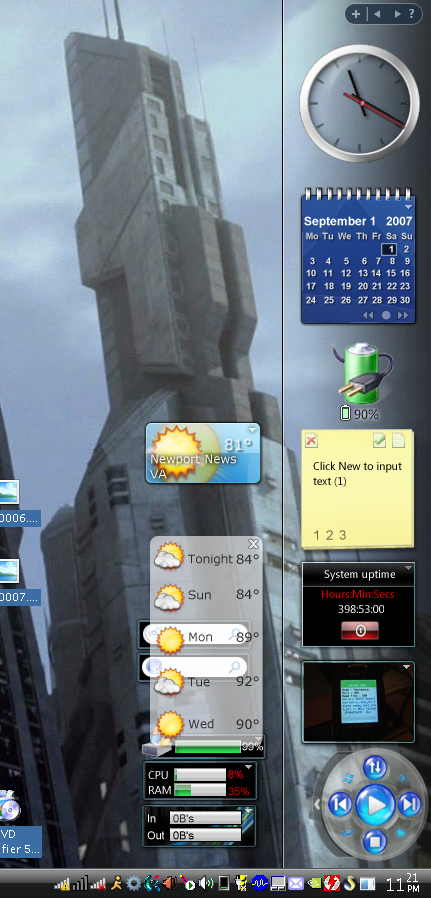
yeah iknow it says 398 hours. it keeps track of the hours while its in hibernation somehow ;)
 
Dang, I missed that part, battery is coming out again.

Glad too because it is much heavier with it in.


Here I'm running at 37-41 again. Reason ... the fan is running all the time for some reason. Not a bad thing, just wish I knew how to control it or what is causing it all of a sudden.
fanstayson37ceo6.png

Hey all of a sudden mine is doing this too.. I just saw 40C and now its sitting around 43C now, with the quiet fan humming.. I just finished a 2 hour session of battlefield 2, and switched back from maximal performance to performance on demand. Also I was using rivatuner to overclock my GPU and after gaming I turned that off too. What about the program speedfan? Doesn't that control fans?


On another note, I had a session where the lappy froze up on me. All of a sudden, the screen turned off completely, and the hard drive was wirring and was doing something as the hd light was on constant. I tried pressing the power button but it wouldn't shut down. In the end I had to hold the power button down for a few seconds to manually kill it. But whatever caused that I haven't seen it again(knock on wood). I did a virus scan and it was fine btw. Weirdhuh?

EDIT - it kind of happened again, but just for a split second.. an error message came up and said this:

03873@stopped.jpg
 
Back
Top