![[H]ard|Forum](/styles/hardforum/xenforo/logo_dark.png)
Navigation
Install the app
How to install the app on iOS
Follow along with the video below to see how to install our site as a web app on your home screen.
Note: This feature may not be available in some browsers.
More options
-
Some users have recently had their accounts hijacked. It seems that the now defunct EVGA forums might have compromised your password there and seems many are using the same PW here. We would suggest you UPDATE YOUR PASSWORD and TURN ON 2FA for your account here to further secure it. None of the compromised accounts had 2FA turned on.
Once you have enabled 2FA, your account will be updated soon to show a badge, letting other members know that you use 2FA to protect your account. This should be beneficial for everyone that uses FSFT.
You are using an out of date browser. It may not display this or other websites correctly.
You should upgrade or use an alternative browser.
You should upgrade or use an alternative browser.
E6420 Overclock Thread
- Thread starter Terc
- Start date
Thanks for the extra info, I learned a little. Also, how'd you manage such a good pic of your chip? Macro sucks on my cam and all, maybe my lighting was bad too, but yours is VERY clear.
Canon S2IS, decent lighting, and a good angle.
Here's a hint......turn on bright lights overhead - turn off the flash - and stand a little ways away.
Zoom in, auto-focus, and click.

By the way, the chip numbering system works for about 85% of the electronic components in the world.
When you see, "9938".......1999, 38th week.
When you see, "0412".......2004, 12th week.
You get the idea.
*Evoic has nothing to do with cars (Mitsubishi Evolution - no", it has to do with Evolution Integrated Circuits.
I dont know if its just the lighting terc but your chip dont look flat at all. I would look into that it looks almost bent out in the center.
Well, it's probably just the lighting, but I think you may actually be right. The ihs may be slightly convex, I've considered lapping, but I may wait on that for a while. My temps are quite good as is, although, I am using some heavy duty water cooling.
Well, it's probably just the lighting, but I think you may actually be right. The ihs may be slightly convex, I've considered lapping, but I may wait on that for a while. My temps are quite good as is, although, I am using some heavy duty water cooling.
Actually after posting that i did a google search it seems alot of the core 2's are not flat and some not even remotely flat. Gonna have to take a peek at mine and see whats up.
I agree my temps are pretty nice too but if it can be better ill do something about it.
Just thought I would chime in on this thread - got my rig in the sig Last saturday having come from an overclocked opteron 170 - this is my first time using Intels cpus... (started off on a 1ghz athlon thunderbird, and had amd's ever since)..
So far im pretty pleased, just starting to play with it at the moment but its at home at the moment testing (its already 2 hrs orthos stable with no tweaks so far) at 3.3 ghz using 1.4v (471*7) - with any luck can get myself in to the 3.5 ghz club.
Will take a note of week/stepping when im back at home.
I just need to find a few pointers about voltages for the chipset on this 680i, at the moment I have bumped all the chipset options up a fair bit, something I want to reduce really.
So far im pretty pleased, just starting to play with it at the moment but its at home at the moment testing (its already 2 hrs orthos stable with no tweaks so far) at 3.3 ghz using 1.4v (471*7) - with any luck can get myself in to the 3.5 ghz club.
Will take a note of week/stepping when im back at home.
I just need to find a few pointers about voltages for the chipset on this 680i, at the moment I have bumped all the chipset options up a fair bit, something I want to reduce really.

- Joined
- Oct 12, 2004
- Messages
- 15,022
So far, I got a very bad chip, probably defective with L707A323 as batch. Impossible to reach 3.0 GHz at stock voltage and even at stock speed/stock voltage, it's a bit unstable with OCCT crashing 1 in 3 runs It also managed to fry my RAM and my 120 Gb hard disk while running this... I know my motherboard and the rest is ok since my E4300 on the same setup can go up to 3.6 GHz at 1.54v with no issues (9x400).
I'm setting up a RMA with my online store.
It also managed to fry my RAM and my 120 Gb hard disk while running this... I know my motherboard and the rest is ok since my E4300 on the same setup can go up to 3.6 GHz at 1.54v with no issues (9x400).I'm setting up a RMA with my online store.
So far, I got a very bad chip, probably defective with L707A323 as batch. Impossible to reach 3.0 GHz at stock voltage and even at stock speed/stock voltage, it's a bit unstable with OCCT crashing 1 in 3 runs
I'm setting up a RMA with my online store.
Details please!
- Joined
- Oct 12, 2004
- Messages
- 15,022
Details please!
My own topic at http://www.hardforum.com/showthread.php?t=1192608 sum pretty well the issues. I may be able to RMA the chip solely on the basis that the 2 core temps vary between 3 and 6 degrees
I believe it's a badly assembled IHS causing partial contact.I put back my E4300 now and things is back to normal beside the dead FireStix and WD 120 Gb

So far, I got a very bad chip, probably defective with L707A323 as batch. Impossible to reach 3.0 GHz at stock voltage and even at stock speed/stock voltage, it's a bit unstable with OCCT crashing 1 in 3 runs
I'm setting up a RMA with my online store.
I have NEVER heard of a CPU frying a hard drive. In fact, I am quite certain there is no way this would be possible unless you were running it at 12vcore or higher...
- Joined
- Oct 12, 2004
- Messages
- 15,022
I have NEVER heard of a CPU frying a hard drive. In fact, I am quite certain there is no way this would be possible unless you were running it at 12vcore or higher...
Honestly, I cannot explain this... Let's just say that it's a strange coincidence that the hdd died but it's possible that it's on his last leg and the whole cpu swap gave the last hit to kill.
Honestly, I cannot explain this... Let's just say that it's a strange coincidence that the hdd died but it's possible that it's on his last leg and the whole cpu swap gave the last hit to kill.
What the hell would a "CPU swap" have to do with the health of someone's hard drive?
Operating System...maybe. Hard drive lifespan - not remotely.
- Joined
- Oct 12, 2004
- Messages
- 15,022
I don't think it's possible to destroy a hdd directly but like I said, I needed to move the computer on the bench to swap the cpu and this move may have put enough stress to kill it unexpectedly. Like I said, it may be a coincidence and it had not died right away but after 30 mins of messing with the bios lockups (the XBX2 has a bad thing when you get a unstable setting, it lock with no post so you need to hard shutdown, move a jumper to get in the bios, readjust the settings then reboot).
I don't think it's possible to destroy a hdd directly but like I said, I needed to move the computer on the bench to swap the cpu and this move may have put enough stress to kill it unexpectedly. Like I said, it may be a coincidence and it had not died right away but after 30 mins of messing with the bios lockups (the XBX2 has a bad thing when you get a unstable setting, it lock with no post so you need to hard shutdown, move a jumper to get in the bios, readjust the settings then reboot).
You might want to look into the health of your power supply, RAM being fried by a bad processor isn't something I've heard of either. Not saying it isn't possible but very improbable.
I think it might be a good idea for you to reset your bios, reboot in stock settings (make sure you adjust settings on your ram to manufacturer's specs) then see where you end up. Also, check out that power supply.
- Joined
- Oct 12, 2004
- Messages
- 15,022
You might want to look into the health of your power supply, RAM being fried by a bad processor isn't something I've heard of either. Not saying it isn't possible but very improbable.
I think it might be a good idea for you to reset your bios, reboot in stock settings (make sure you adjust settings on your ram to manufacturer's specs) then see where you end up. Also, check out that power supply.
No, the BadAxe2 has a tendency of killing RAM and there are lots of report. Since i'm running the ram at 2.2v, the XBX2 often give a voltage surge (someone saw a surge to 3.0v) till the BIOS set the right voltage for sticks who cannot boot at 1.8v. I'm not that surprised.
Like i said, I put back the e4300 and did some extensive testing of the remaining components and all works fine. I'm just pissed off that the BIOS was bad enough to screw with the settings when it got unstable.
- Joined
- Oct 12, 2004
- Messages
- 15,022
Phew... I just thought about the SATA cables and knowing how flimsy the connectors can be, especially no-name ones, I pulled the new cables from my XBX2 box and tried to run with them. Both drives is ok
I was just stupid trying the same cable over and over with the same drive and not thinking about swapping them...
So it remain the ram which is fried but not surprising due to the tendency of the XBX2 to kill them at unexpected times. Anyway, I will do a RMA since the store (DirectCanada) agreed that the core temps difference of 3-6 degrees at any time (at stock speeds) is not normal and they will refund me (the store only do refunds on RMA, weird policy but good for me).
I was just stupid trying the same cable over and over with the same drive and not thinking about swapping them...
So it remain the ram which is fried but not surprising due to the tendency of the XBX2 to kill them at unexpected times. Anyway, I will do a RMA since the store (DirectCanada) agreed that the core temps difference of 3-6 degrees at any time (at stock speeds) is not normal and they will refund me (the store only do refunds on RMA, weird policy but good for me).

3.2 Ghz .. w00t. This overclock later turned out to be stable under Orthos for ~10 hours.
Anything I should be changing? I've got my PC2-8000 Tracers @ 5-5-5-15 (2.1 V) for the time being, and everything's rock solid. Now, for some reason, my voltage is reading @ 1.4, CPU-Z changed its mind ...? Thoughts/suggestions are appreciated, TIA ...
3.2 Ghz .. w00t. This overclock later turned out to be stable under Orthos for ~10 hours.
Anything I should be changing? I've got my PC2-8000 Tracers @ 5-5-5-15 (2.1 V) for the time being, and everything's rock solid. Now, for some reason, my voltage is reading @ 1.4, CPU-Z changed its mind ...? Thoughts/suggestions are appreciated, TIA ...
A few things:
1. Stability needs to be proven for more than the 4-5 minutes that the screenshot shows.
Over in the main overclock thread, the requirement is Prime95 on both cores or Orthos for a minimum of 4 hours. (For instance, I can boot at just under 3600Mhz, but I can't even get stable at 3500Mhz.....)
2. As far as voltage - there could be a number of things at play here.
I'm no voltage expert, so I won't try to diagnose it - but a few things may be PSU, CPU-Z itself, the MoBo, the CPU, or the BIOS.
3. Nice temps for full load.
.
.
A few things:
1. Stability needs to be proven for more than the 4-5 minutes that the screenshot shows.
Over in the main overclock thread, the requirement is Prime95 on both cores or Orthos for a minimum of 4 hours. (For instance, I can boot at just under 3600Mhz, but I can't even get stable at 3500Mhz.....)
3. Nice temps for full load.
.
.
I'll have a screenshot from overnight Orthos tommorow morning.
Load temps are thanks to incredible ambient temps (it's been ~60F max outside for the past few days) and the house, consequently, is quite cool. That, coupled with the side vent on the NZXT Adamas and a Scythe Ninja with push-pull 120mm set up ...
Not using AS5, either. I managed to lose my 3.5g syringe and instead applied the stock grease included with an XP-120 ... works quite well.
Yeah... I keep playin with this processor. Probably having too much fun.
3840Mhz!
http://valid.x86-secret.com/show_oc?id=200206

3840Mhz! http://valid.x86-secret.com/show_oc?id=200206
Now, for some reason, my voltage is reading @ 1.4, CPU-Z changed its mind ...? Thoughts/suggestions are appreciated, TIA ...
CPU-Z cannot read the correct voltage for this processor, try speedfan.
Oh, and congrats!
Thanks for the encouragement.Whoa.
Now that's a big-time overclock.
Get that thing stable and claim your rightful seat on the throne.
Nicely done!
I'm sure I won't be posting a stable speed that high, that took 1.6vcore to get into windows (although 1.54 would make the loading screen). I'm still hoping to retake the fastest stable, but not at over 3.8Ghz.
I agree. What program were you using to monitor your core temps?... the core temps difference of 3-6 degrees at any time (at stock speeds) is not normal....
TAT can show some inaccurate information because of time lag issues but CoreTemp and SpeedFan are pretty good with real time data.
Were these differences happening at idle, full load or both?
Core 2 Duos are supposed to automatically balance the temperature of both cores by constantly shifting a bigger percentage of the load to the cooler running processor. If you are gaming it's interesting to watch the temperature graph in SpeedFan. With single threaded apps If you graph the two cores they should be pretty close together ( +/- 2 degrees ) most of the time and should swap back and forth with both cores taking turns at being the hotter core.

If the temperature of one core is constantly hotter than the other one then something is definitely wrong.
- Joined
- Oct 12, 2004
- Messages
- 15,022
I agree. What program were you using to monitor your core temps?
TAT can show some inaccurate information because of time lag issues but CoreTemp and SpeedFan are pretty good with real time data.
Were these differences happening at idle, full load or both?
Core 2 Duos are supposed to automatically balance the temperature of both cores by constantly shifting a bigger percentage of the load to the cooler running processor. If you are gaming it's interesting to watch the temperature graph in SpeedFan. With single threaded apps If you graph the two cores they should be pretty close together ( +/- 2 degrees ) most of the time and should swap back and forth with both cores taking turns at being the hotter core.
If the temperature of one core is constantly hotter than the other one then something is definitely wrong.
I used CoreTemp 0.94/0.95, SpeedFan 4.32 and TAT and all 3 displayed the same behavior (with TAT at a lesser extend) both at idle and load. I made sure to test at stock speed and stock voltage since a RMA cannot be made for a poor overclocking, only on defective processors. The temp differences can be considered as defective by the RMA staff from what I learned during a phone call. Too bad I forgot to take the same screenshot as you with SpeedFan graph showing the difference (The 2 lines is always apart, not overlapped).
Ironically, when you stress the core enough while running at 3 GHz and 1.6v, the differences got much lower with only 1-2C but I cannot tell them this
In my opinion, being unable to boot at over 3 GHz even with 1.6v would make me consider the CPU may be defective.
crashthenet44
Limp Gawd
- Joined
- Jan 31, 2006
- Messages
- 367
Thanks for the encouragement.
I'm sure I won't be posting a stable speed that high, that took 1.6vcore to get into windows (although 1.54 would make the loading screen). I'm still hoping to retake the fastest stable, but not at over 3.8Ghz.
Now you got me wondering if mine will load Windows at 3.8 using 1.6. Too bad my temps would be insanely high on air at that vcore. Hell at 1.55 my idle temps were well above 50C.
Now you got me wondering if mine will load Windows at 3.8 using 1.6. Too bad my temps would be insanely high on air at that vcore. Hell at 1.55 my idle temps were well above 50C.
Ah, Swiftech MCR120-QP + Black Ice GTX Xtreme radiators plus a Swiftech Apogee GT keep my temps in the mid to low 40's at idle, but once the cores hit full load I see temps up to 65C. I found that if I drop the fan speed and let it hit 67C I get crashes, so, if you're using an L647G476, you'll probably need to keep below 65-68C to be stable at all at those speeds.
I'm not willing to upgrade my cooling anymore, so I'll have to lower my clock a bit before posting new orthos stable speeds.
silent-circuit
[H]F Junkie
- Joined
- Sep 18, 2005
- Messages
- 16,132
E6420 running stable at:
3.2Ghz, 1.35 vcore
linked/synced
RAM is at 800, 1.85v, 4-4-4-12 as intended.
Idles around 30, 31C, full load is between 50 and 53C.
I've run OCCT for a night (~9 hours) completely stable, though temps were near 60C in the morning, didn't like that.
Running water cooling, though just barely. My Thermaltake SilentWater kit hardly counts as a proper water cooling rig, but I got it dirt cheap and the thing runs fairly good temps (I think? Haven't OCd much in the past, my Athlon64 3500+ didn't like it at all...)
Happy with it thus far. Does exactly what I wanted it to do -- namely, save me some money.
3.2Ghz, 1.35 vcore
linked/synced
RAM is at 800, 1.85v, 4-4-4-12 as intended.
Idles around 30, 31C, full load is between 50 and 53C.
I've run OCCT for a night (~9 hours) completely stable, though temps were near 60C in the morning, didn't like that.
Running water cooling, though just barely. My Thermaltake SilentWater kit hardly counts as a proper water cooling rig, but I got it dirt cheap and the thing runs fairly good temps (I think? Haven't OCd much in the past, my Athlon64 3500+ didn't like it at all...)
Happy with it thus far. Does exactly what I wanted it to do -- namely, save me some money.
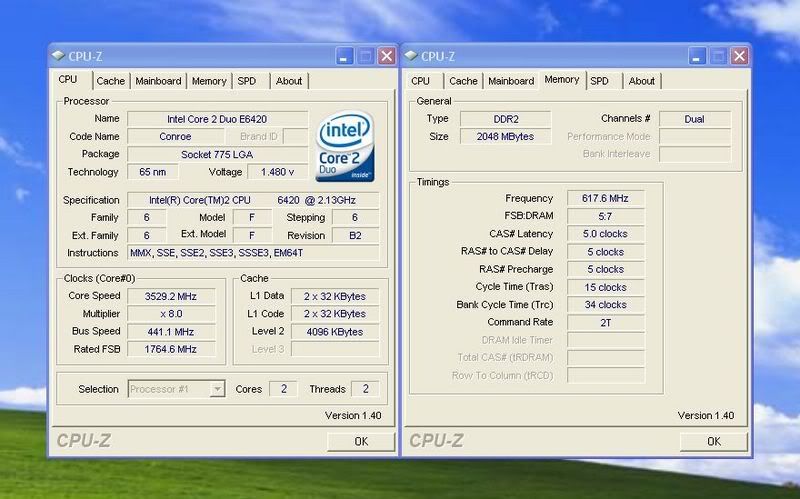
This chip is going to drive me crazy.
I can boot and run everything at speed, but if I try a 4-hour Orthos run to get added to the overclock list, it never makes it all the way through.
As a matter of fact, I backed everything down to 3.2Ghz / 1082Mhz just to see if Orthos would even LET me go 4 hours, and sure enough, it ran with no problems.
4 hours+ at 50c load temps.
I'm going to run my electric bill up to $1,000 this month trying to find the damn sweet spot between the stable 3.2Ghz - unstable 3.58Ghz and the stable 1082Mhz - unstable 1255Mhz.
Here's another in the long series of boot and play, but do not pass go attempts.
I can boot and run everything at speed, but if I try a 4-hour Orthos run to get added to the overclock list, it never makes it all the way through.
As a matter of fact, I backed everything down to 3.2Ghz / 1082Mhz just to see if Orthos would even LET me go 4 hours, and sure enough, it ran with no problems.
4 hours+ at 50c load temps.
I'm going to run my electric bill up to $1,000 this month trying to find the damn sweet spot between the stable 3.2Ghz - unstable 3.58Ghz and the stable 1082Mhz - unstable 1255Mhz.
Here's another in the long series of boot and play, but do not pass go attempts.
OK, my input on this is now sorted and stable.
Using e6420 - l642g043
evga 680i with p28 bios.
2x 1024 ocz 8500 sli sticks @ 880 4-4-4-12 2.1V.

3520 stable for 8 hours orthos using 1.49v bios voltage. I think I could probably squeese 3.6 out of it if I really threw some voltage at it.
Using e6420 - l642g043
evga 680i with p28 bios.
2x 1024 ocz 8500 sli sticks @ 880 4-4-4-12 2.1V.
3520 stable for 8 hours orthos using 1.49v bios voltage. I think I could probably squeese 3.6 out of it if I really threw some voltage at it.
3520 stable for 8 hours orthos using 1.49v bios voltage. I think I could probably squeese 3.6 out of it if I really threw some voltage at it.
Took just over 1.5 to get me stable at 3.6 and 1.525 to get to 3.65.
It is doable. I also think 3.7 is in some our futures too!

Well, I decided to run my fans at full speed just for kicks. With the specs in my sig, I managed some fairly low idle temps.... just thought some people might be interested in temperatures possible with a mid range watercooled rig and a daily overclock on an E6420.
Also note, temps tend to be a little high in P180s. They have decent airflow, but can't beat cases with more room and fans.
By the way, CPU0 Fan is reading my pump, not a fan speed.

Also note, temps tend to be a little high in P180s. They have decent airflow, but can't beat cases with more room and fans.
By the way, CPU0 Fan is reading my pump, not a fan speed.
Weird.
At 3460Mhz, I'm idling at 24c/25c on Air cooling with the CPU at 1.525v - at least that's what Speedfan tells me.
Intel's TAT program reads 27c/28c at idle.
Is the CPUZ reading on your voltage accurate?
Nope, CPU-Z is known (at least by some of us in this forum) to not report correct voltages on E6420
Take a look at my core temperatues... They stay at a very constant 29C.
Those are some very impressive temps though, I'm at 1.425vcore.
When idling with fans at their normal 30% (speedfan controlled, I can't hear anything until 65%) I see core temps of around 31C, sometimes as low as 29 if room temp drops to 65 (while AC is running)
Maybe that's where the difference lies.....
This room is always 70-72 degrees in the evening and you can hear my set-up fairly easily if there's no additional noise in the room. 5 x 120mm fans will do that....no matter how silent they claim to be.
It's definitely a quiet rig, but I'd bet money it's probably twice as loud as yours is with fans at 30%.
This room is always 70-72 degrees in the evening and you can hear my set-up fairly easily if there's no additional noise in the room. 5 x 120mm fans will do that....no matter how silent they claim to be.
It's definitely a quiet rig, but I'd bet money it's probably twice as loud as yours is with fans at 30%.
Maybe that's where the difference lies.....
This room is always 70-72 degrees in the evening and you can hear my set-up fairly easily if there's no additional noise in the room. 5 x 120mm fans will do that....no matter how silent they claim to be.
It's definitely a quiet rig, but I'd bet money it's probably twice as loud as yours is with fans at 30%.
Yeah, I went for all silent: P180 case, Nexus fans and a Swiftech MCP350 pump. My raid array shuts off after 30 minutes of inactivity, and after that, you'd have to check for the power light to know it's on. Temps aren't fantastically low, but because this computer lives in my bedroom, I wasn't willing to hear it, especially when it's quiet.
Speaking of lower temps...
I just found this, and thought I'd send people to check it out if they hadn't already heard about Masscool Shin-Etsu x23 thermal paste.
http://forumz.tomshardware.com/hardware/DaClan-Review-Thermal-Interface-Shootout-ftopict221751.html
If the review sold you on it, I found a place to buy it:
http://www.crazypc.com/products/x23-778d-50119.html
http://www.ajigo-store.com/se7783d.html lower price, but I've personally never shopped here
:EDIT:
sorry guys, those links are for the 7783D revision of the thermal paste. The guy that organized the test says that it is a slightly better revision, however, they used 7762 in the tests.
It can be found here: http://www.crazypc.com/products/50118.html
And while I'm at it, the best instructions I've found for applying a super thin layer of paste:
http://amdforums.com/showthread.php?s=&threadid=230649&highlight=Application
I just found this, and thought I'd send people to check it out if they hadn't already heard about Masscool Shin-Etsu x23 thermal paste.
http://forumz.tomshardware.com/hardware/DaClan-Review-Thermal-Interface-Shootout-ftopict221751.html
If the review sold you on it, I found a place to buy it:
http://www.crazypc.com/products/x23-778d-50119.html
http://www.ajigo-store.com/se7783d.html lower price, but I've personally never shopped here
:EDIT:
sorry guys, those links are for the 7783D revision of the thermal paste. The guy that organized the test says that it is a slightly better revision, however, they used 7762 in the tests.
It can be found here: http://www.crazypc.com/products/50118.html
And while I'm at it, the best instructions I've found for applying a super thin layer of paste:
http://amdforums.com/showthread.php?s=&threadid=230649&highlight=Application