• Some users have recently had their accounts hijacked. It seems that the now defunct EVGA forums might have compromised your password there and seems many are using the same PW here. We would suggest you UPDATE YOUR PASSWORD and TURN ON 2FA for your account here to further secure it. None of the compromised accounts had 2FA turned on.
    Once you have enabled 2FA, your account will be updated soon to show a badge, letting other members know that you use 2FA to protect your account. This should be beneficial for everyone that uses FSFT.

DoubleSight DS-263N - 26"

You're so funny. You sold your old one and want a new one. You complain about it and want to give this another shot...interesting...Hope you get lucky this time. I'm waiting later this year to upgrade my lcd.

So, I take the time to write reply back to your question and explain why I'm considering giving the monitor another run, and you tell me that I'm "funny" because of that. How old are you?

Listen; I'm still complaining about the lines, and if I had paid double for the NEC version I would be pissed to have that type of artifact in my field of view. If you are working very close to the monitor and have to do photo re-touching, the fine screen lines can become distracting on certain colors. If your gaming you probably won't ever notice them, so it depends on what your doing.

What I was saying is that maybe (to me) it's worth giving the monitor another shot because the color and viewing angles are superior on this screen compared to most monitors in this price range and i might be able to live with the lines.
 
Hey guys I've been keeping up on the thread for sometime now. Through my investigating a 1920x1200 monitor over time (and the help of this thread) i have narrowed that search down to the DS. What I'm having trouble with now is that since my price range has just jumped to <=1000, 32" 1080p HDTV's have entered into the fray.

Now i'm struck trying to decide between the DS, which is by far the best deal on any lcd monitor i can find in its size, and a Toshiba Regza 32RV530U (newegg has both). The main reason i worry about getting an HDTV though is that I am currently using a 27" Akai 720p HDTV and when using my dvd drive to view movies or TV in windows media center i experience horrific ghosting. The funny yet sad thing is that when i use my 360 to view the same movies there is no ghosting at all, and when i plug my cable into the TV's tv tuner there also is no ghosting effect (gaming was never effected through the pc use). I also was wondering if any of you have used the DS to view movies from you pc's and not an external player/have a pc tv tuner card and are running tv through the monitor, and whether or not you experience a ghosting effect.

My main usages are Gaming = 90%, and Watching BlueRay moives = 10%.
Any help in swaying my decision would be greatly appreciated.
 
No worries, I've gone through similar issues.

If you are funny, then I'm hilarious. I've gone through the following monitors to finally find I am ultimately very happy with my LCD2690WuXi and BenQ G2400W:

Dell 2005FPW, BenQ FP241W, 2 x BenQ FP241VW, 2 x BenQ G2400W, HP L2335, 2 x LG L246WP, 2 x NEC LCD2690WUXI, Samsung 2493HM, Westinghouse L2410NM.

I even used an LG 37LB5D as a 37" monitor for about 8 months.

Ultimately, I figured the fewest trade offs were with S-IPS displays. I haven't really noticed this screen door effect, but I do sit about 2' away from the LCD2690, which may mitigate this.

Had I been able to get my hands on the DS263N I would have, but up here in Canada, the pickins' they are slim.

Truly though, the DS263N is a fabulous deal, and I would vote that you give it another shot, as I don't think any other screen will make you as happy.

It comes down to what you are willing to tolerate in a monitor.

Regards,

10e


So, I take the time to write reply back to your question and explain why I'm considering giving the monitor another run, and you tell me that I'm "funny" because of that. How old are you?

Listen; I'm still complaining about the lines, and if I had paid double for the NEC version I would be pissed to have that type of artifact in my field of view. If you are working very close to the monitor and have to do photo re-touching, the fine screen lines can become distracting on certain colors. If your gaming you probably won't ever notice them, so it depends on what your doing.

What I was saying is that maybe (to me) it's worth giving the monitor another shot because the color and viewing angles are superior on this screen compared to most monitors in this price range and i might be able to live with the lines.
 
I know of absolutely ZERO HDTVs that can match the DS263N for low input lag.

My LG 37LB5D is one of the better looking monitors I've ever used, but it suffers from input lag (between 40 and 80!ms). I used it for 8 months.

The Sharp LC32GP3U is reported to have about 20ms of input lag, and that is the lowest of any HDTV that I've seen. In comparison the DS263N has less than 16ms.

Now for console gaming, most new HDTVs should be fine, but for PC gaming, I draw their input speed into question.

If you need the multifunctional/multi input capabilities of an HDTV, then by all means consider it, but if you don't, then go with the Doublesight as long as one digital and one analog connector suffice for your purposes.

Regards,

10e

Hey guys I've been keeping up on the thread for sometime now. Through my investigating a 1920x1200 monitor over time (and the help of this thread) i have narrowed that search down to the DS. What I'm having trouble with now is that since my price range has just jumped to <=1000, 32" 1080p HDTV's have entered into the fray.

Now i'm struck trying to decide between the DS, which is by far the best deal on any lcd monitor i can find in its size, and a Toshiba Regza 32RV530U (newegg has both). The main reason i worry about getting an HDTV though is that I am currently using a 27" Akai 720p HDTV and when using my dvd drive to view movies or TV in windows media center i experience horrific ghosting. The funny yet sad thing is that when i use my 360 to view the same movies there is no ghosting at all, and when i plug my cable into the TV's tv tuner there also is no ghosting effect (gaming was never effected through the pc use). I also was wondering if any of you have used the DS to view movies from you pc's and not an external player/have a pc tv tuner card and are running tv through the monitor, and whether or not you experience a ghosting effect.

My main usages are Gaming = 90%, and Watching BlueRay moives = 10%.
Any help in swaying my decision would be greatly appreciated.
 
Got mine yesterday, no dead pixels at all. And as far as I can tell it has the polarizer. This thing is glowing sex. Absolutely beautiful, the concern over how much you just paid for a monitor melts away once you play on this thing.

The displays default levels are quite bright, i too turned mine down to about 12.5 on the brightness. Then I just ran the nvidia monitor calibration software in the nvidia display options and it looks even better.

I want to take pictures but Im waiting on the rest of the computer to get here so my new case is in the picture as well as its part of the...theme i went for.

The rest gets here tomorrow, but probably wont get it finsihed until friday, so if you want to see some pictures of the monitor in action and from extreme viewing angles check back then.
 
I'm also at Step 5 at the Egg.

I also noticed that the Newegg listing includes that this monitor has the polarizer:

DoubleSight DS-263N Black 26" 5ms(GTG) Widescreen LCD Monitor with 4 USB ports and Polarization Filter 500 cd/m2 800:1 - Retail
 
Got mine yesterday, no dead pixels at all. And as far as I can tell it has the polarizer. This thing is glowing sex. Absolutely beautiful, the concern over how much you just paid for a monitor melts away once you play on this thing.

The displays default levels are quite bright, i too turned mine down to about 12.5 on the brightness. Then I just ran the nvidia monitor calibration software in the nvidia display options and it looks even better.

I want to take pictures but Im waiting on the rest of the computer to get here so my new case is in the picture as well as its part of the...theme i went for.

The rest gets here tomorrow, but probably wont get it finsihed until friday, so if you want to see some pictures of the monitor in action and from extreme viewing angles check back then.

Nice, dude!

Keep us posted! I'm just curious, but where did you get the rest of your build from?
 
Have mine and running it as an extended desktop from my laptop, desktop still being built, but this thing is beautiful. Anyone have some solid tests that I can run to make sure everything is up and running properly, no dead pixels, how do I check for polarization, etc.?
 
Quick shot with a P&S camera, what do you guys think? Something up with the bottom right corner maybe?

IMG_0205.jpg
 
Looks like a little backlight bleed going on probably.

It is what I figured, but I must say the camera added the reddish-orange color because I do not see that with my eyes. I could tell there was more "white" coming from that color on a full black screen, but nothing I think that is going to kill the monitor for me (yet). Also, no dead pixels have been found, but this screen is so massive I might have missed a spot.
 
To theDreamer - wow, that looks like a lot of backlight bleeding. Is it really that bad or did the camera just "bring it out"? I'm talking about the >entire< screen area, not just that one corner.
 
That's really not very bad at all, in fact it's very uniform. Camera always make the backlight look bad.
 
Here are some more I took, the last two are with contrast at ~25% and the first two are at 100% (which is what the previous one was at), do not think contrast is changing anything but I am messing with settings and seeing what my eyes like and taking pictures.

Edit: I think much of it might be on the camera, generic P&S with "auto" settings.

IMG_0224.jpg

IMG_0223.jpg


IMG_0222.jpg

IMG_0221.jpg
 
That's really not very bad at all, in fact it's very uniform. Camera always make the backlight look bad.
Well, the fact it's uniform doesn't mean it's not bad. And, I'm sorry to say, it looks pretty atrocious. theDreamer's latest pics, particularly the first two, look awful. The second two look a lot better, which makes me wonder how much artifacting the camera is introducing versus the contrast reduction.
 
You really can't trust pictures with this kinda shit. 9 times out of 10 it will look different in real life.

But, I can kind of inference what it would look like in real life, and I think it looks good.
 
Have mine and running it as an extended desktop from my laptop, desktop still being built, but this thing is beautiful. Anyone have some solid tests that I can run to make sure everything is up and running properly, no dead pixels, how do I check for polarization, etc.?

Try this test for dead pixels, ghosting, gradient.
Press the small monitor icon in the upper left hand corner to download.
 
Ye, i'd have to agree. The first two picks look much worse then the last too. I'd image it looks probably closer to the latter two. Either way if this monitor's still a better buy then the planar/nec for the price.
 
Cancelled my Amazon order and ordered it from Newegg with the stand combo. I'll post a full report on Monday and moan about all the pixels and lines and blah blah blah
 
Well, the fact it's uniform doesn't mean it's not bad. And, I'm sorry to say, it looks pretty atrocious. theDreamer's latest pics, particularly the first two, look awful. The second two look a lot better, which makes me wonder how much artifacting the camera is introducing versus the contrast reduction.

Uniformity is the only thing you can judge with a camera. Cameras have too limited a dynamic range to judge what black levels would be like in a dark room in person.

Also, backlight bleed is where one portion of the screen lets significantly more light in than the rest. Bad black levels are just bad black levels.
 
Also in the last two photos the image seems more centred, and not off-angle.

My NEC which cost 2x isn't much better, if at all better than this. In fact I even have the slight horizontal clouding bars that you have, but only on a black screen.

I even have the slight "reddish" tint at the bottom left that you see. This is the polarizer, so this is what you get instead of the white glow.

Your images look pretty typical of this screen, and I doubt you have anything to worry about. Your backlight looks fairly good to me. I can post you a shot of the NEC for comparison.

Regards,

10e

Ye, i'd have to agree. The first two picks look much worse then the last too. I'd image it looks probably closer to the latter two. Either way if this monitor's still a better buy then the planar/nec for the price.
 
Thanks for looking and helping, tonight I might have some more time with the monitor and should be able to look at some settings. I do think my camera is messing with how bad it actually looks overall, plus I am not seeing any major problems yet.

What exactly will back light bleed cause or change?
 
anyone with this monitor have it mounted with an Ergotron LX?

http://www.ergotron.com/tabid/71/ctl/Product/mid/396/PRDID/11/language/en-US/default.aspx

wondering if the weight of the monitor is too much for it?

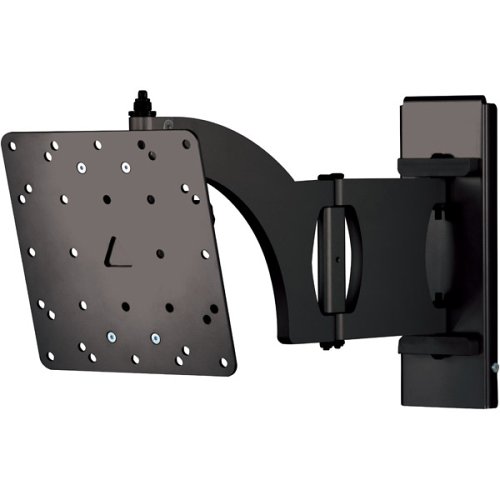
The monitor itself weighs 26 pounds, the stand you linked says 7 to 20 pounds, so I'd guess it won't work.

It has standard vesa mount, so any monitor mount that can handle 30 pounds should do fine.

I got one of these, and it's wall mounted above my desk. When I use my steering wheel, I can move the monitor over the wheel 20" from the wall! It's a bit overkill as it handles 80 pounds, but I can use it later with a big screen tv.

41JWC01QPZL._SS500_.jpg


http://www.amazon.com/Universal-Fla...?ie=UTF8&s=electronics&qid=1210861015&sr=1-11
 
As an Amazon Associate, HardForum may earn from qualifying purchases.
So you feel DS is strong enough to lay back on replacement wise?

Yeah, I read the description of the warranty, yet I still can't make up my mind. I know how tricky some of these companies can be.

I can only speak to my experience...

I had a flaw in the liquid crystal layer, and Doublesight support was great. I sent them pictures, and they issued me an RMA to exchange direct with them, though I also could have still returned it to buy.com.

The replacement is perfect, though they wouldn't cross ship.

I would advise calling support. They didn't receive my first email sent to them through their web email thingy. I then called, and got the support person's email, and after that he responded to me within minutes during business hours.
 
Has anyone found a dual monitor mount for this bad-boy? Or a full articulating one that doesn't cost several hundred dollars?

Doublesight makes dual monitors on a single stand... hence the name.

Go to their website and check out their dual monitors. I think they sell the stands seperate as well.
 
Got mine yesterday.... fantastic monitor. I am very happy no dead pixels - which was my main worry with buying online. Newegg even delivered it one day before estimated time !!

After 3 monitors 24'' that I bough and brought back (2 were TN, 1 had dead pixels and did not wake up from sleep), this is amazing. I am definitively an IPS kinda guy ;)

Stand a bit low and not adjustable but plenty of monitor shelves exist if you want it higher.
With uniform color test image, there is slight variation in color but absolutely invisible during gaming. WoW in 1920x1200 rocks :cool:


True $699 is a lot of money but considering the crappy 24'' that you can get for $500, this is a bargain.
 
Also in the last two photos the image seems more centred, and not off-angle.

My NEC which cost 2x isn't much better, if at all better than this. In fact I even have the slight horizontal clouding bars that you have, but only on a black screen.

I even have the slight "reddish" tint at the bottom left that you see. This is the polarizer, so this is what you get instead of the white glow.

Your images look pretty typical of this screen, and I doubt you have anything to worry about. Your backlight looks fairly good to me. I can post you a shot of the NEC for comparison.

Regards,

10e

10e, thanks for the response, if you can post a couple shots (like mine) of your NEC I would love to see and compare the two. My pictures are a bit messy also because I had just gotten done riding a bike for an hour and my body was still tired so the camera was shaking a bit. Hopefully tonight I can get some cleaner shots maybe but I think in the end I am happy and that is what matters.
 
I can only speak to my experience...

I had a flaw in the liquid crystal layer, and Doublesight support was great. I sent them pictures, and they issued me an RMA to exchange direct with them, though I also could have still returned it to buy.com.

The replacement is perfect, though they wouldn't cross ship.

I would advise calling support. They didn't receive my first email sent to them through their web email thingy. I then called, and got the support person's email, and after that he responded to me within minutes during business hours.

Thank you for this! It's reassuring!

Mine's scheduled to be delivered tomorrow :D:D:D:D:D
 
I have read a bit about only one port working with HDMI... which one is it? The DVI-D port? I RMAed my first monitor and should be receiving my second shortly, and I'd like to test this as accurately as I can without trial and error.
 
Back
Top