• Some users have recently had their accounts hijacked. It seems that the now defunct EVGA forums might have compromised your password there and seems many are using the same PW here. We would suggest you UPDATE YOUR PASSWORD and TURN ON 2FA for your account here to further secure it. None of the compromised accounts had 2FA turned on.
    Once you have enabled 2FA, your account will be updated soon to show a badge, letting other members know that you use 2FA to protect your account. This should be beneficial for everyone that uses FSFT.

DCS World 2.9 (Digital Combat Simulator)

Bought the Grass Monkey Simulations for $75. Good news is the price is shipped. I like VR, but it is a pain in the ass to setup at times with occasional software issues and other BS if an issue goes wrong with the game itself or the VR software. Will see how the IR works. VR has other shortcomings. If I'm tired the VR headset irritates my eyes more, or sometimes it can dry out your eyes and give you some eye strain. Will likely keep the VR and use it every now and then when I want more immersion even if the IR works out well. Still need to play HL Alyx as well.

Also, learning to use new plane on VR sucks. There is Virtual Desktop which will allow me to switch between Youtube and whatnot but it is still a pain to use. And I still need to take off the headset to assign buttons. At $75 probably worth getting the Grass Monkey IR to try out even if you have VR.
 
I’m skipping VR and may get some little cockpit displays with the buttons. My Thrustmaster has a whole F16 panel of switches I would not be able to see.

The key to IR is to have it set up properly and tweaked in software. I downloaded Spudnocker’s profile and it works great.
 
Yeah I will have to see how it works. Both options appear to have their down sides. If this ends up being more practical I will switch to it for most of the time, and maybe use VR for more sight seeing flights. Heard that Grass Money IR performs similar to Track IR, at $75 it is cheap enough to consider. If you're spending $48-60 per plane, a few hundred on controllers, $40 on maps, and $600-1000 on GPUs it is a small expense all things considered.

Grass Monkey IR

No idea how long the sale lasts but if you're trying to get into flight sims you should probably look into them.
 
Hoping DCS participates in the Planes, Trains and Automobiles Fest sale starting on Monday. I'd like to pick up pretty much all of the terrains, the Hornet, the Carrier, WWII assets, A-10C, F-16 and maybe the P-51, but there is NO WAY I am paying full price. I'm thinking if the Growling code stacks I might be able to get 60% off. if not, I am guessing the next sale is Halloween.
 
You can try Growling but it did not stack the last time I used it. The Steam and non-Steam versions cannot be used together anymore from a license standpoint but you can play online together regardless of store. Steam won't allow you to redeem keys bought from other stores so that came to an end. ED store is preferred as you get store credit (Miles) for a number of modules that you can use for other modules.

So here is the best way to do it. If you use Miles on an order, it will not gain Miles. So you should check if you modules you want to get are part of the program. Then lets say you have 4 modules you want to buy that are part of the Miles program. Buy the 3 most expensive ones. Then in a follow up order, use all of your cumulative Miles on the cheapest module. Essentially you get $1 for every $10 you spend. If you bought F-16 from the ED store you'll have Miles from that purchase to.

I got the Grass Monkey IR and have been trying it out. The big problem it seems to have is light bounce affects it more than I thought. Even light bounce off of wood doors/walls can affect it. When it cools down/is dark it works good but has some deadzones in the lower right. I cannot figure out sensitivity settings either. I find that it is more disorienting when trying to look up/back and whatnot. Sometimes it seems to invert itself partway through an axis. So VR head tracking is better and feels more natural, especially for off angles. But I do enjoy the clarity. Using my monitor again is far, far more legible than the Quest 2. And performance is much better.

Seems like both technologies have lots of shortcomings and no one is the clear winner.
 
You can try Growling but it did not stack the last time I used it. The Steam and non-Steam versions cannot be used together anymore from a license standpoint but you can play online together regardless of store. Steam won't allow you to redeem keys bought from other stores so that came to an end. ED store is preferred as you get store credit (Miles) for a number of modules that you can use for other modules.

So here is the best way to do it. If you use Miles on an order, it will not gain Miles. So you should check if you modules you want to get are part of the program. Then lets say you have 4 modules you want to buy that are part of the Miles program. Buy the 3 most expensive ones. Then in a follow up order, use all of your cumulative Miles on the cheapest module. Essentially you get $1 for every $10 you spend. If you bought F-16 from the ED store you'll have Miles from that purchase to.

I got the Grass Monkey IR and have been trying it out. The big problem it seems to have is light bounce affects it more than I thought. Even light bounce off of wood doors/walls can affect it. When it cools down/is dark it works good but has some deadzones in the lower right. I cannot figure out sensitivity settings either. I find that it is more disorienting when trying to look up/back and whatnot. Sometimes it seems to invert itself partway through an axis. So VR head tracking is better and feels more natural, especially for off angles. But I do enjoy the clarity. Using my monitor again is far, far more legible than the Quest 2. And performance is much better.

Seems like both technologies have lots of shortcomings and no one is the clear winner.
you might want to see if someone has made a profile for DCS for grass monkey that you can download and implement. The stock profiles for track. IR were no good, but I found somebody that did one for DCS and it’s great.
 
You can try Growling but it did not stack the last time I used it. The Steam and non-Steam versions cannot be used together anymore from a license standpoint but you can play online together regardless of store. Steam won't allow you to redeem keys bought from other stores so that came to an end. ED store is preferred as you get store credit (Miles) for a number of modules that you can use for other modules.

So here is the best way to do it. If you use Miles on an order, it will not gain Miles. So you should check if you modules you want to get are part of the program. Then lets say you have 4 modules you want to buy that are part of the Miles program. Buy the 3 most expensive ones. Then in a follow up order, use all of your cumulative Miles on the cheapest module. Essentially you get $1 for every $10 you spend. If you bought F-16 from the ED store you'll have Miles from that purchase to.

I got the Grass Monkey IR and have been trying it out. The big problem it seems to have is light bounce affects it more than I thought. Even light bounce off of wood doors/walls can affect it. When it cools down/is dark it works good but has some deadzones in the lower right. I cannot figure out sensitivity settings either. I find that it is more disorienting when trying to look up/back and whatnot. Sometimes it seems to invert itself partway through an axis. So VR head tracking is better and feels more natural, especially for off angles. But I do enjoy the clarity. Using my monitor again is far, far more legible than the Quest 2. And performance is much better.

Seems like both technologies have lots of shortcomings and no one is the clear winner.
yes, yes, I’m thinking that if they are participating in the planes sale on steam, they will also have a sale on their side and that is where I will buy. Worst case scenario stick it out until the Halloween sale.

50% off would be fair. The terrains are overpriced, but it is what it is.

What planes do you have so far?
 
For the grassmonkey stuff I used the open tracker v 2024.1.1 but I loaded up the profiles from the grassmonkey site as the starting point for the games. The only real setting I use for sensitivity is the "options-> tracker->point extraction" one and use it manually not automatic for threshold. Using automatic just goes nuts during the day. During the day you will need blackout curtains to really remedy the problems. But if you want a quick dirty fix, you can just block the camera view behind you with cardboard taped to the back of your chair. Just look at the left view in the open tracker interface and put your chair in position. Get a piece or two of cardboard and hold it behind your chair backrest till you see only black in the window. Tape the cardboard in place and you can play without blackout curtains. Yeah it's ugly, but it does work as a temp day time solution.

The inversion thing is taken from the mapping section of the software. After turning your head Left or Right a certain amount it goes to a rear view when looking left or right. Change the graphs there to adjust it.
 
yes, yes, I’m thinking that if they are participating in the planes sale on steam, they will also have a sale on their side and that is where I will buy. Worst case scenario stick it out until the Halloween sale.

50% off would be fair. The terrains are overpriced, but it is what it is.

What planes do you have so far?

Generally prices have gone up. I paid less for the F-16 ($40) a few years ago than it has been on the recent sales ($56?). I would think most $80 modules will be $48-56. Terrains as well, older ones go for less. Nevada NTTR goes for $25, Persian Gulf for not much more. I paid $35 for South Atlantic because it had a poor reputation but honestly it is quite nice now. Some nice scenery to fly around. It does have a bit more load in time but I think that is because it is one of the larger maps by size. Kola looks amazing. Sinai is $40 right now, which is similar to a sale price for the newer maps.

South Atlantic:

Screen_240910_233801.jpgScreen_240715_143623.jpgScreen_240715_143630.jpg


For modules I have a lot, but generally don't play all of them too much. Off the top of my head:

Flaming Cliffs - F-15C, Su-27, Su-33, J-11, MIG-29A/G, MIG-29S, A-10A, Su-25, Su-25T, F-5E, F-86 and MIG-15
P-51
A-10C <--- really need to update controls for this one
KA-50
UH-1
F-16C
F-18C
F-14A/B
Mirage 2000C

MIG-21
JF-17

Ones in bold are the ones I play a lot. MIG-21 is fun to, but I prefer modern. Will probably get F-15E next.

For the grassmonkey stuff I used the open tracker v 2024.1.1 but I loaded up the profiles from the grassmonkey site as the starting point for the games. The only real setting I use for sensitivity is the "options-> tracker->point extraction" one and use it manually not automatic for threshold. Using automatic just goes nuts during the day. During the day you will need blackout curtains to really remedy the problems. But if you want a quick dirty fix, you can just block the camera view behind you with cardboard taped to the back of your chair. Just look at the left view in the open tracker interface and put your chair in position. Get a piece or two of cardboard and hold it behind your chair backrest till you see only black in the window. Tape the cardboard in place and you can play without blackout curtains. Yeah it's ugly, but it does work as a temp day time solution.

The inversion thing is taken from the mapping section of the software. After turning your head Left or Right a certain amount it goes to a rear view when looking left or right. Change the graphs there to adjust it.

So I should re-do the calibration? Is there a way to delete the calibration settings I have? Using Opentrack and the profiles provided on the webpage. My big issue is lower right seems to have a bit of a dead zone even when completely dark. Lower left works fine. I have Point Extraction set to manual, and found that playing with the slider with different levels of ambient light can help.
 
Last edited:
So I should re-do the calibration? Is there a way to delete the calibration settings I have? Using Opentrack and the profiles provided on the webpage. My big issue is lower right seems to have a bit of a dead zone even when completely dark. Lower left works fine. I have Point Extraction set to manual, and found that playing with the slider with different levels of ambient light can help.
As far as calibration goes, I think all you have to do is delete the default.ini profile in your documents/opentrack-x.x folder. I just unzipped the opentrack-2.3_profiles.zip file into the directory and used them as the start point. I basically followed the video:

View: https://www.youtube.com/watch?v=UEpohHTreEI
and started tweaking things.

The dead zone, do you still see the points on the camera view port on the software? If it disappears maybe it's a hardware issue, and you might want to contact their support. The only time my tracker kind of stops, is if the point goes out of view usually because I moved close to the screen and tried to look down which then puts the bottom IR LED out of the frame.
 
Last edited:
whenever I have a dead zone on my track IR, is because my track clip is not oriented In way with the camera can see it. With a clip there are three lights and you can adjust their positioning. They need to be spaced out in the right way so that no matter where you look the camera can track. I was having problem with dead zones when I was looking up. But it turned out that I needed to fiddle with the orientation of the lights on my headset.

The other thing I do is map a centering button to my hotas. That way I can continually center the view and recalibrate it. If the grass monkey is anything like track IR, the problem is the way your hardware is oriented.

The two biggest factors for me seem to be distance from the camera and whether the track clip is oriented properly.

Nintendo pretty much mastered this tech with the Wii many years ago and is disappointing to see how difficult it is to get it to work now.
 
F-15E is in a state of chaos because of the Razbam thing. I would certainly be interested otherwise. But no, i’m not unvesting the time and money in what could be a dead module.

Persian Gulf is probably my favorite terrain so far.

As far as planes go, I’m getting the Hog for sure. I’m not big on the Hornet, but feel it is a must have for carrier ops. I feel like between the Hog, the F16, F14, and F18, the jet game would be complete for me.

Is the F14 fun to fly or is it too difficult because of the lack of fly by wire?

Have you tried Normandy 2.0?
 
End of summer sale is on!

Modules with a 50% discount​

Fixed Wing​


Helicopters​


Terrains​


Other​


Campaigns​


Modules with a 35% discount​

Fixed Wing​


Modules with a 30% discount​

Fixed Wing​


Helicopters​


Terrains​

Campaigns​


Modules with a 25% discount​

Campaigns​


Modules with a 20% discount​

Terrains​


Modules not on sale​

Fixed Wing​


Helicopters​


Terrains​


Campaigns​

 
As far as calibration goes, I think all you have to do is delete the default.ini profile in your documents/opentrack-x.x folder. I just unzipped the opentrack-2.3_profiles.zip file into the directory and used them as the start point. I basically followed the video:

View: https://www.youtube.com/watch?v=UEpohHTreEI
and started tweaking things.

The dead zone, do you still see the points on the camera view port on the software? If it disappears maybe it's a hardware issue, and you might want to contact their support. The only time my tracker kind of stops, is if the point goes out of view usually because I moved close to the screen and tried to look down which then puts the bottom IR LED out of the frame.


I redid the calibration. Works a bit better now. Previously when I looked straight up at an angle, it would sometimes "flip" the head movement direction if that makes sense. That seems to be mostly gone, or at least not as bad now. For dead zones it appears my stick my be blocking my IR lights occasionally which makes sense for the lower right. Not really seeing how I can avoid that without changing my desk/chair and putting the stick between my legs though.

The main thing I would like to do is make it more sensitive to head movement. Lets say I want to look at my 8-0 clock position in game. With my head I am looking at around 10-0 Clock. The problem is half my screen is in my peripheral vision now. This makes off angle AIM-9X shots tricky, as well as flying in general. What settings would I need to use?

F-15E is in a state of chaos because of the Razbam thing. I would certainly be interested otherwise. But no, i’m not unvesting the time and money in what could be a dead module.

That is what I worry about.

As far as planes go, I’m getting the Hog for sure. I’m not big on the Hornet, but feel it is a must have for carrier ops. I feel like between the Hog, the F16, F14, and F18, the jet game would be complete for me.

Is the F14 fun to fly or is it too difficult because of the lack of fly by wire?

Have you tried Normandy 2.0?

I really like the F-18, and I'm sure you would to if you like the F-16. If you want to use carriers then it is a must. It is a challenge to land without a doubt. It also gets anti ship missiles if you want to do anti shipping missions. F-14 is a good bit harder to fly than all the other jets I have. Dog fighting is harder but it isn't really meant for that. Still fun, but needs a good bit more cockpit clicking. They are considering doing an F-14B(U) or F-14D, which will have HUDs. I assume they will offer a module discount for those that own the A/B should they do those variants.

Have not tried Normandy.

I wouldn't sleep on the JF-17 either. Not as fast turning or accelerating as the F-16, but control wise it functions similar to the American planes. The AGM is good but the slewing is a pain sensitivity wise.

Mirage 2000C is a fun dog fighter but a bit dated.
 
Sale hasn't arrived on Steam yet.

I just flew around Normandy 2.0 earlier today. but I didn't find anything particularly remarkablle.
 
I redid the calibration. Works a bit better now. Previously when I looked straight up at an angle, it would sometimes "flip" the head movement direction if that makes sense. That seems to be mostly gone, or at least not as bad now. For dead zones it appears my stick my be blocking my IR lights occasionally which makes sense for the lower right. Not really seeing how I can avoid that without changing my desk/chair and putting the stick between my legs though.

The main thing I would like to do is make it more sensitive to head movement. Lets say I want to look at my 8-0 clock position in game. With my head I am looking at around 10-0 Clock. The problem is half my screen is in my peripheral vision now. This makes off angle AIM-9X shots tricky, as well as flying in general. What settings would I need to use?
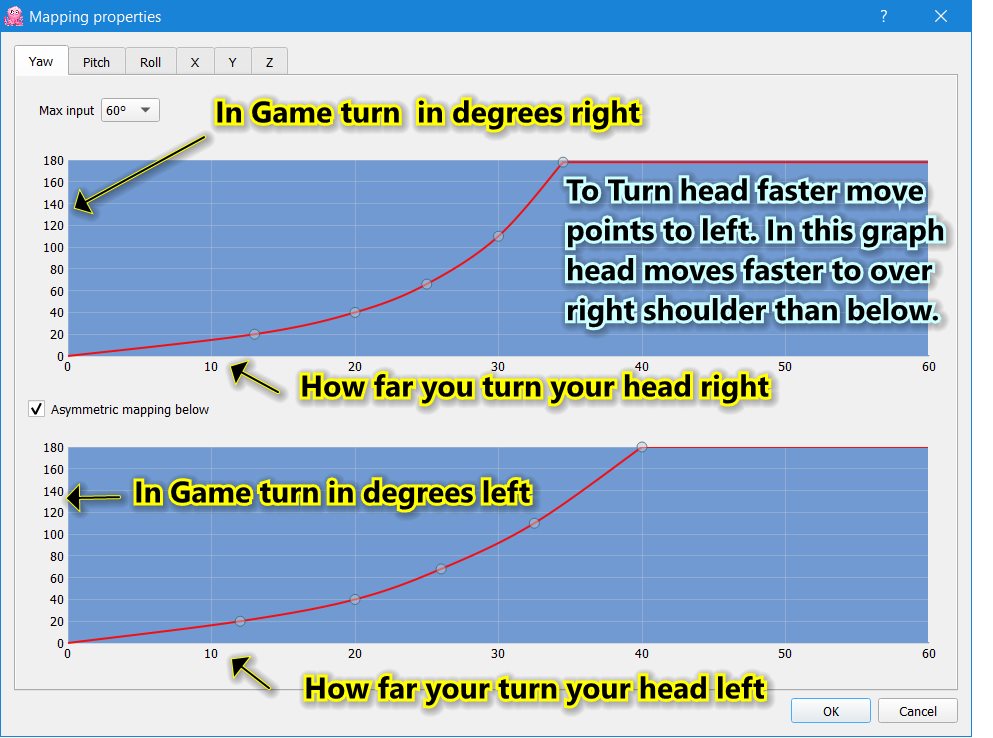
OpenTrackMapping.jpg

So I would estimate that in your example, 8 O Clock is about 115-120 left and you want your head 10 o clock so approx 30 deg left. So you'd want to move or add a point at that spot then adjust the graph accordingly.

In the example above you can see I want my turn right to go to the 180 view faster or with less of a turn to the right of my head. So I clicked Asymmetric mapping box. So I need to turn my head aboout 35 deg to look over my right shoulder and see my plane's tail, while turning left I have to turn a full 40 deg left to do the same. I do this because the IR LEDs are on the right side of my face and my face can obscure it slightly and cause issues because my headband that it's connected to is right up against my head.
 
Ok so the total damage for today is:

F-16 Gamblers Campaign;
F/A 18 Hornet
Super Carrier
Normandy 2.0
WWII Assets
P51 Mustang
A/10C II Warthog
Kola Map - I tried not to but failed.
Persian Gulf Map
Syria Map

Edit: Looks like SU-33 flaming cliffs is thrown in with carrier.

I used miles as suggested and a $100 visa card I got from my birthday so total was not too bad.

I think I’m good! Anyone wanna fly with me? lol
 
Last edited:
May as well suggest Combined Arms. You can command and control some of the ground units like tanks and whatnot. They're not simulation level but I had some fun with those some years back. They're asking $20 for it which is a bit much IMO unless you use all of the functionality, but I paid $8 many years ago.

I may skip everything, think I spent a lot this year already. Mainly looking forward to Kola, Sinai, Iraq and the F-15E and Eurofighter which is many years out. F-15E I'll wait for more updates and sales, same with the maps.
 
May as well suggest Combined Arms. You can command and control some of the ground units like tanks and whatnot. They're not simulation level but I had some fun with those some years back. They're asking $20 for it which is a bit much IMO unless you use all of the functionality, but I paid $8 many years ago.

I may skip everything, think I spent a lot this year already. Mainly looking forward to Kola, Sinai, Iraq and the F-15E and Eurofighter which is many years out. F-15E I'll wait for more updates and sales, same with the maps.
Isn’t the F15E totally screwed because of the dispute with third-party Razbam? As it stands, it gets no support or updates. I mean it is at a stand still. People are MAD about it!

The pricing on this stuff is just absolutely heinous, but I feel like there is a virtual collectibility aspect to it. There is a certain pride in owning the high fidelity models. And there is something decidedly old school about the game and community, like walking in to an old fashion gaming store loaded with dice and DnD and Mechwarrior stuff. Here the shelves are lined with aircraft, and campaigns and terrain. And i don’t mind supporting them because they are slowing improving it. Multicore, and soon vulcan and maybe even some ray tracing I hear. I can’t tell if they are doing well, or teetering on the edge of collapse.

I’ll never have time to master all the content I just grabbed, but I feel like I purchased something tangible. A replica of a real plane I can take up any time. A detailed map of a real place. And it is a reasonably good use of an underutilized PC.
 
View attachment 679521
So I would estimate that in your example, 8 O Clock is about 115-120 left and you want your head 10 o clock so approx 30 deg left. So you'd want to move or add a point at that spot then adjust the graph accordingly.

In the example above you can see I want my turn right to go to the 180 view faster or with less of a turn to the right of my head. So I clicked Asymmetric mapping box. So I need to turn my head aboout 35 deg to look over my right shoulder and see my plane's tail, while turning left I have to turn a full 40 deg left to do the same. I do this because the IR LEDs are on the right side of my face and my face can obscure it slightly and cause issues because my headband that it's connected to is right up against my head.

Going to need to do this tomorrow. What settings do you use? Currently mine looks like:

Untitled.jpg


So for yaw I turned it down to 20, and will have to check how it is tomorrow.

Isn’t the F15E totally screwed because of the dispute with third-party Razbam? As it stands, it gets no support or updates. I mean it is at a stand still. People are MAD about it!

It might be, I would probably avoid it for now. Older Razbam modules should be fine. South Atlantic map is made by the Orbix team (doing Kola?) and that apparently is not affected, and the recent update turned it into an amazing map. Paid $35 for it last sale, now it is up to $48.

The pricing on this stuff is just absolutely heinous, but I feel like there is a virtual collectibility aspect to it. There is a certain pride in owning the high fidelity models. And there is something decidedly old school about the game and community, like walking in to an old fashion gaming store loaded with dice and DnD and Mechwarrior stuff. Here the shelves are lined with aircraft, and campaigns and terrain. And i don’t mind supporting them because they are slowing improving it. Multicore, and soon vulcan and maybe even some ray tracing I hear. I can’t tell if they are doing well, or teetering on the edge of collapse.

I’ll never have time to master all the content I just grabbed, but I feel like I purchased something tangible. A replica of a real plane I can take up any time. A detailed map of a real place. And it is a reasonably good use of an underutilized PC.

Part of it is due to licensing and high costs. I recall many years ago they said it took $200,000 to model some flight model for 1 plane. Add in licensing, the extreme amount of R&D, and low sales (super niche product) and I can see why. I too see it as a way to collect planes. I also have models, those are physical but they take up space and collect dust. I kind of see a DCS plane as an interactive model that takes up less space, can have more fun with it, but of course it isn't physical which has its own cool factor.
 
Good god the P51 is a beauty! I crashed and burned on the runway 10 times before figuring out I need rudder trim set go 6 to counter the prop. The plane is glorious to behold.
 
Yeah this is a niche product but if you don't stop yourself you'll end up spending a small fortune that makes these modules look cheap in comparison. I mean look at this setup:

View: https://www.youtube.com/watch?v=ieh0RutAFq8

Going to need to do this tomorrow. What settings do you use? Currently mine looks like:

So for yaw I turned it down to 20, and will have to check how it is tomorrow.
For a start I'd try taking just the one that handles the left look (bottom graph) and just adjust each point to the left by about 5 and see if it's close to what you want. You can always adjust it after it gets close to what you are looking for. The setting I use are the ones in the image I posted. It's basically just the default for left and adjusted about -5 to the left for the right with a few small tweaks to make the curve jump a bit slower before it goes to look over the shoulder.
 
Going to need to do this tomorrow. What settings do you use? Currently mine looks like:

View attachment 679589

So for yaw I turned it down to 20, and will have to check how it is tomorrow.


It might be, I would probably avoid it for now. Older Razbam modules should be fine. South Atlantic map is made by the Orbix team (doing Kola?) and that apparently is not affected, and the recent update turned it into an amazing map. Paid $35 for it last sale, now it is up to $48.


Part of it is due to licensing and high costs. I recall many years ago they said it took $200,000 to model some flight model for 1 plane. Add in licensing, the extreme amount of R&D, and low sales (super niche product) and I can see why. I too see it as a way to collect planes. I also have models, those are physical but they take up space and collect dust. I kind of see a DCS plane as an interactive model that takes up less space, can have more fun with it, but of course it isn't physical which has its own cool factor.
The Community on DCS forums and Reddit DO NOT appreciate what they’ve got. The modules are EASILY worth the $80 let alone $40-60 they sell for on sale for the hours of entertainment they provide. Look at any DCS forum, it is nothing but complaining that this small company isn’t doing this and isn’t doing that.

Prices are creeping up but I suspect some modules not on sale this round or only lightly discounted will see bigger discounts for Halloween and the holidays.

I wonder if the higher prices mean more or less success for them.
 
There is some talks that they might not be doing so well financially, but it is hard to say. They have some new modules coming out soon like Iraq and MIG-29A with full fidelity so if they are, those should help. A number of things could be better but it is a complex game. Until very recently, for around 8 years BMP-2s and other IFVs were better anti aircraft weapons than dedicated AA systems like the Gepard and Shilka. Even today I am still be sniped by auto cannons. Managed to avoid two Gepards only to be taken out by a BMP-2 while flying an F-16. Russia did a test with a captured M113 recently with a BTR-82 (same cannon, same accuracy issues in DCS). It fired two shots at 100 meters, one hit, the other went over the top. No way those are hitting F-16s. :ROFLMAO:

When the Grass Monkey IR works, it works well. Got the movement sensitivity done for the most part. Problem is the room more or less needs to be completely dark. VR gives more movement and a bit easier head movement tracking, but the IR gets most of the stuff done. Much better performance.

If you didn't get it, South Atlantic is beautiful. If you play realistic missions the lack of large airfields will be a problem but if you are okay with spawning in the air it has some great scenery. I took off from this carrier in this valley.


Screen_240916_181853.jpgScreen_240916_182305.jpgScreen_240916_182443.jpgScreen_240916_184225.jpg
 
DCS sale is on on Steam.

OT: IL-2 1946 is on sale for $2.50. That's a great offer for a big game.
 
DCS sale is on on Steam.

OT: IL-2 1946 is on sale for $2.50. That's a great offer for a big game.
Isn’t the one we want IL-2 Stalingrad? Isn’t that the newer one.

I’d maybe do Stalingrad and Normandy for $30.00.
 
Isn’t the one we want IL-2 Stalingrad? Isn’t that the newer one.

I’d maybe do Stalingrad and Normandy for $30.00.

I already have the newer ones :)

But yes, IL-2 1946 is a complete collection of IL-2 content earlier than "great battles". So it is older.
 
Hey all, have been lurking in this thread for some time enjoying the screenshots and the updates on the development of the sim! I've tried to jump into DCS a couple of times, but am wondering if I am doing something wrong or why I am having such difficulty getting to grips with it. As a bit of background, I've played pretty much every flight sim from the EA's old F-18 Interceptor, Lucasfilms Their Finest Hour and SWOTL, Red Baron, all the Janes series, IL-2, and even Falcon 4.0. With this sim though, I just seem to be hitting a wall when it comes to learning. I am trying to play it with my trusty Logitech Extreme 3D Pro joystick which many people say is a good starter stick, but despite downloading a couple stick config files for it, and also trying to map my own, I just don't have enough buttons to manage all the controls. I am trying to start with the Flaming Cliffs 4 which people on the DCS forums say is for "newbs" and very beginner friendly, but even with it, I just can't find a way to effectively control my aircraft with just the stick and keyboard. I know a HOTAS is recommended, but I just can't figure out how so many others seem to be able to pull this off without any problems. For example, the one config file everyone recommends for this controller remaps the hat switch to SLEW, so you lose your ability to look around in the aircraft without using the mouse. It also doesn't have a key mapped for wheel brakes, so trying to use your stick throttle, the twist grip for nosewheel turning, and then somehow reach to hit the "w" key to apply brakes is just incredibly difficult to do! As I said earlier, I LOVE sims, and would so love to be able to get into this but am finding it so frustrating right now. How are others able to play this with just a joystick, and what am I doing wrong?

Also, there are some things that just seem weird to me with the sim. Being a fan of the A-10 I thought well I'll start with the A-10A. Going to the Training section of Flaming Cliffs 4, several of the aircraft such as the A-10, F-15, J-11, F-86 and Mig-15 have no training missions for them. Are these items that might be added to the sim at a later time? While a very very impressive sim, it seems to be anything but accessible and I can't help but finding myself wishing they would make things a bit more friendly for new users. Any tips for someone who really badly wants to learn this sim?
 
Hey all, have been lurking in this thread for some time enjoying the screenshots and the updates on the development of the sim! I've tried to jump into DCS a couple of times, but am wondering if I am doing something wrong or why I am having such difficulty getting to grips with it. As a bit of background, I've played pretty much every flight sim from the EA's old F-18 Interceptor, Lucasfilms Their Finest Hour and SWOTL, Red Baron, all the Janes series, IL-2, and even Falcon 4.0. With this sim though, I just seem to be hitting a wall when it comes to learning. I am trying to play it with my trusty Logitech Extreme 3D Pro joystick which many people say is a good starter stick, but despite downloading a couple stick config files for it, and also trying to map my own, I just don't have enough buttons to manage all the controls. I am trying to start with the Flaming Cliffs 4 which people on the DCS forums say is for "newbs" and very beginner friendly, but even with it, I just can't find a way to effectively control my aircraft with just the stick and keyboard. I know a HOTAS is recommended, but I just can't figure out how so many others seem to be able to pull this off without any problems. For example, the one config file everyone recommends for this controller remaps the hat switch to SLEW, so you lose your ability to look around in the aircraft without using the mouse. It also doesn't have a key mapped for wheel brakes, so trying to use your stick throttle, the twist grip for nosewheel turning, and then somehow reach to hit the "w" key to apply brakes is just incredibly difficult to do! As I said earlier, I LOVE sims, and would so love to be able to get into this but am finding it so frustrating right now. How are others able to play this with just a joystick, and what am I doing wrong?

Also, there are some things that just seem weird to me with the sim. Being a fan of the A-10 I thought well I'll start with the A-10A. Going to the Training section of Flaming Cliffs 4, several of the aircraft such as the A-10, F-15, J-11, F-86 and Mig-15 have no training missions for them. Are these items that might be added to the sim at a later time? While a very very impressive sim, it seems to be anything but accessible and I can't help but finding myself wishing they would make things a bit more friendly for new users. Any tips for someone who really badly wants to learn this sim?

You can certainly try with a stick but you really need a HOTAS. If you're on a budget you just missed B&H Photo's Logitech X52 Pro sale. It was $120. It isn't the greatest HOTAS but mine, Saitek branded, has lasted over a decade. The other cheap HOTAS options that used to be $70 are now $150+ and those are a big step down. So I would look for an X52 Pro and see if it goes on sale. It is also twist stick, so you can use the twist function for rudders without having to buy physical pedals or use the keyboard, which adds to the value. If you have more money there are better options in the previous page of the thread.

For training missions, some of them are old and may not be working but youtube videos generally do a good job. J-11 is 98% the same as the Su-27, it just has minor external differences and R-77s. The more recent planes like F-86 and F-5 were just added but generally once you figure out the main mappable options you can search for them and get a similar type of setup for most of the Flaming Cliffs planes.
 
Hey all, have been lurking in this thread for some time enjoying the screenshots and the updates on the development of the sim! I've tried to jump into DCS a couple of times, but am wondering if I am doing something wrong or why I am having such difficulty getting to grips with it. As a bit of background, I've played pretty much every flight sim from the EA's old F-18 Interceptor, Lucasfilms Their Finest Hour and SWOTL, Red Baron, all the Janes series, IL-2, and even Falcon 4.0. With this sim though, I just seem to be hitting a wall when it comes to learning. I am trying to play it with my trusty Logitech Extreme 3D Pro joystick which many people say is a good starter stick, but despite downloading a couple stick config files for it, and also trying to map my own, I just don't have enough buttons to manage all the controls. I am trying to start with the Flaming Cliffs 4 which people on the DCS forums say is for "newbs" and very beginner friendly, but even with it, I just can't find a way to effectively control my aircraft with just the stick and keyboard. I know a HOTAS is recommended, but I just can't figure out how so many others seem to be able to pull this off without any problems. For example, the one config file everyone recommends for this controller remaps the hat switch to SLEW, so you lose your ability to look around in the aircraft without using the mouse. It also doesn't have a key mapped for wheel brakes, so trying to use your stick throttle, the twist grip for nosewheel turning, and then somehow reach to hit the "w" key to apply brakes is just incredibly difficult to do! As I said earlier, I LOVE sims, and would so love to be able to get into this but am finding it so frustrating right now. How are others able to play this with just a joystick, and what am I doing wrong?

Wheel brakes are usually mapped to the toe brakes on the pedals. That's why there's no key defined.

Using a hat switch for looking around is out of fashion. The people who did your mappings obviously used head tracking or VR.
 
Wheel brakes are usually mapped to the toe brakes on the pedals. That's why there's no key defined.

Using a hat switch for looking around is out of fashion. The people who did your mappings obviously used head tracking or VR.

Most likely. If you can get your room nice and dark, get the Grass Monkey IR tracking for $75. I know spending that much money on a niche peripheral can be tough but it is quite necessary. I would get a proper HOTAS first though. With the price being that cheap (relatively) I think most people would be running one of those now. Flight sims certainly do cost a bit more than the average game and if you want to get into them and enjoy them right it does require dropping at least $250 or so in hardware.
 
You can certainly try with a stick but you really need a HOTAS. If you're on a budget you just missed B&H Photo's Logitech X52 Pro sale. It was $120. It isn't the greatest HOTAS but mine, Saitek branded, has lasted over a decade. The other cheap HOTAS options that used to be $70 are now $150+ and those are a big step down. So I would look for an X52 Pro and see if it goes on sale. It is also twist stick, so you can use the twist function for rudders without having to buy physical pedals or use the keyboard, which adds to the value. If you have more money there are better options in the previous page of the thread.

For training missions, some of them are old and may not be working but youtube videos generally do a good job. J-11 is 98% the same as the Su-27, it just has minor external differences and R-77s. The more recent planes like F-86 and F-5 were just added but generally once you figure out the main mappable options you can search for them and get a similar type of setup for most of the Flaming Cliffs planes.
With how much I used to enjoy playing my old combat flight simulators, I'm willing to spend some money to help with my hobby. As I have a glass computer desk with a dropdown keyboard tray, a desk mounted HOTAS setup isn't possible. I am going to see if I can find a HOTAS group on Reddit and post a picture of my current office chair and see if there is anyway I could use the arm mounts to attach a pair of removeable HOTAS mounting bases. I found a person selling a Tobii Eye Tracker 5 for $200 Canadian that I might take a look at. I know these didn't get the best reviews when they first came out, but I did some searching on Reddit and I guess using OpenTrackIR with the Tobii plugin it works much better for DCS and Flight Sim than with the included Tobii software. Thanks again for all your help, hopefully some day I will be able to join you guys in the skies! Just curious, but any other old simmers on here? I started my sim days with Sublogic Flight Sim on my old C64. Moved up to the Amiga and such gems as Fighter Bomber and F-18 Interceptor, and eventually got so jealous of some of the sims like Lucasfilms SWOTL and Rowan's Overlord that were PC exclusive that I made the leap to a brand spankin new 486/DX 100. Those were the days!
 
With how much I used to enjoy playing my old combat flight simulators, I'm willing to spend some money to help with my hobby. As I have a glass computer desk with a dropdown keyboard tray, a desk mounted HOTAS setup isn't possible. I am going to see if I can find a HOTAS group on Reddit and post a picture of my current office chair and see if there is anyway I could use the arm mounts to attach a pair of removeable HOTAS mounting bases. I found a person selling a Tobii Eye Tracker 5 for $200 Canadian that I might take a look at. I know these didn't get the best reviews when they first came out, but I did some searching on Reddit and I guess using OpenTrackIR with the Tobii plugin it works much better for DCS and Flight Sim than with the included Tobii software. Thanks again for all your help, hopefully some day I will be able to join you guys in the skies! Just curious, but any other old simmers on here? I started my sim days with Sublogic Flight Sim on my old C64. Moved up to the Amiga and such gems as Fighter Bomber and F-18 Interceptor, and eventually got so jealous of some of the sims like Lucasfilms SWOTL and Rowan's Overlord that were PC exclusive that I made the leap to a brand spankin new 486/DX 100. Those were the days!

Look into the Grass Monkey IR, it is on sale for $75 shipped (in the US at least). Shipping is fairly modest to international from what I have read. Guy making them is more or less doing them at cost seemingly. Just be aware the non-electronic parts are 3D printed but they're tough enough that it is a non-issue. I believe these have a better reputation than the Tobbi Eye tracker, so double check those.

For a glass desk an X52 Pro will work. It has those rubber things and they stick to glass well. When I am not using them I just lift them up to put away. I leave my keyboard between the two. Not sure if other HOTAS have similar things on the bottom.
 
With how much I used to enjoy playing my old combat flight simulators, I'm willing to spend some money to help with my hobby. As I have a glass computer desk with a dropdown keyboard tray, a desk mounted HOTAS setup isn't possible. I am going to see if I can find a HOTAS group on Reddit and post a picture of my current office chair and see if there is anyway I could use the arm mounts to attach a pair of removeable HOTAS mounting bases. I found a person selling a Tobii Eye Tracker 5 for $200 Canadian that I might take a look at. I know these didn't get the best reviews when they first came out, but I did some searching on Reddit and I guess using OpenTrackIR with the Tobii plugin it works much better for DCS and Flight Sim than with the included Tobii software. Thanks again for all your help, hopefully some day I will be able to join you guys in the skies! Just curious, but any other old simmers on here? I started my sim days with Sublogic Flight Sim on my old C64. Moved up to the Amiga and such gems as Fighter Bomber and F-18 Interceptor, and eventually got so jealous of some of the sims like Lucasfilms SWOTL and Rowan's Overlord that were PC exclusive that I made the leap to a brand spankin new 486/DX 100. Those were the days!
DCS is probably the single most expensive and hardcore title on PC right now. You are quite correct, you do not have enough buttons. My advice is to pick the plane you like the best, your “main” and then look at how the real life joystick and throttles are set up. Then try and emulate it. That means you NEED a HOTAS throttle and stick that has the enough and the right kind of buttons and switches. You will need, for example, a mini joystick on your throttle, usually on your index finger or thumb, for slewing your radar cursor, ect. My Viper throttle has a wheel for radar antenna elevation and a dogfight switch. Your current stick may not have enough buttons. I had enough extra on my gunfighter to assign wheelbrake.

I am not sure that any stick and throttle has enough buttons to bind a camera view. On my Thrustmaster Viper Throttle and VKB Gunfighter, every axis and five way switch is utilized for the plane. You need a head tracker like TrackIr Grassmonkey to look around in cockpit view. This isn’t really optional, as I came to understand a few weeks in.

Most good sticks and throttles can sit right on a desktop. Maybe you need a rubber mat under them.

I’d advise not to get into DCS unless you are ready to pony up for some realistic peripherals. It is incredibly fun if you do and of course that stuff can be used for other games as well, but you will need to invest a LOT of time learning how it all works.
 
I dunno. I am not doing too badly with my left hand on the keyboard, moving it to the throttle when needed. I would never be able to remember my own mapping of all those buttons on the throttle.

(I have a HOTAS but don't use it. But I do have pedals with toe brakes)
 
Well here is the HORI HOTAS on sale for $250 on woot (amazon subsidiary) https://electronics.woot.com/offers...stem-mount-for-pc?ref=w_cnt_lnd_cat_elec_3_98
It looks nice with Hall effect sensors, a joystick twist for rudders and it include the desk mount. I am kind of tempted only because there is a bit of an issue with my TM Cougar's pots. Still I am on the fence because I feel like the controller + kb is good enough for me for the amount of time I actually play flight sims these days.
 
New update incoming, part I found interesting:

Aircraft AI and Ground AI


The latest update will include fixes and improvements to both Aircraft AI and Ground AI behaviour. For aircraft, issues such as cargo doors on the AI Mi-8 helicopter remaining open during transportation tasks and helicopters having difficulty landing will be fixed. The carpet bombing task will work correctly when a priority target is set and weapons free. Additionally, fighters will perform better in cruise missile interception scenarios. For Ground AI, bridge crossing is being improved along with route following behaviour. The BTR-80 and BTR-82 will deploy a bow-wave shield when crossing water. Please stay tuned for the upcoming changelog.


Weapons


Weapon behaviour will see several important fixes, particularly for the AIM-54C's lock reacquisition issue. AI units will properly use APKWS rockets. Additionally, the R-27R/ER missiles will be adjusted to track cruise missiles effectively, and a new China Asset Pack addition will introduce the HJ-12 Anti-Tank Guided Missile (ATGM). Other improvements will include updates to the Sea Eagle missile, which will have a collision model that can be intercepted.


Terrain Engine


The terrain engine will receive notable optimizations, including better VRAM usage, disk streaming, and CPU utilisation for rendering scenery models. This enhances performance across maps, especially in VR. Additionally, issues like crashes at mission start in certain maps (Afghanistan, Kola, and Sinai) and graphical artefacts when zooming or panning in map modes have been addressed. These optimizations will contribute to a smoother and more stable gameplay experience, especially in complex and processor intensive situations.


Other important improvements will include cargos no longer being destroyed when dropped, improved oil and water leak effects for World War II aircraft, and the Arleigh Burke Close-In Weapon System (CWIS) use against missiles is improved.

Terrain optimization seems greats. The newer maps like South Atlantic have a longer load time, and switching views can result in longer load in to high resolution and stutters. A big issue in VR for me, so seeing that VR performance may be improved sounds nice. The maps take a long time to load even on a decent NVMe SSD.

There is talk of a new Chinese asset pack, the first one was free and I hope this one is to.
 
I want them to fix ground fire. The accuracy of some units that shouldn't be accurate (like BMPs) is ridiculous. And quite honestly it sounds easy to fix, so what is the holdup?
 
Back
Top