• Some users have recently had their accounts hijacked. It seems that the now defunct EVGA forums might have compromised your password there and seems many are using the same PW here. We would suggest you UPDATE YOUR PASSWORD and TURN ON 2FA for your account here to further secure it. None of the compromised accounts had 2FA turned on.
    Once you have enabled 2FA, your account will be updated soon to show a badge, letting other members know that you use 2FA to protect your account. This should be beneficial for everyone that uses FSFT.

980 Ti

Well, got an NZXT X31... and it's defective :(

It's making horrible grinding noises at low speed, and LOUD buzzing at high speed. Basically 100% unusable.

Temps are better, but it looks like I need yet-another RMA... I've been through a pile of H55's and H75's for similar issues, so am I just really unlucky, or are all AIO coolers built poorly?
 
Last edited:
Mine drops by 15 MHz @ 72C (1469 to 1455) and then stays there.
Seems like an odd decision.

Yes, around 70-72c I get a small mhz drop (10-15 IIRC) too. Since ~72 is the absolute max temp I can hit I'll settle with that rather than downclock or increase fan speeds. Below that my boost stock is always as its highest possible number and never fluctuates (exception being Furmark as I have mentioned before but that's not a game at all).

Throttling at 56c seems wrong, no? Bad OC/BIOS/cooling?
 
Last edited:
Well, got an NZXT X31... and it's defective :(

It's making horrible grinding noises at low speed, and LOUD buzzing at high speed. Basically 100% unusable.

Temps are better, but it looks like I need yet-another RMA... I've been through a pile of H55's and H75's for similar issues, so am I just really unlucky, or are all AIO coolers built poorly?
In my experience, I have had an H80 that worked for 4 years and is now sitting in a box. An H110i GT that died in 1 week but corsair did a very fast replacement. An H55 that I have on my classified right now that works perfect and an NZXT X31 that also is sitting in a box but worked perfect for 1-2 days that I used it. The NZXT X31 was getting to about 70-75 C due to poor case air flow and hence, I had to retire it.

I was lucky to get no grinding noises and other issues with my AIOs. However, the H110i GT dying in a week's time was really unexpected.
 
Well, got an NZXT X31... and it's defective :(

It's making horrible grinding noises at low speed, and LOUD buzzing at high speed. Basically 100% unusable.

Temps are better, but it looks like I need yet-another RMA... I've been through a pile of H55's and H75's for similar issues, so am I just really unlucky, or are all AIO coolers built poorly?
You must just have extremely bad luck or bad karma. Did you ever abuse computers in a previous life? :p
 
Well, got an NZXT X31... and it's defective :(

It's making horrible grinding noises at low speed, and LOUD buzzing at high speed. Basically 100% unusable.

Temps are better, but it looks like I need yet-another RMA... I've been through a pile of H55's and H75's for similar issues, so am I just really unlucky, or are all AIO coolers built poorly?


You're the exact reason why I have yet to pull the trigger on AIO cooling for either CPU or GPU. Issues like this worry me and it always seems hit or miss on getting a decent one. Amount of issues you had in this thread alone is ridiculous.
 
You're the exact reason why I have yet to pull the trigger on AIO cooling for either CPU or GPU. Issues like this worry me and it always seems hit or miss on getting a decent one. Amount of issues you had in this thread alone is ridiculous.
Yeah... they all seem to have some kind of issue. Pumps that grind or buzz, pumps that die for no reason, coolant that never stops gurgling, air trapped in the line that never stops sloshing...

After going through six AIO coolers (3 different models from two different companies), I have yet to receive a single one in proper working order. I'm putting in an advanced RMA with NZXT now, but who knows if the next one will be any better...

I will say this, though. Even the problematic AIO coolers generate very, very nice temps... if only I could get one with a good pump and no air in the lines...
 
Last edited:
I purchased an EVGA 980Ti Hybrid and am really happy with the performance of the card and temps. Two things:

1/ It has the buzzing noise issue, should I RMA the card? Or do all of these cards buzz from the AIO cooler?
2/ Fan replacement, the GPU has a 2 pin connector with a 3 pin casing, I was planning on using a 4 pin PWM fan as a replacement for the stock fan, is there an adapter for this or am I SOL?

Thanks!
 
You're the exact reason why I have yet to pull the trigger on AIO cooling for either CPU or GPU. Issues like this worry me and it always seems hit or miss on getting a decent one. Amount of issues you had in this thread alone is ridiculous.

When we still have nice air coolers, I still see no reason for the cpu barring fitment issues of course :D
 
When we still have nice air coolers, I still see no reason for the cpu barring fitment issues of course :D
Not a fan of the dual-fan coolers that OEMs have a habit of pre-installing on cards these days (AXC, TrwinFrozr, etc). They just blow hot air into my case and force me to run my other fans faster to compensate...

If I wanted more fan noise, I'd stick to the Nvidia reference blower and just run it a tad-bit faster.
 
I guys, I'm in.
Just arrived the two beasts :D

coolrigti.jpg
 
Zarathustra[H];1041889025 said:
Lol, that is remarkably similar to mine.


I have two of those EVGA 980TI's and a Corsair H110i GTX cooler :p
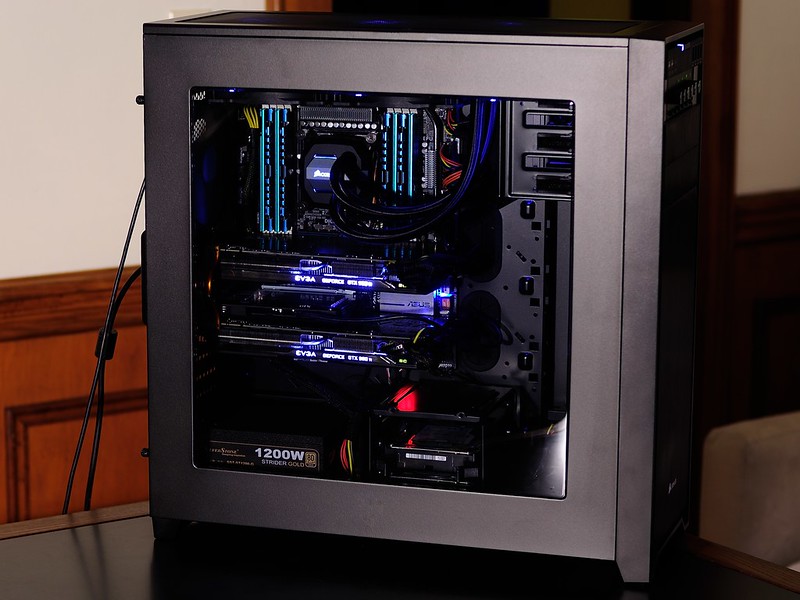

Is this a 750d or a 450d?
 
Is this a 750d or a 450d?
It says 750D in his sig. ;)

You can also easily tell by looking at the front of the case. The 750D has 3 external 5.25 slots where as the 450D only has 2. And the 750D has 4 USB in the front while the 450D only has 2.
 
Is this a 750d or a 450d?

It says 750D in his sig. ;)

You can also easily tell by looking at the front of the case. The 750D has 3 external 5.25 slots where as the 450D only has 2. And the 750D has 4 USB in the front while the 450D only has 2.

Correct. It's an 750d upgraded with the Airflow front panel:


To be fair though, the front wasn't very visible in that first pic.

The size is a little deceptive as I have a huge SSI-CEB form factor motherboard.
 
Last edited:
Is there something that would prevent Adaptive Power mode from working?

feQPEQw.png

Just curious, what specifically are you showing with that screenshot? The low gpu usage or throttled clocks or both? My card was seeing lower gpu usage last night (77% ish) in some situations and I'm wondering what was causing it. I'll have to check and make sure Adaptive Power Management is set correctly in nv control panel.
 
Just curious, what specifically are you showing with that screenshot? The low gpu usage or throttled clocks or both? My card was seeing lower gpu usage last night (77% ish) in some situations and I'm wondering what was causing it. I'll have to check and make sure Adaptive Power Management is set correctly in nv control panel.
In adaptive mode the clocks are supposed to scale down at low GPU usage. It was working when I first got the card, I switched to Max Performance for overclocking but I'd like to see what kind of impact Adaptive has. Now it's not working at all, both Adaptive & Max Performance are doing the exact same thing (permantly Max Performance mode).

I suspect it's something in MSIA / NVInspector forcing the clocks up. Reinstalling drivers would probably fix it but I don't really want to reset everything just to test it.
 
Just curious, what specifically are you showing with that screenshot? The low gpu usage or throttled clocks or both? My card was seeing lower gpu usage last night (77% ish) in some situations and I'm wondering what was causing it. I'll have to check and make sure Adaptive Power Management is set correctly in nv control panel.
I think he is asking why his gpu clock speed did not change even though the gpu was hardly being utilized at times.

EDIT: Apparently I type way too slow...
 
Just curious, what specifically are you showing with that screenshot? The low gpu usage or throttled clocks or both? My card was seeing lower gpu usage last night (77% ish) in some situations and I'm wondering what was causing it. I'll have to check and make sure Adaptive Power Management is set correctly in nv control panel.

in every game and every scenario?

In adaptive mode the clocks are supposed to scale down at low GPU usage. It was working when I first got the card, I switched to Max Performance for overclocking but I'd like to see what kind of impact Adaptive has. Now it's not working at all, both Adaptive & Max Performance are doing the exact same thing (permantly Max Performance mode).

I suspect it's something in MSIA / NVInspector forcing the clocks up. Reinstalling drivers would probably fix it but I don't really want to reset everything just to test it.

probably but also be sure you are forcing adaptive and/or max performance in general settings and not per game.. Nvidia control panel is working wonky for me in all the last couple of updates, sometimes Adaptive Vsync works, sometimes not, sometimes forcing vsync work and sometimes not..

just reset all the nvidia control panel settings to default and restart your machine and see if help..
 
MSI have just released a Sea Hawk Edition and quietly released a Golden Edition of 980ti (the latter is not on the website yet)

Golden Edition, at least for the 970, uses full copper Heatsink rather than Aluminum

http://tw.msi.com/product/vga/GTX-980Ti-SEA-HAWK.html#hero-overview

Sea hawk is Air/Water hybrid cooler, with the water being made by Corsair. The fan seems to have LED lightning (blueish white, so not sure if white or blue, probably blue)

Both are currently priced just a hair under Lightning, so probably around $750 given $800 for the lightning.
 
Really wanted a blue/green version... Just kidding.

I'm hoping more companies besides EVGA sell GPU's with worthwhile waterblocks in the future though.
 
in every game and every scenario?

bahh i may be cpu limited in some situations. after some initial testing it looks like my i5-2500K @ 4.4Ghz isn't up to the task.

BF4 100% resolution scale, 64 player Lancang Dam: gpu usage 70-80%, cpu usage ~87%
BF4 150% resolution scale, 64 player Lancang Dam: gpu usage 99%, cpu usage ~87%

i'm surprised my cpu usage isn't maxed out at 99-100%. also tried a lower player count and simple map:

BF4 100% resolution scale, 48 player Lockers: gpu usage 90-99%, cpu usage ~87%

a couple other games that i just loaded up for a quick try:
Crysis 2 max settings - gpu usage 70-80%
Stalker COP with Complete mod - gpu usage 70-80%

might be time to push my cpu overclock. i've been running 4.4Ghz since i got it in January of 2011 :D. i've been running it at 1.296V and max temps are 55C or so. there's probably still some room to overclock.
 
Last edited:
Really wanted a blue/green version... Just kidding.

I'm hoping more companies besides EVGA sell GPU's with worthwhile waterblocks in the future though.

By waterblock do you mean a real waterblock for custom loops, or an AIO?

Either way, the Hydrocopper uses a stock EK Titan X block, and the Hybrid likely uses an Asetek AIO. Bottom line is you can easily DIY a hybrid solution with a Kraken G10 and any 120mm AIO that fits. And if you're going full custom there's at least 5+ options if you stick with reference PCB, so you don't have to rely on any of the companies to release their own solutions.
 
I have now kept my cards stock clocked with only 25 MHz added to them so they boost to 1405 MHz at full load instead of 1380. Very happy with the performance of these puppies.
 
I got adaptive working again by resetting defaults to my 3D settings.
It's still kinda useless, anything over approximately 40% total load bumps it to full clocks.

Here's what it looks like:

6jJrNKi.png


I have now kept my cards stock clocked with only 25 MHz added to them so they boost to 1405 MHz at full load instead of 1380. Very happy with the performance of these puppies.
Why 1405?
 
Probably to max out the stock boost bins. Maxwell boosts in 13MHz increments, my 66% 970 boosts to 1367MHz, while my 74% 970 boosts to 1405.
 
That is correct I can set either 1380, 1393 or 1405. I choose 1405 since that is where my cards start at default boost and then drop 2 buckets so the +25 covers this drop and cards start at 1430 but drop down to 1405 as temps stabilize.
 
That is correct I can set either 1380, 1393 or 1405. I choose 1405 since that is where my cards start at default boost and then drop 2 buckets so the +25 covers this drop and cards start at 1430 but drop down to 1405 as temps stabilize.

Cmon now, push those classi's! :D
 
I have strange low results in 3dmark with my GTX980Ti SLI.
I score 23000 in firestrike standard with the system in signature, with the old GTX980 SLI I scored 20000. Not a big improvement from GTX980 to GTX980Ti. at least, not in 3dmark.
 
I score 26K with classifieds at 1506/8200 and system in sig.
You should be hovering around 24K if your cards are overclocked to about 1350/1400.
 
Well, got an NZXT X31... and it's defective :(

It's making horrible grinding noises at low speed, and LOUD buzzing at high speed. Basically 100% unusable.

Temps are better, but it looks like I need yet-another RMA... I've been through a pile of H55's and H75's for similar issues, so am I just really unlucky, or are all AIO coolers built poorly?

Just got my replacement X31... same issue (sounds like a playing card in bicycle spokes when the pump drops to low-RPM mode). Already got a second RMA going, and the person I spoke to on the phone assured me that the next one would be tested before being sent out. Hopefully that's what actually ends up happening...

Really getting tired of this BS. I've literally gone through a pile of AIO coolers (3 different models from 2 different manufacturers, multiple RMA's of each unit) and all of them have had similar pump issues.
 
Hey everyone, long time lurker here (since 2004). I recently got my hands on a MSI 980ti Gaming 6G Asic of 63%. Definitely have had some strange time overclocking this card. On default voltage with a 109% PT on Air with 66-74*C, I am able to get to 1405-1415, ok cool no problem. The memory on the other hand has been giving me some issues. It has Hynix memory, and I'm only able to get a max of +250 to the memory which puts me at about roughly 7500.

Any ideas how to get that up to the +500 / 8000 mhz mark? Seems like many people are able to get to that point without issue. Did I end up falling short in the lottery?

PC specs:
5820K at 4.3ghz
Noctua D15S Cpu cooler
16GB Ram
Asus X99-A Motherboard
EVGA 1000W P2 PSU
Corsair 750D
Gentle Typhoon AP-15's for Intakes (3)and Exhaust(3).

Any help will be appreciated,
-Jason
 
Back
Top